Keap Pipeline: How Keap CRM Pipelines Actually Work in 2026
Keap's pipeline is half deal tracker, half automation engine — and that combination is exactly why it works for some teams and frustrates others. Here's an honest breakdown of stages, automation, pricing and the limits nobody mentions.
TL;DR
- The Keap pipeline is a visual, drag-and-drop deal board where every stage can fire an automation — that trigger-on-stage-move behavior is the single feature that separates it from a plain Kanban CRM.
- It is built for small businesses that sell and market from the same system. If you want a sales-only board with deep forecasting, Pipedrive or HubSpot will feel lighter and cheaper per seat.
- Keap's entry price sits far above per-seat CRMs (roughly $249+/mo at list, bundled contacts and users, not $14/user) — verify current numbers on keap.com before you budget.
- Common failure modes: too many stages, stages named after internal tasks instead of buyer commitments, and automations that fire on dead or invalid contact records.
- A pipeline is only as good as the contacts entering it. Bad emails inflate stage counts and destroy conversion math before you ever look at a report.
What is the Keap pipeline?#
The Keap pipeline is Keap CRM's opportunity-tracking board: a horizontal set of stages, with deal cards you drag from left to right as a prospect moves toward a close. Think of it as a kitchen pass — orders come in on the left, move station to station, and anything sitting too long at one station is visible to everyone instantly.
What makes it different from a generic board is what happens underneath the drag. Keap grew out of Infusionsoft, a marketing-automation platform, so every pipeline stage in Keap can be wired to an automation sequence. Move a card into "Proposal Sent" and Keap can email the proposal, start a three-touch follow-up cadence, create a task for the rep, and update a contact tag — without anyone clicking anything else.
That is the whole pitch: the pipeline is not just a reporting artifact, it is the trigger surface for your follow-up. Most small-business CRM tools make you choose between a clean sales board and a marketing automation builder. Keap's bet is that a solo owner or a five-person team does not have the bandwidth to run two systems.
The trade-off is real, though. You are paying automation-platform prices for a sales board, and the board itself is less sophisticated than what dedicated sales CRMs ship. Whether that math works depends entirely on how much of your follow-up is automated versus rep-driven.
How does a Keap pipeline actually work?#
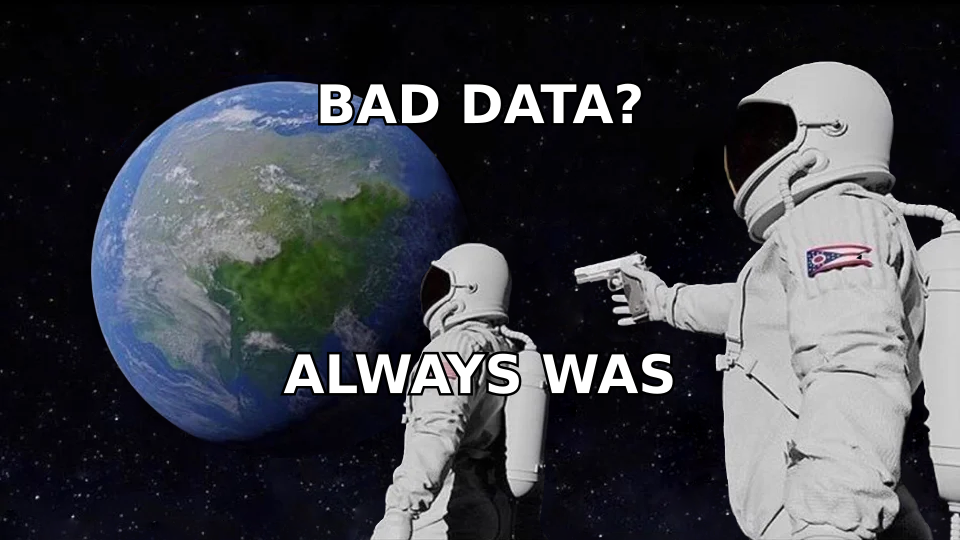
Five moving parts do nearly all the work. Understand these and the rest of the product is configuration detail.
- Stages — Named columns representing buyer commitment, not internal activity. You create them per pipeline, reorder them, and assign a probability-of-close percentage to each. Keap uses that percentage to weight your forecast.
- Opportunity records — The deal card. Each one links to exactly one contact record, carries a value, an owner, an expected close date, and custom fields you define.
- Stage automations — The differentiator. Each stage holds "when a deal moves in" and "when a deal moves out" triggers that can start an email sequence, assign a task, apply a tag, send an internal notification, or hand off to a broader Keap automation.
- Tags and contact data — Keap's tagging system is the connective tissue between marketing and sales. A pipeline move can apply a tag; a tag can enroll the contact in a nurture campaign that runs independently of the deal.
- Reports and dashboards — Pipeline value by stage, deals won/lost by owner, and stage-duration views. Serviceable for a small team. Not a substitute for a real revenue-analytics layer if you are running multiple segments.
- Integrations and forms — Web forms, landing pages, appointment bookings and Zapier-style connections create opportunities automatically, so cards can appear in stage one without a human touching the CRM.
The practical consequence of item 3 is that your stage design is also your automation design. In Pipedrive, renaming a stage is cosmetic. In Keap, renaming and reordering stages can silently change which sequences fire and when. Plan the stage list once, carefully, and change it rarely.
What stages should a Keap pipeline have?#
Fewer than you think. The most common mistake in Keap implementations is a twelve-stage pipeline that mirrors an internal checklist — "Research Done," "Email Drafted," "Manager Reviewed." Those are tasks. Stages should represent something the buyer did.
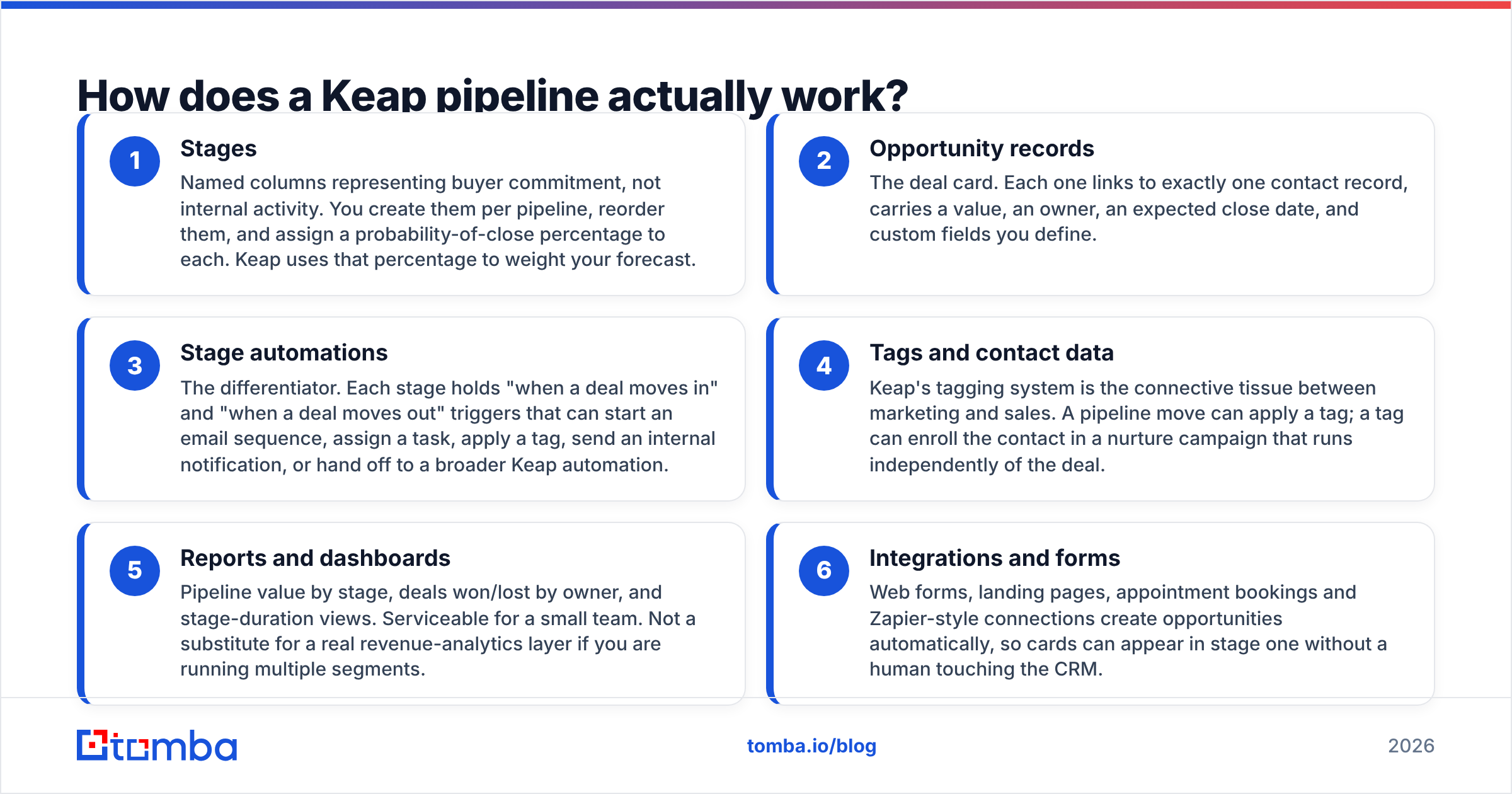
A defensible default for a small B2B team:
- New Lead — Contact exists, fit unverified. Automation: enrichment + a qualification email.
- Contacted — First outbound touch delivered. Automation: three-step follow-up cadence, task at day 7.
- Qualified — Buyer confirmed budget, need and timeline. Automation: internal Slack ping, discovery-call booking link.
- Proposal Sent — Pricing is in their hands. Automation: proposal follow-up at 2, 5 and 10 days.
- Negotiation — They came back with objections or terms. Automation: manager notification if value exceeds a threshold.
- Won / Lost — Terminal. Automation: onboarding sequence, or a 90-day re-engagement hold.
Six stages. Each one is a fact you can verify from the buyer's behavior, which means your stage-conversion rates mean something. If you cannot answer "what did the prospect do to earn this stage?" the stage does not belong on the board.
One more rule that matters more in Keap than elsewhere: do not create a stage for a state a deal can sit in indefinitely. Because stage-exit automations only fire on movement, a parking-lot stage becomes a place where deals go silent and no follow-up ever triggers. Use a lost reason or a hold tag instead.
Is the Keap pipeline better than HubSpot or Pipedrive?#
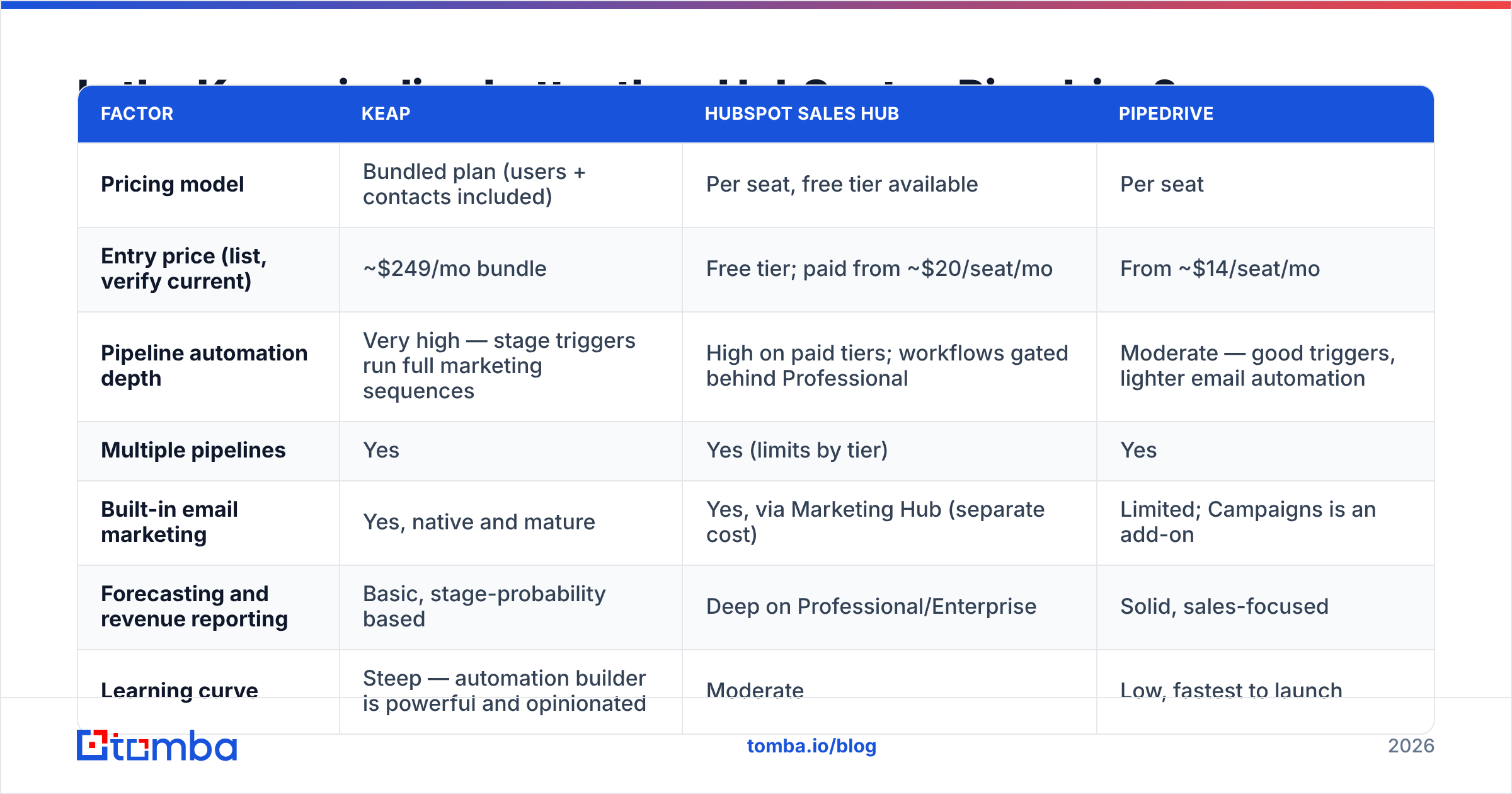
Not better — different, and priced for a different buyer. Keap sells a bundle; HubSpot and Pipedrive sell seats. Here is the honest side-by-side.
| Factor | Keap | HubSpot Sales Hub | Pipedrive |
|---|---|---|---|
| Pricing model | Bundled plan (users + contacts included) | Per seat, free tier available | Per seat |
| Entry price (list, verify current) | ~$249/mo bundle | Free tier; paid from ~$20/seat/mo | From ~$14/seat/mo |
| Pipeline automation depth | Very high — stage triggers run full marketing sequences | High on paid tiers; workflows gated behind Professional | Moderate — good triggers, lighter email automation |
| Multiple pipelines | Yes | Yes (limits by tier) | Yes |
| Built-in email marketing | Yes, native and mature | Yes, via Marketing Hub (separate cost) | Limited; Campaigns is an add-on |
| Forecasting and revenue reporting | Basic, stage-probability based | Deep on Professional/Enterprise | Solid, sales-focused |
| Learning curve | Steep — automation builder is powerful and opinionated | Moderate | Low, fastest to launch |
| Best fit | Solo founders and SMBs running sales + marketing in one tool | Teams that will scale into a full GTM platform | Sales-only teams that want a clean board today |
Read that table as a fit question, not a ranking. If your follow-up is 80% automated sequences triggered by deal movement, Keap's bundle is cheaper than paying for Pipedrive plus a separate email platform plus the glue between them. If you have eight reps who each need a seat and your follow-up is human-driven, Keap's pricing model works against you hard.
Third-party review data on G2 tracks this split closely: Keap scores well on automation and support, and takes consistent criticism on complexity and price-to-value for smaller use cases. Nobody disputes that the automation works. They dispute whether they needed that much of it.
For a fuller comparison of how HubSpot structures its own pipeline tooling, its documentation is unusually candid about tier limits — worth reading before you assume feature parity across plans.
What does Keap pipeline automation actually do well?#
Three things, concretely.
It kills the follow-up gap. The single biggest leak in SMB sales is the proposal that never gets a second touch. A stage-entry automation on "Proposal Sent" that fires at days 2, 5 and 10 recovers deals a busy owner would have dropped. This is the highest-ROI automation in the product and takes fifteen minutes to build.
It keeps the board honest. Stage-exit triggers can force data hygiene — require a close date, apply a tag, log an activity. Because the automation runs on movement rather than on a nightly job, your pipeline reflects reality within seconds rather than at the end of the week.
It unifies the lifecycle. Won deals can drop straight into onboarding sequences. Lost deals can enter a 90-day nurture and re-enter the pipeline automatically when they click a re-engagement email. In a two-tool stack, that handoff is a Zapier chain someone has to maintain.
Where does the Keap pipeline fall short?#
Be clear-eyed about four limits.
Reporting depth. Stage-probability forecasting is a blunt instrument. If you want cohort analysis, multi-touch attribution or velocity by segment, you will export to a spreadsheet or a BI tool. Keap's dashboards answer "what is in the pipeline," not "why is this quarter different from last."
Per-seat economics at scale. The bundle that feels generous at three users feels constraining at fifteen, and contact-count tiers add cost as your marketing list grows — even though those contacts are not sales pipeline.
Automation sprawl. The same power that makes stage triggers useful makes them dangerous. Six months in, most Keap accounts have automations nobody can fully map. Document every stage trigger in a shared doc from day one, or you will eventually be debugging why a won customer received a cold-outreach email.
Garbage in, garbage out. This is the one people underweight. Stage automations fire on contact records regardless of whether the email on that record is real. A pipeline stuffed with invalid or catch-all addresses produces sequences that bounce, a sender reputation that degrades, and stage-conversion percentages that are mathematically meaningless.

How do you keep a Keap pipeline full of real opportunities?#
Automation multiplies whatever you feed it. Feed it noise and you automate noise at scale. Three habits fix most of it.
Validate before the record is created, not after. Run new contacts through an email verifier before they land in stage one. A bounced proposal follow-up is worse than no follow-up — it damages the sending domain that your other sequences depend on.
Source contacts deliberately. If you are building target-account lists rather than waiting on inbound, a domain search against your ICP account list produces named contacts and role patterns far faster than manual LinkedIn work, and every result enters the pipeline with a verified address attached.
Enrich on entry. Job title, company size and location should be on the opportunity record before a rep opens it, because those fields are what your stage automations branch on. Data enrichment at the point of creation removes the research tax from stage one entirely.
Audit stale cards monthly. Any deal that has not moved in two stage-durations is either dead or mislabeled. Both are reporting problems. Close them or reclassify them.
Do this and your stage-conversion numbers become a real diagnostic instead of a vanity chart. Do not, and you will spend a quarter optimizing automations that are firing into the void.
How do you measure whether your Keap pipeline is working?#
Track four numbers, monthly:
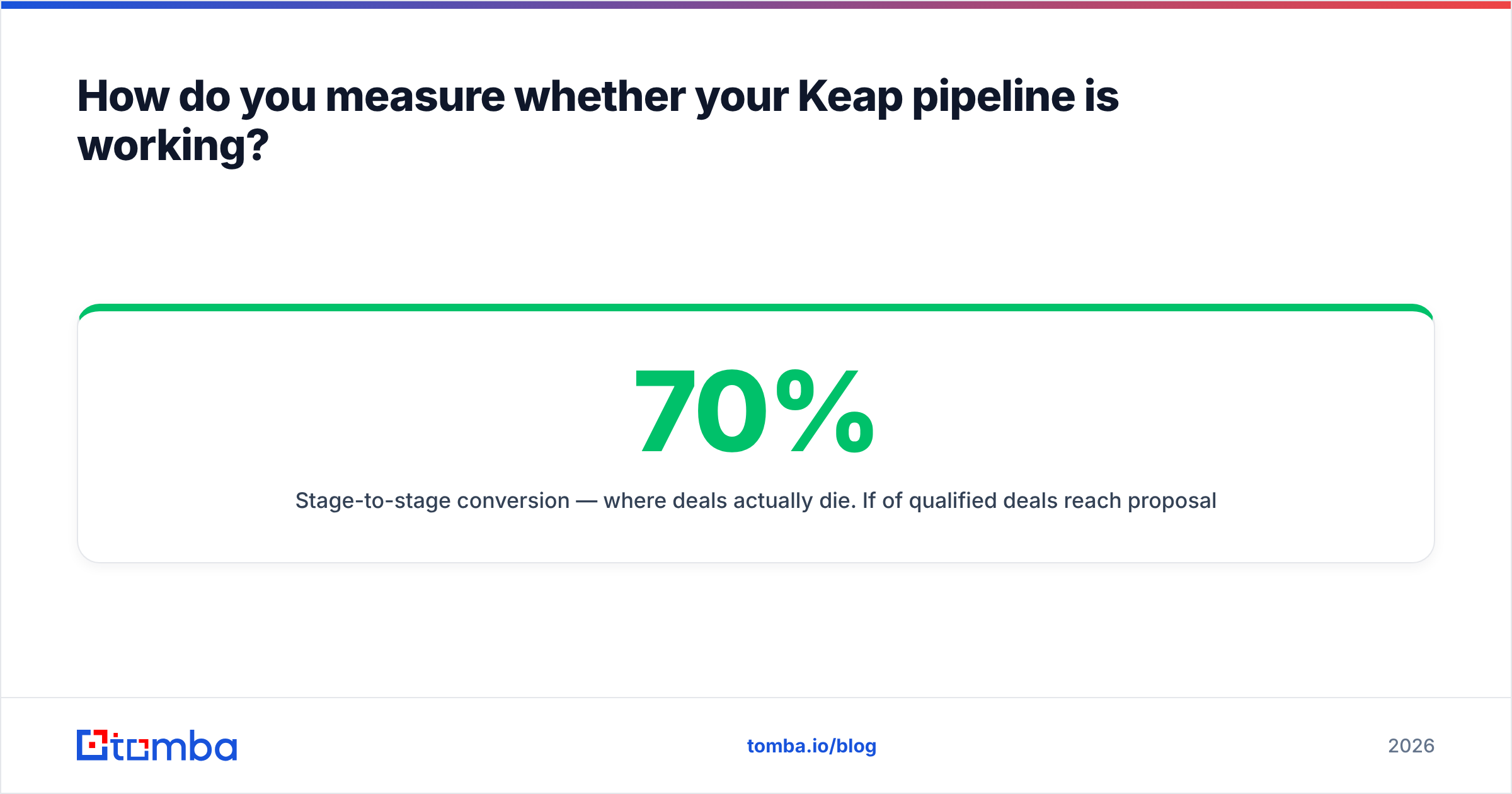
- Stage-to-stage conversion — where deals actually die. If 70% of qualified deals reach proposal but only 20% of proposals close, your problem is pricing or your proposal, not your prospecting.
- Average stage duration — the early-warning system. A stage whose duration doubles quarter over quarter is a process breakdown, not bad luck.
- Pipeline coverage ratio — open pipeline value divided by target. Below 3x for a typical SMB sales cycle and you have a top-of-funnel problem no automation will fix.
- Contact validity rate — percentage of pipeline contacts with a verified, deliverable email. Most teams never measure this, and most teams are shocked the first time they do.
Should you use Keap for your pipeline?#
Use Keap if you are a small business where sales and marketing are the same people, your follow-up is repeatable enough to automate, and the bundled price is cheaper than the two or three tools it replaces. Choose a per-seat CRM if you have a growing rep headcount, need deep forecasting, or only want the board.
Either way, the pipeline is downstream of your data. Stages, automations and dashboards all assume the contact in the record is a real person with a real inbox — and that assumption fails quietly, at volume, in almost every CRM in existence.
Fix the input and everything downstream improves. Use the Tomba Email Finder to source verified, deliverable contacts for the accounts you actually want, so every card entering your Keap pipeline is a genuine opportunity rather than a bounce waiting to happen. Start free with 25 searches a month, then scale on the Starter plan at $49/mo — full details on Tomba pricing.
Related guides#
// get started
Find, verify and enrich your first contacts today
Start on the free plan with 25 searches a month, then scale when your team is ready.
Free plan · No credit card required · GDPR & CCPA
// about the author