Keap Pricing in 2026: Reviews, Real Costs, Pros and Cons
Keap bundles CRM, automation, invoicing and SMS into one subscription — but the sticker price is only part of the bill. Here's what Keap really costs in 2026, what reviewers complain about, and when a leaner stack wins.
TL;DR
- Keap is an all-in-one CRM for small service businesses: pipeline, marketing automation, invoicing, appointments and SMS in one subscription. Its list price starts in the high-$200s per month for a small contact tier and two users — verify the current number on keap.com/pricing before you budget.
- The sticker price is not the bill. Budget for a one-time onboarding/coaching fee, per-user add-ons, and automatic step-ups as your contact count grows.
- Reviews are consistent: people love the automation depth and the fact that billing lives next to the CRM. They dislike the cost curve, the learning curve, and support wait times.
- Keap is worth it if you actually use the invoicing, appointments and automation together. If you only need a CRM plus outbound email, you are paying for a suite to use a sliver of it.
- Whatever CRM you land on, the contact data feeding it decides your results. A dedicated email finder at $49/mo beats paying suite prices for thin, stale records.
What is Keap, and who is it actually for?#
Keap is the company formerly known as Infusionsoft. It launched in 2001, rebranded in 2019, and sells a single idea: a small business should not need six tools to run sales and marketing. So Keap bundles a CRM, email and SMS marketing, visual automation builders, landing pages, appointment booking, quotes, invoices and payment collection into one login.
That bundle tells you exactly who it fits. Keap sells best to owner-operated service businesses — coaches, consultants, agencies, home services, clinics, fitness studios, professional services — where one or two people run the whole revenue motion and every hour spent stitching Zapier flows together is an hour not billed.
It fits badly for two other groups. Product-led SaaS teams with a developer on staff usually want composable tools and an API-first stack. And outbound sales teams doing high-volume cold prospecting want a sequencer plus a data provider, not an invoicing suite. Keap's automation is built around people who already raised a hand — form fills, bookings, referrals, past customers — not around cold lists you build yourself.
Here's the honest framing: Keap is a business operating system that happens to include a CRM, not a CRM that happens to include billing. Judge the price against the tools it replaces, not against a standalone CRM seat.
How much does Keap cost in 2026?#
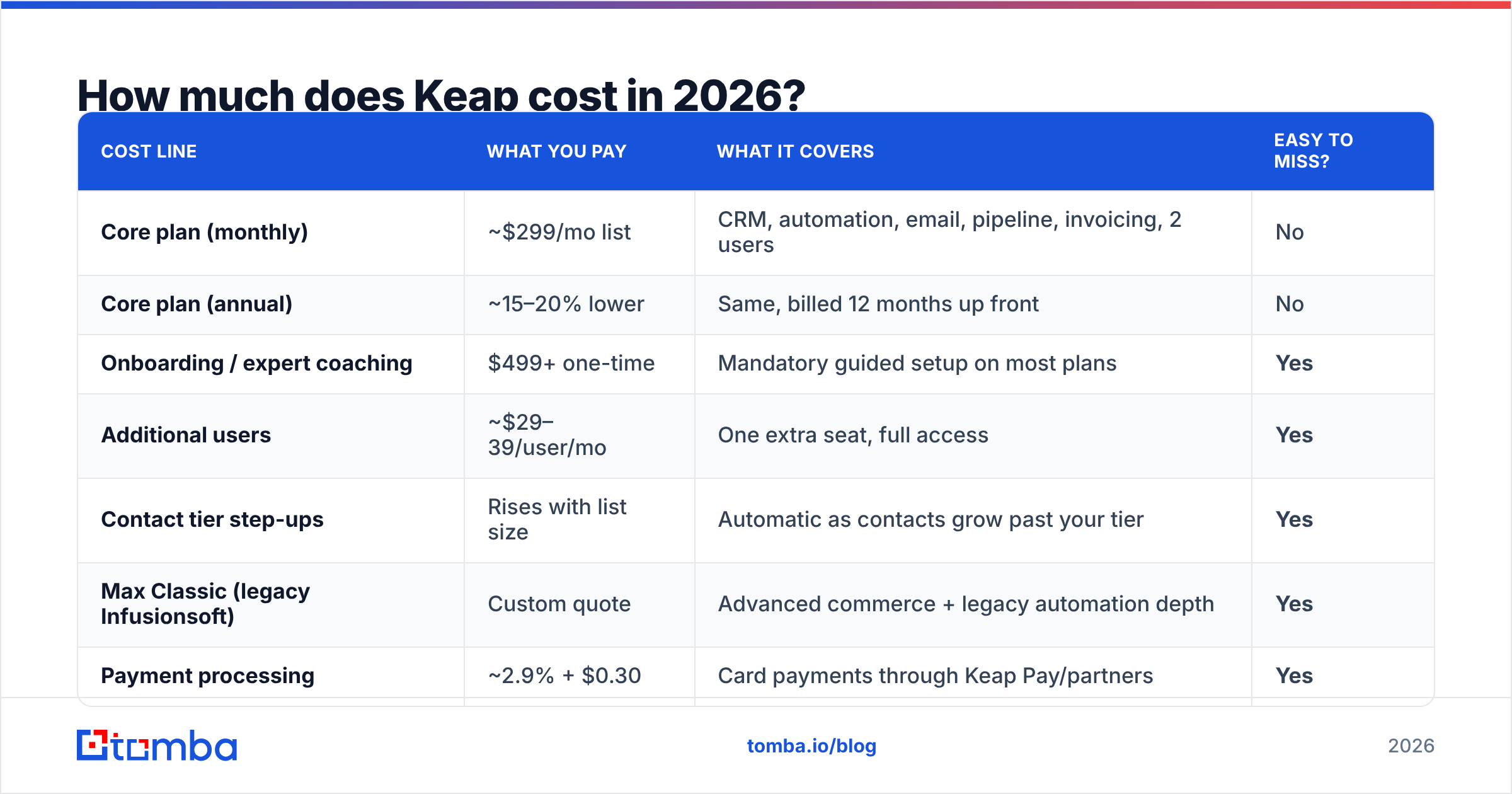
Keap has simplified its packaging repeatedly over the years — from three named tiers (Grow, Pro, Infusionsoft) to a Pro/Max split, to a mostly single-plan structure where price scales with contacts and users. As of 2026 the public entry point sits in the high-$200s per month for a small contact allowance and two seats, with annual billing shaving a chunk off the monthly rate.
Because that number moves, treat the table below as a budgeting model rather than a quote, and confirm every line on the vendor page before you sign.
| Cost line | What you pay | What it covers | Easy to miss? |
|---|---|---|---|
| Core plan (monthly) | ~$299/mo list | CRM, automation, email, pipeline, invoicing, 2 users | No |
| Core plan (annual) | ~15–20% lower | Same, billed 12 months up front | No |
| Onboarding / expert coaching | $499+ one-time | Mandatory guided setup on most plans | Yes |
| Additional users | ~$29–39/user/mo | One extra seat, full access | Yes |
| Contact tier step-ups | Rises with list size | Automatic as contacts grow past your tier | Yes |
| Max Classic (legacy Infusionsoft) | Custom quote | Advanced commerce + legacy automation depth | Yes |
| Payment processing | ~2.9% + $0.30 | Card payments through Keap Pay/partners | Yes |
Four things drive the real number:
- Contacts, not revenue. Keap prices on how many records sit in your database. A list you never email still counts. Deduplicating and pruning before migration is the single highest-ROI hour you will spend.
- Seats are additive. The base plan includes a small number of users. A five-person team lands well above the advertised price before anyone sends an email.
- Onboarding is usually not optional. Keap has long required a paid implementation package for new accounts. It is genuinely useful — Keap is not a tool you self-serve in an afternoon — but it is real cash in month one.
- Migration labor is invisible on the invoice. Rebuilding campaigns, tags and forms takes weeks, and that cost is your team's time.
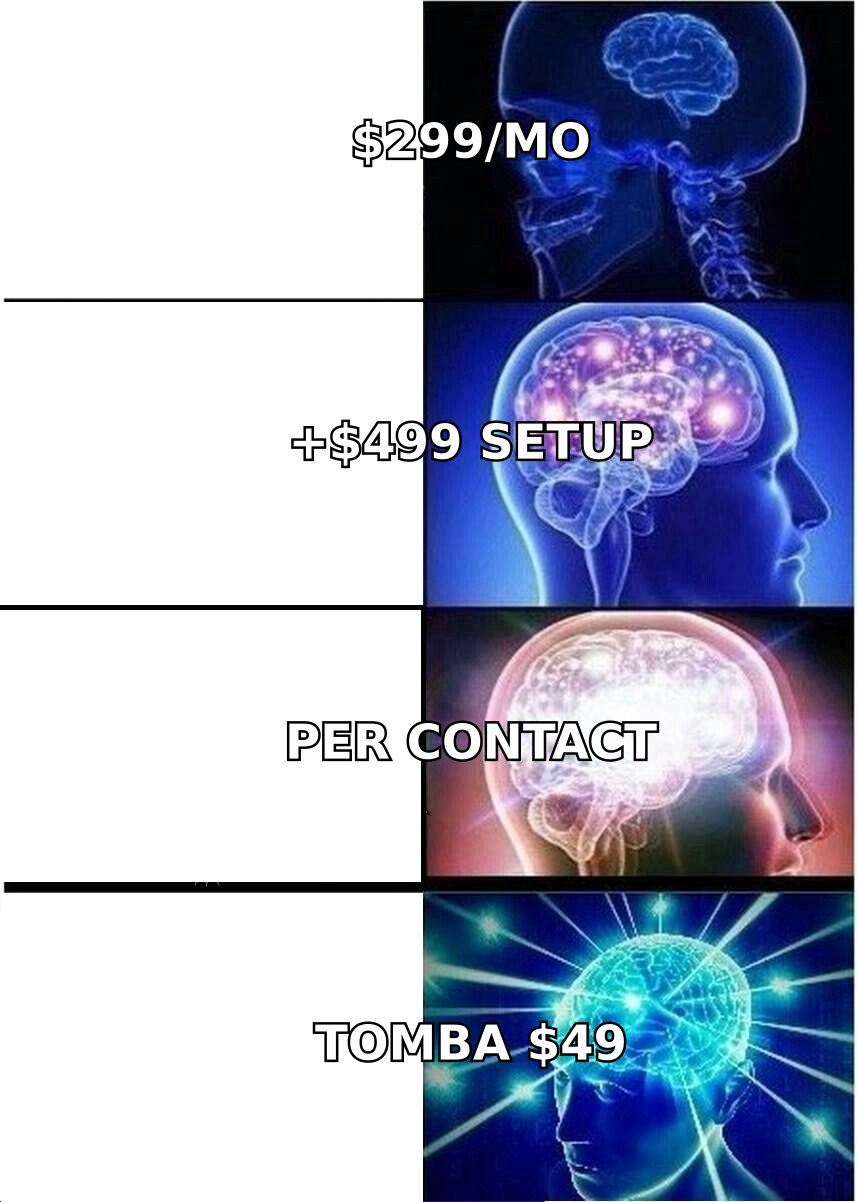
A useful sanity check: add up what you currently pay for CRM, email marketing, scheduling, invoicing and SMS. If that stack costs more than Keap's all-in number and you actually use all five, Keap is cheap. If three of those five are free tools you barely touch, Keap is expensive.
What do Keap reviews actually say?#
Aggregate scores on G2 and Capterra sit in the low 4s out of 5 across thousands of reviews — solid, not spectacular, and remarkably stable over time. The score matters less than the pattern underneath it, which barely changes from year to year.
What reviewers consistently praise:
- Automation depth. The campaign builder handles branching, wait steps, tags, internal notifications and conditional paths that most SMB tools flatten into linear sequences.
- Billing inside the CRM. Quote → invoice → payment → follow-up lives in one record. Agencies and service businesses call this the reason they stay.
- Lifecycle marketing for existing customers. Referral campaigns, re-engagement, renewal nudges and post-purchase sequences are where Keap earns its keep.
- Onboarding quality. The paid coaching gets unusually good marks — people resent paying for it and then admit it worked.
What reviewers consistently criticize:
- Price growth. The most common complaint is not the starting price, it's the trajectory as contacts accumulate.
- Learning curve. Power comes with complexity. Reviewers who treat Keap like Mailchimp churn; reviewers who invest two weeks stay for years.
- Interface age. Parts of the product, especially legacy Max Classic areas, feel dated next to newer competitors.
- Support latency. Response times draw recurring grumbles, particularly on lower tiers and outside US business hours.
- Deliverability sensitivity. Keap enforces strict sending policies. Import a cold, unverified list and you will get throttled or reviewed — which is correct behavior on their side, but a shock if you expected a cold email tool.
That last point is worth underlining. Keap is built for permission-based marketing. If you plan to upload purchased or scraped lists, you need a clean, verified file and a separate cold-outreach channel. Running unverified contacts through a marketing platform is the fastest way to torch your sender reputation and your account.
What are the real pros and cons of Keap?#
Pros
- One subscription replaces four to six tools, which removes integration debt and the monthly "which tool broke?" tax.
- Automation is genuinely deep for the SMB segment — closer to enterprise marketing automation than to a newsletter tool.
- Native payments turn the CRM into a revenue system, not just a record of intentions.
- Mature ecosystem: two decades of partners, certified consultants, templates and community answers.
- Strong fit for referral-driven and repeat-purchase businesses where lifecycle beats prospecting.
Cons
- Total cost of ownership is high relative to per-seat CRMs, especially for teams above four or five users.
- Contact-based pricing punishes list growth even when the extra contacts generate nothing.
- Setup is a project, not a signup. Plan for weeks, not days.
- Weak fit for outbound-heavy teams: no native prospecting data, and cold list tolerance is deliberately low.
- Reporting is adequate rather than analytical; revenue teams that live in dashboards often bolt on a BI tool.
How does Keap compare to the main alternatives?#
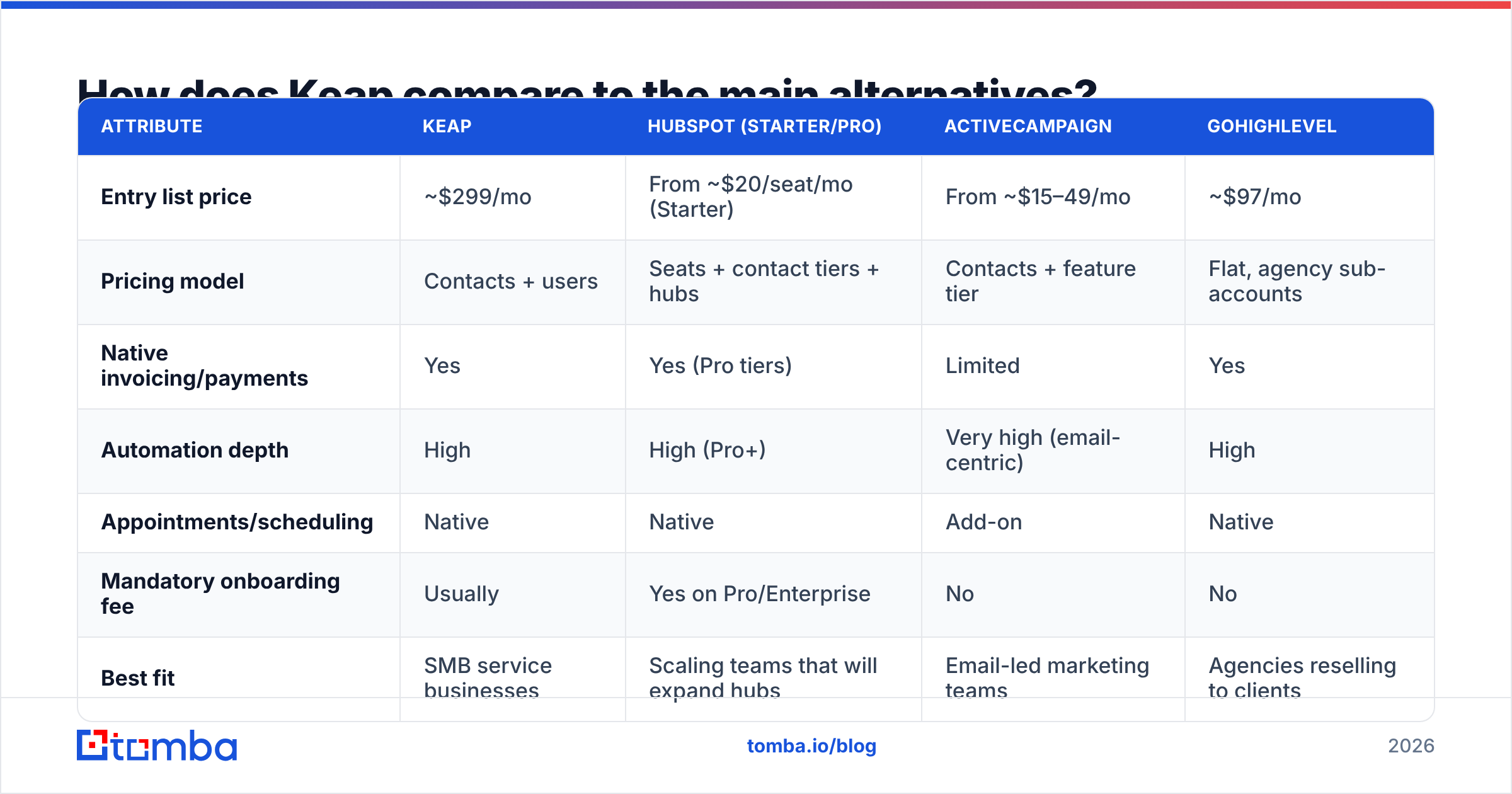
The right comparison depends on which job you are hiring the tool for. Compare Keap to other all-in-one platforms, not to a $20 CRM seat.
| Attribute | Keap | HubSpot (Starter/Pro) | ActiveCampaign | GoHighLevel |
|---|---|---|---|---|
| Entry list price | ~$299/mo | From ~$20/seat/mo (Starter) | From ~$15–49/mo | ~$97/mo |
| Pricing model | Contacts + users | Seats + contact tiers + hubs | Contacts + feature tier | Flat, agency sub-accounts |
| Native invoicing/payments | Yes | Yes (Pro tiers) | Limited | Yes |
| Automation depth | High | High (Pro+) | Very high (email-centric) | High |
| Appointments/scheduling | Native | Native | Add-on | Native |
| Mandatory onboarding fee | Usually | Yes on Pro/Enterprise | No | No |
| Best fit | SMB service businesses | Scaling teams that will expand hubs | Email-led marketing teams | Agencies reselling to clients |
| Prospecting data included | No | Limited | No | No |
Two takeaways from that grid.
First, HubSpot looks cheaper at the door and rarely stays cheaper. Starter seats are inexpensive, but the features Keap gives you at $299 — real automation branching, quotes with payments — mostly live in Professional tiers that cost multiples of Keap. Compare at feature parity, not at entry price. HubSpot publishes its tiers openly at hubspot.com/pricing, so the math is easy to run.
Second, none of them include prospecting data. That is the row most buyers skip and then discover in month two. Every platform in this table assumes you already have contacts. If your growth plan depends on reaching people who have never heard of you, the CRM is not the bottleneck — the data is.
Is Keap worth it for your team?#
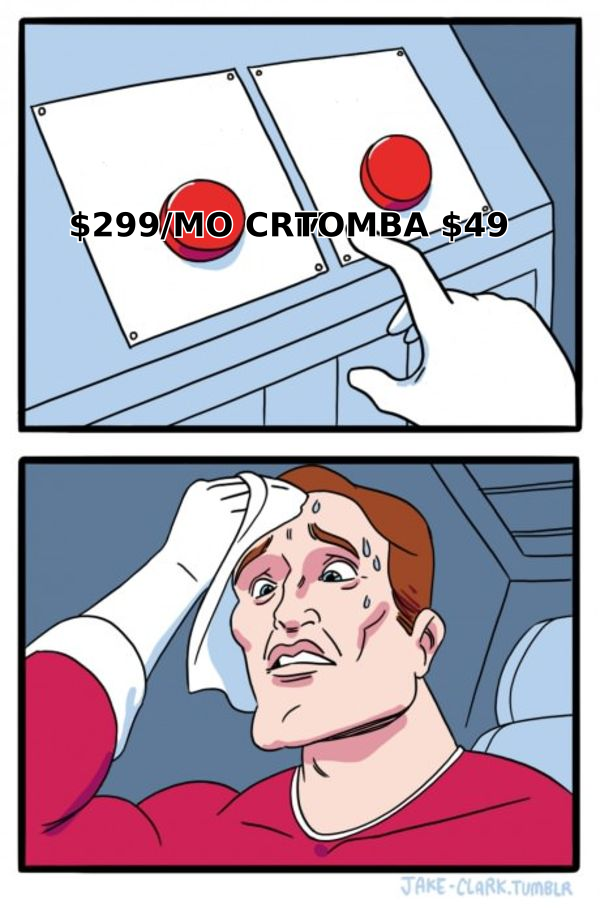
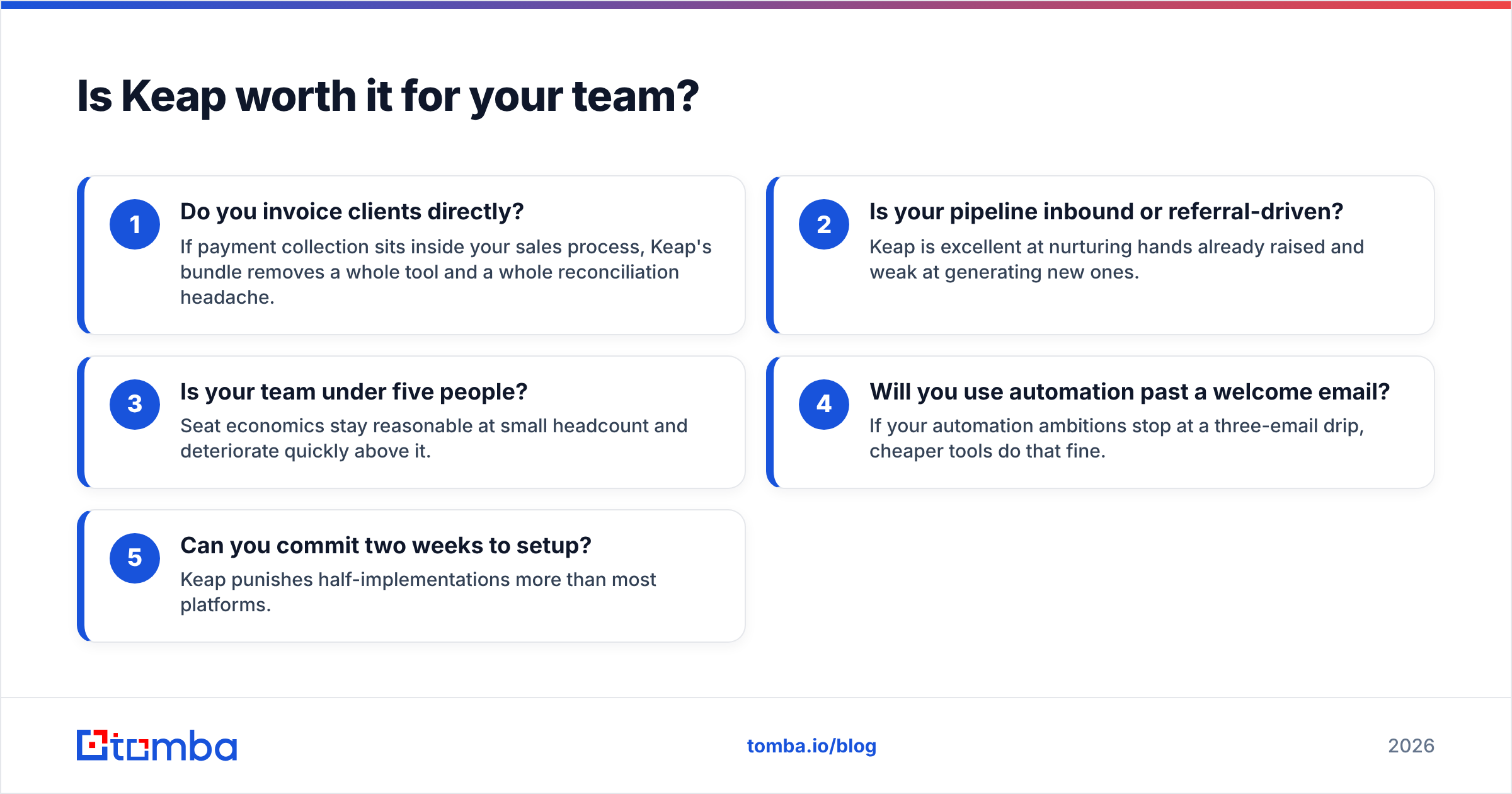
Use these five filters. Three or more "yes" answers and Keap earns its price.
- Do you invoice clients directly? If payment collection sits inside your sales process, Keap's bundle removes a whole tool and a whole reconciliation headache.
- Is your pipeline inbound or referral-driven? Keap is excellent at nurturing hands already raised and weak at generating new ones.
- Is your team under five people? Seat economics stay reasonable at small headcount and deteriorate quickly above it.
- Will you use automation past a welcome email? If your automation ambitions stop at a three-email drip, cheaper tools do that fine.
- Can you commit two weeks to setup? Keap punishes half-implementations more than most platforms.
If you answered no to most of them — especially if your growth depends on outbound — a leaner combination usually wins: a simple CRM, a sending tool, and a dedicated data source. That stack typically lands under $150/month all-in and does the one job you actually need.
What data layer should you pair with any CRM?#
Whichever platform you pick, the same rule applies: automation multiplies whatever quality you feed it. A beautifully built Keap campaign firing at 30% invalid addresses produces bounces at scale, not revenue at scale.
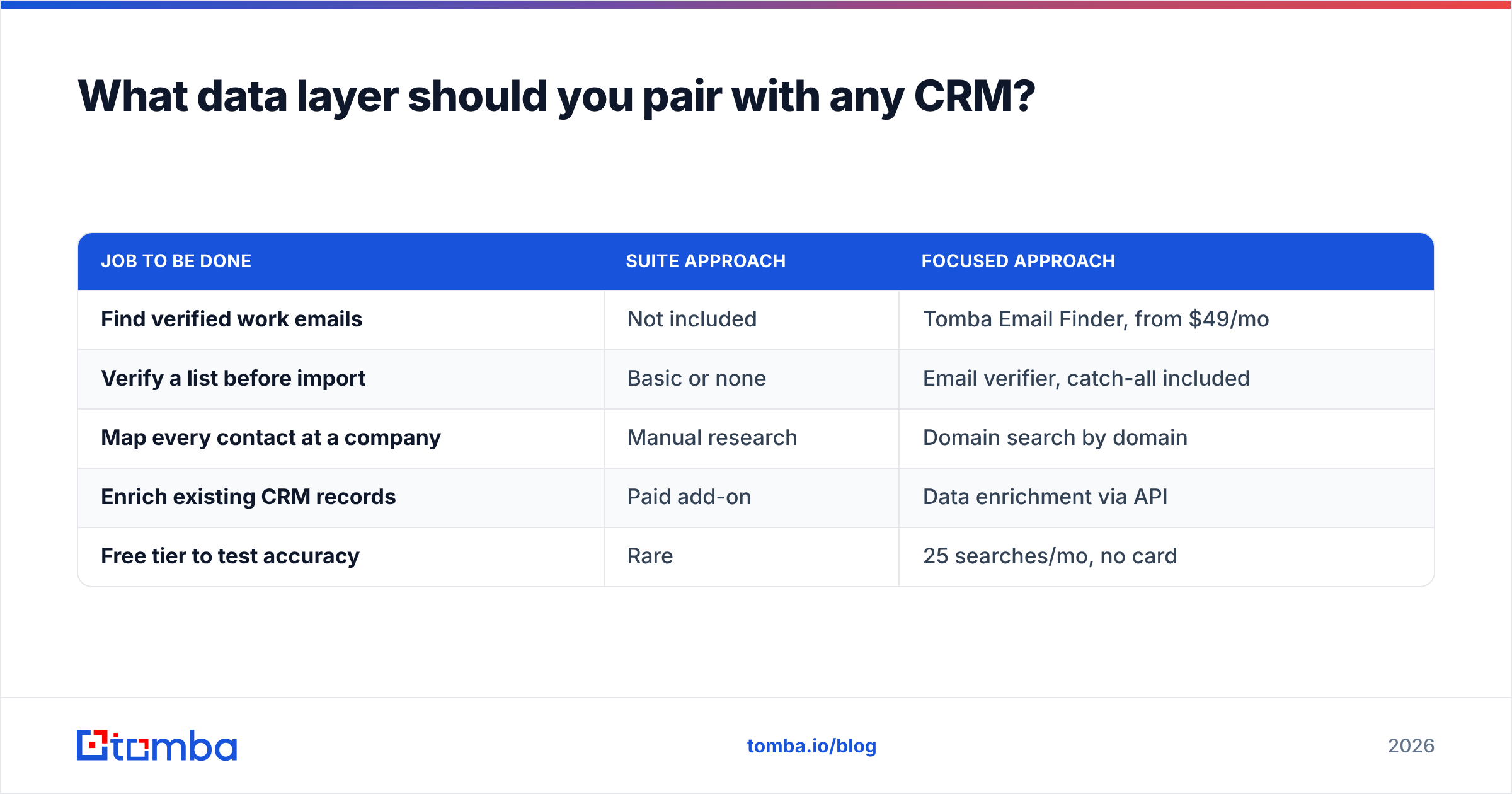
That is where the spend actually belongs. Compare the numbers honestly:
| Job to be done | Suite approach | Focused approach |
|---|---|---|
| Find verified work emails | Not included | Tomba Email Finder, from $49/mo |
| Verify a list before import | Basic or none | Email verifier, catch-all included |
| Map every contact at a company | Manual research | Domain search by domain |
| Enrich existing CRM records | Paid add-on | Data enrichment via API |
| Free tier to test accuracy | Rare | 25 searches/mo, no card |
Tomba's plans run Free (25 searches/mo), Starter at $49/mo, Growth at $99/mo, and Pro at $249/mo, with Enterprise quoted per volume — full details on Tomba pricing. Bulk B2B list vendors such as BookYourData solve a related problem well if you want a pre-built list rather than targeted lookups; the two approaches complement each other more often than they compete.
Practical workflow that works with Keap or anything else:
- Find decision-maker emails by domain or name before they enter the CRM.
- Verify every address, including catch-all domains, so imports don't damage your sending reputation.
- Enrich records with role, company and social data so your automation can segment properly.
- Sync through the HubSpot integration, Zapier, or the Tomba API so the pipeline runs without manual CSVs.
What's the verdict on Keap pricing?#
Keap is fairly priced for what it is and badly priced for what many buyers assume it is. If you run a small service business that invoices clients, books appointments and nurtures a warm list, the all-in subscription is competitive against the four tools it replaces — and reviewers who use it that way stay for years. If you are buying it as a CRM with email attached, you are paying suite economics for a fraction of the suite, and the contact-tier curve will make that worse every quarter.
Do the arithmetic before the demo: current stack cost, projected contact count in 12 months, headcount in 12 months, plus onboarding. If Keap still wins, buy it with confidence. If it doesn't, the money is better spent on the layer no CRM includes.
Start with the data. Run 25 free searches through the Tomba Email Finder, check the verified addresses against whatever you already have, and see how much of your CRM is worth automating in the first place. Clean contacts make an average platform perform well; bad contacts make an expensive one look broken.
Related guides#
// get started
Find, verify and enrich your first contacts today
Start on the free plan with 25 searches a month, then scale when your team is ready.
Free plan · No credit card required · GDPR & CCPA
// about the author