Keap vs Pipedrive (2026): Which CRM Actually Fits Your Team?
Keap bundles CRM, email marketing, and invoicing for small businesses. Pipedrive is a lean sales pipeline built for closers. Here is how they compare on price, automation, setup effort, and the one gap neither fills.
TL;DR
- Pipedrive is a sales CRM. Keap is a small-business operating system. Pipedrive wins on pipeline visibility and per-seat pricing; Keap wins when you need marketing automation, invoicing, and a CRM in one login.
- Price structures are not comparable. Pipedrive charges per user per month (roughly $14–$99 at list). Keap charges a flat platform fee that starts near $299/mo and scales with your contact count, not your headcount.
- Keap punishes small sales teams. Pipedrive punishes marketers. Two reps on Keap pay for automation they may never use. Five reps on Pipedrive eventually bolt on a separate email marketing tool anyway.
- Setup effort differs by an order of magnitude. Pipedrive is usable in an afternoon. Keap expects a genuine implementation project, and it sells onboarding for exactly that reason.
- Neither tool finds you contacts. Both are containers. The pipeline you build is only as good as the verified emails and phone numbers you pour into it.
What are Keap and Pipedrive, really?#
Think of it like kitchens. Pipedrive is a chef's station: one surface, perfect knife layout, everything within reach for the one job you do all day. Keap is a full restaurant build-out — prep, line, front of house, and the point-of-sale terminal — sold as a package.
Pipedrive launched as a visual deal pipeline and never really wandered from that. Deals move left to right through stages, activities get scheduled against every deal, and the reporting answers one question well: where is revenue stuck? Everything else — email sequences, forms, chatbots, documents — arrived later as add-ons layered on top of that core.
Keap (formerly Infusionsoft) came from the other direction. It was built for owner-operated businesses that needed to capture a lead, nurture it with email, book an appointment, send an invoice, and take payment without stitching five SaaS tools together. The CRM is there, but it exists to feed the automation engine, not the other way around.
That origin story explains almost every practical difference you will hit in month two.
How do Keap and Pipedrive compare feature by feature?#
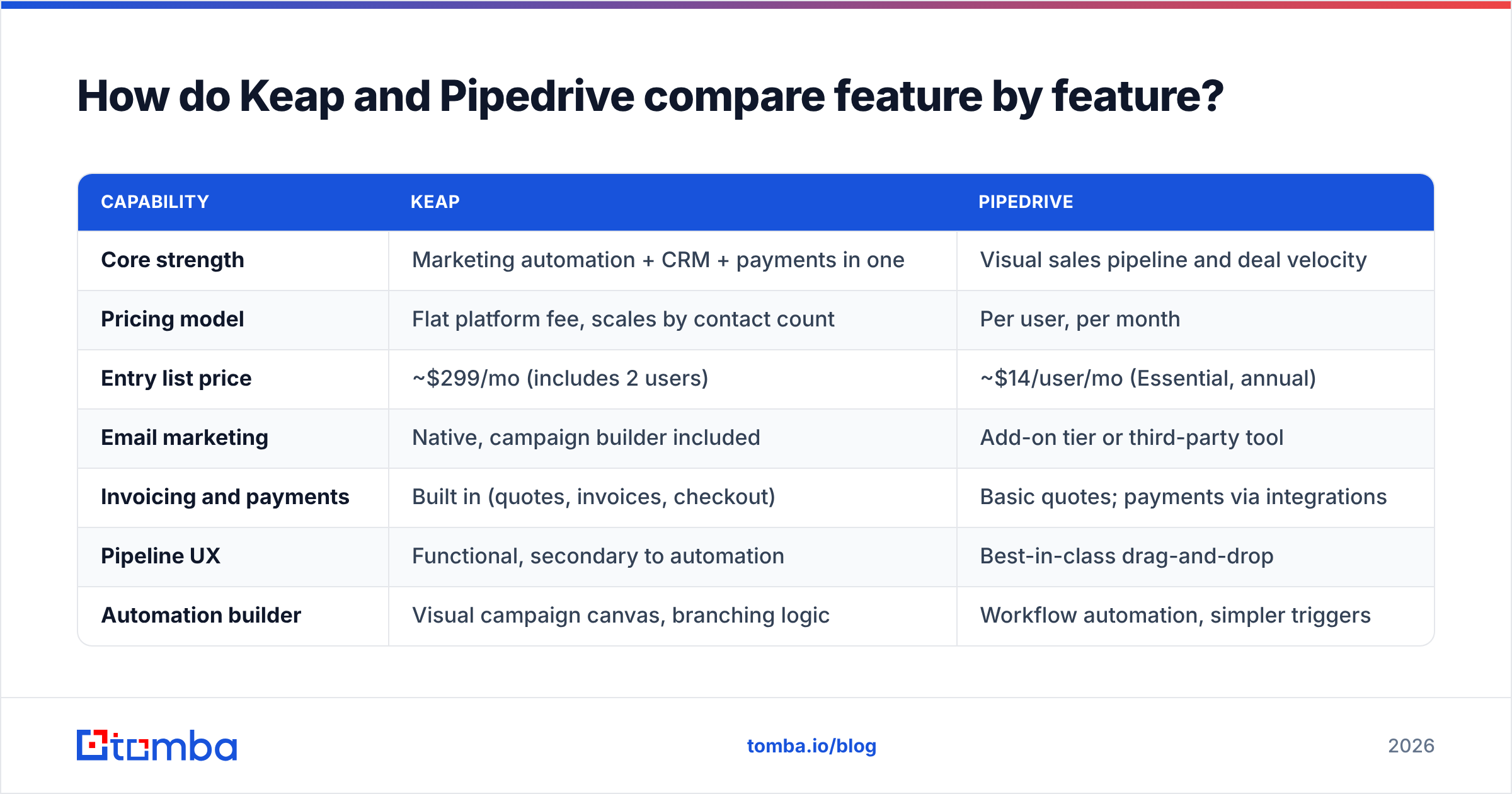
| Capability | Keap | Pipedrive |
|---|---|---|
| Core strength | Marketing automation + CRM + payments in one | Visual sales pipeline and deal velocity |
| Pricing model | Flat platform fee, scales by contact count | Per user, per month |
| Entry list price | ~$299/mo (includes 2 users) | ~$14/user/mo (Essential, annual) |
| Email marketing | Native, campaign builder included | Add-on tier or third-party tool |
| Invoicing and payments | Built in (quotes, invoices, checkout) | Basic quotes; payments via integrations |
| Pipeline UX | Functional, secondary to automation | Best-in-class drag-and-drop |
| Automation builder | Visual campaign canvas, branching logic | Workflow automation, simpler triggers |
| Appointment booking | Native scheduler | Native scheduler (higher tiers) |
| Mobile app | Adequate | Strong, built for field reps |
| Typical setup time | 2–6 weeks, often with paid onboarding | 1–3 days, self-serve |
| Best fit | Solo founders, coaches, agencies, local services | SMB and mid-market outbound sales teams |
Read that table twice, because the trap in the keap vs pipedrive decision is comparing them as if they compete for the same budget line. They usually do not. Keap replaces your CRM and your Mailchimp and your invoicing tool. Pipedrive replaces your spreadsheet and expects to sit next to a sending tool.
What does each one actually cost in 2026?#
List price is where most comparisons stop and where most buyers get surprised. Always confirm current numbers on the vendor pricing pages — both companies repackage tiers regularly — but the shape of the pricing is stable and it is the shape that matters.
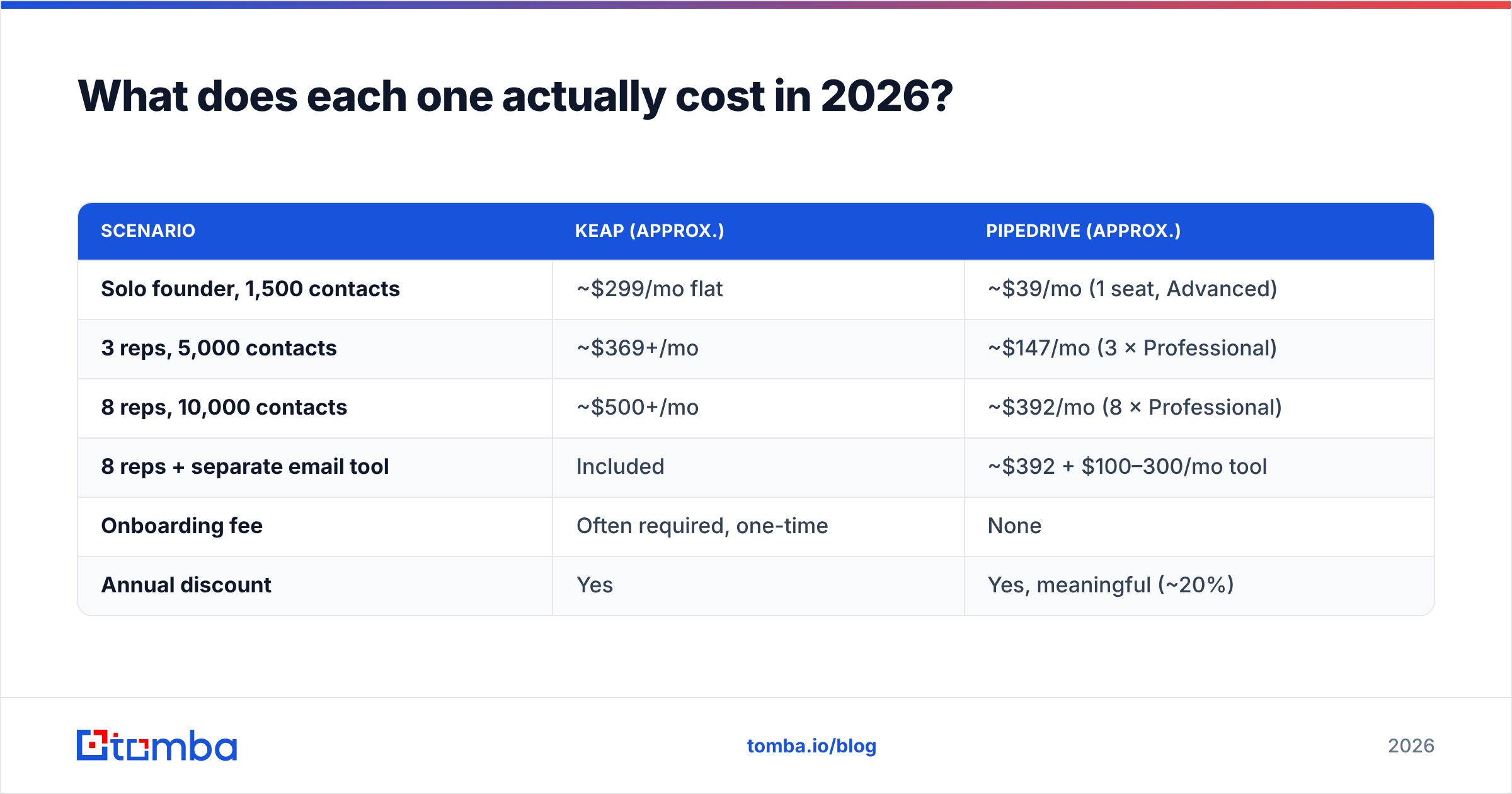
| Scenario | Keap (approx.) | Pipedrive (approx.) |
|---|---|---|
| Solo founder, 1,500 contacts | ~$299/mo flat | ~$39/mo (1 seat, Advanced) |
| 3 reps, 5,000 contacts | ~$369+/mo | ~$147/mo (3 × Professional) |
| 8 reps, 10,000 contacts | ~$500+/mo | ~$392/mo (8 × Professional) |
| 8 reps + separate email tool | Included | ~$392 + $100–300/mo tool |
| Onboarding fee | Often required, one-time | None |
| Annual discount | Yes | Yes, meaningful (~20%) |
Two conclusions fall out of this.
First, Pipedrive gets more expensive as you hire; Keap gets more expensive as you grow your list. A five-person team with 800 contacts pays Keap almost nothing extra per head. A two-person team with 60,000 newsletter subscribers pays Keap a lot. Model your own trajectory before you sign an annual deal, because the curve that bites you in month 18 is rarely the one you tested in month one.
Second, the honest Pipedrive comparison is not "Pipedrive alone." It is Pipedrive plus whatever you use for sequences, plus a data source, plus maybe a proposal tool. Once you add those, the gap narrows considerably — and Keap's bundle starts looking less like a premium and more like a package deal.

Which one is better for sales pipeline management?#
Pipedrive, and it is not close.
If your team lives in a pipeline — qualifying, moving deals through stages, forecasting off weighted values — Pipedrive's interface does more work for you per click than almost anything in its price range. Stage rot is visible. Activity gaps are flagged. A rep can update six deals from a phone in a parking lot.
Keap's pipeline is competent but it is clearly the second citizen in the product. It works for a founder tracking twenty open opportunities. It starts to feel thin when you have four reps, custom qualification criteria, and a sales manager who wants to know conversion rate by stage by source by month.
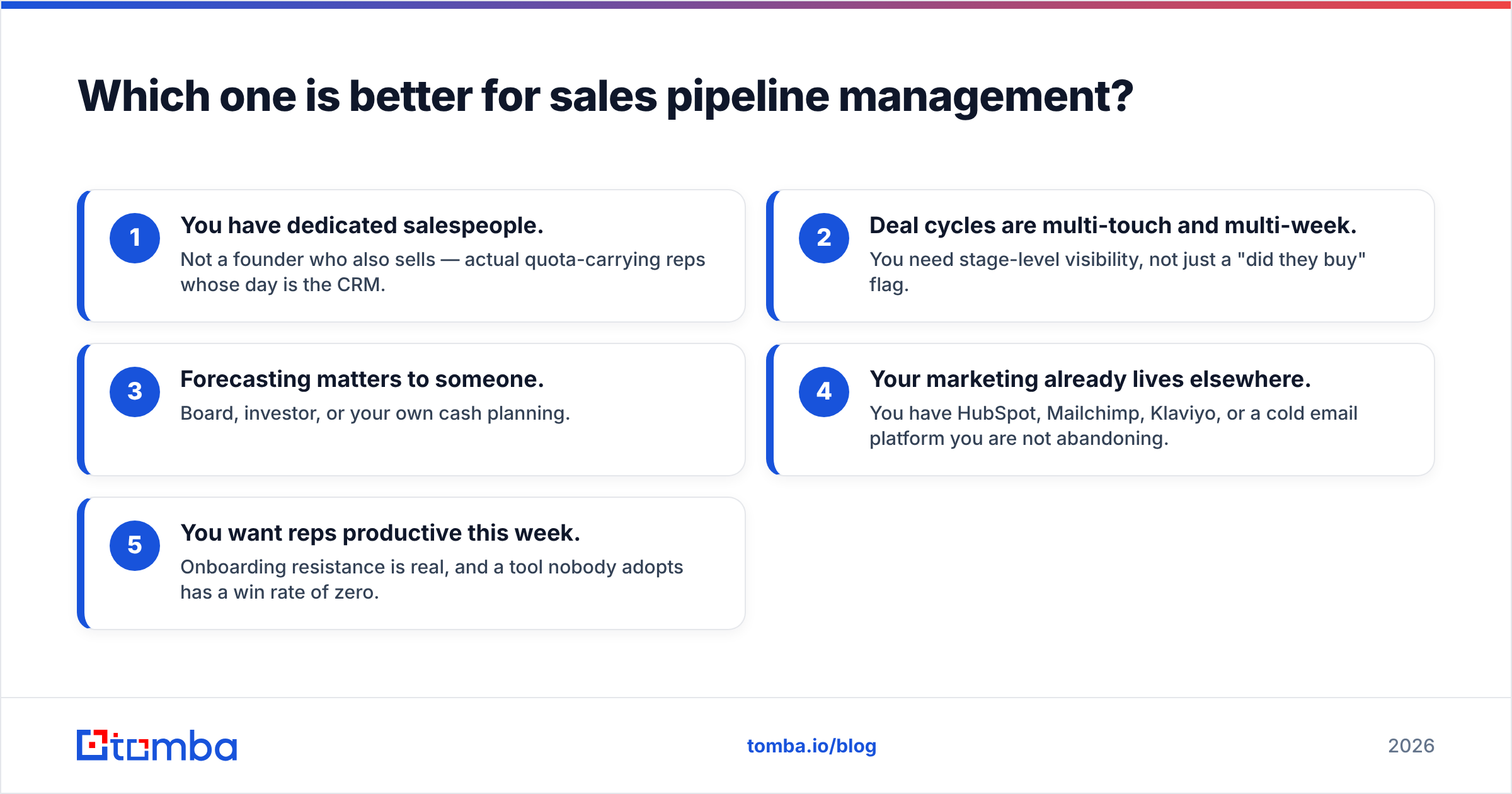
Signals you should lean Pipedrive:
- You have dedicated salespeople. Not a founder who also sells — actual quota-carrying reps whose day is the CRM.
- Deal cycles are multi-touch and multi-week. You need stage-level visibility, not just a "did they buy" flag.
- Forecasting matters to someone. Board, investor, or your own cash planning.
- Your marketing already lives elsewhere. You have HubSpot, Mailchimp, Klaviyo, or a cold email platform you are not abandoning.
- You want reps productive this week. Onboarding resistance is real, and a tool nobody adopts has a win rate of zero.
Which one is better for marketing automation and follow-up?#
Keap, comfortably.
Keap's campaign builder is a visual canvas where you drag sequences, decision diamonds, tags, and goals onto a map. You can build "if they clicked the pricing link but did not book a call, wait three days, send version B, then notify the owner" without writing a line of logic or paying a third vendor. For a coaching business, a local services company, or an agency running evergreen nurture, that is the whole product.
Pipedrive's automation is trigger-and-action: when a deal moves to stage X, do Y. It is genuinely useful and far easier to learn, but it is not a nurture engine. Long-horizon, behavior-branching campaigns are not what it was built for, and the higher tiers where email campaigns unlock still feel like a sales tool doing marketing rather than a marketing tool.
The other Keap differentiator people underrate: money moves through it. Quotes, invoices, subscriptions, and checkout pages live in the same system as the contact record. If you sell a $2,000 program and want the payment, the receipt, the tag, and the onboarding sequence to fire from one place, Keap does that natively. Pipedrive needs Stripe plus Zapier plus a bit of hope.
How hard is each one to set up and maintain?#
This is the most underweighted factor in the entire decision, so be blunt with yourself about your capacity.
- Pipedrive: afternoon-to-week. Import contacts, define stages, set required fields, invite reps. Most teams are running real deals within 48 hours. Ongoing admin is light.
- Keap: project, not a task. Tag architecture, campaign maps, forms, and payment setup all need decisions before the first send. Keap sells onboarding packages because most accounts genuinely need them.
- Tag debt is Keap's real cost. Two years in, an unplanned Keap account has 400 tags nobody can explain. Plan a naming convention on day one or you will pay for it forever.
- Migration pain runs one direction. Moving from Keap to Pipedrive means abandoning automation logic you cannot export. Moving from Pipedrive to Keap means rebuilding pipelines you can rebuild in a day.
- Admin ownership matters. Keap needs a named owner who understands the automation. Pipedrive can survive without one.
Check current user sentiment on a neutral aggregator like G2's CRM category before you commit — the complaint patterns are consistent and they will tell you which failure mode you are signing up for.
Which integrates better with the rest of your stack?#
Pipedrive has the broader and more sales-native integration ecosystem: dialers, enrichment tools, sequencers, revenue intelligence, and a clean, well-documented API. If your stack is a collection of best-of-breed sales tools, Pipedrive slots in with less friction. Tomba's own Pipedrive integration is a representative example — contacts get found and pushed straight into the pipeline without a CSV round trip.
Keap integrates fine, but its philosophy is centripetal: it wants to be the stack. Many Keap integrations exist to get data in, not to let you run half your process elsewhere. That is a feature if you are consolidating and a constraint if you are assembling.
If you use sales automation tooling across several vendors, that difference will define your next two years more than any feature checkbox.
Where do both Keap and Pipedrive leave a gap?#
Neither one gets you contacts. This is the part every CRM comparison glosses over, and it is the part that determines whether the tool you just bought produces revenue.
A CRM is a filing cabinet with opinions. It stores, sorts, routes, and reminds. It does not know the head of ops at a 200-person logistics company exists, it does not know her email address, and it will happily let you push a stale, guessed, or role-based address into a sequence and burn your domain doing it.

That gap has a measurable cost. A list with a 20–30% invalid rate does three things at once: it wrecks your email deliverability, it poisons your pipeline metrics with contacts that were never reachable, and it makes both Keap and Pipedrive look like the problem when the real problem upstream is the data.
The fix is boring and it works:
- Find the contact at the source. Use a domain-driven email finder to get real addresses at target companies rather than guessing formats.
- Verify before it enters the CRM, not after. An email verifier run at import time keeps junk out of the system permanently.
- Enrich the record with title, company size, and phone so your Keap tags or Pipedrive filters actually segment something real.
- Re-verify quarterly. B2B data decays at roughly 2–3% per month. A clean list in January is a mediocre list by August.
Do that and both CRMs perform better. Skip it and you will be writing a "Pipedrive vs something else" comparison next year, chasing a fix that was never in the CRM layer.
Who should choose Keap, and who should choose Pipedrive?#
Choose Keap if: you are a founder-led or owner-operated business, your growth comes from nurture rather than outbound prospecting, you sell services or programs with invoicing attached, your team is small but your contact list is large, and you want one bill instead of five.
Choose Pipedrive if: you have real salespeople, deals move through defined stages, you need forecasting and per-rep visibility, your marketing tooling is already chosen, and you want adoption without an implementation consultant.
Choose neither if: you need heavyweight enterprise features — complex territory management, CPQ, multi-entity revenue recognition. That is a different shortlist entirely.
And if you are genuinely torn, run the cheapest test available. Put fifty verified, well-enriched contacts into a Pipedrive trial and fifty into a Keap trial, work them for two weeks, and see which one your team actually opens. The answer is usually obvious by day four.
Start with the data, not the CRM#
Whichever way the keap vs pipedrive call lands, the constraint on your pipeline is rarely the software — it is the quality of the contacts inside it. Tomba's Tomba Email Finder gets you verified, deliverable professional email addresses by domain, name, or company, so what lands in Keap or Pipedrive is worth working. Start free with 25 searches a month, or check Tomba pricing — plans run from $49/mo Starter to $99/mo Growth and $249/mo Pro, with an API and CRM integrations on every paid tier. Fill the pipeline first; the CRM argument gets a lot easier after that.
Related guides#
// get started
Find, verify and enrich your first contacts today
Start on the free plan with 25 searches a month, then scale when your team is ready.
Free plan · No credit card required · GDPR & CCPA
// about the author