Key Account Management Platform: The 2026 Buyer's Guide
Key account management platforms promise bigger renewals and cleaner expansion plans. Here's what they actually do, how they differ from your CRM, what they really cost, and the honest test for whether your team needs one in 2026.
TL;DR
- A key account management platform is account-planning software that sits on top of your CRM. It handles relationship maps, whitespace analysis, joint success plans, and QBR prep for a small number of strategic accounts — not your whole pipeline.
- Your CRM already tracks deals. A KAM platform tracks account strategy: who influences whom, which products are missing, and what the growth plan is for the next four quarters.
- Almost nobody in this category publishes pricing. Expect per-seat add-on costs on top of a Salesforce or Dynamics license you already pay for, plus a services fee for setup.
- The honest threshold: you need one when 10-30 named accounts drive the majority of revenue and more than one person touches each account. Below that, a disciplined template beats software.
- Every KAM platform is only as good as the contact data inside it. Relationship maps built on stale titles and bounced emails produce confident, wrong plans.
What Is a Key Account Management Platform?#
A key account management platform is software built for growing and defending a short list of your most valuable customers. Think of it as the difference between a calendar and a wedding planner. Your CRM is the calendar — it records what happened and what's scheduled. A KAM platform is the planner: it forces you to name every decision-maker, spot the gaps, and commit to a sequence of moves months out.
The category goes by several names — account planning software, strategic account management software, KAM software. Gartner and most analysts fold it into sales technology broadly, but the buyers are usually specific: strategic account directors, customer success leaders running enterprise books, and heads of revenue operations who got tired of PowerPoint account plans that go stale in three weeks.
The unit of work is the account, not the deal. That's the whole distinction. A deal closes and disappears. A key account is a permanent object you're expected to grow every year, and the work of growing it — mapping a new buying committee after a reorg, finding the three product lines the customer doesn't own yet, prepping a QBR that actually lands — has almost nothing in common with running an opportunity through stages.
What Does a Key Account Management Platform Actually Do?#
Strip the marketing away and nearly every product in this category does five things. If a vendor can't demo all five on your own data, it's a point solution wearing a KAM label.
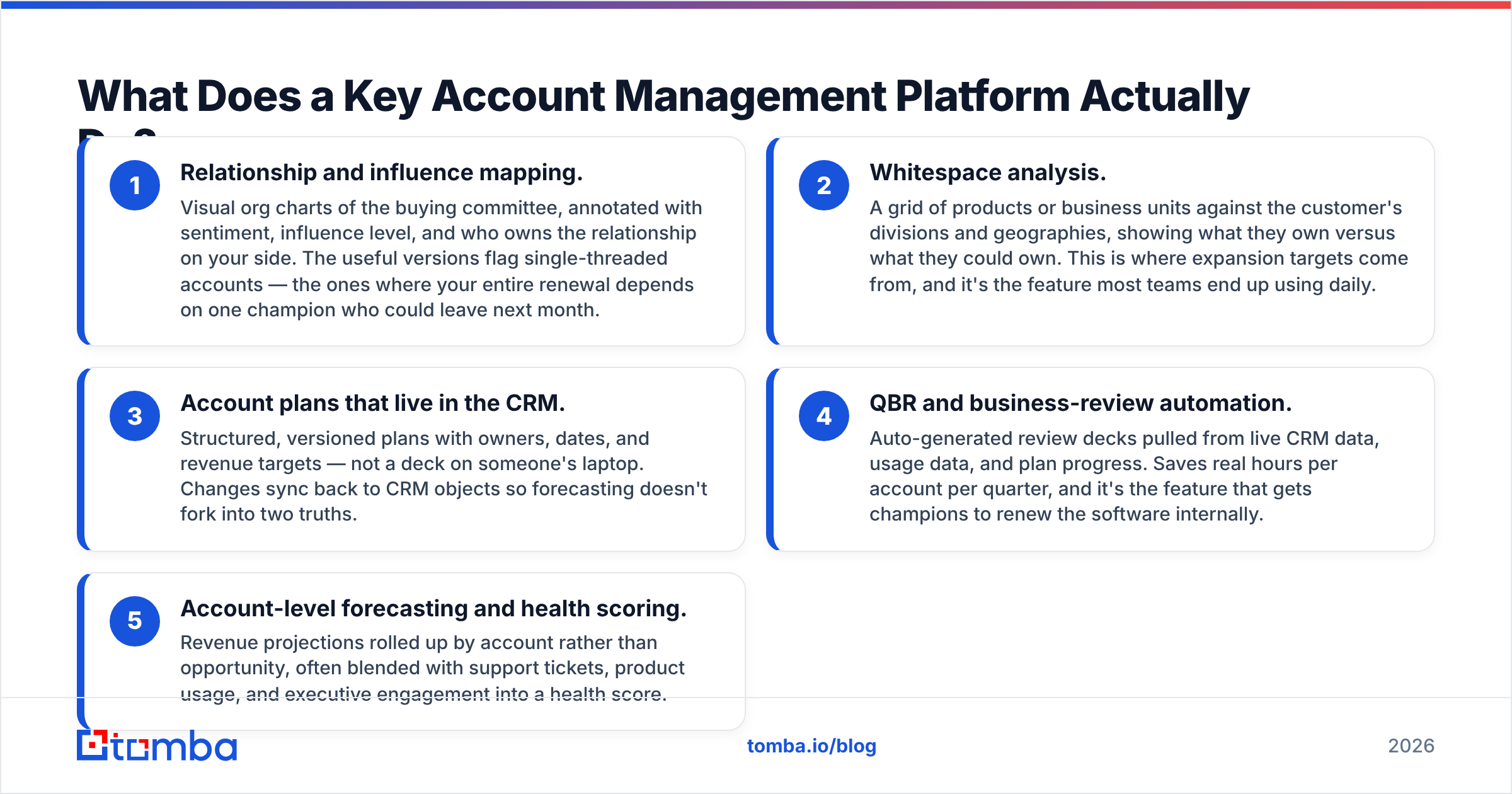
- Relationship and influence mapping. Visual org charts of the buying committee, annotated with sentiment, influence level, and who owns the relationship on your side. The useful versions flag single-threaded accounts — the ones where your entire renewal depends on one champion who could leave next month.
- Whitespace analysis. A grid of products or business units against the customer's divisions and geographies, showing what they own versus what they could own. This is where expansion targets come from, and it's the feature most teams end up using daily.
- Account plans that live in the CRM. Structured, versioned plans with owners, dates, and revenue targets — not a deck on someone's laptop. Changes sync back to CRM objects so forecasting doesn't fork into two truths.
- QBR and business-review automation. Auto-generated review decks pulled from live CRM data, usage data, and plan progress. Saves real hours per account per quarter, and it's the feature that gets champions to renew the software internally.
- Account-level forecasting and health scoring. Revenue projections rolled up by account rather than opportunity, often blended with support tickets, product usage, and executive engagement into a health score.
Some vendors bolt on more — mutual action plans, org-chart scraping, ABM signal integrations. Treat those as tiebreakers, not core requirements.
Is a Key Account Management Platform Different From a CRM?#
Yes, and the difference matters more than vendors admit. Salesforce and HubSpot can both be bent into account planning with custom objects and enough admin time. The question is whether you want to maintain that yourself.
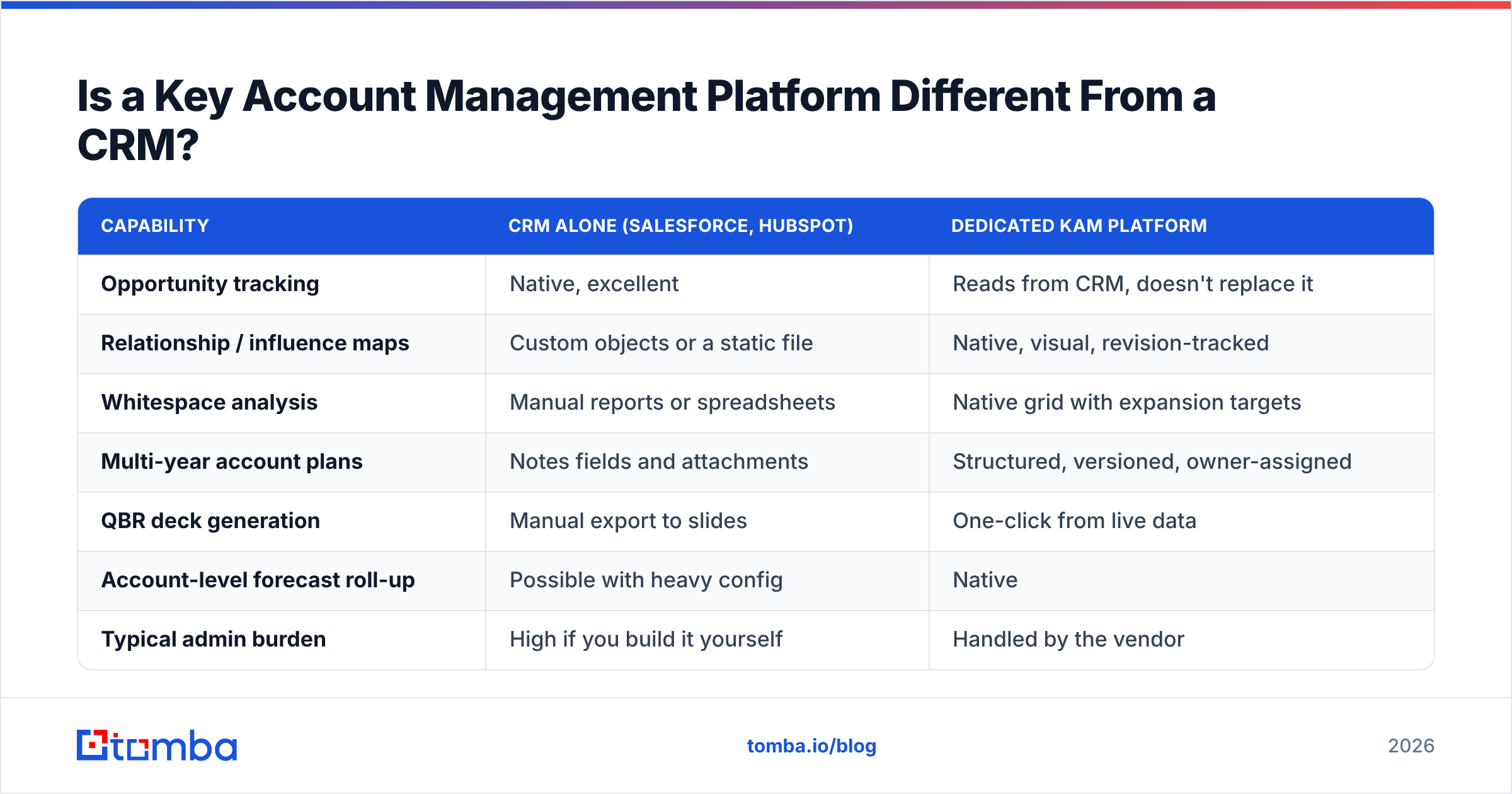
| Capability | CRM alone (Salesforce, HubSpot) | Dedicated KAM platform |
|---|---|---|
| Opportunity tracking | Native, excellent | Reads from CRM, doesn't replace it |
| Relationship / influence maps | Custom objects or a static file | Native, visual, revision-tracked |
| Whitespace analysis | Manual reports or spreadsheets | Native grid with expansion targets |
| Multi-year account plans | Notes fields and attachments | Structured, versioned, owner-assigned |
| QBR deck generation | Manual export to slides | One-click from live data |
| Account-level forecast roll-up | Possible with heavy config | Native |
| Typical admin burden | High if you build it yourself | Handled by the vendor |
| Cost on top of existing stack | $0 (you already pay) | Add-on per seat, usually quoted |
The honest read: if you have five strategic accounts and a strong Salesforce admin, build it in the CRM. If you have forty accounts across three regions and a rotating cast of account directors, the config debt of DIY will cost more than the license.
That license, by the way, is where most evaluations stall. Nearly every product here is priced per seat on top of a CRM license you already pay for, and the quote usually arrives with an implementation fee attached.

Which Key Account Management Platforms Should You Shortlist in 2026?#
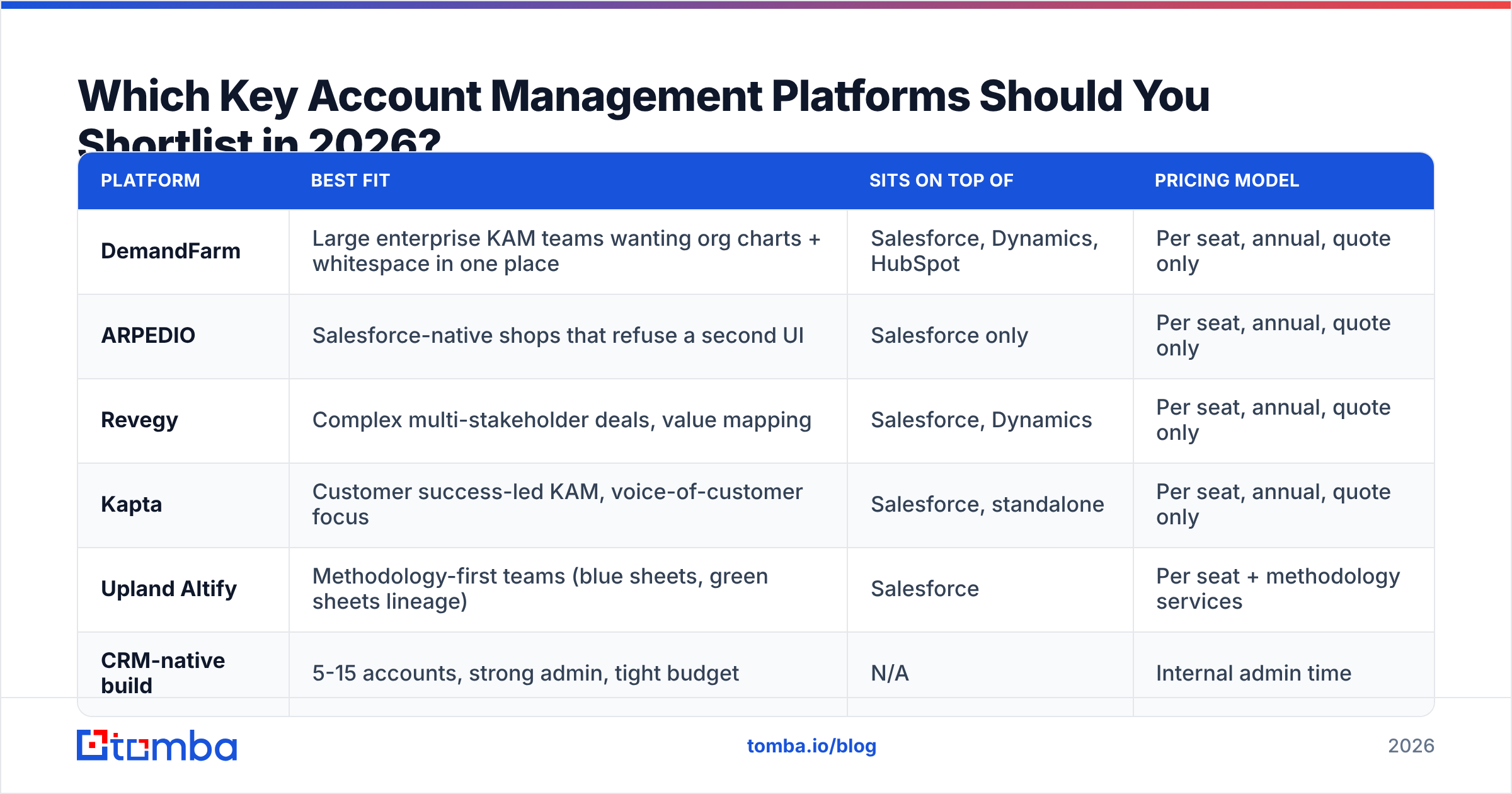
The category is small and specialized. These are the names that show up repeatedly in enterprise evaluations. Pricing is quote-only across the board, so the column below describes the model, not a number you can plan a budget around — get written quotes before you shortlist.
| Platform | Best fit | Sits on top of | Pricing model |
|---|---|---|---|
| DemandFarm | Large enterprise KAM teams wanting org charts + whitespace in one place | Salesforce, Dynamics, HubSpot | Per seat, annual, quote only |
| ARPEDIO | Salesforce-native shops that refuse a second UI | Salesforce only | Per seat, annual, quote only |
| Revegy | Complex multi-stakeholder deals, value mapping | Salesforce, Dynamics | Per seat, annual, quote only |
| Kapta | Customer success-led KAM, voice-of-customer focus | Salesforce, standalone | Per seat, annual, quote only |
| Upland Altify | Methodology-first teams (blue sheets, green sheets lineage) | Salesforce | Per seat + methodology services |
| CRM-native build | 5-15 accounts, strong admin, tight budget | N/A | Internal admin time |
Check current reviews on G2 before you commit — this category churns features fast, and the 2024 comparison posts still circulating are describing products that have since shipped AI summarization and relationship-decay alerts.
What Does a Key Account Management Platform Cost?#
Budget in three buckets, not one. The license is usually the smallest surprise.
| Team profile | Typical setup | What actually drives the bill |
|---|---|---|
| 5-10 strategic accounts, 3 users | CRM-native build or lightest tier | Admin hours, not software |
| 20-40 accounts, 10-15 users | Dedicated platform, single CRM | Per-seat licenses + one-time implementation |
| 100+ accounts, 40+ users, multi-region | Platform + methodology training | Seats, services, and enablement retainers |
| Any size, messy CRM data | Platform + data cleanup project | Data remediation, often 2-3 months |
The last row is the one teams underestimate. A relationship map is a data product. If your CRM contacts are 30% stale — wrong titles, departed employees, bouncing addresses — the platform will render a beautiful, confident org chart of people who no longer work there. Vendors will not fix this for you. Budget for contact enrichment and verification as part of the implementation, not as a nice-to-have afterward.
Who Actually Needs One — and Who Doesn't?#
Use the concentration test. Pull last year's revenue and check what share came from your top 20 customers.
You probably need a platform if:
- Your top 20 accounts drive 50%+ of revenue, and losing any one of them would trigger a board conversation.
- More than two people touch each key account (AE, CSM, solutions engineer, exec sponsor) and they keep discovering each other's notes after the fact.
- Account plans currently live in decks that get rebuilt from scratch every quarter.
- You've lost a renewal in the past 18 months because a single champion left and nobody had mapped a second relationship.
You probably don't if:
- Your revenue is spread across hundreds of similar-sized customers. That's a customer success automation problem, not a KAM problem.
- One person owns each account end to end and holds the context. Software adds ceremony without adding coordination.
- Your CRM hygiene is bad enough that nobody trusts the data. Fix that first — the platform will only industrialize the mess.
That third point is worth sitting with. HubSpot's own research on CRM adoption keeps landing on the same finding: tools fail at the data layer, not the feature layer. A KAM platform inherits whatever quality your records already have.
Where Does Contact Data Fit Into Key Account Management?#
At the center, which is why this section isn't an afterthought. Every core KAM feature — relationship maps, whitespace targets, health scores — is a function of knowing who the people are and being able to reach them.
Three failure modes show up constantly:
The reorg gap. Your map shows a VP of Operations who was promoted nine months ago and a director who left. Nobody noticed because nothing in the system checks. Enterprise buying committees turn over fast, and a map that isn't re-verified quarterly is decoration.
The new-division problem. Whitespace analysis tells you the customer's EMEA logistics division should own your product. Great — now you need names and contact details for people in a business unit you've never sold to. Your CRM has nothing, because you've never worked that division.
The bounce cascade. An account director sends a QBR invite to eleven stakeholders. Four bounce. The email domain's sender reputation takes a small hit, and worse, the account team concludes the platform's data is unreliable and stops updating it. Adoption dies within two quarters.
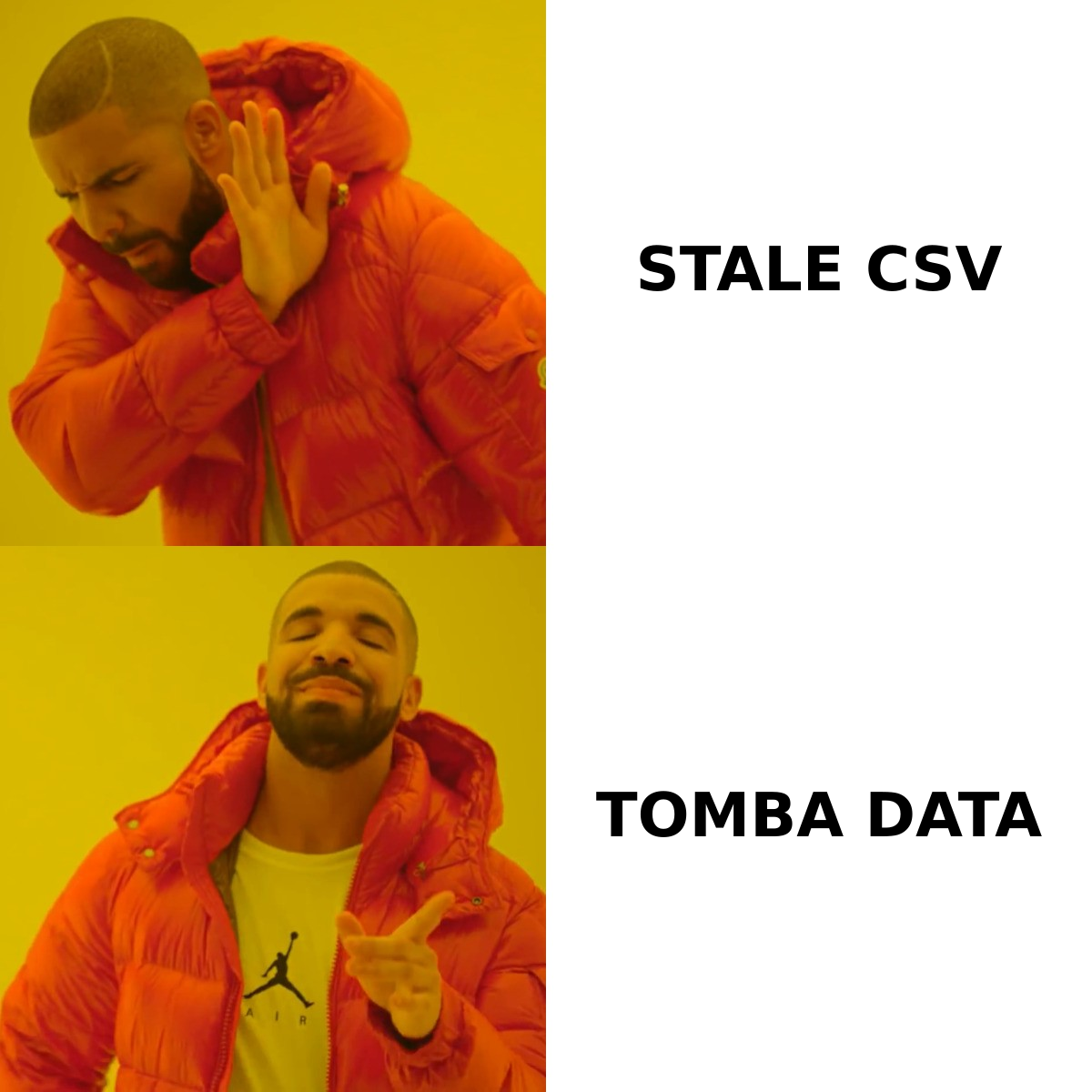
The fix is a standing enrichment step, not a heroic cleanup project. Practical version:
- Run a quarterly refresh on every contact inside your key accounts. Use a bulk email verifier to flag dead addresses before an account director sends to them.
- When whitespace analysis surfaces a new division, use domain search to pull the current employee list at that company and filter by department, rather than asking the AE to dig through LinkedIn manually.
- Pipe the results back into the CRM automatically. A Salesforce integration or a scheduled job against the Tomba API keeps the KAM platform's source data fresh without adding a manual task to anyone's week.
Teams that do this get a second benefit: the relationship map becomes trustworthy enough that executives actually reference it in QBR prep. Trust is what separates a platform people use from a platform people renew out of sunk-cost guilt.
How Do You Roll One Out Without It Becoming Shelfware?#
Most failed implementations follow the same shape — big bang launch, 40 accounts loaded on day one, mandatory plan templates, silence by month three. Run it narrower instead.
Weeks 1-3: pick five accounts and clean their data. Verify every contact, fill the gaps, confirm titles. Nothing else. You want the first five maps to be indisputably accurate, because those become the internal proof.
Weeks 4-6: build plans with the account owners, not for them. Facilitate a working session per account. The plan the AE helped write is the plan the AE maintains.
Weeks 7-9: run one QBR entirely out of the platform. Generate the deck from live data. Measure the prep-time delta against last quarter and publish the number internally.
Weeks 10-12: expand to the full account list, with the data-refresh cadence already automated. If the refresh is manual at this stage, it will not survive contact with quarter-end.
Track two adoption metrics and ignore the rest: percentage of key accounts with a plan updated in the last 45 days, and percentage of mapped contacts verified in the last 90 days. Both are leading indicators. Everything else is reporting theater.
Frequently Asked Questions#
Is a key account management platform the same as ABM software? No. ABM platforms (6sense, Demandbase) target accounts you want to acquire and run marketing plays against them. KAM platforms grow accounts you already closed. Some teams run both; the data overlaps, the workflows don't.
Can I run key account management in Salesforce alone? Yes, up to roughly 15 accounts and one admin's patience. Custom objects for the account plan, a related list for stakeholders, and a report for whitespace will get you surprisingly far. The break point is usually multi-region teams or a second CRM.
How long does implementation take? Six to twelve weeks for a single-CRM deployment under 50 users, assuming clean data. Data cleanup is the variable, and it's usually the majority of the timeline.
What's the biggest cause of failure? Stale contact data, followed closely by mandating plans without changing what leadership reviews. If the QBR agenda doesn't reference the plan, the plan won't get written.
Getting the Data Layer Right First#
A key account management platform is a multiplier on the quality of what you feed it. Accurate stakeholders in, sharp expansion plans out. Departed employees and bouncing addresses in, confident nonsense out — usually discovered in front of a customer.
Before you sign a quote, fix the input. Tomba Email Finder resolves current, verified business emails for the stakeholders inside your key accounts, including the divisions you haven't sold to yet, and pushes them straight into your CRM through the API or a native integration. The free tier covers 25 searches a month if you want to spot-check your existing map before committing to anything; paid plans start at $49/mo on Starter, with Growth at $99/mo for teams refreshing larger books. Full Tomba pricing is public — which, in this category, is a rarer thing than it should be.
Clean the contact layer, then buy the platform. Doing it the other way around is how account plans become fiction.
Related guides#
// get started
Find, verify and enrich your first contacts today
Start on the free plan with 25 searches a month, then scale when your team is ready.
Free plan · No credit card required · GDPR & CCPA
// about the author