The Key Account Management Process: A 7-Stage Playbook
Most key account programs fail because they scale attention, not revenue. Here is the seven-stage key account management process that actually protects and grows your biggest logos in 2026.
TL;DR
- A key account management process is a repeatable system for selecting, planning, growing, and defending your highest-value customers — not a job title you hand to your friendliest rep.
- Most programs fail at stage one: they pick accounts by current revenue instead of by growth potential, strategic fit, and coverage depth.
- The seven stages are: select, map, diagnose, plan, execute, govern, and review. Skipping the governance stage is why 70% of "key account plans" are stale PowerPoints by month four.
- Single-threaded accounts churn. If you have one contact at a $400K account, you do not have an account — you have a relationship with one person who will change jobs.
- Contact data decay (25-30% annually) silently breaks account maps. Re-verifying your stakeholder list quarterly is a cheap insurance policy on a large number.
What is a key account management process?#
A key account management process is the documented sequence of steps your company uses to identify its most strategically valuable customers, build a deep multi-threaded map of each one, plan growth against their business objectives, and hold someone accountable for delivering it.
Think of it like the difference between a gym membership and a training program. Both involve the gym. Only one has a plan, a measurement, and a coach who notices when you stop showing up. Most companies have key account "memberships" — a list of big logos assigned to senior reps — and call it a process.
The distinction matters because the economics are brutal at the top of your customer base. In most B2B portfolios, 10-20% of accounts drive 60-80% of revenue. A 5% churn event in that tier does more damage than a quarter of missed new-business quota. And unlike new business, you cannot re-run the pipeline to fix it.
Key account management (KAM) is not customer success, and it is not upsell. Customer success ensures the customer gets value from what they bought. KAM decides which customers deserve disproportionate investment and then engineers revenue growth inside them. One is defensive and reactive; the other is offensive and planned.
Why do most key account programs fail?#
Three failure modes account for almost everything I have seen go wrong.
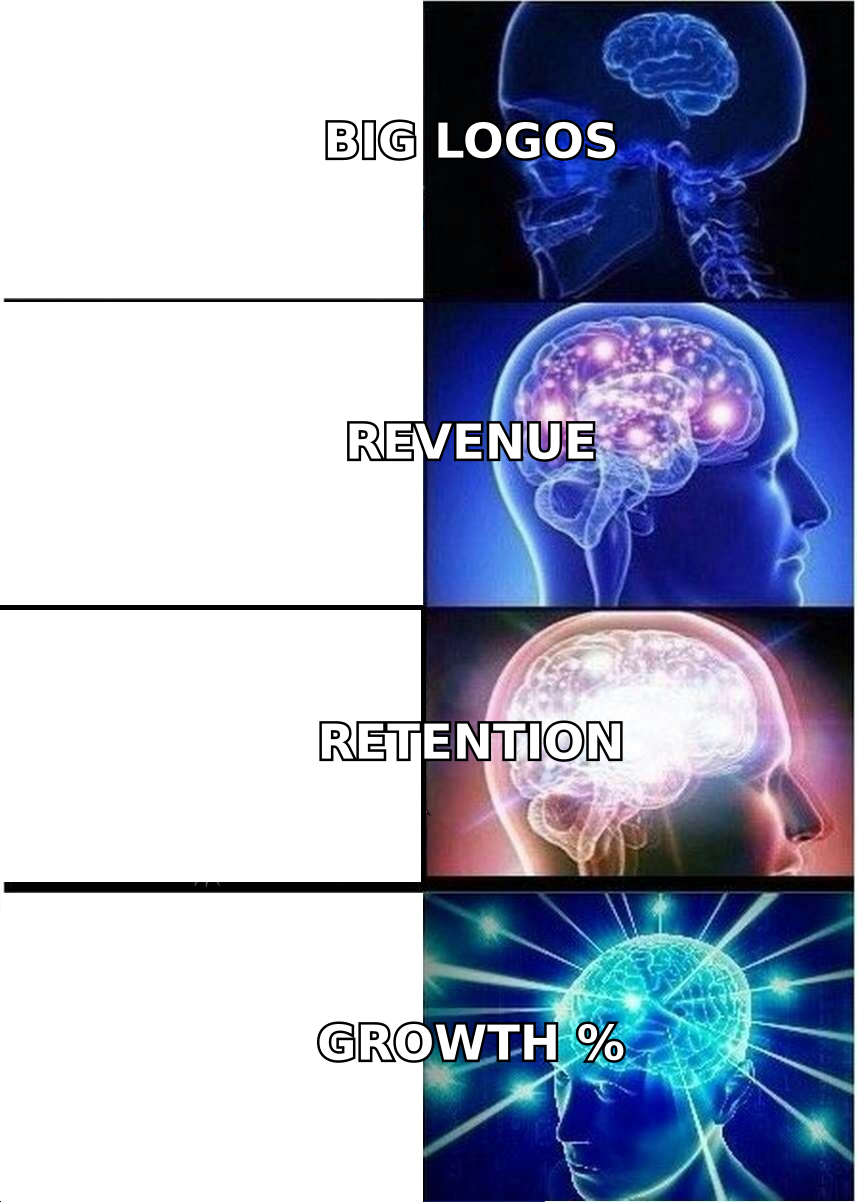
1. Selection by revenue alone. Your biggest current customer may be fully penetrated, price-sensitive, and structurally declining. Your third-largest might be a 10x expansion story. Revenue is a lagging indicator; you are selecting for the future, not the past.
2. Single-threading. The average enterprise buying committee is now 6-11 people according to Gartner's B2B buying research. If your account map has three names and one of them is your champion, a single job change can take out a seven-figure relationship. Champions leave. Roughly a fifth of B2B contacts change roles every year.
3. No governance cadence. The account plan gets built in Q1 during an offsite, looks beautiful, and is never opened again. Without a scheduled review where someone senior asks "what changed and what did you do about it," the plan is decoration.
What are the 7 stages of the key account management process?#
Here is the sequence. Each stage has an owner, an output, and an exit condition — that is what makes it a process rather than a philosophy.
- Select — Score and tier accounts against growth potential, strategic fit, and effort-to-serve. Output: a ranked, capped key account list. Exit condition: leadership signs off on the list and the accounts that did not make it.
- Map — Build the org chart, stakeholder map, and relationship coverage grid. Output: named contacts by role, influence, and sentiment, with verified contact details. Exit condition: at least four validated relationships per account across two functions.
- Diagnose — Understand the customer's own business goals, competitive pressure, and internal politics. Output: a one-page account thesis. Exit condition: you can state the customer's top three priorities in their own language.
- Plan — Set a growth target, name the specific expansion plays, and assign owners and dates. Output: a living account plan. Exit condition: the plan has a number and a named executive sponsor on both sides.
- Execute — Run the plays: QBRs, exec alignment, new-division entry, pricing conversations, joint roadmaps. Output: pipeline inside the account.
- Govern — A fixed monthly or quarterly review where the plan is challenged and updated. Output: revised plan with changed assumptions flagged.
- Review — Annual re-tiering. Accounts get promoted, demoted, or removed. Output: next year's key account list.
Stages one through four are strategy; five through seven are operating discipline. Companies are usually good at one half and terrible at the other.
How do you select key accounts without guessing?#
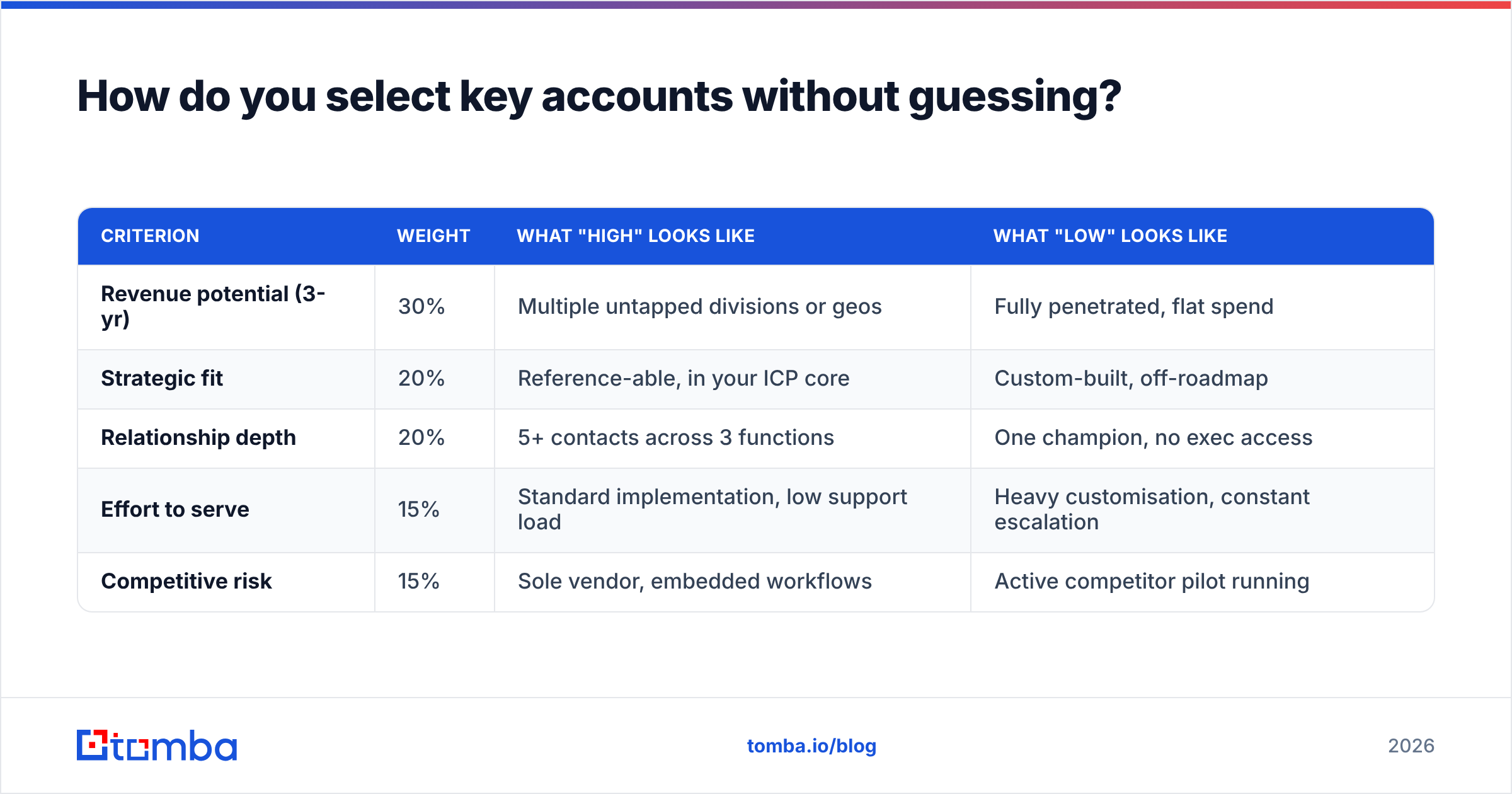
Score them. A simple weighted model beats intuition and, more importantly, it survives an argument with a sales director who loves one particular logo.
| Criterion | Weight | What "high" looks like | What "low" looks like |
|---|---|---|---|
| Revenue potential (3-yr) | 30% | Multiple untapped divisions or geos | Fully penetrated, flat spend |
| Strategic fit | 20% | Reference-able, in your ICP core | Custom-built, off-roadmap |
| Relationship depth | 20% | 5+ contacts across 3 functions | One champion, no exec access |
| Effort to serve | 15% | Standard implementation, low support load | Heavy customisation, constant escalation |
| Competitive risk | 15% | Sole vendor, embedded workflows | Active competitor pilot running |
Score each on 1-5, multiply, rank. Then cap the list. This is the part everyone skips: a key account list with 60 accounts on it is not a key account list, it is your customer base with a new label. A realistic cap is 5-10 accounts per key account manager, fewer if the accounts are genuinely complex.
The accounts that just miss the cut go into a named "watch tier" with a lighter cadence. Tell those reps explicitly what would move an account up — it turns a demotion into a target.
How do you build an account map that does not go stale?#
An account map has three layers: the formal org chart, the informal influence network, and your actual coverage.
The formal layer is the easy part — titles, reporting lines, divisions. The informal layer is where deals are won: who the CFO actually listens to, which director has veto power despite a mid-level title, who was burned by a previous vendor. The coverage layer is the honest one: for each named person, do you (or someone at your company) have a real relationship, a weak one, or none?
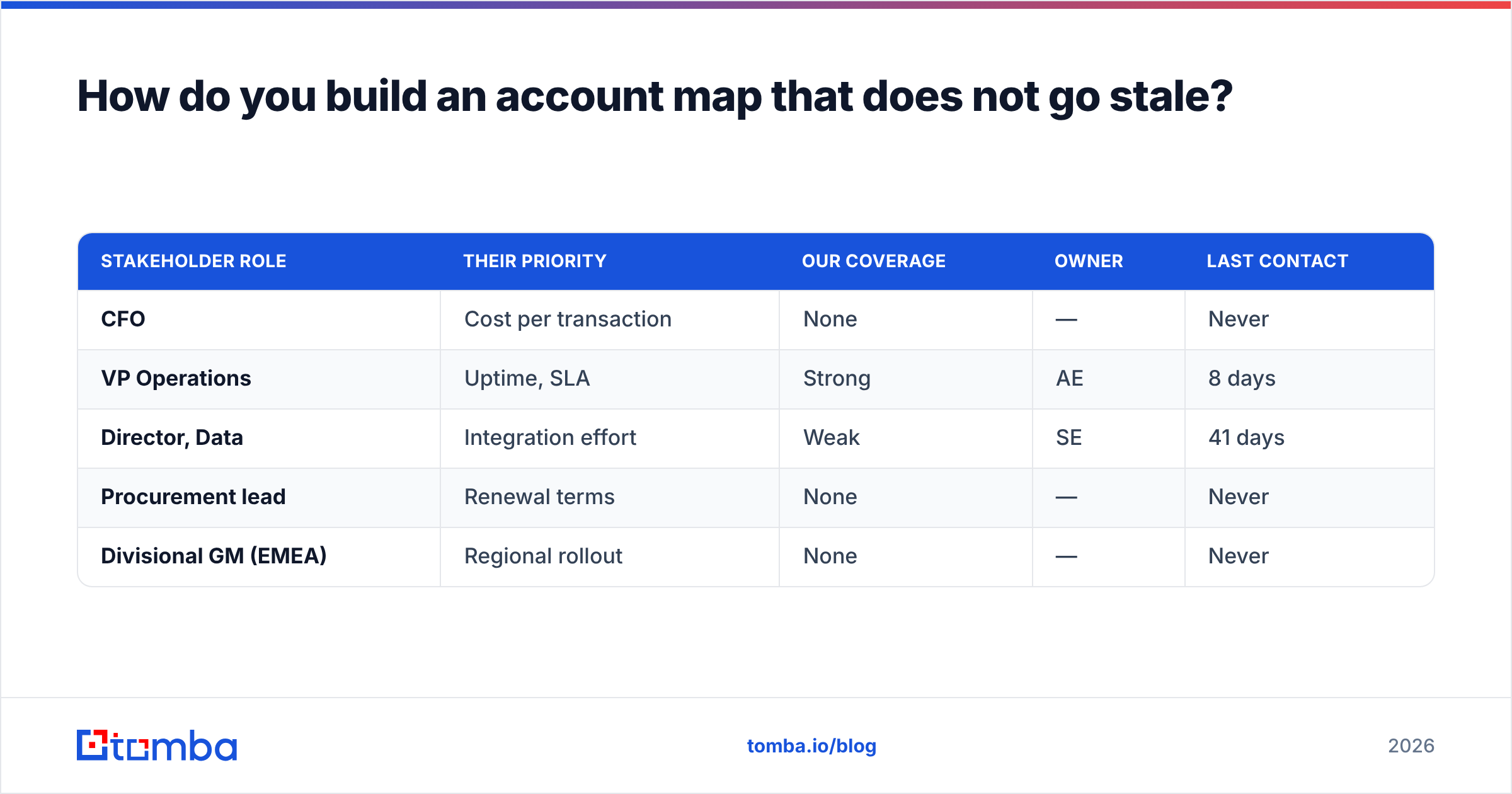
A coverage grid makes gaps impossible to hide:
| Stakeholder role | Their priority | Our coverage | Owner | Last contact |
|---|---|---|---|---|
| CFO | Cost per transaction | None | — | Never |
| VP Operations | Uptime, SLA | Strong | AE | 8 days |
| Director, Data | Integration effort | Weak | SE | 41 days |
| Procurement lead | Renewal terms | None | — | Never |
| Divisional GM (EMEA) | Regional rollout | None | — | Never |
Two things become obvious immediately: you have no finance relationship at an account where finance signs the renewal, and you have never spoken to the EMEA business you are trying to expand into.
Filling those gaps starts with knowing who the people are and how to reach them. When a target division has no inbound path, a domain search across the customer's own domain surfaces the org's contactable roster far faster than guessing formats by hand, and a LinkedIn finder converts the names you already identified on LinkedIn into reachable addresses.
The staleness problem is mechanical. B2B contact data decays at roughly 25-30% per year through job changes, restructures, and domain migrations. Every quarter, run your key account contact list through an email verifier and flag the bounces — a hard bounce on a champion's address is usually the first signal that they left, often weeks before you would have heard it any other way.
What goes into a key account plan that people actually use?#
Short answer: one page, a number, and dates. Long plans die.
The plan should answer five questions:
- Where are we now? Current spend, products in use, penetration percentage, health signals, renewal date.
- Where does the customer want to go? Their stated business objectives for the next 12-18 months, in their words, ideally quoted from their earnings call or annual report.
- Where do we want to be? A specific target — "$1.4M from $850K, driven by EMEA rollout and the analytics module" — not "grow the account."
- What are the three plays? Named, sequenced, owned. A play is "get the CFO into a value review by March 15 via the VP Ops intro," not "deepen the finance relationship."
- What could kill us? Competitive pilots, budget freezes, champion flight risk, unresolved support escalations.
If your account plan template has more than 12 fields, reps will fill it out once to satisfy the process and never return. HubSpot publishes a reasonable account planning starting point if you need a template to cut down rather than build from scratch.
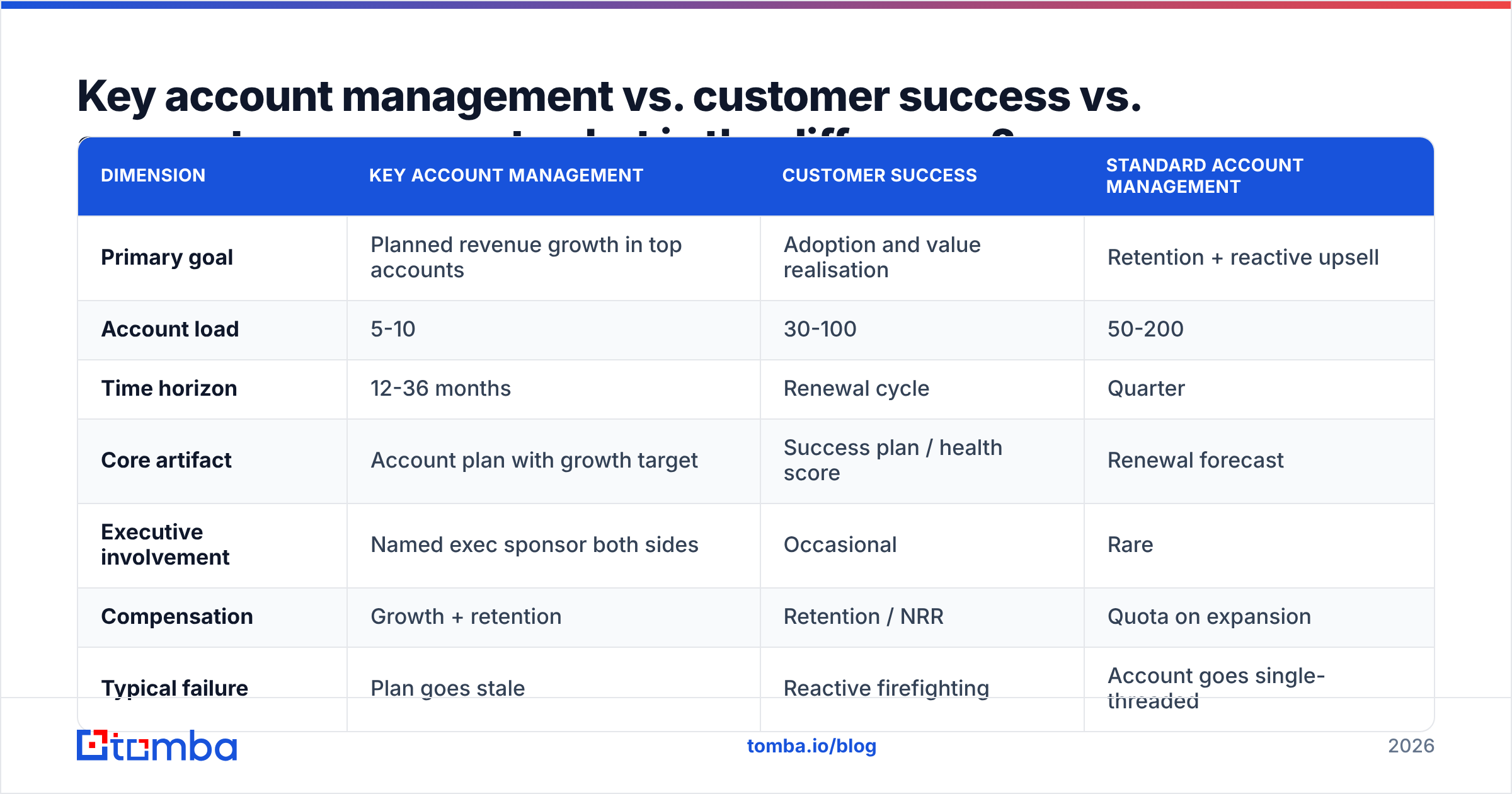
Key account management vs. customer success vs. account management: what is the difference?#
These three get blended constantly, usually because one person is doing all three jobs badly.
| Dimension | Key account management | Customer success | Standard account management |
|---|---|---|---|
| Primary goal | Planned revenue growth in top accounts | Adoption and value realisation | Retention + reactive upsell |
| Account load | 5-10 | 30-100 | 50-200 |
| Time horizon | 12-36 months | Renewal cycle | Quarter |
| Core artifact | Account plan with growth target | Success plan / health score | Renewal forecast |
| Executive involvement | Named exec sponsor both sides | Occasional | Rare |
| Compensation | Growth + retention | Retention / NRR | Quota on expansion |
| Typical failure | Plan goes stale | Reactive firefighting | Account goes single-threaded |
The practical test: if your "key account manager" spends most of their week on support escalations and QBR decks, you have a senior customer success manager with an expensive title. Real KAM time goes to relationship building outside the current buying centre and to conversations about the customer's business, not your product.
How do you govern the process so plans stay alive?#
Governance is the cheapest, most-skipped stage. It is three mechanics.
Fixed cadence. Monthly for the top tier, quarterly for the rest. Calendar it for the year in advance. A review that gets rescheduled twice stops existing.
A challenge format, not a status update. The reviewer's job is to ask uncomfortable questions: What changed in their business this month? Who did you meet that you had never met before? What is the CFO's view of us? If the rep can answer all three crisply, the account is being managed. If the answers are about your product roadmap, it is not.
Leading indicators, not just revenue. Revenue in a key account moves slowly and lags by quarters. Track the things that predict it:
- Relationship breadth — number of active, multi-function contacts (target: 5+ across 3 functions)
- Executive coverage — days since last C-level or VP-level conversation
- Whitespace conversion — products or divisions sold into vs. total addressable inside the account
- Champion risk — flagged job changes, bounced emails, LinkedIn title updates
- Escalation load — open severity-1 tickets, as a health drag on expansion conversations
These are all measurable, all leading, and all boring — which is exactly why they work. G2's account management software category is full of tools that track them; most teams can do it in their CRM with five custom fields and the discipline to update them.
Where automation genuinely helps is in the mechanical parts: keeping contact records current, detecting job changes, and filling in firmographic context when a customer acquires a company or spins out a division. Contact enrichment run against your key account contact list on a schedule catches role changes and new divisional entities before they show up as a surprise in a renewal call.
What does a 90-day rollout look like?#
If you are standing this up from nothing, do not try to launch all seven stages at once.
Days 1-30 — Select. Build the scoring model, score the customer base, cap the list, get leadership to sign off. Publish the list including the accounts that did not make it and why.
Days 31-60 — Map and diagnose. For each key account, build the coverage grid and the one-page thesis. Expect this to be uncomfortable — most teams discover they have half the coverage they assumed. Verify every contact record in the process.
Days 61-90 — Plan and govern. One-page plans with numbers and dates. Schedule twelve months of reviews. Run the first review before day 90 so the cadence is real, not theoretical.
Stage five, execute, starts on day 91 and never stops. The mistake is treating execution as the whole process — it is the part that is visible, but it is downstream of four stages of work that determine whether the effort is pointed at the right accounts at all.
Where does contact data fit into all of this?#
Underneath every stage of the key account management process is a list of humans you need to reach, and that list rots.
When you expand into a new division, you need names and addresses you do not have. When a champion leaves, you need their replacement fast. When a customer acquires a company, you need the new entity's contactable roster. When procurement changes hands, you need to know before renewal, not during it.
That is where an email finder earns its keep inside a KAM motion — not for cold outbound volume, but for surgical coverage inside accounts you already own. Finding the EMEA GM's address so your VP can make a warm introduction is worth more than a thousand cold sends. Pricing is straightforward if you want to check the fit: Tomba's free tier covers 25 searches a month, Starter is $49/mo, Growth $99/mo, and Pro $249/mo — see Tomba pricing for the full breakdown.
For teams managing 50-100 key account contacts, the workflow is simple: export the stakeholder list quarterly, run it through bulk verify, and treat every bounce as a relationship alert rather than a data cleanup task.
Start with coverage, not with a plan#
The single highest-leverage change most teams can make is not a better account plan template. It is admitting how thin their coverage actually is and fixing it — naming the five people at each key account you have never spoken to, finding out how to reach them, and getting a real conversation on the calendar this quarter.
If you are rebuilding your key account maps and need reliable contact data for the divisions, geos, and stakeholders you have never touched, Tomba Email Finder will get you from a name and a domain to a verified address in seconds — and the free tier is enough to test it against one account before you commit to anything.
Related guides#
// get started
Find, verify and enrich your first contacts today
Start on the free plan with 25 searches a month, then scale when your team is ready.
Free plan · No credit card required · GDPR & CCPA
// about the author