Kickbox vs Leadsforge: Which Email Data Tool Wins in 2026?
Kickbox cleans the list you already have. Leadsforge tries to build you a new one. Here is where each tool actually earns its budget in 2026 — and what a lean stack looks like when you need both jobs done.
Kickbox vs Leadsforge comes down to one question: do you need to clean a list you already have, or build a new one? Kickbox verifies. Leadsforge sources. Here is the short version.
TL;DR
- Kickbox and Leadsforge are not really competitors. Kickbox is a mature email verification service. Leadsforge is an AI-assisted lead sourcing tool that builds contact lists from a plain-language prompt.
- If your problem is "my bounce rate is 8% and Google is throttling me," Kickbox is the right buy. If your problem is "I have no list at all," Kickbox cannot help you.
- Leadsforge-style list builders hand you contacts at varying confidence levels. You still need a verification step before those contacts touch a sending domain.
- Pay-as-you-go verification pricing (Kickbox's model) is cheap at low volume. It gets expensive when you re-verify the same stale database every quarter. Subscription sourcing tools flip that math.
- Most teams end up with a sourcing layer plus a verification layer. A combined platform like Tomba folds both into one credit pool. Plans start at $49/mo, which usually beats paying two vendors.
What are Kickbox and Leadsforge, actually?#
They solve two different halves of the same problem. Mixing them up is the fastest way to waste a quarter of budget.
Kickbox (kickbox.com) has been in the email hygiene business since 2015. You upload a list, or call the API in real time at signup. It returns a verdict per address: deliverable, undeliverable, risky, or unknown. You also get a Sendex quality score. It flags role addresses (info@, sales@), disposable domains, and free providers. It does not find anyone. It grades what you already have.
Leadsforge is a newer, AI-forward lead generation tool. The pitch is conversational search. You describe your ideal customer in plain words — "marketing directors at Series B fintechs in Germany" — and it returns matching contacts with emails and company data. Export them, or push them into your sequencer. It is a sourcing tool with a verification step bolted on, not a verification vendor with sourcing bolted on.
That order matters. Vendors that start in verification tend to be careful and accurate, but they have no supply of new contacts. Vendors that start in sourcing cover more ground and stay looser on confidence. Neither approach is wrong. They simply guard against different failures.
Here is the practical split of responsibilities:
- Sourcing — finding people who match your ICP and getting a candidate email address. Leadsforge territory.
- Pattern resolution — working out whether a company uses first.last@, flast@, or first@. Sourcing tools do this silently. Dedicated email finder engines show you the confidence score.
- Syntax and domain checks — MX records, malformed addresses, dead domains. Both tools handle this.
- SMTP-level verification — does this mailbox actually accept mail? Kickbox's core skill.
- Catch-all handling — roughly a fifth of B2B domains accept every address, so SMTP tells you nothing. This is where tools differ most, and where a catch-all verifier earns its keep.
- Ongoing hygiene — re-checking a list every 60–90 days as people change jobs. Verification vendors price for that. Sourcing tools generally don't.
Kickbox vs Leadsforge: how do the features compare?#
| Capability | Kickbox | Leadsforge | Tomba |
|---|---|---|---|
| Primary job | Email verification | AI lead sourcing | Find + verify in one |
| Builds new lists | No | Yes | Yes (domain search, database) |
| Real-time API verification | Yes, mature | Limited | Yes |
| Catch-all handling | Flags as "risky" | Varies by record | Dedicated catch-all verifier |
| Bulk CSV workflow | Yes | Export-oriented | Yes, bulk finder + verifier |
| Phone numbers | No | Partial | Yes (phone finder) |
| Native CRM sync | Via integrations | Yes | HubSpot, Salesforce, Pipedrive |
| Entry price | Pay-as-you-go credits | Subscription tiers | Free tier, then $49/mo |
| Best for | Cleaning existing databases | Cold list building from scratch | Teams that need both |
The first row decides most evaluations. Buying Kickbox when you have no list is like buying a dishwasher when you own no plates. Buying Leadsforge when 200,000 CRM records are already rotting at a 14% bounce rate is just as backwards.
Which one is more accurate, and what does accuracy even mean here?#
Accuracy means different things for each tool, and vendors use that gap to their advantage.
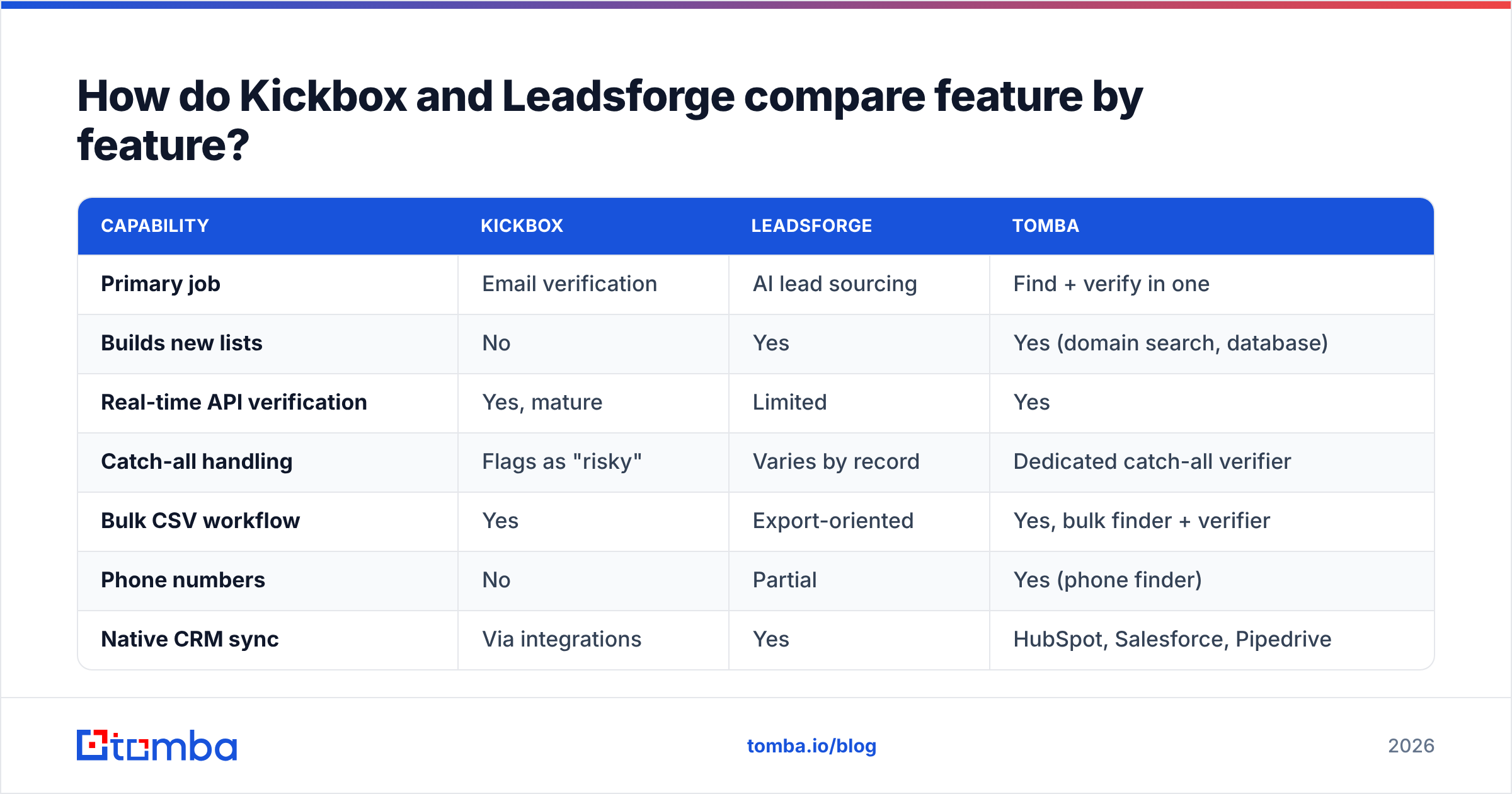
For Kickbox, accuracy means: when it says deliverable, does the message actually land? On normal domains, solid SMTP verification — Kickbox included — lands in the 97–99% range. Every serious vendor clears that bar. The real difference is how each one handles the "unknown" and "risky" buckets. It also shows in how boldly they guess on catch-all domains. Kickbox plays it safe. It would rather flag an address as risky than call it safe. That is the right trade when your sending domain is precious. It is frustrating when 30% of your list comes back as "you decide."
For Leadsforge, accuracy means: is this the right person, and is this address still theirs? That claim is much harder to audit. A sourced contact can look perfect and still belong to someone who left nine months ago. People change jobs at roughly 2–3% a month in B2B. Over a year, that stales about a third of a list. No SMTP check catches it. Only fresh sourcing and re-enrichment do.

So the honest framing is simple. Kickbox protects you from bounces. A sourcing tool protects you from irrelevance. They guard different doors, and running only one leaves the other wide open.

Want to test a vendor's claims? Run the same 500 contacts through both tools. Then send to a holdout of 100 and watch what bounces. Published accuracy numbers are marketing. Your own bounce log is not. Compare the results with peer reviews on G2's email verification category before you sign anything annual.
Kickbox vs Leadsforge pricing: what does each one cost in 2026?#
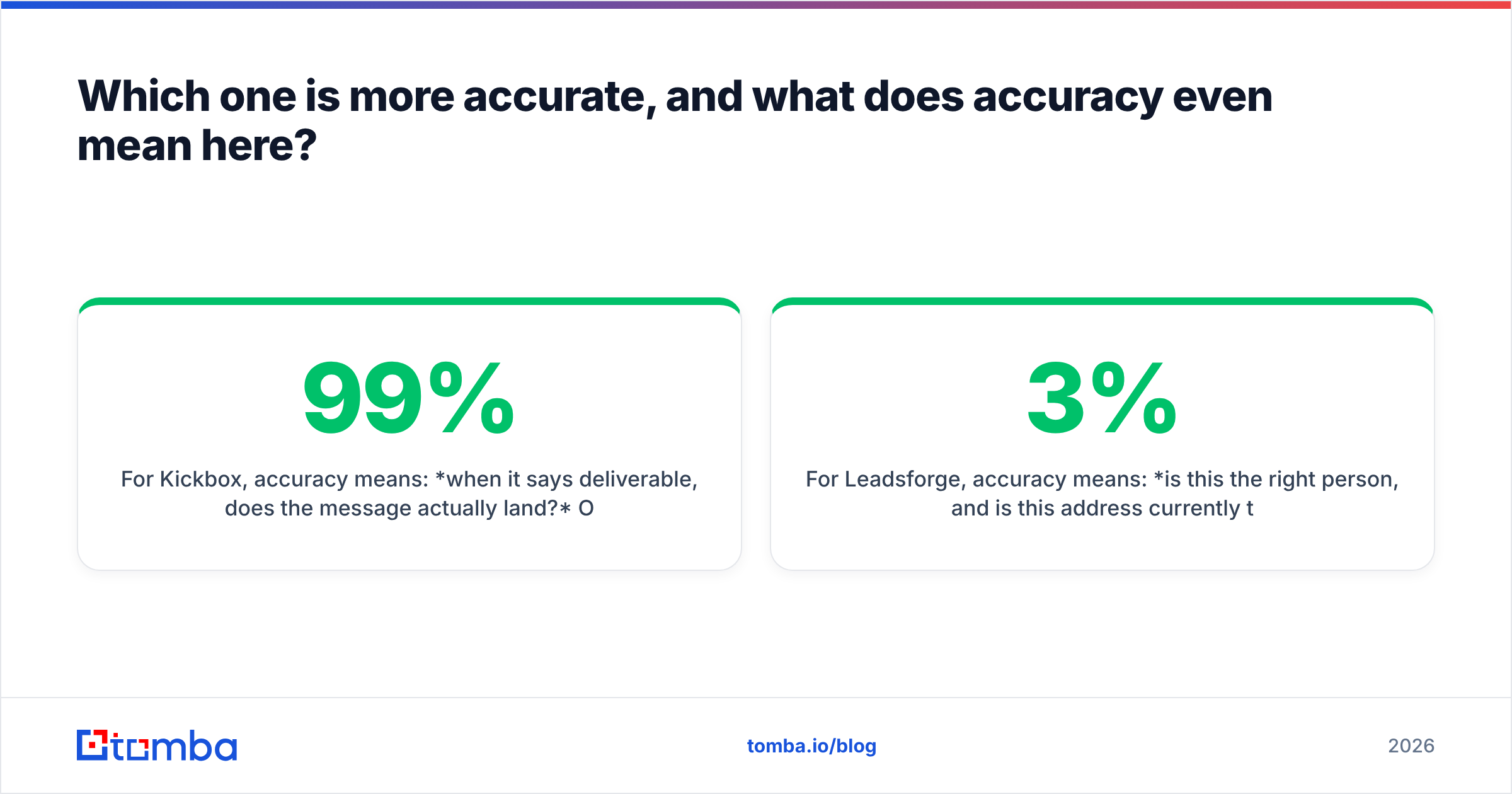
Pricing models differ more than headline numbers do. Compare cost per outcome, not cost per credit.
| Pricing dimension | Kickbox | Leadsforge | Tomba |
|---|---|---|---|
| Model | Pay-as-you-go credits | Monthly subscription | Monthly subscription + free tier |
| Free allowance | 100 free verifications | Trial-based | 25 searches/mo, free forever |
| Typical entry spend | ~$5–$80 depending on volume | Plan-dependent — check current tiers | $49/mo Starter |
| Mid tier | Volume discounts on credits | Plan-dependent | $99/mo Growth |
| Team tier | Volume discounts | Plan-dependent | $249/mo Pro |
| Credits expire? | Kickbox credits do not expire | Monthly reset typical | Monthly reset, see plan details |
| Rollover / annual | Credit purchase | Annual discount typical | Annual discount available |
Two honest notes. First, Leadsforge has changed its prices since launch, as most AI-native tools do. Do not trust a number you read in a blog post, including this one. Pull the current tiers from the vendor before you build a business case. Second, Kickbox's non-expiring credits are underrated. If you verify in bursts — one big clean each quarter, nothing in between — pay-as-you-go beats any subscription. If you verify every day, the subscription wins.
Tomba pricing runs a free tier at 25 searches a month, then Starter at $49/mo, Growth at $99/mo, and Pro at $249/mo. Enterprise is custom. The case for a combined platform is not that it is the cheapest verifier on earth. It isn't. It is that one credit pool covers finding, verifying, and enriching — usually for less than two vendor invoices plus the glue work between them.
When should you choose Kickbox?#
Pick Kickbox when all of these are true:
- You already have the contacts. Inbound signups, a CRM export, an event list, a newsletter database — the names exist. You just don't trust the addresses.
- You need real-time API verification at the point of capture. This is Kickbox's strongest use case, and it is genuinely good at it. Reject the typo'd Gmail at signup instead of cleaning it up later.
- Your sending domain is high-value. Careful verdicts are a feature when one deliverability incident costs more than a few extra "risky" flags.
- Your volume is spiky. Non-expiring credits suit quarterly hygiene cycles better than a monthly plan you underuse.
Skip Kickbox if your real bottleneck is "we ran out of people to email." No amount of verification creates pipeline.
When should you choose Leadsforge?#
Pick a sourcing-first tool like Leadsforge when:
- You're starting cold. New market, new segment, new product line, no existing database.
- Your ICP is easier to describe than to filter. Conversational search beats 14 dropdown filters when your definition is fuzzy ("companies that just raised and are hiring SDRs").
- You want export-to-sequencer speed more than forensic data lineage.
- Your team is small and nobody wants to maintain a scraping-plus-enrichment pipeline.
One caveat: treat every sourced list as unverified until proven otherwise. Sourcing tools chase coverage because empty results look like a broken product. That pressure is built into the model, not malicious. You balance it with a verification pass — yours or theirs.

Is there a better option than picking one?#
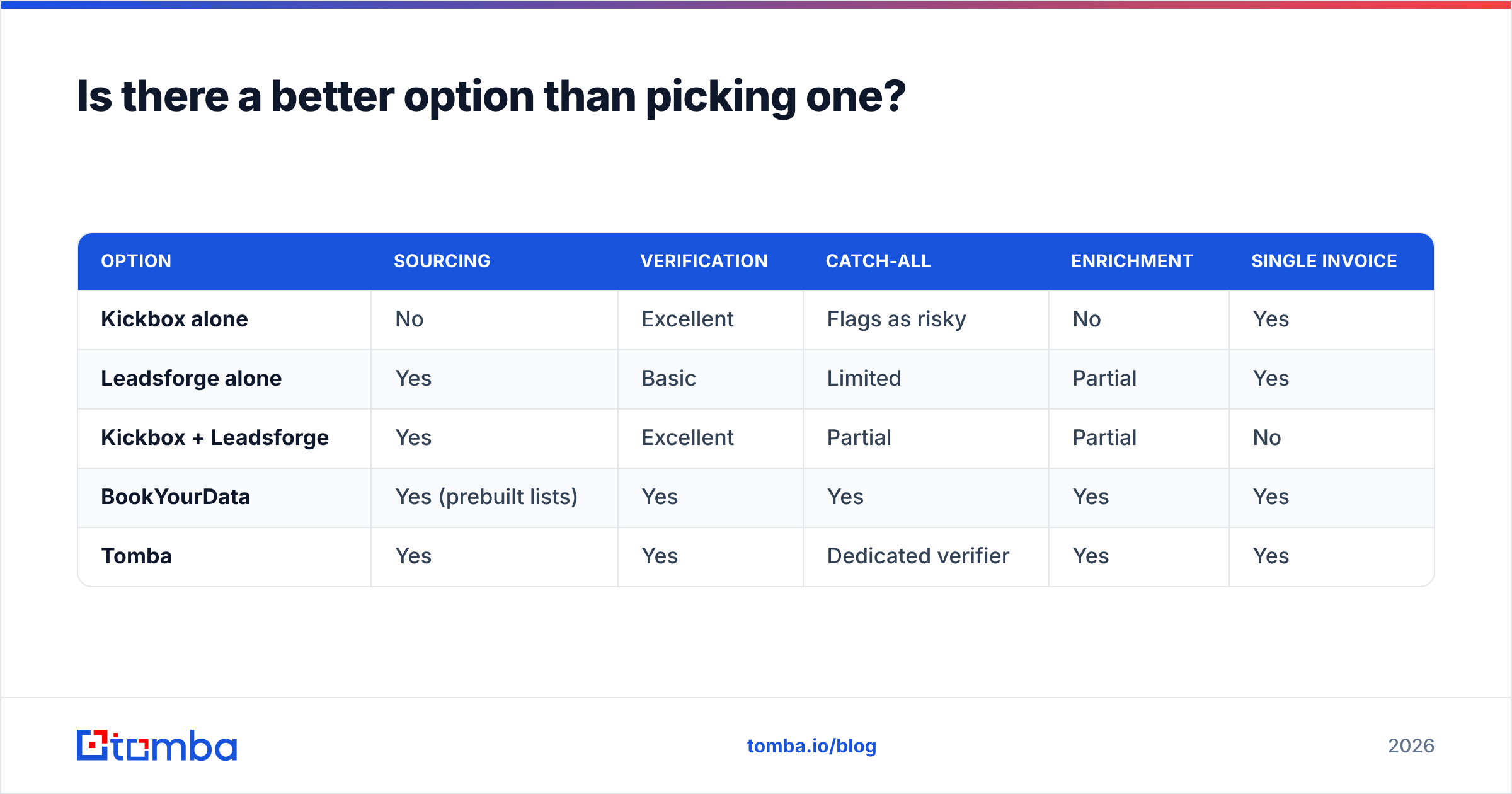
For most teams under 50 seats, yes. The two-vendor stack carries a hidden third cost: the plumbing between them. Export from the sourcing tool. Upload to the verifier. Download the clean file. Re-import it to the CRM. Then reconcile the duplicates. That is roughly two hours a week of someone's time, and it is a real line item.

| Option | Sourcing | Verification | Catch-all | Enrichment | Single invoice |
|---|---|---|---|---|---|
| Kickbox alone | No | Excellent | Flags as risky | No | Yes |
| Leadsforge alone | Yes | Basic | Limited | Partial | Yes |
| Kickbox + Leadsforge | Yes | Excellent | Partial | Partial | No |
| BookYourData | Yes (prebuilt lists) | Yes | Yes | Yes | Yes |
| Tomba | Yes | Yes | Dedicated verifier | Yes | Yes |
BookYourData is worth a look if you want to buy pre-verified lists instead of searching for them yourself. It is a different way to buy, but a fair one when you want a file delivered rather than a tool to operate.
The case for a combined platform like Tomba is straightforward. Domain search and the email finder cover the sourcing job. The email verifier covers hygiene. The catch-all verifier handles the ~20% of domains where SMTP is useless. And data enrichment fills in titles, company size, and social profiles, so your sequences have something to personalize with. One API key, one credit pool.
What does a sane 2026 stack actually look like?#
- Define the ICP in writing before you touch any tool. "VP Marketing, 50–500 employees, US, uses HubSpot" beats "marketing people."
- Source the contacts — conversational search (Leadsforge), domain search (Tomba), or a purchased list. Pull 3x what you plan to send to, because you will discard a third.
- Verify everything before it touches a sending domain. No exceptions, even for contacts that arrived "pre-verified." Vendors grade their own homework.
- Route the catch-alls separately. Don't dump them, and don't blast them. Send from a secondary domain, or run a catch-all-specific check.
- Enrich for personalization, not for vanity fields. If a field never shows up in a sequence or a filter, you are paying to store noise.
- Re-verify on a 90-day cycle. Job-change decay quietly kills good lists, and a re-check costs far less than rebuilding sender reputation. Email deliverability is a maintenance habit, not a one-time setup.
Curious why mailbox providers punish repeated invalid sends so hard? The mechanics of email address validation are worth ten minutes of reading. Bounce handling is older and stricter than most senders assume.
Frequently asked questions#
Can Kickbox find email addresses? No. It verifies addresses you supply. If you need discovery, you need a finder or a sourcing tool.
Does Leadsforge replace a verifier? Not fully. It includes validation, but a dedicated verification pass is still safer for anything you are about to send — especially on catch-all domains.
What bounce rate should I target? Under 2%. Above 3%, Google and Microsoft start to throttle you. Above 5%, you are rebuilding reputation for months.
Is pay-as-you-go or subscription cheaper? Burst usage favors pay-as-you-go credits. Daily prospecting and ongoing enrichment favor a subscription, because per-credit rates drop and you stop rationing.
The bottom line#
So, Kickbox vs Leadsforge? Kickbox wins on verification depth and real-time API quality. Leadsforge wins on speed from "I have an idea of my ICP" to "I have a list." Neither one wins the whole stack, and both vendors would mostly agree.
If you'd rather not run two subscriptions and a CSV shuttle between them, start with the Tomba Email Finder. Find contacts by domain, name, or company. Verify them in the same workflow. Push them straight into your CRM. The free tier gives you 25 searches a month, so you can test the data against your own list before you spend a dollar.
Related guides#
// get started
Find, verify and enrich your first contacts today
Start on the free plan with 25 searches a month, then scale when your team is ready.
Free plan · No credit card required · GDPR & CCPA
// about the author