Kickbox vs Skrapp: Email Verifier vs Email Finder 2026
Kickbox verifies email addresses you already have. Skrapp finds addresses you don't. Here's an honest breakdown of pricing, accuracy, data coverage, and when one tool replaces both.
TL;DR — Kickbox vs Skrapp is not a fair fight. The two tools do different jobs.
- Kickbox checks emails you already own. It flags the ones that will bounce.
- Skrapp finds new emails. It pulls work addresses from LinkedIn and company domains.
- Did your list come from signups, a CRM export, or a bought file? Buy Kickbox. Its Sendex score and live API are built to clean lists.
- Do you have no contacts at all? Kickbox cannot help you. Skrapp can.
- Buying both means two bills, two credit pools, and two dashboards for one job: find, then check.
- Tools like Tomba, Hunter, and Dropcontact do both jobs from one credit pool. That is often cheaper past 5,000 contacts a month.
Kickbox vs Skrapp: what does each tool do?#
Start here. Half the people who search "kickbox vs skrapp" are comparing a wrench to a hammer.
Kickbox checks email lists. You upload a list, or you call the API at signup. It tells you if each address is good, bad, risky, or unknown. Its best-known feature is the Sendex score. That score rates an address from 0 to 1, going past "does this inbox exist" to grade how useful the address really is. Kickbox also sells inbox monitoring and an SMTP relay. What it will not do: hand you an address you did not already have.
Skrapp finds B2B emails. Its core product is a Chrome add-on. The add-on reads LinkedIn and Sales Navigator profiles and returns work emails, while a domain search lists known emails at any company. A bulk finder takes a name plus a company and returns a best guess. Skrapp does check its own results, but that check is a side feature.
So the real question is not "which tool is better?" It is this: which half of the job are you missing?
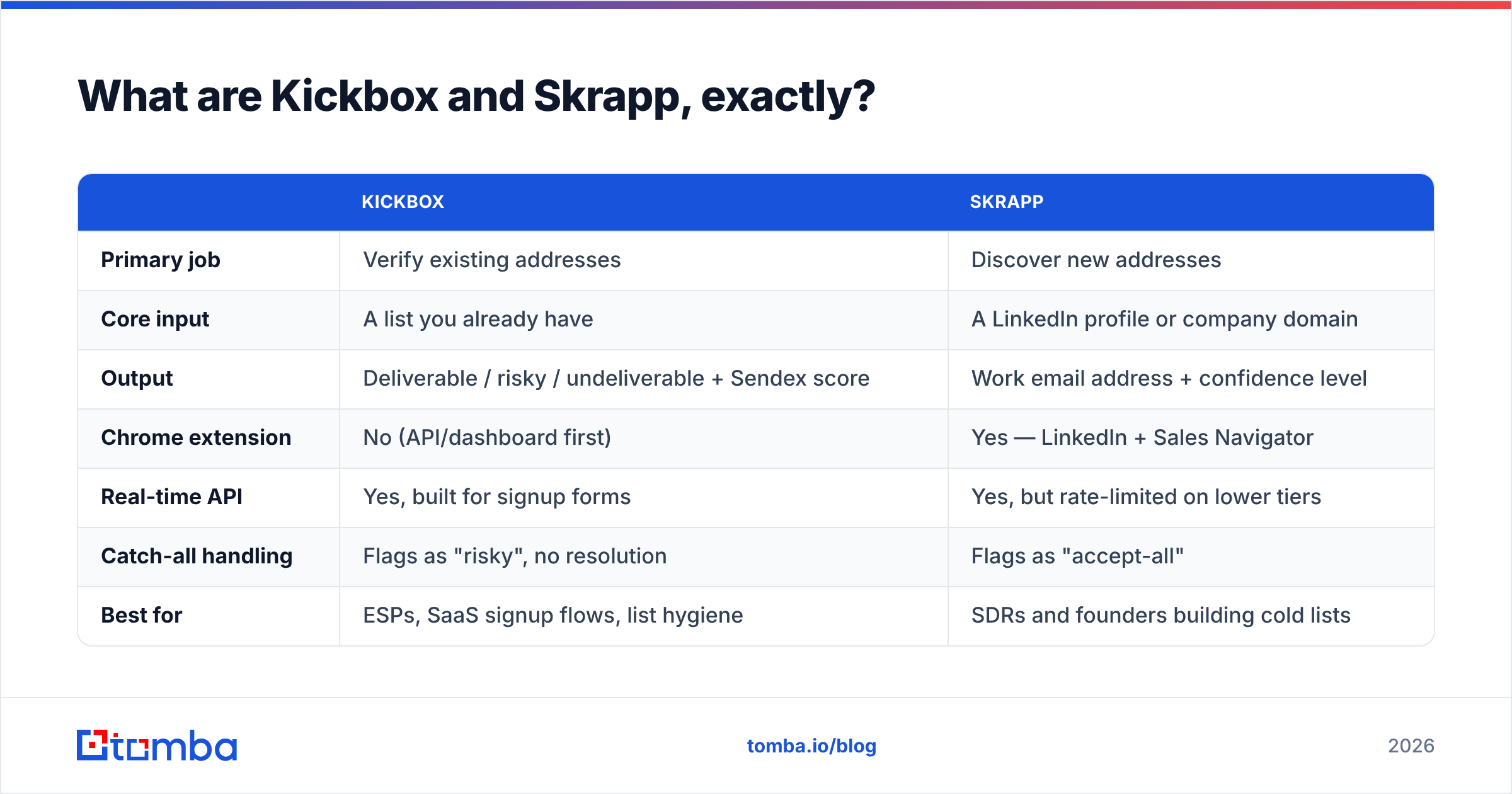
| Kickbox | Skrapp | |
|---|---|---|
| Main job | Checks emails you own | Finds new emails |
| Input | A list you have | A profile or a domain |
| Output | Good, risky, or bad, plus Sendex score | Work email, plus confidence |
| Chrome add-on | No | Yes |
| Live API | Yes, for signup forms | Yes, capped on low tiers |
| Catch-all domains | Marked "risky" | Marked "accept-all" |
| Best for | Signup forms, list cleanup | Cold list building |
Is Kickbox better than Skrapp for cold outreach?#
No. This is where people get stuck.
Cold outreach starts as a discovery problem. You have target accounts and job titles, but no emails yet, so Kickbox has nothing to work with. You would have to guess the addresses first. Think first.last@, f.last@, or flast@. Then you pay Kickbox to tell you which guesses bounce. Call it the guess-and-pray method. It burns credits four to eight times faster than a real finder, because you test four guesses per person.
Skrapp is built for this job. Open a Sales Navigator search. Run the add-on across the results. Export a list with emails attached. For a two-person outbound team, that takes minutes, not hours.
Kickbox wins on inbound and owned data. Say you run a SaaS app and want to block junk domains at signup. Its live API is mature, well documented, and genuinely good at that job. Its junk-domain and role-account flags (info@, sales@, support@) beat what most finders bundle in. Cleaning a 200,000-row list left by a past marketing team? Kickbox is the safer pick.
How accurate are Kickbox and Skrapp in practice?#
"Accurate" means two different things here. That is why vendor numbers do not line up.
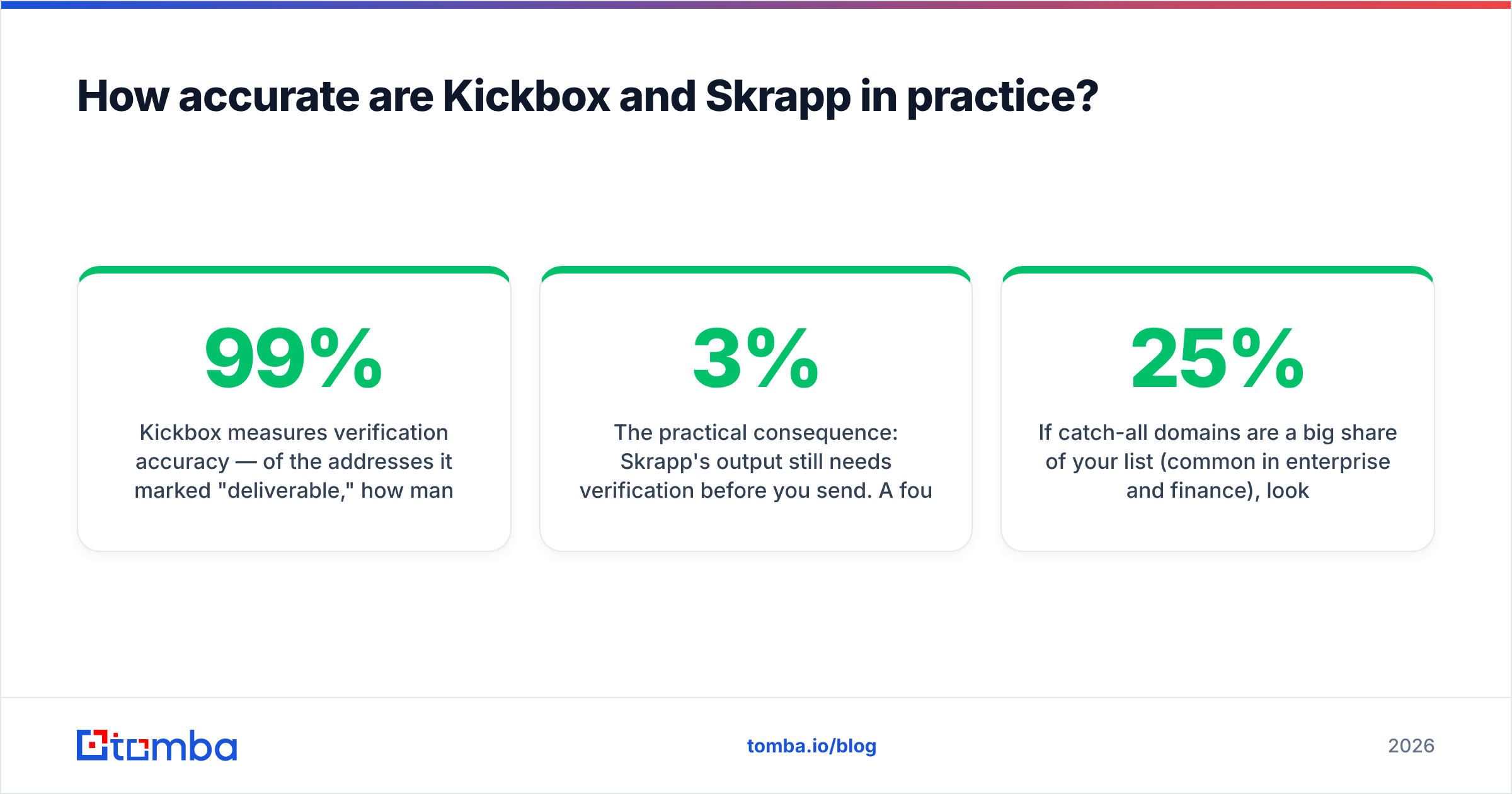
Kickbox grades its checks. Of the emails it called good, how many landed? In outside tests and G2 reviews, Kickbox sits near the top. On normal domains it runs 97-99%. Its weak spot is honest: catch-all domains. There it says "risky" and leaves the call to you. That is fair, since the server accepts every address. But part of your list comes back unsolved.
Skrapp grades its finds. Of the emails it found, how many are real? That is a harder job, and every finder counts it its own way. Skrapp often reports a confidence level, not a clean yes or no. SDR teams report good hit rates at US and Western European tech firms. Coverage drops at small firms, non-English domains, and odd email formats.

So here is the catch. Skrapp's output still needs a check before you send. A found-but-unchecked address is a bounce waiting to happen. Bounce rates above 2-3% get your domain throttled. That is why so many teams end up paying for both tools, and why one combined tool tends to win on cost.
Is your list full of catch-all domains? That is common in banking and at large firms. Then use a real catch-all verifier instead of writing off every "risky" result. Solving catch-alls can save 15-25% of a big prospect list.
Kickbox vs Skrapp pricing: what does each cost in 2026?#
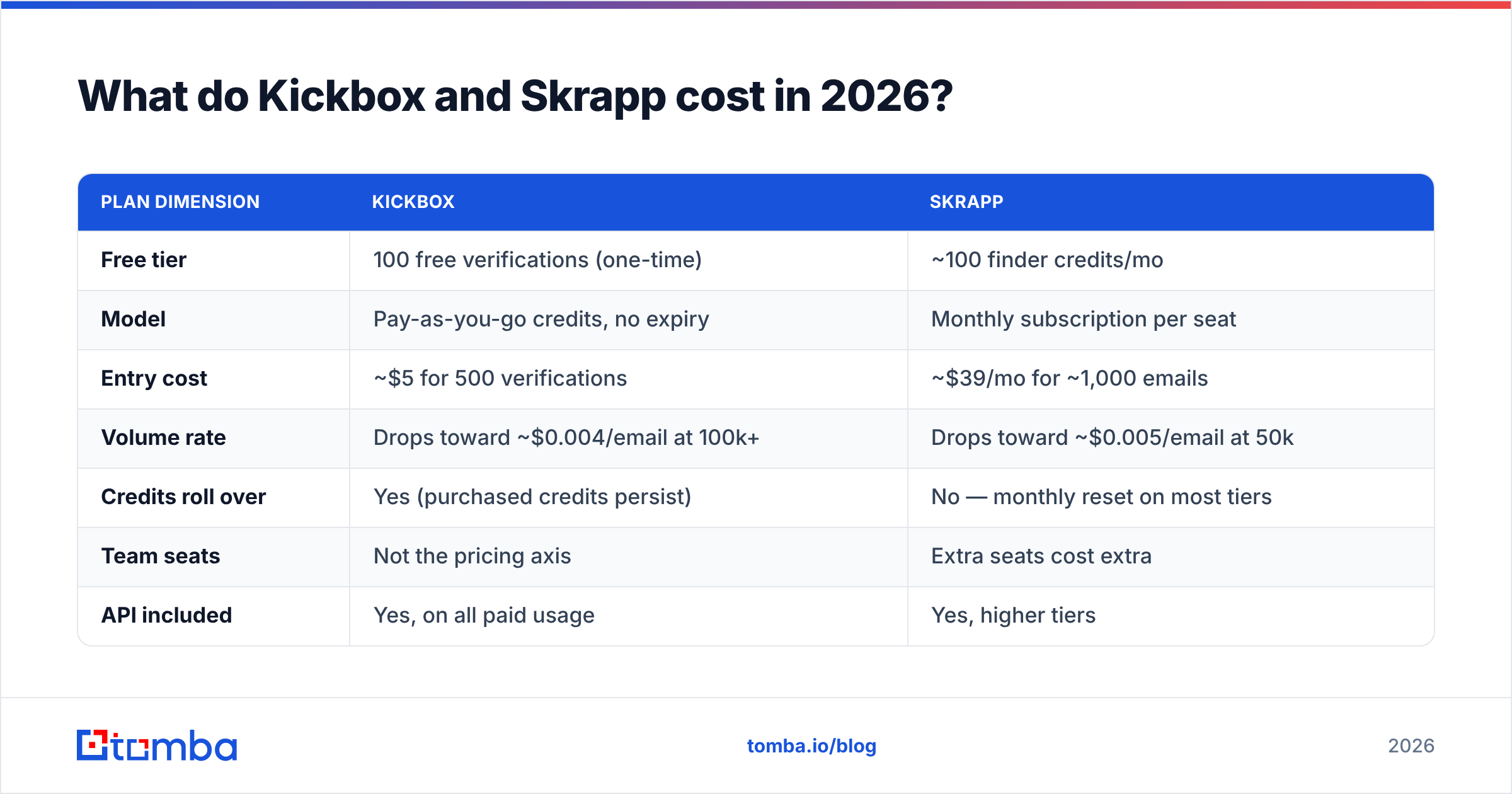
The two price models differ, so a flat monthly compare will mislead you. Kickbox sells credits as you go. Skrapp sells a seat each month. Check both vendor pages before you buy, since tiers move.
| Plan detail | Kickbox | Skrapp |
|---|---|---|
| Free tier | 100 checks, one time | ~100 finder credits a month |
| Model | Credits, no expiry | Monthly seat |
| Entry cost | ~$5 for 500 checks | ~$39 a month for ~1,000 emails |
| Volume rate | ~$0.004 an email at 100k | ~$0.005 an email at 50k |
| Credits roll over | Yes | No, most tiers reset |
| Team seats | Not the price axis | Extra seats cost more |
| API included | Yes, on all paid use | Yes, higher tiers |
Two things matter more than the sticker price.
Kickbox credits never expire. Do you clean a list once a quarter? Then pay-as-you-go beats any subscription by a mile. Buy 50,000 credits once and use them all year.
Skrapp credits reset each month. Does your team work in bursts, heavy in January and quiet in August? Then you pay for months you barely use.
Now stack the real cost of doing both jobs. Skrapp runs about $79 a month for 5,000 finds, and Kickbox adds about $40 to check those same 5,000 addresses. That is roughly $120 a month for one workflow. Compare that with Tomba pricing. The Growth plan is $99 a month and covers finding plus checking from one credit pool. The Starter plan is $49 a month for smaller runs. Hunter and Dropcontact bundle in much the same way. Two tools only win when your cleanup volume dwarfs your finding volume. One example: a 500,000-address list you built through inbound.
Do you actually need both tools?#
Here is the decision path, in the order that matters.
Do you own the emails already? Signups, CRM, event lists, bought data? Then you only need checking. Kickbox is a solid, boring, safe pick. Stop reading here.
Do you need lists from LinkedIn? Is your whole motion Sales Navigator, export, then sequence? Skrapp's add-on is built for that one path. A LinkedIn finder does the same job if you would rather not add a tool.
Do you need whole-company coverage? LinkedIn tools only reach profiles you can surface in search. A domain search returns every known address at a firm, plus the pattern it uses. That is a wider net.
Is your bounce rate what keeps you up at night? Then buy on check quality. Look at catch-all handling, role-account flags, and junk filters. Do not buy on finder polish.
Are you paying two vendors for one pipeline? If yes to 2 and 4, merge them. Two dashboards and two CSV round-trips cost real time, not just money.

How does a combined platform compare to running Kickbox plus Skrapp?#
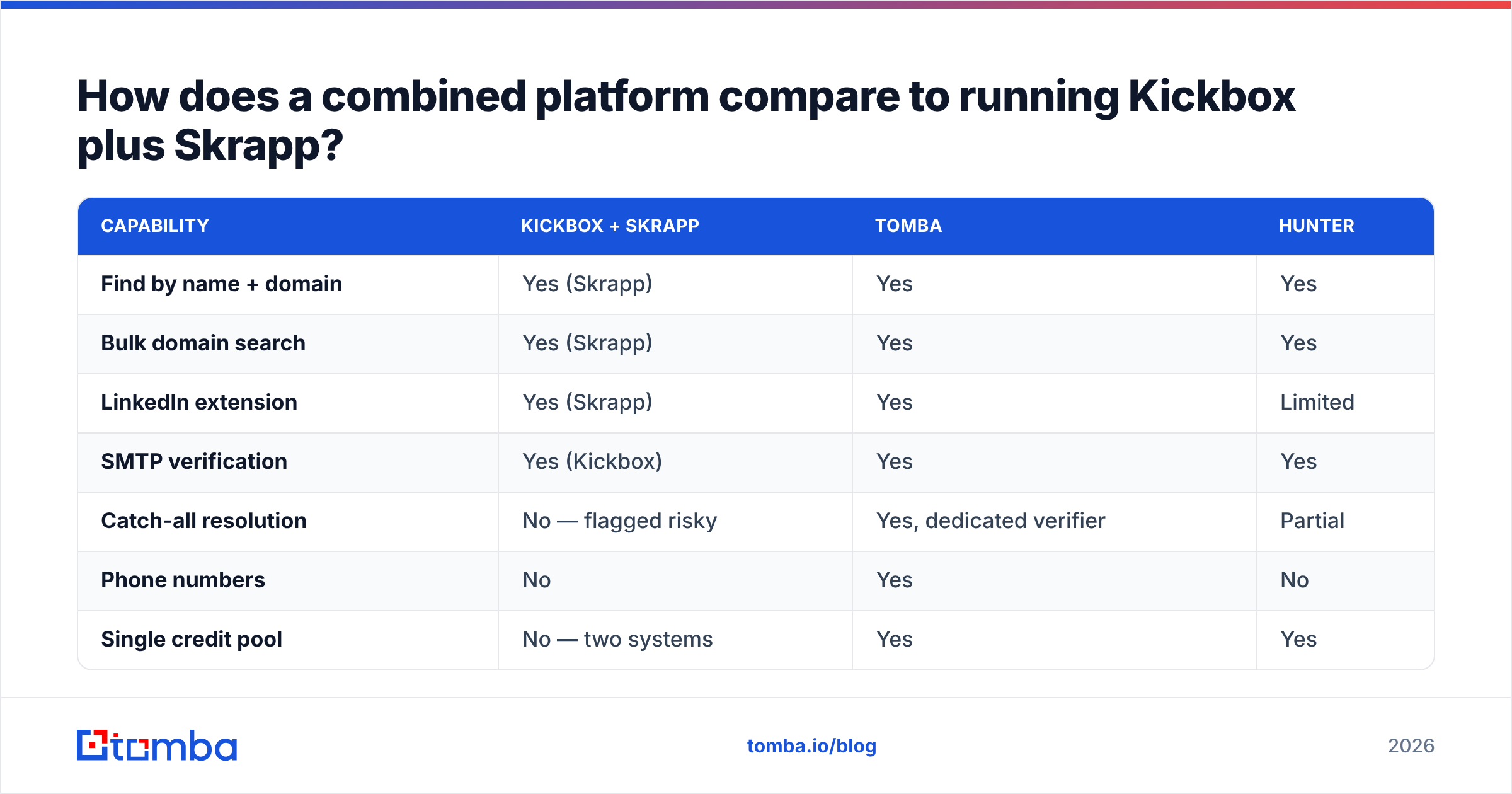
| Feature | Kickbox + Skrapp | Tomba | Hunter |
|---|---|---|---|
| Find by name and domain | Yes, Skrapp | Yes | Yes |
| Bulk domain search | Yes, Skrapp | Yes | Yes |
| LinkedIn add-on | Yes, Skrapp | Yes | Limited |
| SMTP check | Yes, Kickbox | Yes | Yes |
| Catch-all answers | No, marked risky | Yes | Partial |
| Phone numbers | No | Yes | No |
| One credit pool | No, two systems | Yes | Yes |
| Entry price | ~$44 a month | $49 a month | $49 a month |
| Free tier | 100 checks, ~100 finds | 25 searches | 25 searches |
The honest read: Kickbox checks emails better than any all-in-one does. That is its whole job, and it shows in odd cases like strange MX setups, greylisting, and catch-all quirks at scale. Is checking 90% of your job? Then keep Kickbox.
But often checking is just one step inside prospecting. Then a small gain in accuracy rarely pays for a second bill plus the CSV shuffle. Running a new address through a built-in email verifier in the same API call is worth more than two points of edge-case precision.
Which should you pick for your team?#
Pick Kickbox if you run an ESP, a SaaS app with signup forms, or a big marketing list you did not build. Buy credits. Use the live API. Then stop thinking about it. Pay-as-you-go is friendlier than a subscription for bursty cleanup.
Pick Skrapp if your team lives in Sales Navigator and you stay under about 5,000 contacts a month. One focused tool can beat a platform full of features you never open. Just budget for checking too, or accept more bounces.
Pick one combined platform if you do both jobs, want one API instead of two, or need more than LinkedIn shows. That means catch-all answers, phone numbers, or data on records you already own.
One rule holds whatever you pick. Warm up your sending domain, keep bounces under 2%, and never mail a list you have not checked in the last 30 days. Contact data rots about 22-30% a year as people switch jobs. The list you cleaned in January is worse by June.
Ready to stop paying for two tools?#
Does your Kickbox vs Skrapp shortlist keep ending at "I need both"? That is a sign to merge, not to stack. The Tomba Email Finder finds work emails by name, domain, or LinkedIn profile. It checks them in the same call. One credit pool. One API. One dashboard. Start free with 25 searches a month. Test it on your own accounts. Then compare the hit rate before you renew anything.
Related guides#
// get started
Find, verify and enrich your first contacts today
Start on the free plan with 25 searches a month, then scale when your team is ready.
Free plan · No credit card required · GDPR & CCPA
// about the author