Kipplo vs LetsExtract: B2B Email Data Compared for 2026
One is a cloud contact-intelligence platform, the other is a Windows scraper you buy once. Kipplo vs LetsExtract compared on data sourcing, accuracy, real 12-month cost, and deliverability risk.
TL;DR
- Kipplo vs LetsExtract in one line: Kipplo sells named contacts, LetsExtract sells raw volume.
- Kipplo is a cloud tool for B2B contacts. You search a person or a company. It returns a work email, and often a mobile number.
- Kipplo runs in the browser and adds a Chrome extension. Paid plans start near $27/mo on an annual deal. You are not billed for data it cannot confirm.
- LetsExtract is Windows software. It scrapes emails from search engines, web pages, social pages, and local files.
- LetsExtract costs a one-time $39–$79. A free build exists, with fewer features.
- Scraped lists often test at 40–70% valid. Platform data should clear 90% after a fresh check.
What are Kipplo and LetsExtract?#
Both tools answer one ask: "get me email addresses." They answer it in opposite ways.
Kipplo is a B2B contact platform. You give it a name and a company. You can also give it a LinkedIn profile, a domain, or a phone number. It returns work emails and direct dials. Records come from a large contact index plus live lookups. A Chrome extension helps you prospect on LinkedIn. A short trial gives you about 20 email and 10 phone credits. Bad data is free. You pay for hits only.
LetsExtract is classic desktop software. You download it, install it on Windows, and it crawls. Point it at a keyword, a set of URLs, a social page, or a folder of files. It grabs every string that looks like an email. The Email Studio bundle adds a checker and a bulk sender. You buy the license once and keep it.
That one gap shapes the whole Kipplo vs LetsExtract story: data quality, legal risk, cost over time, and how much cleanup you do by hand.

How does each tool find its data?#
Most reviews skip this part. It is also the part that predicts your bounce rate. Here is what happens under the hood.
- Kipplo starts with a person. You search a known name or company. The tool matches that identity to a record. You get one row per person, with a title and a company.
- LetsExtract starts with a page. You give it a query or a URL list. The crawler grabs every address in the source, the footer, a form, a PDF, or a bio. You get a bare list with no names.
- Kipplo refreshes in the cloud. The index updates without you. When someone changes jobs, the vendor fixes it.
- LetsExtract freezes in time. You own what the page said the day you crawled it. A list from March is stale by September.
- Both tools check addresses. But a checker only strips dead mail. It cannot turn
info@orsales@into a buyer.
Point five is the crux of Kipplo vs LetsExtract. A crawler returns mostly shared inboxes and free webmail. A domain search hands you named people with job titles. That is a different asset. A text file of 40,000 strings is not the same thing.
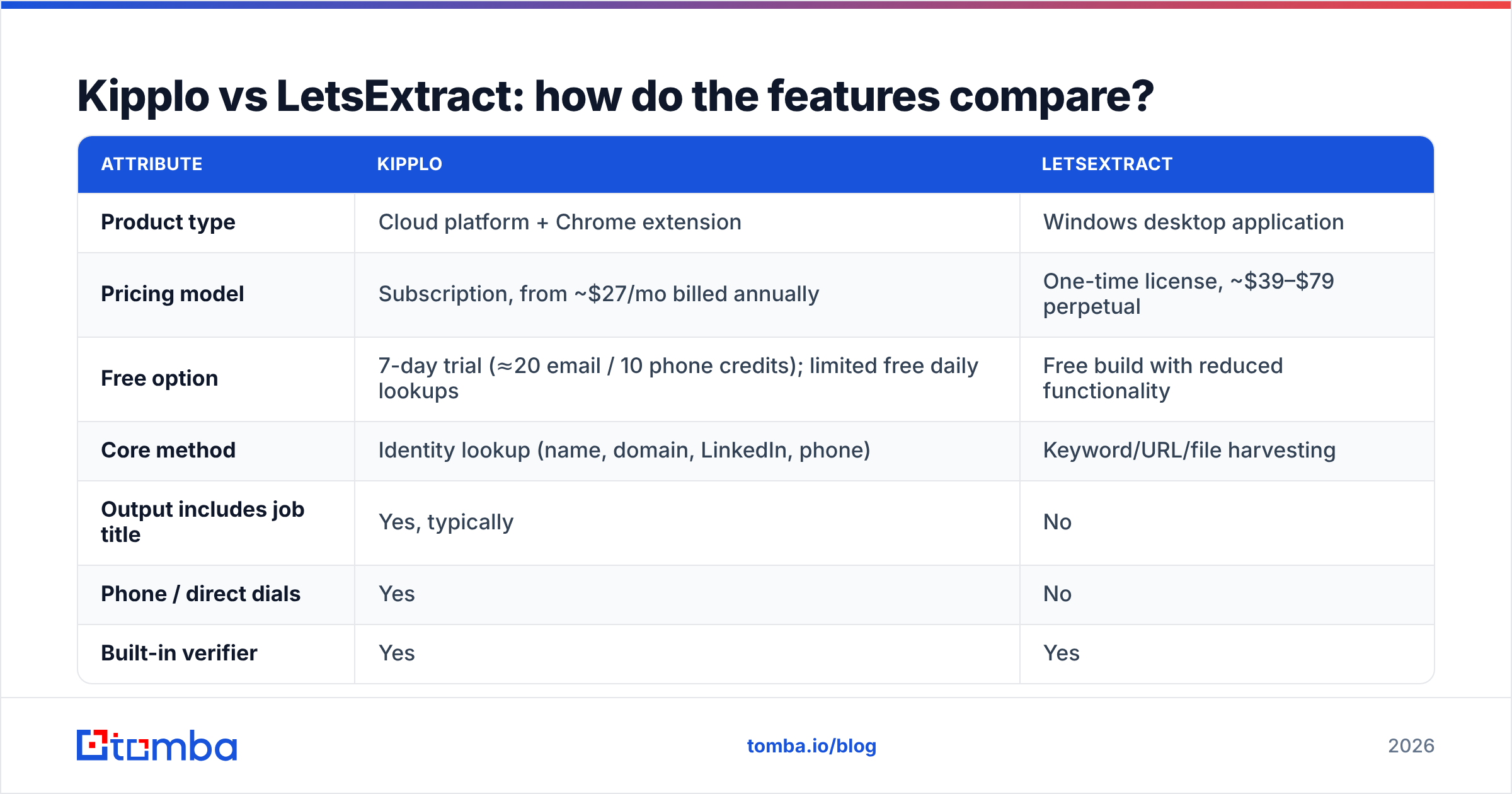
Kipplo vs LetsExtract: how do the features compare?#

| Attribute | Kipplo | LetsExtract |
|---|---|---|
| Product type | Cloud app + Chrome extension | Windows desktop app |
| Pricing model | From ~$27/mo, billed yearly | One-time, ~$39–$79 |
| Free option | 7-day trial, plus small daily limit | Free build, fewer features |
| Core method | Lookup by name, domain, or phone | Crawl by keyword, URL, or file |
| Job title in output | Yes, most rows | No |
| Phone numbers | Yes | No |
| Built-in checker | Yes | Yes |
| Built-in bulk sender | No — export instead | Yes |
| Catch-all domains | Scored by trust level | Flagged as unknown |
| Data freshness | Refreshed in the cloud | Frozen at crawl time |
| Mac or Linux | Yes, runs in a browser | No, Windows only |
| Best fit | Outbound to named buyers | Bulk directory scraping |
Two rows deserve extra weight.
The sender. A built-in sender is not a bonus. It is a trap for cold B2B email in 2026. You would blast a fresh scraped list from your own SMTP. That is the fastest way to burn a domain you spent years building. Google and Yahoo now score bulk senders on spam complaints and require signed mail.
A desktop blaster gives you no warmup and no throttling. It tells you nothing about where your mail lands. If you use LetsExtract, export the list. Send it through a real sequencer.
The OS lock. LetsExtract runs on Windows only. If your reps use MacBooks, that cheap license costs you a VM or a spare laptop. Not so cheap now.
Which one lands more email in the inbox?#

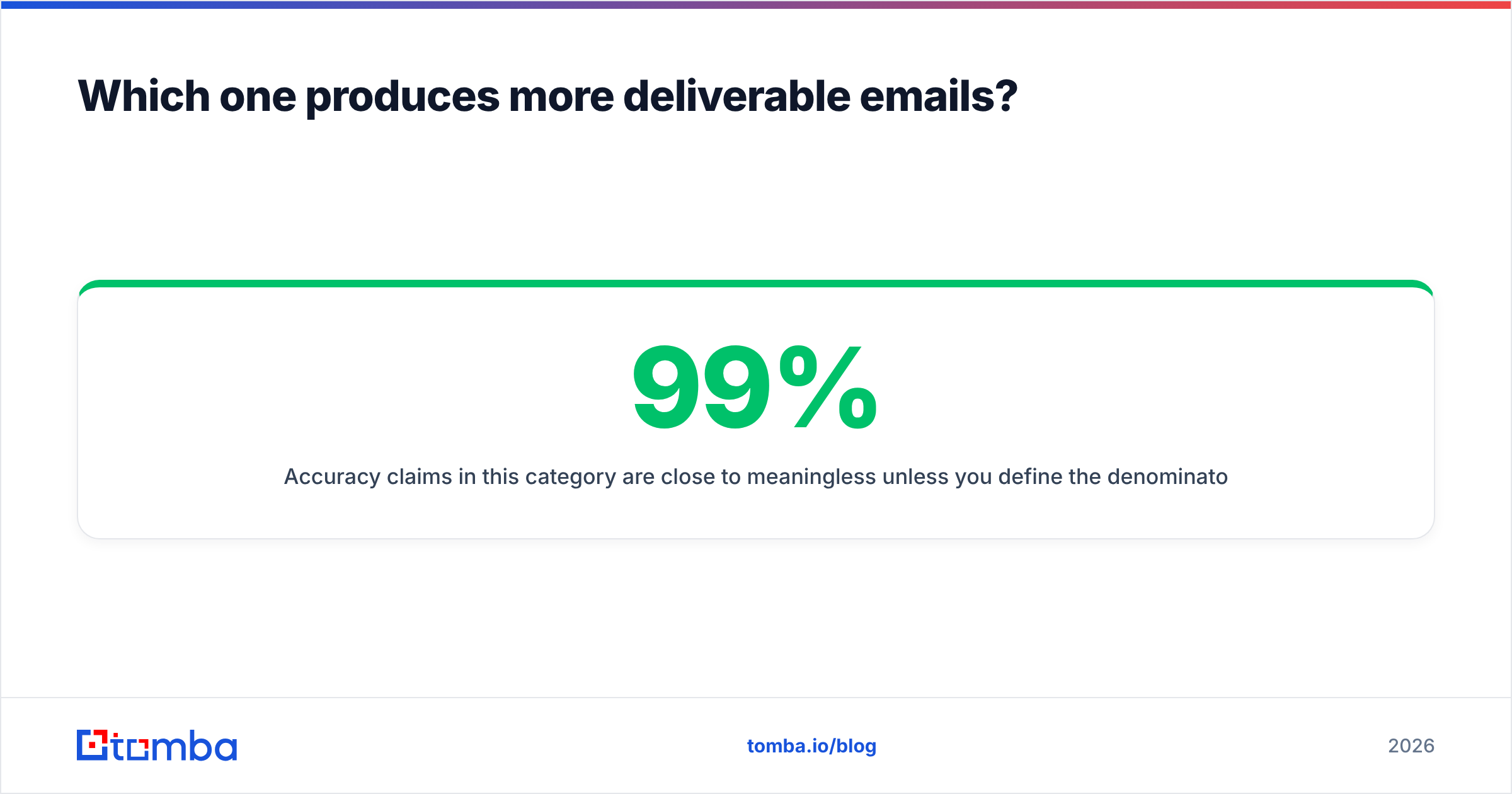
Accuracy claims mean little without a denominator. A crawler can claim "99% valid syntax" while 60% of the list bounces. A finder can claim "98% accuracy" while it answers only 45% of your searches. Two numbers matter:
- Hit rate — of 100 target people, how many came back with an address?
- Inbox rate — of those addresses, how many pass an outside check and land?
Test it yourself before you buy. Take 100 real prospects from your ICP. Use named people at named accounts. Run them through Kipplo. Now try the same 100 with LetsExtract.
The second half is where Kipplo vs LetsExtract stops being close. Crawling does not work that way. You can crawl a company site and grab what it publishes. But "find the VP of Ops at this 200-person plant" is not a query a crawler can answer.
That gap is the honest verdict on accuracy. You can score Kipplo against a target list. You can only score LetsExtract against itself.
Check both outputs with a third-party email verifier. Do not trust the tool's own checker. No vendor should grade its own homework. Watch for catch-all domains too. They accept every address and tell you nothing. On a scraped list, catch-alls and shared inboxes can be half the file. A catch-all verifier is the only way to split "likely real" from "quietly binned."

What does each one cost over 12 months?#
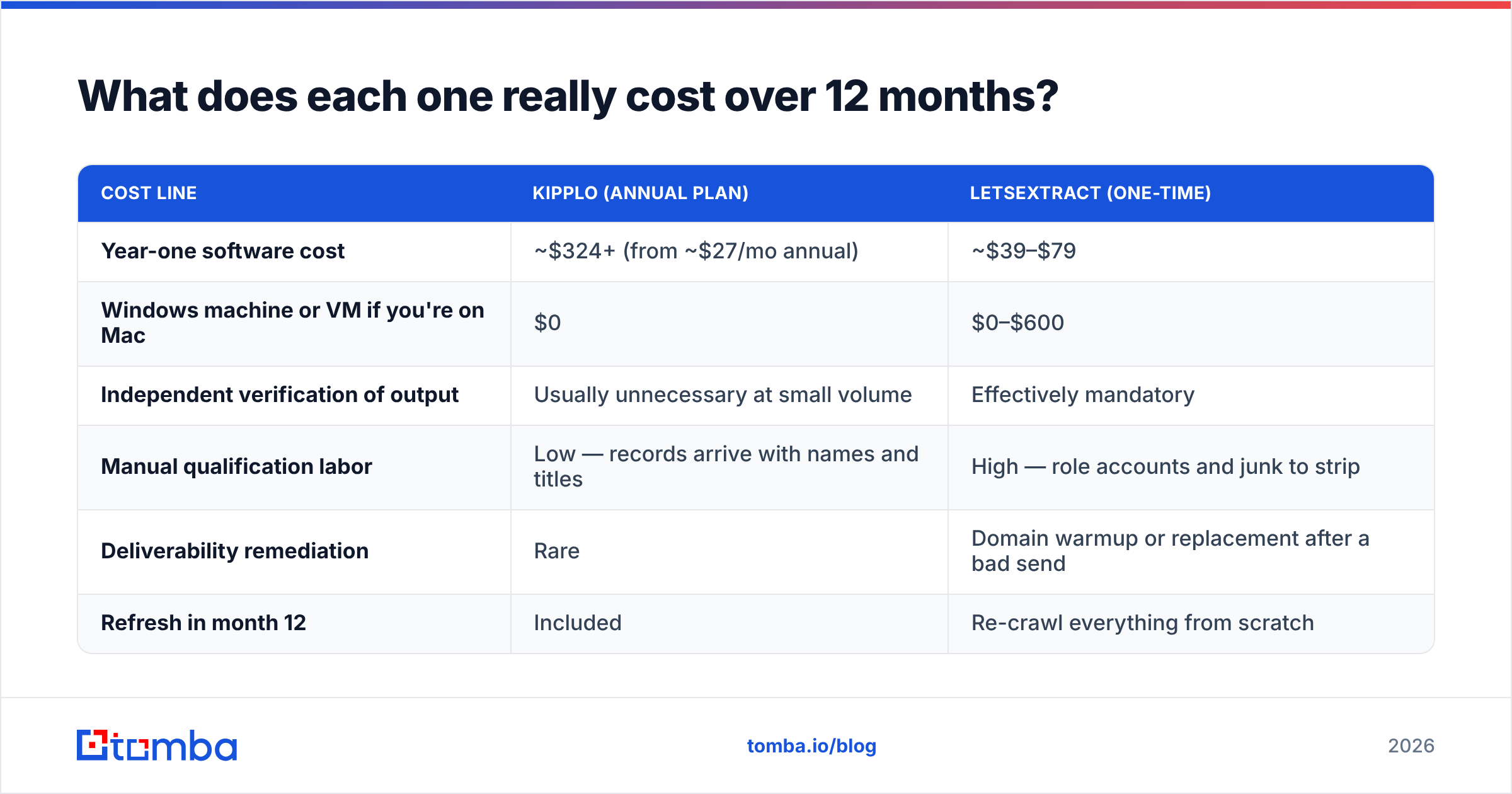
Sticker price flatters LetsExtract. Loaded cost does not.
| Cost line | Kipplo (yearly plan) | LetsExtract (one-time) |
|---|---|---|
| Year-one software | ~$324+, from ~$27/mo | ~$39–$79 |
| Windows box if you use a Mac | $0 | $0–$600 |
| Outside check on the output | Rarely needed | Always needed |
| Manual cleanup time | Low — rows arrive named | High — junk to strip |
| Domain repair after a bad send | Rare | Warmup or a new domain |
| Refresh in month 12 | Included | Crawl it all again |
Say one rep spends four hours a week on a scraped list. They dedupe it, strip junk, and hunt for names. At $30 an hour, that is about $6,200 a year. Both license fees look tiny next to that.
The cheap tool is the one that cuts hours per good contact. It is not the one with the smaller invoice. That is the real Kipplo vs LetsExtract math.
One cost never shows up in a spreadsheet: risk. Scraped addresses carry no consent trail. Under GDPR, they give you no clear legal basis for EU contacts. You also cannot tell a work address from a personal one.
A public address is not an invite to market. Buyers spot a scraped email fast, and they hit "report spam." If you sell into Europe, treat keyword scraping as a liability, not a shortcut.
Who should choose Kipplo, and who should choose LetsExtract?#
Here is the Kipplo vs LetsExtract split by use case.
Choose Kipplo if:
- You pick target accounts first, then hunt for the people inside them.
- You want phone numbers next to email for a mixed sequence.
- Your team is on mixed hardware and wants a LinkedIn extension.
- You would rather pay per good contact than per hour of cleanup.
Choose LetsExtract if:
- You scrape a known public set: a trade-show list, a member roster, a local index.
- You want volume for research, not for outreach. Think market maps or supplier hunts.
- You are on Windows, your budget is one-time, and you own the legal cleanup.
- You will not use the built-in sender for cold email.
Choose neither if you need contacts pushed into a CRM, enriched, and refreshed on a schedule. Neither tool does that job. That is work for a data platform.
Where does Tomba fit in the Kipplo vs LetsExtract debate?#
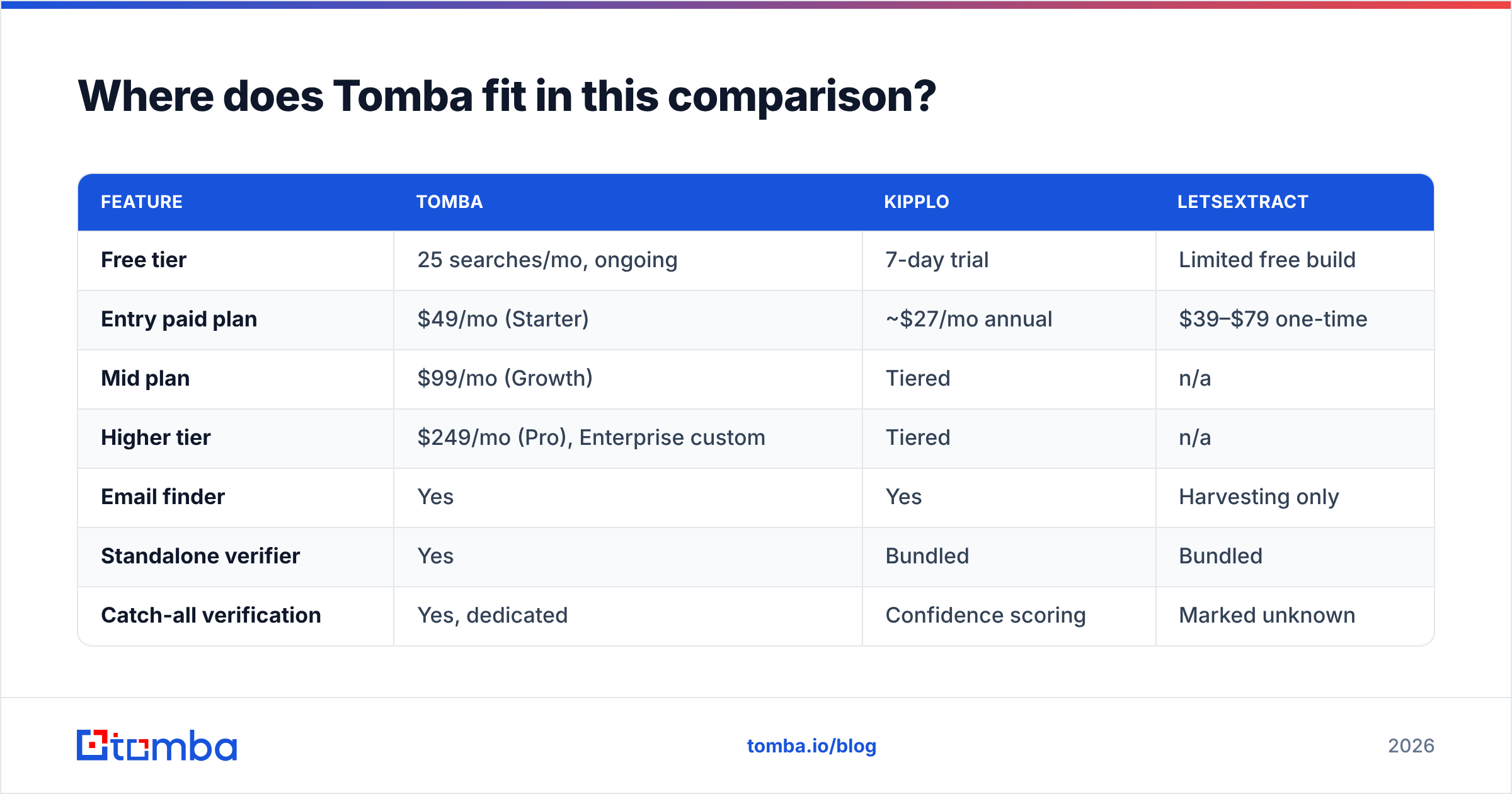
Tomba sits on the same side as Kipplo. Identity first, checks second. The tool set is wider and the pricing differs.
| Feature | Tomba | Kipplo | LetsExtract |
|---|---|---|---|
| Free tier | 25 searches/mo, ongoing | 7-day trial | Limited free build |
| Entry paid plan | $49/mo (Starter) | ~$27/mo annual | $39–$79 one-time |
| Mid plan | $99/mo (Growth) | Tiered | n/a |
| Higher tier | $249/mo (Pro), Enterprise custom | Tiered | n/a |
| Email finder | Yes | Yes | Scraping only |
| Standalone checker | Yes | Bundled | Bundled |
| Catch-all check | Yes, dedicated | Trust score | Marked unknown |
| Phone finder | Yes | Yes | No |
| Domain search | Yes | Partial | n/a |
| Bulk processing | Yes | Yes | Yes, crawl-based |
| Public API | Yes | Check vendor | No |
| Sheets / Excel add-ons | Yes | Extension | No |
| Platform | Web, API, CLI, extensions | Web + extension | Windows desktop |
Two honest notes. Kipplo's entry price beats Tomba's $49/mo Starter. And its no-charge-for-bad-data policy is a fair, buyer-friendly stance.
Tomba's edge is a free tier that never expires, not a 7-day clock. There is a documented Tomba API for teams that want lookups inside their own stack. The checking stack is broader too, with a dedicated catch-all tool and bulk verify for lists you inherit. Tomba pricing is public. Compare it against your real monthly volume, not a headline rate.
Already own a LetsExtract list? That is not wasted money. It is raw material. Run it through a check, strip the shared inboxes, and match the rest back to real people.
What should you test before you commit?#
Run this in one afternoon. It settles Kipplo vs LetsExtract for your own market.
- Pick 50 real targets. Named people at named accounts.
- Run both tools. For LetsExtract, crawl the company domains.
- Measure hit rate. How many of the 50 came back tied to the right person?
- Check the output with a tool that did not create the data.
- Score the mess. Count shared inboxes, dupes, and rows with no job title. That count is your hidden labor bill.
- Send 20 test emails from a spare domain. Watch bounces and spam for a week.
The tool that wins step 3 and step 5 is your answer. Price pages do not decide it. Cross-check with reviews on G2, then weight your own 50-contact test far higher. Review scores blend use cases that look nothing like yours.
The verdict on Kipplo vs LetsExtract#
For outbound to named buyers, Kipplo is the better product, and it is not a close call. It returns real people. It refreshes its data. It runs on any OS.
LetsExtract still wins one narrow job. It pulls published addresses out of a defined public set, on Windows, for a single payment. Use it for research, not for pitches.
As a cold-email engine, scraping is done. It stopped working when inbox providers began to score senders on complaints.
Want to test identity-first data against the list you have today? Start with the Tomba Email Finder. You get 25 free searches a month and no trial clock. Every result is checked before it reaches you. Find the people who actually buy, then send like you mean it.
Related guides#
// get started
Find, verify and enrich your first contacts today
Start on the free plan with 25 searches a month, then scale when your team is ready.
Free plan · No credit card required · GDPR & CCPA
// about the author