Kipplo vs Nymeria: Which B2B Email Finder Wins in 2026?
Kipplo and Nymeria both promise verified B2B emails, but they source and price data very differently. Here is an honest breakdown of coverage, accuracy, credits, and which one actually fits your outbound motion.
TL;DR
- Kipplo is the lighter, prospecting-first option: fast list building, simple credit math, and a workflow built around pulling contacts out of company and LinkedIn searches.
- Nymeria is the enrichment-first option: it is strongest when you already have a person (a LinkedIn profile, a name, a domain) and want their work email, personal email, and phone attached to it.
- Neither tool is a full verification suite. Both return addresses you should re-check before a send, especially on catch-all domains.
- If your bounce rate is the metric you are judged on, run a 200-contact bake-off against your own ICP before committing to either. Vendor-published accuracy numbers are marketing, not benchmarks.
- Tomba sits in the same category with a free tier (25 searches/month) and $49/mo entry pricing, plus a separate verifier and catch-all checker — useful if you want finding and verification under one API key.
What are Kipplo and Nymeria?#
Both tools answer the same question — "what is this person's email address?" — but they arrive from different directions.
- Kipplo (kipplo.com) positions itself as a B2B lead-generation and email-finding tool. The core loop is: search companies or roles, build a list, export it. It appeals to solo founders and small outbound teams who want volume without a platform contract.
- Nymeria (nymeria.io) started as a browser extension for LinkedIn and grew into a contact-enrichment API and people-database product. Its signature move is surfacing work email, personal email, and phone from a profile you are already looking at.
- Shared ground: both sell credits, both export CSV, both have a Chrome extension, and both claim high accuracy on professional emails.
- Where they split: Kipplo optimizes for discovery (find me 500 people who look like this). Nymeria optimizes for resolution (I know who I want — give me their contact details).
- What neither does well: ongoing list hygiene. Data decays roughly 25-30% per year as people change jobs, and neither product is designed as a standing verification layer for a CRM.
That distinction matters more than any feature checklist. If you pick the discovery tool for an enrichment job — or vice versa — you will conclude the vendor is inaccurate when the real problem is that you asked it the wrong question.
How do Kipplo and Nymeria source their data?#
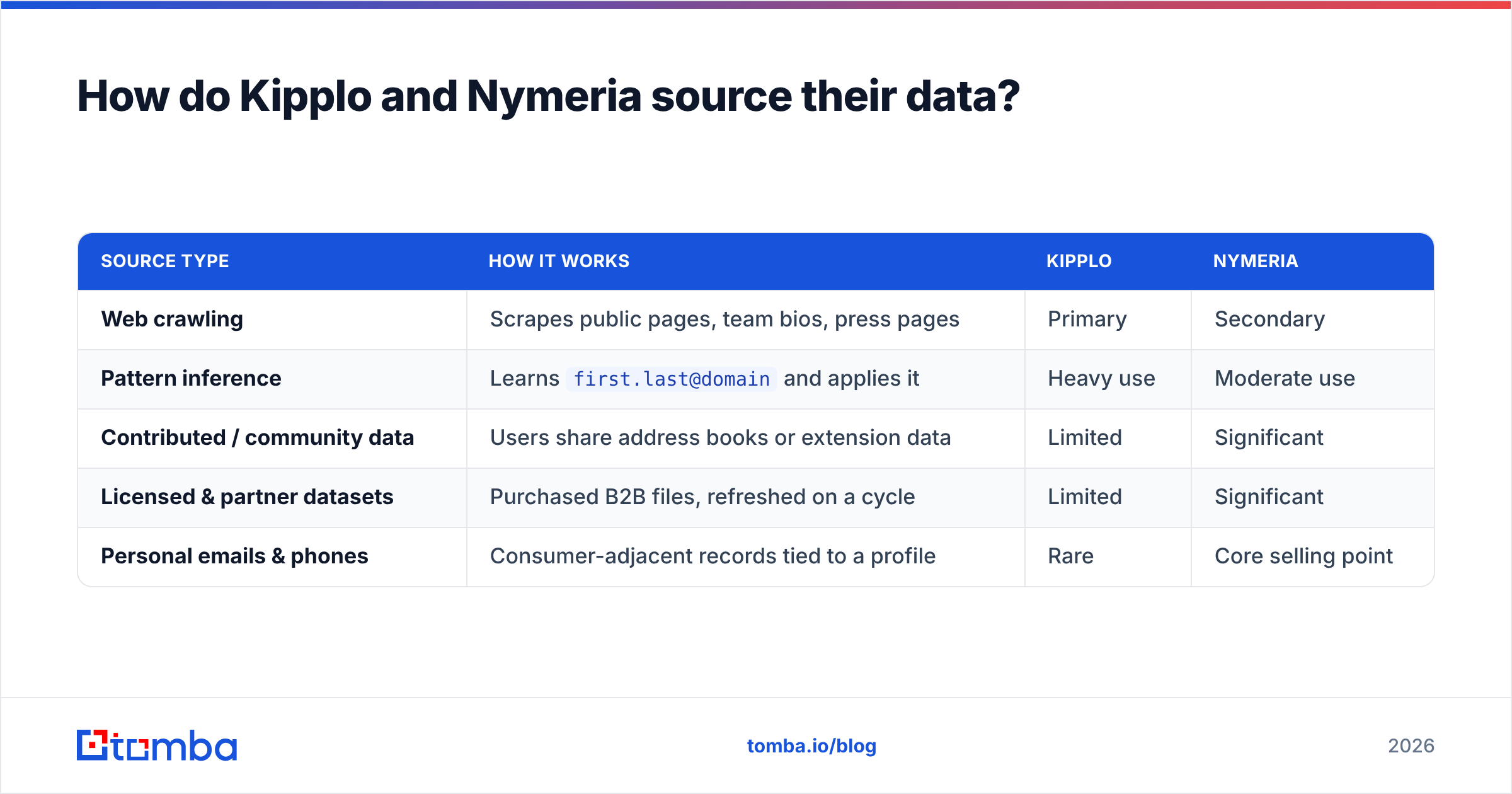
Contact data providers get emails from four places, and the mix determines what you can expect.
| Source type | How it works | Kipplo | Nymeria |
|---|---|---|---|
| Web crawling | Scrapes public pages, team bios, press pages | Primary | Secondary |
| Pattern inference | Learns first.last@domain and applies it |
Heavy use | Moderate use |
| Contributed / community data | Users share address books or extension data | Limited | Significant |
| Licensed & partner datasets | Purchased B2B files, refreshed on a cycle | Limited | Significant |
| Personal emails & phones | Consumer-adjacent records tied to a profile | Rare | Core selling point |
Nymeria's contributed-plus-licensed mix is why it can return a personal Gmail address and a mobile number where a crawl-only tool returns nothing. That is genuinely useful for recruiters and for founder-led sales into people who ignore work inboxes. It is also the reason you need to think about consent and jurisdiction: personal data under GDPR carries obligations that a scraped press@company.com does not. Read the vendor's DPA before you route personal emails into a sequencer.
Kipplo's pattern-inference lean cuts the other way. Pattern inference is cheap and fast, and on mid-size companies with a consistent format it works well. On companies with mixed formats — post-acquisition orgs, agencies, anything with a @eu. or @group. subdomain — inference produces plausible addresses that were never provisioned. Those are the ones that bounce.
Which tool is more accurate in practice?#
Neither vendor's headline number will match what you see. That is not an accusation; it is how the category works. Accuracy is measured against a sample, and the sample is never your ICP.

Three variables move accuracy far more than brand choice:
- Company size. Sub-50-employee companies are the hardest. Fewer public traces, fewer contributed records, more Google Workspace catch-alls.
- Region. US and UK coverage is strong almost everywhere. DACH, Nordics, Japan, and Brazil coverage varies enormously between vendors, and it is the single most common reason a tool that "works great" for one team fails for another.
- Catch-all domains. Roughly a fifth of business domains accept every address at the SMTP layer, which makes standard verification return "unknown." A tool that reports those as valid will flatter its own accuracy and wreck your sender reputation. Running suspected catch-alls through a dedicated catch-all verifier is the only reliable way to separate real mailboxes from black holes.

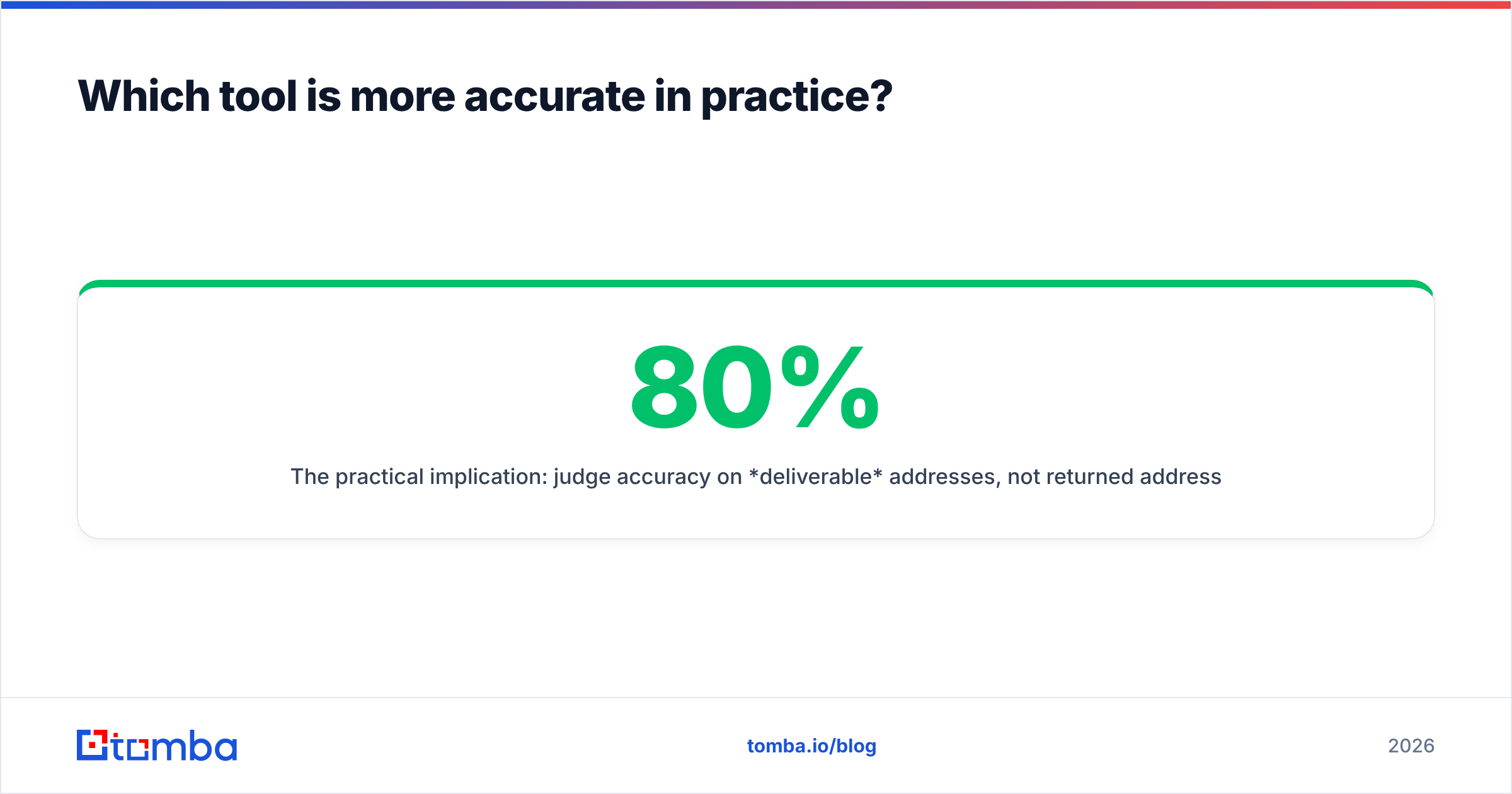
The practical implication: judge accuracy on deliverable addresses, not returned addresses. A tool that returns 80% of your list with a 3% bounce rate is better than one that returns 95% with a 14% bounce rate, because the second one costs you the domain.
How do Kipplo and Nymeria compare on pricing?#
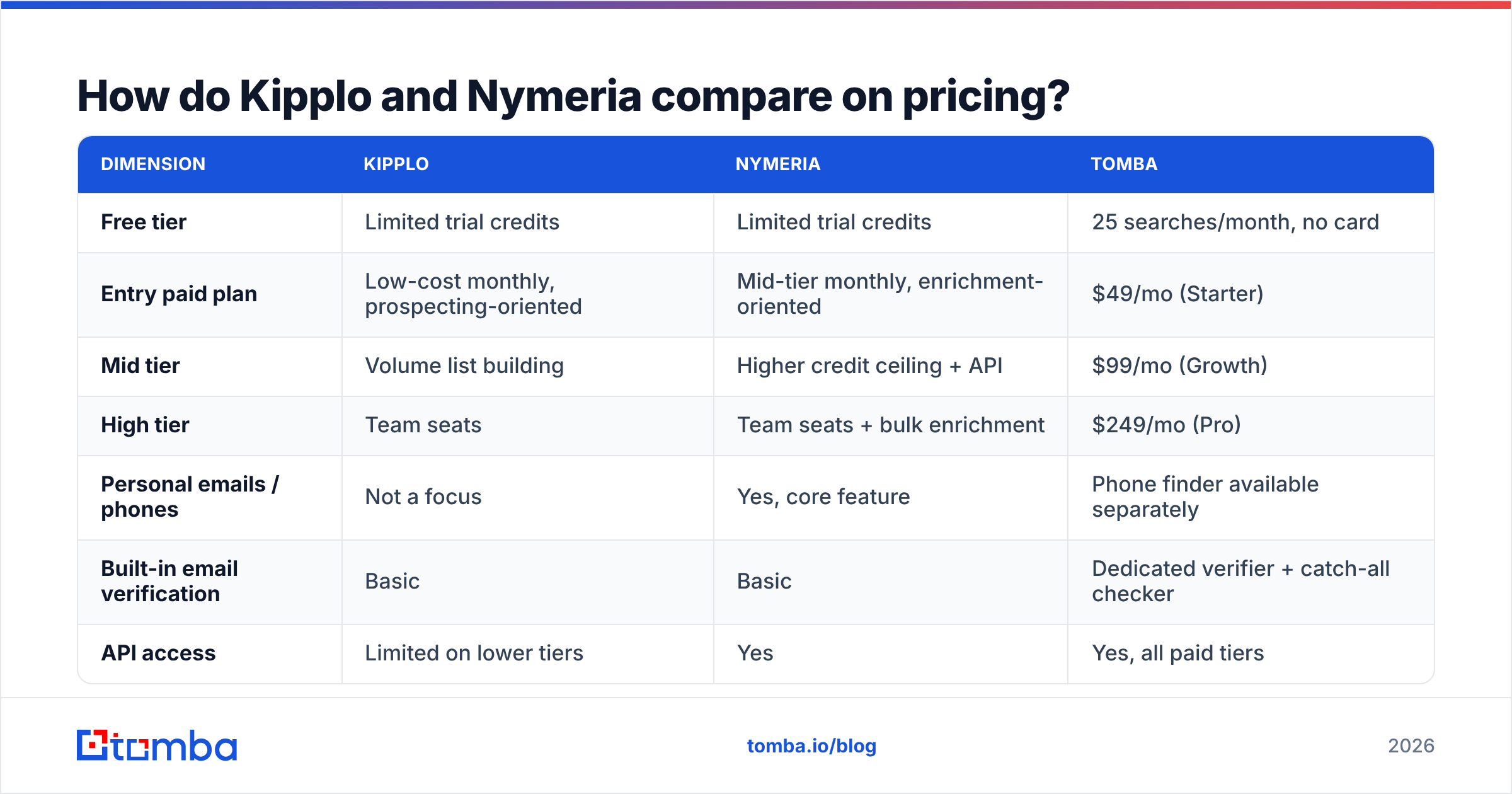
Credit pricing in this category is deliberately hard to compare — vendors change plan names and limits often, so treat the table below as a shape, not a quote, and confirm on each vendor's live pricing page before you buy.
| Dimension | Kipplo | Nymeria | Tomba |
|---|---|---|---|
| Free tier | Limited trial credits | Limited trial credits | 25 searches/month, no card |
| Entry paid plan | Low-cost monthly, prospecting-oriented | Mid-tier monthly, enrichment-oriented | $49/mo (Starter) |
| Mid tier | Volume list building | Higher credit ceiling + API | $99/mo (Growth) |
| High tier | Team seats | Team seats + bulk enrichment | $249/mo (Pro) |
| Personal emails / phones | Not a focus | Yes, core feature | Phone finder available separately |
| Built-in email verification | Basic | Basic | Dedicated verifier + catch-all checker |
| API access | Limited on lower tiers | Yes | Yes, all paid tiers |
| Credit rollover | Check current terms | Check current terms | Check current terms |

Two pricing traps show up repeatedly in this category, regardless of which logo you pick:
Trap one: credits burned on misses. Some vendors charge for a search that returns nothing or returns a guess. Others only charge on a confirmed result. That single policy difference can change your effective cost per usable contact by 2-3x. Ask support directly and get it in writing.
Trap two: the verification bill you did not budget for. If the finder does not verify to a standard you trust, you will bolt on a separate verifier — and now your real cost per contact is finder credits plus verifier credits. Comparing Tomba pricing against a finder-plus-verifier stack is usually the fairer comparison, because finding and verifying live on the same account.
Which tool fits which team?#
Pick based on your motion, not on a feature count.
Choose Kipplo if:
- You build lists from scratch every week and care about speed per list, not depth per contact.
- Your ICP is SMB-to-mid-market in North America or Western Europe, where pattern inference performs well.
- You are cost-sensitive and willing to eat a slightly higher unknown rate in exchange for volume.
- You already own a verifier and treat the finder purely as a discovery layer.
Choose Nymeria if:
- You work profile-first: recruiting, executive search, founder-led sales into specific named accounts.
- Personal emails and mobile numbers materially change your reply rate — for example, when work inboxes are gatekept.
- You need enrichment via API against an existing CRM table rather than fresh list building.
- You have the legal posture to handle personal contact data responsibly.
Choose something else if:
- You need finding, verification, catch-all handling, and enrichment behind one API. That is a platform question, not a feature question.
- You need a documented, versioned API with SDKs and predictable rate limits for a production pipeline. A Tomba API style integration matters more than UI polish once you are automating.
- Your compliance team requires clear documentation of data provenance. Ask every vendor where their data comes from and expect a real answer.

What do both tools get wrong about verification?#
Here is the uncomfortable part of the category: "verified" is not a regulated term.
Most finders run a lightweight check — syntax, MX record lookup, sometimes a partial SMTP handshake — and label the result "valid." That catches typos and dead domains. It does not catch:
- Catch-all acceptance. The server says yes to everything. Your address may still be undeliverable.
- Role accounts.
info@,sales@,support@are technically valid, frequently spam-trapped, and almost never the person you want. - Recently departed employees. The mailbox exists, forwards to a manager, and quietly kills your reply rate.
- Spam traps. Recycled addresses that mailbox providers use to identify senders working from stale lists. One hit can damage domain reputation for weeks.
The fix is procedural, not brand-dependent: treat every finder output as a candidate, then verify at send time — not at list-build time. A list verified 60 days ago is already 4-5% wrong. Running your file through a dedicated email verifier immediately before a campaign is cheap insurance compared to rebuilding sender reputation. The same logic applies to bulk jobs: bulk verify the export, do not trust the export.
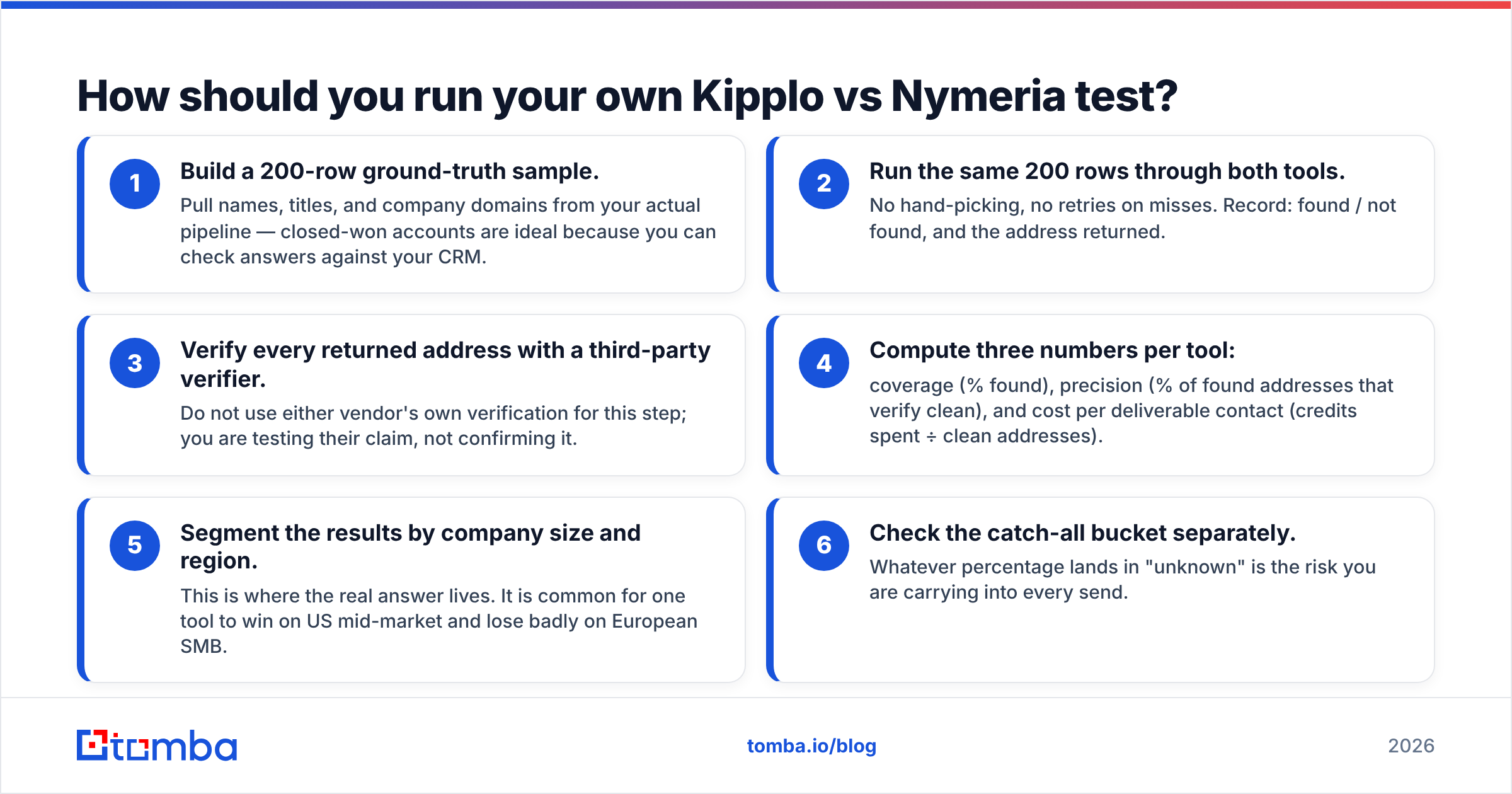
How should you run your own Kipplo vs Nymeria test?#
Ninety minutes of testing beats any comparison article, including this one. Here is the protocol.
- Build a 200-row ground-truth sample. Pull names, titles, and company domains from your actual pipeline — closed-won accounts are ideal because you can check answers against your CRM.
- Run the same 200 rows through both tools. No hand-picking, no retries on misses. Record: found / not found, and the address returned.
- Verify every returned address with a third-party verifier. Do not use either vendor's own verification for this step; you are testing their claim, not confirming it.
- Compute three numbers per tool: coverage (% found), precision (% of found addresses that verify clean), and cost per deliverable contact (credits spent ÷ clean addresses).
- Segment the results by company size and region. This is where the real answer lives. It is common for one tool to win on US mid-market and lose badly on European SMB.
- Check the catch-all bucket separately. Whatever percentage lands in "unknown" is the risk you are carrying into every send.
Cost per deliverable contact is the only metric that survives a CFO conversation. A tool at half the list price with a third of the precision is more expensive, and it also costs you domain reputation — which does not show up on an invoice.
For a broader market read, third-party review sites like G2 are useful for support responsiveness and billing complaints, which are the things review sites actually capture well. They are much less useful for accuracy, since almost nobody measures it the same way twice.
Is there a middle path between discovery and enrichment?#
Yes — and it is usually the right answer for teams that do both.
Most outbound teams need both motions in the same week: build a fresh list Monday, enrich an inbound account list Thursday. Running two vendors means two billing relationships, two credit pools, two data-quality baselines, and reconciliation work nobody wants to own.
A single platform that covers domain search, individual lookup, LinkedIn-based finding, verification, and catch-all handling removes that seam. Tomba's email finder handles the name-plus-domain lookup, domain search handles "give me everyone at this company," and the LinkedIn finder covers the profile-first workflow that Nymeria users rely on — all against one credit pool with one API key.
That is not a claim that Tomba beats both tools on every lookup. No provider wins every lookup; the databases overlap differently by geography and company size. It is a claim that consolidating the workflow removes a class of operational friction that costs more than the credit price difference.
The verdict#
Kipplo vs Nymeria comes down to one question: are you finding people, or finding details about people you already found?
Kipplo is the better fit for high-volume list building on a tight budget, provided you pair it with real verification. Nymeria is the better fit for profile-first work where personal emails and phone numbers change the outcome, provided your compliance posture supports it. Both are legitimate tools with real users, and both will disappoint you if you point them at the wrong job.
What neither should be is your only line of defense against bounces. Verify at send time, segment your accuracy testing by region and company size, and measure cost per deliverable contact rather than cost per credit.
Want to test a third option before you commit? Start with the Tomba Email Finder on the free tier — 25 searches a month, no card required — and run the same 200-row ground-truth sample you used for Kipplo and Nymeria. Same rows, same verifier, same scoring. If the cost per deliverable contact comes out lower, you have your answer in an afternoon instead of a quarter.
Related guides#
// get started
Find, verify and enrich your first contacts today
Start on the free plan with 25 searches a month, then scale when your team is ready.
Free plan · No credit card required · GDPR & CCPA
// about the author