Kipplo vs Power Almanac: Which B2B Data Tool Wins in 2026?
Kipplo vs Power Almanac is an odd matchup. One sells AI-driven B2B contact data across every industry. The other sells one thing: US local government officials. Here's which fits your pipeline — and when neither does.
Kipplo vs Power Almanac is a strange fight. One tool sells contact data for every industry. The other sells one market: US local government. This guide shows which one fits your list, and when neither does.
TL;DR
- Power Almanac is a niche specialist. It sells verified contacts for elected and hired officials at US local governments — cities, counties, townships. If you sell to city halls, nothing else goes that deep.
- Kipplo is a broad B2B contact platform. You search companies and roles in normal commercial markets. It is sold as a subscription with credits.
- They barely overlap. So Kipplo vs Power Almanac comes down to one question: does your buyer wear a "City of ___" badge? If not, Power Almanac is the wrong tool. Its data quality is beside the point.
- Both leave a gap at the end. Neither one replaces a real verifier before you hit send. Bounces are what kill your domain.
- The cheap, honest answer for most teams: use a broad finder like Tomba Email Finder. Add a specialist list only where that specialist truly owns the market.
Kipplo vs Power Almanac: what each tool actually sells#
Start with the shape of each product. The marketing copy blurs it.
Power Almanac (poweralmanac.com) is a database of US local government officials. Mayors, city managers, council members, public works directors, police chiefs, clerks, finance directors. That covers roughly 40,000 local governments and hundreds of thousands of named people. The pitch is that people, not bots, check this data on a rolling cycle. That matters here. Elections and new appointments reshuffle contacts every November. You buy a list, filter it by state, population, government type, and job title, then download a CSV.
Kipplo is a newer, AI-first B2B contact platform built for the general market. You search by company, role, industry, or buying signal. You get back names, emails, and company data, and push them into your outreach tools. It sits next to Apollo, Lusha, or Cognism, not in Power Almanac's govtech corner.
Here is the plain translation. Power Almanac is a vertical data publisher. Kipplo is a horizontal data platform. Both sell rows in a spreadsheet, but they are not the same business.

Kipplo vs Power Almanac: the head-to-head comparison#
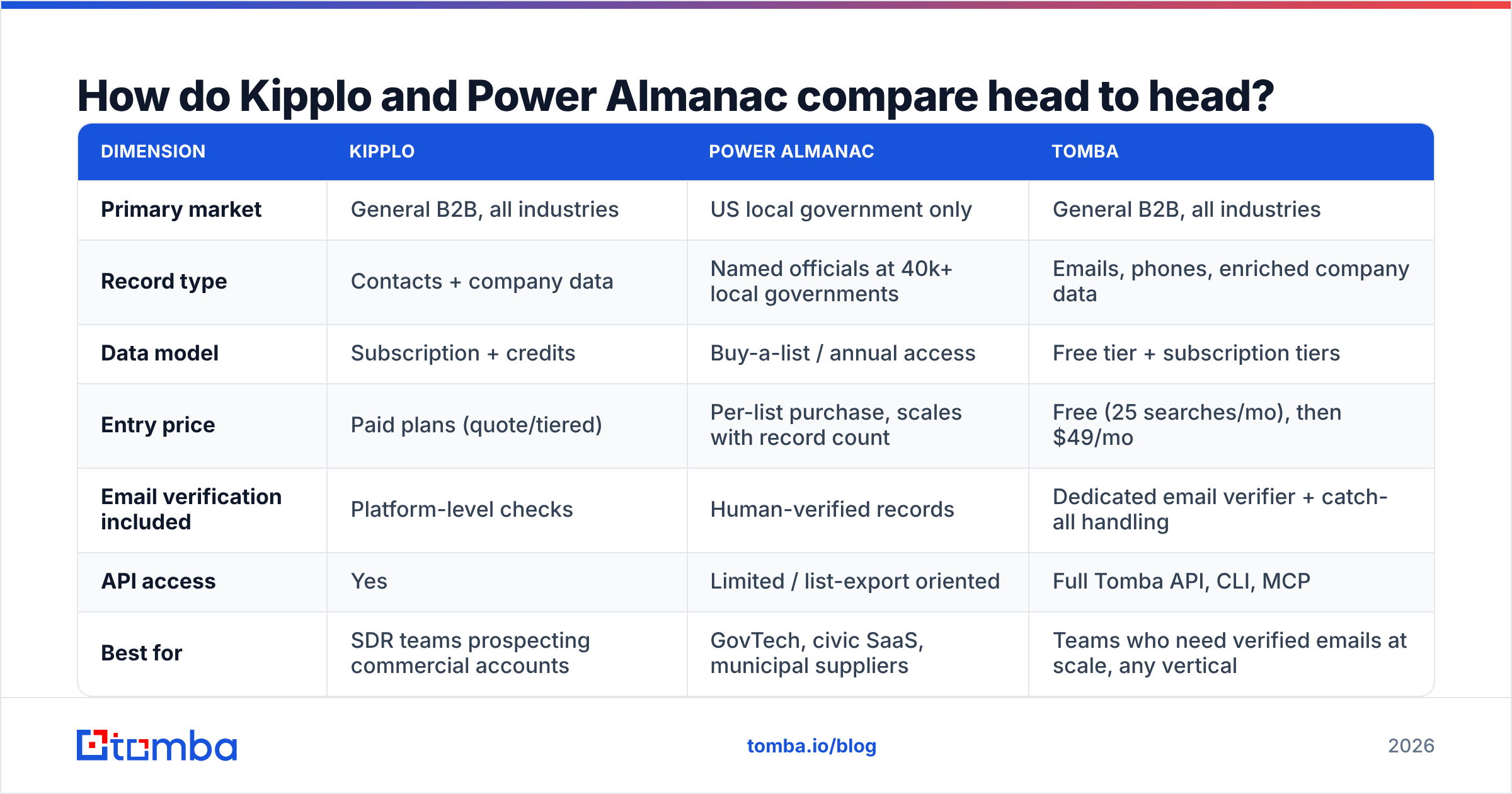
Here is the comparison that drives the choice. Pricing moves at both vendors, and some of it is quote-based. Treat the figures as the public shape, not a locked quote. Check their own pricing pages before you buy.
| Dimension | Kipplo | Power Almanac | Tomba |
|---|---|---|---|
| Primary market | General B2B, all industries | US local government only | General B2B, all industries |
| Record type | Contacts + company data | Named officials at 40k+ local governments | Emails, phones, enriched company data |
| Data model | Subscription + credits | Buy-a-list / annual access | Free tier + subscription tiers |
| Entry price | Paid plans (quote/tiered) | Per-list purchase, scales with record count | Free (25 searches/mo), then $49/mo |
| Email verification included | Platform-level checks | Human-verified records | Dedicated email verifier + catch-all handling |
| API access | Yes | Limited / list-export oriented | Full Tomba API, CLI, MCP |
| Best for | SDR teams prospecting commercial accounts | GovTech, civic SaaS, municipal suppliers | Teams who need verified emails at scale, any vertical |
| Worst for | Deep public-sector coverage | Anything outside US local gov | Buying a pre-built niche vertical list |
Two things fall out of that table.
First, say you sell snow plows, ERP for clerks, body cameras, water chemicals, or civic software. Then Power Almanac's narrow focus is the whole point. Broad databases are thin on city org charts. They index people who are active on LinkedIn, and a township road commissioner in rural Ohio usually is not.
Second, if you sell to anyone else, Power Almanac is not a real option. The choice becomes "Kipplo vs every other broad data vendor." That is a crowded fight, and a much more price-driven one.
Which one has better data accuracy?#
They fail in different ways. That is the more useful lens.
Power Almanac's risk is the calendar. Local government contacts churn on a hard schedule. One November election can spoil a big slice of any city list by January. Power Almanac answers with a manual re-check cycle. Real people call and confirm. That costs money, so it shows up in the price. Buy a list in month one of a refresh cycle and it is excellent. Buy in month eleven, or reuse last year's export, and you are emailing people who lost their seats.
Kipplo's risk is the classic broad-database one: guessed emails. Almost every wide B2B platform fills gaps by guessing patterns (first.last@, flast@). It then scores a confidence number instead of proving the mailbox is real. That works when the score is high and the domain is normal. It breaks on catch-all domains. Those accept every address at send time, then bounce later. Worse, they can drop your mail into a spam trap.
Teams underrate this part. A 92% accurate list sounds great, until you send 5,000 emails. That is 400 bounces. On a fresh domain, that is enough to wreck your sender reputation and push the whole sequence into spam. Google and Yahoo now expect a hard-bounce rate well under 2%, and both publish the numbers in their postmaster guidelines.
The fix is the same either way: treat every list you buy or export as unverified until you check it yourself. Run it through a catch-all verifier. That splits real inboxes from domains that say yes to everything. Then drop or park the rest. Vendors quote accuracy on the day they sell you the records. Nobody quotes accuracy six months later, which is when you actually send.
When should you choose Power Almanac?#
Pick Power Almanac when all of these are true:
- Your buyer holds a public office or a city staff job. City manager, county administrator, school district roles, public works, parks and rec, emergency services.
- You need small governments, not just big cities. Any tool can find the Mayor of Chicago. The value here is the 38,000 places nobody has heard of.
- You want a filtered, downloadable list, not a search-as-you-go tool. Power Almanac is built around picking a segment and exporting it. Think population 10k–50k, Midwest, public works directors.
- Your sales cycle is slow anyway. Public-sector buying runs on RFPs and takes months. Week-to-week freshness matters less. Yearly re-purchase matters a lot.
- You are fine running a second tool for everything else. Power Almanac will not help you prospect a Series B fintech.
Check three or fewer of those boxes and you are paying for a specialist you cannot use.
When should you choose Kipplo — or a broader tool?#
Choose a broad platform when your buyer is defined by company traits: industry, headcount, tech stack, funding. That is most B2B teams.
Be honest about what you are buying, though. This is the most crowded layer in the sales stack. Judge it on four things:
- Coverage where you sell. Strong global averages hide bad regional gaps. Test 50 of your real target accounts, not the demo accounts.
- Verification depth. Does the tool prove the mailbox, or score a guess? Ask how it handles catch-all domains. The answer sorts real vendors from resellers.
- Cost per usable contact. Not per credit. If 30% of records fail a check, your real price is 1.43x the sticker.
- Workflow fit. API, CRM sync, spreadsheet add-ins. A cheap database you have to hand-copy into HubSpot burns more SDR hours than it saves.
On that last point, G2's B2B data category is more useful than any vendor comparison page, this one included. Sort by company size closest to yours. Then read the 3-star reviews. That is where the real limits get written down.


Is there a third option that covers both?#
Partly. And "partly" is the honest word.
No vendor can credibly claim deep US city org charts and wide commercial coverage. Anyone who says both is selling you a thin version of one. What you can do is split the stack by job:
- A vertical list for the vertical. If local government is your market, buy Power Almanac. There is no clever workaround.
- A broad finder for everything else, including the vendors, consultants, and partners who orbit your public-sector accounts.
- One checking layer on top of both, so you are not trusting two vendors' ideas of "valid."
That third layer is where Tomba fits. It does not replace a niche publisher. It handles the find-and-verify job across whatever domains you feed it. Domain search pulls every address it can find at a target org, including .gov and .us domains that many commercial databases skip. Data enrichment fills gaps in a list you already own. That includes a Power Almanac export that has aged past its refresh date.
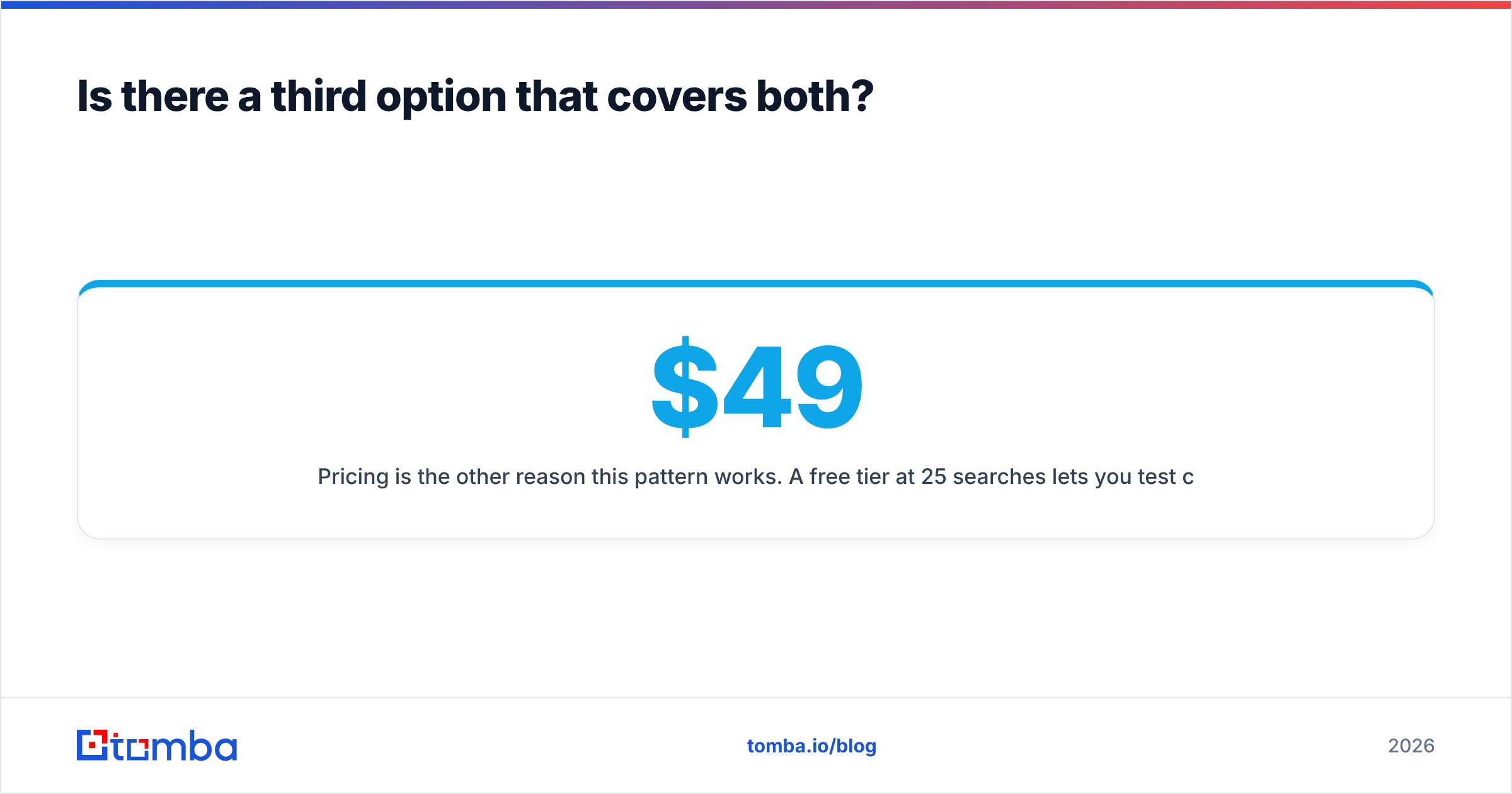
Price is the other reason this works. A free tier of 25 searches a month lets you test coverage on your own accounts first. Tomba pricing then starts at $49/mo on Starter, $99/mo on Growth, and $249/mo on Pro. Next to a vertical data subscription, that layer is a rounding error, not a second big bill.

What does Kipplo vs Power Almanac cost in practice?#
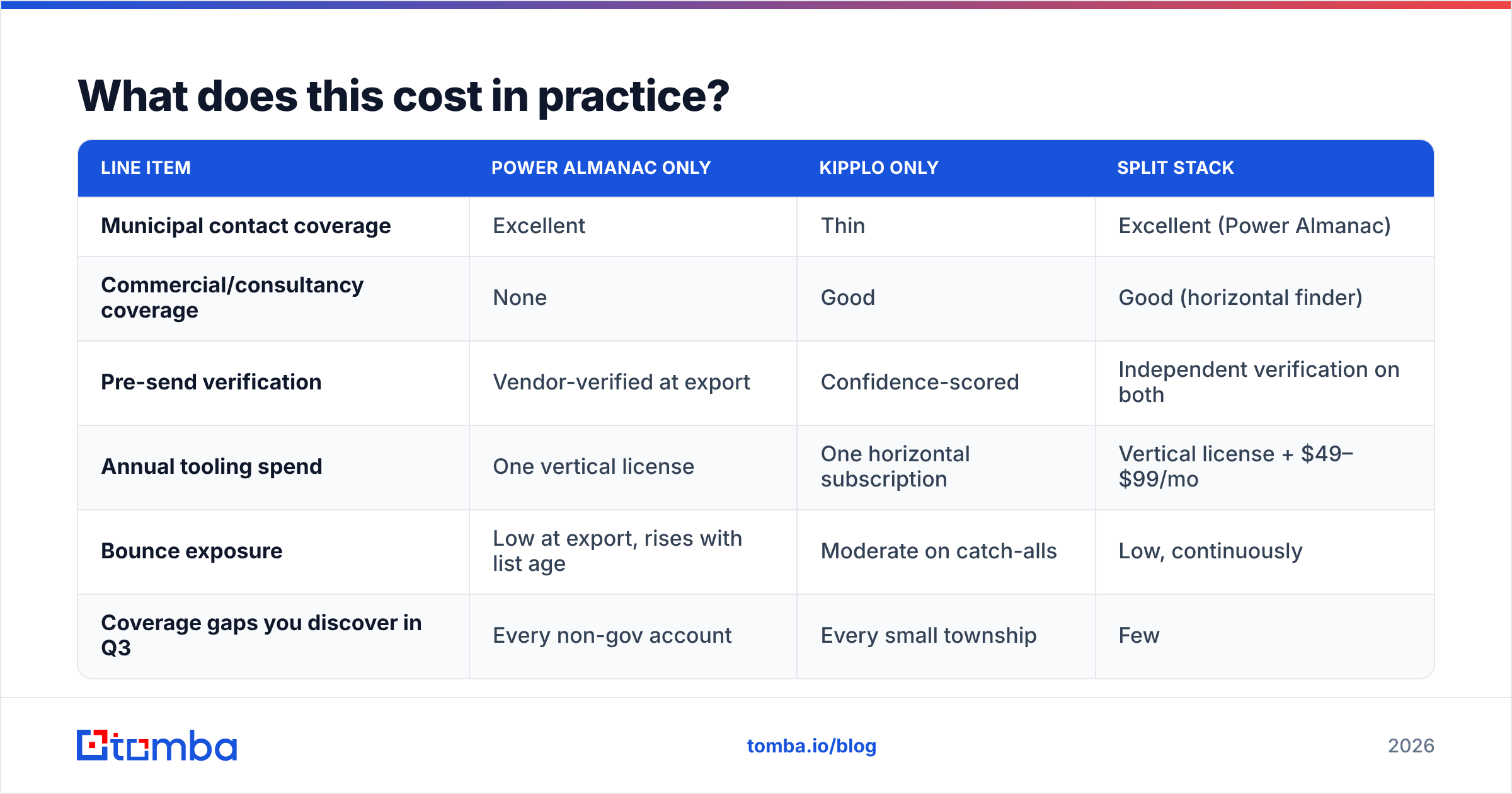
Run the numbers on a real case. A govtech vendor sells permitting software to mid-size cities. It also sells to the engineering consultancies those cities hire.
| Line item | Power Almanac only | Kipplo only | Split stack |
|---|---|---|---|
| Municipal contact coverage | Excellent | Thin | Excellent (Power Almanac) |
| Commercial/consultancy coverage | None | Good | Good (horizontal finder) |
| Pre-send verification | Vendor-verified at export | Confidence-scored | Independent verification on both |
| Annual tooling spend | One vertical license | One horizontal subscription | Vertical license + $49–$99/mo |
| Bounce exposure | Low at export, rises with list age | Moderate on catch-alls | Low, continuously |
| Coverage gaps you discover in Q3 | Every non-gov account | Every small township | Few |
The split stack costs more in dollars and less in wasted SDR weeks. With one or two reps, going broad-only is fine if government is a small slice of pipeline. Past three reps, or past roughly 30% of pipeline in one vertical, the specialist pays for itself on reply rate alone.
One caveat, stated plainly. If your budget covers one tool and your market is truly split, buy the tool that covers the bigger half. Fill the smaller half by hand. Researching 200 city contacts by hand is dull but doable. Researching 5,000 commercial contacts is not.
How do you test either one without burning a quarter?#
A 90-minute test beats a 30-day trial you never plan.
- Build a golden list of 50 real target accounts. The ones your reps actually want, awkward ones included. Not the Fortune 500 logos every database has.
- Run the same 50 through each tool. Record match rate, role accuracy, and email format. Did it find a contact? Is it the right contact?
- Check every returned address on your own with a neutral email verifier. You want to grade the vendor, not the vendor's own grading.
- Work out the cost per verified, role-correct contact. This one number settles most vendor arguments.
- Send 25 real emails from a warmed domain to the winners. Reply rate is the only metric that survives contact with reality.
- Re-run step 2 ninety days later on 10 of the same accounts. This measures decay. Everyone skips it, and it is the step that exposes stale databases.
Comparing several vendors at once? A few neutral peers are worth adding to the bake-off. BookYourData is a good pick if you want pay-as-you-go verified B2B lists with no subscription. That is a different way to buy than either tool here, and often the right call for one-off campaigns. Run it through the same 6-step test and let the numbers decide.
Kipplo vs Power Almanac: which should you pick?#
If you sell to US local governments: Power Almanac, and it is not close. Its depth in small cities is a real moat. No broad platform matches it. Budget for a yearly re-purchase, and still verify the export before your first send.
If you sell to commercial accounts: Power Almanac is not for you. Judge Kipplo against the wider field on three things: coverage where you sell, verification depth, and cost per usable contact. Insist on testing with your own account list, not a demo.
If you sell to both: run the split stack. A vertical publisher for the vertical. A broad finder for the rest. One verification layer across both, so your bounce rate stays low no matter the source.
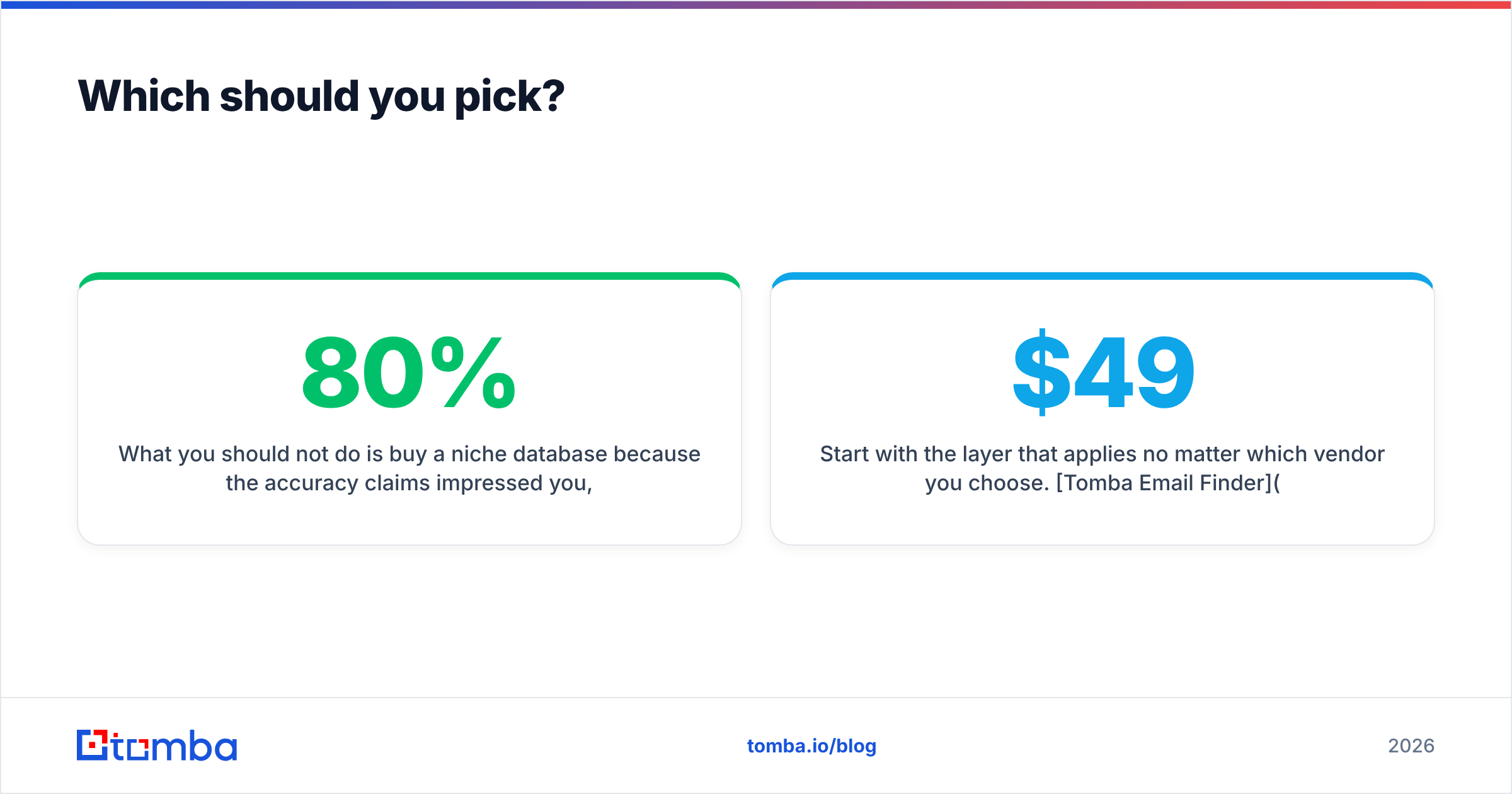
What you should not do is buy a niche database because the accuracy claim impressed you. Then in Q3 you find that 80% of your pipeline sits outside its coverage. Coverage fit beats accuracy claims every time. An unusable 99% accurate record is worth zero.
Start with the layer you need no matter which vendor wins. Tomba Email Finder finds and verifies work emails by domain, name, or company. That includes the .gov and .us domains most databases ignore. The free tier gives you 25 searches a month. That is enough to run the 50-account test above before you spend a dollar. Paid plans start at $49/mo, and the Tomba API drops the same checks into the pipeline you already built.
Related guides#
// get started
Find, verify and enrich your first contacts today
Start on the free plan with 25 searches a month, then scale when your team is ready.
Free plan · No credit card required · GDPR & CCPA
// about the author