Kipplo vs Tomba: Email Finder Comparison for 2026 Teams
Kipplo and Tomba both promise verified B2B emails, but they solve different problems. Here's an honest look at accuracy, coverage, pricing models and API depth before you commit budget.
TL;DR
- Kipplo is a lean, credit-based email finder aimed at solo operators and small outbound teams who want a fast lookup box without a platform to learn. Confirm current plan limits directly on kipplo.com — newer tools change tiers often.
- Tomba is a wider data layer: email finder, verifier, catch-all handling, domain search, phone finder and enrichment, all behind one API and one credit pool. Pricing is public: Free (25 searches/mo), Starter $49/mo, Growth $99/mo, Pro $249/mo.
- Pick Kipplo if you run a handful of manual lookups a week and want the simplest possible surface.
- Pick Tomba if you need bulk runs, catch-all verdicts, CRM sync, or a documented API your engineers will actually build on.
- The real cost driver is not sticker price — it's wasted credits on unverifiable addresses. Model cost-per-usable contact, not cost-per-search.
What is Kipplo, and who is it for?#
Kipplo positions itself as a straightforward B2B email lookup tool: give it a name and a company domain, get a likely work address back, usually with a confidence indicator attached. That's the whole pitch, and there's nothing wrong with it. A lot of buyers don't want a data platform — they want a box, a button, and an answer.
Tools in this bracket tend to share a shape:
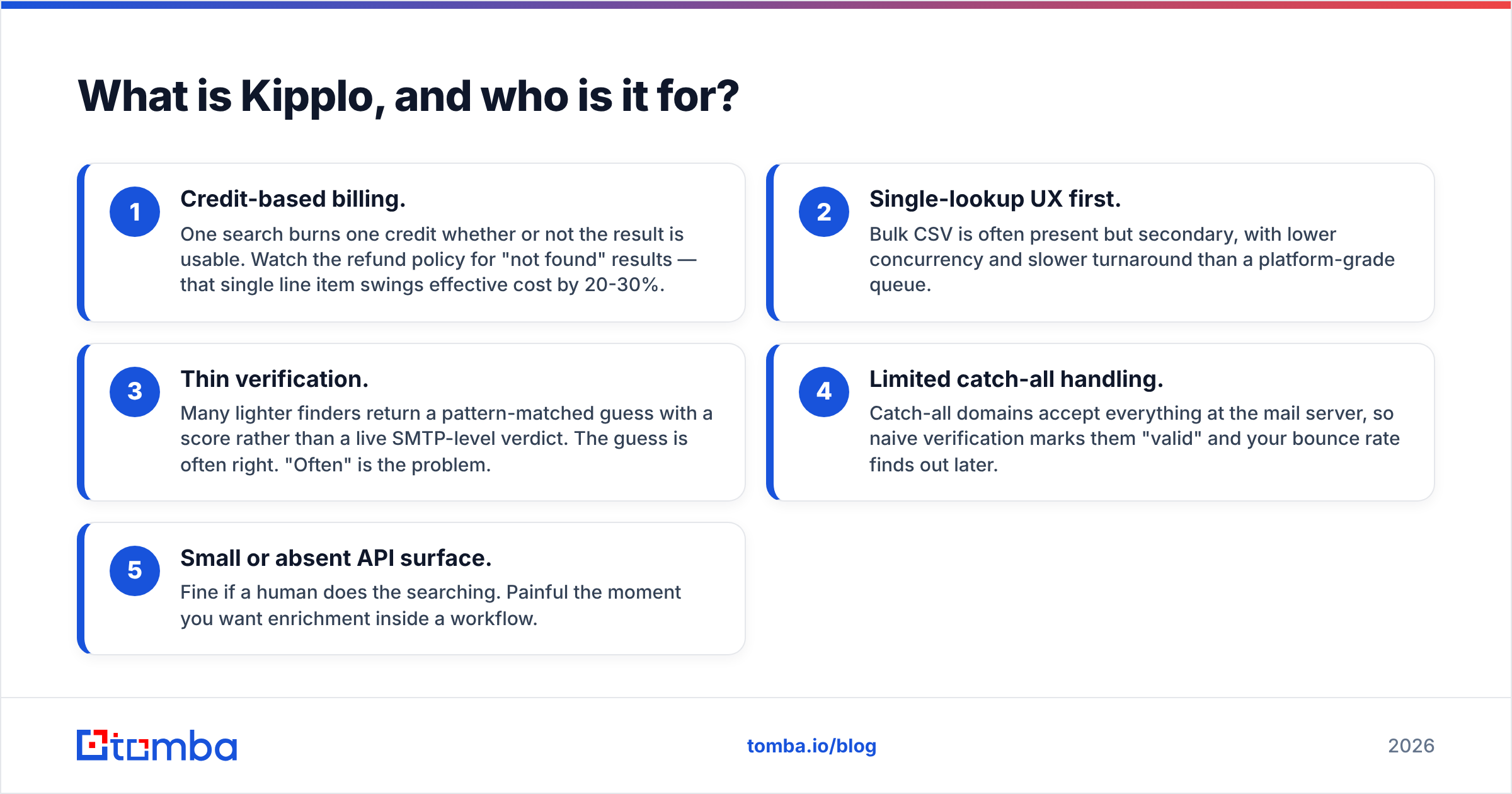
- Credit-based billing. One search burns one credit whether or not the result is usable. Watch the refund policy for "not found" results — that single line item swings effective cost by 20-30%.
- Single-lookup UX first. Bulk CSV is often present but secondary, with lower concurrency and slower turnaround than a platform-grade queue.
- Thin verification. Many lighter finders return a pattern-matched guess with a score rather than a live SMTP-level verdict. The guess is often right. "Often" is the problem.
- Limited catch-all handling. Catch-all domains accept everything at the mail server, so naive verification marks them "valid" and your bounce rate finds out later.
- Small or absent API surface. Fine if a human does the searching. Painful the moment you want enrichment inside a workflow.
None of this makes Kipplo a bad product. It makes it a narrow one, and narrow is a feature when your use case is narrow. The mistake buyers make is assuming a lookup box will scale into an outbound engine. Check Kipplo's own docs and current tiers before you assume a capability exists — the category moves fast and third-party reviews on G2 go stale within a quarter.
What is Tomba, and how is it structured differently?#
Tomba starts from the same primitive — find a work email — but treats it as one node in a data pipeline rather than the whole product. The email finder is the front door; behind it sit a verifier, a catch-all verifier, domain search, phone finder, reverse lookup and enrichment, all drawing on the same credit balance and the same API key.
That architecture matters for one practical reason: the handoff between "found" and "verified" is where lists rot. When finding and verifying live in separate tools, you export a CSV, upload it somewhere else, reconcile the columns, and lose provenance. When they share a pipeline, an address that fails verification never reaches your sequencer.
The other structural difference is the developer surface. Tomba ships a documented REST email finder API, a CLI, an MCP server, a Chrome extension, and native add-ins for Sheets, Excel and Airtable. Whether you need any of that depends entirely on whether a human or a script is doing the prospecting.
How do Kipplo and Tomba compare feature by feature?#
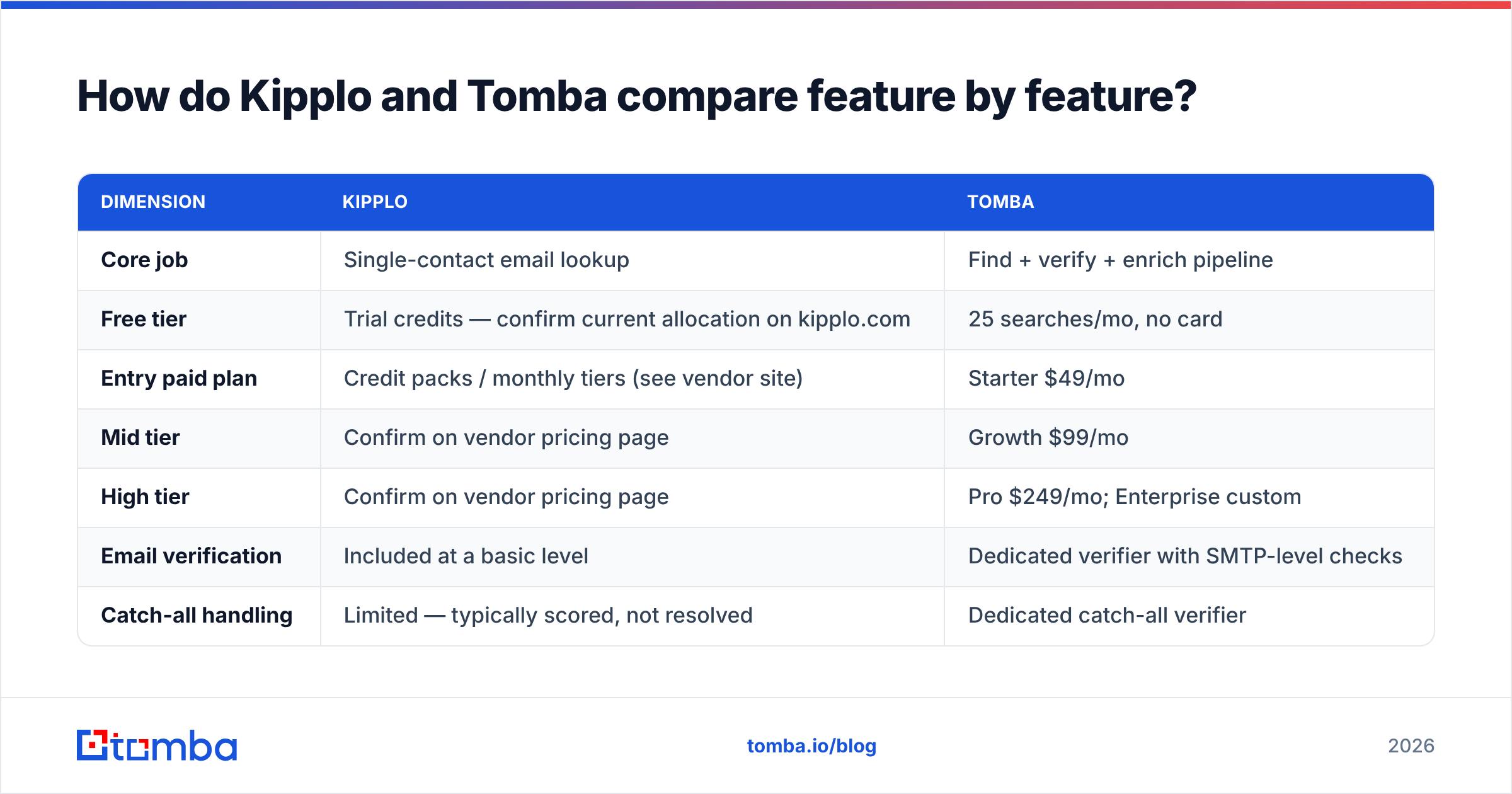
| Dimension | Kipplo | Tomba |
|---|---|---|
| Core job | Single-contact email lookup | Find + verify + enrich pipeline |
| Free tier | Trial credits — confirm current allocation on kipplo.com | 25 searches/mo, no card |
| Entry paid plan | Credit packs / monthly tiers (see vendor site) | Starter $49/mo |
| Mid tier | Confirm on vendor pricing page | Growth $99/mo |
| High tier | Confirm on vendor pricing page | Pro $249/mo; Enterprise custom |
| Email verification | Included at a basic level | Dedicated verifier with SMTP-level checks |
| Catch-all handling | Limited — typically scored, not resolved | Dedicated catch-all verifier |
| Domain search (all emails at a company) | Not a headline feature | Yes |
| Phone numbers | No | Yes, phone finder + validator |
| Bulk processing | CSV upload, modest volumes | Bulk finder + bulk verify |
| Public REST API | Limited | Full API, CLI, MCP server |
| Native integrations | Few | HubSpot, Salesforce, Pipedrive, Zapier, Make, Sheets, Excel, Airtable |
| Best fit | Solo founder, light manual prospecting | SDR teams, agencies, RevOps, developers |
Two honest caveats about that table. First, Kipplo's published tiers change; treat the vendor site as the source of truth and this column as a shape, not a quote. Second, "included verification" means different things at different vendors — always test it against a list where you already know the answers.
Which tool is more accurate in practice?#
Accuracy claims in this category are close to worthless as marketing copy, because every vendor measures differently. Some report accuracy on results they chose to return (easy — suppress the hard ones). Some count catch-all domains as hits. Some quote a bounce rate from a curated sample.

Here's the test that actually settles it, and it takes about twenty minutes:
- Build a 100-row control list. Pull contacts you already have confirmed addresses for — past customers, inbound leads, people who've replied to you. Mix company sizes and regions.
- Strip the emails, keep name + domain. Run the identical list through both tools.
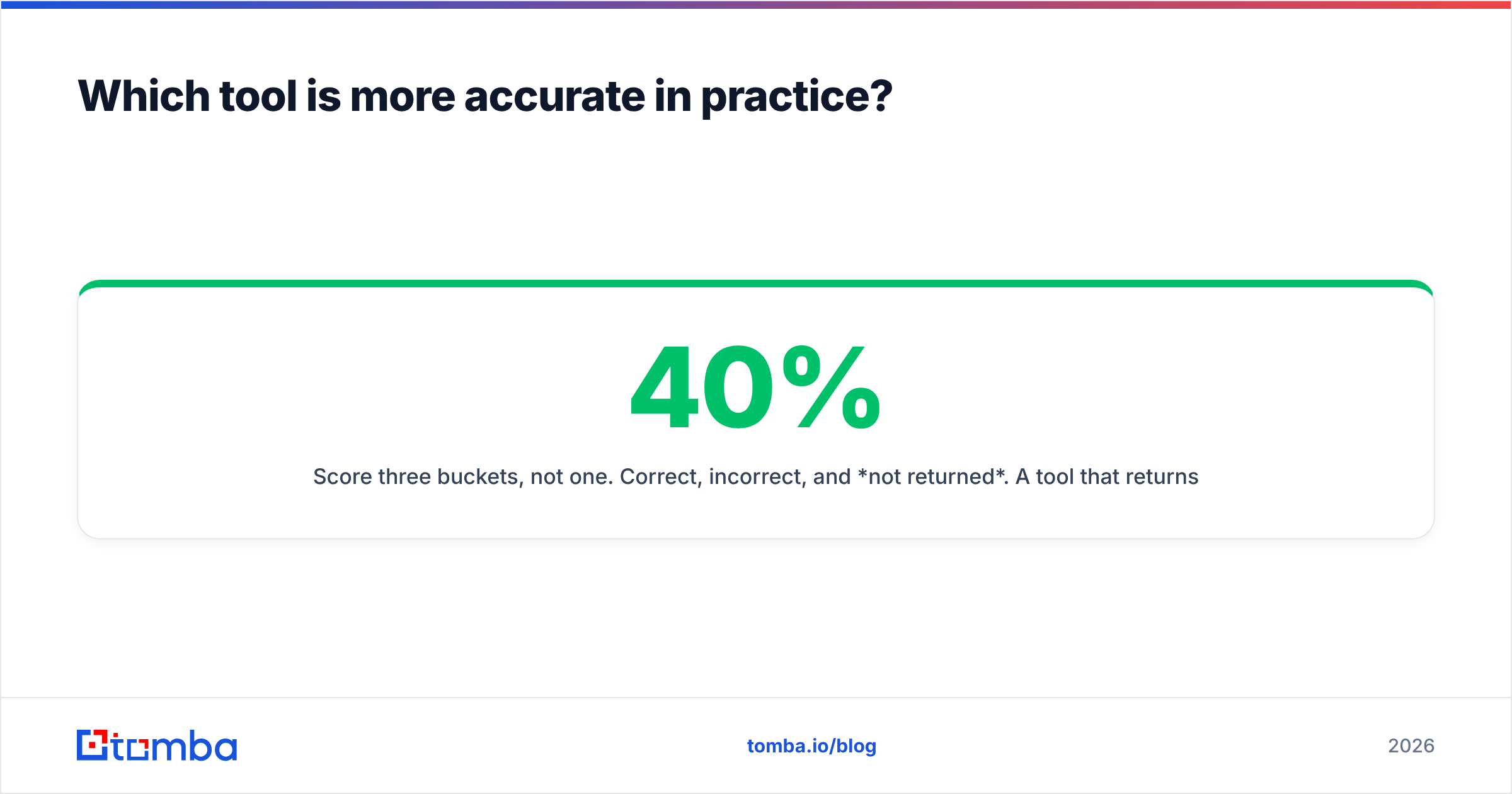
- Score three buckets, not one. Correct, incorrect, and not returned. A tool that returns nothing on 40% of rows isn't 98% accurate — it's 58% useful.
- Check the catch-all column separately. Count how many results are on accept-all domains and what verdict each tool gives. This single column predicts most of your future bounce rate.
- Weight by cost. Divide plan price by usable contacts, not by searches. That's your real unit economics.
Run that and you'll stop arguing about headline percentages. In our experience the gap between tools is rarely in the easy rows — every finder nails firstname.lastname@bigcompany.com. The gap shows up on 20-person companies, non-US domains, and anything behind an accept-all MX record. That's exactly where a dedicated email verifier earns its keep, and where lightweight finders quietly hand you a pattern guess wearing a confidence badge.
If you want the mechanics of why SMTP checks are probabilistic rather than binary, the SMTP protocol documentation explains why mail servers are allowed to lie to you during a handshake. Understanding that makes vendor accuracy claims much easier to read critically.

How do the pricing models compare?#
Tomba's pricing is public and flat: Free (25 searches/mo), Starter $49/mo, Growth $99/mo, Pro $249/mo, Enterprise on request. Credits pool across every tool — finder, verifier, domain search, enrichment — so you're not buying a separate SKU to check whether the address you just bought is real.

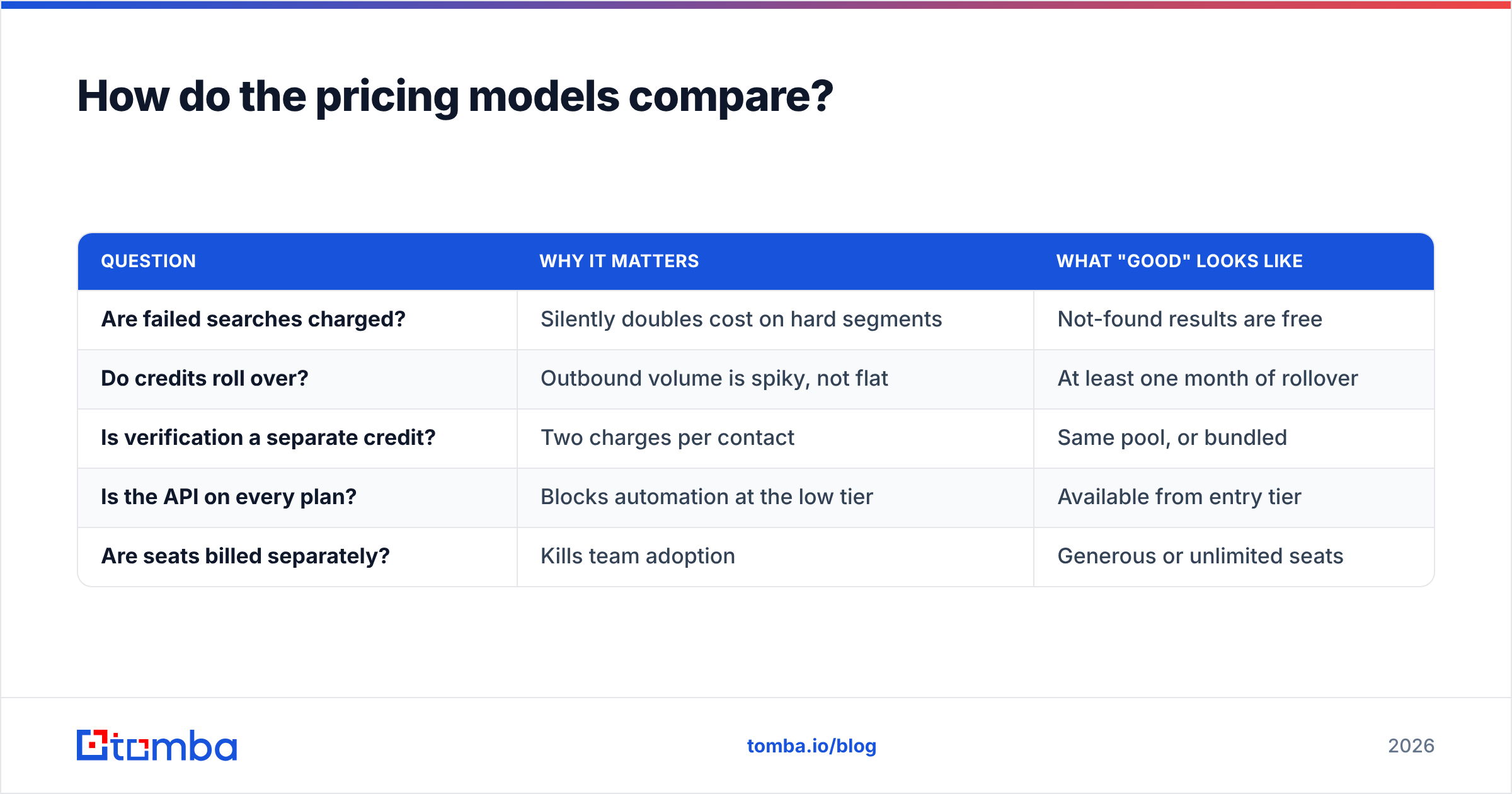
Kipplo sells on a credit model too. The questions worth asking before you pay, in order:
| Question | Why it matters | What "good" looks like |
|---|---|---|
| Are failed searches charged? | Silently doubles cost on hard segments | Not-found results are free |
| Do credits roll over? | Outbound volume is spiky, not flat | At least one month of rollover |
| Is verification a separate credit? | Two charges per contact | Same pool, or bundled |
| Is the API on every plan? | Blocks automation at the low tier | Available from entry tier |
| Are seats billed separately? | Kills team adoption | Generous or unlimited seats |
Ask those five and the "cheaper" tool frequently stops being cheaper. A $29 plan that charges for misses and bills verification separately can land above a $49 plan that doesn't.
Is Kipplo or Tomba better for bulk prospecting?#
This is the cleanest dividing line between the two.
Manual prospecting — you, a browser, twenty target accounts a week — barely stresses either tool. Kipplo's simplicity is genuinely an advantage here; there's less to configure and less to ignore.
Bulk prospecting is a different engineering problem. You need concurrency, deduplication, retry logic on transient SMTP failures, catch-all triage, and a clean export into your CRM. Tomba's bulk email finder exists for that shape of work, and the Tomba API covers the case where the job should run without a human clicking anything — nightly enrichment of new signups, on-demand lookups inside your app, or an agent pipeline through the MCP server.
Rule of thumb: under ~200 lookups a month, tooling depth doesn't pay for itself. Over ~1,000, it's the only thing that does.
What about data coverage and compliance?#
Coverage is regional and vertical, not global. Most finders are strongest on US and Western European tech companies and weakest on SMBs outside those markets. Don't take any vendor's total-records number seriously — a database of 500M contacts is irrelevant if your ICP is 800 German manufacturing firms. Test your ICP, not the index size.
On compliance, ask both vendors the same three questions: where does the data come from, is there a documented deletion/suppression process, and what happens to your uploaded lists after processing? Tomba publishes its data sources; ask Kipplo for the equivalent in writing. If either answer is vague, that's your answer.
Which should you choose?#
Choose Kipplo if: you're a solo founder or one-person agency, you run occasional manual lookups, you don't need phone numbers or catch-all resolution, and you value a tool you can learn in five minutes over one you can build on. Simplicity has real value and it's undersold in this category.
Choose Tomba if: you're running outbound at team scale, you need finding and verification in the same pipeline, you care about catch-all domains, you want CRM integrations that don't route through CSV exports, or you have engineers who will call an API. The Free tier gives you 25 searches a month to check the accuracy claims yourself before any card touches the form.
Choose both if: you genuinely don't want to migrate. Some teams keep a light tool for ad-hoc lookups and run a platform for pipeline work. It's not elegant, but it's honest about how work actually gets done.
The wrong move is picking on headline price. The list you can't email is infinitely expensive, and the difference between a 3% bounce rate and a 12% bounce rate isn't a line item — it's whether your domain still lands in the inbox next quarter.
Run the 100-row control test before you commit to either tool. If you want to start with Tomba's side of it, the Tomba Email Finder gives you 25 free searches a month — enough to score a real sample against addresses you already know are correct, catch-all column included. Bring your own list, measure usable contacts rather than raw hits, and let the numbers pick the winner instead of the pricing page.
Related guides#
// get started
Find, verify and enrich your first contacts today
Start on the free plan with 25 searches a month, then scale when your team is ready.
Free plan · No credit card required · GDPR & CCPA
// about the author