Kitt AI Pricing, Reviews, Pros and Cons: An Honest Look
Kitt AI keeps most of its price list behind a sales call. Here is what buyers actually pay, what the reviews say, where the hidden costs sit, and when a cheaper data-first stack does the same job.
TL;DR
- Kitt AI does not publish a complete, self-serve price list. Almost every serious deployment is quoted by a salesperson, which means your cost depends on your negotiation as much as on the product.
- The line item on the invoice is rarely the real cost. Onboarding, integration work, usage overages, and the data you feed the system usually add 30-60% on top of the software fee.
- Reviews cluster around two themes: people like what the automation does once it is configured, and they dislike how long configuration takes and how opaque the renewal conversation is.
- Kitt AI is a poor fit if your contact data is thin. Automating outreach on top of stale records just makes bad prospecting faster.
- If your actual bottleneck is finding and verifying contacts, a $49/mo data layer solves more of the problem than a five-figure AI platform.
What is Kitt AI and who actually uses it?#
Kitt AI sits in the AI sales technology category: software that listens to, drafts, routes, or places parts of the sales conversation so a human rep does less mechanical work. Products in this space range from voice agents that handle first-touch calls, to assistants that summarize meetings and update the CRM, to systems that decide which account gets contacted next.
The buyers are almost always the same three profiles:
- A VP of Sales with a headcount freeze. They cannot hire three more SDRs, so they buy software that claims to do the volume work of three SDRs.
- A RevOps lead cleaning up a messy stack. They want fewer tools, better logging, and an audit trail of every touch.
- An agency or outbound shop. They run outreach for clients and need throughput more than nuance.
That matters for pricing, because vendors in this category price against the salary they are displacing, not against their own cost to serve. When a tool is positioned as "cheaper than an SDR," the anchor is $60,000-$90,000 a year, and quotes get built backward from there. This is the single most important thing to understand before you take the demo call.
It also explains why Kitt AI pricing is not on a public page with three neat tiers. Public pricing caps what the vendor can charge the largest account in the room. Quote-based pricing does not.
How does Kitt AI pricing work in 2026?#
Be careful with any article that tells you Kitt AI costs exactly $X per month. Unless the vendor publishes it, that number is either an old quote someone leaked or an outright guess. What you can do reliably is understand the structure of the quote, because AI sales platforms are priced along a small, predictable set of axes.
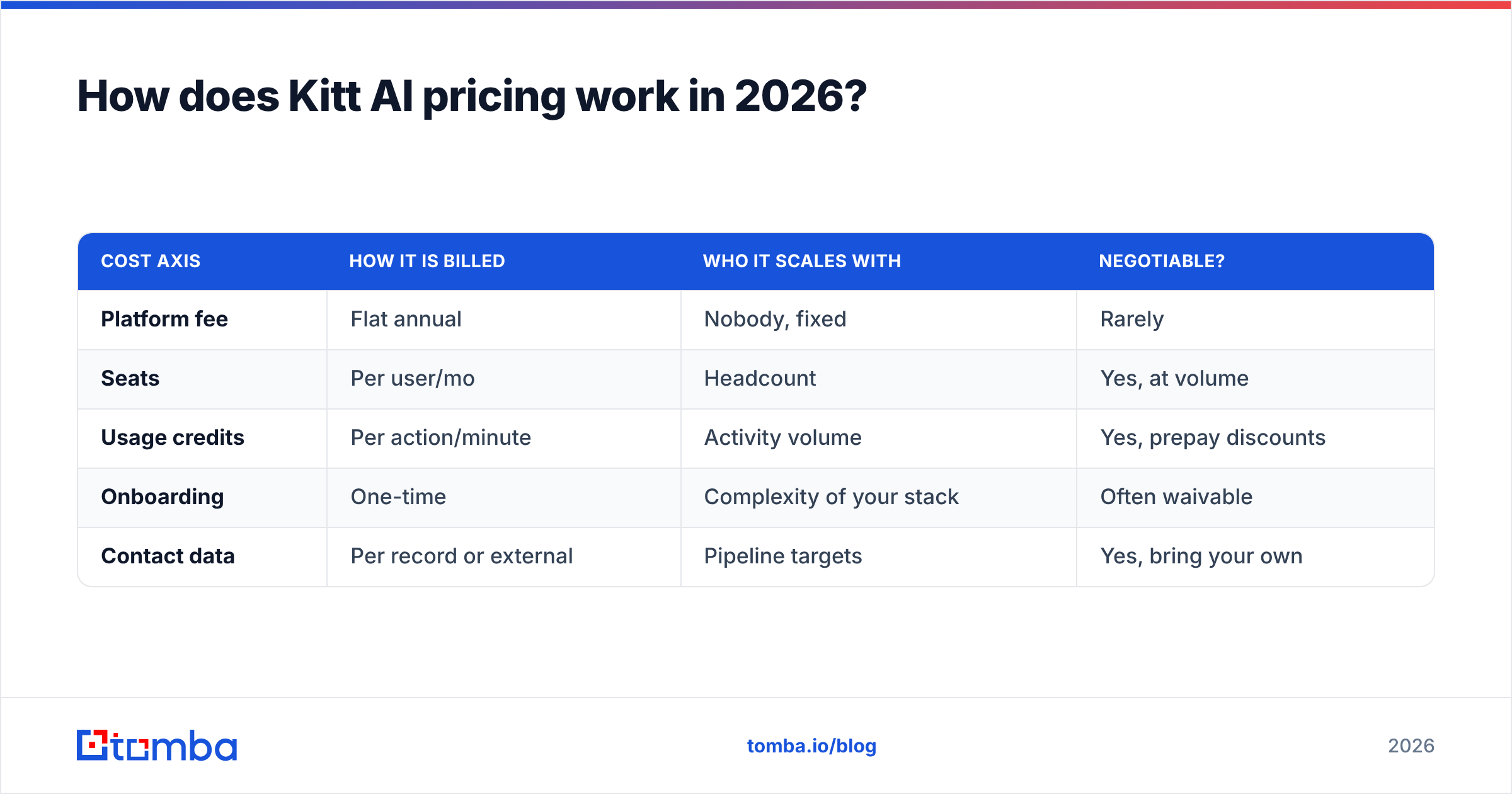
Here are the five components that show up in nearly every quote in this category:
- Platform fee. A fixed annual or monthly base that buys you access to the product at all. This is the number vendors negotiate least.
- Seats. Per-user pricing for reps, managers, and sometimes read-only admins. Ask explicitly whether admin and analytics seats are billable.
- Usage credits. Minutes, messages, enrichments, or actions. This is where budgets break, because usage grows with success. A pilot that works produces overages.
- Onboarding and implementation. A one-time fee, frequently 15-25% of year-one contract value, sometimes waived for annual prepay.
- Data. Either a bundled data allowance or, more often, your problem. If the platform does not supply contacts, you are buying a database or an email finder separately.
| Cost axis | How it is billed | Who it scales with | Negotiable? |
|---|---|---|---|
| Platform fee | Flat annual | Nobody, fixed | Rarely |
| Seats | Per user/mo | Headcount | Yes, at volume |
| Usage credits | Per action/minute | Activity volume | Yes, prepay discounts |
| Onboarding | One-time | Complexity of your stack | Often waivable |
| Contact data | Per record or external | Pipeline targets | Yes, bring your own |
The practical implication: two companies with the same seat count can pay wildly different amounts. A ten-seat team running high volume with a messy CRM can easily pay three times what a ten-seat team with clean data and low volume pays.

What do Kitt AI reviews say about the pros and cons?#
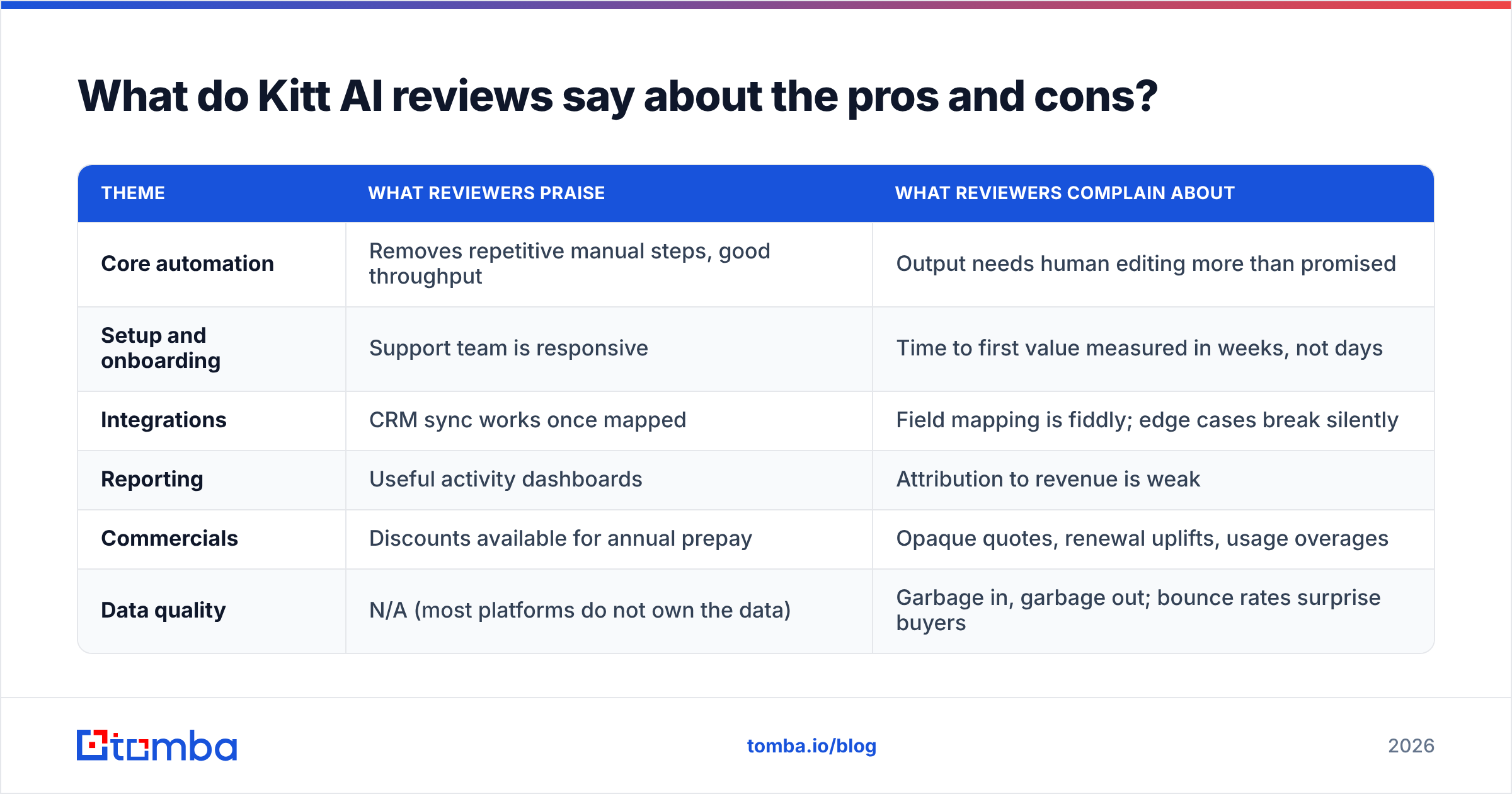
Review sentiment for AI sales platforms follows a reliable arc, and Kitt AI reviews sit inside it. If you read the public listings on G2's AI sales assistant category or the comparable listings on Capterra, you will see the same structure again and again: high marks for what the product does after setup, lower marks for setup itself, and the sharpest criticism reserved for commercial terms.
Consolidating the recurring themes:
| Theme | What reviewers praise | What reviewers complain about |
|---|---|---|
| Core automation | Removes repetitive manual steps, good throughput | Output needs human editing more than promised |
| Setup and onboarding | Support team is responsive | Time to first value measured in weeks, not days |
| Integrations | CRM sync works once mapped | Field mapping is fiddly; edge cases break silently |
| Reporting | Useful activity dashboards | Attribution to revenue is weak |
| Commercials | Discounts available for annual prepay | Opaque quotes, renewal uplifts, usage overages |
| Data quality | N/A (most platforms do not own the data) | Garbage in, garbage out; bounce rates surprise buyers |
That last row is the one most buyers underweight. An AI layer does not improve your contact data. It multiplies whatever quality your data already has. If 22% of your list is invalid, you have just automated 22% bounces at a higher velocity, and your sending domain pays for it. Running a list through an email verifier before it ever touches an automation platform is the cheapest insurance in outbound.
The honest pros#
- Real time savings on mechanical work. Logging, follow-up scheduling, and first-draft writing genuinely compress.
- Consistency. A machine does not skip the third follow-up because it had a bad Tuesday.
- Coverage at the bottom of the list. Accounts your reps would never touch get touched.
- Auditability. Every action is logged, which managers love and reps tolerate.
The honest cons#
- Quote opacity. You cannot budget cleanly without a sales cycle, and you cannot compare vendors without three parallel sales cycles.
- Time to value. Budget four to eight weeks before the system is doing anything you would show a board.
- Usage risk. Success increases usage; usage increases cost. Model the upside case, not just the base case.
- Data dependency. The platform assumes you already have good contacts. Most teams do not.
- Renewal leverage. Once your workflows live inside the tool, switching cost is real, and renewal pricing reflects that.
What hidden costs should you model before signing?#
Software people talk about list price. Finance people talk about total cost of ownership. For an AI sales platform, the gap between the two is usually large enough to change the buy decision.
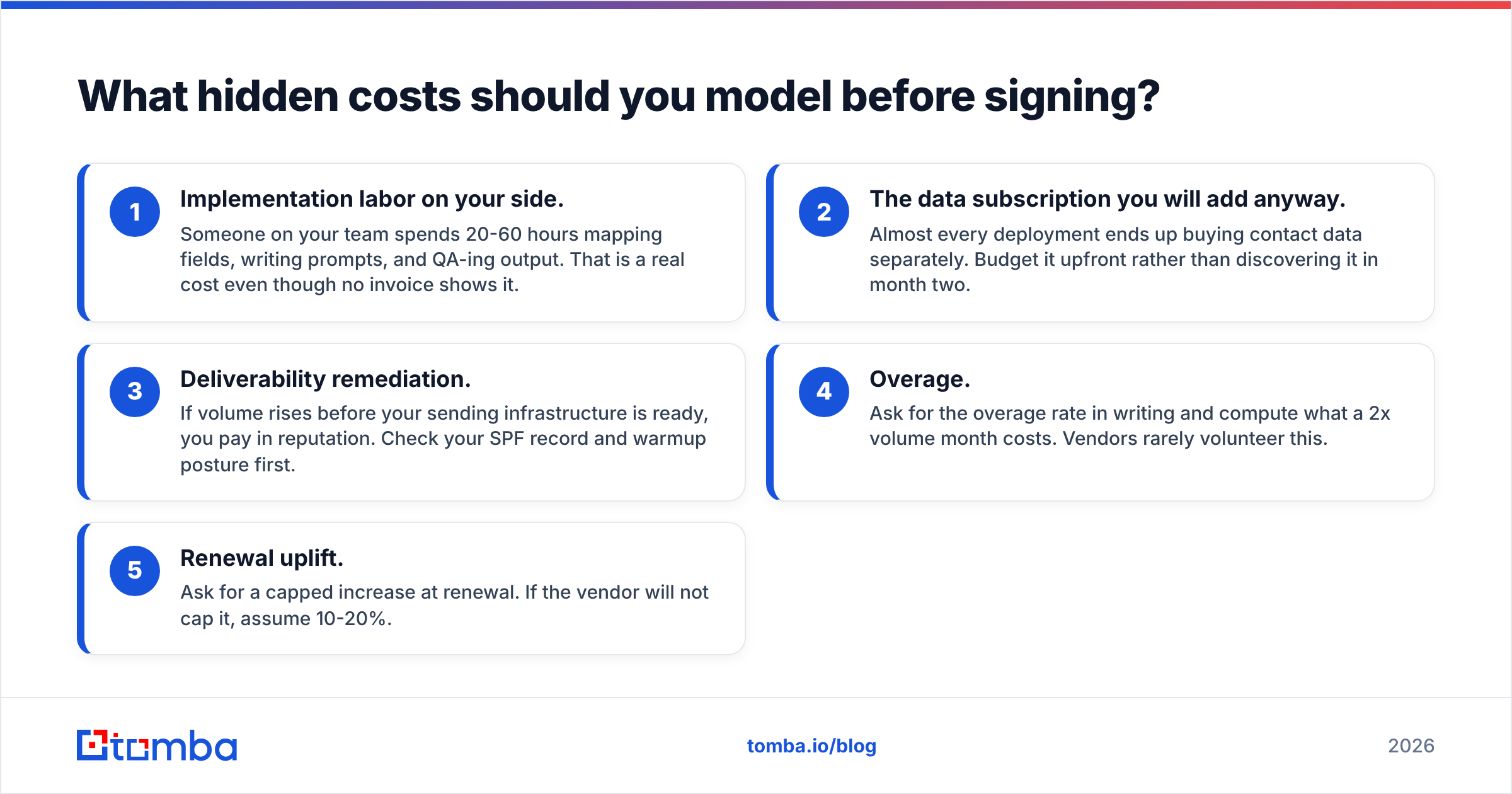
Model these five before you sign:
- Implementation labor on your side. Someone on your team spends 20-60 hours mapping fields, writing prompts, and QA-ing output. That is a real cost even though no invoice shows it.
- The data subscription you will add anyway. Almost every deployment ends up buying contact data separately. Budget it upfront rather than discovering it in month two.
- Deliverability remediation. If volume rises before your sending infrastructure is ready, you pay in reputation. Check your SPF record and warmup posture first.
- Overage. Ask for the overage rate in writing and compute what a 2x volume month costs. Vendors rarely volunteer this.
- Renewal uplift. Ask for a capped increase at renewal. If the vendor will not cap it, assume 10-20%.

Is Kitt AI worth it compared with a leaner stack?#
This is where most write-ups get lazy and declare a winner. The honest answer is that it depends entirely on which bottleneck you actually have.
Run this diagnostic before you spend anything:
- If your reps have good lists and cannot work them fast enough, an AI sales platform is a defensible purchase. You are buying throughput against a real constraint.
- If your reps are spending half their week hunting for contacts, guessing email formats, and cleaning bounces, the constraint is data, not automation. Buying an AI layer here is spending five figures to accelerate a broken input.
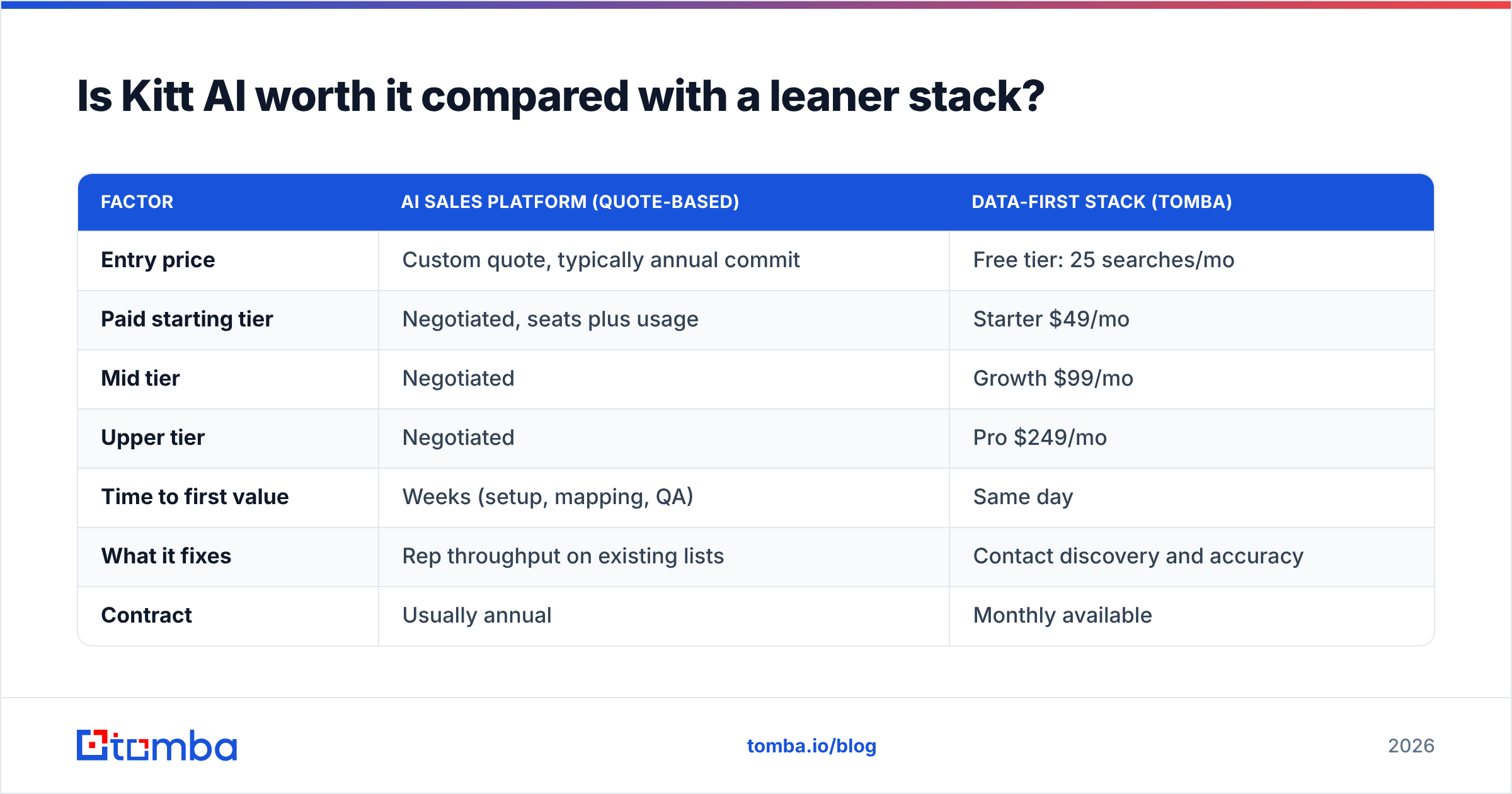
The second case is far more common than vendors admit. Here is how the two paths compare on cost and what each one actually fixes:
| Factor | AI sales platform (quote-based) | Data-first stack (Tomba) |
|---|---|---|
| Entry price | Custom quote, typically annual commit | Free tier: 25 searches/mo |
| Paid starting tier | Negotiated, seats plus usage | Starter $49/mo |
| Mid tier | Negotiated | Growth $99/mo |
| Upper tier | Negotiated | Pro $249/mo |
| Time to first value | Weeks (setup, mapping, QA) | Same day |
| What it fixes | Rep throughput on existing lists | Contact discovery and accuracy |
| Contract | Usually annual | Monthly available |
| Overage risk | High, usage-based | Predictable credit limits |
Full Tomba pricing is public, which is the point of putting it in the table: you can budget it in thirty seconds without booking a call. That transparency is not a knock on Kitt AI's product quality. It is a knock on the purchasing experience, and it is a legitimate factor in a buying decision.
A reasonable sequencing for most teams under 30 reps: fix the data layer first for a few hundred dollars a month, run outbound for a quarter, measure reply rates against clean lists, and only then decide whether an AI platform is buying you throughput you can actually use. If reply rates jump on clean data alone, you may find you no longer need the five-figure layer at all. If they jump and your reps are now genuinely capacity-constrained, you have a much stronger business case for the platform and much better leverage in the negotiation.
Who should buy Kitt AI and who should skip it?#
Strong fit:
- Teams with 20+ reps and a clean, well-governed CRM.
- Organizations with a dedicated RevOps person who can own configuration.
- High-volume motions where marginal throughput converts to marginal revenue predictably.
- Buyers with procurement muscle who can negotiate caps, overage rates, and renewal terms.
Weak fit:
- Teams under ten reps. The per-seat math and the implementation burden rarely clear the bar.
- Companies whose lists come from scraped exports and manual guesswork.
- Anyone who needs a result inside 30 days.
- Teams that cannot articulate, in one sentence, which specific manual step the tool removes.
If you land in the weak-fit column, the money is better spent on inputs. A domain search across your target accounts, verification before sending, and a phone number layer via phone finder for the accounts worth calling will do more for pipeline this quarter than any orchestration layer sitting on top of thin data.
How should you run the Kitt AI evaluation?#
Treat the sales process itself as a pricing negotiation from message one.
- Ask for the full rate card in writing, including per-seat, per-unit, overage, and onboarding. If it cannot be written down, it is not a price, it is an opening position.
- Run a paid pilot with a hard scope. 30-60 days, defined success metric, no auto-renew.
- Benchmark against doing nothing. Measure your current reply rate on clean, verified data before the pilot starts, so the comparison is honest.
- Get the exit terms. Data export format, notice period, and what happens to your configured workflows when you leave.
- Cap the renewal. A written cap on year-two increase is worth more than a year-one discount.
Do those five things and you will get a better price than the majority of buyers, regardless of which platform you choose.
The verdict#
Kitt AI, like most quote-based AI sales platforms, is neither a scam nor a silver bullet. It solves a throughput problem for teams that already have a data foundation, and it creates a budgeting problem for teams that do not. The pros are real; the cons are mostly commercial rather than technical. Judge it on whether throughput is genuinely your constraint, insist on a written rate card, and model the upside usage case before you sign anything annual.
And before you automate anything, fix the input. If your reps are still guessing at email formats or watching bounce rates climb, start with the Tomba Email Finder. The free tier gives you 25 searches a month to test accuracy on your own target accounts, Starter is $49/mo, and you can be running verified lists this afternoon instead of six weeks from now. Clean data makes every tool above it work better, including the expensive one you are about to evaluate.
Related guides#
// get started
Find, verify and enrich your first contacts today
Start on the free plan with 25 searches a month, then scale when your team is ready.
Free plan · No credit card required · GDPR & CCPA
// about the author