Kixie vs PhoneBurner 2026: Which Sales Dialer Actually Wins
Kixie and PhoneBurner both promise more conversations per hour, but they win in different ways. Here's the side-by-side on dialing speed, pricing, CRM fit, and the hidden costs that decide which one your team should buy.
TL;DR
- Kixie is a sales phone system first and a dialer second: multi-line power dialing, two-way SMS, local presence, and deep CRM click-to-call. Best for teams that live inside HubSpot, Pipedrive, or Salesforce and want calling plus texting in one seat.
- PhoneBurner is a single-line, no-delay power dialer built around list-burning: load a list, hit start, talk, drop a voicemail in one click, move on. Best for high-volume list callers who want zero connection lag and no per-minute surprises.
- Price gap is real. Kixie starts cheaper per seat but adds costs as you layer on SMS, AI, and power dialing tiers. PhoneBurner is a flatter, higher per-seat number that already includes most of what you need.
- Neither tool fixes bad data. A 40% wrong-number rate wipes out any dialing-speed advantage. Verified direct dials matter more than dials-per-hour.
- Pick Kixie if calling is one channel in a multi-channel sequence. Pick PhoneBurner if calling is the motion and connect-rate per hour is the only metric that counts.
What are Kixie and PhoneBurner?#
Both tools solve the same bottleneck — reps waste most of their "calling hour" not calling — but they attack it from opposite ends.
Kixie is a cloud phone system for revenue teams. You get a business number, click-to-call from any web page, a power dialer that can run one to ten lines, two-way SMS with templates, call recording, local presence dialing, and native CRM logging. Think of it as replacing your phone system and your dialer in one purchase. Kixie's center of gravity is the CRM: it wants to be the calling layer bolted onto HubSpot or Salesforce so that every dial, text, and recording lands on the contact record automatically.
PhoneBurner is a dedicated power dialer with its own contact workspace. The core loop is deliberately narrow: import a list, start a dial session, and PhoneBurner connects you to live humans with no awkward pause at pickup — because it dials from a bridged line rather than connecting audio after the fact. When you hit voicemail, one click drops a pre-recorded message and the system moves to the next record while the voicemail is still playing. That single design choice is why PhoneBurner users talk about 60–80 dials per hour as normal rather than aspirational.
The practical difference, in one sentence: Kixie is a phone system with a dialer inside it; PhoneBurner is a dialer with a phone system bolted on.
How do Kixie and PhoneBurner compare at a glance?#
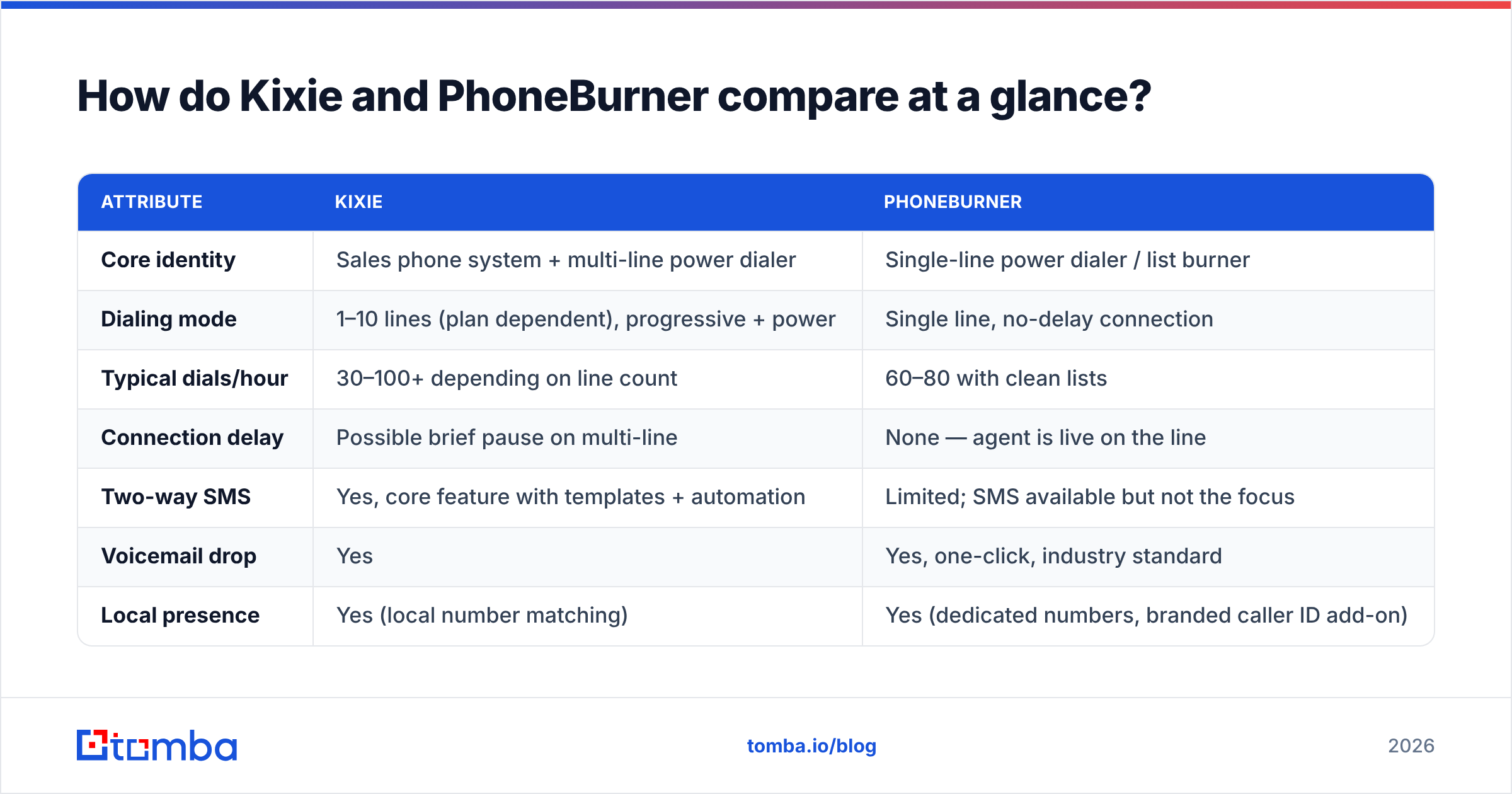
| Attribute | Kixie | PhoneBurner |
|---|---|---|
| Core identity | Sales phone system + multi-line power dialer | Single-line power dialer / list burner |
| Dialing mode | 1–10 lines (plan dependent), progressive + power | Single line, no-delay connection |
| Typical dials/hour | 30–100+ depending on line count | 60–80 with clean lists |
| Connection delay | Possible brief pause on multi-line | None — agent is live on the line |
| Two-way SMS | Yes, core feature with templates + automation | Limited; SMS available but not the focus |
| Voicemail drop | Yes | Yes, one-click, industry standard |
| Local presence | Yes (local number matching) | Yes (dedicated numbers, branded caller ID add-on) |
| Native CRM integrations | HubSpot, Salesforce, Pipedrive, Zoho, ActiveCampaign | Salesforce, HubSpot, Zoho + Zapier-heavy |
| Built-in CRM | No — designed to sit on top of yours | Yes — usable standalone |
| Call recording | Yes | Yes |
| AI features | AI summaries, sentiment, transcription (higher tiers) | AI transcription/summaries on upper tiers |
| Entry price (per user/mo) | ~$35 billed annually, integrated plan | ~$149 standard plan |
| Minutes model | Metered/bundled by plan | Unlimited-style included dialing in US/Canada |
| Best for | Multi-channel SDR teams inside a CRM | High-volume list callers, agencies, insurance, real estate |
Pricing on both platforms moves. Treat the numbers above as a directional comparison and confirm on each vendor's current pricing page and on G2 before you sign anything annual.
Which dialer is actually faster?#
"Faster" is the wrong question. The right one is which tool produces more conversations per hour with your list quality and your compliance posture. Here's how the two break down on the variables that move that number:
- Line count vs. connection quality. Kixie's multi-line power dialer can fire 4, 8, or 10 lines at once. On paper that multiplies dials. In practice, multi-line dialing raises abandonment risk, can introduce a half-second pause at pickup, and increases the odds your numbers get flagged by carrier analytics. PhoneBurner stays single-line on purpose — fewer dials, but every connect is a clean, instant hello.
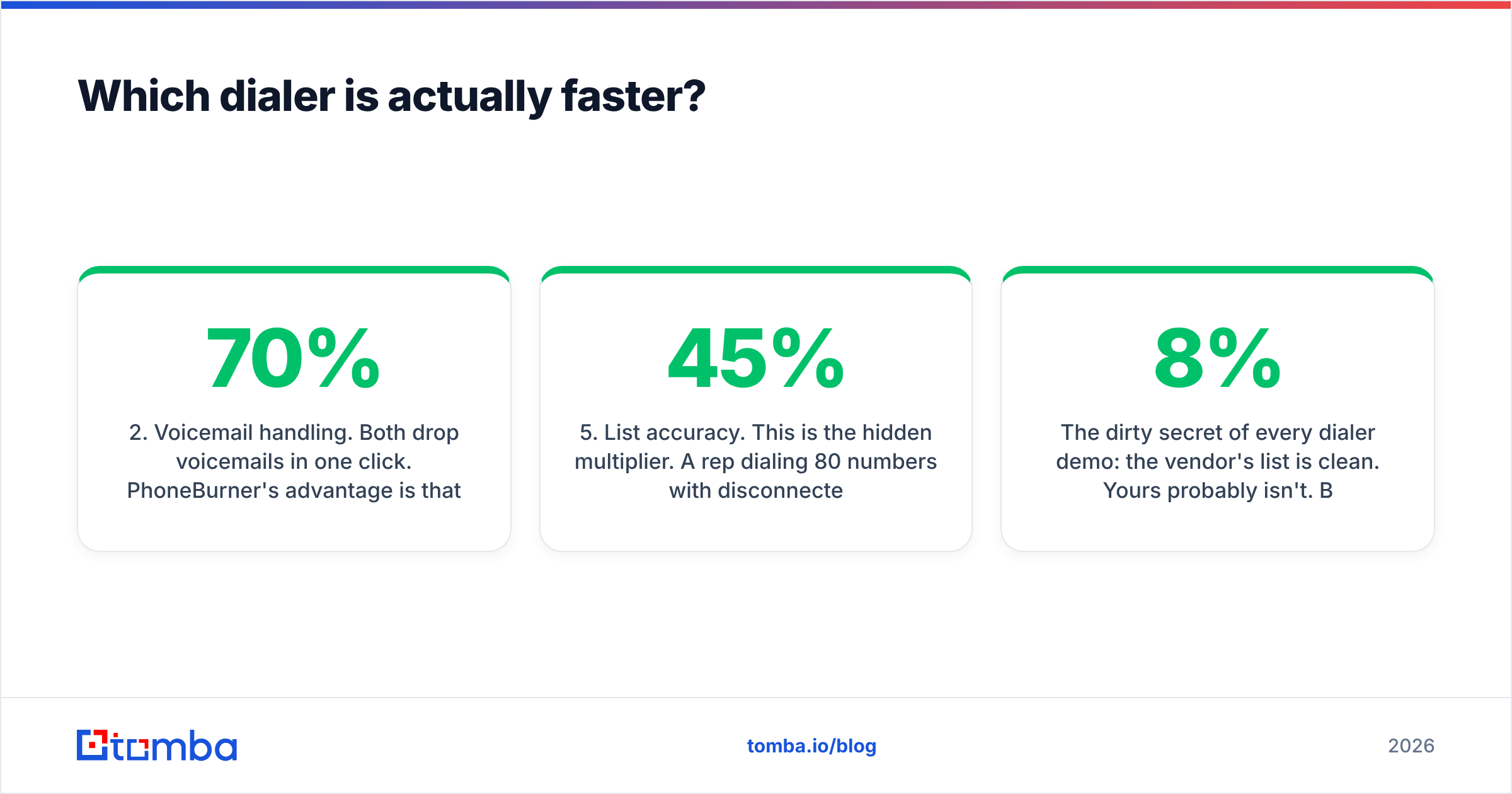
- Voicemail handling. Both drop voicemails in one click. PhoneBurner's advantage is that the drop happens asynchronously — the rep is already dialing record #2 while record #1 hears the message. If 70% of your dials go to voicemail, this is where the hour is won or lost.
- Post-call work. Kixie's edge is CRM automation: dispositions, notes, recordings, and follow-up SMS fire into HubSpot or Salesforce without the rep touching anything. PhoneBurner handles this well inside its own workspace but relies more on integrations or Zapier to push everything back into an external CRM.
- Caller ID reputation. Both offer local presence and spam-flag remediation, but neither can save a number you've burned. Rotating numbers, warming them, and keeping your dial-to-connect ratio sane matters more than any feature on either pricing page.
- List accuracy. This is the hidden multiplier. A rep dialing 80 numbers per hour with 45% disconnected lines is doing worse than one dialing 50 numbers with 95% valid direct dials. Run your list through a phone validator before the session, not after.

The dirty secret of every dialer demo: the vendor's list is clean. Yours probably isn't. Before you attribute a bad quarter to the wrong software, measure your connect rate per 100 dials. If it's under 8%, the problem is data, not dialing speed.
How much do Kixie and PhoneBurner really cost?#
Sticker price is the easy part. The total is what you should model.
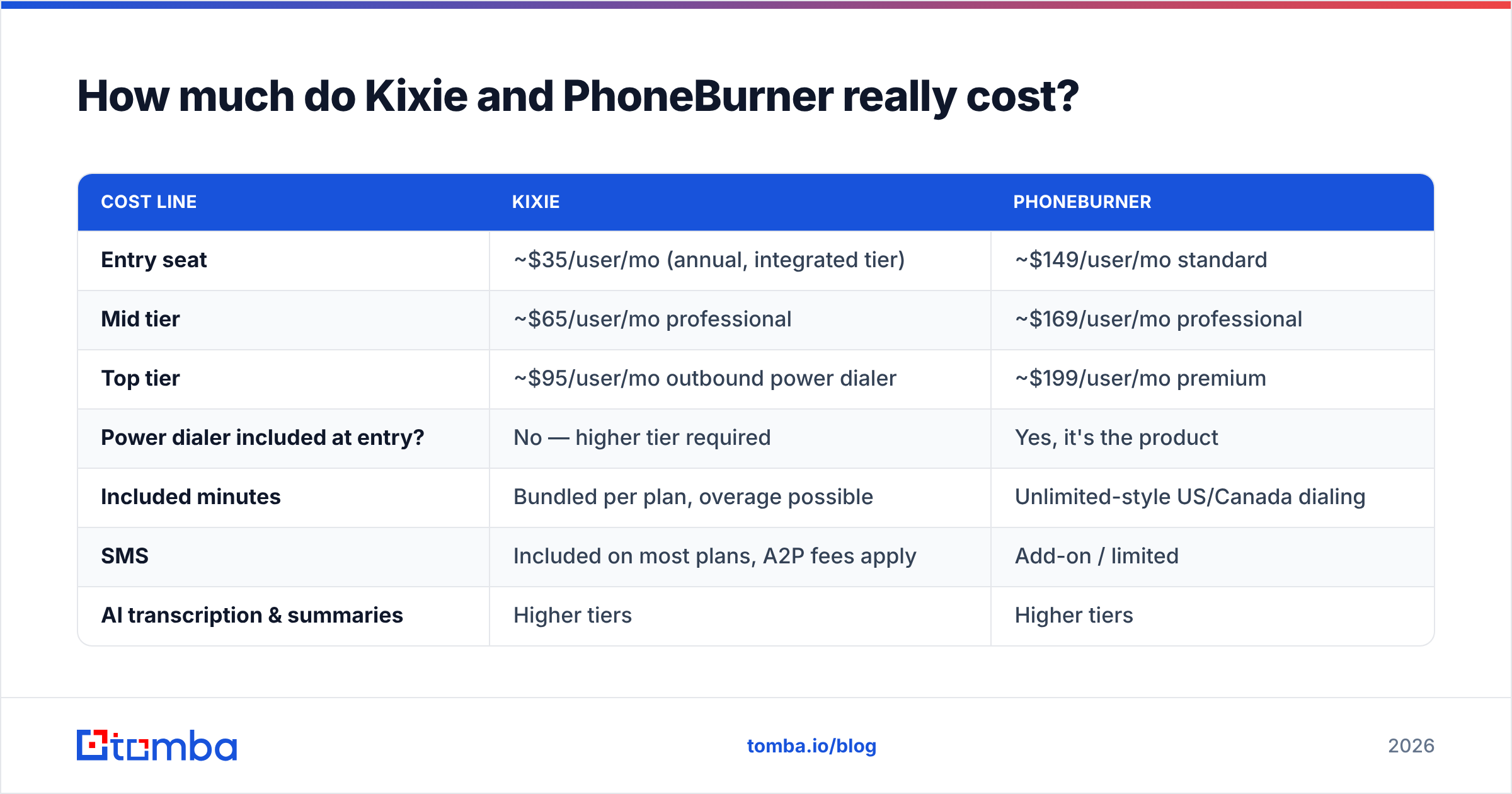
| Cost line | Kixie | PhoneBurner |
|---|---|---|
| Entry seat | ~$35/user/mo (annual, integrated tier) | ~$149/user/mo standard |
| Mid tier | ~$65/user/mo professional | ~$169/user/mo professional |
| Top tier | ~$95/user/mo outbound power dialer | ~$199/user/mo premium |
| Power dialer included at entry? | No — higher tier required | Yes, it's the product |
| Included minutes | Bundled per plan, overage possible | Unlimited-style US/Canada dialing |
| SMS | Included on most plans, A2P fees apply | Add-on / limited |
| AI transcription & summaries | Higher tiers | Higher tiers |
| Number provisioning | Per number | Per number |
| Annual contract discount | Yes, meaningful | Yes |
| Free trial | Yes | Yes, no card on some offers |
| Realistic 5-rep annual spend | $3,000–$6,000 | $9,000–$12,000 |
Two things jump out.
First, Kixie's headline price is not the price you'll pay if calling volume is your main use case — the true power dialer sits on the upper tier, which narrows the gap considerably. Compare like for like: Kixie's outbound power dialer tier against PhoneBurner's standard plan, not Kixie's $35 entry against PhoneBurner's $199 premium.
Second, PhoneBurner's number looks steep until you count what's inside it. Unlimited-style dialing, voicemail drop, its own contact management, email tracking, and reporting are in the box. Teams that switch to PhoneBurner from a cheaper dialer plus a separate CRM plus a separate minute bundle often find the line items roughly cancel out.

The one cost nobody budgets: rep time spent on dead numbers. At $149/seat, a rep burning 30% of their dial session on disconnected lines is $45/month of pure waste per seat — before you count the opportunity cost of the conversations that didn't happen.
Is Kixie better than PhoneBurner for SMS and multi-channel?#
Yes, clearly — and this is the cleanest decision line between the two.
Kixie treats SMS as a first-class channel. You get two-way texting from the same interface as calling, templates, automated text triggers based on call disposition, and full logging into the CRM timeline. The "missed call → auto-text" play alone converts a meaningful slice of voicemails into replies. If your sequence looks like call → text → email → LinkedIn, Kixie fits the motion.
PhoneBurner is unapologetically a voice tool. SMS exists, but it isn't the product's center, and the automation depth doesn't match Kixie's. If your team's entire outbound engine is "dial the list until someone picks up," that's not a weakness — it's focus.
The same split shows up in workflow philosophy. Kixie assumes your source of truth is elsewhere and stays out of the way. PhoneBurner gives you a real workspace with folders, dial sessions, and its own reporting, which is why solo operators and small agencies often run it without a CRM at all.
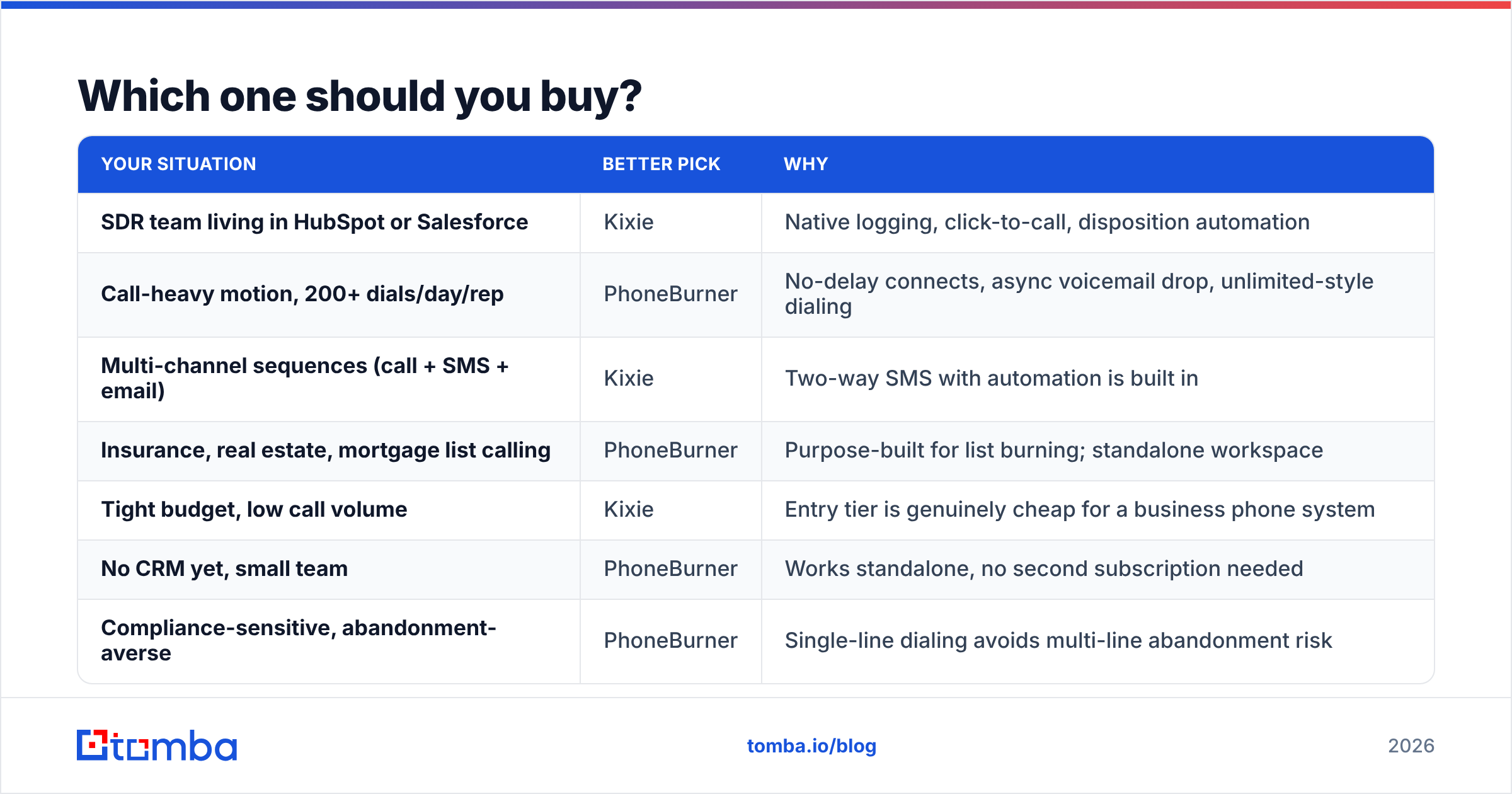
Which one should you buy?#
| Your situation | Better pick | Why |
|---|---|---|
| SDR team living in HubSpot or Salesforce | Kixie | Native logging, click-to-call, disposition automation |
| Call-heavy motion, 200+ dials/day/rep | PhoneBurner | No-delay connects, async voicemail drop, unlimited-style dialing |
| Multi-channel sequences (call + SMS + email) | Kixie | Two-way SMS with automation is built in |
| Insurance, real estate, mortgage list calling | PhoneBurner | Purpose-built for list burning; standalone workspace |
| Tight budget, low call volume | Kixie | Entry tier is genuinely cheap for a business phone system |
| No CRM yet, small team | PhoneBurner | Works standalone, no second subscription needed |
| Compliance-sensitive, abandonment-averse | PhoneBurner | Single-line dialing avoids multi-line abandonment risk |
| Need AI call coaching across a big team | Either — evaluate tiers | Both gate AI behind upper plans; check quotas |
If you're still torn, run both trials against the same list for one week and measure three numbers: connects per hour, conversations over 60 seconds, and meetings booked. Dials per hour is a vanity metric. Conversations are the only currency.
What do you need in place before either dialer works?#
A dialer is a distribution channel, not a pipeline. Three inputs decide whether either tool earns its seat cost:
- Valid direct dials, not switchboards. A company main line routed through a receptionist is not a direct dial. If your list is mostly corporate mains, your connect rate will look catastrophic no matter which dialer you bought. Sourcing verified mobile and direct numbers with a dedicated phone finder does more for connect rate than any feature toggle.
- Enriched context on the record. Title, company size, tech stack, and recent trigger events turn a cold dial into a relevant one. Feed those fields into the dialer's screen-pop or note template via data enrichment so the rep isn't improvising.
- A working email fallback. Most dials end in voicemail. The follow-up email is what converts the attempt — and it only works if the address is real. Pair your dial list with a verified email for every contact so the voicemail-plus-email one-two punch actually lands, and keep the list clean with an email verifier before you send.
Teams that get this order right — data first, dialer second — routinely see connect rates double without changing software at all. Teams that buy the dialer first usually end up churning off it within two quarters and blaming the vendor.
Kixie vs PhoneBurner: the verdict#
Buy Kixie if calling is one of several channels, your CRM is the system of record, and you want SMS and voice under one seat. It's the more modern, more integrated, more flexible platform, and its entry pricing is hard to beat for a full business phone system.
Buy PhoneBurner if calling is the whole job. Nothing on the market makes a single rep's dial hour denser without the compliance baggage of predictive dialing. The per-seat number stings until you price out what you'd otherwise stitch together.
Neither choice is wrong. Both are wrong if you point them at a stale list.
Before you load a single list into either dialer, fix the input. Tomba's Email Finder gives you verified professional contacts by domain, name, or company — so your reps dial and follow up against records that actually resolve. Start free with 25 searches a month, or scale on the Starter plan at $49/mo; full Tomba pricing runs from Free through Growth at $99/mo and Pro at $249/mo. Clean data first, then pick your dialer.
Related guides#
// get started
Find, verify and enrich your first contacts today
Start on the free plan with 25 searches a month, then scale when your team is ready.
Free plan · No credit card required · GDPR & CCPA
// about the author