Know Your Prospect: A 2026 Playbook for B2B Sales Teams
Most reps confuse "I read their LinkedIn headline" with research. Here's the five-layer prospect intelligence stack, a 10-minute workflow, and the signals that actually predict a reply in 2026.
TL;DR
- "Know your prospect" is not a personality exercise. It is five concrete data layers: identity, company, role context, trigger events, and contactability. Skip any one and your outreach reads like a template.
- Buyers reply to relevance about their situation, not flattery about their podcast appearance. The highest-converting research surfaces a problem they already own.
- Ten minutes per account is the ceiling for most outbound motions. Anything more and your math stops working; anything less and you are guessing.
- Verified contact data is part of research, not a separate step. A brilliant, personalized email sent to a bounced address scores zero.
- Tooling splits cleanly: databases for breadth, enrichment APIs for depth, intent platforms for timing, and finder/verifier tools for reachability. Most teams need two of the four, not all of them.
What does "know your prospect" actually mean in 2026?#
It means you can answer four questions before you hit send: who is this person, what does their company look like right now, what is currently on fire in their world, and can I actually reach them.
That last one trips up more teams than the first three combined. Reps spend twenty minutes reading a company's Series B announcement and then send the message to an address they guessed from a naming pattern. The research was real. The delivery was fiction.
The phrase gets abused because it sounds soft. In practice it is a data problem with a hard edge. A prospect you "know" is one where you hold structured, current, verified facts — job title and tenure, headcount and funding stage, tech stack, a recent change event, and a deliverable email or phone number. Everything else is decoration.
The reason this matters more in 2026 than it did in 2020 is volume defense. Buyers now sit behind AI triage, stricter inbox filtering, and a decade of learned distrust. Gartner's sales research has tracked the shift toward buyers completing most of their evaluation before a seller is involved. If you arrive with generic context, you arrive after the decision has already leaned somewhere else.
Why does prospect research beat raw volume?#
Because reply rates are not linear with send volume — they are capped by deliverability and by patience.
Send 2,000 unresearched emails and three things happen. Your bounce rate climbs because the list was never verified. Your spam complaint rate climbs because the message is irrelevant to most recipients. And your domain sender reputation degrades, which quietly suppresses the messages that would have landed. You do not get a warning. You get a slowly declining response rate and a theory that "cold email is dead."
Send 200 researched emails to verified addresses and the math inverts. Fewer sends, higher inbox placement, higher relevance, and — critically — a list you can re-touch in ninety days without having burned the relationship.
The trade is real, though. Research costs time, and time is the scarcest thing an SDR has. So the goal is not "research more." The goal is to research the right five things fast enough that you can still hit meaningful volume.
What are the five layers of prospect intelligence?#
Think of prospect research like checking the weather before a flight. You do not need the full atmospheric model. You need five readings, and you need them current.
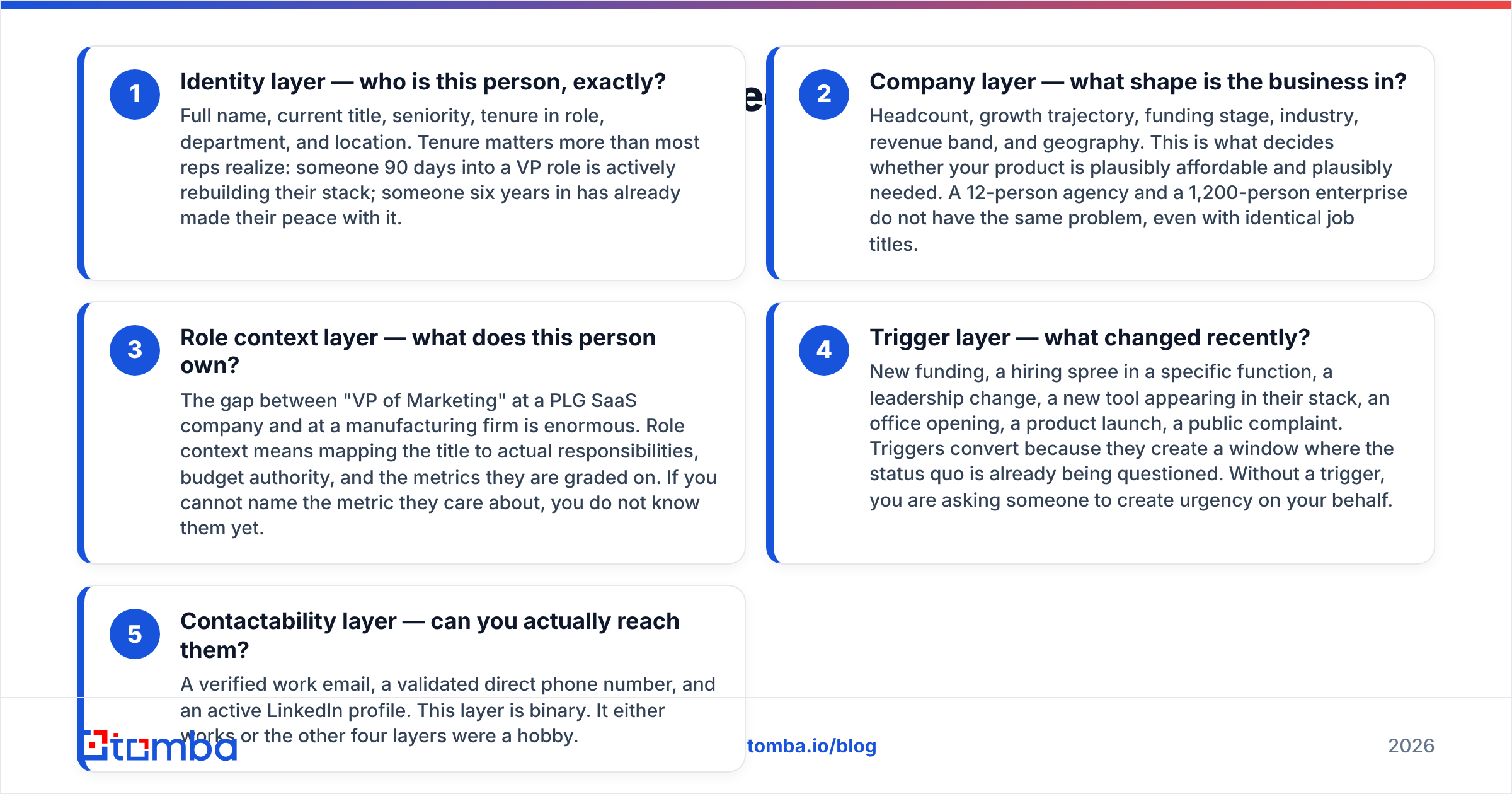
Identity layer — who is this person, exactly? Full name, current title, seniority, tenure in role, department, and location. Tenure matters more than most reps realize: someone 90 days into a VP role is actively rebuilding their stack; someone six years in has already made their peace with it.
Company layer — what shape is the business in? Headcount, growth trajectory, funding stage, industry, revenue band, and geography. This is what decides whether your product is plausibly affordable and plausibly needed. A 12-person agency and a 1,200-person enterprise do not have the same problem, even with identical job titles.
Role context layer — what does this person own? The gap between "VP of Marketing" at a PLG SaaS company and at a manufacturing firm is enormous. Role context means mapping the title to actual responsibilities, budget authority, and the metrics they are graded on. If you cannot name the metric they care about, you do not know them yet.
Trigger layer — what changed recently? New funding, a hiring spree in a specific function, a leadership change, a new tool appearing in their stack, an office opening, a product launch, a public complaint. Triggers convert because they create a window where the status quo is already being questioned. Without a trigger, you are asking someone to create urgency on your behalf.
Contactability layer — can you actually reach them? A verified work email, a validated direct phone number, and an active LinkedIn profile. This layer is binary. It either works or the other four layers were a hobby.
Most teams over-invest in layer four and under-invest in layer five. Triggers are fun to find. Verified contact data is boring. Revenue disagrees with that ranking.
Which data sources should you actually use?#
There is no single source that covers all five layers well. Here is how the main categories compare on what they are genuinely good at.
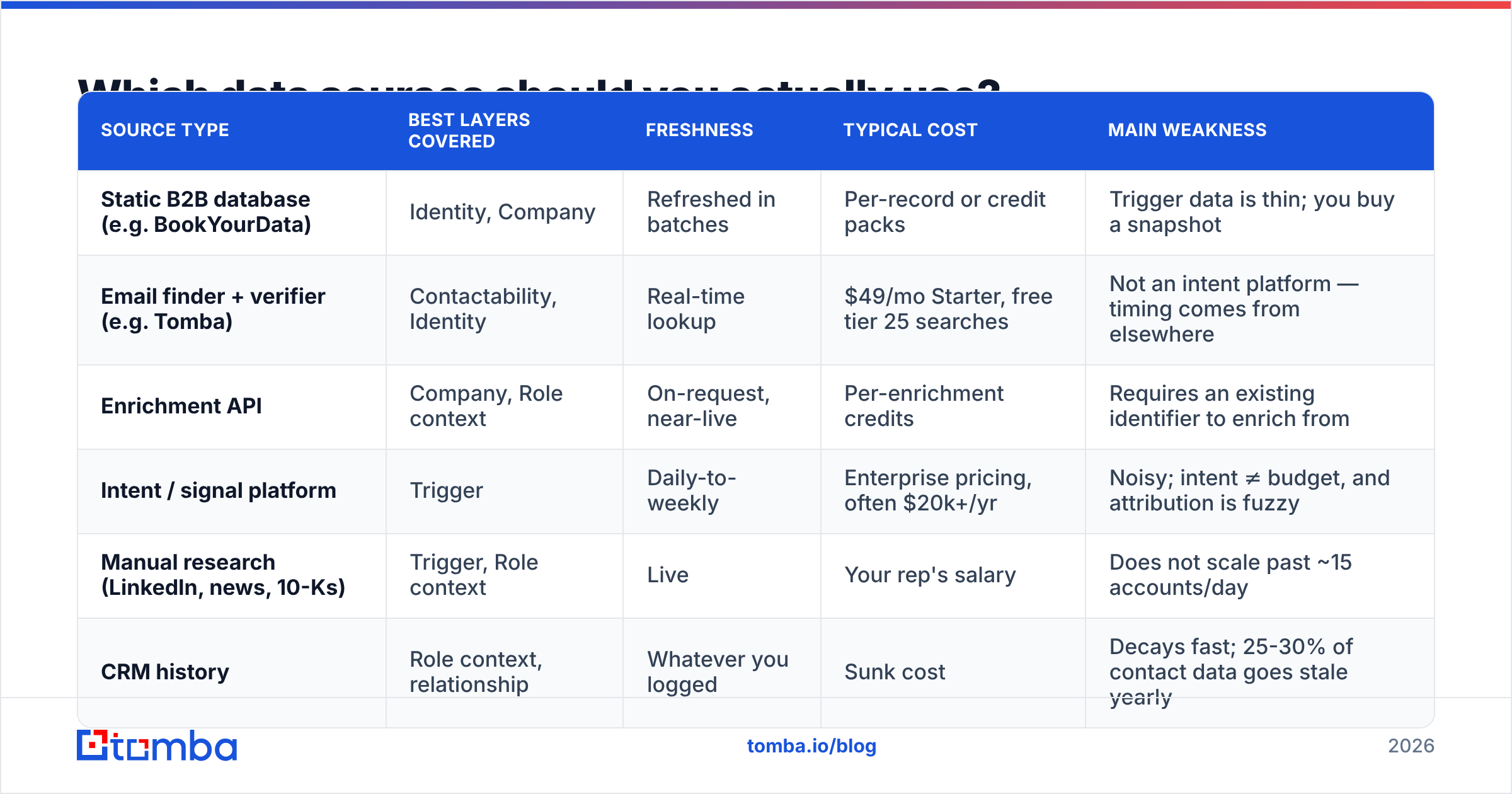
| Source type | Best layers covered | Freshness | Typical cost | Main weakness |
|---|---|---|---|---|
| Static B2B database (e.g. BookYourData) | Identity, Company | Refreshed in batches | Per-record or credit packs | Trigger data is thin; you buy a snapshot |
| Email finder + verifier (e.g. Tomba) | Contactability, Identity | Real-time lookup | $49/mo Starter, free tier 25 searches | Not an intent platform — timing comes from elsewhere |
| Enrichment API | Company, Role context | On-request, near-live | Per-enrichment credits | Requires an existing identifier to enrich from |
| Intent / signal platform | Trigger | Daily-to-weekly | Enterprise pricing, often $20k+/yr | Noisy; intent ≠ budget, and attribution is fuzzy |
| Manual research (LinkedIn, news, 10-Ks) | Trigger, Role context | Live | Your rep's salary | Does not scale past ~15 accounts/day |
| CRM history | Role context, relationship | Whatever you logged | Sunk cost | Decays fast; 25-30% of contact data goes stale yearly |
The pragmatic stack for a team under 20 reps is: one database or list source for breadth, one finder/verifier for contactability, and manual research reserved for your top 10% of accounts. Intent platforms are a later-stage purchase — they solve timing, which is only your bottleneck once relevance and deliverability are already solved.
If you want to see how the coverage side works in practice, Tomba's data sources page documents where records originate and how they are validated, which is a question worth asking any vendor before you sign.
How long should researching one prospect take?#
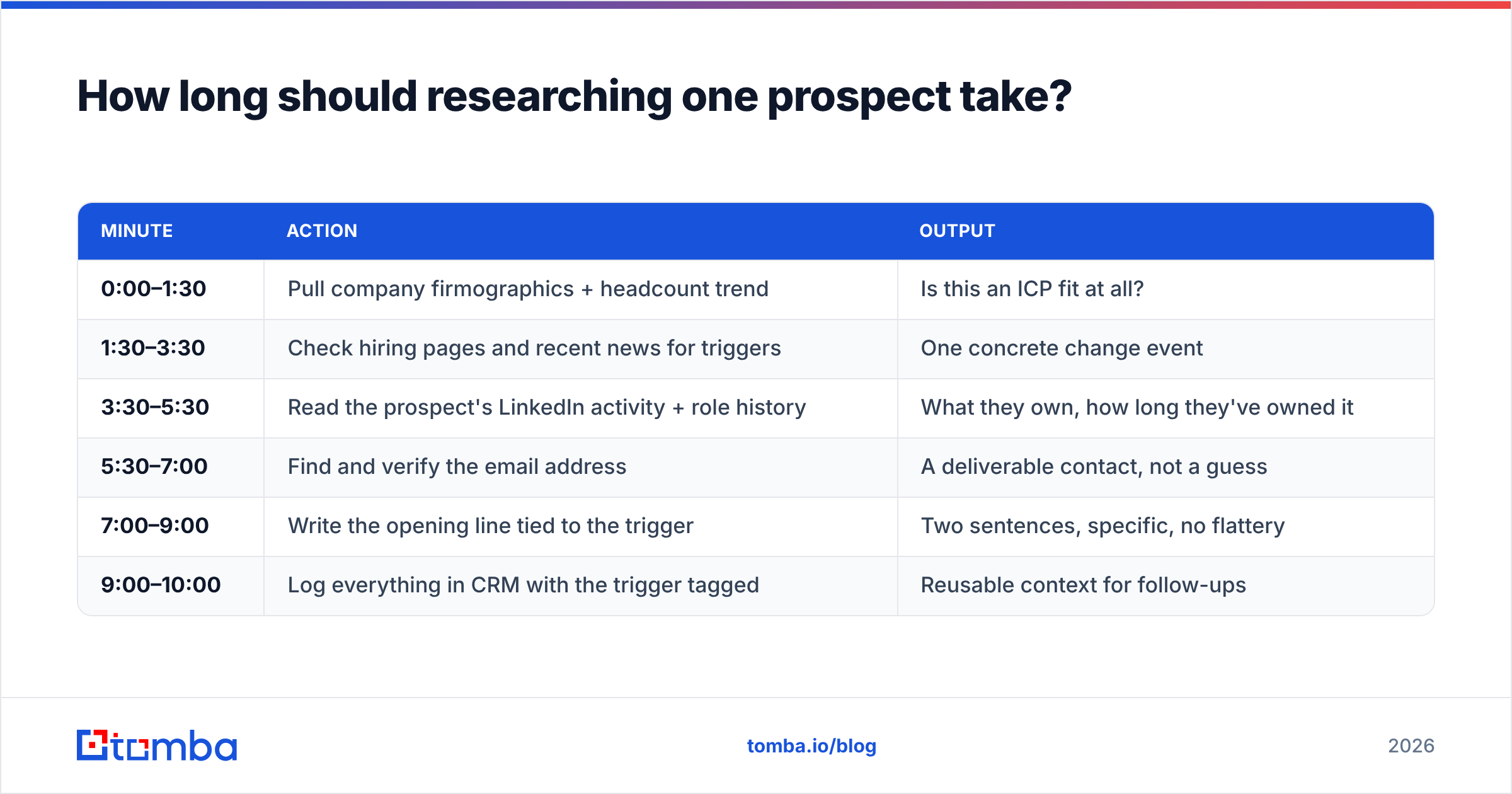
Ten minutes for a tier-one account. Ninety seconds for everyone else. If you cannot articulate which tier an account is in, that is the first problem to fix.
Here is a workflow that fits inside ten minutes without producing shallow output:
| Minute | Action | Output |
|---|---|---|
| 0:00–1:30 | Pull company firmographics + headcount trend | Is this an ICP fit at all? |
| 1:30–3:30 | Check hiring pages and recent news for triggers | One concrete change event |
| 3:30–5:30 | Read the prospect's LinkedIn activity + role history | What they own, how long they've owned it |
| 5:30–7:00 | Find and verify the email address | A deliverable contact, not a guess |
| 7:00–9:00 | Write the opening line tied to the trigger | Two sentences, specific, no flattery |
| 9:00–10:00 | Log everything in CRM with the trigger tagged | Reusable context for follow-ups |
The two-minute contactability step is where most workflows break. Guessing first.last@company.com works roughly half the time across the web and much worse at companies with non-obvious patterns. Running the name and domain through a dedicated email finder and then confirming with an email verifier turns a coin flip into a known outcome — and tells you when to fall back to a phone or LinkedIn touch instead.
For tier-two and tier-three accounts, compress this: firmographics + verified email + one templated variable pulled from the company layer. That is honest personalization at scale. It is not as strong as the ten-minute version, and it should not pretend to be.
What signals actually predict a reply?#
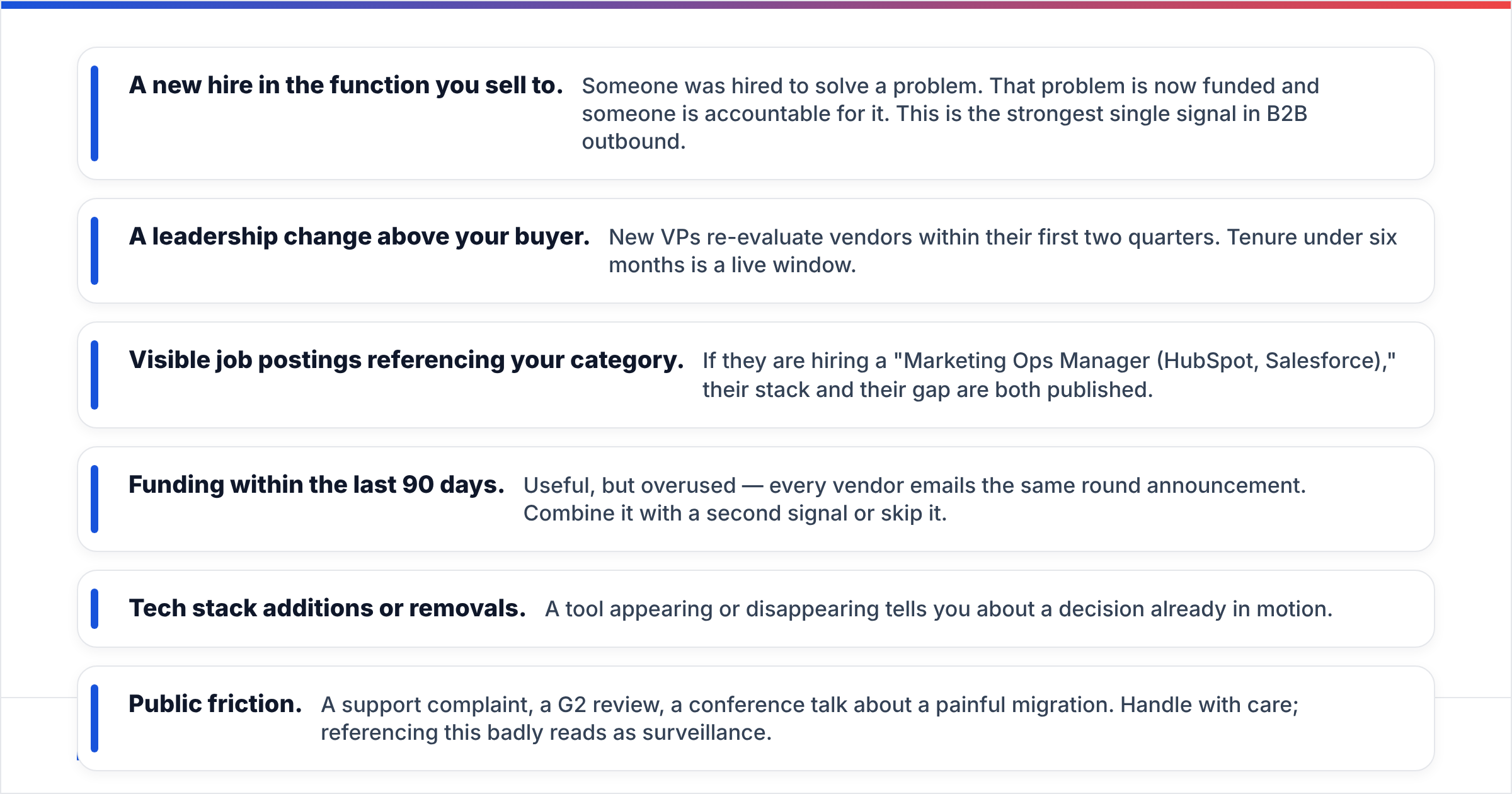
Not all research is equally predictive. Ranked roughly by observed impact on reply rate:
- A new hire in the function you sell to. Someone was hired to solve a problem. That problem is now funded and someone is accountable for it. This is the strongest single signal in B2B outbound.
- A leadership change above your buyer. New VPs re-evaluate vendors within their first two quarters. Tenure under six months is a live window.
- Visible job postings referencing your category. If they are hiring a "Marketing Ops Manager (HubSpot, Salesforce)," their stack and their gap are both published.
- Funding within the last 90 days. Useful, but overused — every vendor emails the same round announcement. Combine it with a second signal or skip it.
- Tech stack additions or removals. A tool appearing or disappearing tells you about a decision already in motion.
- Public friction. A support complaint, a G2 review, a conference talk about a painful migration. Handle with care; referencing this badly reads as surveillance.
The anti-signals matter too. Ignore birthdays, ignore "I loved your post about..." when the post was three years old, and ignore hometown/alma mater openers. HubSpot's sales research has consistently found that buyers rate relevance to their business problem far above personal rapport-building in cold contexts. The rapport comes after you have earned the reply.

How do you scale research without killing personalization?#
Split the work between machines and humans along a clean line: machines handle anything structured and repeatable; humans handle judgment.
Structured and automatable:
- Firmographics, headcount, funding, industry, geography
- Email discovery and verification
- Phone number lookup and validation
- Tech stack detection
- Deduplication and list hygiene
Judgment work that stays human:
- Deciding which trigger is actually relevant to your offer
- Writing the specific first line
- Choosing the channel and the sequence
- Deciding when an account is not worth pursuing
In practice this means batching. Take a list of 300 accounts, run them through bulk lead generation to attach verified contacts and firmographics in one pass, then let reps spend their time only on the trigger and the opening line. Piping enriched records straight into the CRM via a HubSpot integration or equivalent removes the copy-paste tax entirely.
The failure mode to watch: automating the judgment layer too. AI-generated "personalization" that references a company's mission statement is worse than no personalization, because it signals effort without delivering relevance. Buyers have learned to spot it. If the variable could have been filled by any vendor in any category, delete it.
What are the most common prospect research mistakes?#
Researching the account but not the person. You know the company raised $40M. You do not know whether your contact has any authority over the budget. Company-level research without role context produces confident emails sent to the wrong human.
Treating stale data as current. Contact records decay at roughly a quarter to a third per year through job changes alone. A list you bought eighteen months ago is now substantially fiction. Re-verify before every campaign, not once at import.
Skipping verification to save credits. The cost of a verification credit is trivial next to the cost of a bounce. High bounce rates directly damage email deliverability, and that damage is shared across every campaign sent from the domain.
Confusing intent with readiness. Someone reading a comparison article is not someone with a signed budget. Intent narrows the list; it does not close the deal.
Over-researching low-tier accounts. If a deal is worth $3,000 in first-year revenue, ten minutes of research per contact may not clear the bar. Tier ruthlessly.
Not writing it down. Research that lives in a rep's head disappears when they change territory. Log the trigger, the source, and the date in the CRM. Future-you and future-them will need it.
Where should you start this week?#
Pick your next 50 target accounts and run the five layers on each one. Time yourself. You will find that layers one, two, and five are almost entirely automatable, and that layers three and four are where your competitive edge actually lives.
Then fix the contactability gap first, because it is the cheapest win. Every other layer compounds only if the message arrives.
Tomba's Email Finder covers that layer directly: search by domain, by name and company, or in bulk, with verification built into the same workflow so you are not stitching two vendors together. The free tier gives you 25 searches a month to test your own list against — enough to see your real hit rate before you commit to the $49/mo Starter plan. Start with the accounts you already researched and never contacted. That is usually where the fastest pipeline is hiding.
Related guides#
// get started
Find, verify and enrich your first contacts today
Start on the free plan with 25 searches a month, then scale when your team is ready.
Free plan · No credit card required · GDPR & CCPA
// about the author