Koalendar Pricing, Reviews, Pros and Cons (2026 Guide)
Koalendar is one of the few scheduling tools with a genuinely usable free plan. Here is what the paid tier actually costs, what reviewers complain about, and where it breaks down inside a real outbound stack.
TL;DR
- Koalendar is a lightweight Calendly alternative built around one unusual decision: the free plan is genuinely usable, not a 14-day tease. Unlimited event types, unlimited bookings, your own branded booking page.
- Paid pricing is the cheapest in the category — roughly $6.99 per user per month for Premium, versus $12–$20/seat for Calendly's comparable tiers. Always confirm current numbers on koalendar.com, since scheduling vendors reshuffle tiers often.
- Reviews are consistently positive on price, speed, and setup time, and consistently critical on depth: no round-robin routing, thin CRM integrations, limited payment options, no native SMS.
- Koalendar is a booking page, not a pipeline tool. It converts demand you already created. It does not create demand.
- If your bottleneck is "prospects aren't booking," a cheaper scheduler won't fix it. The bottleneck is usually contact data quality upstream.
What is Koalendar, and who actually uses it?#
Koalendar is a meeting-scheduling tool. You connect Google Calendar, define availability rules, publish a booking link, and let people pick a slot. The invite lands in both calendars with a Google Meet link attached. That is the whole product, and the narrow scope is deliberate.
Think of it like a folding bike. A full touring bike has 21 gears, panniers, and a suspension fork — and 90% of riders use it to go three miles to work. Koalendar is the folding bike: fewer parts, less to maintain, does the one trip you actually take. Technically, it is a single-purpose availability engine with a hosted booking page and calendar write access.
The user base skews in a predictable direction:
- Solo consultants and coaches who need a professional booking link and refuse to pay $144/year for one.
- Small agencies running 2–8 seats where every SaaS line item gets questioned.
- Early-stage founders doing their own demos before there is a sales team to systematize.
- Recruiters and support leads who book high volumes of simple 1:1 calls with no routing logic.
- Teams escaping Calendly's price ladder after a renewal quote made them go shopping.
Who it is not for: anyone who needs lead routing, territory assignment, or a scheduler that reads CRM ownership fields before offering a slot. That is a different product category with a different price tag.
How much does Koalendar cost in 2026?#
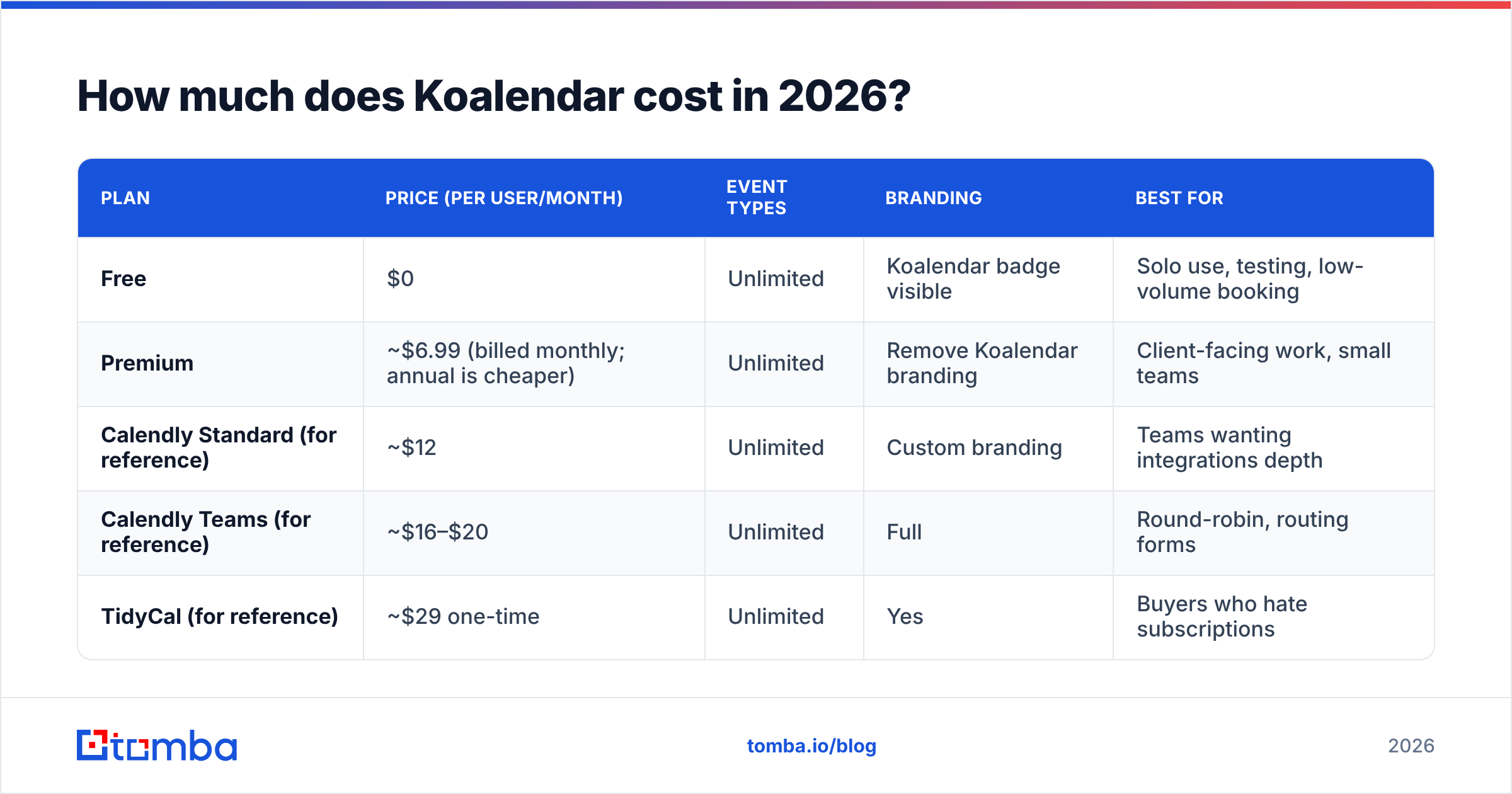
Two tiers. That's it — which is refreshing after auditing tools that hide a "contact sales" wall at every turn.
| Plan | Price (per user/month) | Event types | Branding | Best for |
|---|---|---|---|---|
| Free | $0 | Unlimited | Koalendar badge visible | Solo use, testing, low-volume booking |
| Premium | ~$6.99 (billed monthly; annual is cheaper) | Unlimited | Remove Koalendar branding | Client-facing work, small teams |
| Calendly Standard (for reference) | ~$12 | Unlimited | Custom branding | Teams wanting integrations depth |
| Calendly Teams (for reference) | ~$16–$20 | Unlimited | Full | Round-robin, routing forms |
| TidyCal (for reference) | ~$29 one-time | Unlimited | Yes | Buyers who hate subscriptions |
The interesting number is not $6.99. It's $0. Most "free" scheduling plans cap you at one event type — which is the single most annoying limit possible, because the moment you want both a 15-minute intro and a 45-minute demo, you're on the paid plan. Koalendar doesn't do that. The free plan's real constraint is branding: a small Koalendar badge sits on your booking page, and paid removes it.
What you give up at this price point, across both tiers:
- No round-robin or collective scheduling in the way a team-scale tool handles it. One person, one calendar, one link is the happy path.
- Integration breadth is shallow. Google Calendar is first-class. Outlook/Microsoft 365 support and Zapier-style connections are functional but not the deep two-way CRM sync that HubSpot Meetings or Calendly Teams offer.
- Payments are basic. Stripe collection exists for simple paid bookings; do not expect invoicing, taxes, or package logic.
- No native SMS reminders on the cheap tiers — email reminders only.
None of that is a scandal at $6.99. It's the trade you are explicitly buying.

What do Koalendar reviews actually say?#
Pull the review corpus on G2 and Capterra and the sentiment clusters tightly. Four themes come up again and again.
Praise theme 1 — setup speed. Reviewers repeatedly cite 5–10 minutes from signup to a working link. There is no onboarding wizard, no workflow builder, no "connect your data warehouse" step. For a tool people adopt under deadline pressure, this matters more than feature counts.
Praise theme 2 — price-to-value. The most common phrasing is some variant of "does 90% of what Calendly does for a fraction of the cost." That's an honest read. For a single-link 1:1 booking use case, the functional gap is small.
Criticism theme 1 — feature ceiling. Teams that grow into routing, multi-host events, or conditional questions hit a wall. Several reviews describe migrating to Koalendar to save money, then migrating back 12 months later when the team hit eight reps. Factor migration cost into your math, not just the monthly delta.
Criticism theme 2 — integration gaps. This is the one that bites B2B sales teams hardest. If your reps live in a CRM, you want the booking event to create or update the record automatically, with the right owner and the right activity log. Koalendar's answer is usually "use Zapier," which works but adds a second tool, a second bill, and a second thing to debug at 6pm on a Friday.
A fair summary: reviewers are happy with what they bought, and the complaints are almost entirely about things the product never claimed to do.
What are the pros and cons of Koalendar?#
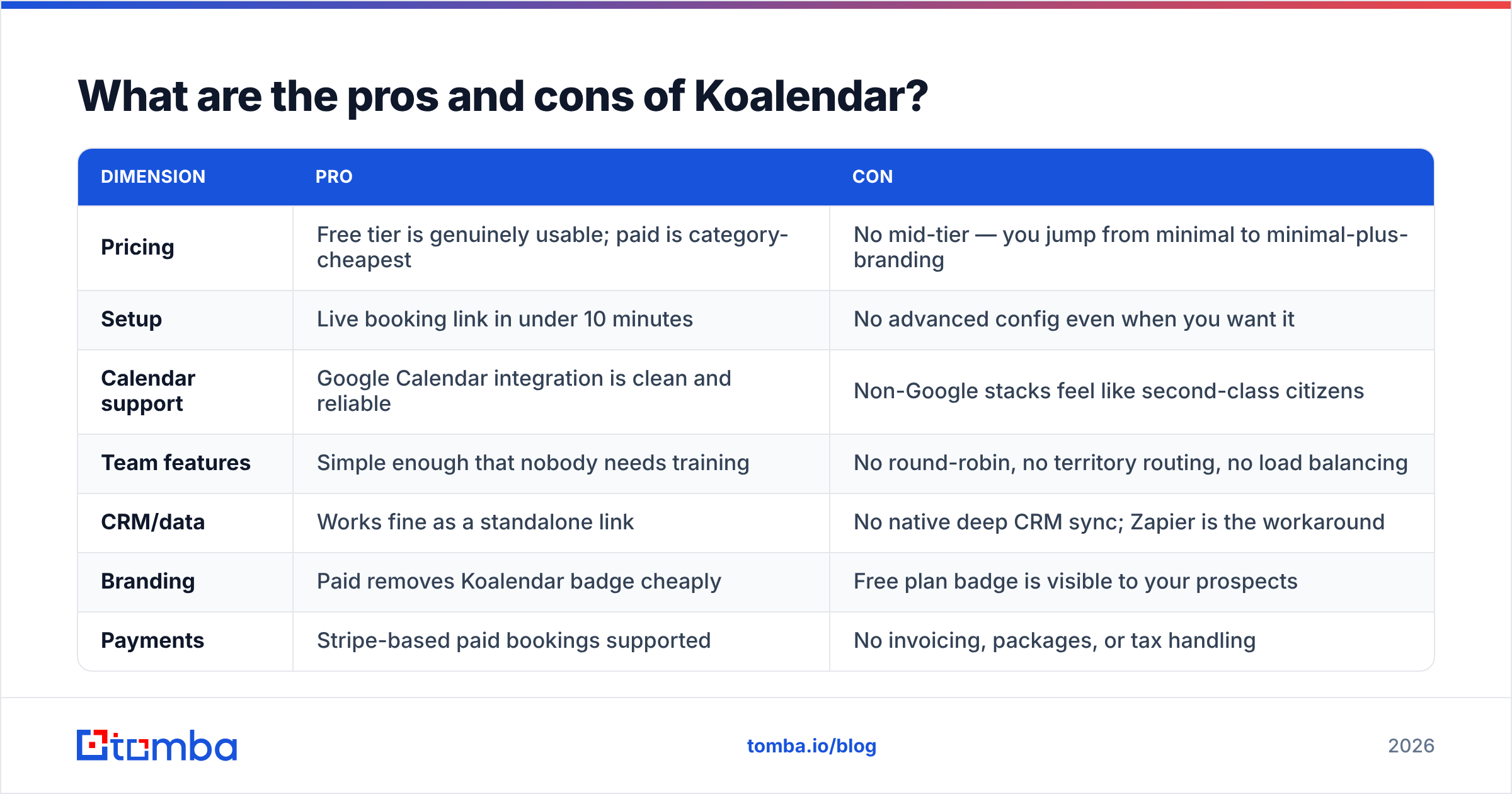
| Dimension | Pro | Con |
|---|---|---|
| Pricing | Free tier is genuinely usable; paid is category-cheapest | No mid-tier — you jump from minimal to minimal-plus-branding |
| Setup | Live booking link in under 10 minutes | No advanced config even when you want it |
| Calendar support | Google Calendar integration is clean and reliable | Non-Google stacks feel like second-class citizens |
| Team features | Simple enough that nobody needs training | No round-robin, no territory routing, no load balancing |
| CRM/data | Works fine as a standalone link | No native deep CRM sync; Zapier is the workaround |
| Branding | Paid removes Koalendar badge cheaply | Free plan badge is visible to your prospects |
| Payments | Stripe-based paid bookings supported | No invoicing, packages, or tax handling |
| Scalability | Perfect at 1–8 seats | Teams past ~10 reps typically outgrow it |
The honest verdict: Koalendar wins decisively on cost-per-booked-meeting for simple use cases and loses decisively on anything involving routing logic or data depth.
Is Koalendar better than Calendly, TidyCal, or SavvyCal?#
"Better" depends entirely on which constraint is binding for you.
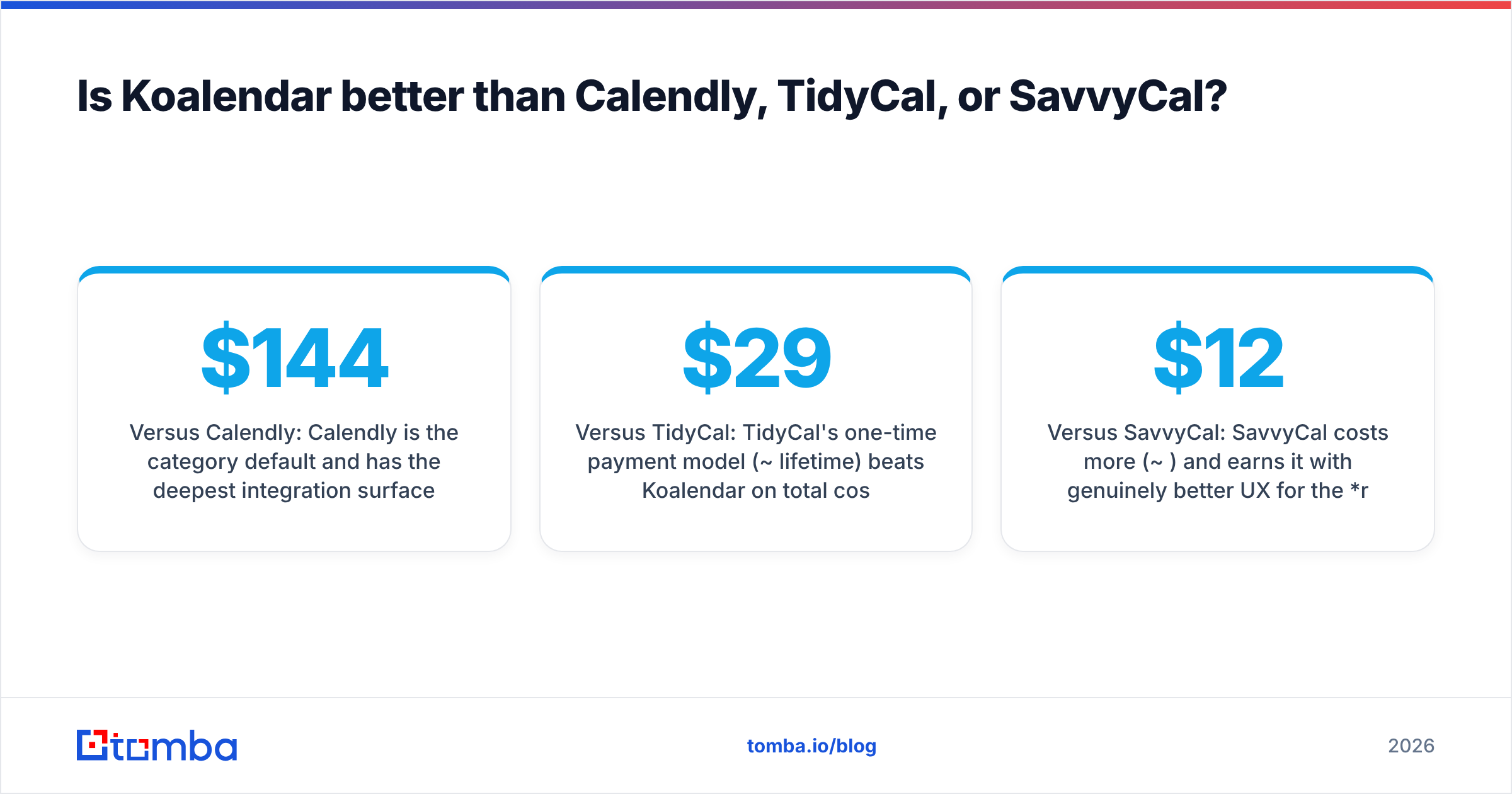
- Versus Calendly: Calendly is the category default and has the deepest integration surface — Salesforce, HubSpot, routing forms, workflows, analytics. If you need any of those, Koalendar is not a substitute at any price. If you need a link, Calendly is a $144/year link.
- Versus TidyCal: TidyCal's one-time payment model (~$29 lifetime) beats Koalendar on total cost over five years. Koalendar's booking page is cleaner and its free tier is stronger. This is largely a taste and cash-flow decision.
- Versus SavvyCal: SavvyCal costs more (~$12/mo) and earns it with genuinely better UX for the recipient — overlay-your-calendar-on-mine, ranked availability, personalized links. If you're booking executives and want the scheduling experience to feel considerate rather than transactional, SavvyCal is the upgrade.
- Versus HubSpot Meetings: If you already pay for HubSpot, its meeting links are effectively free and write straight to the CRM. Read HubSpot's own meetings documentation before buying anything standalone — a lot of teams buy a scheduler they already own.
Is Koalendar's free plan enough for a B2B sales team?#
For a one- or two-person sales motion, yes, with one caveat: the branding badge. A prospect who sees a third-party badge on your booking page learns something small about your company — usually nothing fatal, occasionally a signal you didn't want to send in an enterprise deal. Spending $6.99 to remove it is the easiest ROI decision in your stack.
Past roughly five reps, the free plan's absence of routing becomes the problem, not the badge. You end up with reps manually swapping links, double-booked demo slots, and no shared view of who owns what. At that point you're not comparing $0 to $6.99 — you're comparing "cheap scheduler plus operational chaos" to "$16/seat and it just works."
The practical rule: use Koalendar free until a scheduling mistake costs you a deal, then decide whether the fix is a paid Koalendar seat or a different category of tool entirely.
Where does Koalendar fit in an outbound stack?#
Here is the part most scheduling-tool comparisons skip. A booking link is the last step in a sequence, and it is almost never the step that's broken.
Walk the chain backwards from a booked meeting:
- Meeting booked — the scheduler's job. Koalendar handles this fine.
- Prospect clicked the link — copy and offer's job. A different scheduler will not move this number.
- Email was opened and read — subject line and sender reputation's job. Check your sender reputation before blaming anything downstream.
- Email was delivered at all — list hygiene's job. This is where most outbound actually dies.
- You had a correct email address — data's job. And this is the true root cause in the majority of underperforming outbound programs.
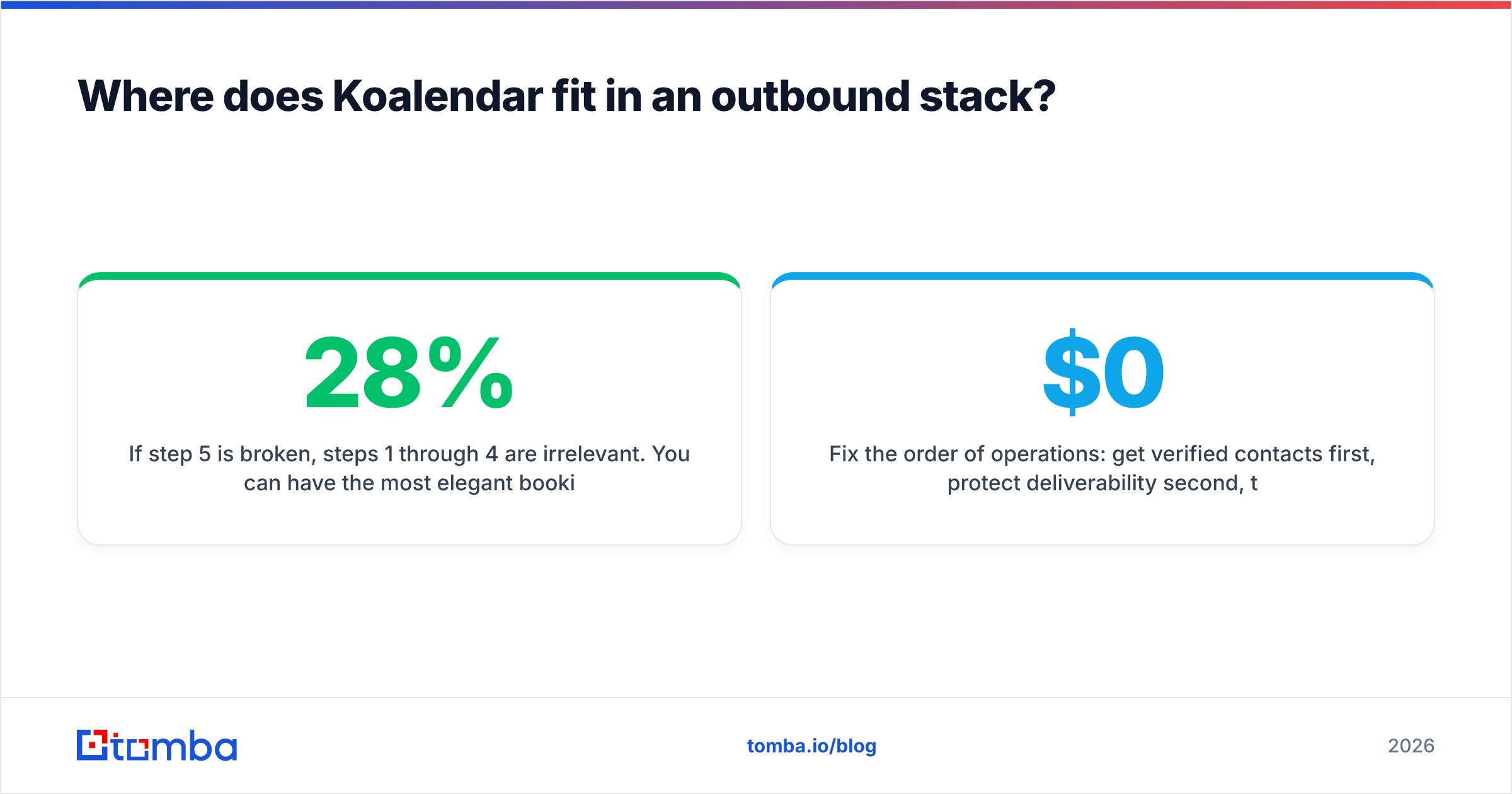
If step 5 is broken, steps 1 through 4 are irrelevant. You can have the most elegant booking page ever designed and it will sit at zero bookings because 28% of your list bounced and the rest went to a catch-all void. Teams routinely spend a week evaluating schedulers and zero hours auditing whether their contact list is accurate.
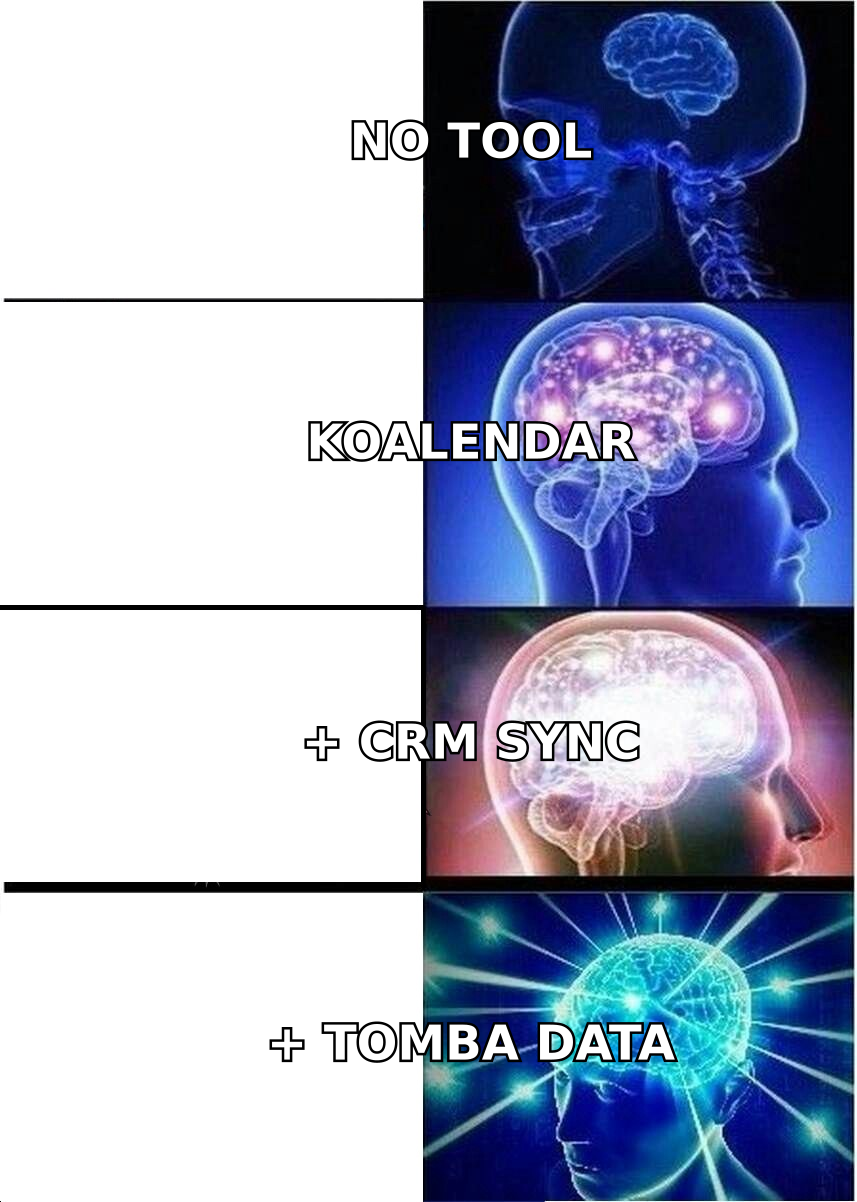
Fix the order of operations: get verified contacts first, protect deliverability second, then worry about whether your booking page costs $0 or $12.
Who should buy Koalendar — and who shouldn't?#
Buy Koalendar if: you're solo or under eight seats, you live in Google Calendar, you book simple 1:1 calls, and the main thing you want from a scheduler is for it to be invisible and cheap. The free plan means you can validate this in an afternoon at zero risk — which is rare enough in B2B software to be worth taking advantage of.
Skip Koalendar if: you need round-robin, you need the booking to write cleanly into Salesforce or HubSpot with correct ownership, you run a team of more than ten reps, or your scheduling workflow involves qualification questions that route to different people. Those are real requirements and Koalendar will frustrate you into a migration inside a year.
Don't buy any scheduler yet if: your meetings-booked number is low because your emails aren't landing. That is a data problem wearing a scheduling problem's costume.
How do you make the booking link actually get used?#
Three concrete moves, in order of impact:
- Verify before you send. Run your list through an email verifier and cut the invalid addresses. A 3% bounce rate protects your domain; a 15% bounce rate destroys it, and no booking page survives a destroyed domain.
- Put the link in the second touch, not the first. Booking links in cold opening emails read as presumptuous. Earn the ask, then drop the link.
- Enrich before you personalize. Knowing the company's headcount, stack, and the prospect's actual role turns a generic pitch into a relevant one. Contact enrichment is what makes the first line of your email worth reading.
Koalendar does step nothing on this list. It just quietly catches whatever demand the rest of your process manages to create — which is exactly what a $6.99 tool should do.
The upstream fix#
Cheap scheduling is a solved problem. Koalendar solved it, TidyCal solved it, and Calendly solved it if you don't mind paying. Pick one in twenty minutes and move on.
The unsolved problem is knowing who to contact and having an address that actually works. That's where meeting volume is won or lost. Start with the Tomba Email Finder to build a verified, deliverable list from company domains and names — the free tier covers 25 searches a month, Starter runs $49/mo, and you can see full Tomba pricing before committing. Fill the top of the funnel properly, and whatever booking link you paste at the bottom will start looking a lot more effective.
Related guides#
// get started
Find, verify and enrich your first contacts today
Start on the free plan with 25 searches a month, then scale when your team is ready.
Free plan · No credit card required · GDPR & CCPA
// about the author