Kronologic Pricing Reviews Pros and Cons: 2026 Breakdown
Kronologic automates meeting scheduling by negotiating calendar invites for your reps. Here is what it actually costs, what G2 reviewers complain about, and when a cheaper stack beats it.
Kronologic pricing reviews pros and cons, in one line: it is not cheap, it books real meetings, and it only pays off at volume.
TL;DR
- Kronologic is an AI scheduling layer. It emails your leads and books a calendar slot for them. It does not hand out a booking link. It is not a sequencer, a dialer, or a data source.
- Pricing is quote-only. Reviews and reseller listings point to $1,000–$2,500 per user per year. Most teams land near $100–$200 per seat per month, plus setup fees.
- Reviewers like the lift in meetings from inbound and event follow-up. The gripes are steady: rigid setup, odd AI tone, calendar sync bugs, and annual-only deals.
- It only pays off at volume. Plan on a few hundred good contacts a month. Below that, the seat cost eats the gain.
- Your data drives the return, not the tool. Bad addresses turn auto-invites into bounces and spam complaints.
What is Kronologic and what problem does it solve?#
Kronologic sits between your CRM and your reps' calendars. A lead asks for a demo. Most tools send a Calendly link and hope for a click. Kronologic sends a real invite instead, for a set time, from a set rep. If the lead says "I can't do Tuesday," it offers a new slot.
Here is the everyday version. Most tools are the "book a table" button on a restaurant website. Kronologic is the host who calls and says, "we have 7:30 on Thursday, does that work?" Then the host calls back with new times until you say yes. A held slot creates a small duty. A link does not.
Under the hood it runs a chat engine. The AI reads each reply. It spots a request to move the time. It offers new slots. Then it writes the booked meeting back to your CRM. It plugs into Salesforce, HubSpot, Outreach, Salesloft, and Google or Microsoft calendars.
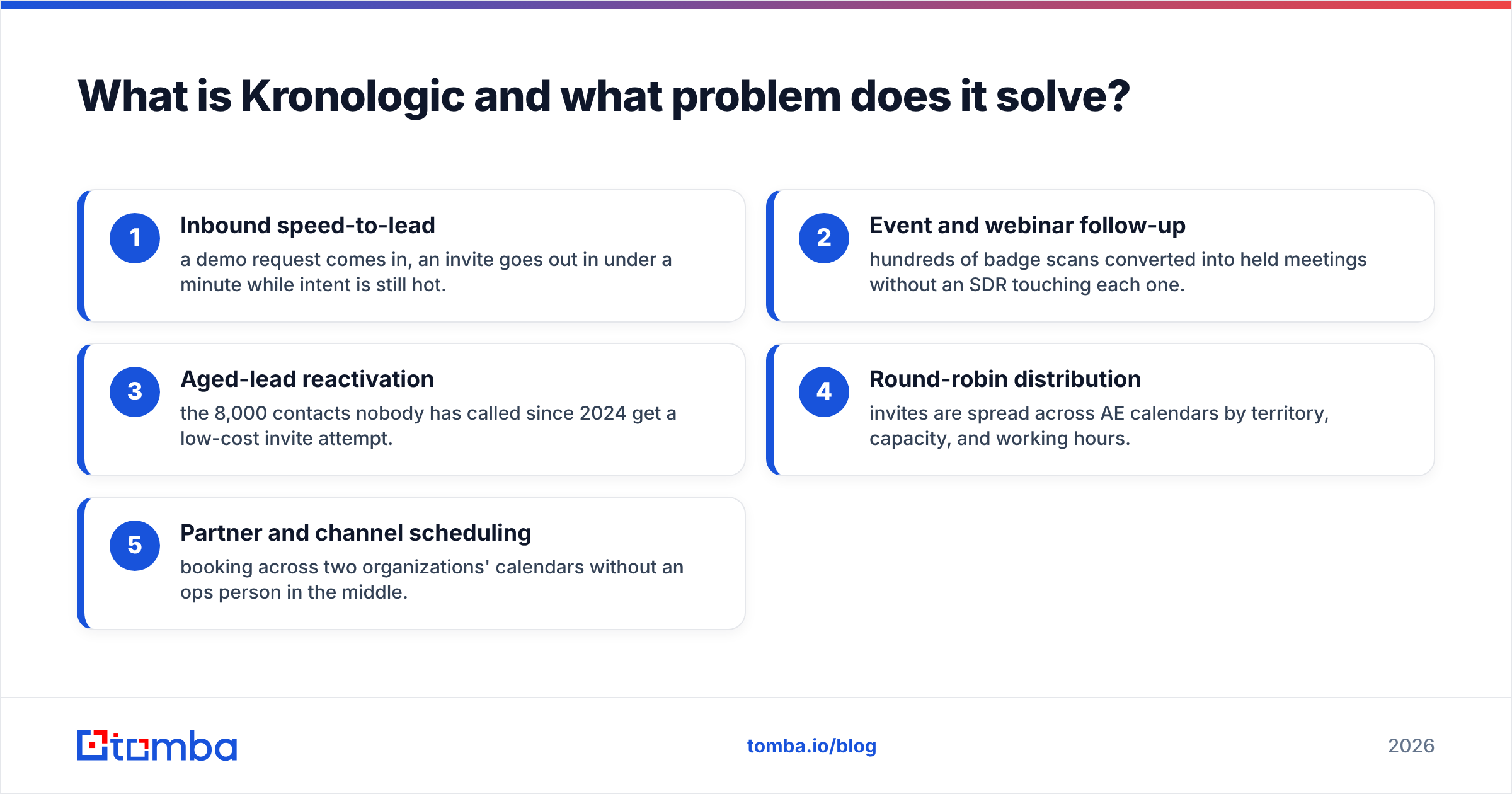
Where teams use it:
- Speed to lead — a demo request comes in, and an invite goes out in under a minute.
- Event and webinar follow-up — hundreds of badge scans turn into booked meetings with no SDR in the loop.
- Old-lead wake-up — the 8,000 contacts nobody has called since 2024 get one cheap invite.
- Round-robin — invites spread across AE calendars by region, load, and work hours.
- Partner scheduling — booking across two firms' calendars with no ops person in the middle.

How much does Kronologic actually cost in 2026?#
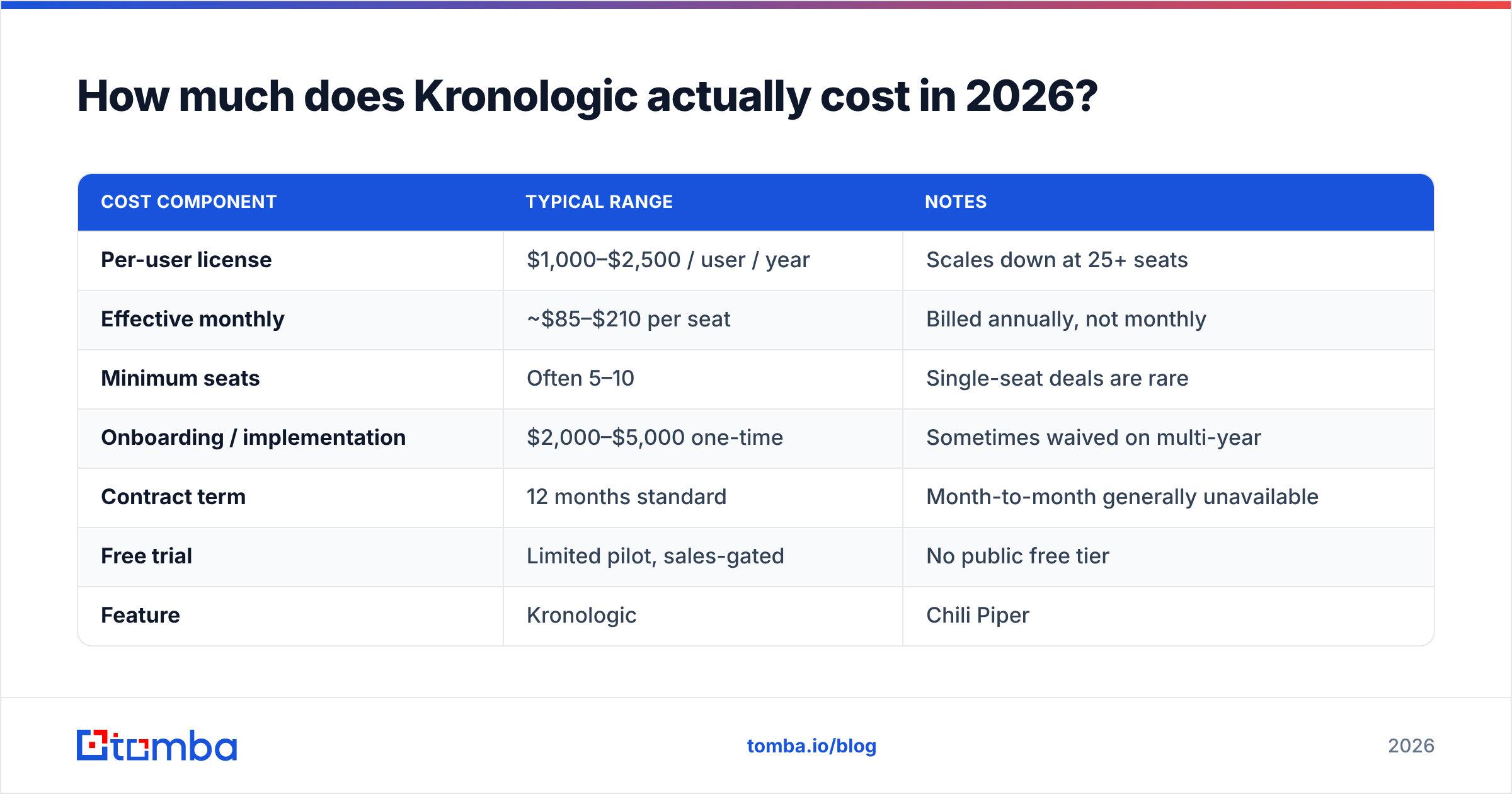
Kronologic does not publish a price list. Every deal runs through sales. That is the first honest note in any Kronologic pricing reviews pros and cons review: you will not know your number until you take a call.
Vendor listings, reseller pages, and buyer reports on G2 and Capterra all point the same way.
| Cost component | Typical range | Notes |
|---|---|---|
| Per-user license | $1,000–$2,500 / user / year | Scales down at 25+ seats |
| Effective monthly | ~$85–$210 per seat | Billed annually, not monthly |
| Minimum seats | Often 5–10 | Single-seat deals are rare |
| Onboarding / implementation | $2,000–$5,000 one-time | Sometimes waived on multi-year |
| Contract term | 12 months standard | Month-to-month generally unavailable |
| Free trial | Limited pilot, sales-gated | No public free tier |
So a 10-person AE team should budget about $15,000–$25,000 in year one. That figure includes setup. Hold it up against your pipeline math, not the per-seat sticker.
Break-even is easy to check. Say a seat costs $150 a month. Say your average won deal is $8,000 and you close one in five. One extra meeting per seat each month pays for the tool many times over. Now say your deal size is $1,200 and each rep books four meetings a month. The math stops working.
How does Kronologic compare to the alternatives?#
Buyers weigh Kronologic against three groups at once. That is why the comparison gets muddy. Chili Piper plays on inbound routing. Calendly plays on price and reach. Outreach and Salesloft own the whole sequence.
| Feature | Kronologic | Chili Piper | Calendly | Outreach |
|---|---|---|---|---|
| Entry price | Quote only, ~$100+/seat/mo | $22.50/seat/mo (Instant Booker) | Free tier; $12–$20/seat/mo | ~$100+/seat/mo, annual |
| Free tier | No | No | Yes | No |
| AI invite negotiation | Yes — core feature | Limited | No | No |
| Form-to-meeting routing | Yes | Yes — best in class | Basic | Via integrations |
| Sequencing / cadences | No | No | No | Yes |
| Aged-lead reactivation | Yes — strongest use case | Weak | No | Partial |
| Contract flexibility | Annual only | Annual, some monthly | Monthly self-serve | Annual only |
| Setup effort | High (2–6 weeks) | Medium | Minutes | High |
| Best fit | High-volume inbound + dormant DBs | Inbound demo routing | SMB, self-serve | Full outbound orgs |
Read the table and the fit is clear. Kronologic is not a Calendly swap for a five-person startup. It is an automation layer for teams that hold more good contacts than their reps can work.
Kronologic pricing reviews pros and cons: what buyers report#
Scores on G2 and Capterra sit between 4.3 and 4.6. Solid, not spotless. Read past the score and the same themes repeat.
What reviewers praise:
- More meetings from old data. The top praise is waking up dead leads. Several reviewers book double digits from lists that sat idle for a year.
- Fast first invite. Inbound replies go out in under a minute. Reviewers say the show rate improves.
- Less SDR admin. Reps stop playing calendar tennis. That time goes back into calls.
- Helpful support team. Setup help gets praised more often than it gets bashed.
What reviewers complain about:
- Setup is heavier than the pitch. Expect weeks of work, CRM field mapping, and logic that needs an ops owner.
- The AI misreads edge cases. A lead writes "I have left the company" or "send info first." The bot may push another time slot anyway. This is the most common gripe.
- Calendar sync quirks. A few reviews report time zone and double-booking bugs. They usually trace to complex round-robin rules.
- No public price, and a year-long lock-in. Buyers dislike a 12-month deal whose value rests on their own data.
- Thin reporting. It is hard to tell a bot-booked meeting from a rep-booked one.

One pattern runs through the bad reviews. Almost none of them say the product fails. They say it works only when the basics are in place. That means a clean CRM, real email addresses, a clear ICP, and an ops owner.
What are the real pros and cons?#
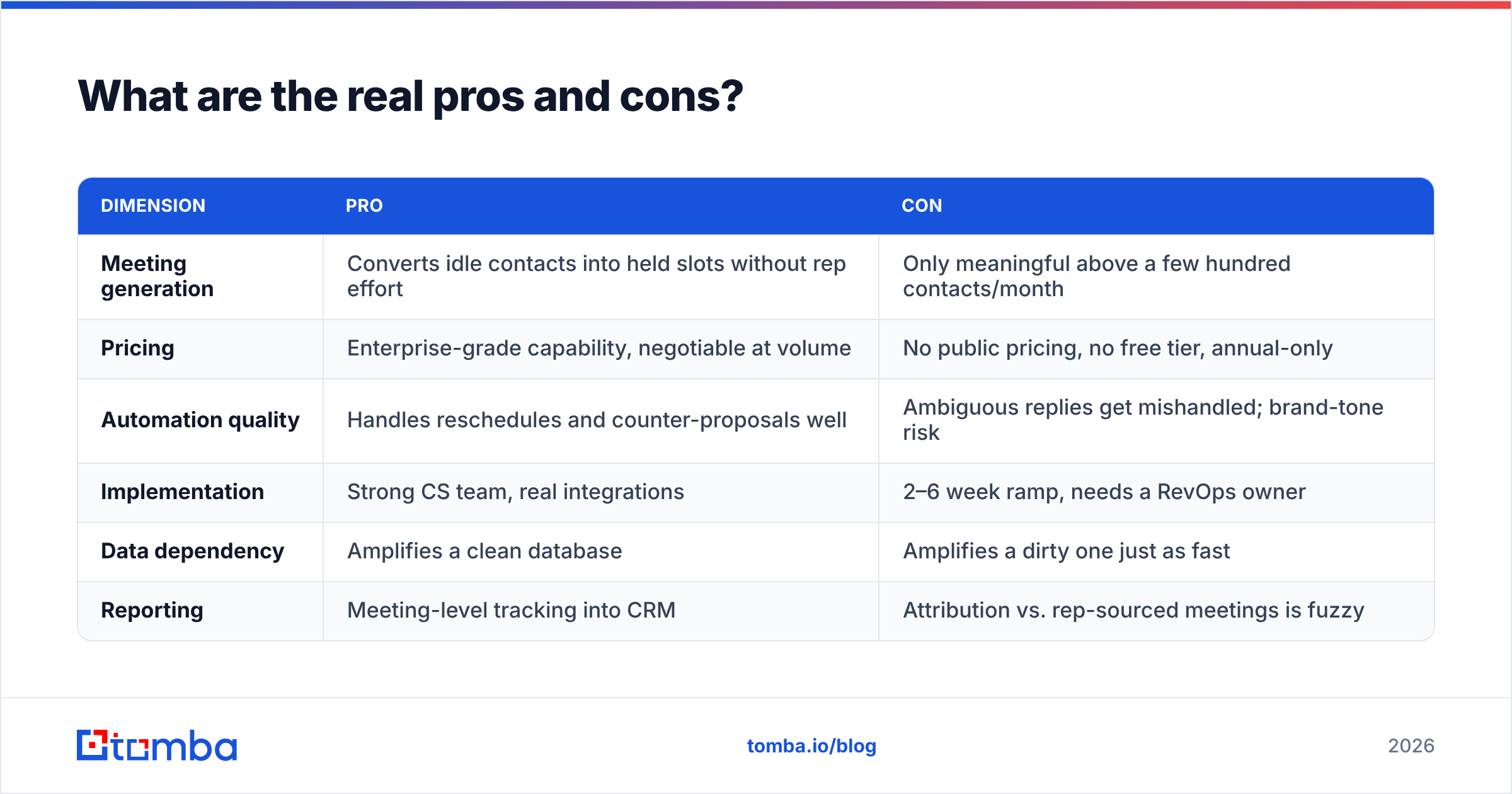
| Dimension | Pro | Con |
|---|---|---|
| Meeting generation | Converts idle contacts into held slots without rep effort | Only meaningful above a few hundred contacts/month |
| Pricing | Enterprise-grade capability, negotiable at volume | No public pricing, no free tier, annual-only |
| Automation quality | Handles reschedules and counter-proposals well | Ambiguous replies get mishandled; brand-tone risk |
| Implementation | Strong CS team, real integrations | 2–6 week ramp, needs a RevOps owner |
| Data dependency | Amplifies a clean database | Amplifies a dirty one just as fast |
| Reporting | Meeting-level tracking into CRM | Attribution vs. rep-sourced meetings is fuzzy |
The data row is the one buyers miss. Kronologic sends real invites from real rep inboxes. Every invite to a dead address is a bounce. Each bounce chips away at your sender reputation. Every invite to the wrong person can draw a spam report.
Automation does not forgive bad data. It scales it. So clean your list with an email verifier before it ever reaches a scheduling tool. That one step sits between a working channel and a burned domain.
Who should buy Kronologic, and who should not?#
Buy it if:
- You get 300+ good inbound contacts a month and cannot staff enough SDRs.
- You run field events or webinars and drown in follow-up.
- Your CRM holds old leads with real value and no owner.
- Your deal size is big enough that one extra meeting per rep clears a $150 seat with room to spare.
- You have a RevOps person who will own the setup. Own it, not glance at it.
Skip it if:
- You have fewer than ten reps and your inbound runs in dozens, not hundreds. Calendly plus steady follow-up wins on cost.
- You do not know your list quality. Fix that first. The tool will expose it, and the lesson is pricey.
- You need cadences, dialing, or contact data. Kronologic leaves those to other tools.
- You cannot sign for a year. There is no clean way out mid-term.
What should you check before you sign?#
- Ask for the all-in year-one price. Include setup, not just the seat rate.
- Get the bounce policy in writing. Ask what a hard bounce does to your sender reputation. Ask whether the tool blocks that address on its own.
- Ask for a pilot on one segment. Old leads work best, since the baseline is zero meetings.
- Check the reply logic for out-of-office, job change, and "not interested" replies. Ask to read real transcripts, not a demo script.
- Pin down the renewal raise. Quote-only tools hide year-two hikes.
How do you keep the meetings you book from being wasted?#
A meeting with the wrong person is worse than no meeting. It burns an hour for your rep and goodwill with the buyer. Three habits protect the top of that funnel. None of them are Kronologic's job.
Verify before you automate. Check every contact before it enters an invite flow. That includes catch-all domains. They pass simple checks and then bounce. A catch-all verifier sorts out the ones other tools mark "unknown."
Enrich so the invite fits. A job title from eight months ago gets the invite ignored. Refresh title, company, and contact data with data enrichment before you send.
Fill the gaps at the source. Some old leads have names and firms but no email. A domain search finds the current pattern at that firm and rebuilds the address. Guessed addresses are how invite flows land in spam.
One more note. If your problem is list supply, not scheduling, a data vendor like BookYourData solves the other half. They are complements, not rivals. One supplies contacts. The other books them. Either way, live checks decide whether any of it works.
Is Kronologic worth it in 2026?#
Yes, with strings. Kronologic does something real in a market full of booking links. The AI back-and-forth works. Reviewers confirm the lift in meetings. On old leads it does what no link can do.
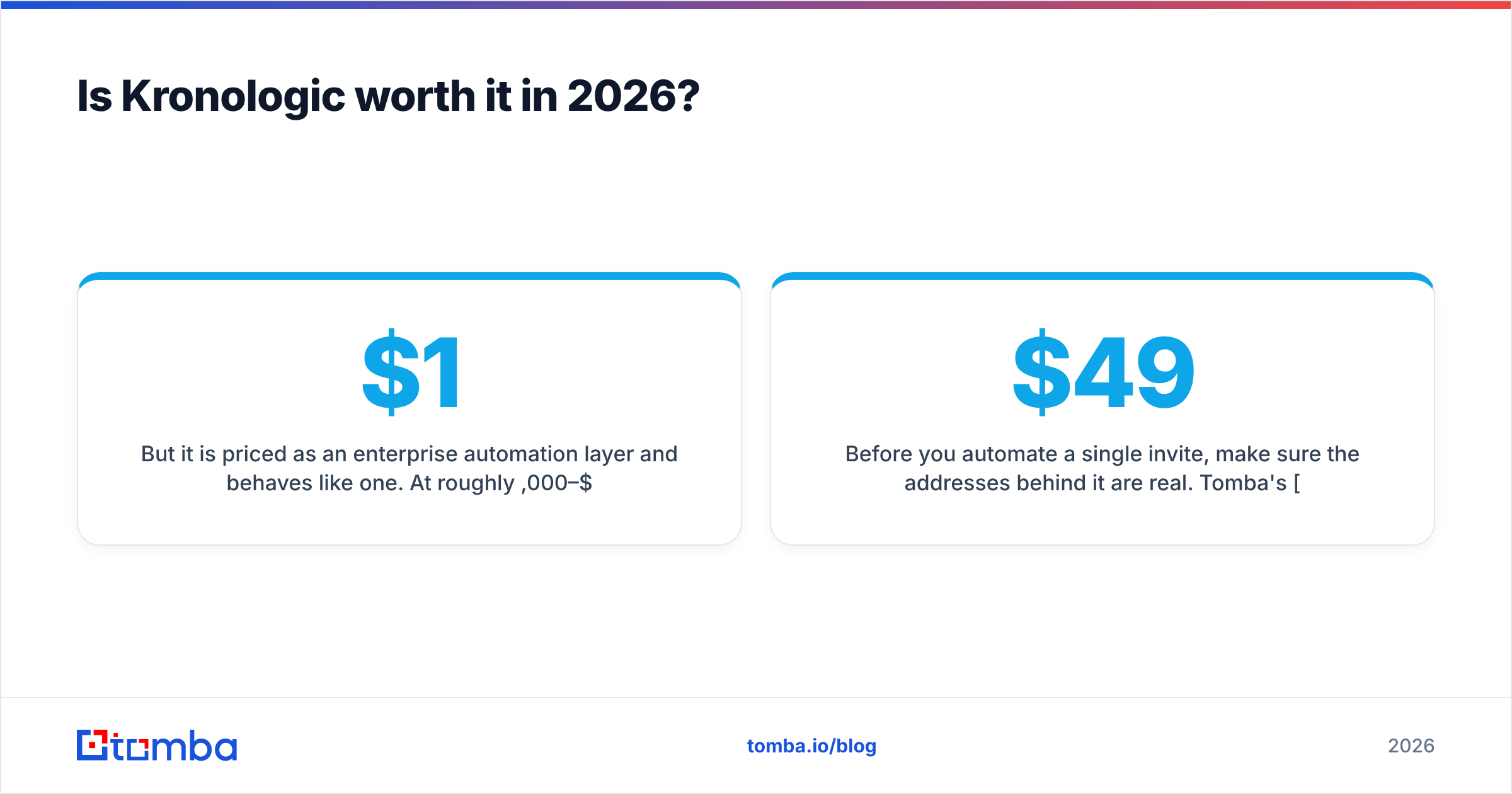
But it is priced like enterprise software and acts like it. Plan for $1,000–$2,500 per user per year, a 12-month deal, and weeks of setup. That asks for volume, an owner, and clean data. Teams with all three renew. Teams missing one call it costly, and they are right. The tool cannot create the conditions it needs.
So do the math before the demo, not after. Take your contact volume, your extra meeting rate, your close rate, and your deal size. If that does not clear year-one cost by 3x, the answer is no. That is the plain end of any Kronologic pricing reviews pros and cons check, whatever the demo looks like.
Before you automate a single invite, make sure the addresses are real. Tomba's Email Finder pulls verified work emails by name and domain. So the contacts you push into Kronologic are live people at current firms, not bounces in waiting.
Start free with 25 searches a month. The Starter plan runs $49 a month. Full Tomba pricing goes up through Growth at $99 and Pro at $249. Clean data first, automation second. That order is what makes the second one worth paying for.
Related guides#
// get started
Find, verify and enrich your first contacts today
Start on the free plan with 25 searches a month, then scale when your team is ready.
Free plan · No credit card required · GDPR & CCPA
// about the author