Kuasa Pricing Pros and Cons: A Neutral 2026 Buyer's Guide
Kuasa's pricing raises more questions than it answers. Here's how the credit model really works, what reviewers do and don't tell you, and how the real cost per usable contact stacks up against Tomba and BookYourData.
Kuasa pricing pros and cons come down to one thing: the plan card is not the price you pay. This guide breaks down how the credit model works, what the reviews miss, and what a usable contact really costs.
TL;DR
- Kuasa sells B2B contact data on a credit model. The number on the plan card is not what you pay per usable contact.
- Three costs decide your bill: credit burn on failed lookups, seat minimums, and annual-only discounts. Ask about all three before you sign.
- Reviews of small lead-data vendors are thin and easy to misread. Treat them as a signal, not a verdict, and run your own 200-contact test.
- Tomba publishes its prices (Free, $49, $99, $249). Kuasa makes you book a call first, which costs you time before it costs money.
- Short version of the Kuasa pricing pros and cons: it fits teams that want data plus outreach in one contract. If you just need accurate emails at a price you can forecast, a finder plus a verifier is cheaper.
What is Kuasa, and who is it actually for?#
Kuasa sits in the B2B lead-data and outreach tooling category: you search for prospects, pull contact details, and push them into a sequence or a CRM. That category is crowded. The tools inside it differentiate on three things only — how much data they have, how accurate that data is, and how they charge you for it.
The buyer profile that gravitates toward tools like Kuasa is usually one of these:
- A founder-led sales team that wants one subscription instead of three.
- An agency running outbound for several clients that needs volume without enterprise contracts.
- A RevOps lead consolidating a stack and hunting for a cheaper replacement for a legacy data contract.
If you are in the third group, be warned. Consolidation savings are real, but they are rarely where the vendor says they are. The savings come from cutting wasted credits, not from a lower sticker price. That is the lens this review uses throughout.
Kuasa pricing pros and cons: how the credit model works#
Credit-based pricing is the norm in this category, and Kuasa follows it. Tier names matter far less than mechanics. Here are the first three questions to put on any quote you receive:
- What consumes a credit. Does a failed lookup still cost you? A search that returns nothing, or returns a guessed pattern with low confidence, should not burn credit. Vendors that charge only for found-and-verified results are cheaper in practice, even at a higher headline price.
- Whether verification is bundled or billed. Some platforms charge one credit to find an address and a second to verify it. If so, your real per-contact cost is double what the pricing page implies. Bundled verification, like the model used by Tomba's email verifier alongside its finder, removes that second line item.
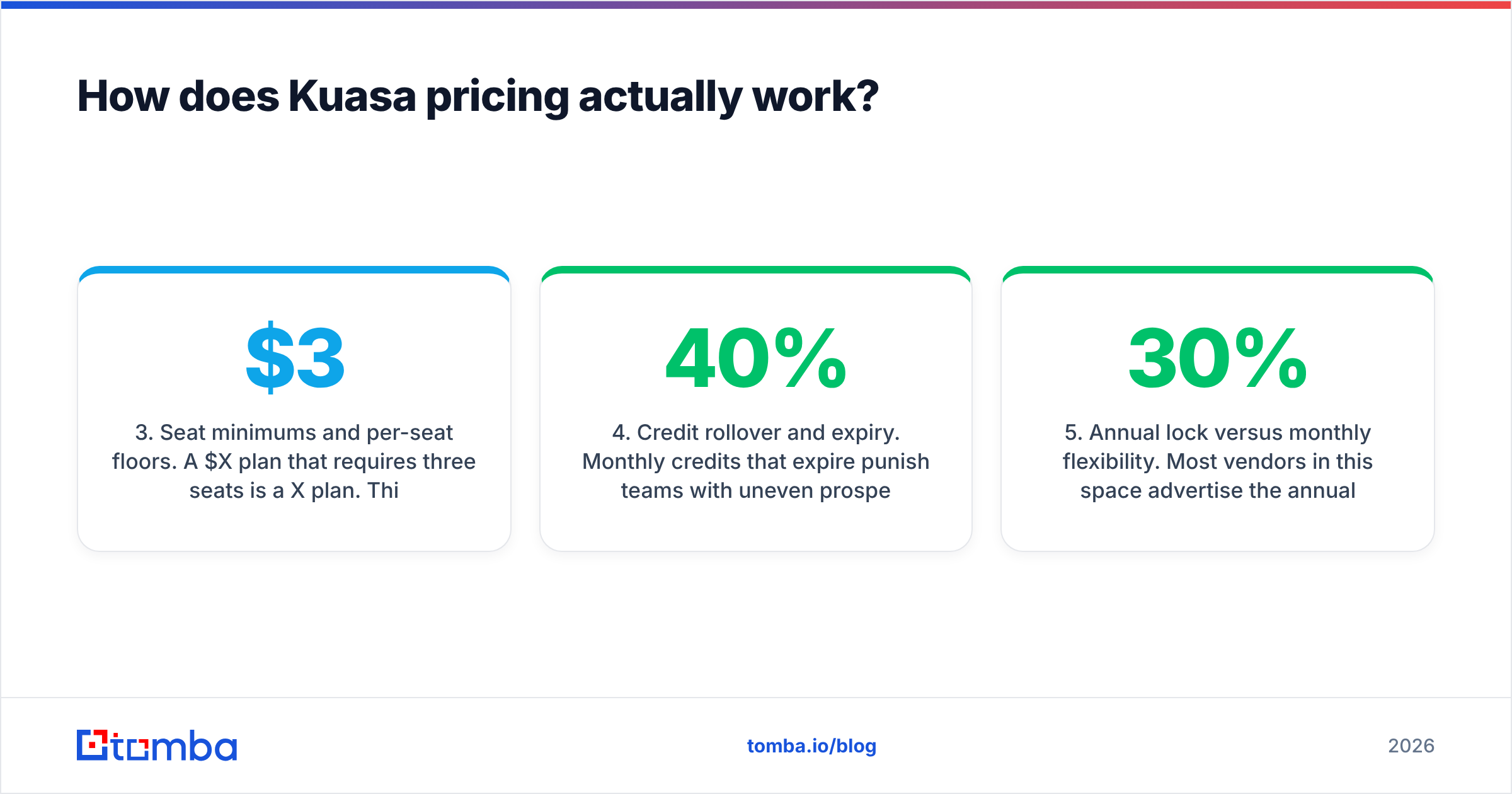
- Seat minimums and per-seat floors. A $X/month plan that requires three seats is a $3X/month plan. This is the most common gap between a quoted price and a signed invoice.
Those three set your unit price. The next three decide how much of what you buy you actually get to use:
- Credit rollover and expiry. Monthly credits that expire punish teams with uneven prospecting cycles. If you run campaign bursts rather than steady daily volume, expiring credits can waste 30-40% of what you bought.
- Annual lock versus monthly flexibility. Most vendors here advertise the annual-equivalent monthly figure. If you need month-to-month, expect the real number to be 20-30% higher.
- Export and API limits. Some plans cap CSV exports or gate API access to higher tiers. If your workflow is enrichment at scale rather than manual search, an API-gated plan quietly pushes you up a tier.
Run those six questions against any quote and you get a defensible cost model. Skip them, and you are comparing marketing pages, not products.
Sorry — that image should read: 
What do Kuasa reviews actually tell you?#
Here is the honest answer: not much. Factor that into the decision, because review volume is how you price risk in any Kuasa pricing pros and cons call.
Kuasa's public review footprint is thin next to the incumbents. When a vendor has a few dozen reviews rather than a few thousand, three distortions kick in:
- Recency bias. Early adopters review during the honeymoon window, before renewal pricing and data decay show up.
- Incentive skew. Small vendors commonly run review-for-credit campaigns. Those reviews are not fake, but they are selected.
- Survivorship. Customers who churned in month two rarely write anything at all.
This is not specific to Kuasa. It applies to every sub-100-review listing on G2's lead intelligence category and the matching listings on Capterra. The practical move is to read reviews for specific complaints rather than for the star rating. One review saying "support took nine days" tells you more than fifty saying "great tool."
What we could not verify#
Kuasa does not publish a complete self-serve price list. There is no public breakdown of per-tier credit allowances, seat minimums, and overage rates that can be checked and quoted here. Treat any exact Kuasa dollar figure you read elsewhere as unconfirmed unless it links to a live pricing page or an invoice screenshot.
That gap is itself a finding. A vendor that needs a sales call to disclose the price is telling you the price is negotiable. That is good news if you have leverage and volume. It is bad news if you are a two-person team who just wants to buy something on a card this afternoon.
What are the pros of Kuasa?#
Start with the upside. Four items sit on the pros side of the Kuasa pricing pros and cons ledger.
Bundled workflow. Data and outreach in one place removes a sync layer. Every integration you delete is an integration that cannot break at 2 a.m. before a campaign.
Negotiable pricing. Quote-led vendors discount. If you are buying real volume, a sales-led motion usually beats a fixed price card. Ask for annual credits with rollover rather than a percentage discount — it is worth more.
Smaller vendor, better attention. Support at emerging vendors often beats what you get as a mid-size account at a market leader. You may get a named contact rather than a ticket queue.
Room to shape the roadmap. Feature requests from early customers get built. That matters if your motion has a specific wrinkle.
What are the cons of Kuasa?#
The cons side of the Kuasa pricing pros and cons ledger is mostly about information you never get.
Opaque pricing costs you time. Two sales calls and a week of back-and-forth is a real expense, especially when a competitor lets you test the data before lunch.
Thin review corpus means thin risk data. You cannot benchmark support SLAs, refund behaviour, or data-refresh cadence from a small sample. You are buying with less information.
Bundle risk. A platform that does data and sequencing usually does one of them better than the other. If the sequencing is the strong half, you are paying for data as a loss leader — and loss-leader data is rarely the freshest.
Verification depth is the usual weak spot. Catch-all domains are where cheap data quietly fails. A provider without genuine catch-all handling hands you addresses that pass a syntax check and bounce anyway. If you run heavy enterprise lists, test with a catch-all verifier before you trust any vendor's "valid" label.
How does Kuasa pricing compare to the alternatives?#
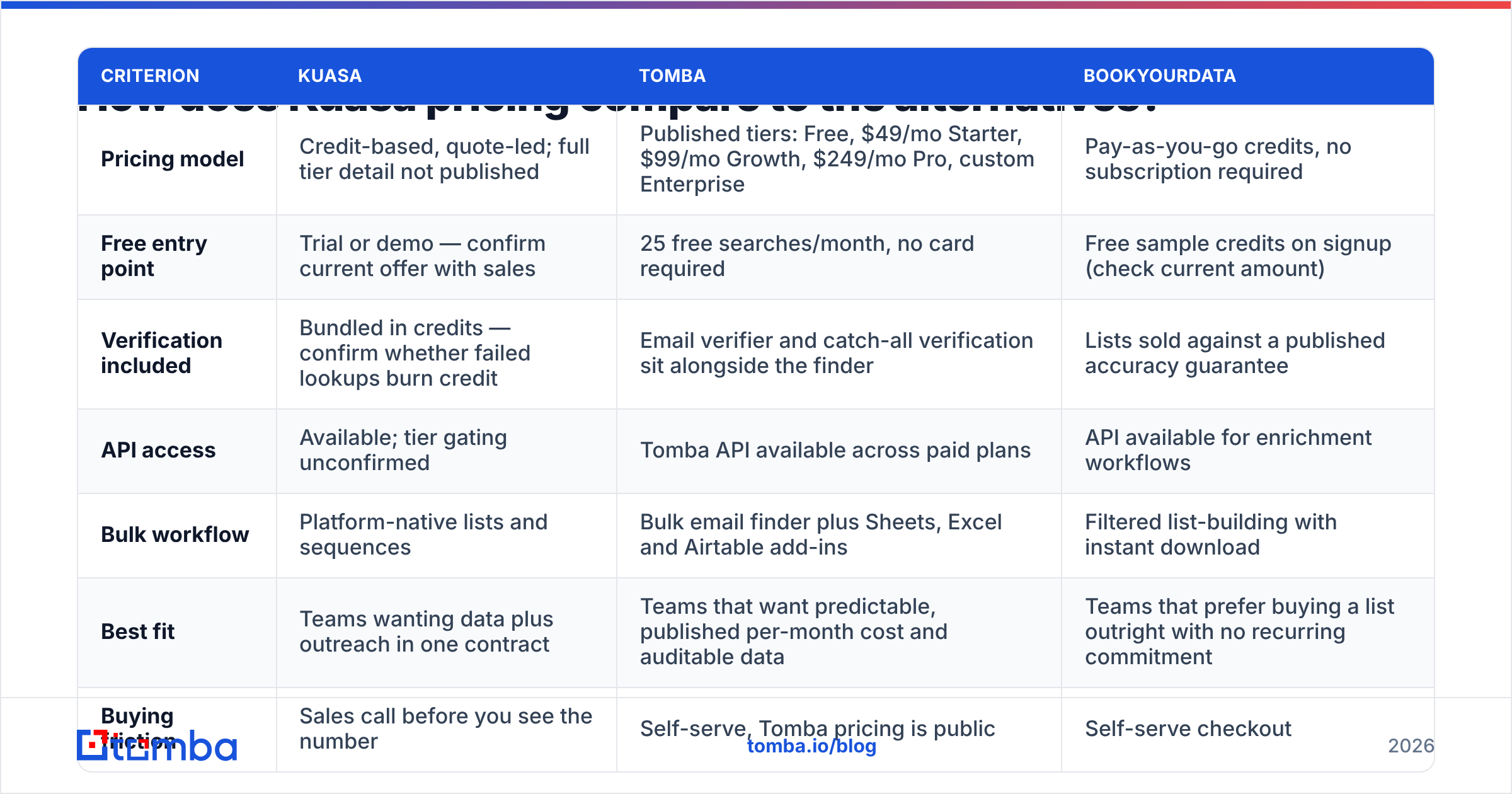
| Criterion | Kuasa | Tomba | BookYourData |
|---|---|---|---|
| Pricing model | Credit-based, quote-led; full tier detail not published | Published tiers: Free, $49/mo Starter, $99/mo Growth, $249/mo Pro, custom Enterprise | Pay-as-you-go credits, no subscription required |
| Free entry point | Trial or demo — confirm current offer with sales | 25 free searches/month, no card required | Free sample credits on signup (check current amount) |
| Verification included | Bundled in credits — confirm whether failed lookups burn credit | Email verifier and catch-all verification sit alongside the finder | Lists sold against a published accuracy guarantee |
| API access | Available; tier gating unconfirmed | Tomba API available across paid plans | API available for enrichment workflows |
| Bulk workflow | Platform-native lists and sequences | Bulk email finder plus Sheets, Excel and Airtable add-ins | Filtered list-building with instant download |
| Best fit | Teams wanting data plus outreach in one contract | Teams that want predictable, published per-month cost and auditable data | Teams that prefer buying a list outright with no recurring commitment |
| Buying friction | Sales call before you see the number | Self-serve, Tomba pricing is public | Self-serve checkout |
Two of those three options let you validate the data before a human ever calls you. That is the real comparison point, not the dollar figures, and it is where most Kuasa pricing pros and cons arguments get settled.
What does a contact actually cost you?#
Sticker price is a vanity metric. Cost per usable contact is the number your CFO cares about. The formula:
Real cost per contact = (monthly spend) ÷ (contacts found × deliverability rate)
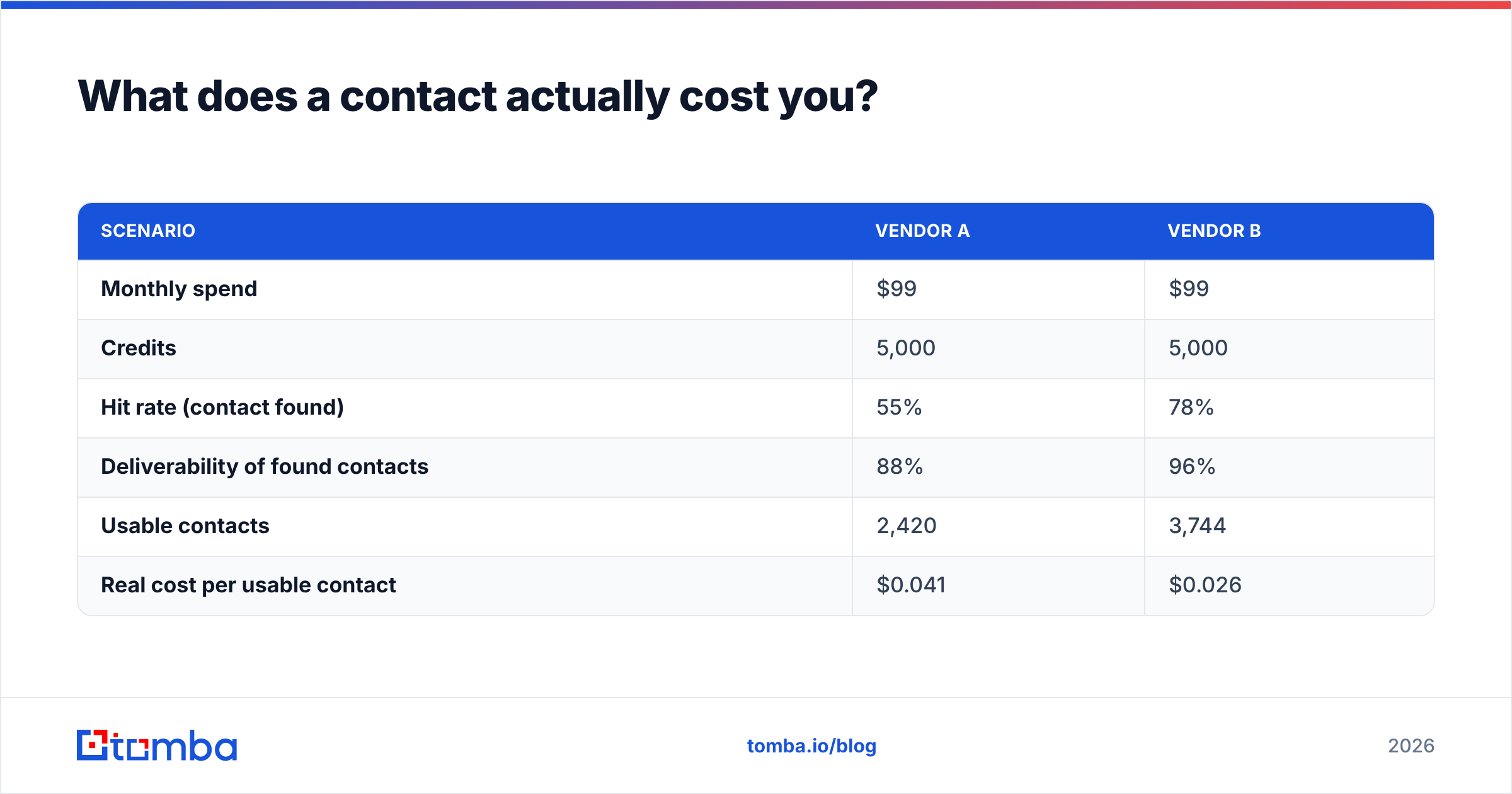
Work a simple example. Say two vendors both give you 5,000 credits for $99/month.
| Scenario | Vendor A | Vendor B |
|---|---|---|
| Monthly spend | $99 | $99 |
| Credits | 5,000 | 5,000 |
| Hit rate (contact found) | 55% | 78% |
| Deliverability of found contacts | 88% | 96% |
| Usable contacts | 2,420 | 3,744 |
| Real cost per usable contact | $0.041 | $0.026 |
Same price card, 58% difference in real cost. That gap also ignores the downstream damage. A 12% bounce rate wrecks sender reputation, and a poor reputation suppresses inbox placement for every campaign that follows. HubSpot's sales blog has tracked this for years: deliverability compounds. Good data makes the next campaign cheaper. Bad data makes it more expensive.
So when you weigh the Kuasa pricing pros and cons, do not compare plan cards. Pull 200 contacts from each vendor for the same ICP, verify them independently, and run the table above with your own numbers.
Correct embed: 
Kuasa pricing pros and cons: is it worth it in 2026?#
Buy it if: you want one contract covering both data and sequencing, you have enough volume to negotiate, and a paid pilot on your own ICP cleared a 70% hit rate and 95% deliverability.
Skip it if: you are a small team that needs to move today, your ICP sits outside the vendor's strongest geographies, or you simply need accurate email addresses at a price you can forecast. In that case a dedicated finder plus verifier is cheaper and easier to audit. A pay-as-you-go seller like BookYourData also works when you would rather buy a clean list than carry a subscription.
Renegotiate if: you are already a customer approaching renewal. Bring your real cost-per-usable-contact table to the call. Vendors discount against a competitor's published price far more readily than against a vague complaint.
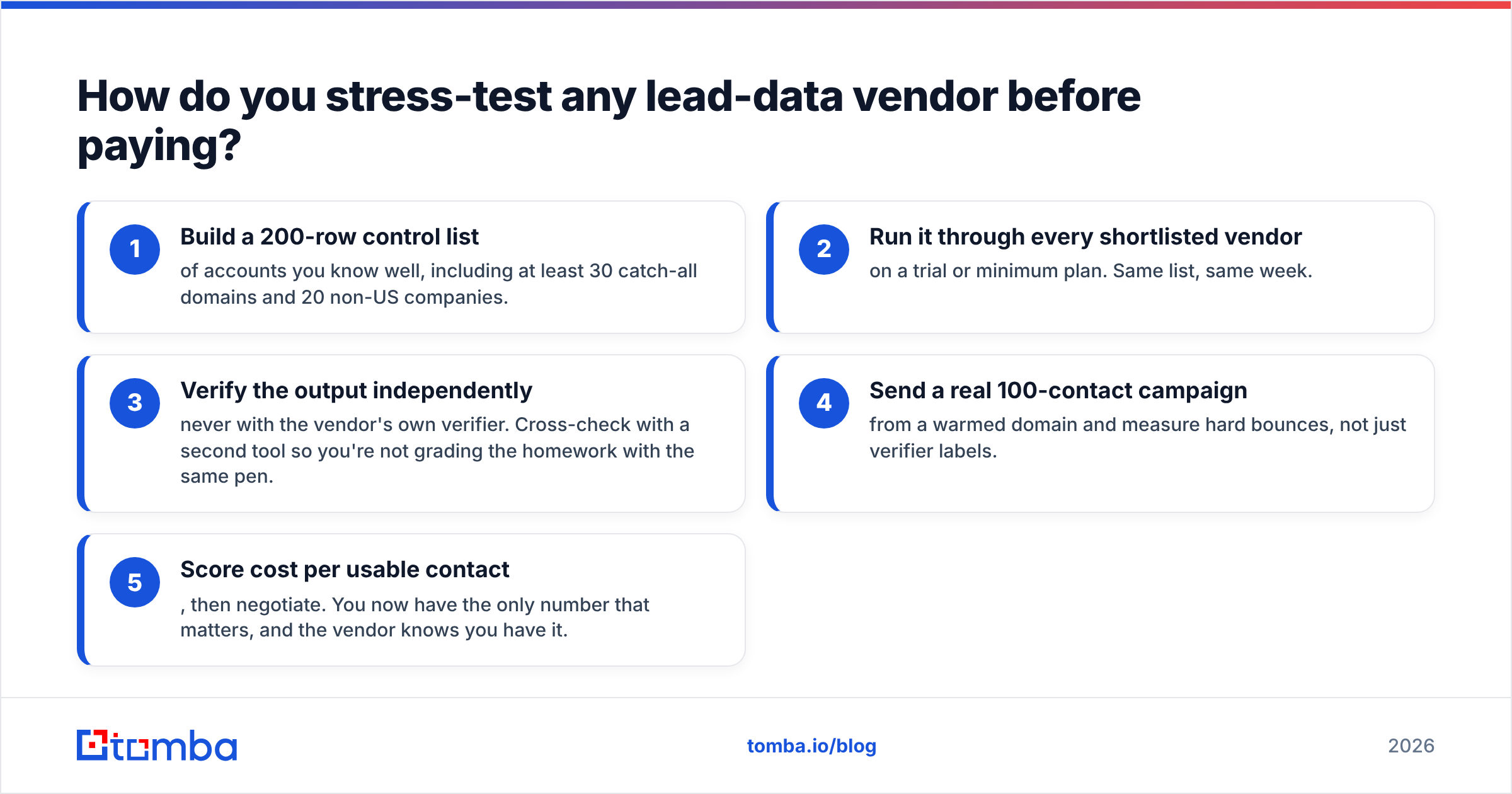
How do you stress-test any lead-data vendor before paying?#
- Build a 200-row control list of accounts you know well. Include at least 30 catch-all domains and 20 non-US companies.
- Run it through every shortlisted vendor on a trial or minimum plan. Same list, same week.
- Verify the output independently — never with the vendor's own verifier. Cross-check with a second tool so you are not grading the homework with the same pen.
- Send a real 100-contact campaign from a warmed domain. Measure hard bounces, not just verifier labels.
- Score cost per usable contact, then negotiate. You now have the only number that matters, and the vendor knows you have it.
Most teams skip steps 3 and 4. Then they spend six months blaming their copy for a data problem. Two afternoons of testing prevents a year of it. If you want to know what feeds accuracy in the first place, read how providers document their data sources. Vendors that will not explain provenance usually have a reason.
The bottom line#
The core Kuasa pricing pros and cons trade-off is bundling and negotiability versus transparency and speed. If your team values one invoice and has the volume to win a real discount, it deserves a shortlist slot. Just insist on a paid pilot with your own control list before you sign for twelve months.
If what you need is accurate B2B email addresses at a price you can predict without booking a call, start with the Tomba Email Finder. The free tier gives you 25 searches a month with no card. Paid plans start at $49/month with verification built in rather than billed separately. Every number is published before you talk to anyone. Run your 200-row control list through it this afternoon and check the cost-per-usable-contact math yourself — that is the only review that counts.
Related guides#
// get started
Find, verify and enrich your first contacts today
Start on the free plan with 25 searches a month, then scale when your team is ready.
Free plan · No credit card required · GDPR & CCPA
// about the author