Kuration Pricing, Reviews, Pros and Cons: A 2026 Breakdown
A neutral breakdown of Kuration AI: how its credit pricing really adds up, what reviewers praise and complain about, and the cases where a flat-rate email finder costs you far less per usable contact.
TL;DR
- Kuration AI is a credit-based lead research agent: you upload or build a list, then point AI "curation steps" at it to research, filter, and enrich each row. It is not a static database and it is not primarily an email finder.
- Pricing is consumption-based. A free tier exists for testing, paid plans start in the low double digits per month, and real spend is driven by how many enrichment steps you run per row — not by seats.
- Reviewers consistently praise the research depth and the natural-language filtering. The recurring complaints are credit unpredictability, slow runs on large lists, and contact data that often needs a second source.
- The honest verdict: Kuration earns its keep when your ICP needs qualification a database cannot express ("agencies that recently hired a paid media lead"). It is expensive overkill when you already know the accounts and just need verified emails.
- Cost math matters more than sticker price. Compare dollars per usable, verified contact, not dollars per month.
What is Kuration AI and who is it actually for?#
Kuration AI is an agentic list-building and research tool. Think of it as hiring a junior researcher who never sleeps: you hand over a spreadsheet of companies, tell it what to find out about each one in plain English, and it works through the rows one by one, checking websites, directories, and public sources.
Technically, you define a list (imported CSV, a source search, or a seed set of domains), then stack "curation steps" on top of it. Each step is a question or an action — Does this company run an affiliate program? What ecommerce platform do they use? Who leads growth marketing? Is this a franchise or an independent location? The agent researches each row and writes the answer into a new column. You then filter on those columns to keep only the accounts that match.
That shape matters for pricing, because you are not paying for records. You are paying for reasoning over records.
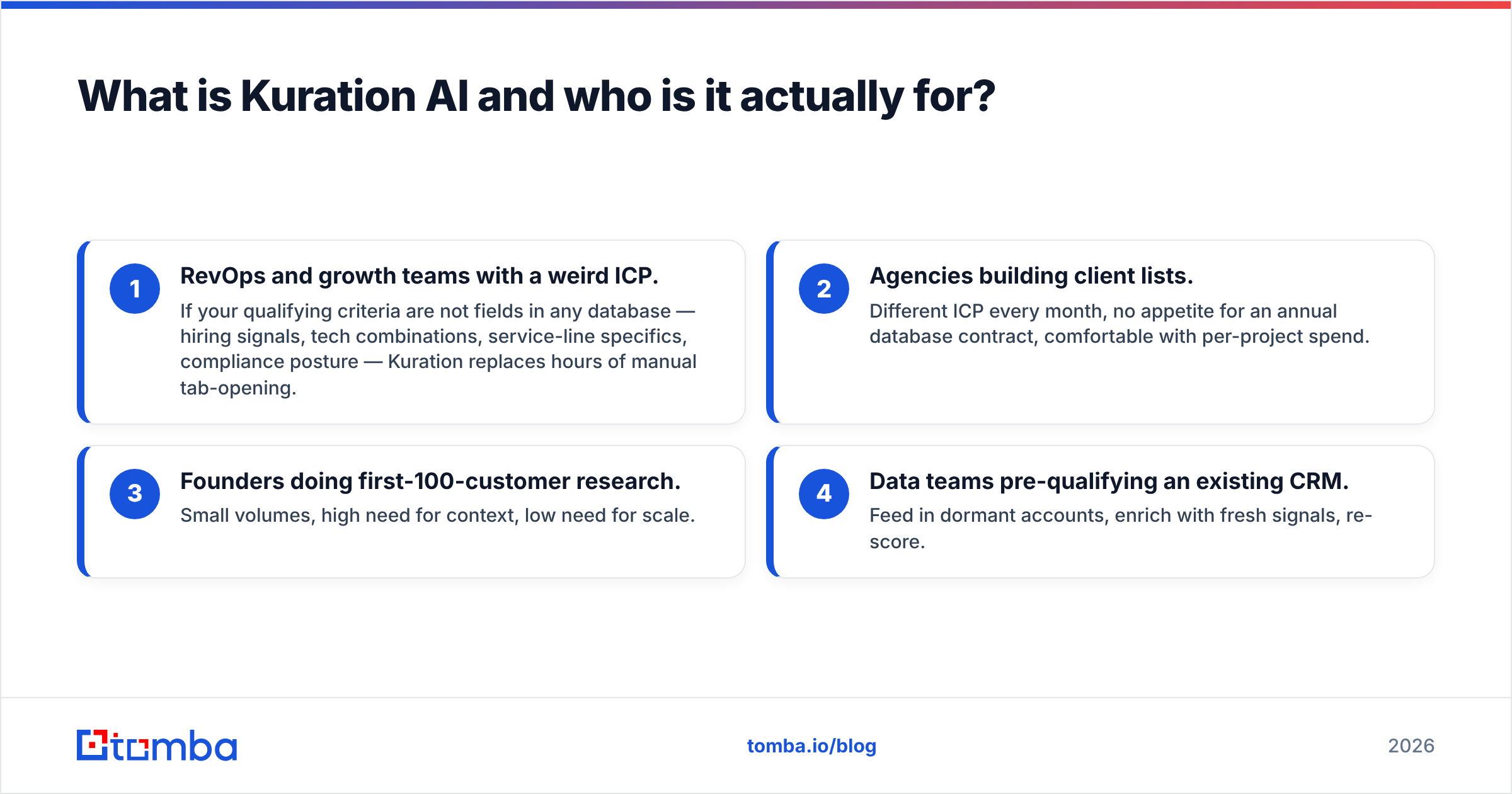
The realistic buyer profiles:
- RevOps and growth teams with a weird ICP. If your qualifying criteria are not fields in any database — hiring signals, tech combinations, service-line specifics, compliance posture — Kuration replaces hours of manual tab-opening.
- Agencies building client lists. Different ICP every month, no appetite for an annual database contract, comfortable with per-project spend.
- Founders doing first-100-customer research. Small volumes, high need for context, low need for scale.
- Data teams pre-qualifying an existing CRM. Feed in dormant accounts, enrich with fresh signals, re-score.
Who it is not for: anyone whose bottleneck is "I have 4,000 named prospects and no email addresses." That is a bulk email finder problem, and running it through an AI research agent is like paying a consultant to look up phone numbers.

How does Kuration pricing actually work?#
Kuration uses credit-based (consumption) pricing rather than seat licensing. The published structure at the time of writing runs a free tier for evaluation, self-serve monthly plans starting in the low double digits, a mid plan around the $100/month mark for teams, and custom enterprise pricing above that. Vendors in this category adjust tiers frequently — always confirm the current numbers on kuration.ai before you budget.
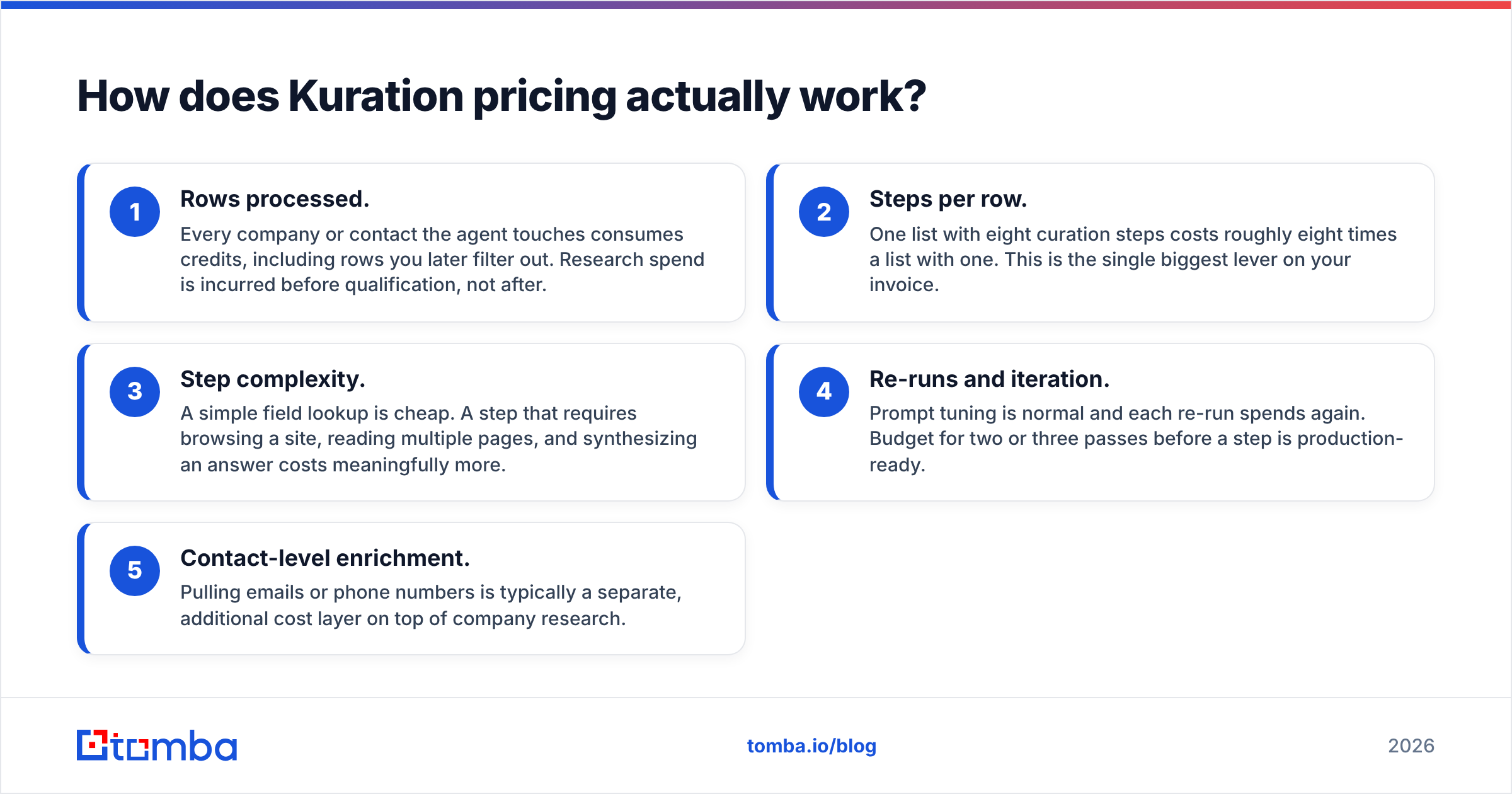
The number on the plan card is the least interesting part. What determines your bill is credit burn, and credit burn is driven by five things:
- Rows processed. Every company or contact the agent touches consumes credits, including rows you later filter out. Research spend is incurred before qualification, not after.
- Steps per row. One list with eight curation steps costs roughly eight times a list with one. This is the single biggest lever on your invoice.
- Step complexity. A simple field lookup is cheap. A step that requires browsing a site, reading multiple pages, and synthesizing an answer costs meaningfully more.
- Re-runs and iteration. Prompt tuning is normal and each re-run spends again. Budget for two or three passes before a step is production-ready.
- Contact-level enrichment. Pulling emails or phone numbers is typically a separate, additional cost layer on top of company research.
That fifth point is where most teams get surprised. You can spend a full research budget qualifying 2,000 companies and still not have a single deliverable inbox to write to.
The useful metric is therefore cost per usable contact, not cost per month. Run it honestly:
(Monthly plan cost + overage) ÷ (rows that survived filtering AND have a verified, deliverable email)
A list where 2,000 rows collapse to 180 qualified accounts and 140 verified emails has a very different unit economic than the plan price suggests. Sometimes it is still excellent — 140 perfectly-fit accounts beats 4,000 sprayed ones. Sometimes it is a $0.70-per-contact bill for data you could have sourced for a few cents.
What do Kuration reviews say?#
Public review volume is thinner than for incumbents — Kuration is a younger product, so you will find more founder-community commentary than enterprise G2 or Capterra coverage. Reading across what exists, the themes are consistent.
What reviewers like:
- Natural-language filtering feels genuinely new. Being able to write "only keep B2B SaaS companies that sell to legal teams" and get a defensible column back is the repeated "wow" moment.
- Transparency of reasoning. Most steps show their working, so you can audit why a row was kept. That builds trust faster than a black-box score.
- Time saved on manual research. The most common quantified claim is replacing multi-hour manual qualification sprints with a single run.
- Fast iteration for agencies. New ICP, new list, no procurement cycle.
What reviewers complain about:
- Credit unpredictability. The most frequent criticism by a wide margin. Users report difficulty forecasting a run's cost before launching it, particularly on complex multi-step lists.
- Runtime on large lists. Agentic research is not instant. Thousands of rows with several steps each means waiting, sometimes hours.
- Contact data depth. Reviewers generally rate the research higher than the contact records. Emails and phone numbers are widely described as needing verification or a second provider.
- Occasional hallucinated or shallow answers. When a public source does not exist, an agent can still produce a confident-sounding cell. Spot-checking is not optional.
- Learning curve on prompting. Step quality is a function of prompt quality, and the first few attempts are usually mediocre.
None of that is disqualifying. It is the standard profile of an AI research tool in 2026: strong at judgment, uneven at raw identifiers.
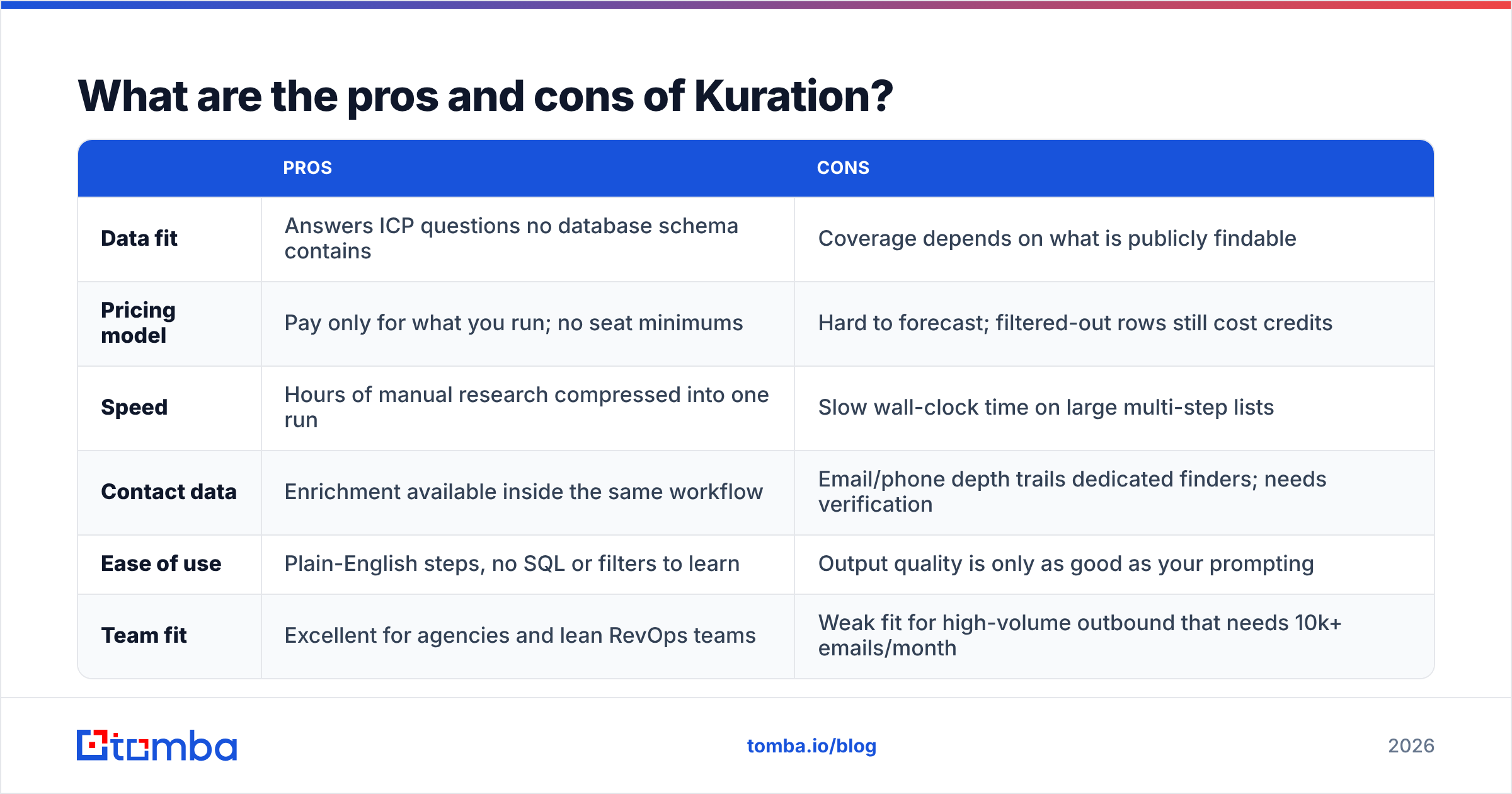
What are the pros and cons of Kuration?#
| Pros | Cons | |
|---|---|---|
| Data fit | Answers ICP questions no database schema contains | Coverage depends on what is publicly findable |
| Pricing model | Pay only for what you run; no seat minimums | Hard to forecast; filtered-out rows still cost credits |
| Speed | Hours of manual research compressed into one run | Slow wall-clock time on large multi-step lists |
| Contact data | Enrichment available inside the same workflow | Email/phone depth trails dedicated finders; needs verification |
| Ease of use | Plain-English steps, no SQL or filters to learn | Output quality is only as good as your prompting |
| Team fit | Excellent for agencies and lean RevOps teams | Weak fit for high-volume outbound that needs 10k+ emails/month |
The honest summary: Kuration is a qualification tool that also touches contact data, not a contact data tool that also qualifies. Buy it for the former and you will be happy. Buy it for the latter and you will end up paying twice.
How does Kuration compare to other lead data tools?#
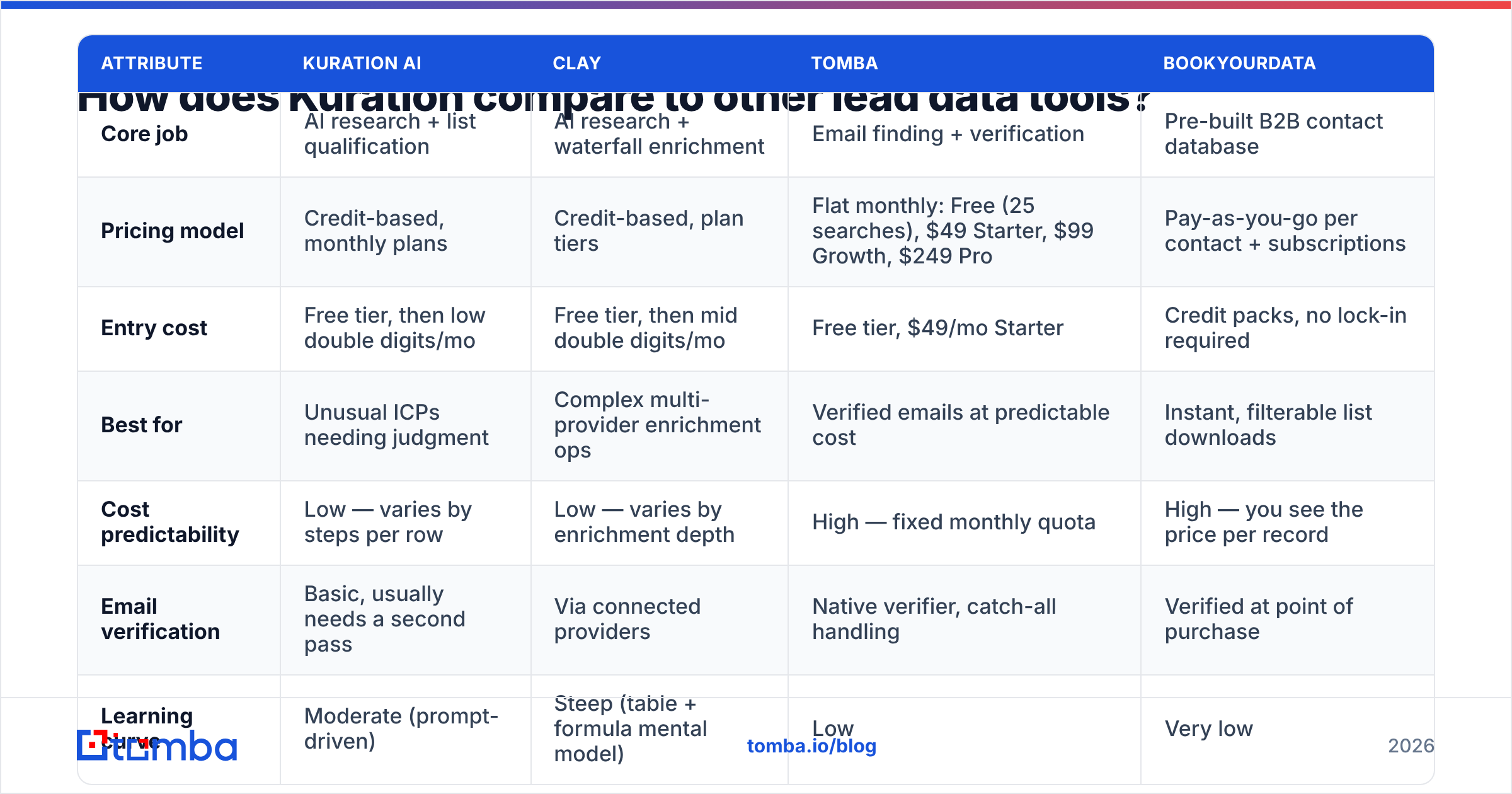
Different tools solve different halves of the same job. This is the comparison that actually matters when you are allocating a budget:
| Attribute | Kuration AI | Clay | Tomba | BookYourData |
|---|---|---|---|---|
| Core job | AI research + list qualification | AI research + waterfall enrichment | Email finding + verification | Pre-built B2B contact database |
| Pricing model | Credit-based, monthly plans | Credit-based, plan tiers | Flat monthly: Free (25 searches), $49 Starter, $99 Growth, $249 Pro | Pay-as-you-go per contact + subscriptions |
| Entry cost | Free tier, then low double digits/mo | Free tier, then mid double digits/mo | Free tier, $49/mo Starter | Credit packs, no lock-in required |
| Best for | Unusual ICPs needing judgment | Complex multi-provider enrichment ops | Verified emails at predictable cost | Instant, filterable list downloads |
| Cost predictability | Low — varies by steps per row | Low — varies by enrichment depth | High — fixed monthly quota | High — you see the price per record |
| Email verification | Basic, usually needs a second pass | Via connected providers | Native verifier, catch-all handling | Verified at point of purchase |
| Learning curve | Moderate (prompt-driven) | Steep (table + formula mental model) | Low | Very low |
| Volume ceiling | Modest; runtime-bound | High with credits | High via API and bulk | High; database-bound |
Read that table as a stack, not a bake-off. The teams getting the best results usually run two of these, not one: a research layer to decide who is worth contacting, and a contact layer to get a deliverable address for that person.
BookYourData deserves a specific mention here because it solves a problem the AI agents genuinely do not: when you already know the segment and just want a filtered, verified list in your hands in five minutes, a pay-as-you-go database is faster and cheaper than any agent run. Different instrument, different job.

Is Kuration worth it, or is there a cheaper path?#
Run this decision in order.
Choose Kuration if: your qualifying question cannot be expressed as a database filter, your volumes are in the hundreds-to-low-thousands per month, and being wrong about fit is expensive (long sales cycles, high ACV, limited TAM). Research credits are cheap relative to a wasted quarter chasing bad-fit accounts.
Skip it if: you already know your accounts. If your list is "every Series A fintech in the UK" and it exists as a filter in three products you can already log into, an AI agent adds cost and latency, not insight.
Split the stack if: you are doing both — which is most teams. The pattern that consistently wins on unit economics:
- Step 1 — Source the universe cheaply. Use a domain search or a database export to assemble candidate companies without spending research credits on discovery.
- Step 2 — Qualify with AI, narrowly. Run Kuration on the smallest possible set of steps that answers your single disqualifying question. One sharp step beats six vague ones, and it costs a sixth as much.
- Step 3 — Get contacts from a dedicated finder. Once the list is short and qualified, resolve names to addresses with an email finder built for that job. Flat-rate pricing means this step never surprises you.
- Step 4 — Verify before sending. Push everything through an email verifier, including catch-all domains, so your bounce rate stays under 2% and your sender reputation survives.
- Step 5 — Enrich only the survivors. Add firmographics, phones, or social data to the accounts that cleared steps 2–4 with contact enrichment, never to the raw list.
That ordering is the whole trick. Every dollar of AI research you spend on a row you were going to delete anyway is pure waste, and the default workflow — enrich everything, filter later — inverts it.
What questions should you ask before you buy?#
Bring these to the trial, not to the renewal:
- What does one realistic list cost end to end? Run 100 rows with your actual steps, measure credits consumed, multiply by your monthly volume. Do this before you pick a plan.
- What happens at the credit ceiling? Hard stop, auto-top-up, or overage billing? Auto-top-up with complex steps is how surprise invoices happen.
- How accurate is the contact layer on your segment? Sample 50 emails, verify them independently, and record the deliverable rate. Sub-90% means you need a dedicated finder regardless of what the marketing says.
- Can you export freely? Check row limits, format, and whether enriched columns survive the export.
- Does it fit the rest of your stack? If the output has to land in HubSpot or Salesforce, confirm the path — native, Zapier, or CSV — before you build a process around it.
- Is the "AI" replacing judgment or just formatting it? Read ten output cells manually. If you would have written the same answer, it is working. If you find yourself correcting a third of them, tighten the prompt or drop the step.
For context on how contact data is sourced and why coverage varies so much between vendors, it is worth understanding where the data comes from — public crawls, pattern inference, and verification each fail in different ways, and no single provider wins every segment. HubSpot's ongoing research on sales data quality makes the same point from the buyer side: the cost of bad records compounds far past the subscription line item.
The bottom line#
Kuration is a good AI research agent with honest limitations and a pricing model that rewards discipline and punishes sprawl. If your ICP requires judgment, it will save you real hours. If your ICP is already known and your actual gap is deliverable addresses, you are buying a research tool to do a lookup job — and paying research-tool prices for it.
Most teams should run the split stack: narrow AI qualification on a small set, then a purpose-built finder for contacts. That keeps the expensive credits pointed at decisions and the cheap flat-rate quota pointed at volume.
If the contact half is where you are losing money, start there. The Tomba Email Finder resolves names and domains to verified professional addresses with native verification and catch-all handling built in — with a free tier of 25 searches to test your own segment, $49/month Starter, and predictable pricing all the way up, so your cost per usable contact stops moving every time you change a prompt.
Related guides#
// get started
Find, verify and enrich your first contacts today
Start on the free plan with 25 searches a month, then scale when your team is ready.
Free plan · No credit card required · GDPR & CCPA
// about the author