Labnify vs LeadGibbon: Which Cold Email Stack Wins in 2026
Labnify sends cold email at volume. LeadGibbon finds the people you send it to. Here is an honest breakdown of what each one is actually good at, where both leave gaps, and how to decide without paying for the wrong layer.
TL;DR
- Labnify and LeadGibbon are not really competitors. Labnify is a cold email sending and infrastructure platform. LeadGibbon is a lead data and email discovery tool. Comparing them head-to-head only makes sense if you are deciding which layer of your outbound stack to buy first.
- Pick Labnify if you already have a clean, verified list and your bottleneck is deliverability, inbox rotation, and volume.
- Pick LeadGibbon if your bottleneck is finding decision-makers and their contact details, especially from LinkedIn.
- Neither one is a complete outbound stack. Both leave the same hole: verification depth. Bad data kills sequences before copy ever gets a chance.
- Most teams end up paying for three things — data, verification, and sending. Buying a sender to fix a data problem (or vice versa) is the single most common budgeting mistake in cold outreach.
What are Labnify and LeadGibbon, exactly?#
Start here, because the naming does not help you.
Labnify (labnify.com) sits on the sending side. Its pitch is cold email infrastructure: connect mailboxes or use its relay, rotate sending across domains, warm up, and push campaigns at volume without torching your domain reputation. Think of it as the plumbing and the pressure pump — it does not care who is on the other end of the pipe.
LeadGibbon (leadgibbon.com) sits on the data side. It is a B2B contact tool with a LinkedIn-facing workflow: pull people from a search or a list, get their work email and company details, export to CSV or your CRM. Think of it as the address book — it does not care whether your emails actually land.
Here is the everyday analogy. Labnify is the delivery truck fleet. LeadGibbon is the list of addresses. If half the addresses are wrong, a bigger fleet just means more packages returned to sender — and in email, returned packages are bounces, and bounces are what get your domain flagged.
Technically: Labnify operates at the SMTP/campaign layer; LeadGibbon operates at the contact-database and enrichment layer. They can sit in the same stack without overlapping much at all.
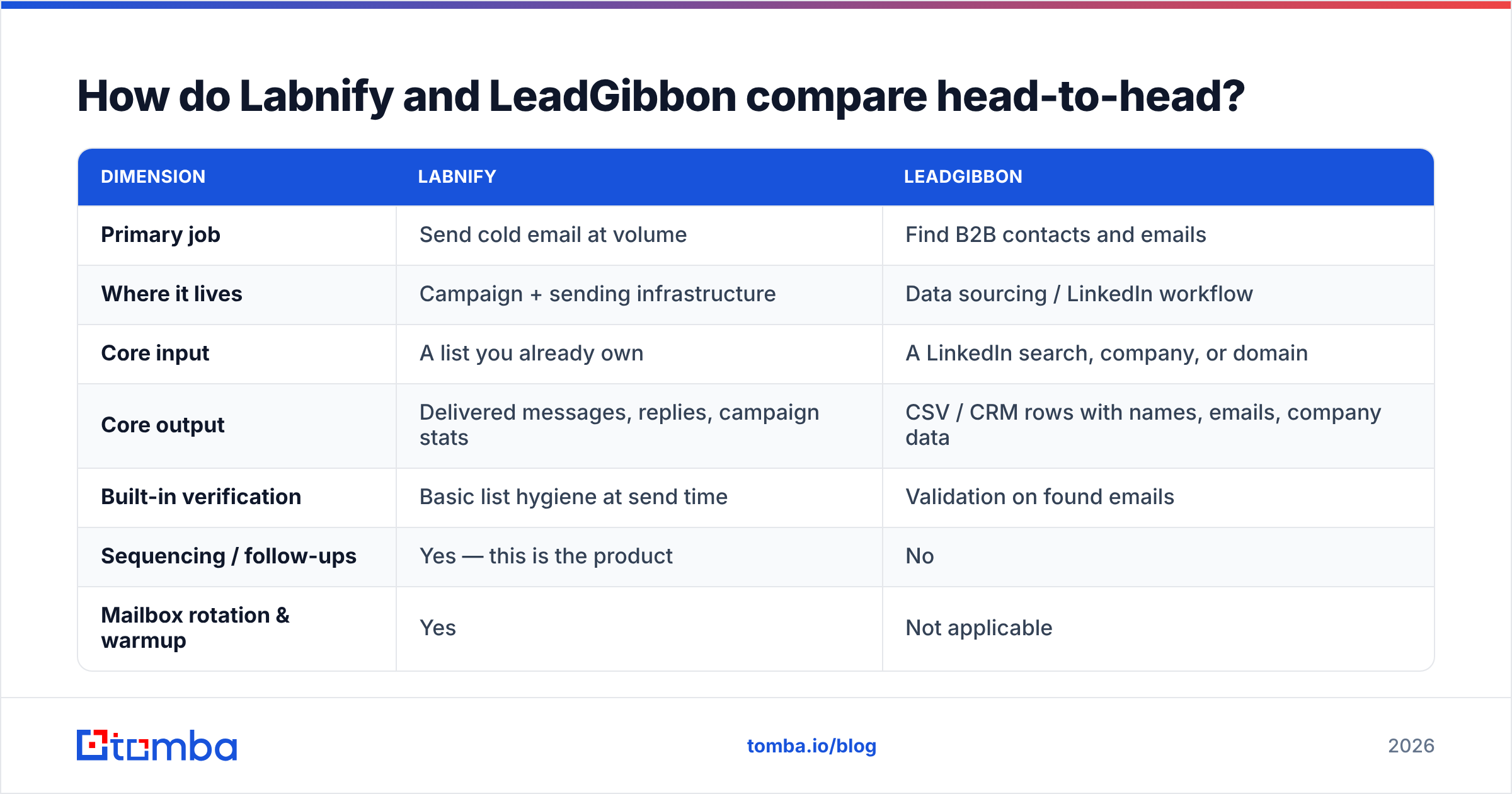
How do Labnify and LeadGibbon compare head-to-head?#
| Dimension | Labnify | LeadGibbon |
|---|---|---|
| Primary job | Send cold email at volume | Find B2B contacts and emails |
| Where it lives | Campaign + sending infrastructure | Data sourcing / LinkedIn workflow |
| Core input | A list you already own | A LinkedIn search, company, or domain |
| Core output | Delivered messages, replies, campaign stats | CSV / CRM rows with names, emails, company data |
| Built-in verification | Basic list hygiene at send time | Validation on found emails |
| Sequencing / follow-ups | Yes — this is the product | No |
| Mailbox rotation & warmup | Yes | Not applicable |
| API access | Sending-focused | Data-focused, more limited |
| Who it's for | SDR teams, agencies running volume | Founders, recruiters, list builders |
| Replaces the other? | No | No |
The honest read: if someone tells you "Labnify vs LeadGibbon" as an either/or, they are answering a question you should not be asking. The real question is which bottleneck is costing you more this quarter.

Which bottleneck do you actually have?#
Run this diagnostic before you spend anything. Four signals, and each one points at a different purchase.
- Your bounce rate is above 4%. This is a data problem, not a sending problem. No amount of domain rotation fixes a list where one in twenty addresses does not exist. Fix the list first — an email verifier pass costs a fraction of a sending platform.
- Your bounce rate is clean but your open rate cratered. This is a deliverability problem. Your content is landing in spam or promotions. That is Labnify territory — or at least an infrastructure audit (SPF, DKIM, DMARC, sending volume ramp).
- You cannot build a list of 500 qualified people in an afternoon. This is a sourcing problem. LeadGibbon, or any tool that turns a LinkedIn or firmographic filter into rows, is what you are missing.
- You have a list and a sender, but replies are flat. This is a targeting and copy problem. Neither tool fixes it. Narrow the ICP and rewrite the first line.
- You are duplicating contacts across three exports. This is an ops problem. Dedupe before you send — sending the same person three emails from three domains is a fast way to get reported.
Most teams mis-diagnose #1 as #2, buy the sending platform, and wonder why the numbers barely move.
What does Labnify do well — and where does it fall short?#
Strengths. Volume sending is genuinely hard to self-host. Managing dozens of inboxes across multiple domains, staggering ramp-up schedules, rotating sends so no single mailbox spikes, and keeping warmup running in the background is a real engineering problem. Labnify's value is that you do not have to solve it. For agencies running outbound on behalf of ten clients at once, that consolidation is worth real money.
It also forces good habits. Most sending platforms in this class will refuse or throttle a list with obvious junk in it, and they surface bounce data fast enough that you can kill a bad segment before it does damage.
Limits. Three things to be clear-eyed about:
- It assumes you have data. The platform is only as good as the CSV you upload. There is no meaningful sourcing layer.
- Verification is a gate, not a service. Send-time hygiene catches syntax errors and known-dead domains. It does not tell you whether
first.last@company.comis the right pattern, or whether that person left in March. - Deliverability is shared responsibility. Infrastructure helps, but your domain age, content, and reply rate still dominate. If you want to understand the levers, the email deliverability fundamentals matter more than any vendor's rotation algorithm.
What does LeadGibbon do well — and where does it fall short?#
Strengths. Speed from intent to list. If you know who you want — "VP Marketing at 50-200 person SaaS companies in DACH" — a LinkedIn-first tool gets you from filter to exportable rows quickly. That workflow is intuitive in a way that querying a giant static database is not, because you are working from the profile you already trust.
It is also a reasonable fit for non-technical users. Founders doing their own prospecting, recruiters sourcing candidates, and anyone who lives in LinkedIn all day will find the flow natural.
Limits.
- Coverage varies sharply by region and seniority. Anglophone tech has dense coverage. Mid-market manufacturing in Southern Europe does not.
- Freshness is the silent killer. B2B contact data decays at roughly 22–30% per year according to widely-cited industry estimates. A record sourced eighteen months ago is a coin flip.
- No sending, no sequencing. You export and move on.
- Catch-all domains are a blind spot. Plenty of companies accept every address at the SMTP layer, which means a "valid" result is not actually a validation. A dedicated catch-all verifier is the only way to resolve those rows with confidence.
Is one better than the other for cold outreach?#
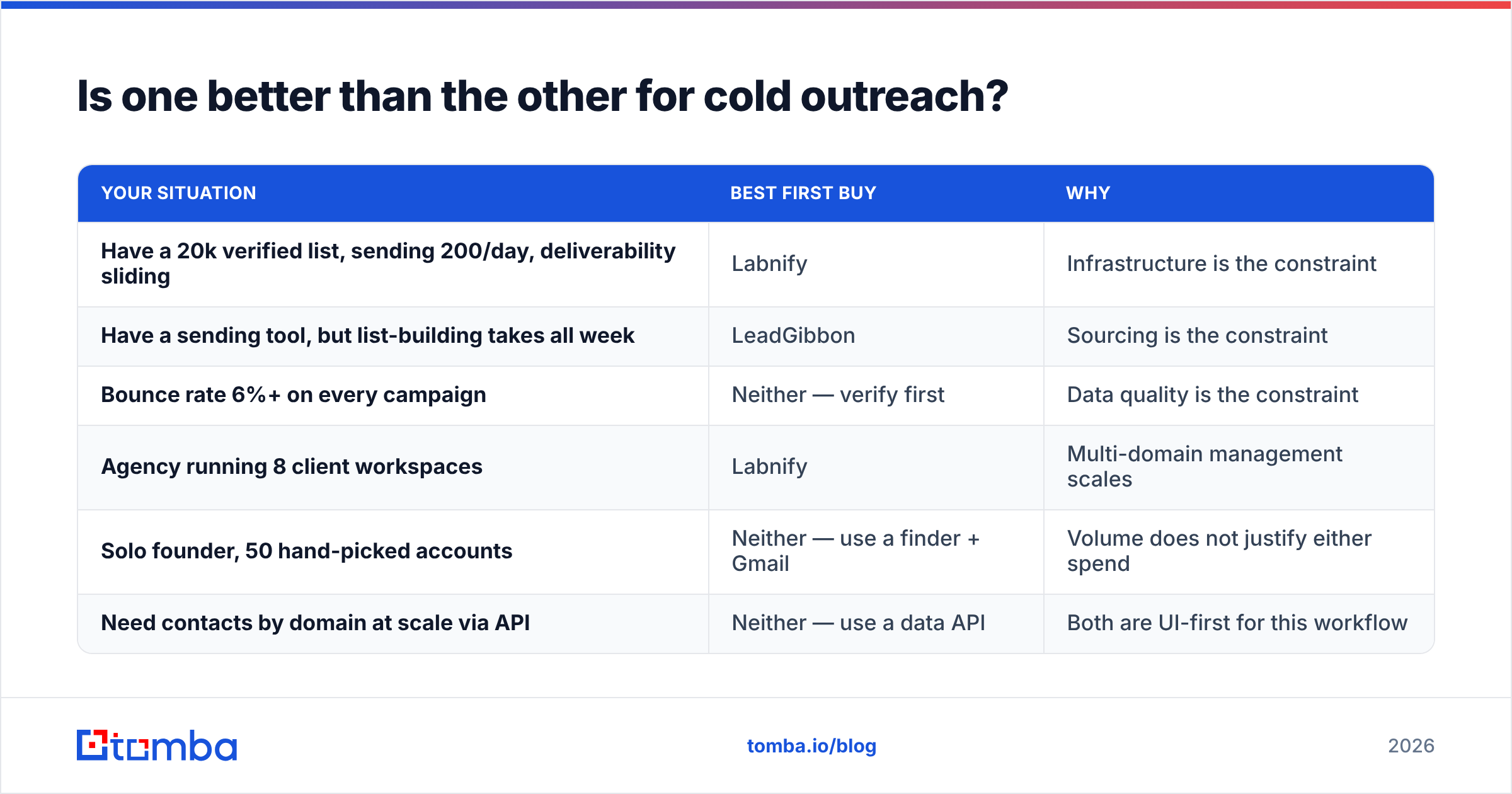
Depends entirely on your starting point. Here is the decision matrix:
| Your situation | Best first buy | Why |
|---|---|---|
| Have a 20k verified list, sending 200/day, deliverability sliding | Labnify | Infrastructure is the constraint |
| Have a sending tool, but list-building takes all week | LeadGibbon | Sourcing is the constraint |
| Bounce rate 6%+ on every campaign | Neither — verify first | Data quality is the constraint |
| Agency running 8 client workspaces | Labnify | Multi-domain management scales |
| Solo founder, 50 hand-picked accounts | Neither — use a finder + Gmail | Volume does not justify either spend |
| Need contacts by domain at scale via API | Neither — use a data API | Both are UI-first for this workflow |
Notice how often the answer is "neither yet." That is not a dodge. Both tools are downstream of a decision most teams skip: how good is the data going in?

What do both tools leave out?#
The verification layer, and it is the expensive gap.
Here is the arithmetic that should drive your budget. Say you send 10,000 emails a month on a 6% bounce rate. That is 600 hard bounces. Mailbox providers read hard-bounce ratios as a spam signal, and once your sender reputation drops, the emails that would have converted start landing in spam too. You do not just lose the 600 — you lose a share of the 9,400.
Now compare the cost. Verifying 10,000 addresses is typically a two-figure monthly line item. Recovering a burned domain costs weeks of warmup and a new domain purchase. The math is not close.
What a proper verification pass gives you that neither Labnify nor LeadGibbon fully covers:
- SMTP-level existence checks, not just syntax and MX lookup
- Catch-all resolution, so accept-all domains are not silently counted as valid
- Role-address flagging (
info@,sales@,support@) — high bounce-adjacent risk, low reply rate - Disposable and spam-trap detection, the fastest route to a blocklist
- Pattern confidence scoring — how sure are we that this company uses
first.last@?
If you want to see how pattern-level inference works in practice, the company email pattern checker is free and takes ten seconds on a domain you already know.
How does the pricing compare in 2026?#
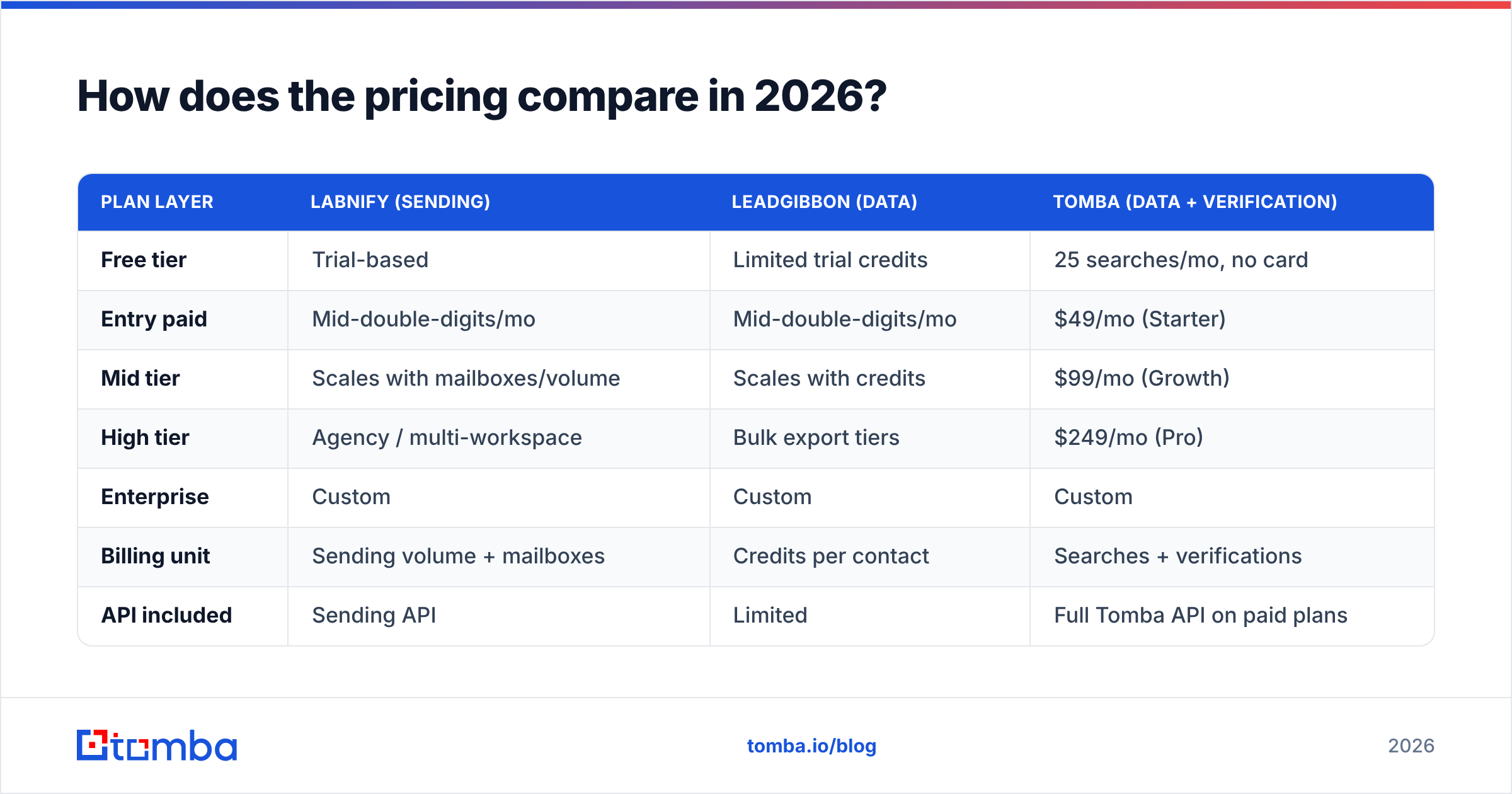
Pricing on both platforms moves, and both run promotional tiers, so treat this as a shape rather than a quote — confirm on each vendor's own pricing page before you commit.
| Plan layer | Labnify (sending) | LeadGibbon (data) | Tomba (data + verification) |
|---|---|---|---|
| Free tier | Trial-based | Limited trial credits | 25 searches/mo, no card |
| Entry paid | Mid-double-digits/mo | Mid-double-digits/mo | $49/mo (Starter) |
| Mid tier | Scales with mailboxes/volume | Scales with credits | $99/mo (Growth) |
| High tier | Agency / multi-workspace | Bulk export tiers | $249/mo (Pro) |
| Enterprise | Custom | Custom | Custom |
| Billing unit | Sending volume + mailboxes | Credits per contact | Searches + verifications |
| API included | Sending API | Limited | Full Tomba API on paid plans |
The pattern worth noticing: Labnify bills against throughput, LeadGibbon bills against records. If you buy both, your costs scale on two independent axes, which is how outbound budgets quietly triple. Full Tomba pricing is published if you want a third reference point on what the data layer alone should cost.
For third-party reviews of any of these, G2 is the least-bad public source — filter for reviews from the last twelve months, since older ones often describe products that have since been rebuilt.
What does a sane 2026 outbound stack look like?#
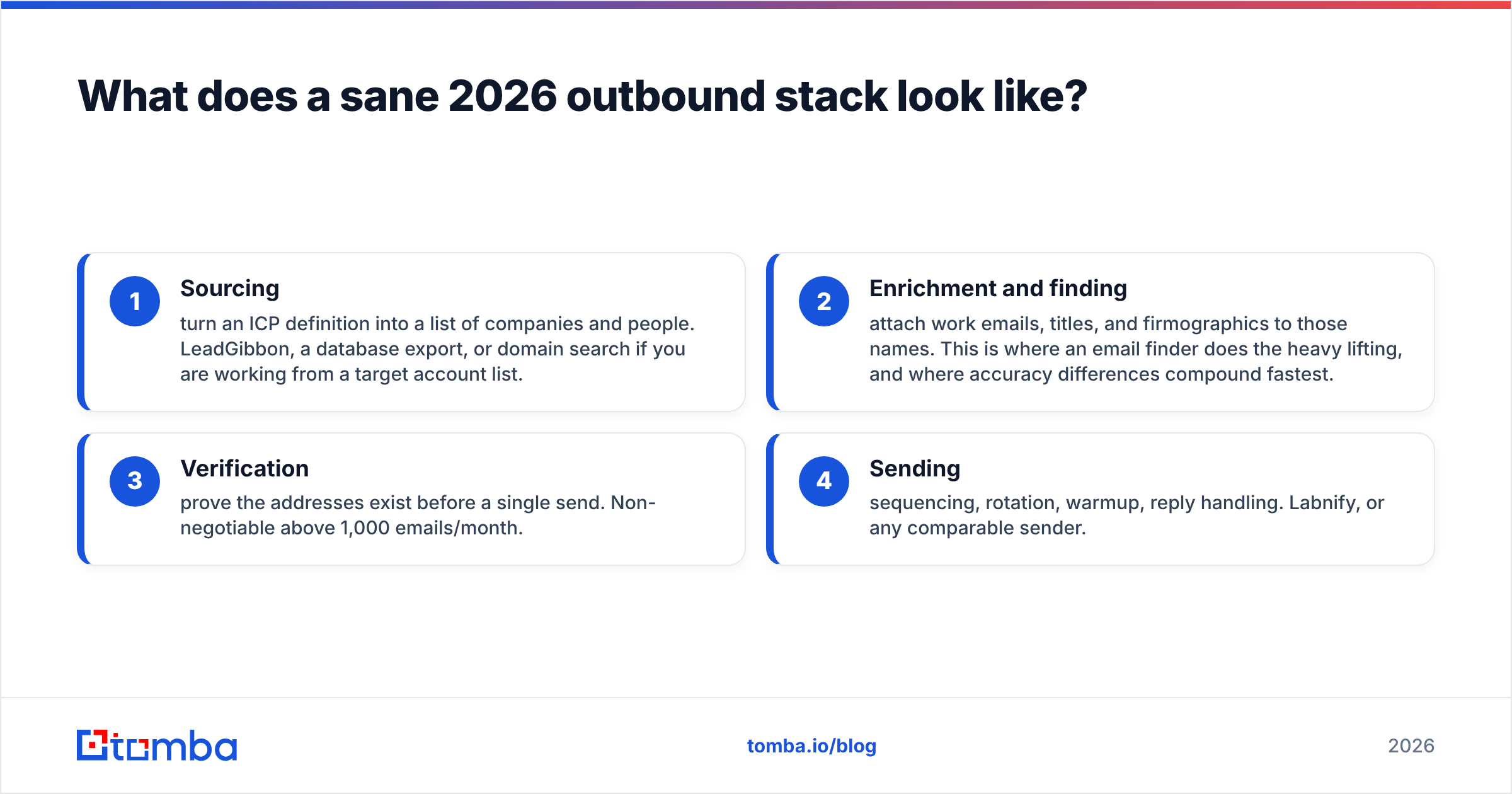
Four layers, in order. Skipping one does not save money; it moves the cost somewhere less visible.
- Sourcing — turn an ICP definition into a list of companies and people. LeadGibbon, a database export, or domain search if you are working from a target account list.
- Enrichment and finding — attach work emails, titles, and firmographics to those names. This is where an email finder does the heavy lifting, and where accuracy differences compound fastest.
- Verification — prove the addresses exist before a single send. Non-negotiable above 1,000 emails/month.
- Sending — sequencing, rotation, warmup, reply handling. Labnify, or any comparable sender.
You can mix vendors freely across these layers. You should not assume a vendor strong at layer 4 is also strong at layer 2 — very few are, and the ones that claim to be usually have one weak side they do not advertise.
Worth noting: several credible data vendors compete in layers 1–3, including BookYourData, which takes a pay-as-you-go approach to verified B2B lists rather than a subscription. Different model, legitimately good fit for teams with bursty list needs rather than steady monthly volume. The right answer depends on whether your demand is continuous or project-based.
Common questions#
Can I use Labnify and LeadGibbon together? Yes, and that is the intended combination. Export from LeadGibbon, run a verification pass, import to Labnify. The middle step is the one people skip.
Does Labnify find emails? No. It sends them. Uploading an unverified list and hoping the platform cleans it is not a strategy.
Does LeadGibbon send campaigns? No. It gets you a CSV or a CRM sync.
Which has better data accuracy? Only LeadGibbon has data to be accurate about. Accuracy claims across this category are self-reported and rarely comparable — run the same 100 test contacts through any two tools and measure bounce rate yourself. It takes an hour and it is the only benchmark that reflects your ICP.
What if I only send 100 emails a month? Neither. Use a finder plus a verifier plus your normal mailbox. Sending infrastructure at that volume is overhead with no payoff.
The bottom line#
Labnify and LeadGibbon solve different problems, and the "vs" framing obscures the decision that actually matters: is your outbound failing because of the pipes, or because of what you are putting through them?
If your bounce rate is above 4%, the pipes are fine. Fix the data.
That is where Tomba Email Finder fits — find verified work emails by domain, name, or company, with SMTP-level checks and catch-all resolution built in, so what reaches your sending platform is a list worth sending. The free tier gives you 25 searches a month with no card required, which is enough to test accuracy against whatever list you are using today. Run the comparison, look at the bounce rate, and let the numbers pick your stack.
Related guides#
// get started
Find, verify and enrich your first contacts today
Start on the free plan with 25 searches a month, then scale when your team is ready.
Free plan · No credit card required · GDPR & CCPA
// about the author