Labnify vs Reachfast: Which B2B Outreach Tool Wins in 2026?
Labnify and Reachfast get pitched as rivals, but one is a sending engine and the other is a contact-data tool. Here's what each actually does well, how the pricing models differ, and the stack that beats running either one alone.
TL;DR
- Labnify and Reachfast are not really competitors. Labnify is sending infrastructure — an email platform built to push volume through SMTP/API with deliverability controls. Reachfast is a contact-discovery tool that pulls emails and phone numbers off prospect profiles.
- If your bottleneck is "my emails land in spam," Labnify is the relevant category. If your bottleneck is "I don't have addresses to email," Reachfast is.
- Neither one fully solves the other's problem. Buying Labnify to get better data, or Reachfast to get better inbox placement, is the most common way teams waste budget on this comparison.
- Pricing models differ structurally: sending platforms bill on volume and sending seats, contact finders bill on credits per lookup. Comparing headline prices is meaningless until you normalise to cost per booked meeting.
- The practical 2026 stack is a dedicated data layer (verified emails, direct dials, enrichment via API) plus a sending layer you actually trust. Tomba covers the data half starting at $49/mo.
What are Labnify and Reachfast, exactly?#
Start here, because the entire comparison collapses if you get the categories wrong.
Labnify positions itself as an email sending and marketing platform — bulk sending, SMTP relay, campaign management, and the deliverability plumbing (authentication, warmup-style ramping, list hygiene, bounce handling) that keeps a domain out of the spam folder. You can read the vendor's own description at labnify.com. Its job starts the moment you already have a list.
Reachfast sits on the opposite end of the pipeline. It's a contact-discovery tool: you land on a prospect's profile or company page, and it returns a work email and, in many cases, a mobile number. Its job ends the moment you have that contact row. It does not own your sending reputation, your throughput, or your unsubscribe compliance.
So "Labnify vs Reachfast" is less "Coke vs Pepsi" and more "oven vs groceries." The searches that lead here usually come from one of three real questions:
- "I have one budget line — which do I spend it on?" Answer depends entirely on which half of your funnel is broken.
- "Can one of them replace the other?" Mostly no. Sending tools ship thin contact features; data tools ship thin sending features. Both are usually worse than the dedicated option.
- "Is there a third option that's cheaper than both?" Sometimes yes — if you split data and sending along the right seam.
Here's the seam that matters, in plain terms:
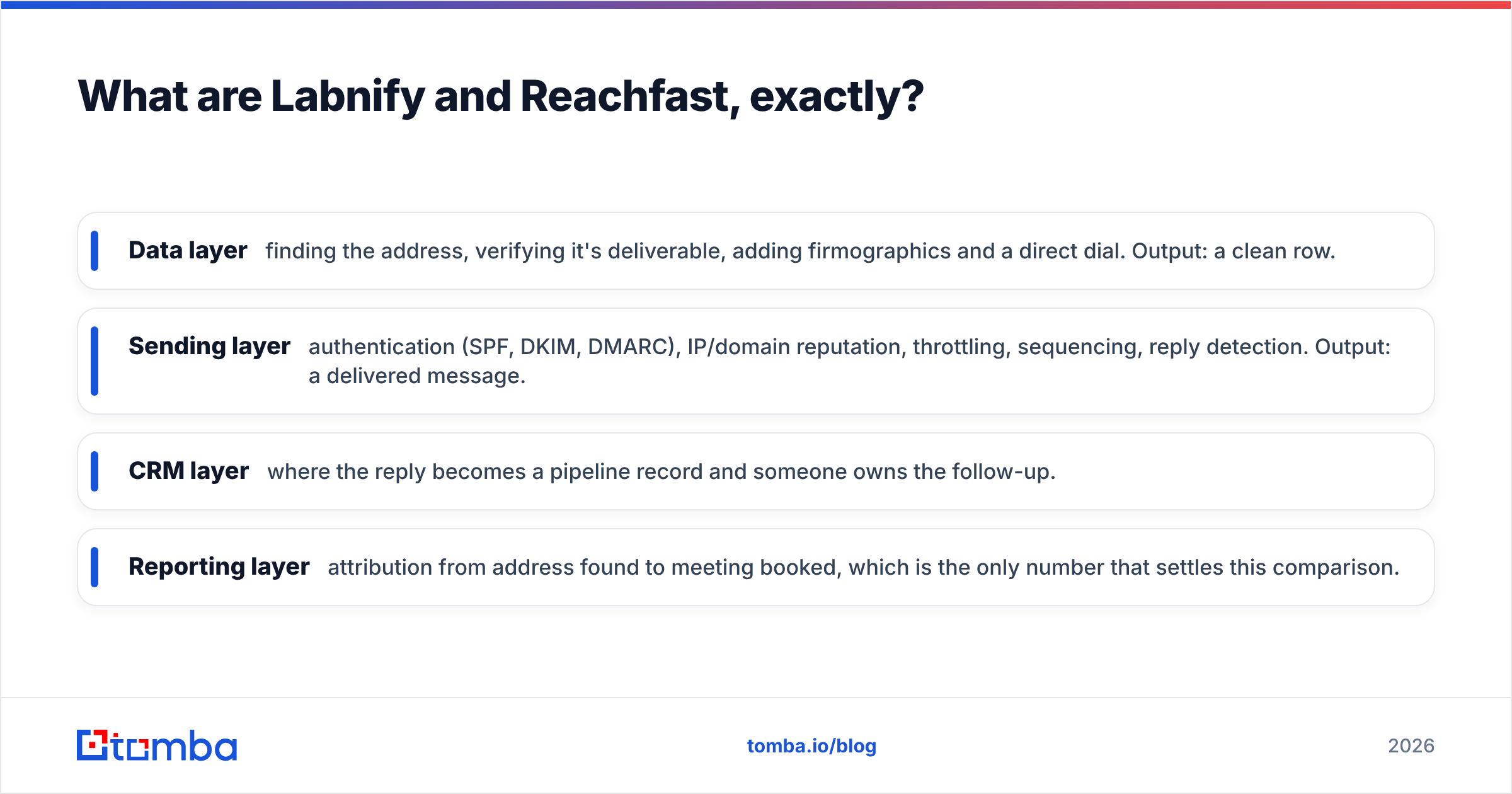
- Data layer — finding the address, verifying it's deliverable, adding firmographics and a direct dial. Output: a clean row.
- Sending layer — authentication (SPF, DKIM, DMARC), IP/domain reputation, throttling, sequencing, reply detection. Output: a delivered message.
- CRM layer — where the reply becomes a pipeline record and someone owns the follow-up.
- Reporting layer — attribution from address found to meeting booked, which is the only number that settles this comparison.
Labnify lives in layer two. Reachfast lives in layer one. Confusing the two is how teams end up with a 22% bounce rate and a perfectly configured DMARC record.

How do Labnify and Reachfast compare head-to-head?#
Because the two tools occupy different layers, a fair table has to compare what each is responsible for rather than matching feature checkboxes. I've included Tomba as a third column for the data-layer side, since that's the specific gap most readers arrive with.
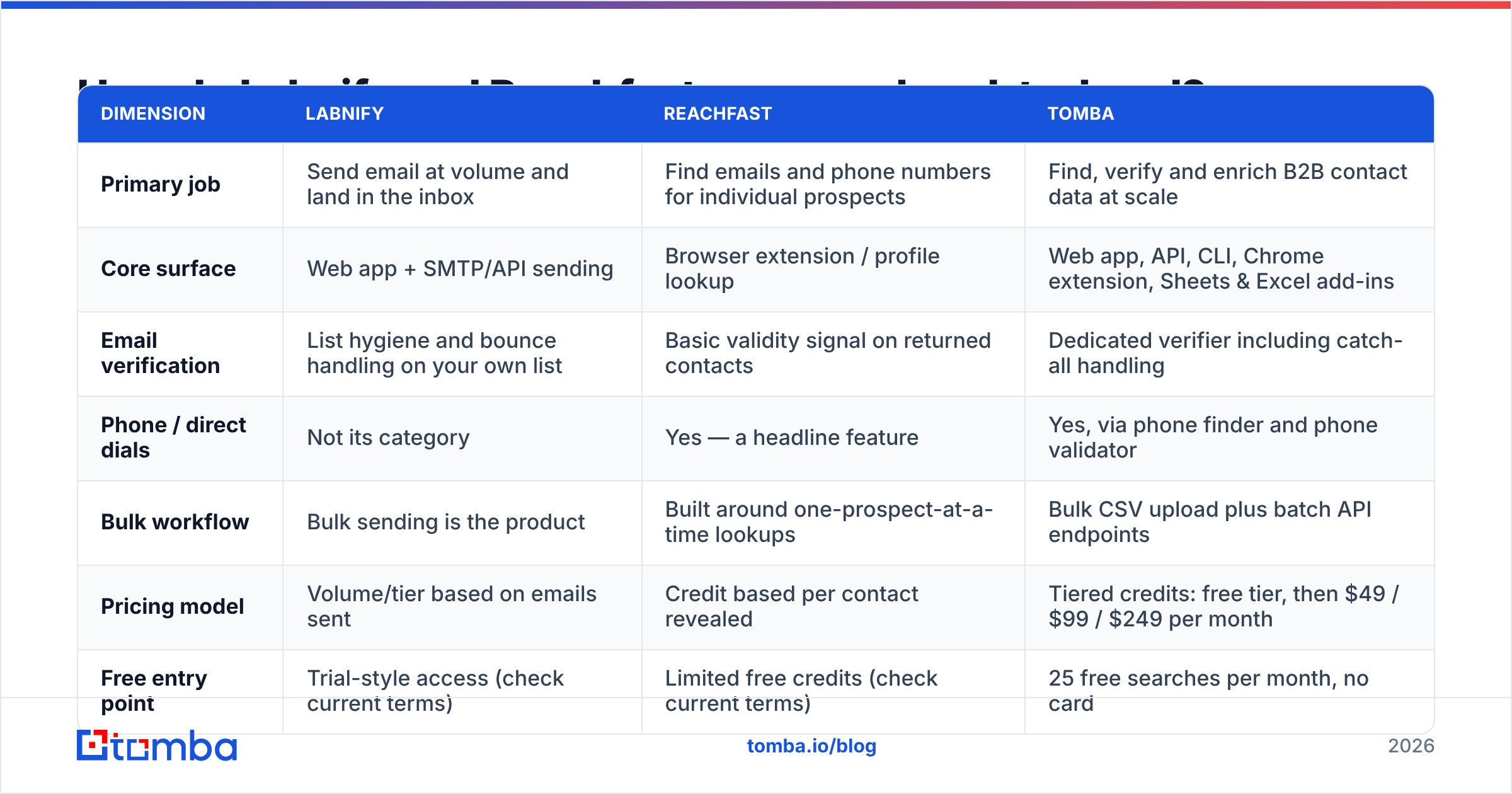
| Dimension | Labnify | Reachfast | Tomba |
|---|---|---|---|
| Primary job | Send email at volume and land in the inbox | Find emails and phone numbers for individual prospects | Find, verify and enrich B2B contact data at scale |
| Core surface | Web app + SMTP/API sending | Browser extension / profile lookup | Web app, API, CLI, Chrome extension, Sheets & Excel add-ins |
| Email verification | List hygiene and bounce handling on your own list | Basic validity signal on returned contacts | Dedicated verifier including catch-all handling |
| Phone / direct dials | Not its category | Yes — a headline feature | Yes, via phone finder and phone validator |
| Bulk workflow | Bulk sending is the product | Built around one-prospect-at-a-time lookups | Bulk CSV upload plus batch API endpoints |
| Pricing model | Volume/tier based on emails sent | Credit based per contact revealed | Tiered credits: free tier, then $49 / $99 / $249 per month |
| Free entry point | Trial-style access (check current terms) | Limited free credits (check current terms) | 25 free searches per month, no card |
| Best for | Teams whose deliverability is the constraint | Reps who prospect manually inside LinkedIn | Teams that need clean data piped into any sending tool |
Two rows deserve unpacking.
Pricing model. Sending platforms and data platforms bill on different units, so the sticker prices are not comparable. A $30/mo sending plan that lets you send 50,000 emails is worthless if 30% of those addresses bounce — you've just burned a domain. A credit plan that costs $0.04 per verified contact is expensive on paper and cheap in practice if the reply rate doubles. Normalise everything to cost per meeting before you decide. If you want a concrete anchor for the data side, Tomba pricing publishes its tiers openly rather than gating them behind a call.
Bulk workflow. This is the quiet dealbreaker. Extension-first tools like Reachfast are excellent when a rep is working 20 named accounts and wants a mobile number right now. They get painful when RevOps needs 4,000 contacts enriched by Thursday. If your motion is list-based rather than profile-by-profile, you want an API or a bulk email finder workflow, not a browser sidebar and a lot of clicking.
Which tool actually solves a data problem?#
Reachfast, clearly — that's its category. But "solves a data problem" has three sub-questions that most comparison posts skip.
Coverage. Does the tool return anything for the accounts you actually sell to? Coverage is wildly uneven by geography and company size. US mid-market SaaS is well covered by almost every vendor. German Mittelstand manufacturers, Gulf-region construction firms, and sub-20-employee agencies are where databases go quiet. Test with 50 real target accounts, not the vendor's demo list.
Accuracy. Does the returned address actually accept mail? Every vendor quotes a high accuracy number and every vendor measures it differently. The only number that counts is your bounce rate on your list after you send. Anything above 3-4% hard bounces is actively damaging your sender reputation, which — full circle — is the thing Labnify exists to protect. Running an independent email verifier pass over any provider's export, including a good one's, is cheap insurance.
Catch-all handling. A large share of B2B domains are configured as catch-all, meaning the mail server accepts everything and tells you nothing. Tools that mark catch-alls as "valid" inflate their accuracy stats and hand you a list that quietly bounces later. Tools that mark them "unknown" and drop them cost you real, reachable prospects. The useful middle path is a dedicated catch-all check that scores likelihood rather than guessing binary — worth asking any vendor about directly before you sign.
If contact data is your constraint, evaluate on those three axes and ignore the interface entirely. A beautiful extension that returns nothing for your ICP is worse than an ugly CSV that returns 70%.
Which tool actually solves a deliverability problem?#
Labnify, and it isn't close. Reachfast has no meaningful role in whether your mail reaches the inbox.
Deliverability in 2026 is mostly a compliance-and-reputation game, and the requirements tightened after the major mailbox providers standardised their bulk-sender rules. The non-negotiables:
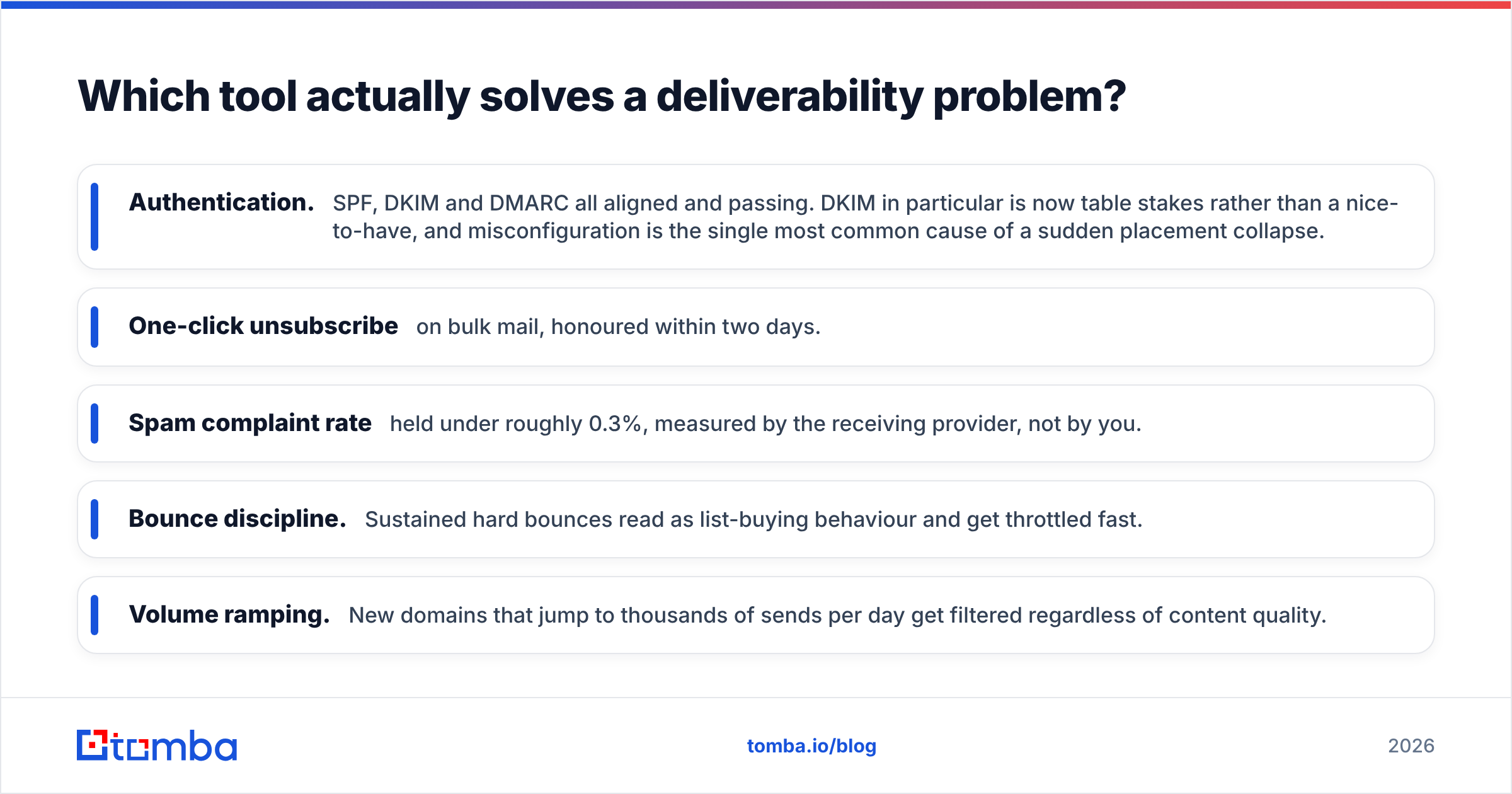
- Authentication. SPF, DKIM and DMARC all aligned and passing. DKIM in particular is now table stakes rather than a nice-to-have, and misconfiguration is the single most common cause of a sudden placement collapse.
- One-click unsubscribe on bulk mail, honoured within two days.
- Spam complaint rate held under roughly 0.3%, measured by the receiving provider, not by you.
- Bounce discipline. Sustained hard bounces read as list-buying behaviour and get throttled fast.
- Volume ramping. New domains that jump to thousands of sends per day get filtered regardless of content quality.
Notice that two of those five — bounce discipline and, indirectly, complaint rate — are data problems wearing a deliverability costume. That's why the "which one do I buy" question is so often answered wrong. Teams see spam-folder placement, assume they need a better sending platform, buy one, and discover their placement is still bad because a quarter of their list was never real. A sending platform can throttle around bad data; it cannot fix it.
The honest split: Labnify (or any serious sending platform) handles ramping, authentication UX, throttling, suppression lists and reply routing. A data provider handles whether the address was ever worth sending to. You need both. You will not get both from one $29/mo tool, and any vendor telling you otherwise is selling you the thin version of each.

What does each one cost in practice?#
Three cost buckets, only one of which shows up on a pricing page.
Direct subscription. Sending platforms scale with volume; contact finders scale with lookups. Both vendors adjust plans regularly, so check current terms rather than trusting any blog's snapshot — including this one. What you can compare structurally: volume pricing punishes you for sending more, credit pricing punishes you for searching more. If you run a low-volume, high-value ABM motion, credit pricing hurts less. If you run 100k-send newsletters, volume pricing hurts less.
Wasted credits and wasted sends. This is the bucket that decides the comparison. A 1,000-contact export at 75% accuracy is really 750 usable contacts, so your effective cost per contact is 33% higher than advertised — and the 250 bad rows also cost you sender reputation on the way out. Always compute effective cost, not list price.
Integration and ops time. If a tool can't push into your CRM, someone is exporting CSVs weekly. At a fully loaded ops cost, four hours a month of CSV shuffling can exceed the subscription itself. Check the integrations or native connector list of anything you're buying, and prefer tools that expose a real API so the workflow can disappear into a scheduled job.
For a sanity check on how buyers in each category actually rate these tools, the sales intelligence category on G2 is more useful than vendor case studies — filter reviews to your company size, because enterprise reviewers and solo-founder reviewers describe entirely different products.
Who should choose Labnify, and who should choose Reachfast?#
Choose Labnify if:
- You already have a list you trust and your problem is placement, throughput, or campaign management.
- You send meaningful volume — newsletters, lifecycle mail, or multi-thousand-contact outbound — and need SMTP/API sending with proper controls.
- You've outgrown sending from a single mailbox and need ramping, suppression and bounce handling as first-class features.
Choose Reachfast if:
- Your reps prospect manually, account by account, and need a work email or a mobile number on demand.
- Phone outreach is a real channel for you, not a checkbox. Direct dials are the feature most data tools handle badly.
- Your volumes are modest enough that a per-profile workflow doesn't become a bottleneck.
Choose neither as your data layer if:
- You need thousands of contacts enriched on a schedule rather than dozens found by hand.
- You need verification and enrichment in the same pass, so rows land in the CRM already clean.
- You need the data step to run headlessly — inside a workflow, a script, or a nightly job — instead of inside a browser tab.
That last group is large and underserved, and it's where a dedicated data API earns its keep. Being able to call find emails by domain for an entire target account list, verify the results, append direct dials, and push the output straight into your sequencing tool turns a two-day manual task into a cron job. It also makes the Labnify-vs-Reachfast question mostly irrelevant: you pick the sending platform on sending merits alone, and the data arrives clean regardless.
So what's the actual verdict?#
Labnify wins the sending comparison. Reachfast wins the manual-prospecting comparison. Neither wins the "one tool for all of outbound" comparison, because that tool doesn't exist at this price point.
The decision tree is short:
- Bounce rate above 5%? Fix data first. Nothing else you do to the sending stack will matter.
- Bounce rate healthy but placement poor? That's authentication and reputation — a sending platform's job.
- Reps spending hours hunting contacts one profile at a time? That's a workflow problem. Move the data step to an API or bulk process and give the hours back.
- Can't attribute meetings to either tool? Fix reporting before you renew anything.
Most teams that arrive at this comparison are in bucket one and think they're in bucket two. Run the test: export 200 addresses from whatever you're using now, verify them independently, and look at how many come back risky. If the number is ugly, your next purchase is a data tool, not a sending tool — and the Labnify-vs-Reachfast debate resolves itself.
Ready to fix the data half? Start with the Tomba Email Finder — find and verify professional addresses by domain, name, or company, with 25 free searches a month before you commit to anything, and a straightforward $49/mo Starter tier when you're ready to scale. Plug it into whichever sending platform you land on, and let each layer do the one job it's actually good at.
Related guides#
// get started
Find, verify and enrich your first contacts today
Start on the free plan with 25 searches a month, then scale when your team is ready.
Free plan · No credit card required · GDPR & CCPA
// about the author