Labnify vs ReachStream (2026): Sender vs Database Compared
Labnify sends email. ReachStream sells contact data. Most teams compare them as rivals and pick the wrong one. Here is what each tool actually does, what it costs, and where the accuracy problem really lives.
TL;DR
- Labnify and ReachStream are not really competitors. Labnify is a sending and deliverability platform; ReachStream is a B2B contact database. Buying one does not remove the need for the other.
- If your reply rate is low because emails land in spam, Labnify is the layer to fix. If your reply rate is low because you are mailing the wrong or dead contacts, ReachStream (or a finder/verifier) is the layer to fix.
- ReachStream's pitch is flat-rate access to a large contact database. The trade-off with any static database is decay: B2B contact data goes stale at roughly 2–2.5% per month, so a list bought in January is measurably worse in June.
- Labnify's pitch is high-volume sending with its own infrastructure. That solves throughput, not list quality. A clean sender reputation dies fast if you push unverified addresses through it.
- The practical stack for most teams: a data source for coverage, a verification step before every send, and a sending platform on top. Skip the middle step and the other two stop working.
What are Labnify and ReachStream, actually?#
They sit on opposite ends of the outbound pipeline, which is why head-to-head reviews of the two tend to be confusing.
Labnify is an email sending platform built around bulk and cold outreach. Its selling point is sending infrastructure — SMTP handling, campaign sending at volume, warmup, and inbox placement tooling — packaged so you do not have to stitch together a transactional provider, a warmup service, and a sequencer. It is the layer that decides whether your message arrives.
ReachStream is a B2B contact data provider. You search a database by industry, job title, geography, company size, and technology, then export contacts as a list or pull them via API. It is the layer that decides who you message.
Here is the pipeline in order, so you can see where each one sits:
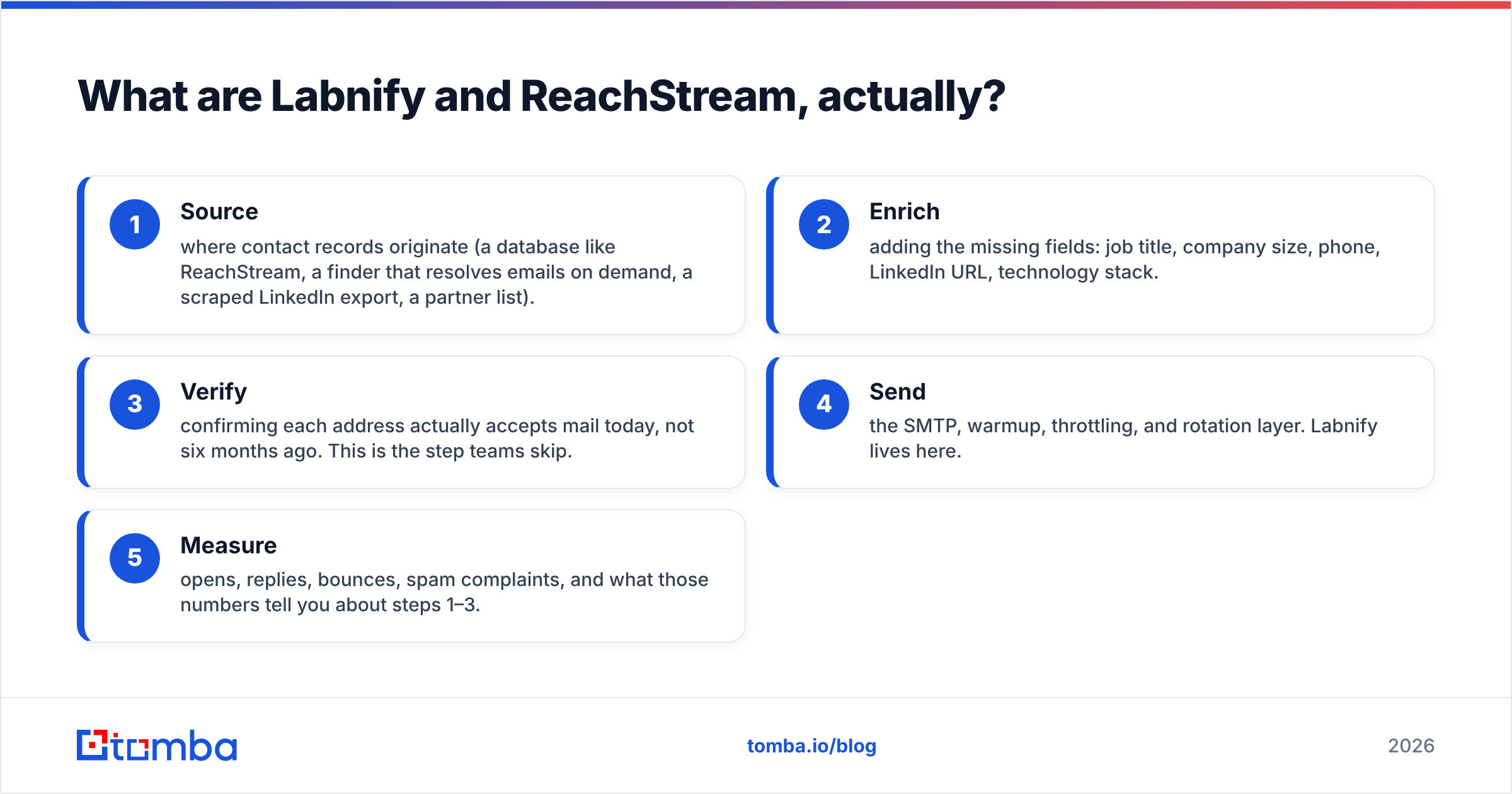
- Source — where contact records originate (a database like ReachStream, a finder that resolves emails on demand, a scraped LinkedIn export, a partner list).
- Enrich — adding the missing fields: job title, company size, phone, LinkedIn URL, technology stack.
- Verify — confirming each address actually accepts mail today, not six months ago. This is the step teams skip.
- Send — the SMTP, warmup, throttling, and rotation layer. Labnify lives here.
- Measure — opens, replies, bounces, spam complaints, and what those numbers tell you about steps 1–3.
ReachStream owns step 1 and part of step 2. Labnify owns step 4 and part of step 5. Neither one owns step 3 in a way that survives contact with a 50,000-address campaign — and step 3 is where most outbound programs quietly fail.
Are Labnify and ReachStream even competitors?#
Only in the narrow sense that they compete for the same line item in your budget.
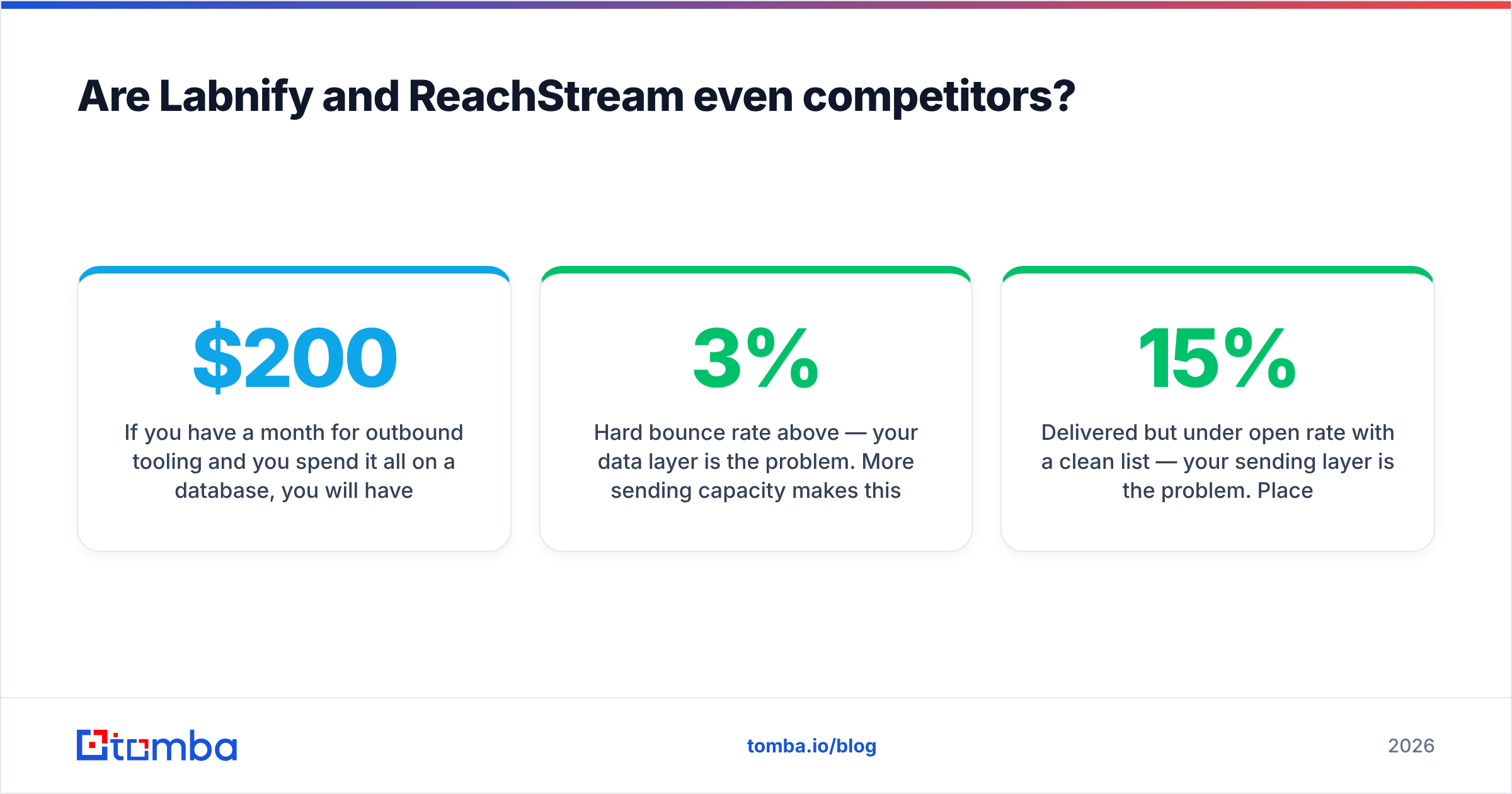
If you have $200 a month for outbound tooling and you spend it all on a database, you will have thousands of contacts and a Gmail account that gets throttled at 500 sends a day. If you spend it all on a sending platform, you will have industrial-grade infrastructure pointed at a list you scraped by hand.
The question is not "which is better." It is "which gap is currently costing you the most pipeline." Diagnose it with three numbers from your last campaign:
- Hard bounce rate above 3% — your data layer is the problem. More sending capacity makes this worse, not better.
- Delivered but under 15% open rate with a clean list — your sending layer is the problem. Placement, not data.
- Good opens, near-zero replies — neither tool fixes this. Your targeting or your copy is off.
Most teams that search "labnify vs reachstream" are in bucket one or two and do not know which. Run the numbers before you run the credit card.
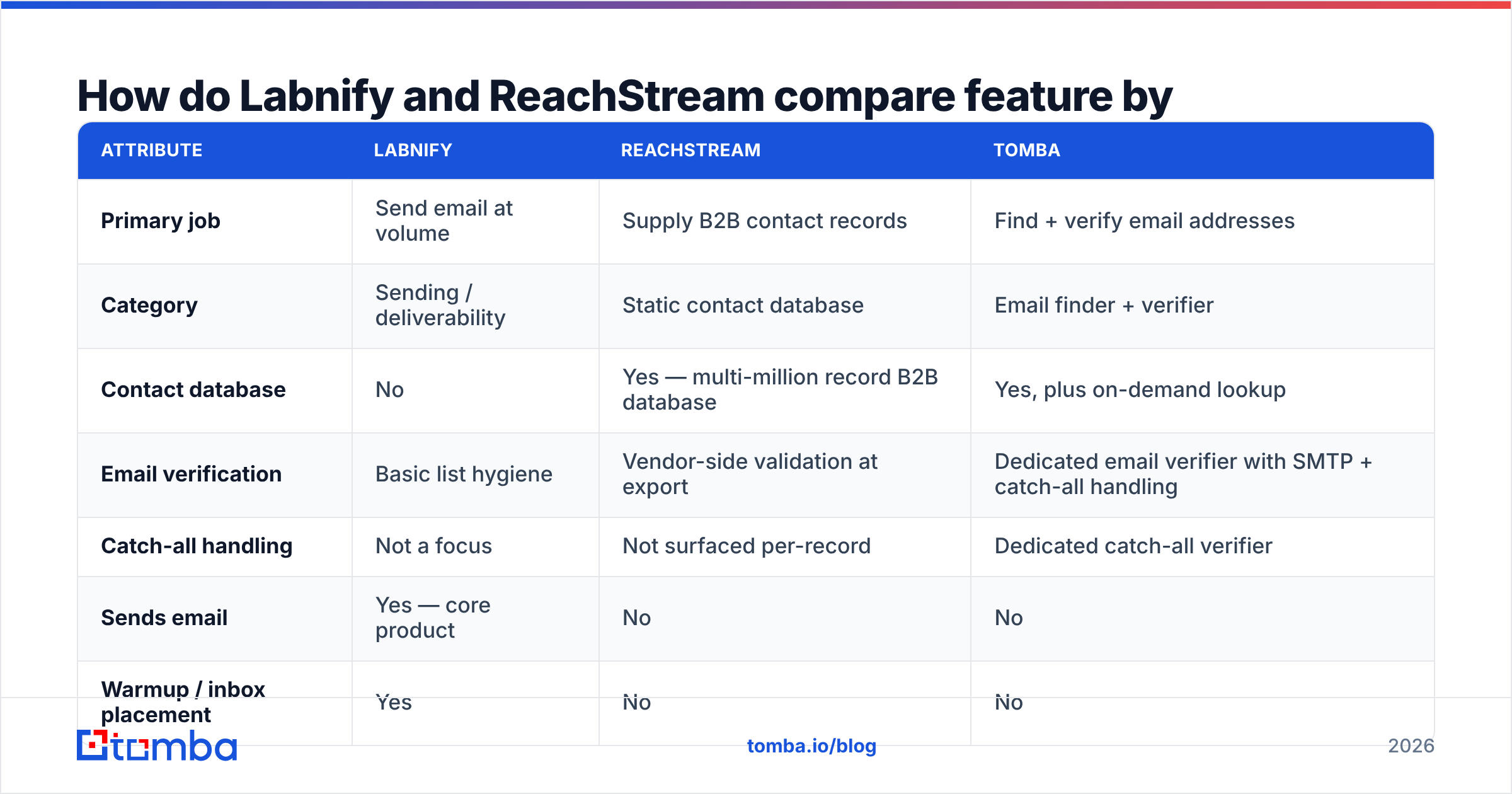
How do Labnify and ReachStream compare feature by feature?#
| Attribute | Labnify | ReachStream | Tomba |
|---|---|---|---|
| Primary job | Send email at volume | Supply B2B contact records | Find + verify email addresses |
| Category | Sending / deliverability | Static contact database | Email finder + verifier |
| Contact database | No | Yes — multi-million record B2B database | Yes, plus on-demand lookup |
| Email verification | Basic list hygiene | Vendor-side validation at export | Dedicated email verifier with SMTP + catch-all handling |
| Catch-all handling | Not a focus | Not surfaced per-record | Dedicated catch-all verifier |
| Sends email | Yes — core product | No | No |
| Warmup / inbox placement | Yes | No | No |
| API access | Yes (sending) | Yes (data) | Yes — email finder API, CLI, MCP |
| Bulk workflow | Campaign-level | CSV export | Bulk email finder + bulk verify |
| Free entry point | Trial-based | Limited free credits | Free tier, 25 searches/mo |
| Entry paid plan | Published on vendor site | Published on vendor site | $49/mo Starter |
| Best for | Teams that already have a list | Teams that need volume of records fast | Teams that need accurate, current addresses |
Pricing on both vendors changes often and varies by region and contract length — check Labnify and ReachStream directly before you budget. For reference, Tomba pricing is public and flat: Free (25 searches/mo), Starter $49/mo, Growth $99/mo, Pro $249/mo, Enterprise custom.
How accurate is ReachStream's B2B data?#
The honest answer for any static database — ReachStream, its competitors, or the big enterprise vendors — is that accuracy is a function of two things: how recently the record was collected, and whether it was validated at the moment you exported it.
Databases are snapshots. B2B contact data decays somewhere around 25–30% per year, driven by job changes, company restructures, domain migrations, and role eliminations. That decay is not a vendor failing; it is what happens when humans change jobs. It does mean the useful question is not "how accurate is this database" but "how accurate is this database on the day I send."
Three things to check before you commit to any database, including ReachStream:
- Refresh cadence. How often are records re-validated? Quarterly is common. Monthly is good. "Continuously, at export" is what you want.
- Verification at export. Does the vendor re-check an address when you pull it, or hand you the stored value? Stored values are where bounce rates come from.
- Credit policy on bad records. Do you get a refund or replacement credit for hard bounces? Vendors confident in freshness usually offer this.
- Catch-all treatment. Catch-all domains accept everything at SMTP and tell you nothing. A vendor that marks them "valid" is inflating its accuracy number. Check how yours labels them, and run a catch-all verifier before you trust them.
Read current user reviews on G2 for both vendors before signing — the pattern in negative reviews tells you more than the average score does. Look specifically at complaints about bounce rates and export quality rather than complaints about UI.
For comparison, BookYourData is a respected peer in this category that leans hard on pay-as-you-go pricing and a bounce guarantee — worth a look if the flat-rate subscription model does not fit how you buy.
Does Labnify actually fix deliverability?#
It fixes the parts of deliverability that are infrastructure. It cannot fix the parts that are list quality, and the distinction matters.
What a sending platform genuinely controls:
- Authentication — SPF, DKIM, and DMARC alignment on your sending domain. Get this wrong and nothing else matters. Google and Yahoo have both enforced bulk sender authentication requirements since 2024, and the bar has only risen since.
- Warmup and ramp — gradually increasing volume from a new domain so mailbox providers build a reputation profile instead of flagging a cold blast.
- Throttling and rotation — spreading sends across inboxes and hours instead of dumping 10,000 messages in twenty minutes.
- Bounce and complaint handling — pulling addresses out of rotation automatically when they fail.
What no sending platform controls:
- Whether the address exists.
- Whether a spam trap is sitting in your list.
- Whether the recipient has any reason to care about your message.
That last group is where sender reputation actually gets destroyed. A 2% hard bounce rate is a warning. Past 5%, mailbox providers start treating your domain as a list-buying operation regardless of how well Labnify is configured underneath. You can run perfect infrastructure into the ground with a bad CSV in about four days.

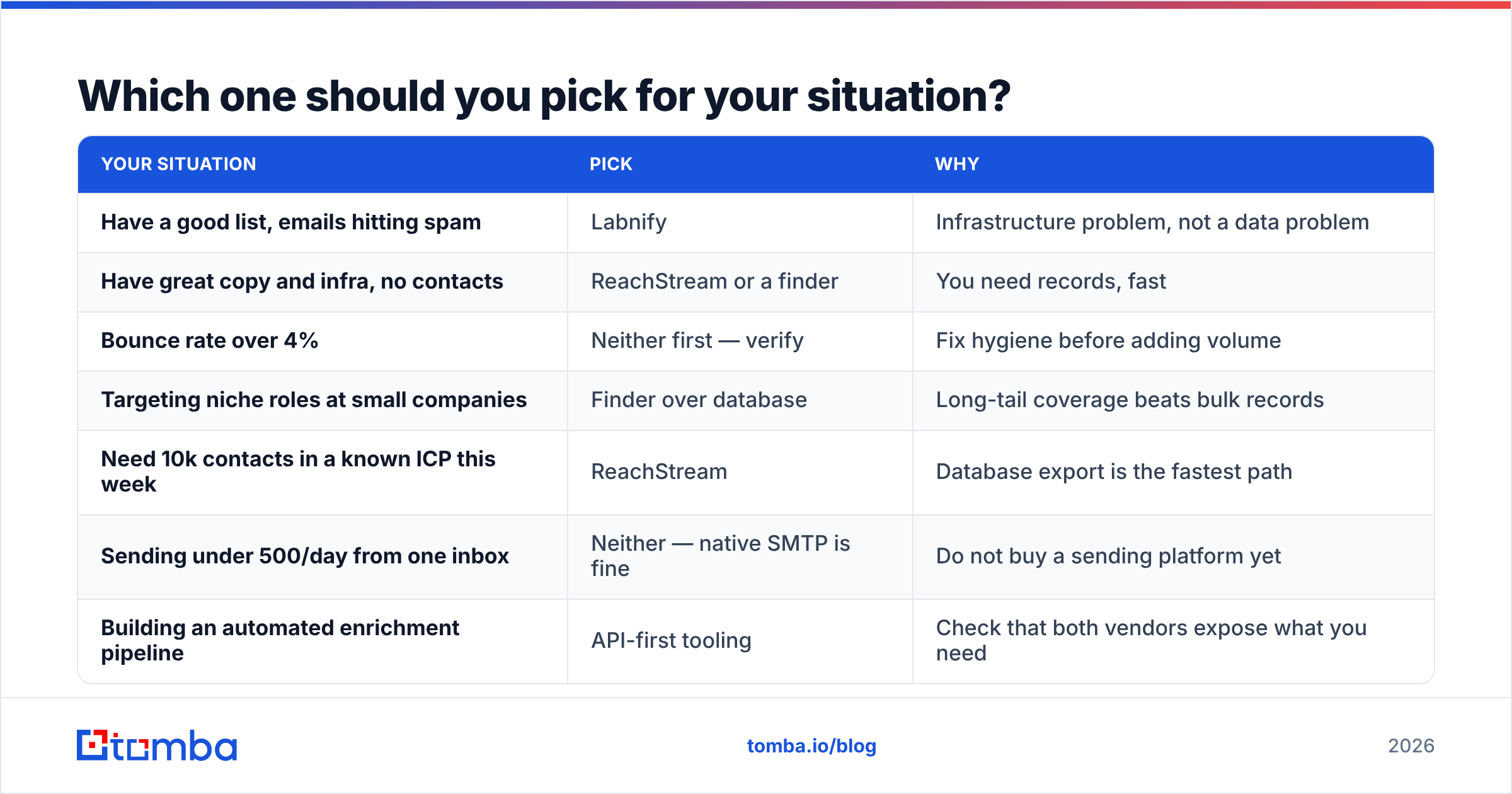
Which one should you pick for your situation?#
| Your situation | Pick | Why |
|---|---|---|
| Have a good list, emails hitting spam | Labnify | Infrastructure problem, not a data problem |
| Have great copy and infra, no contacts | ReachStream or a finder | You need records, fast |
| Bounce rate over 4% | Neither first — verify | Fix hygiene before adding volume |
| Targeting niche roles at small companies | Finder over database | Long-tail coverage beats bulk records |
| Need 10k contacts in a known ICP this week | ReachStream | Database export is the fastest path |
| Sending under 500/day from one inbox | Neither — native SMTP is fine | Do not buy a sending platform yet |
| Building an automated enrichment pipeline | API-first tooling | Check that both vendors expose what you need |
The most expensive mistake in this comparison is buying a database to fix a deliverability problem, or buying a sender to fix a data problem. Both purchases feel productive. Neither moves the number you care about.
Where should the data layer actually come from?#
There are two models for getting B2B email addresses, and they fail in opposite directions.
Static databases (ReachStream, BookYourData, the large enterprise vendors) give you breadth. You filter, export, and have 5,000 contacts in an hour. The failure mode is staleness and coverage gaps in long-tail companies — the 40-person manufacturer in Ohio is probably not in anyone's database.
On-demand finders give you freshness. You supply a name and a domain, and the tool resolves the address against live sources and pattern intelligence at that moment. The failure mode is that you need to know who you are looking for first; a finder will not hand you an ICP.
In practice, serious outbound teams run both. They pull breadth from a database, then re-resolve and verify every address before it enters a sequence. That second pass is what keeps the bounce rate under 2% regardless of how old the source list is.
This is the slot Tomba fills. The email finder resolves addresses by name and domain, domain search pulls every discoverable address at a company with role and confidence scoring, and the verifier runs SMTP-level checks with explicit catch-all handling rather than a binary valid/invalid guess. It does not send email and it does not pretend to be a sequencer — it sits between your database and your sending platform, which is exactly where the money leaks.
What does a working outbound stack look like?#
A stack that survives contact with a real quarter, in order:
- Define the ICP narrowly. Job title plus company size plus one qualifier. Broad ICPs are why databases feel inaccurate — you are not filtering, you are hoping.
- Source records. Database export for breadth, finder for the accounts the database missed. Expect to combine both.
- Enrich the gaps. Fill missing titles, company data, and phone numbers. Contact enrichment turns a half-record into something you can personalize against.
- Verify everything, every time. Not the ones that look suspicious. All of them, including the ones the database already labeled valid. This is a cents-per-record cost that protects a domain worth thousands.
- Send through real infrastructure. Authenticated domain, warmed inboxes, sane daily volume, per-inbox throttling. Labnify or an equivalent belongs here.
- Kill campaigns on bounce signal, not on reply signal. If step 4 was done properly and you still see over 3% bounce, your source is bad. Change the source, not the copy.
Steps 4 and 6 are the ones teams skip, and they are the reason the "labnify vs reachstream" question gets asked in the first place. Neither product is failing. The pipeline has a missing link between them.
What is the verdict?#
Buy Labnify if your problem is placement. Buy ReachStream if your problem is coverage. Assume you will eventually need both, plus a verification layer neither one is built to own.
If you are starting from zero with a limited budget, the sequence that wastes the least money is: get a small, accurate list first, prove the offer converts on 200 contacts sent from a single warmed inbox, and only then buy volume tooling on either side. Scaling a message that does not work just means more people ignoring you faster.
And if you are mid-stack — you have contacts, you have sending, and your bounce rate is embarrassing — the fix is not a new subscription to either vendor. It is running your existing list through verification and finding out how much of it was never real.
Start with the data layer. Run your current list through Tomba's Email Finder and verifier before your next send — the free tier covers 25 searches a month, Starter is $49/mo, and you will know within an hour whether your reply-rate problem is a sending problem or a list problem. Fix the right layer and the other tools start earning their price.
Related guides#
// get started
Find, verify and enrich your first contacts today
Start on the free plan with 25 searches a month, then scale when your team is ready.
Free plan · No credit card required · GDPR & CCPA
// about the author