Labnify vs Tomba: Which Cold Email Stack Wins in 2026?
Labnify sends the email. Tomba finds and verifies who should receive it. Here is the honest, feature-by-feature breakdown of where each one wins, where they overlap, and which you should buy first.
TL;DR
- Labnify vs Tomba is not a fair fight, because the two tools do different jobs. Labnify sends mail. Tomba finds and checks who to send it to.
- Do your emails bounce or land in spam? That is a data problem first. Clean data comes before sending.
- The one real overlap is list checking. Tomba treats it as a core product, with catch-all support. Labnify treats it as basic hygiene bolted onto sending.
- Pricing works in different units. Tomba lists plans from $49/mo. Labnify leans on volume deals and lifetime offers, so check their page today.
- Most outbound teams in 2026 use both. The question is not which tool. It is which one is your bottleneck right now.
What is Labnify?#
Labnify is an email sending platform. The core job is delivery. You connect sending accounts, push campaigns or app mail through an SMTP relay or API, and the platform handles speed limits, warmup, tracking, and reports.
Its pitch has always been high volume without a brutal per-email bill. That is why it keeps showing up in lifetime-deal shops, and in threads from founders trying to escape a Mailgun or SendGrid invoice.
Think of Labnify as the post office. You hand it envelopes. It gets them delivered, tells you which ones came back, and keeps your return address in good standing. Warmup, sender rotation, bounce handling, open and click tracking, and light list hygiene all sit inside that job.
What Labnify does not do is build your list. It will not go find the work address of a VP of Engineering at a 300-person startup. That is a different job, with different data behind it. Check labnify.com for current features and plans, since sending tools change their limits often.
What is Tomba?#
Tomba is a B2B contact data platform built around an email finder. Give it a domain, a name, or a company. It returns work email addresses with a confidence score and the sources behind them.
Around that core sit an email verifier, domain search, catch-all checks, phone finder, reverse email lookup, and enrichment. There is also an API, a CLI, a Chrome extension, and spreadsheet add-ins, so the data lands where you already work.
Tomba is the address book and the fact checker. Before you write a word of copy, it answers two questions. Who am I emailing? And will that address accept mail?
That second question is where most outbound quietly bleeds. Say a list is 18% invalid. You do not just waste 18% of your sends. You drag your sender reputation down until the good 82% starts landing in Promotions or spam. No sending tool can fix bad input, and that includes Labnify.
Labnify vs Tomba: how do they actually compare?#
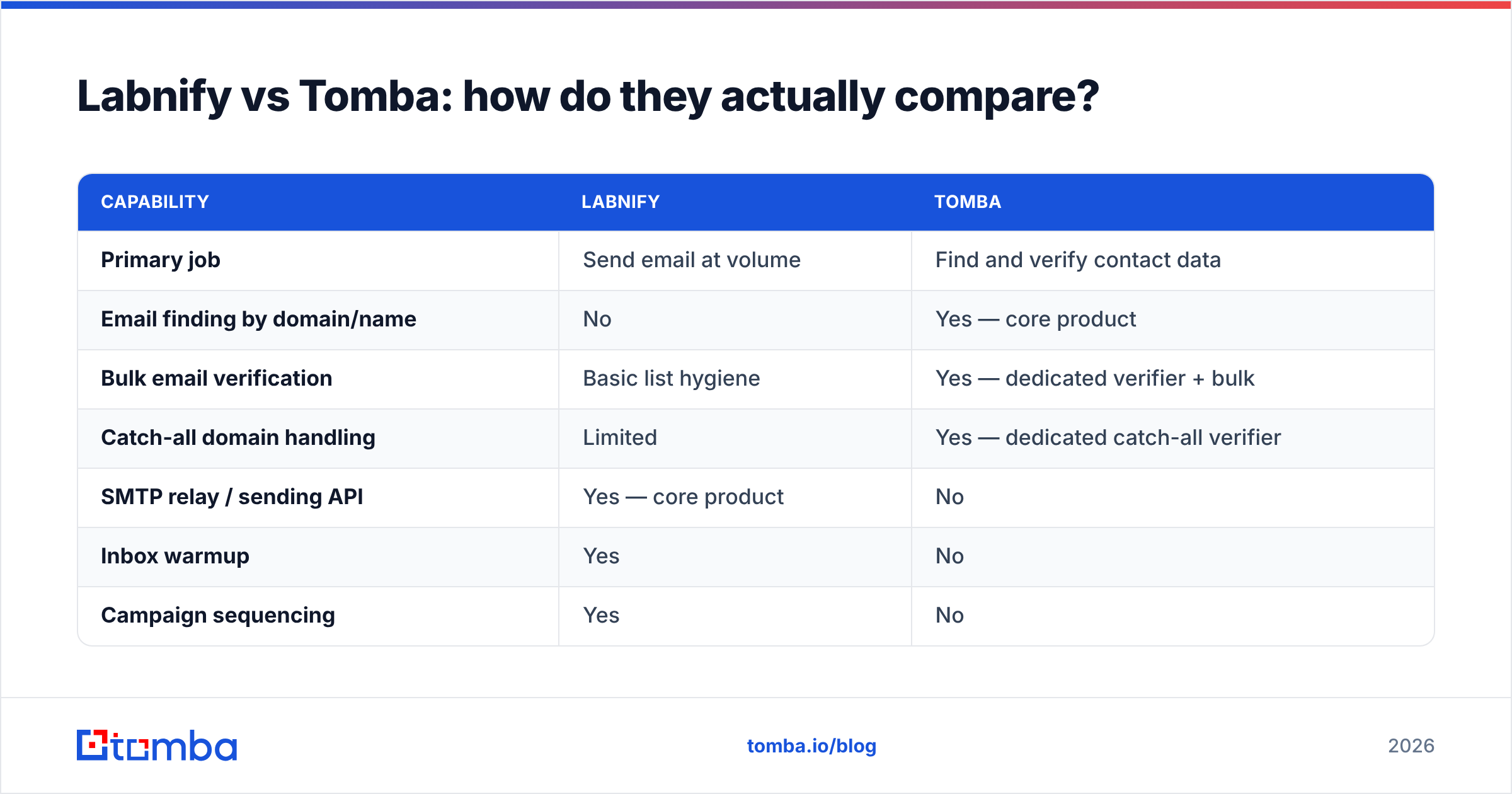
Here is the honest side by side. Look at how few rows are a real fight. That is the answer in itself.
| Capability | Labnify | Tomba |
|---|---|---|
| Primary job | Send email at volume | Find and verify contact data |
| Email finding by domain/name | No | Yes — core product |
| Bulk email verification | Basic list hygiene | Yes — dedicated verifier + bulk |
| Catch-all domain handling | Limited | Yes — dedicated catch-all verifier |
| SMTP relay / sending API | Yes — core product | No |
| Inbox warmup | Yes | No |
| Campaign sequencing | Yes | No |
| Phone number lookup | No | Yes |
| Contact enrichment | No | Yes |
| Developer API | Sending API | Data API (finder, verifier, enrichment) |
| Chrome extension | Not a core surface | Yes |
| Spreadsheet integrations | Limited | Google Sheets, Excel, Airtable |
| Starting paid price | Volume/deal-based — check current site | $49/mo (Starter) |
| Free tier | Trial-dependent | 25 searches/mo, free forever |
The table makes the choice clear. Only one row is contested: verification. Labnify wins three rows outright — sending, warmup, and sequencing. Tomba wins eight — finding, catch-all, phones, enrichment, extensions, spreadsheets, the data API, and the free tier.
Where do Labnify and Tomba actually overlap?#
The Labnify vs Tomba overlap is thin. It is list checking, and nothing else. Even there, the two tools worry about different things.
Labnify checks because bounces hurt its own network. High bounce rates on shared IPs damage the pool for every customer. So hygiene is partly self-defense. The check runs at or near send time. It usually covers syntax, MX records, and known bad domains.
Tomba checks because a wrong address is a lost deal. Its email verification runs SMTP-level tests, scores each address, and flags role accounts and throwaways. It also treats catch-all domains as their own problem class.
A catch-all server accepts every address at the MX layer. A naive checker then marks the whole domain as valid. That is how a list passes review and still bounces at 20%.
Selling into large firms? Then catch-all handling is not a nice-to-have. A quarter to a third of mid-market and enterprise domains run this way, depending on whose sample you read. A catch-all verifier is the gap between a list that looks clean and one that is clean.
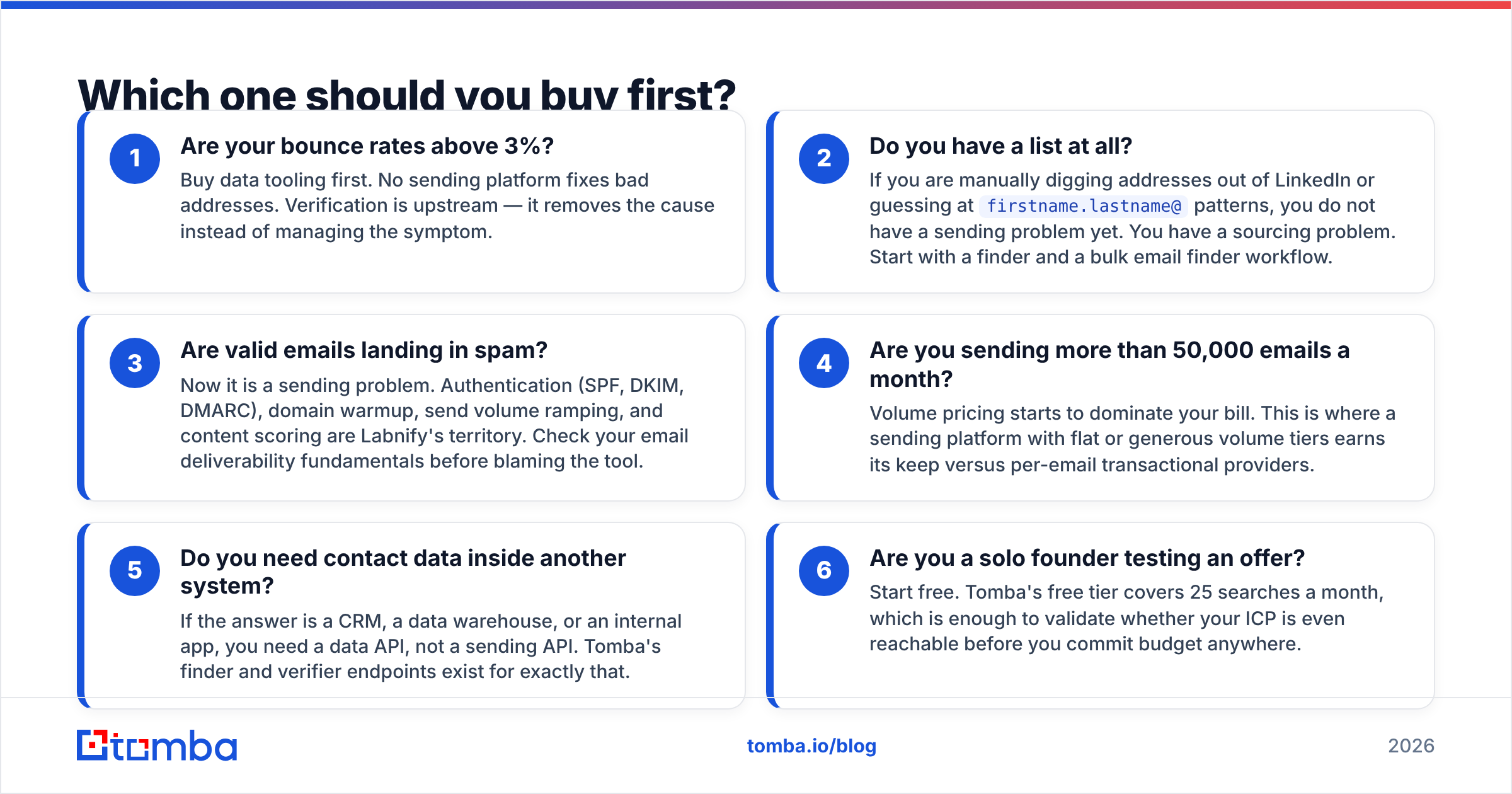
Which one should you buy first?#
Work through this in order. The bottleneck is rarely where people assume it is, and the Labnify vs Tomba choice usually settles itself once you find it.
- Bounce rate above 3%? Buy data tooling first. No sending tool fixes bad addresses. Checking sits upstream. It removes the cause instead of managing the symptom.
- No list yet? If you are digging addresses out of LinkedIn or guessing at
firstname.lastname@patterns, you do not have a sending problem. You have a sourcing problem. Start with a finder and a bulk email finder workflow. - Valid emails landing in spam? Now it is a sending problem. SPF, DKIM, DMARC, domain warmup, volume ramps, and content scoring are Labnify's turf. Review your email deliverability basics before you blame the tool.
- Sending more than 50,000 emails a month? Volume pricing now drives your bill. This is where a flat or generous sending plan beats a per-email provider.
- Need contact data inside another system? A CRM, a warehouse, or your own app needs a data API, not a sending API. Tomba's finder and verifier endpoints exist for that.
- Solo founder testing an offer? Start free. Tomba's free tier covers 25 searches a month. That is enough to see if your buyers are reachable before you spend a cent.
How does pricing compare?#
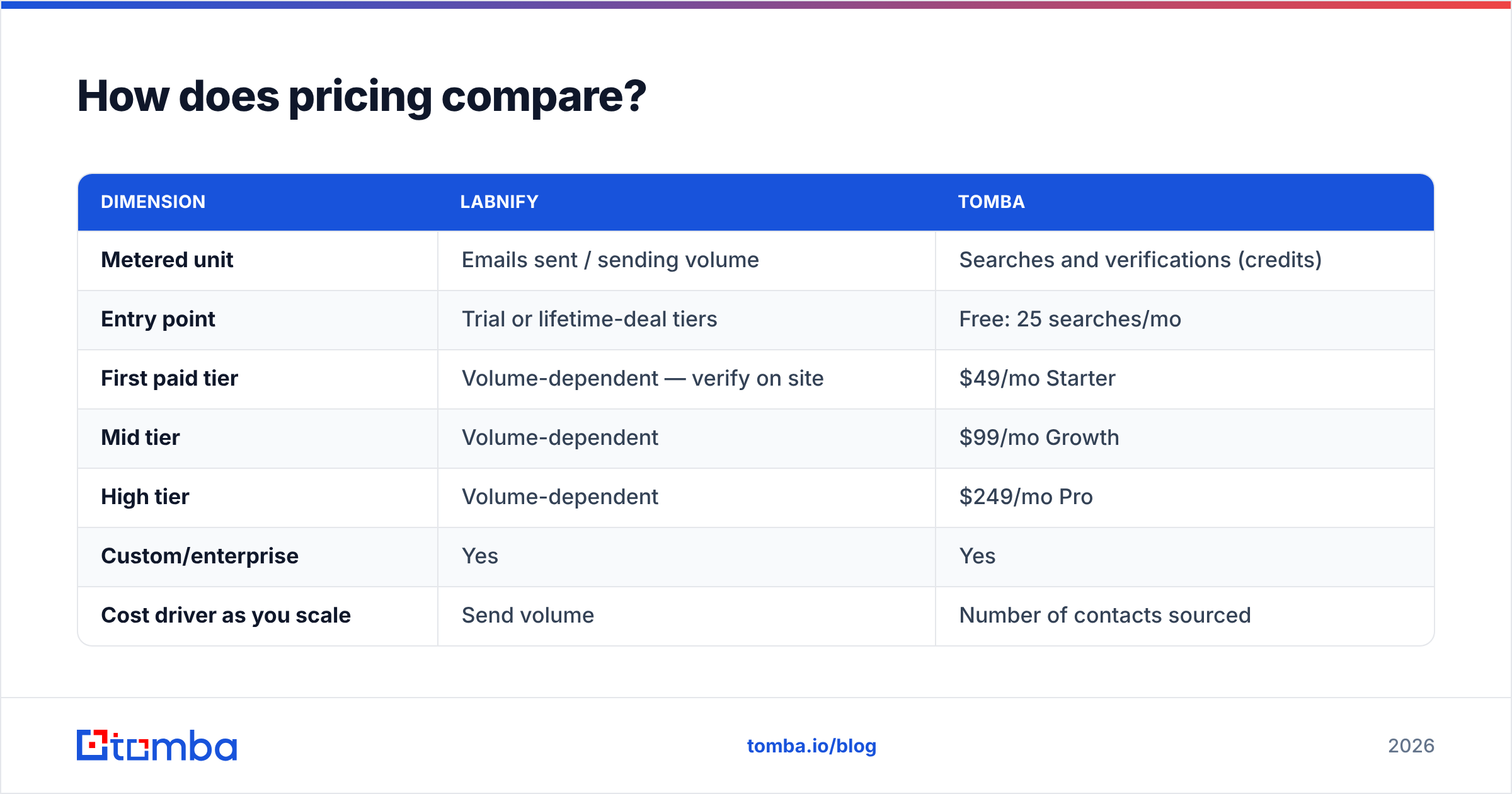
This is the least comparable part of the whole Labnify vs Tomba question. The two tools meter different units.
| Dimension | Labnify | Tomba |
|---|---|---|
| Metered unit | Emails sent / sending volume | Searches and verifications (credits) |
| Entry point | Trial or lifetime-deal tiers | Free: 25 searches/mo |
| First paid tier | Volume-dependent — verify on site | $49/mo Starter |
| Mid tier | Volume-dependent | $99/mo Growth |
| High tier | Volume-dependent | $249/mo Pro |
| Custom/enterprise | Yes | Yes |
| Cost driver as you scale | Send volume | Number of contacts sourced |
Two notes. First, do not compare the headline numbers. 50,000 sends and 50,000 lookups are not the same unit of value, and lookups are the scarcer one.
Second, sending cost scales with how often you contact people. Data cost scales with how many people you contact. A team that emails 2,000 prospects six times each is sending-heavy. A team that emails 40,000 prospects once is data-heavy.
Current tiers live on the Tomba pricing page. Labnify's live on theirs. Lifetime-deal terms shift, so read the fine print on send limits and account counts.

Is Labnify the right choice for you?#
Labnify fits when volume is your limit and your list quality is already handled.
Good fit if you:
- Send high-volume marketing or app mail, and got burned by per-email pricing from a big ESP
- Need SMTP relay access for an app, not just a campaign UI
- Want warmup and sender rotation bundled, not bought separately
- Are cost-sensitive, and fine with a younger tool in exchange for better unit economics
- Already source contacts through another system, a partner, or an existing database
Weak fit if you:
- Need to build a prospect list from nothing
- Sell into enterprise domains, where catch-all checks decide if your list is usable
- Need phone numbers, company data, or enrichment next to the email
- Work in a regulated field and need a long, public uptime and compliance record
On that last point, read recent reviews on G2 instead of any vendor case study, ours included. Sending tools live or die on reputation. Users complain about that in public, and loudly.
Is Tomba the right choice for you?#
Tomba fits when who to contact is the open question.
Good fit if you:
- Build outbound lists all the time, and need accuracy you can audit (Tomba shows sources, not just a score)
- Sell into companies with catch-all mail servers, and need real verdicts on those domains
- Want the data inside Sheets, Excel, Airtable, HubSpot, or your own app via API
- Need phone numbers and extra fields next to the email, from one vendor and one bill
- Want to test the accuracy claim for free before you pay
Weak fit if you:
- Already have a clean, checked list, and just need to push volume out the door
- Need sequencing, reply detection, or a shared inbox — Tomba does none of these, and does not pretend to
- Want warmup built in
Tomba is narrow on purpose. It does one hard thing: find and verify B2B contact data. Then it puts that data everywhere you work, instead of trying to own the whole outbound stack. Want one suite for sourcing, sequencing, and sending under a single login? Neither of these two is that, so look at all-in-one platforms and weigh their trade-offs.
Can you use Labnify and Tomba together?#
Yes. For most outbound teams, that is the real answer to Labnify vs Tomba.
The pipeline looks like this:
- Source. Use domain search to pull every reachable contact at a target company. Use the email finder for named people.
- Verify. Run the list through checks, catch-all included. Drop anything that does not come back clean. Expect to lose 10–25% of a raw list. That is the tool working, not failing.
- Enrich. Add job titles, company size, and phone numbers, so your segments and copy have something to work with.
- Load. Push the clean list into your sending platform, Labnify or otherwise, by CSV or API.
- Send. Warm up domains, ramp volume slowly, and authenticate properly. Then let the sending tool do its job on a list that will not sabotage it.
- Feed back. Route bounces and hard failures back into your data layer, so you stop paying to re-source addresses you already know are dead.
Step six is the one teams skip. That is why the same dead records keep coming back, quarter after quarter.
Treat a verified list as an asset that decays. B2B contact data goes stale at roughly 2–3% a month as people change jobs, a rate HubSpot and other CRM vendors have tracked for years. Re-checking every quarter costs far less than the damage from mailing a list you cleaned eleven months ago.
What is the verdict on Labnify vs Tomba?#
They are not substitutes. Any Labnify vs Tomba verdict that crowns a single winner is comparing a hammer to a tape measure.
Buy Labnify, or any sending tool, when your limit is throughput, infrastructure cost, or inbox placement on a list you already trust. Buy Tomba when your limit is knowing who to email, and whether that address is real.
Not sure which limit you are under? Look at your bounce rate. Above 3%, it is data. Below 3% with weak open rates, it is sending or copy.
Starting outbound from zero in 2026? Sequence it right: data, then deliverability, then volume. Flip that order and you buy a very fast way to burn a domain.
Start with the list, not the send. Tomba's Email Finder gives you verified, source-backed work email addresses by domain, name, or company. You get 25 free searches a month, and no card is required.
Run your next target account through it. Check the results against what you already know, and decide from evidence instead of a pricing page. When the list is clean, every sending platform you plug it into performs better.
Related guides#
// get started
Find, verify and enrich your first contacts today
Start on the free plan with 25 searches a month, then scale when your team is ready.
Free plan · No credit card required · GDPR & CCPA
// about the author