LakeB2B vs Tomba (2026): Which B2B Email Data Source Wins?
LakeB2B sells curated B2B lists by quote. Tomba finds and verifies emails on demand from $49/mo. Here is the honest breakdown of accuracy, pricing, compliance and which one your team should actually buy.
LakeB2B vs Tomba comes down to one question: do you buy a finished list, or find and verify emails yourself?
TL;DR
- LakeB2B is a data provider. You brief a target audience, and their team builds and delivers a list.
- Tomba is a data tool. You look up and verify contacts yourself, at the moment you need them.
- LakeB2B pricing is quote-based. It is sold per thousand records, with a minimum order size.
- Tomba publishes pricing: free tier at 25 searches/mo, Starter $49/mo, Growth $99/mo, Pro $249/mo.
- Pick a list provider for offline channels (direct mail, phone, healthcare NPI) or a one-off segmented audience.
- Pick a self-serve finder for continuous outbound, per-contact checks before send, or an API in your pipeline.
- Decay is the hidden variable. Any list loses about 2-2.5% of its contacts each month. Verifying at send time matters more than where the record came from.
What exactly are LakeB2B and Tomba?#
They are not the same kind of product. That is why "which is better" has no single answer.
LakeB2B is a US-based B2B data and demand-generation company. The core model is custom audience building. You describe a target segment — industry, job function, company size, technology installed, healthcare specialty. Their team then assembles a contact file and delivers it, usually as a CSV or a direct CRM push. Around that sits a services layer: data appending, list cleansing, intent data, and managed campaign work. Healthcare and technology are the audiences they market most heavily.
Tomba is a self-serve email-finding and verification platform. You give it a domain, a name plus a domain, or a LinkedIn profile. It returns the work email address with a confidence score and the sources it was found on. Alongside the email finder sit a verifier, domain search, catch-all handling, phone lookup, and enrichment. All of it works through the UI, a Chrome extension, spreadsheets, or the API.
The practical difference: LakeB2B sells you a file. Tomba sells you the ability to produce files whenever you want.
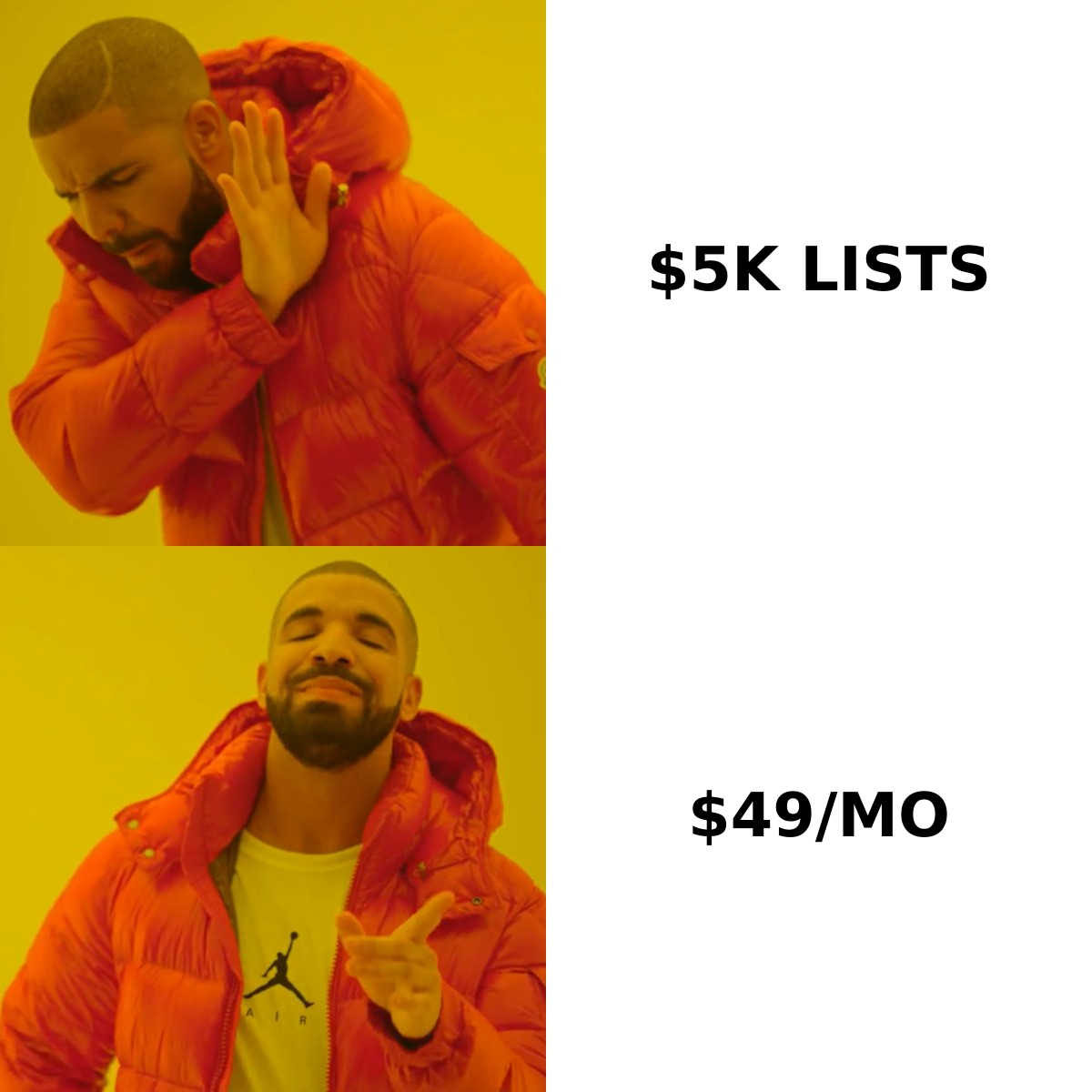
LakeB2B vs Tomba: how do they compare head-to-head?#
Here is the side-by-side on the attributes that change your outcome.
| Attribute | LakeB2B | Tomba |
|---|---|---|
| Model | Managed data provider / list build | Self-serve email finder + verifier |
| How you get data | Brief a rep, receive a delivered file | Search on demand in UI, extension, or API |
| Pricing transparency | Quote-based, not published | Published: free, $49, $99, $249/mo |
| Minimum commitment | Typically a minimum order per list | None — free tier with 25 searches/mo |
| Time to first contact | Days (scoping, sampling, delivery) | Under a minute |
| Verification | Cleansing offered as part of the build | Built-in verifier, per-address, re-runnable |
| Catch-all domains | Handled during list prep | Dedicated catch-all verifier |
| API access | Limited / enterprise arrangement | Full REST API on all paid plans |
| Offline channels (mail, phone) | Strong — postal and phone data included | Phone finder available; no postal focus |
| Best for | One-off segmented audiences, healthcare, ABM lists | Continuous outbound, enrichment pipelines, dev teams |

The row that decides most evaluations is "time to first contact." A managed list build is a procurement process: scoping call, counts, sample file, negotiation, delivery. That is fine when you plan a quarter-long ABM push. It hurts when a rep needs the VP of Engineering at a company they found on Monday morning.
What does each one actually cost?#
LakeB2B does not publish rate cards. That is normal for the list-brokerage category. Pricing is quoted per record, often as CPM — cost per thousand. The number moves with how narrow the segment is, whether you want phone and postal fields, and whether you license the data for one campaign or forever. Niche audiences cost more per record than broad industry pulls. Expect a minimum order.
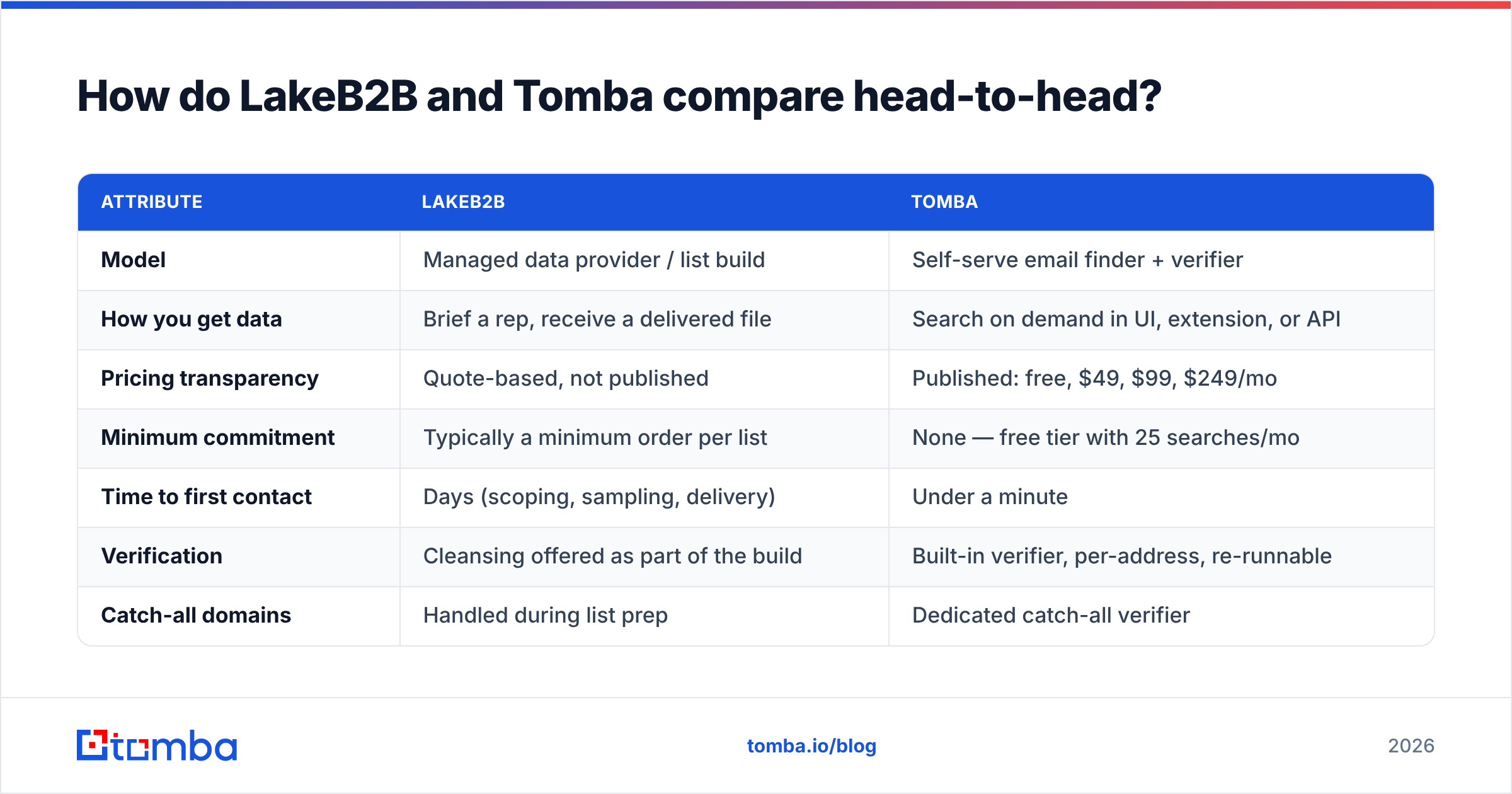
Tomba publishes everything, so you can run the math before you commit.
| Plan | Price | Who it fits |
|---|---|---|
| Free | $0 — 25 searches/mo | Testing accuracy on your own target accounts |
| Starter | $49/mo | Solo founders, one or two SDRs |
| Growth | $99/mo | Small outbound teams running continuous campaigns |
| Pro | $249/mo | Agencies, RevOps, high-volume enrichment |
| Enterprise | Custom | Large data pipelines, custom SLAs |
See full Tomba pricing for exact credit allocations per tier.
In a LakeB2B vs Tomba budget check, one number trips people up: cost per record versus cost per usable record. A cheap list that arrives 20% stale costs more per deliverable contact than a subscription where you verify every address before it enters the sequence. Compare on the second number, not the first.
How accurate is the data on each side?#
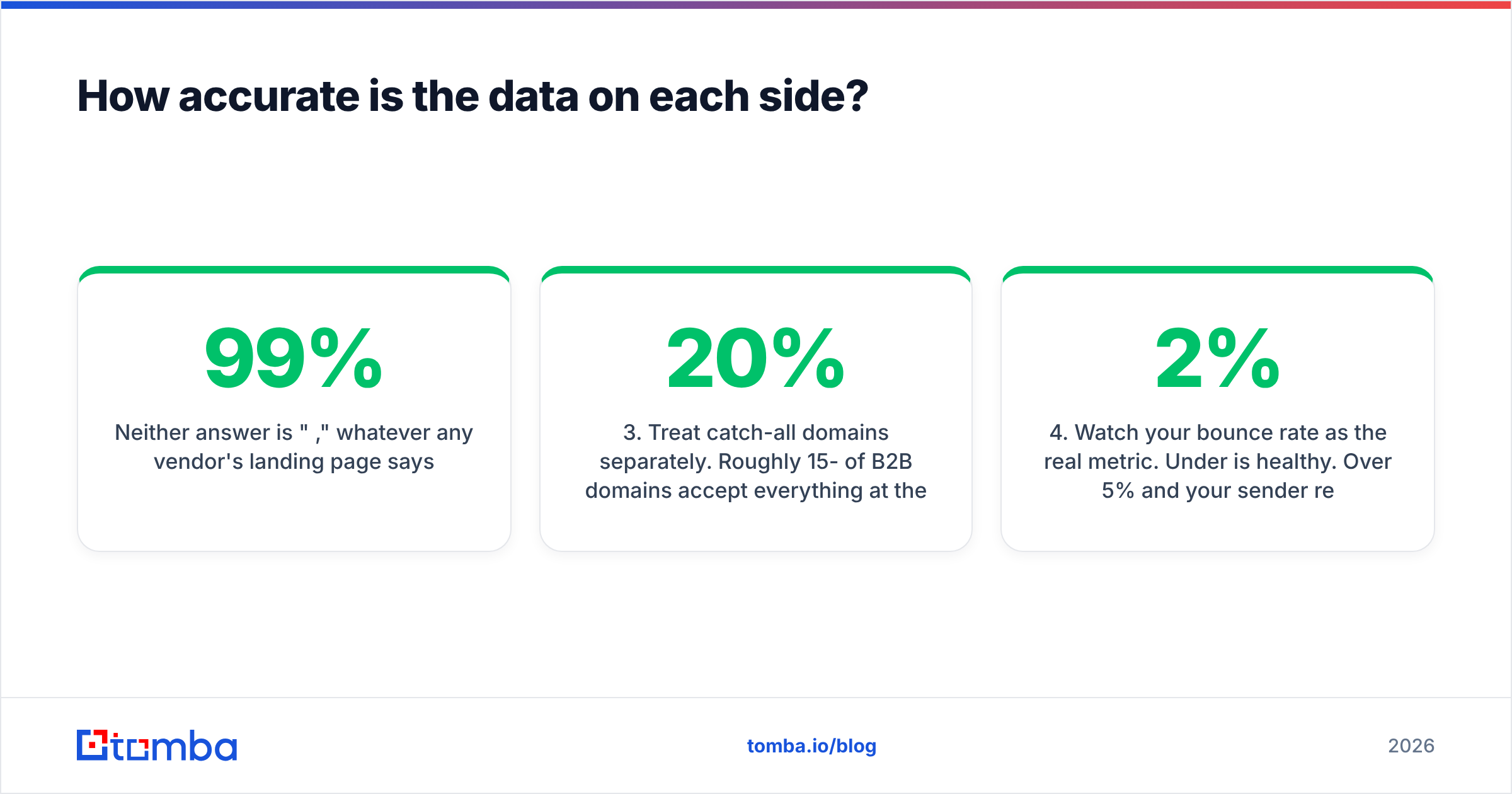
Neither answer is "99%," whatever any vendor's landing page says.
Managed list providers source from compiled directories, publisher partnerships, surveys, opt-in registrations, and licensed third-party files. Quality varies a lot by segment. A list of hospital administrators built from licensure data can be excellent. A list of "SaaS decision makers" pulled from broad compiled sources is often mediocre. Ask for a sample file and check it yourself before you sign. Reputable providers, LakeB2B included, expect that request.
Real-time finders work differently. They crawl public web sources and infer company email patterns. Then they confirm the exact address with SMTP-level checks at the moment you ask. The gain is recency. You are testing whether the mailbox exists today, not whether it existed when the file was built.

Whichever route you take, the discipline is the same:
- Sample before you scale. Pull 100 records from your real ICP and check them. Vendor benchmarks are averages across audiences you do not sell to.
- Verify at send time, not at purchase time. A file verified in January is not a file verified in September. Re-run an email verifier before every campaign.
- Treat catch-all domains separately. Roughly 15-20% of B2B domains accept everything at the MX level. Weak tools mark them "valid" and they bounce anyway.
- Watch your bounce rate. Under 2% is healthy. Over 5% and your sender reputation is already taking damage. No amount of copy testing will fix that.
- Segment your risk. Send to your best records first, check the bounce rate, then release the rest.
Tomba documents its data sources publicly. Ask any vendor for the same thing, list providers included.
Which one fits your workflow?#
Map the choice to how your team actually works.
Choose a managed list provider like LakeB2B when:
- You need offline channel data — postal addresses for direct mail, or dialable numbers for a phone-heavy team.
- You target regulated or niche verticals. Healthcare practitioners by specialty and NPI are the clear case. Specialized compilation beats web crawling there.
- You want the work done for you. A managed build takes headcount out of list production. That matters if you have marketers but no ops person.
- You run a one-off campaign at scale — a conference push, or a launch to 40,000 contacts — rather than continuous prospecting.
- You need services attached, such as appending missing fields to a CRM file or cleaning a database you already own.
Choose a self-serve finder like Tomba when:
- Your reps prospect account by account. They find companies first and contacts second.
- You need contacts inside a workflow — a Tomba API call in your pipeline, a Chrome extension on a LinkedIn profile, or a formula in Google Sheets.
- You want elastic spend. A $49 or $99 line item scales with usage. A list purchase is a sunk cost whether or not the campaign works.
- Recency matters more than volume. You would rather have 300 verified contacts this week than 30,000 from a file built last year.
- You need repeatable verification. The same address gets checked again before every send, not once at delivery.
Is buying a B2B list still compliant in 2026?#
Yes, with real conditions. The conditions differ by geography, not by vendor.
In the US, the CAN-SPAM Act does not require prior consent for commercial email. It requires accurate headers, an honest subject line, a label when the message is an ad, a physical postal address, and a working opt-out honored within ten business days. Buying a list is legal. Sending deceptively is not.
In the EU and UK, GDPR and ePrivacy make purchased B2B data harder. You need a lawful basis, and legitimate interest is the usual route for B2B. You also need a documented balancing test, a clear privacy notice, and proof of where each record came from. Consent claims from a provider are yours to verify, not theirs to assert.
This is where the sourcing model matters more than the brand. Buy a compiled file and you inherit a paper trail you did not build. Look up one person's work email at a company you already target, and the legitimate-interest case is narrower and easier to defend. Neither route is automatically safe. Document whichever one you pick.
A practical rule: get any consent claim into the contract in writing, and keep the suppression list yourself.
When does Tomba clearly lose to a list provider?#
Honest answer: several situations.
Say you need 50,000 verified contacts by Friday for a direct mail drop. A finder is the wrong tool. You would be running bulk lookups against a domain list you do not have yet. A provider hands you the finished file.
Say your ICP is defined by attributes the public web does not expose: license type, verified equipment ownership, or purchasing authority inside a hospital system. Compiled and surveyed data beats crawled data there. That is the core argument for the list-brokerage model, and it is a real one.
And if your team has no operations capacity at all, "someone else builds it" has genuine value, even at a higher cost per record.
Tomba's bulk email finder closes part of that gap when you already hold the account list. Maybe it came from a CRM export, an event roster, or a set of target domains. You just need contacts appended. That is a bulk job a self-serve tool handles well, at a published price.
Can you use both together?#
That is what most mature outbound teams end up doing, and it is not a cop-out answer.
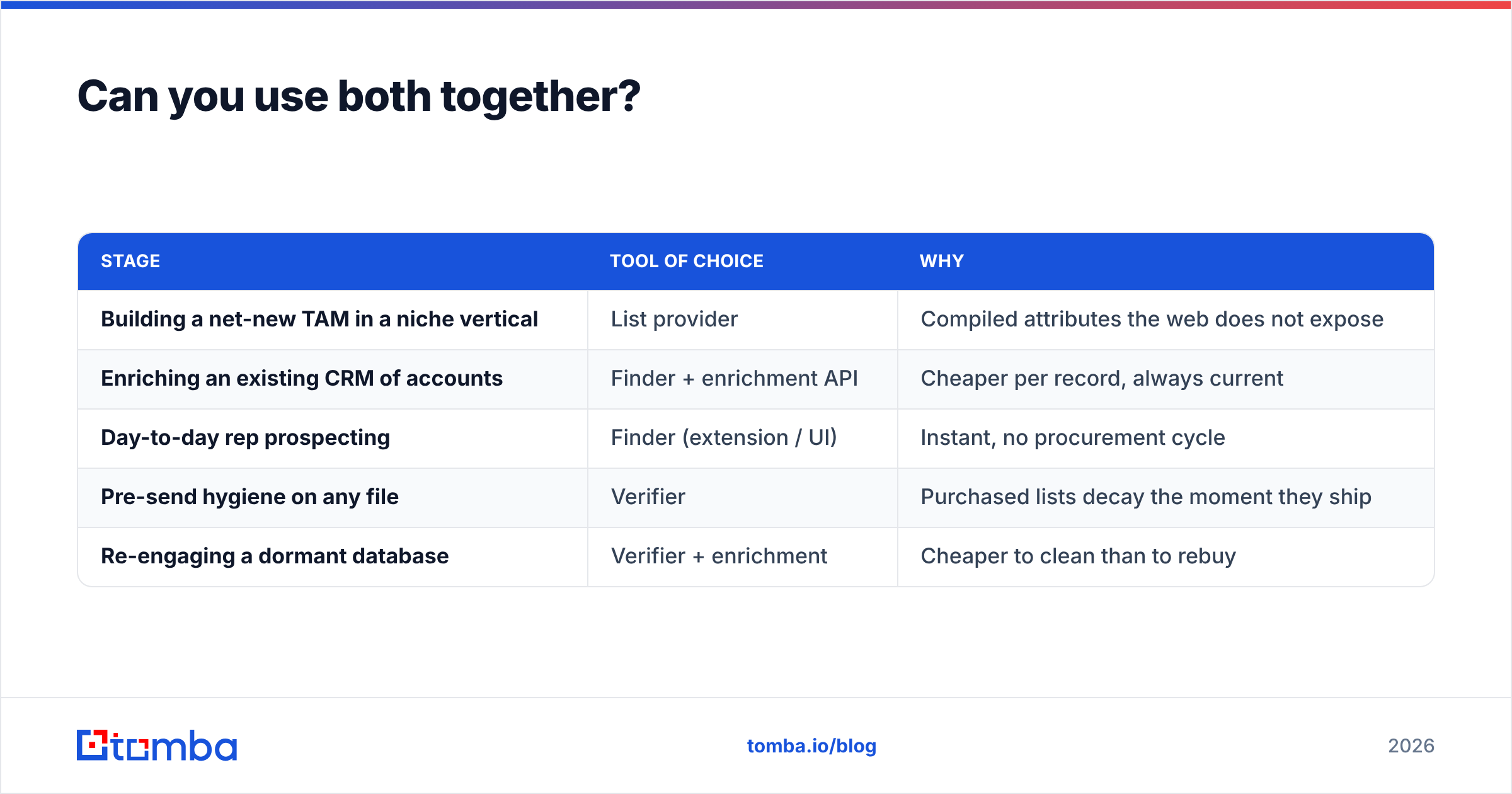
The pattern looks like this:
| Stage | Tool of choice | Why |
|---|---|---|
| Building a net-new TAM in a niche vertical | List provider | Compiled attributes the web does not expose |
| Enriching an existing CRM of accounts | Finder + enrichment API | Cheaper per record, always current |
| Day-to-day rep prospecting | Finder (extension / UI) | Instant, no procurement cycle |
| Pre-send hygiene on any file | Verifier | Purchased lists decay the moment they ship |
| Re-engaging a dormant database | Verifier + enrichment | Cheaper to clean than to rebuy |
The verification layer is the connective tissue. Whatever the source, run a purchased file through a verifier before the first send. It is the highest-ROI step in the whole process. It is cheap, it takes minutes, and it protects the sender reputation that every future campaign depends on. Vendor reviews on G2 say the same thing in a hundred different words.
LakeB2B vs Tomba: so which should you buy?#
Buy from a list provider like LakeB2B if your campaign is a one-off project with an offline component, or a vertical the open web indexes poorly. It also fits when budget is approved up front and you want the build handled for you. Ask for a sample, check it yourself, and get data provenance into the contract.
Buy a self-serve finder if outbound runs all year, your reps need contacts in seconds rather than days, you want spend that flexes with usage, and you need an API rather than a CSV handoff.
The cheapest way to settle LakeB2B vs Tomba for your own ICP is to test both on the same 100 accounts. Get a sample file from the provider. Run the same 100 domains through a finder. Compare verified-deliverable counts. The answer stops being theoretical in about an hour.
Start that test free with the Tomba Email Finder. The free tier gives you 25 searches and asks for no card. Every result comes with a confidence score and its sources, so you can audit the data instead of trusting it. If the numbers hold up on your accounts, Starter is $49/mo and the API is included from day one.
Related guides#
// get started
Find, verify and enrich your first contacts today
Start on the free plan with 25 searches a month, then scale when your team is ready.
Free plan · No credit card required · GDPR & CCPA
// about the author