LakeB2B vs Wiza (2026): Which B2B Email Data Source Wins?
One sells you a custom-built list. The other pulls contacts out of LinkedIn on demand. Here is how LakeB2B and Wiza actually compare on data accuracy, pricing model, and the kind of outbound each one survives.
LakeB2B vs Wiza comes down to one habit: do you buy a list, or build one? LakeB2B sells you a finished file. Wiza pulls contacts out of LinkedIn while you search. Here is how the two compare on data accuracy, pricing, and coverage.
TL;DR
- LakeB2B sells you data. Wiza finds it for you. LakeB2B builds a custom file to your spec. Wiza turns LinkedIn and Sales Navigator searches into contact rows you can export.
- The pricing models do not line up. LakeB2B quotes a price and sets order minimums. Wiza charges per credit each month, so waste shows up right away.
- Wiza wins for LinkedIn-first SDR teams. LakeB2B wins when you need one large file in a niche market. Think healthcare, education, or manufacturing, where no scraper can build the list.
- Neither is the cheapest route to a verified work email when you start from a name and a company domain. That job belongs to a finder-plus-verifier stack.
- Test both with the same 200-contact control list. Vendor accuracy claims are marketing. Your own bounce rate is data.
Why the LakeB2B vs Wiza comparison keeps coming up#
Both tools answer one question: where do I get contacts to email? They answer it from opposite ends of the market.
- LakeB2B (lakeb2b.com) is a long-running B2B data provider. You describe an audience, a rep builds a matching file, and you license it. Healthcare, education, and tech are its strongest verticals.
- Wiza (wiza.co) is a self-serve tool built around LinkedIn. You run a search. Wiza pulls the contact, resolves a work email, verifies it, and hands you a CSV.
- The buying motion differs more than the product. LakeB2B is a sales call, a scope, and a quote. Wiza is a credit card and a Chrome extension.
- The refresh model differs too. A licensed file is a snapshot of delivery day. A LinkedIn export is only as fresh as the profile behind it.
- The failure modes differ. Bought lists fail quietly: roughly 25–30% of B2B contact data goes stale each year. Scraped exports fail loudly, with no email found at all.
Pick the failure mode you can live with. That single choice settles most of the LakeB2B vs Wiza decision.
How do LakeB2B and Wiza source their data?#
LakeB2B buys and blends. Its files come from licensed sources, public registries, event and subscription data, partner feeds, and phone checks.
That is normal for the list-vendor category. It is also why coverage can be strong where LinkedIn is thin. Think hospital buyers, school district administrators, or plant managers at mid-market factories. Many of those people keep no LinkedIn profile at all.
Wiza derives. Each record starts from a LinkedIn profile you picked. Wiza then works out the business email from company patterns and checks it against the mail server.
The result follows LinkedIn usage. For SaaS, agencies, finance, and most VP+ titles in North America and Europe, coverage is excellent. For a 55-year-old operations manager at a regional distributor, it is not.

Neither model is more honest than the other. But the source decides what you should test. With a bought file, you test decay and deliverability. With a derived export, you test hit rate and empty rows.
Which one is more accurate in practice?#
Accuracy claims mean little until you know the denominator.
A list vendor quoting "95% accuracy" usually means the records were valid on the day they shipped. A finder tool quoting the same number usually means the emails it returned were valid. It quietly ignores every search that returned nothing. Both numbers can be true and still produce very different campaigns.

Run your own test instead. The method takes an afternoon.
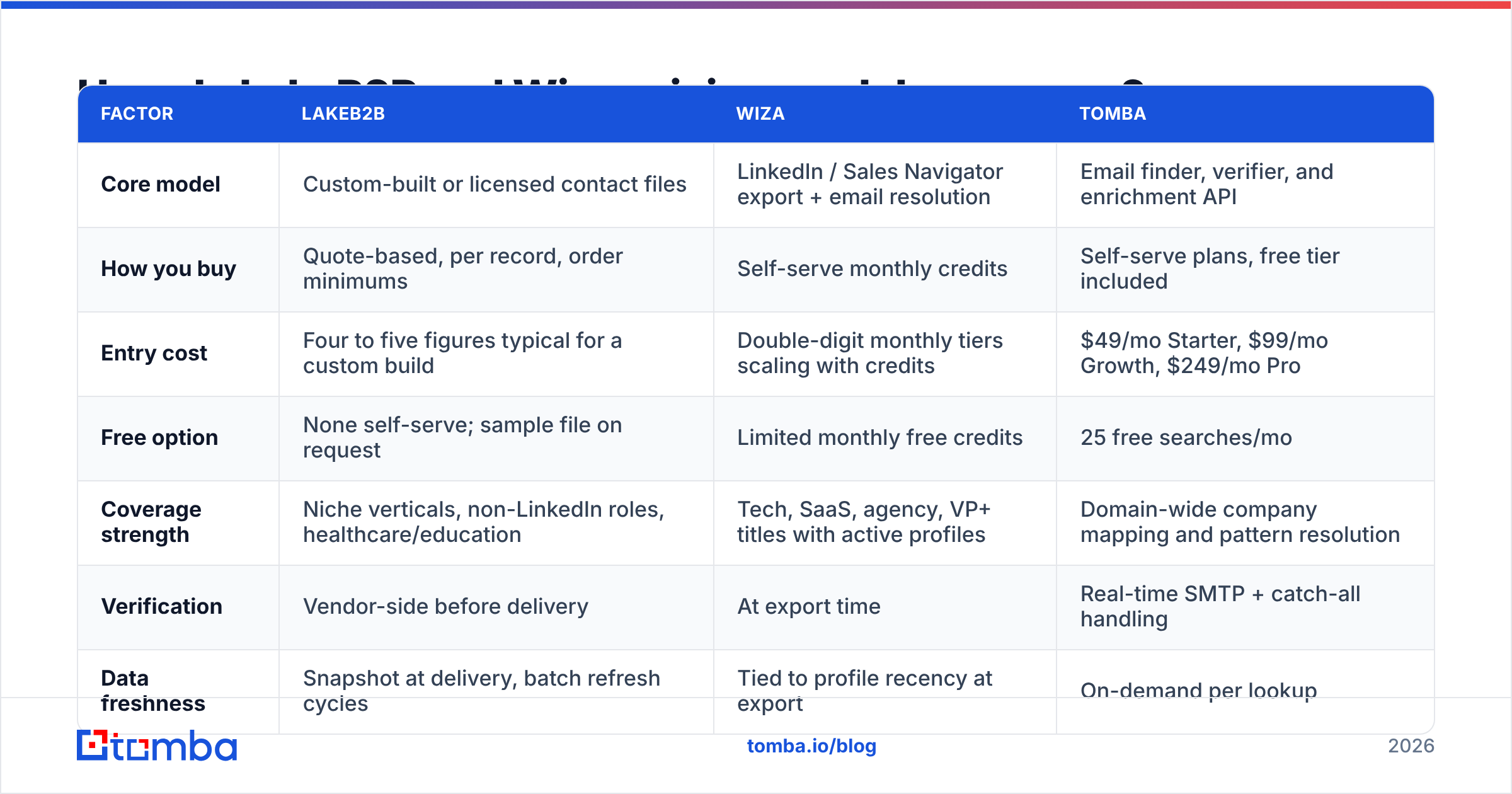
- Build a 200-row control set from contacts whose emails you already know. Past customers and event attendees work well. Strip the emails out.
- Push the same 200 rows through both vendors. For LakeB2B, request an append. For Wiza, export the matching LinkedIn profiles.
- Measure three numbers: coverage, precision, and catch-all share. Coverage is rows returned with an email. Precision is how many match your known-good value.
- Re-verify everything with a neutral email verifier. Never grade a vendor with its own grader.
- Send a small warmed batch and record the hard-bounce rate. Above 3%, you start to damage sender reputation.
Most teams skip step three. Catch-all domains are where accuracy claims hide. A record marked "valid" on an accept-all server is a coin flip, not a contact.
So check your target accounts first. If many of them run catch-all servers, add a catch-all verifier to the pipeline. That holds true whichever vendor you pick.
LakeB2B vs Wiza pricing: how do the two models compare?#
This is where they split hardest. The honest answer depends on the shape of your volume.
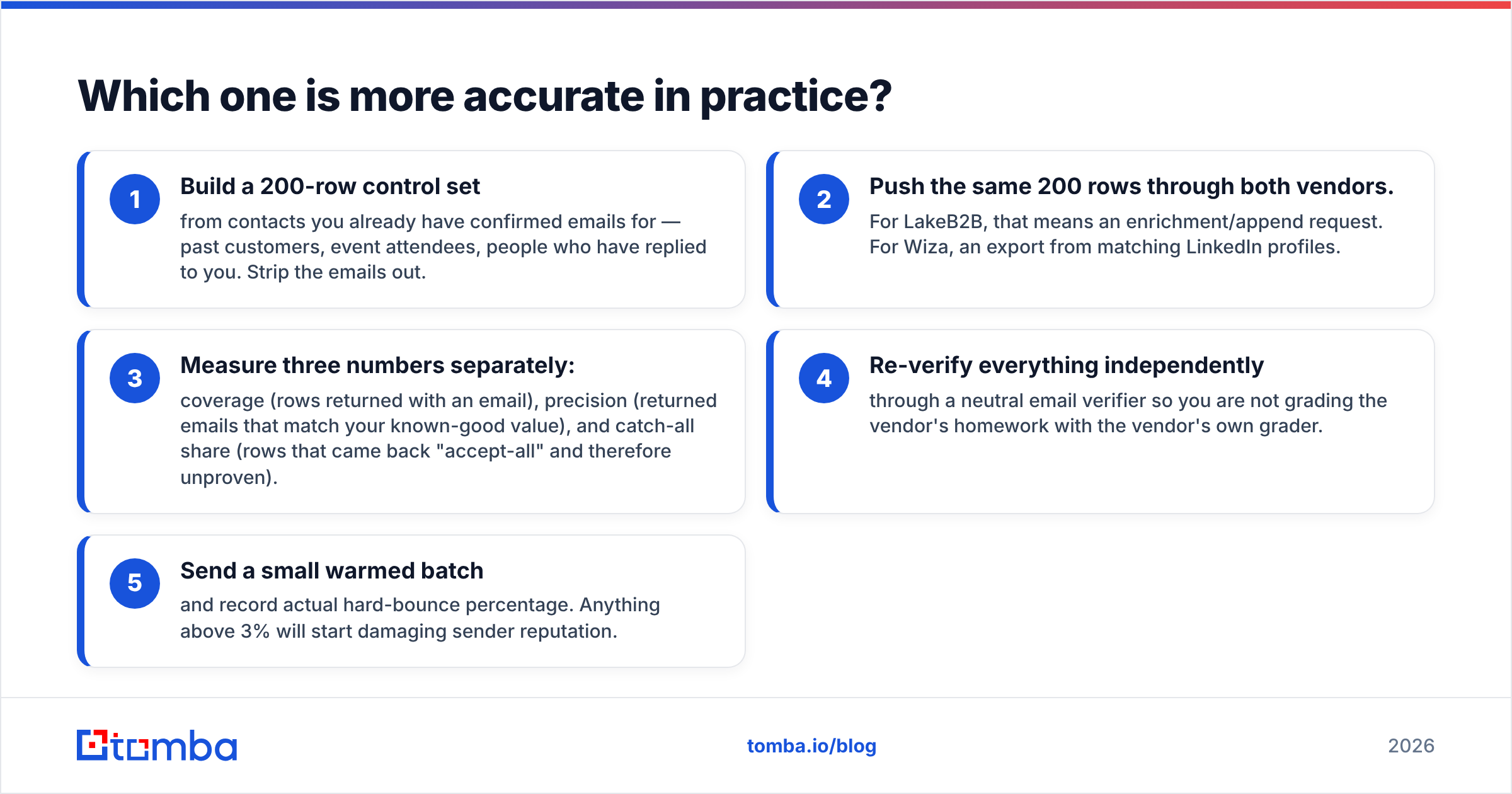
| Factor | LakeB2B | Wiza | Tomba |
|---|---|---|---|
| Core model | Licensed or custom contact files | LinkedIn export + email lookup | Finder, verifier, enrichment API |
| How you buy | Quote, per record, minimums | Monthly credits, self-serve | Self-serve plans, free tier |
| Entry cost | Four to five figures typical | Double-digit monthly tiers | $49/mo Starter, $249/mo Pro |
| Free option | Sample file on request | Limited free credits | 25 free searches/mo |
| Coverage | Niche verticals, healthcare, education | Tech, SaaS, VP+ profiles | Domain-wide pattern mapping |
| Verification | Vendor-side, before delivery | At export time | Real-time SMTP + catch-all |
| Freshness | Snapshot at delivery | Tied to profile recency | On-demand per lookup |
| API access | Enterprise only | Yes | Yes, self-serve |
| Best fit | One-off files in hard verticals | Weekly LinkedIn prospecting | Finding plus verifying in a workflow |
Published positioning at time of writing; always confirm live figures with each vendor before purchasing.

Here is the math that matters. A quoted list looks cheap per record until you divide by the records you can actually use.
Say you buy 20,000 rows at a low rate, and 30% bounce or have left the company. Your real cost per delivered message now beats a credit tool at triple the sticker price. And if you need rows in a vertical Wiza cannot reach, its lower price means nothing, because coverage is zero.
Check a self-serve baseline before you sign. You can read Tomba pricing in thirty seconds with no sales call. It shows what per-lookup data costs when nobody bundles a services retainer into the number.
Which use cases favour LakeB2B?#
Pick LakeB2B when at least two of these are true.
- Your buyers are not on LinkedIn. Facility managers, clinical directors, school buyers, pharmacy owners. Scraper tools return empty rows for these audiences.
- You need volume in one shot. A 50,000-record event push is a list-buy job, not a per-seat tool job.
- You need fields no scraper exposes. NPI numbers, license types, bed counts, installed equipment.
- You must prove where data came from. A license with documented sources is easier to defend than scraped profiles. Get that paperwork in writing first.
- You can absorb a cold file. Sending a bought list from a young domain is how you burn it.
Which use cases favour Wiza?#
Pick Wiza when:
- Your prospecting starts in LinkedIn. If reps live in Sales Navigator, Wiza removes the copy-paste step. That is worth more than most feature differences.
- You need small, frequent batches. 200 contacts on Monday, 300 on Thursday. A subscription fits that rhythm. A quote-based list buy does not.
- Titles matter more than company size. Profiles show current role, tenure, and recent moves. Those are strong triggers for LinkedIn outreach.
- You want live cost per record. Credits burn in plain sight, and that keeps list-building tidy.

There is an honest limit here. Wiza's ceiling is LinkedIn's ceiling. If your market has 4,000 companies and only 600 show a decision-maker on LinkedIn, more credits will not help.
That is also why LakeB2B vs Wiza rarely ends with a permanent winner. Most teams need both motions at different stages.
What are the strongest alternatives to both?#
The LakeB2B vs Wiza framing assumes you must either buy a file or scrape a network. There is a third route. Resolve contacts on demand from a domain or a name, then verify each one before it enters a sequence.
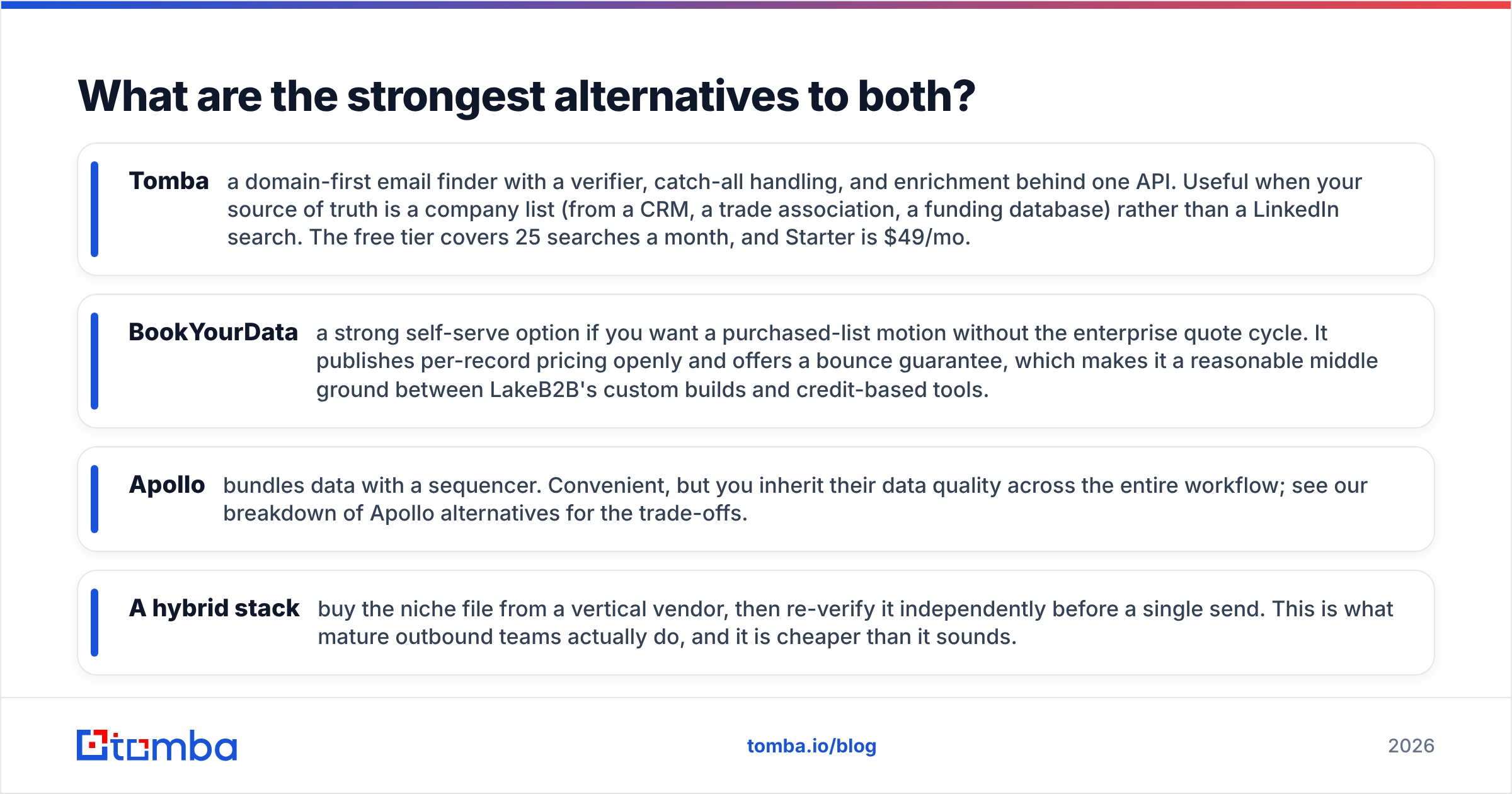
- Tomba — a domain-first email finder with a verifier, catch-all handling, and enrichment behind one API. Best when your source of truth is a company list rather than a LinkedIn search. The free tier covers 25 searches a month, and Starter is $49/mo.
- BookYourData — a self-serve way to buy lists without the enterprise quote cycle. It posts per-record pricing openly and offers a bounce guarantee.
- Apollo — bundles data with a sequencer. Convenient, but you inherit its data quality across the whole workflow. See our Apollo alternatives breakdown.
- A hybrid stack — buy the niche file, then re-verify it yourself before a single send. Mature outbound teams do this, and it costs less than it sounds.
Comparing the LinkedIn-export category specifically? Our Wiza alternative page shows where a finder-plus-verifier stack replaces that workflow, and where it does not.
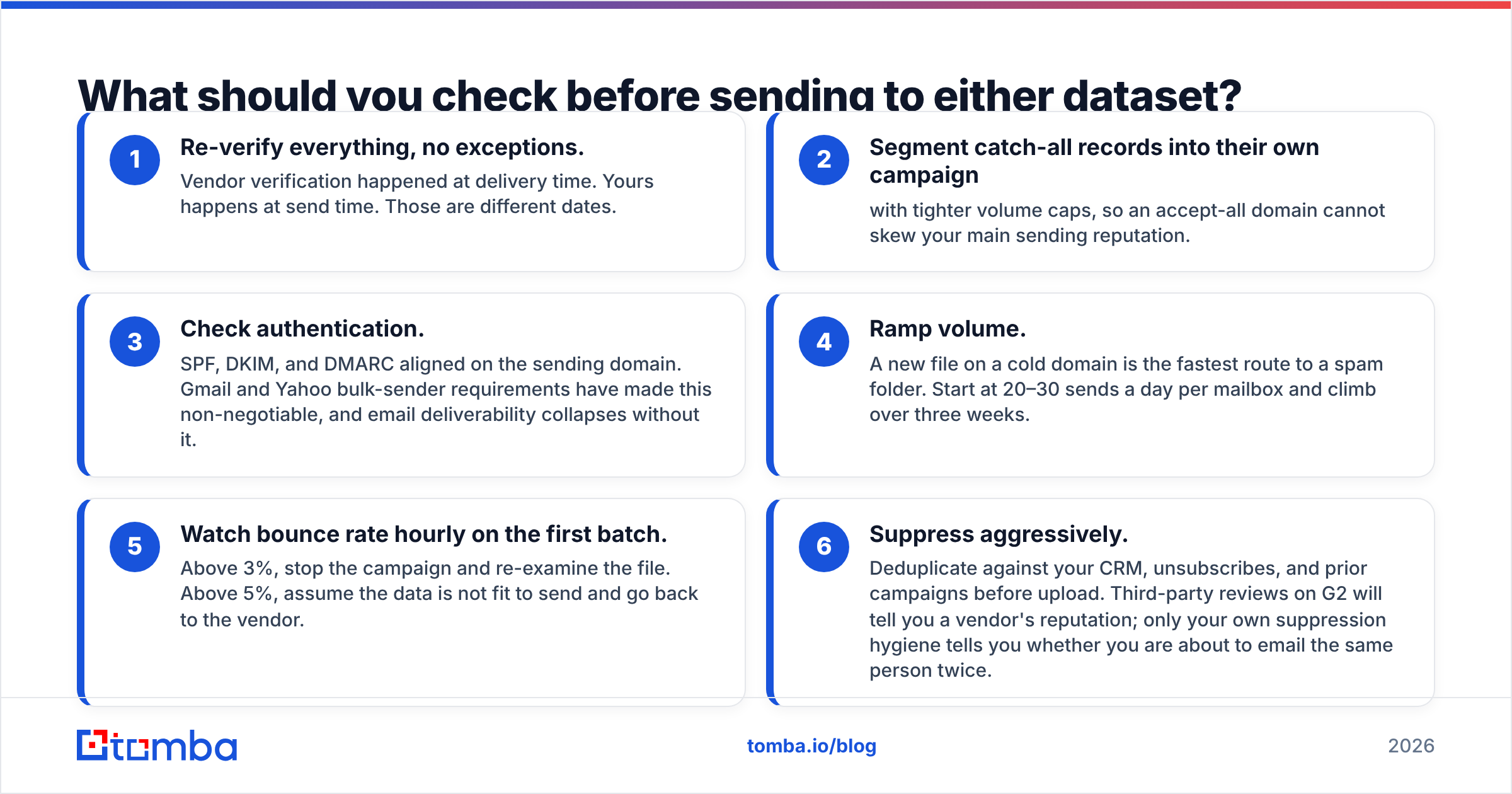
What should you check before sending to either dataset?#
Data quality and inbox placement are separate problems. Better data will not fix a broken sending setup. Work through this list before the first send.
- Re-verify everything. The vendor checked at delivery time. You check at send time. Those are different dates.
- Split catch-all records into their own campaign with tighter caps, so an accept-all domain cannot skew your main reputation.
- Check authentication. SPF, DKIM, and DMARC must align on the sending domain, or email deliverability collapses.
- Ramp volume slowly. Start at 20–30 sends a day per mailbox and climb over three weeks.
- Watch bounces hourly on batch one. Above 3%, stop and re-examine the file. Above 5%, go back to the vendor.
- Suppress aggressively. Dedupe against your CRM, unsubscribes, and past campaigns. Reviews on G2 show a vendor's reputation; only your own hygiene stops repeat emails.
LakeB2B vs Wiza: so which should you choose?#
Choose LakeB2B if your audience is hard to reach and you need one large file. You also need budget for a quote, and a sending setup that can handle cold data.
Choose Wiza if reps prospect in LinkedIn every week, you want predictable self-serve pricing, and your buyers have strong profile coverage.
Choose neither, and build a finder-plus-verifier pipeline, if what you really have is a list of companies. You need current, verified contacts on demand. No minimum order. No dependence on one social network.
Most teams end up with a mix, and that is fine. What is not fine is choosing from a vendor's accuracy slide instead of your own 200-row test.
Ready to test the third option? Run your control list through the Tomba Email Finder on the free tier. That is 25 searches a month, no sales call, no minimum order. Compare coverage and bounce rate against the quote you are weighing. Then decide with your own numbers.
Related guides#
// get started
Find, verify and enrich your first contacts today
Start on the free plan with 25 searches a month, then scale when your team is ready.
Free plan · No credit card required · GDPR & CCPA
// about the author