Land and Expand Strategy: The 2026 Playbook That Works
Most land-and-expand motions stall after the first renewal. Here is the account math, the segmentation rules, and the data hygiene that separate teams compounding 130% NRR from teams re-selling the same seat every year.
TL;DR
- A land and expand strategy means selling a small, fast-to-approve first deal into one team, proving value, then growing seats, products, and departments inside the same account.
- It only works when the first contract is deliberately designed to expand: single use case, short time-to-value, named champion, and a contract structure that does not punish growth.
- The metric that decides whether your motion is real is net revenue retention (NRR), not logo count. Below 100% NRR you are not expanding, you are leaking.
- Expansion fails most often for a boring reason: your CRM only has one contact at the account. You cannot expand into people you cannot reach.
- Land and expand beats big-bang enterprise selling in usage-based, seat-based, and PLG-adjacent products. It loses to big-bang in one-time implementations, compliance-driven purchases, and hardware.
What is a land and expand strategy?#
Land and expand is the practice of entering an account through the smallest viable deal, then systematically growing revenue inside that account over time.
Think of it like a coffee chain opening a kiosk inside an office lobby before signing a lease for a full storefront. The kiosk is cheap, it proves foot traffic exists, and the landlord stops asking for a five-year commitment up front. Once the queue forms every morning, the storefront conversation becomes easy.
Technically: you sell one clearly-scoped use case to one team at a price that clears their discretionary budget, deliver measurable value within 30–90 days, and use that proof to fund expansion — more seats, more products, more business units, higher tiers.
The structural difference from traditional enterprise selling is where the risk sits. In a big-bang enterprise deal, the buyer absorbs the risk of a large, unproven commitment, which is why procurement, security review, and legal grind the cycle to 9–14 months. In land and expand, the vendor absorbs the risk: you take a smaller first check in exchange for a shorter cycle and a seat inside the account.
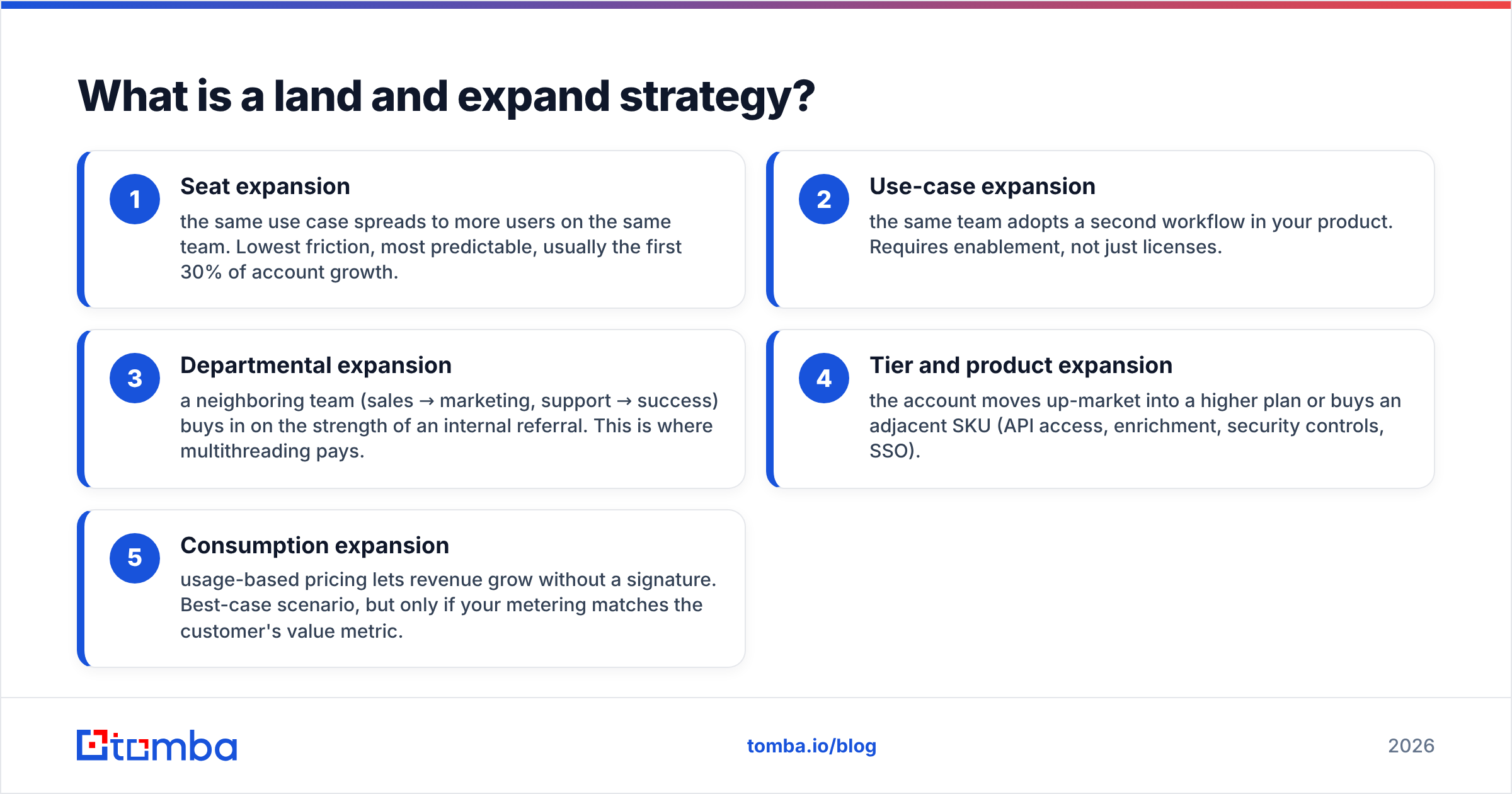
The four mechanics that actually move revenue:
- Seat expansion — the same use case spreads to more users on the same team. Lowest friction, most predictable, usually the first 30% of account growth.
- Use-case expansion — the same team adopts a second workflow in your product. Requires enablement, not just licenses.
- Departmental expansion — a neighboring team (sales → marketing, support → success) buys in on the strength of an internal referral. This is where multithreading pays.
- Tier and product expansion — the account moves up-market into a higher plan or buys an adjacent SKU (API access, enrichment, security controls, SSO).
- Consumption expansion — usage-based pricing lets revenue grow without a signature. Best-case scenario, but only if your metering matches the customer's value metric.
Most teams only run mechanic #1 and call it a strategy. That is why their NRR sits at 103% and their board deck calls it "healthy."
Is land and expand better than big-bang enterprise selling?#
Not universally. It is better in a specific set of conditions, and worse outside them.
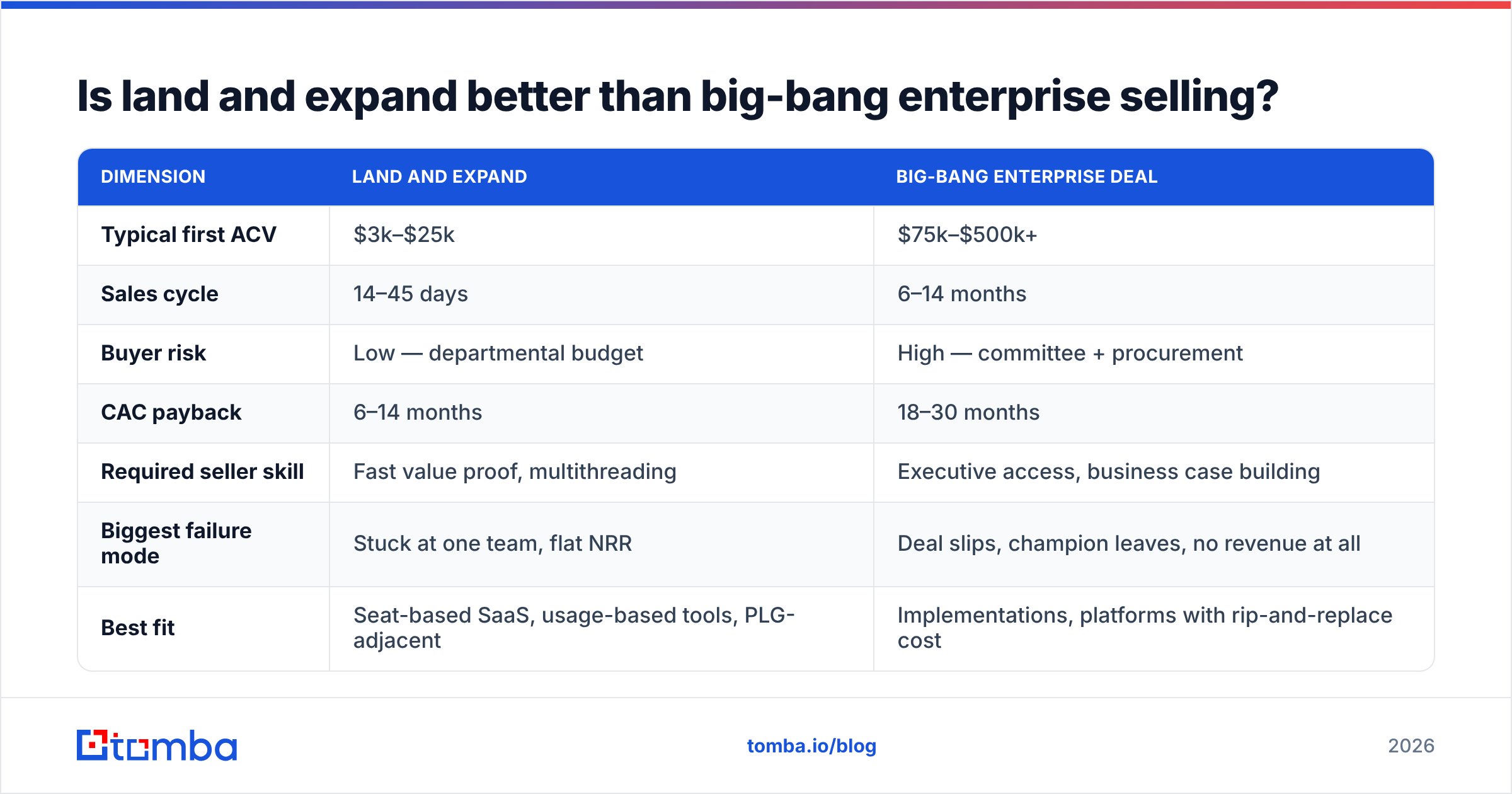
Here is the honest comparison:
| Dimension | Land and expand | Big-bang enterprise deal |
|---|---|---|
| Typical first ACV | $3k–$25k | $75k–$500k+ |
| Sales cycle | 14–45 days | 6–14 months |
| Buyer risk | Low — departmental budget | High — committee + procurement |
| CAC payback | 6–14 months | 18–30 months |
| Required seller skill | Fast value proof, multithreading | Executive access, business case building |
| Biggest failure mode | Stuck at one team, flat NRR | Deal slips, champion leaves, no revenue at all |
| Best fit | Seat-based SaaS, usage-based tools, PLG-adjacent | Implementations, platforms with rip-and-replace cost |
| Forecast accuracy | High in-quarter, weak 12-month | Low in-quarter, strong when signed |
The thing nobody says out loud: land and expand is not cheaper, it is deferred. You trade one hard $200k conversation for twelve medium $15k conversations across three years, plus the customer success cost of keeping the account alive between them. Gartner's sales research has been flagging for years that buying groups now average six to ten stakeholders — land and expand does not remove those stakeholders, it just lets you meet them one at a time instead of all at once in a conference room.
Use land and expand when: your product has a natural single-user entry point, time-to-value is under 30 days, pricing scales on a metric the customer already tracks, and your product survives being used by one person in isolation.
Use big-bang when: the product only works after a data migration, the buyer is regulated into a procurement process regardless of deal size, or your unit economics collapse below a floor ACV.
How do you design the first deal so it can actually expand?#
The land is not a smaller version of the enterprise deal. It is a different object.
Scope it to one measurable outcome. "Cut SDR research time from 12 minutes per lead to 90 seconds for the outbound pod" is a landable scope. "Improve go-to-market efficiency" is not. The first deal's job is to generate an internal data point that a champion can repeat in a meeting you are not in.
Price it under the approval threshold. Find the number your champion can sign without finance. In most mid-market orgs that is $500–$2,000/month. If your entry price sits just above it, you have accidentally converted a 3-week cycle into a 3-month one.
Contract for expansion, not for lock-in. Annual with quarterly seat true-ups beats a 3-year lock every time in this motion. Co-terming clauses, pre-negotiated volume tiers, and a written upgrade path remove the renegotiation tax later. A 3-year lock at a low price is the single most common way teams cap their own expansion revenue.
Instrument adoption from day one. You need to know weekly active usage per seat, which features stuck, and which invited users never logged in. Expansion conversations run on this data. Without it, your QBR is a vibes check.
Multithread before you need to. The champion who bought you will change jobs — average tenure for a B2B SaaS buyer role is roughly two years. If you have one contact, one departure ends the account. You want three to five named relationships inside the account by day 90, including one person a level above your champion.
That last point is where most expansion programs quietly die, and it is a data problem before it is a selling problem.
Why does expansion stall at the data layer?#
Because you cannot expand into contacts you do not have.
The pattern is consistent: a team lands an account with two contacts in the CRM, both from the buying team. Twelve months later the renewal is fine but flat. The account has 340 employees, 40 of whom are plausible users, and 6 of whom sit in the neighboring department you have been told to expand into. Nobody on the account team has their email addresses, their titles are stale, and the internal referral never materialized because asking your champion for eight introductions is an awkward ask you only get to make once.
Fix it mechanically:
- Map the org before the QBR. Run a domain search against the customer's domain to pull the full addressable contact set, then filter by department and seniority. You are building a coverage map, not a prospect list — these are people inside an account that already pays you.
- Enrich what you already have. Half of a two-year-old CRM account record is wrong. Contact enrichment refreshes titles, departments, and seniority so your expansion targeting is based on the current org chart, not the one from the signing date.
- Verify before you send. Emailing a departed employee's dead mailbox at a paying customer's domain is worse than not sending — it hits your sender reputation and it tells the account you are not paying attention. Run the list through an email verifier first.
- Add phone coverage for the exec layer. The VP who approves a tier upgrade does not read cold email from a vendor their team already uses. A phone finder closes that gap for the five or six people who actually control budget.
- Re-run coverage quarterly. Org charts at growth-stage companies turn over roughly 20–25% a year. A static account map is worthless by month nine.
This is unglamorous work and it is the highest-leverage thing an expansion-focused account team can do. Every expansion play — internal referral, champion-led intro, neighboring-team outbound, exec sponsor mapping — assumes you know who is in the building.
What metrics prove a land and expand strategy is working?#
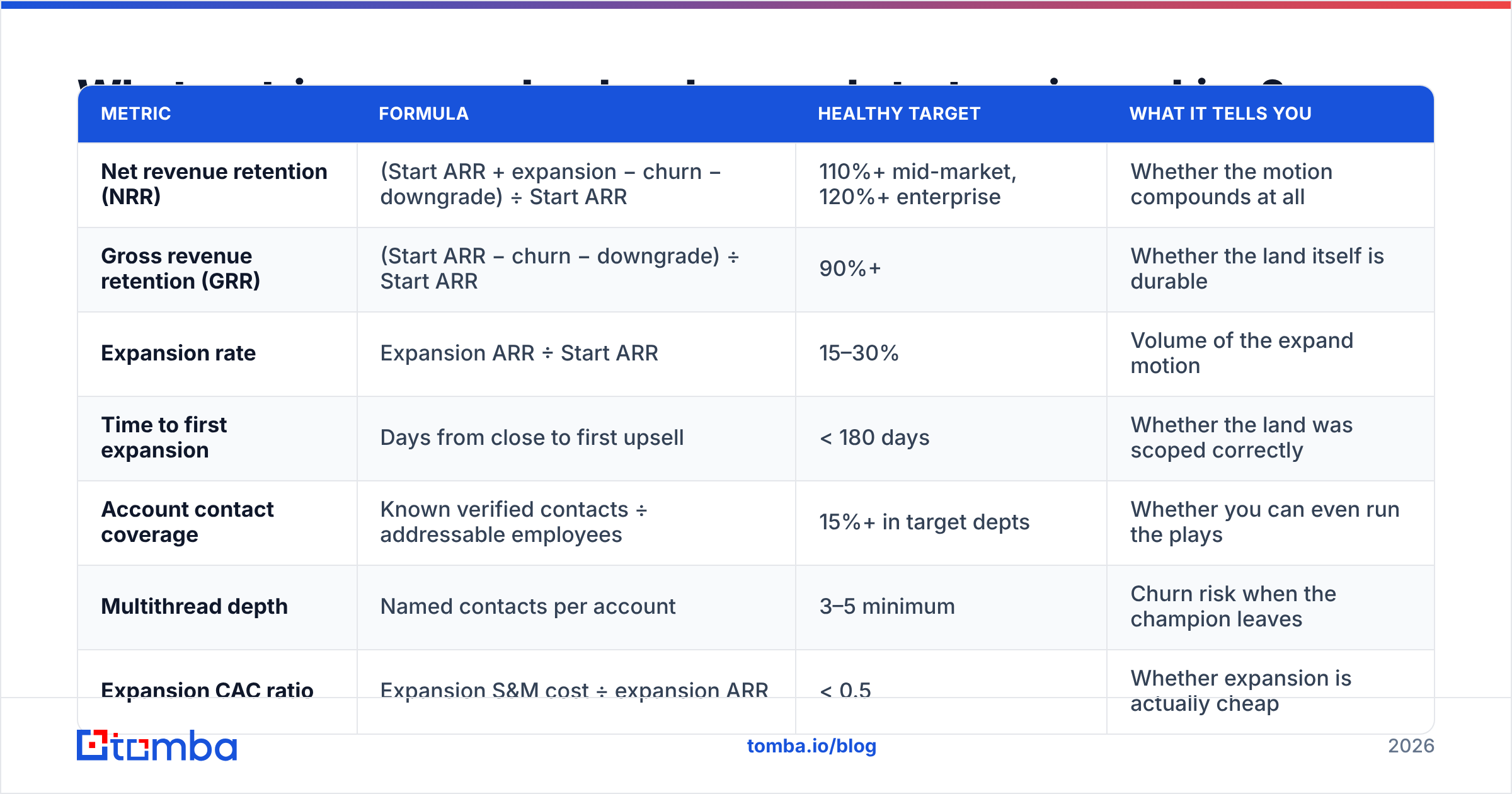
One number rules: net revenue retention. Everything else is diagnostic.
| Metric | Formula | Healthy target | What it tells you |
|---|---|---|---|
| Net revenue retention (NRR) | (Start ARR + expansion − churn − downgrade) ÷ Start ARR | 110%+ mid-market, 120%+ enterprise | Whether the motion compounds at all |
| Gross revenue retention (GRR) | (Start ARR − churn − downgrade) ÷ Start ARR | 90%+ | Whether the land itself is durable |
| Expansion rate | Expansion ARR ÷ Start ARR | 15–30% | Volume of the expand motion |
| Time to first expansion | Days from close to first upsell | < 180 days | Whether the land was scoped correctly |
| Account contact coverage | Known verified contacts ÷ addressable employees | 15%+ in target depts | Whether you can even run the plays |
| Multithread depth | Named contacts per account | 3–5 minimum | Churn risk when the champion leaves |
| Expansion CAC ratio | Expansion S&M cost ÷ expansion ARR | < 0.5 | Whether expansion is actually cheap |
Two traps in this table.
NRR without GRR is a lie. A company can post 118% NRR while churning 18% of its logos, because a handful of whale accounts are expanding hard. That is not a land and expand strategy, that is two good accounts and a leaky bucket. Always read them together.
Time to first expansion is your early warning. If the median account takes 400 days to expand, your land was over-scoped — you sold everything up front and left no room to grow. Shrink the entry package.
For the modeling side, customer lifetime value in an expansion motion behaves very differently from a flat-subscription model — your LTV curve is upward sloping, which is exactly why paying more for the land can be rational. Just make sure the finance team models it that way before you defend a 14-month CAC payback.
What are the most common land and expand mistakes?#
Landing with a discount instead of a scope. Cutting price on the full package is not landing small. You have anchored your value low and given away the expansion lever. Cut scope, hold price per unit.
Treating expansion as a renewal task. If expansion lives with the CSM whose comp plan only pays on retention, expansion does not happen. Either comp CSMs on expansion or assign an AE to the account post-close. Pick one and write it down.
Running expansion outreach like cold outreach. These people work at a company that pays you. Your message should reference the outcome their colleague already got, by name and number. Generic sequences into a customer's domain are a fast way to get your vendor status revoked.
Ignoring the usage signal. Accounts that go from 40 weekly active users to 12 are not expansion targets, they are churn risks wearing an expansion costume. Segment by health before you segment by opportunity size.
Over-indexing on the original champion. One relationship is a single point of failure. HubSpot's sales research has repeatedly documented how much of a deal's fate tracks to buying-committee coverage; the same holds for expansion, where the committee is now internal and invisible to you.
Skipping the quarterly data refresh. You built a beautiful account map in Q1, expanded in Q2, and by Q4 a third of it is stale. Rebuild it on a schedule, not on an impulse.
How do you build a 90-day expansion motion from scratch?#
Start with the accounts you already have, in this order:
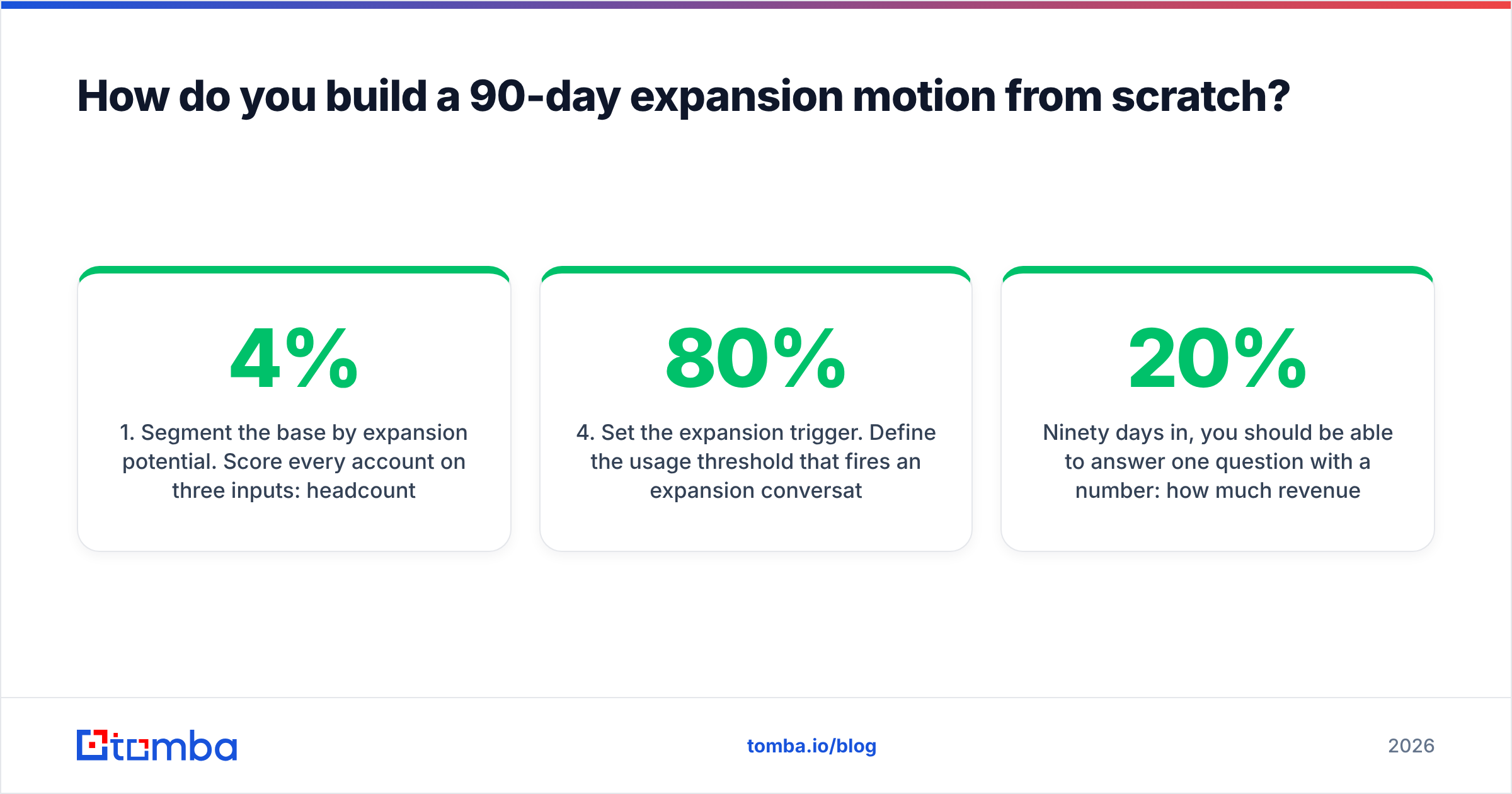
- Segment the base by expansion potential. Score every account on three inputs: headcount in target departments, current product usage trend, and seats-to-employees ratio. The accounts at 4% seat penetration with rising usage are your list.
- Build the contact coverage map. For the top 30 accounts, pull the full org from the customer's domain, enrich titles, verify deliverability, and load it into your CRM tagged as "customer — expansion." Keep it separate from cold pipeline so reporting stays honest.
- Write two plays, not ten. Play one: champion-led internal referral into the neighboring team. Play two: direct outreach to that team, referencing the internal result. Run both, measure which converts, kill the loser.
- Set the expansion trigger. Define the usage threshold that fires an expansion conversation automatically — 80% seat utilization, a second use case adopted, a new department signing up for a trial. Automate the alert.
- Instrument and review weekly. Expansion pipeline gets its own forecast category. If it is blended into new business, it will be deprioritized every single quarter when new-logo targets slip.
Ninety days in, you should be able to answer one question with a number: how much revenue came from accounts you already owned? If the answer is under 20%, your land and expand strategy is still a slide, not a motion.
Where does Tomba fit in an expansion motion?#
The expansion plays above all break at the same point — you need current, verified contact data for people inside accounts you already sell to, and your CRM does not have it.
Tomba Email Finder covers that gap: search by company domain to surface the full addressable contact set inside a customer account, filter by department and seniority to find the neighboring team, and verify deliverability before anything leaves your outbox. Pair it with enrichment to keep titles current between QBRs. Pricing starts free at 25 searches a month so you can map a handful of accounts before committing; paid plans start at $49/mo, with Growth at $99/mo for teams running coverage across a full customer base — see Tomba pricing for the full breakdown.
Land the small deal. Then go find the other 38 people who should be using it.
Related guides#
// get started
Find, verify and enrich your first contacts today
Start on the free plan with 25 searches a month, then scale when your team is ready.
Free plan · No credit card required · GDPR & CCPA
// about the author