7 Best Laserfocus Alternatives in 2026 for CRM-Heavy Sales Teams
Laserfocus made CRM hygiene fast for Salesforce and HubSpot reps. Here are seven alternatives that cover the same job, plus the data problem none of them solve on their own.
TL;DR
- Laserfocus is a speed layer on top of Salesforce and HubSpot: a spreadsheet-style, AI-assisted interface so reps stop dreading CRM updates. It is not a CRM and not a data provider.
- The best alternative depends on which half of the problem you actually have: slow CRM workflows (Scratchpad, Rattle, Momentum, Attio) or unreliable pipeline data (enrichment and contact-data tools).
- Most "CRM productivity" tools price per seat and quote enterprise deals privately. Budget $25–$70 per rep per month for the mid-market options, custom for the revenue platforms.
- A faster CRM interface does not fix wrong emails, dead contacts, or missing decision-makers. That is a data-layer job.
- If your reps are fighting stale contact records rather than slow forms, start with verification and enrichment before you buy another UI.
What is Laserfocus and who is it actually for?#
Laserfocus (laserfocus.io) sits between a rep and their CRM. Instead of clicking through Salesforce record pages one at a time, you get a spreadsheet-like grid plus natural-language commands: bulk-edit next steps, update close dates across twelve opportunities, log outcomes without opening six tabs.
Think of it like a keyboard shortcut layer for a slow application. The application still owns the data; the layer just makes it survivable.
That framing matters because it tells you exactly who Laserfocus helps and who it does not:
- It helps account executives and sales managers who live inside a heavyweight CRM and lose 30–45 minutes a day to data hygiene.
- It does not help teams whose real problem is that the CRM is full of contacts who left the company eighteen months ago.
So when people search for Laserfocus alternatives, they are usually chasing one of three things: a cheaper per-seat price, a broader feature set (forecasting, call recording, workflow automation), or a fix for a problem that a UI layer was never going to solve.
Why do teams look for Laserfocus alternatives?#
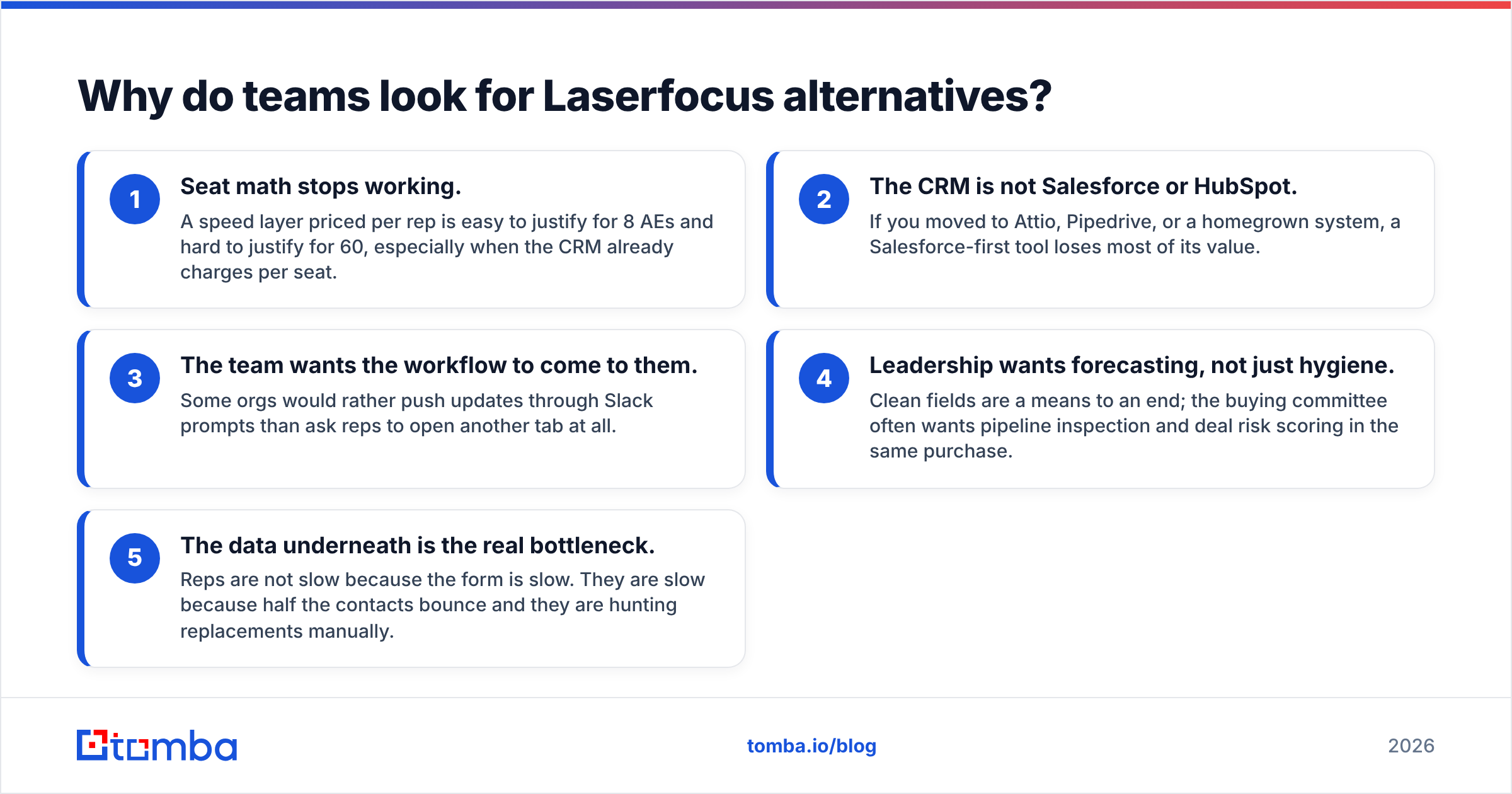
From what shows up repeatedly in buyer conversations and public review sites like G2, the switching triggers cluster into five patterns:
- Seat math stops working. A speed layer priced per rep is easy to justify for 8 AEs and hard to justify for 60, especially when the CRM already charges per seat.
- The CRM is not Salesforce or HubSpot. If you moved to Attio, Pipedrive, or a homegrown system, a Salesforce-first tool loses most of its value.
- The team wants the workflow to come to them. Some orgs would rather push updates through Slack prompts than ask reps to open another tab at all.
- Leadership wants forecasting, not just hygiene. Clean fields are a means to an end; the buying committee often wants pipeline inspection and deal risk scoring in the same purchase.
- The data underneath is the real bottleneck. Reps are not slow because the form is slow. They are slow because half the contacts bounce and they are hunting replacements manually.
That last one is the expensive misdiagnosis. A CRM that updates instantly but points at bad email addresses just produces wrong numbers faster.
How do the top Laserfocus alternatives compare?#
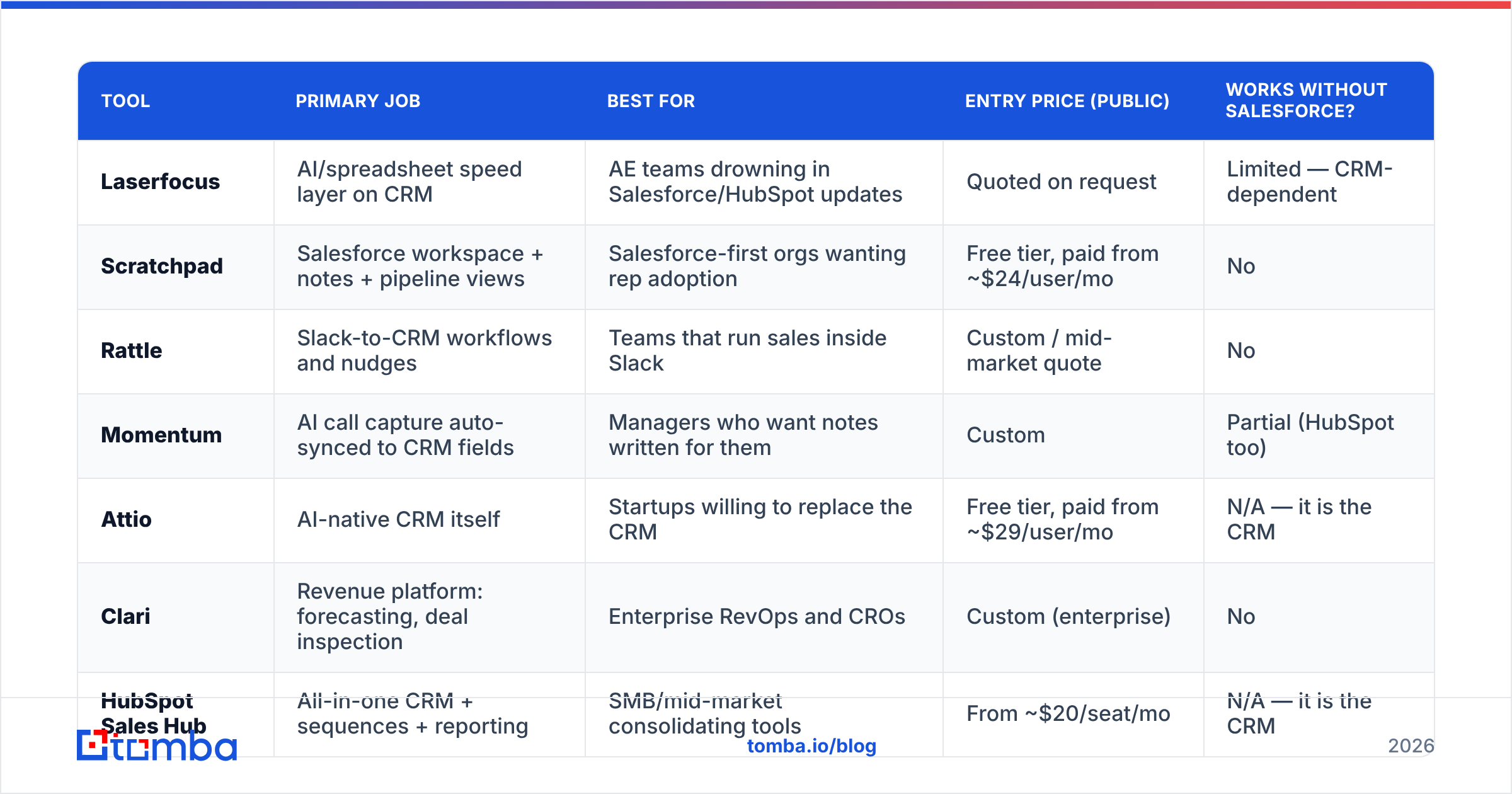
Here is the honest landscape. Prices are the publicly listed entry points at the time of writing and move often — verify on each vendor's site before you build a budget.
| Tool | Primary job | Best for | Entry price (public) | Works without Salesforce? |
|---|---|---|---|---|
| Laserfocus | AI/spreadsheet speed layer on CRM | AE teams drowning in Salesforce/HubSpot updates | Quoted on request | Limited — CRM-dependent |
| Scratchpad | Salesforce workspace + notes + pipeline views | Salesforce-first orgs wanting rep adoption | Free tier, paid from ~$24/user/mo | No |
| Rattle | Slack-to-CRM workflows and nudges | Teams that run sales inside Slack | Custom / mid-market quote | No |
| Momentum | AI call capture auto-synced to CRM fields | Managers who want notes written for them | Custom | Partial (HubSpot too) |
| Attio | AI-native CRM itself | Startups willing to replace the CRM | Free tier, paid from ~$29/user/mo | N/A — it is the CRM |
| Clari | Revenue platform: forecasting, deal inspection | Enterprise RevOps and CROs | Custom (enterprise) | No |
| HubSpot Sales Hub | All-in-one CRM + sequences + reporting | SMB/mid-market consolidating tools | From ~$20/seat/mo | N/A — it is the CRM |
| Tomba | Contact data: find, verify, enrich | Any team whose CRM records are stale | Free (25 searches/mo), Starter $49/mo | Yes — CRM-agnostic |
Two things jump out. First, most of these are not really substitutes for each other; they solve adjacent problems and get lumped together because they all promise "less CRM pain." Second, only one row in that table is CRM-agnostic, which is the tell for where the durable value sits.
Which Laserfocus alternative fits which team?#
Use this as a triage list rather than a ranking. The order is by how narrow the fit is.
Scratchpad — the closest like-for-like. If you liked Laserfocus specifically for the grid-editing and note-taking experience on Salesforce, Scratchpad is the most direct swap. It has a free tier, which makes a pilot with three reps essentially free. Weakness: it is deeply Salesforce-shaped, so a CRM migration kills the investment.
Rattle — when Slack is the real interface. Rattle pushes "update this deal" prompts into Slack at the moment a stage changes, and writes answers straight back to the CRM. Teams that already run deal desks and forecast calls in Slack see adoption jump because nothing new has to be opened. Weakness: prompt fatigue is real; over-configure it and reps start ignoring the bot.
Momentum — when the bottleneck is call notes. Momentum records, summarizes, and writes structured fields back to the CRM automatically. It removes the data entry rather than speeding it up. Weakness: it only covers what was said on calls; email and async deals still need manual updates.
Attio — when the CRM itself is the problem. If you are a startup under 50 people and the honest answer is "our Salesforce instance was configured by someone who left," replacing the CRM with something modern and flexible beats bolting a layer on top. Weakness: migration cost, and enterprise RevOps teams will find the reporting thinner than Salesforce.
Clari — when the buyer is the CRO, not the rep. Clari is a revenue platform: forecast roll-ups, deal risk, pipeline inspection. Hygiene is a side effect of the inspection workflow. Weakness: enterprise pricing and a real implementation project. Nobody buys Clari on a Tuesday afternoon.
HubSpot Sales Hub — when you want fewer vendors. If you are already paying for three point tools, consolidating into HubSpot and using its native sequences, tasks, and reporting can cost less in total than CRM plus speed layer plus engagement tool. Weakness: you inherit HubSpot's opinions about how sales should work.
Tomba — when the records, not the interface, are broken. This is the different-category option. Tomba finds and verifies the contact data that populates all of the above. Weakness: it does not manage your pipeline; pair it with one of the tools above.
Is a CRM speed layer enough without clean data?#
No, and this is the part most alternatives round-ups skip.
Run the arithmetic on a typical mid-market pipeline. Say your CRM holds 20,000 contact records and B2B contact data decays somewhere in the range of 2–3% per month as people change jobs — a figure vendors and analysts like Gartner have flagged for years. After a year without maintenance, a meaningful share of your database points at people who no longer work there. A faster grid lets a rep update a stale record in four seconds instead of forty. It does not tell them the record is stale.
The failure chain looks like this:
- Rep sees a contact in the CRM and assumes it is current.
- Email bounces, or worse, lands in a catch-all void with no bounce signal at all.
- Sender reputation degrades across the whole domain.
- Deliverability drops for the campaigns that were well-targeted.
- Forecast accuracy drops because activity data is noise.
None of those five links are fixable by a better interface.

The practical fix is unglamorous: run your CRM contacts through an email verifier on a schedule, re-enrich the ones that fail, and use a domain search to find the replacement decision-maker at the same company rather than deleting the account. Tomba handles catch-all domains specifically, which is where most verification tools return an unhelpful "unknown" and leave the rep guessing.
If your problem is list acquisition rather than list maintenance — you need net-new verified contacts in a specific ICP and you want them today — a purpose-built list provider such as BookYourData is a reasonable complement, and plenty of teams run both: purchased lists for cold expansion, continuous verification for the records already in the CRM.
What should you check before you switch?#
Five questions, in order. If you cannot answer the first two, the rest do not matter.
1. What is the actual time sink? Shadow two reps for a day. Time the CRM updating separately from the contact hunting. Teams routinely discover the "CRM problem" is 15 minutes a day and the "who do I email now" problem is 90.
2. How locked in is your CRM? If a CRM migration is plausible in the next 18 months, avoid Salesforce-only layers. Choose tools that survive the move.
3. Does it write back cleanly? Ask every vendor for a live demo of a bulk write to a custom object with validation rules turned on. Sync failures are where these tools lose trust fastest.
4. What does it cost at 2x headcount? Per-seat tools that are cheap at 10 reps get renegotiated at 40. Ask for the 40-seat number before you sign the 10-seat contract.
5. Where does the data come from? If the tool enriches records, ask what its sources are and what its verification process looks like. Tomba publishes its data sources for exactly this reason — "AI-powered" is not a sourcing answer.
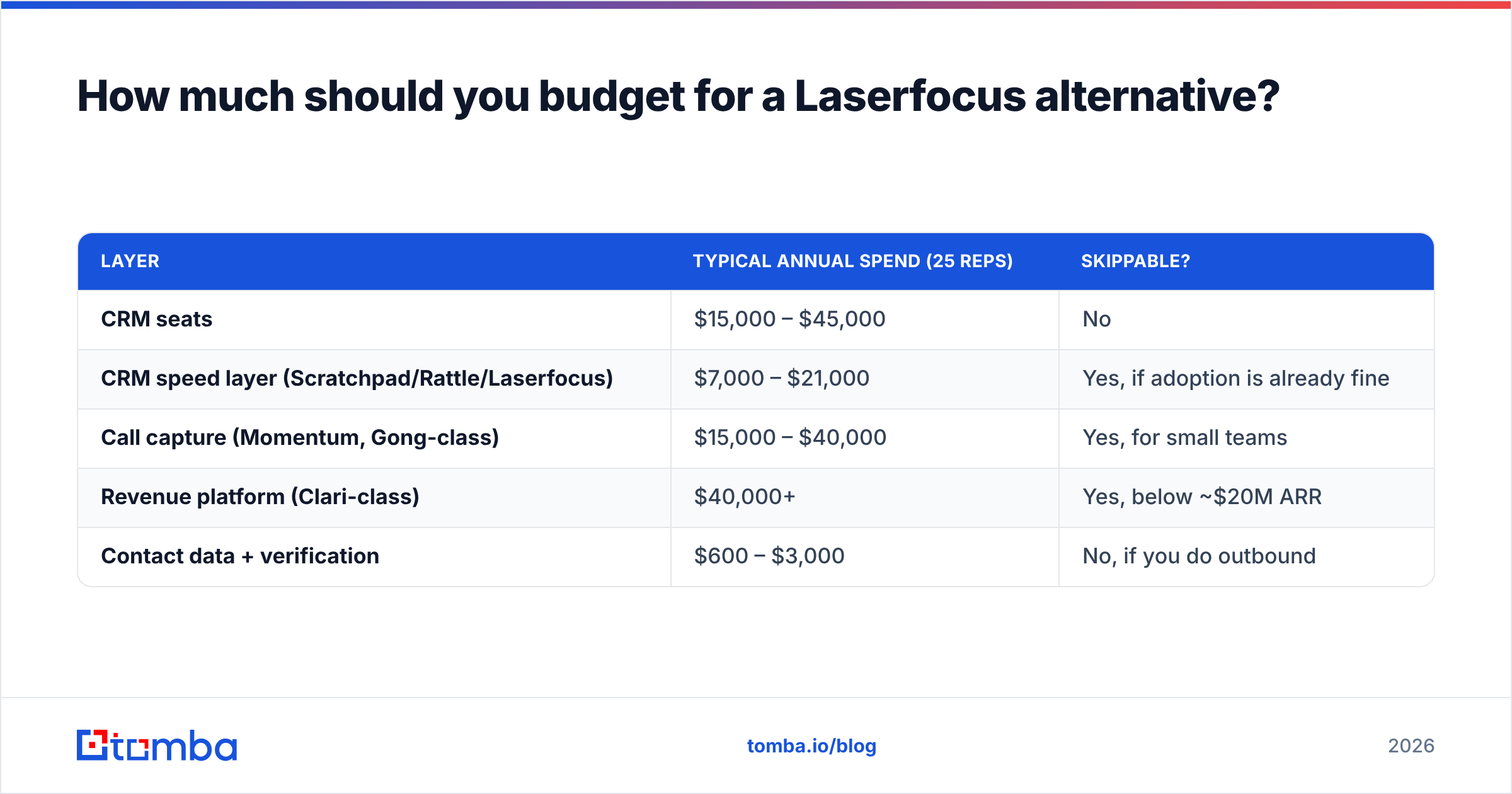
How much should you budget for a Laserfocus alternative?#
A realistic 2026 planning range for a 25-rep team:
| Layer | Typical annual spend (25 reps) | Skippable? |
|---|---|---|
| CRM seats | $15,000 – $45,000 | No |
| CRM speed layer (Scratchpad/Rattle/Laserfocus) | $7,000 – $21,000 | Yes, if adoption is already fine |
| Call capture (Momentum, Gong-class) | $15,000 – $40,000 | Yes, for small teams |
| Revenue platform (Clari-class) | $40,000+ | Yes, below ~$20M ARR |
| Contact data + verification | $600 – $3,000 | No, if you do outbound |
The bottom row is the cheapest line item on the list and the one that determines whether the other four produce accurate numbers. Tomba's pricing starts free at 25 searches per month, with Starter at $49/mo and Growth at $99/mo — which for most 25-rep teams is a rounding error against the CRM bill.
Which one should you pick?#
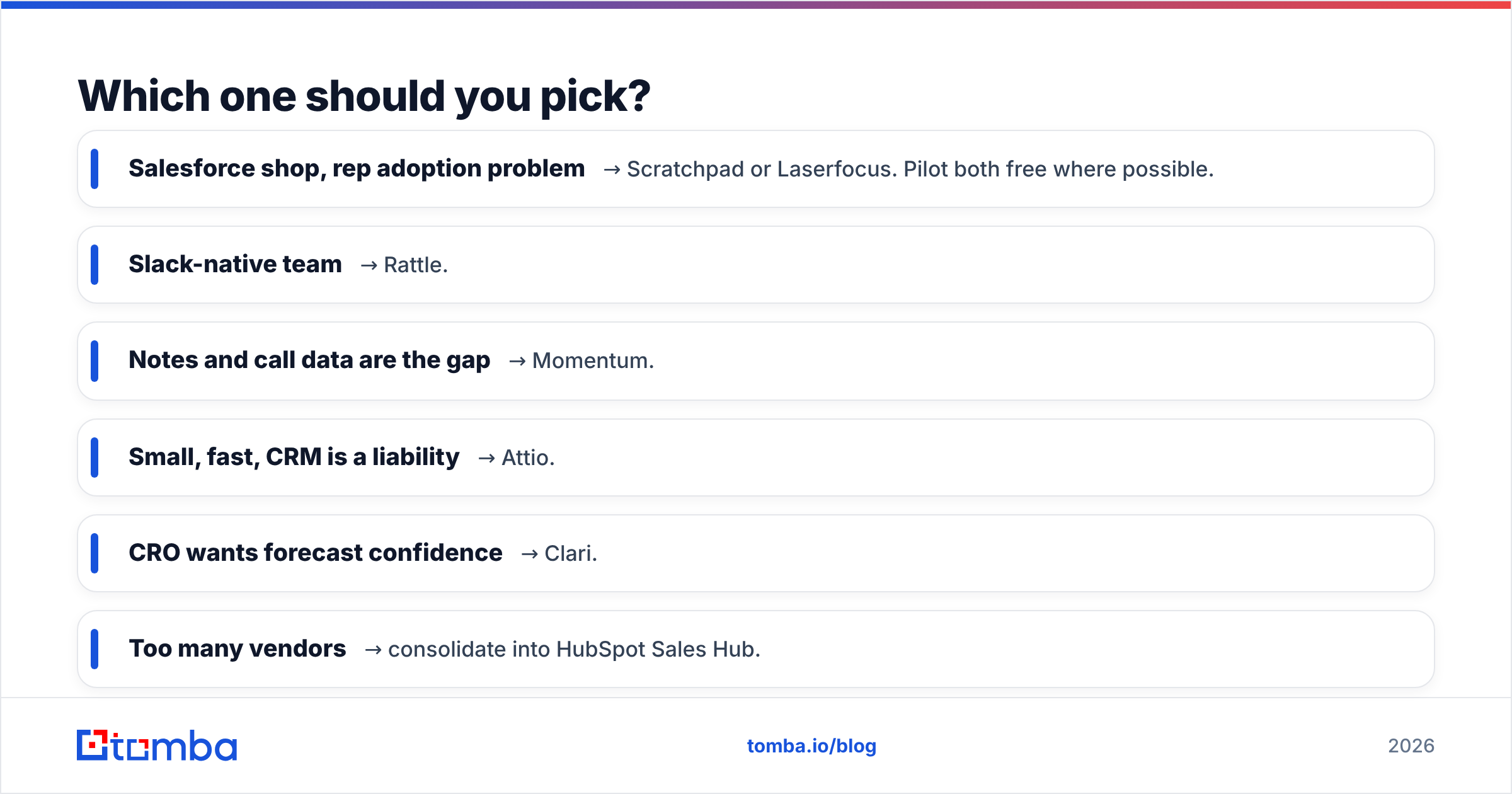
Short version:
- Salesforce shop, rep adoption problem → Scratchpad or Laserfocus. Pilot both free where possible.
- Slack-native team → Rattle.
- Notes and call data are the gap → Momentum.
- Small, fast, CRM is a liability → Attio.
- CRO wants forecast confidence → Clari.
- Too many vendors → consolidate into HubSpot Sales Hub.
- Reps can't find or trust the contacts → fix the data layer first, then re-evaluate whether you still need a speed layer at all.
That last case is more common than the category's marketing suggests. A clean, verified, enriched CRM makes a slow interface tolerable. A fast interface over a rotting database just gets you to the wrong answer sooner.
Start with the free tier of the Tomba Email Finder: pull 25 contacts for your top target accounts, check them against what your CRM currently holds, and count the mismatches. If the mismatch rate is under 5%, buy the speed layer — your data is fine and your workflow really is the problem. If it is north of 20%, you just found the cheaper fix, and it isn't a new interface.
Related guides#
// get started
Find, verify and enrich your first contacts today
Start on the free plan with 25 searches a month, then scale when your team is ready.
Free plan · No credit card required · GDPR & CCPA
// about the author