Lavender Pricing Pros and Cons (2026): An Honest Review
Lavender scores your cold emails in real time — but the seat fee adds up fast. Here's what the plans actually cost in 2026, where reviewers push back, and when a cheaper stack does the same job.
TL;DR
- Here is the short version of the Lavender pricing pros and cons debate. Lavender is an AI email coach. It scores and rewrites your outbound emails inside Gmail, Outlook, and most sequencers. It does not find, verify, or send anything.
- List pricing runs from a capped free plan up to roughly $29–$69 per user per month. Enterprise is quoted case by case. Annual billing trims 20–25%.
- The pros reviewers agree on: fast onboarding, useful real-time scoring, and a real lift in reply rates for junior reps.
- The cons reviewers agree on: per-seat cost scales badly past ~10 reps, the score can be gamed, and strong writers plateau after a few months.
- Lavender improves the message. It does nothing for the list — which is where most cold email actually dies. Budget for a data layer separately.
What is Lavender and what are you actually paying for?#
Lavender is a browser extension and add-in that sits on top of your existing inbox. As you type a cold email, it grades the draft 0–100 on length, reading level, personalization, tone, question count, and formatting. Then it suggests rewrites. It also pulls basic prospect context — job title, company news, social signals — into a sidebar, so you can personalize without opening five tabs.
The important thing to understand before you look at a single price: Lavender is a coaching layer, not an outbound platform. You still need a data source for contacts, a verifier to protect your domain, and a sequencer to actually send. Lavender plugs into those; it does not replace them.
That framing matters for the Lavender pricing pros and cons math. If you already pay for Apollo or Outreach or Instantly, Lavender is an additional per-seat line item on top. If you are a solo founder sending 30 emails a week from Gmail, it may be the only tool you need besides a way to find addresses.
Here is what each layer of a working outbound stack actually does:
- Data layer — finds and verifies the contact. Without it, nothing else matters; a perfect email to a bounced address is worth zero.
- Enrichment layer — adds title, company size, tech stack, and trigger events so personalization has raw material.
- Writing layer — this is where Lavender lives. Turns raw material into a message someone replies to.
- Sending layer — sequencer, inbox rotation, and warmup that get the message delivered.
- Measurement layer — reply rate, meeting rate, and per-rep coaching signal.
Lavender owns exactly one of those five, and touches a bit of the second and fifth. Price it accordingly.
How much does Lavender cost in 2026?#
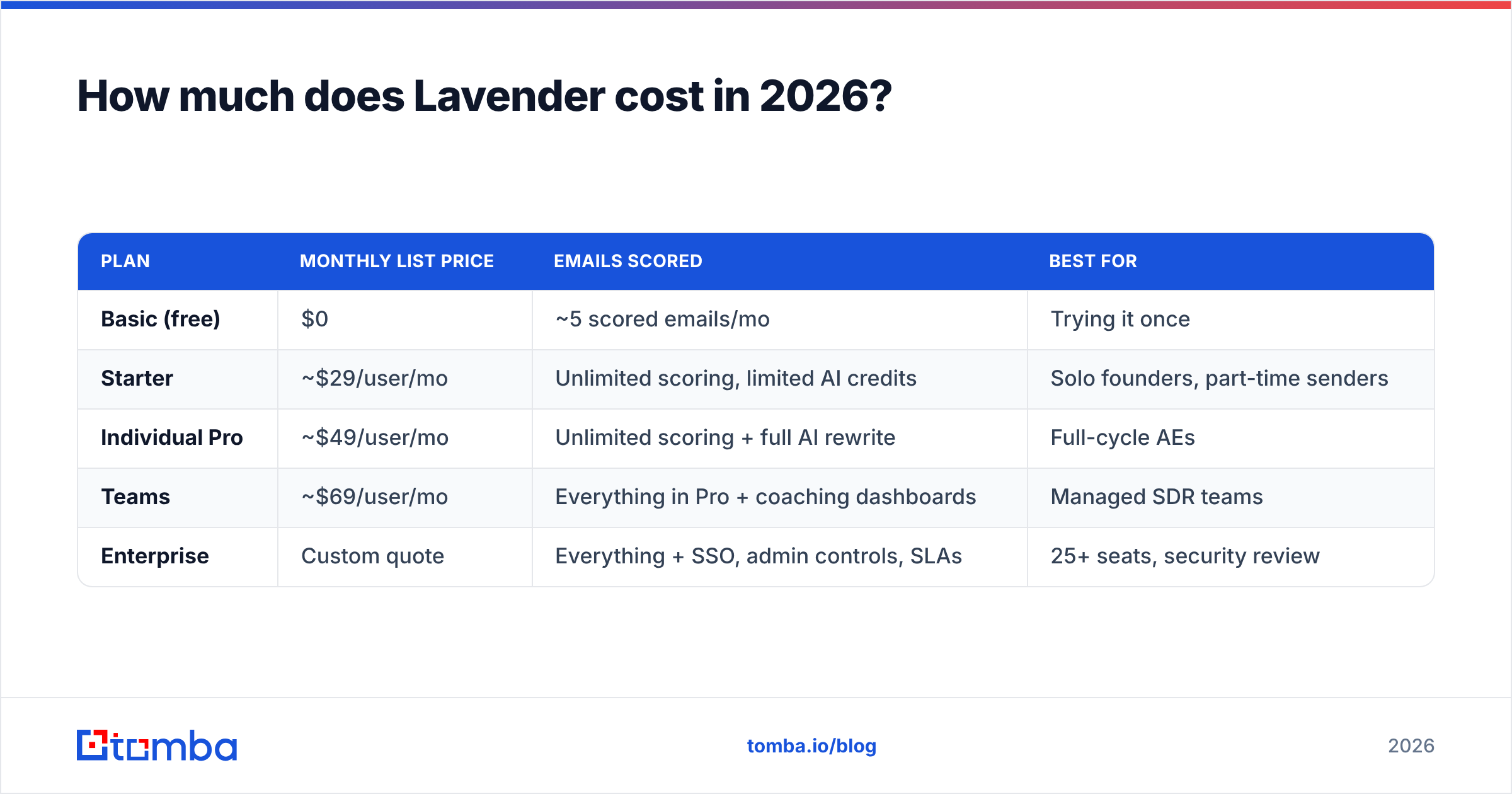
Lavender publishes tiered per-seat pricing. The numbers below reflect list pricing at the time of writing. Always confirm on Lavender's own site before you buy, because AI tooling repriced hard through 2025 and 2026.
| Plan | Monthly list price | Emails scored | Best for |
|---|---|---|---|
| Basic (free) | $0 | ~5 scored emails/mo | Trying it once |
| Starter | ~$29/user/mo | Unlimited scoring, limited AI credits | Solo founders, part-time senders |
| Individual Pro | ~$49/user/mo | Unlimited scoring + full AI rewrite | Full-cycle AEs |
| Teams | ~$69/user/mo | Everything in Pro + coaching dashboards | Managed SDR teams |
| Enterprise | Custom quote | Everything + SSO, admin controls, SLAs | 25+ seats, security review |
Two things reviewers flag repeatedly about this structure.
First, the free plan is a demo, not a plan. Five scored emails a month is enough to see the product work and nothing more. Do not build a workflow on it.
Second, the jump from Individual Pro to Teams is where the value question gets real. The delta buys manager-facing analytics: team score trends, per-rep coaching reports, and a view of who ignores the suggestions. If nobody opens those dashboards on a Monday morning, you pay roughly 40% more for a tab nobody clicks.

Annual prepay typically knocks 20–25% off. For a 10-seat Teams deployment, that is the difference between roughly $8,280 and $6,300 a year. Real money — but also a 12-month commitment on a category that is still moving fast.
What do real Lavender reviews say?#
Aggregate sentiment on G2 and similar review sites stays strong, usually in the 4.6–4.8 range. That is high for sales tooling. But the star rating hides a split, and the split shows up once you read the actual review text.
Reviewers who love it are mostly newer reps, SDRs in their first 18 months, and founders who have never written cold email for work. For them the feedback loop is the product: write, see a 42, fix three things, see a 79, send. That is real skill transfer, and it happens in days rather than quarters.
Reviewers who churn are usually senior AEs and experienced copywriters. Their complaint is consistent. After two or three months, the suggestions get predictable, and chasing a high score flattens voice. Several note that the score rewards short, simple, question-ended emails. That is correct advice on average, and boring advice when everyone in your category follows it.
The most useful review-site signal is not the rating. It is how many reviewers say Lavender changed their process versus their numbers. Process change is near-universal. Number change clusters among teams that had weak email hygiene to begin with.
Lavender pricing pros and cons: where the seat fee earns its keep#
- Real-time feedback beats after-the-fact coaching. Manager review of sent emails is a lagging indicator. Lavender corrects the draft before it ships. That is the only moment the rep is paying attention.
- Onboarding is measured in minutes. It is a browser extension. There is no implementation project, no data mapping, no admin certification. A rep can be scoring emails 10 minutes after the invite lands.
- It works where your reps already are. Gmail, Outlook, Outreach, Salesloft, HubSpot, and most modern sequencers. Nobody has to learn a new window.
- The personalization sidebar saves real time. Pulling headcount, funding, and recent posts into one pane removes the tab-switching tax that kills prospecting blocks.
- Team analytics create an objective coaching talk. "Your average score is 61 and the team is at 78" opens a much easier conversation than "your emails feel off."
What are the cons and hidden costs?#
- Per-seat pricing punishes scale. Twenty reps on Teams runs roughly $16,500 a year at list. That is a Series-A-sized line item for a coaching layer. Worse, it does not shrink as your reps get better.
- The score is gameable. Reps optimize for the number, not the reply. Short, simple, one-question emails score well. At volume, they read like everyone else's short, simple, one-question emails.
- Diminishing returns for strong writers. Most teams see a steep gain in weeks 1–8, then something close to flat. After that you pay a subscription to maintain a skill your reps already have.
Two hidden costs buyers miss#
- Zero deliverability contribution. Lavender does not verify addresses, warm inboxes, or check your SPF record. A beautifully scored email to a dead mailbox still bounces. Bounces still damage your domain.
- No contact data. This is the big one, and it deserves its own section.
Does Lavender fix the real bottleneck in cold email?#
No — and this is the single most important thing to understand before you approve the invoice.
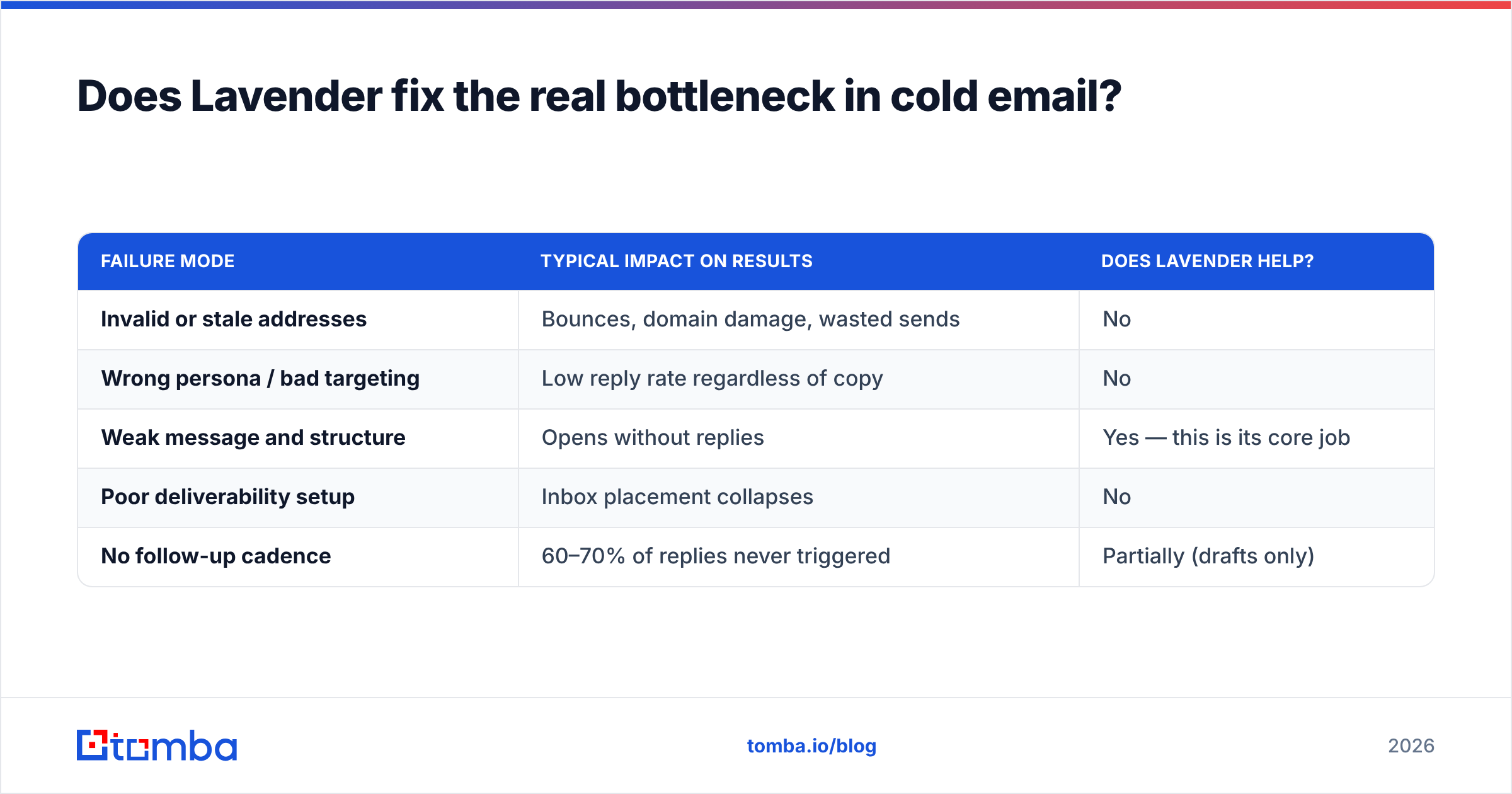
Break down why a cold email campaign underperforms and you get three failure modes: the list is wrong, the message is wrong, or the delivery is wrong. Lavender addresses one of the three.
| Failure mode | Typical impact on results | Does Lavender help? |
|---|---|---|
| Invalid or stale addresses | Bounces, domain damage, wasted sends | No |
| Wrong persona / bad targeting | Low reply rate regardless of copy | No |
| Weak message and structure | Opens without replies | Yes — this is its core job |
| Poor deliverability setup | Inbox placement collapses | No |
| No follow-up cadence | 60–70% of replies never triggered | Partially (drafts only) |
In practice, teams that fix the list before the copy usually see a bigger swing than teams that do the reverse. A 15% bounce rate is not a copywriting problem. If you send to unverified data, an AI email coach is an expensive way to write polished emails to people who left the company in 2024.
The honest sequencing is: get the data right, get deliverability right, then buy a coaching layer. Most teams do it backwards, because the copy problem is the visible one.

How does Lavender compare to the alternatives?#
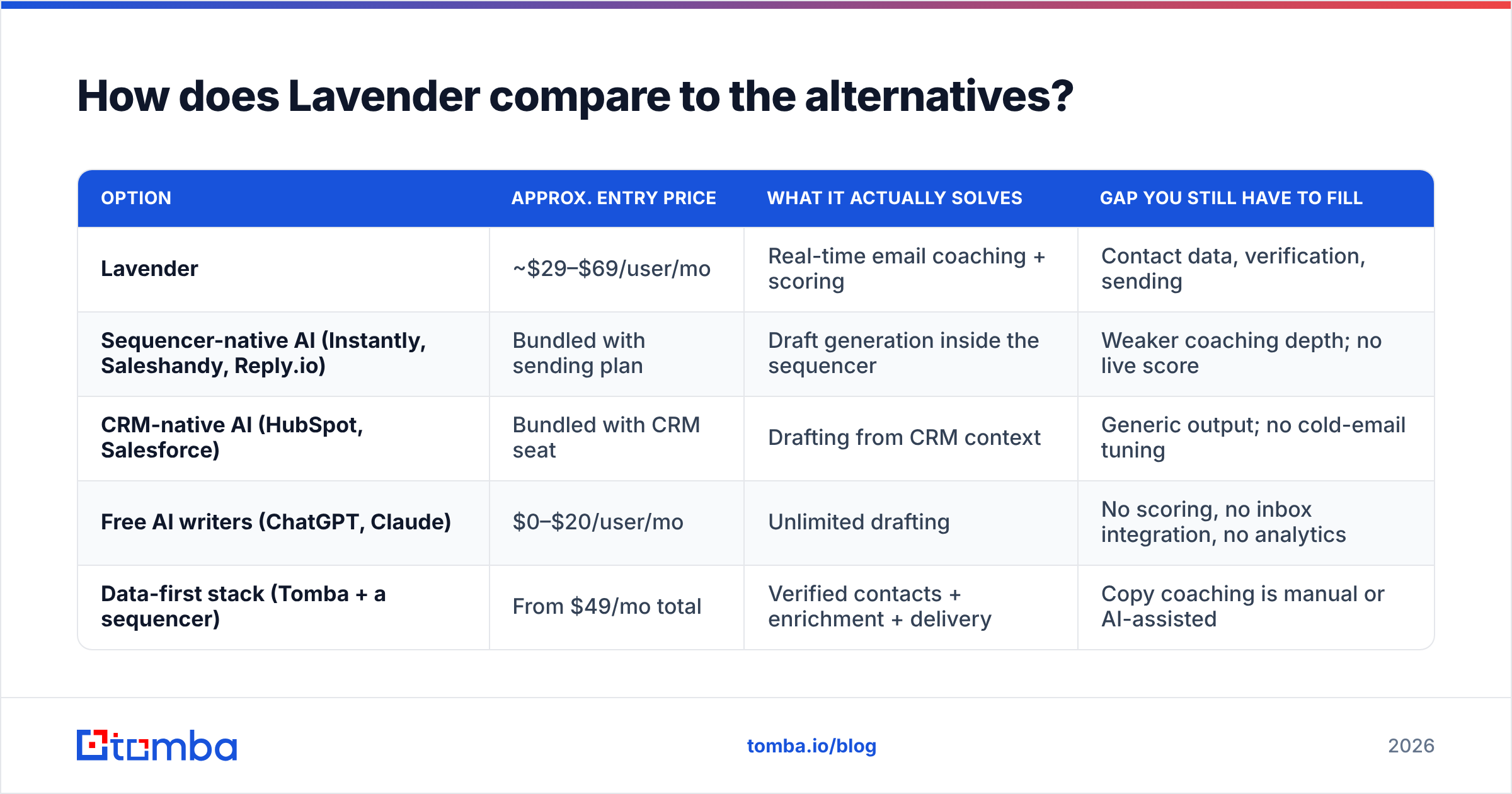
There is no exact one-to-one competitor. Most tools nearby bundle writing into a larger platform instead of selling coaching on its own. Here is the realistic comparison set:
| Option | Approx. entry price | What it actually solves | Gap you still have to fill |
|---|---|---|---|
| Lavender | ~$29–$69/user/mo | Real-time email coaching + scoring | Contact data, verification, sending |
| Sequencer-native AI (Instantly, Saleshandy, Reply.io) | Bundled with sending plan | Draft generation inside the sequencer | Weaker coaching depth; no live score |
| CRM-native AI (HubSpot, Salesforce) | Bundled with CRM seat | Drafting from CRM context | Generic output; no cold-email tuning |
| Free AI writers (ChatGPT, Claude) | $0–$20/user/mo | Unlimited drafting | No scoring, no inbox integration, no analytics |
| Data-first stack (Tomba + a sequencer) | From $49/mo total | Verified contacts + enrichment + delivery | Copy coaching is manual or AI-assisted |
A pattern worth noticing: Lavender is the only line in that table where the spend is purely about message quality. Everything else earns its keep on data, delivery, or both. That is not a criticism — focused tools are often the best tools. But it means Lavender has to justify itself on reply-rate lift alone, and that lift is hard to attribute cleanly.
If you want to test the writing layer without a seat commitment, a free cold email AI and a subject line tester cover a lot of the same ground for a solo sender — just without the team analytics or the live in-draft score.
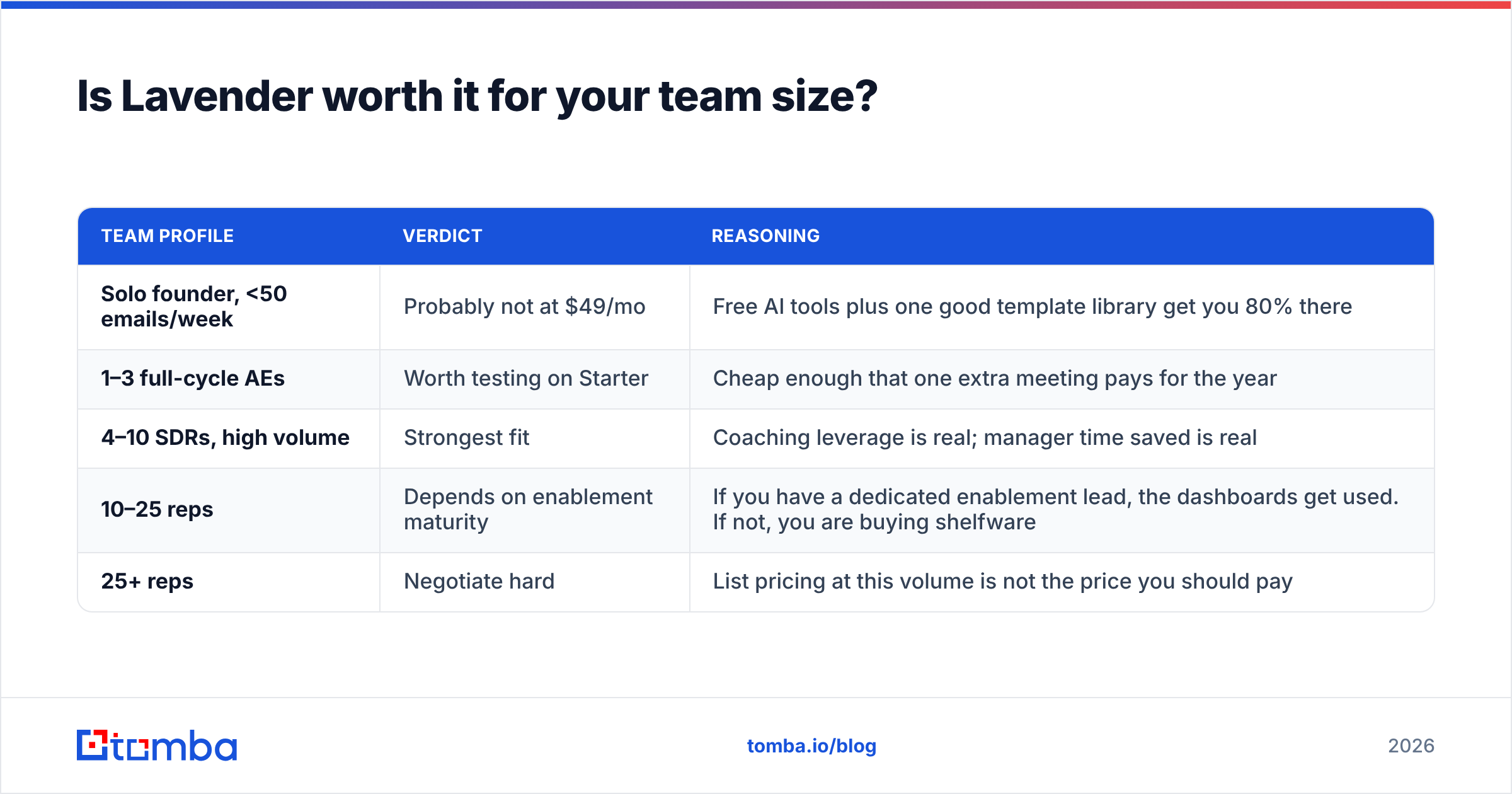
Is Lavender worth it for your team size?#
| Team profile | Verdict | Reasoning |
|---|---|---|
| Solo founder, <50 emails/week | Probably not at $49/mo | Free AI tools plus one good template library get you 80% there |
| 1–3 full-cycle AEs | Worth testing on Starter | Cheap enough that one extra meeting pays for the year |
| 4–10 SDRs, high volume | Strongest fit | Coaching leverage is real; manager time saved is real |
| 10–25 reps | Depends on enablement maturity | If you have a dedicated enablement lead, the dashboards get used. If not, you are buying shelfware |
| 25+ reps | Negotiate hard | List pricing at this volume is not the price you should pay |
One practical tip from reviewers: run a 30-day A/B before you commit annually. Put half the team on Lavender and keep half off. Hold the list and the cadence constant, then compare reply rate. If the tool works as claimed, the gap shows up inside a month. If it does not, you just saved five figures.
What should you buy instead — or alongside?#
The most cost-effective outbound stack in 2026 starts with data, not copy. Concretely:
- Verified contacts first. Run every list through an email verifier before it touches a sequencer. Bounce rate under 2% is the target; anything over 5% costs you inbox placement.
- Enrichment second. Title, headcount, tech stack, and funding events are the raw material every AI writer — Lavender included — depends on. Thin data in, generic email out.
- Coaching third. Once the list is clean and the enrichment is rich, a scoring layer has something real to optimize.
For contact data specifically, the market splits between search-based finders and prepaid database sellers. Tools like BookYourData fit if you want to buy a filtered list outright and own the records. Search-and-verify platforms suit teams that build lists continuously from domains and LinkedIn profiles. Both are legitimate — pick based on whether your ICP is stable or shifting.
Compare the total spend honestly. A 10-rep Lavender Teams deployment at list runs roughly $690 a month. Tomba pricing starts at a free tier with 25 searches a month. Starter is $49/mo, Growth is $99/mo, and Pro is $249/mo. That covers the data layer for a whole team for less than a handful of coaching seats. The budgets are not interchangeable, but weigh them against each other when the money is finite.
For broader benchmarking on where AI actually moves outbound numbers, HubSpot's sales research is a reasonable neutral reference point.
Frequently asked questions#
Does Lavender have a free plan? Yes, but it caps you at roughly five scored emails per month. Treat it as a trial, not a tier.
Can Lavender send emails? No. It drafts and scores inside your existing client or sequencer. Sending, cadences, and inbox rotation are somebody else's job.
Does Lavender verify email addresses? No. It has no verification or deliverability function. You need a separate verifier.
Is annual billing worth it? Only after a 30-day measured pilot. The discount is real (20–25%), but so is the lock-in on a fast-moving category.
What's the biggest hidden cost? Adoption. A seat that scores three emails a month costs the same as one that scores three hundred. Track usage per rep from week one.
The bottom line#
Lavender is a good product that solves a narrow problem well. Weigh the Lavender pricing pros and cons by team size. If your reps write weak emails, and a manager will actually use the coaching data, the pros outweigh the cons at 4–10 seats. Past that, the per-seat math gets uncomfortable. Past month three, the learning curve flattens.
What it will never fix is the list. Before you spend $69 a seat teaching reps to write better emails, make sure those emails reach real, verified, currently-employed humans. Start with the Tomba Email Finder to build a clean, verified contact list from any domain — free for your first 25 searches, $49/mo when you scale. Fix the data, then buy the coaching. That order costs less and works better.
Related guides#
// get started
Find, verify and enrich your first contacts today
Start on the free plan with 25 searches a month, then scale when your team is ready.
Free plan · No credit card required · GDPR & CCPA
// about the author