Lead Analytics in 2026: Metrics, Tools, and What to Track
Most teams track lead volume and call it analytics. Here's the metric set, attribution model, and tooling stack that actually predicts pipeline — plus what to ignore.
TL;DR
- Lead analytics is the measurement layer that connects lead sources to closed revenue — not a dashboard of form fills.
- Four metrics carry most of the signal: source-to-SQL rate, speed-to-lead, stage conversion velocity, and cost per opportunity. Volume metrics like "MQLs this month" predict almost nothing on their own.
- Bad contact data silently corrupts every number you report. If 30% of your records bounce, your source attribution is 30% fiction.
- Attribution models are tools, not truths. First-touch flatters demand gen, last-touch flatters sales, and W-shaped is usually the honest compromise.
- Build the stack in this order: clean data → event tracking → CRM stage hygiene → BI layer. Skipping to the BI layer produces confident, wrong charts.
What is lead analytics, exactly?#
Lead analytics is the practice of measuring how leads enter your funnel, how they move through it, and which entry points produce revenue. It sits between marketing analytics (traffic, impressions, CTR) and sales analytics (win rate, quota attainment), and it's the layer most teams treat as an afterthought.
The distinction matters. Marketing analytics tells you that a LinkedIn campaign generated 400 clicks. Sales analytics tells you your team closed $180K last quarter. Lead analytics is the connective tissue: it tells you that the LinkedIn campaign produced 62 leads, 11 of which became qualified opportunities, 3 of which closed, at a blended cost per opportunity of $940 — and that the same spend on a different channel produced 140 leads and one closed deal.
Without that middle layer, you're optimizing for the wrong end of the funnel. Teams that only watch top-of-funnel volume end up buying cheap, useless leads. Teams that only watch bookings can't explain why bookings moved.
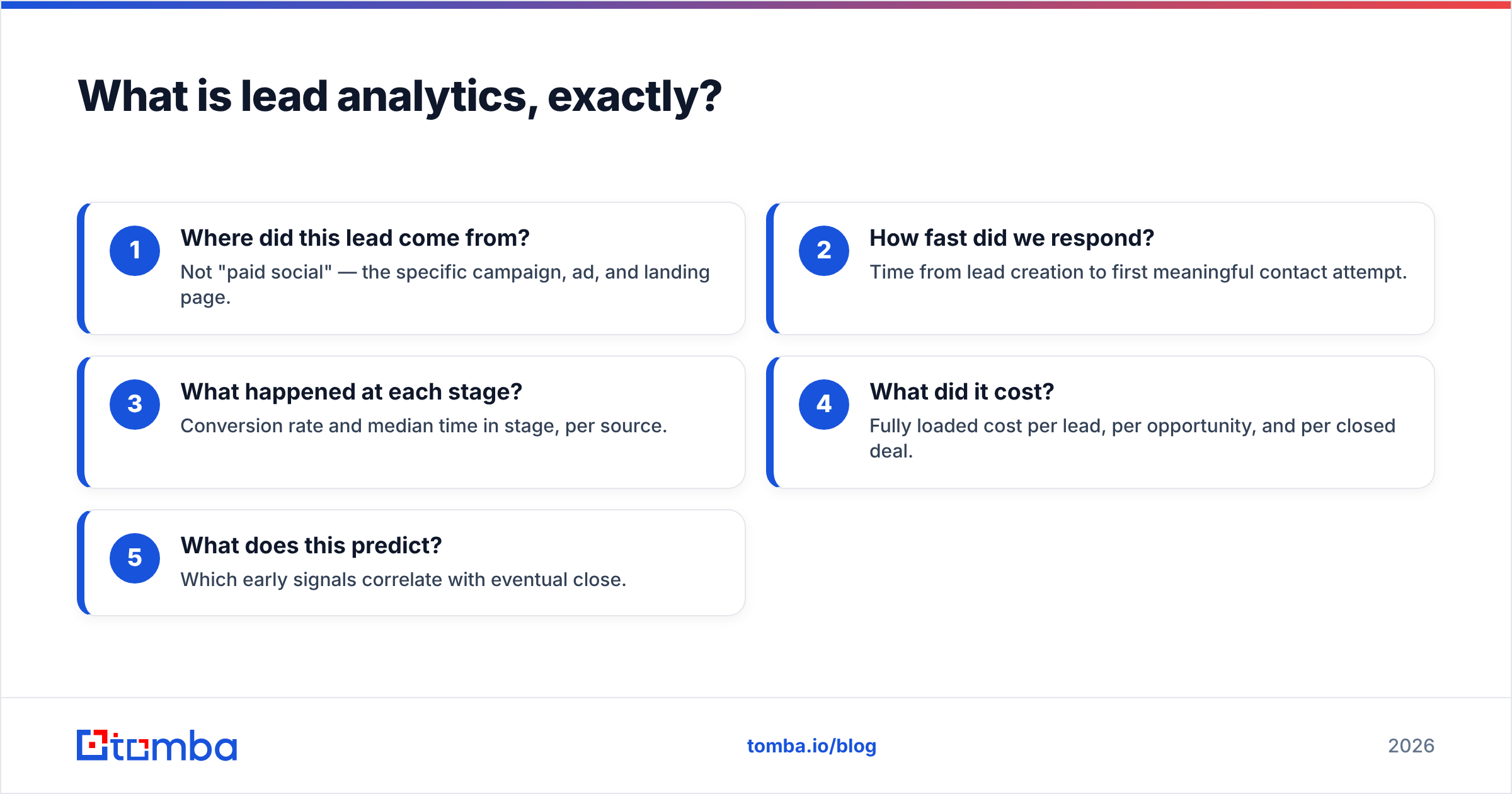
A working lead analytics practice answers five questions on demand:
- Where did this lead come from? Not "paid social" — the specific campaign, ad, and landing page.
- How fast did we respond? Time from lead creation to first meaningful contact attempt.
- What happened at each stage? Conversion rate and median time in stage, per source.
- What did it cost? Fully loaded cost per lead, per opportunity, and per closed deal.
- What does this predict? Which early signals correlate with eventual close.
Which lead metrics actually predict revenue?#
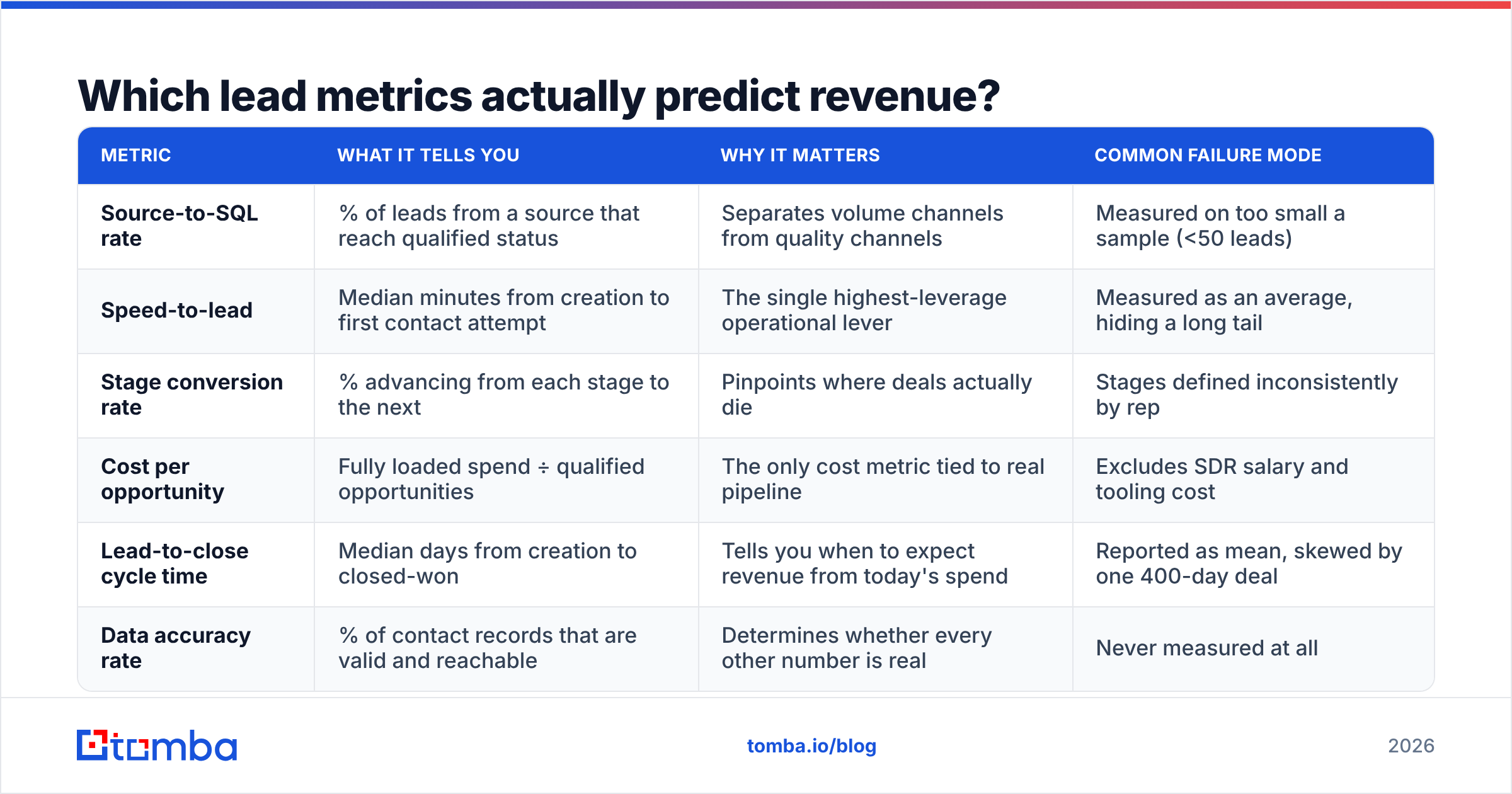
Most lead dashboards are metric hoarding. Here's the shortlist that earns its screen space, ranked by how much decision-making weight it deserves.
| Metric | What it tells you | Why it matters | Common failure mode |
|---|---|---|---|
| Source-to-SQL rate | % of leads from a source that reach qualified status | Separates volume channels from quality channels | Measured on too small a sample (<50 leads) |
| Speed-to-lead | Median minutes from creation to first contact attempt | The single highest-leverage operational lever | Measured as an average, hiding a long tail |
| Stage conversion rate | % advancing from each stage to the next | Pinpoints where deals actually die | Stages defined inconsistently by rep |
| Cost per opportunity | Fully loaded spend ÷ qualified opportunities | The only cost metric tied to real pipeline | Excludes SDR salary and tooling cost |
| Lead-to-close cycle time | Median days from creation to closed-won | Tells you when to expect revenue from today's spend | Reported as mean, skewed by one 400-day deal |
| Data accuracy rate | % of contact records that are valid and reachable | Determines whether every other number is real | Never measured at all |
Speed-to-lead deserves special attention. The relationship between response time and qualification odds is one of the most replicated findings in B2B sales research — HubSpot's research on response times has consistently found that contacting leads within the first few minutes dramatically outperforms contacting them hours later. If your median speed-to-lead is over an hour, fix that before you build another dashboard. No attribution model will recover a lead that went cold.
A note on MQLs. The marketing qualified lead is still the default currency in most orgs, and it's the metric most likely to mislead you. An MQL is only useful if the qualification threshold is calibrated against actual conversion data and recalibrated quarterly. If your MQL definition hasn't changed in two years while your ICP has, the number is a vanity metric wearing a lab coat.
Why does bad data break lead analytics?#
Because every downstream number inherits the error. This is the part of lead analytics nobody puts on a slide.
Here's the mechanics. A lead comes in from a webinar with a typo'd or disposable email address. It's logged, attributed to the webinar, routed to an SDR, sequenced, never opened, never replied to, and eventually marked "no response." Your dashboard now shows the webinar channel with an inflated lead count and a depressed conversion rate. You cut webinar spend. But the webinar wasn't the problem — the capture form was.
Multiply that across thousands of records and the distortion compounds:
- Attribution skews toward sources with sloppy capture. Channels that collect email via a low-friction form will show more volume and worse conversion than channels with verified capture — regardless of actual lead quality.
- Bounce rates poison sender reputation, which poisons response rate. A degraded sender reputation means your emails to good leads stop landing. Now your best channel starts underperforming for reasons that have nothing to do with the channel.
- Duplicate records inflate cost-per-lead denominators. If 12% of your CRM is duplicates, your cost per lead is understated by roughly the same margin.
- Stale records make cycle-time medians meaningless. Records that can never convert sit in the pipeline forever, dragging medians rightward.
The fix is unglamorous: validate at the point of capture, and re-validate on a schedule. Running your list through an email verifier before it enters a sequence is the cheapest analytics improvement available, because it removes noise from every metric simultaneously. For records missing contact data entirely, a data enrichment pass fills the gaps rather than letting them sit as unattributable dead weight.

Set a floor: no source gets evaluated on conversion rate until its records pass a validity check. Otherwise you're comparing channels on data hygiene, not lead quality.
Which attribution model should you use?#
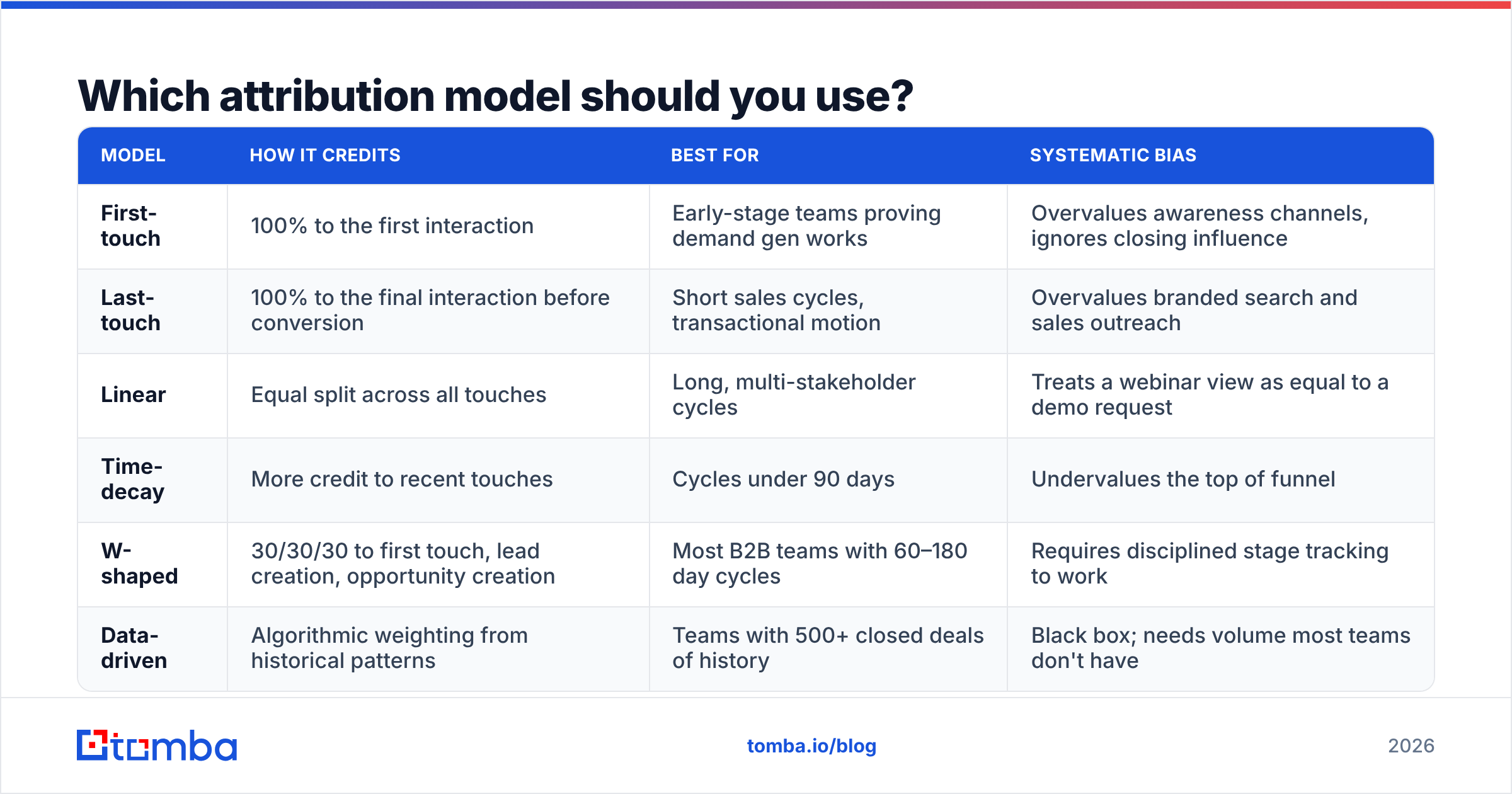
The honest answer: pick one, document it, and stop relitigating it every quarter. Attribution models are lenses, not measurements. Each one is wrong in a predictable direction.
| Model | How it credits | Best for | Systematic bias |
|---|---|---|---|
| First-touch | 100% to the first interaction | Early-stage teams proving demand gen works | Overvalues awareness channels, ignores closing influence |
| Last-touch | 100% to the final interaction before conversion | Short sales cycles, transactional motion | Overvalues branded search and sales outreach |
| Linear | Equal split across all touches | Long, multi-stakeholder cycles | Treats a webinar view as equal to a demo request |
| Time-decay | More credit to recent touches | Cycles under 90 days | Undervalues the top of funnel |
| W-shaped | 30/30/30 to first touch, lead creation, opportunity creation | Most B2B teams with 60–180 day cycles | Requires disciplined stage tracking to work |
| Data-driven | Algorithmic weighting from historical patterns | Teams with 500+ closed deals of history | Black box; needs volume most teams don't have |
For most B2B teams running a 60–180 day cycle, W-shaped is the practical default. It credits the three moments that actually change trajectory — the first exposure, the moment someone raised their hand, and the moment sales qualified them — without pretending a whitepaper download and a pricing-page visit carry equal weight.
Gartner's research on B2B buying consistently describes buying journeys as non-linear, with buyers cycling through the same activities repeatedly. That's an argument against over-engineering your model. If the journey is genuinely a loop, no linear credit assignment is going to be "correct." Pick the model that makes your team argue less and act faster.
One rule that matters more than the model choice: never change attribution models mid-analysis. If you switch from last-touch to W-shaped in Q3, every year-over-year comparison you make for the next four quarters is invalid unless you backfill.
What does a lead analytics stack look like in 2026?#
Four layers, built in order. Each one depends on the one below it being trustworthy.
- Data foundation. Contact discovery and verification. This is where you find and validate the actual email addresses and phone numbers your outbound motion depends on. Tools: email finder, verification services, enrichment APIs.
- Capture and event tracking. Forms, chat, website visitor identification, and event instrumentation. The job here is making sure every lead arrives with its source, campaign, and timestamp intact. Tools: Segment, RudderStack, native form builders, website visitor reveal.
- CRM as the source of truth. Stage definitions, required fields, routing rules, and activity logging. Your CRM is where analytics either works or dies — inconsistent stage usage across reps is the number one cause of meaningless funnel reports.
- BI and reporting. Dashboards, cohort analysis, and forecasting. Tools: Looker, Tableau, Metabase, or native CRM reporting for smaller teams.
Most teams skip straight to layer four because dashboards are visible and data hygiene isn't. That's how you end up with a beautiful Looker dashboard reporting on garbage.
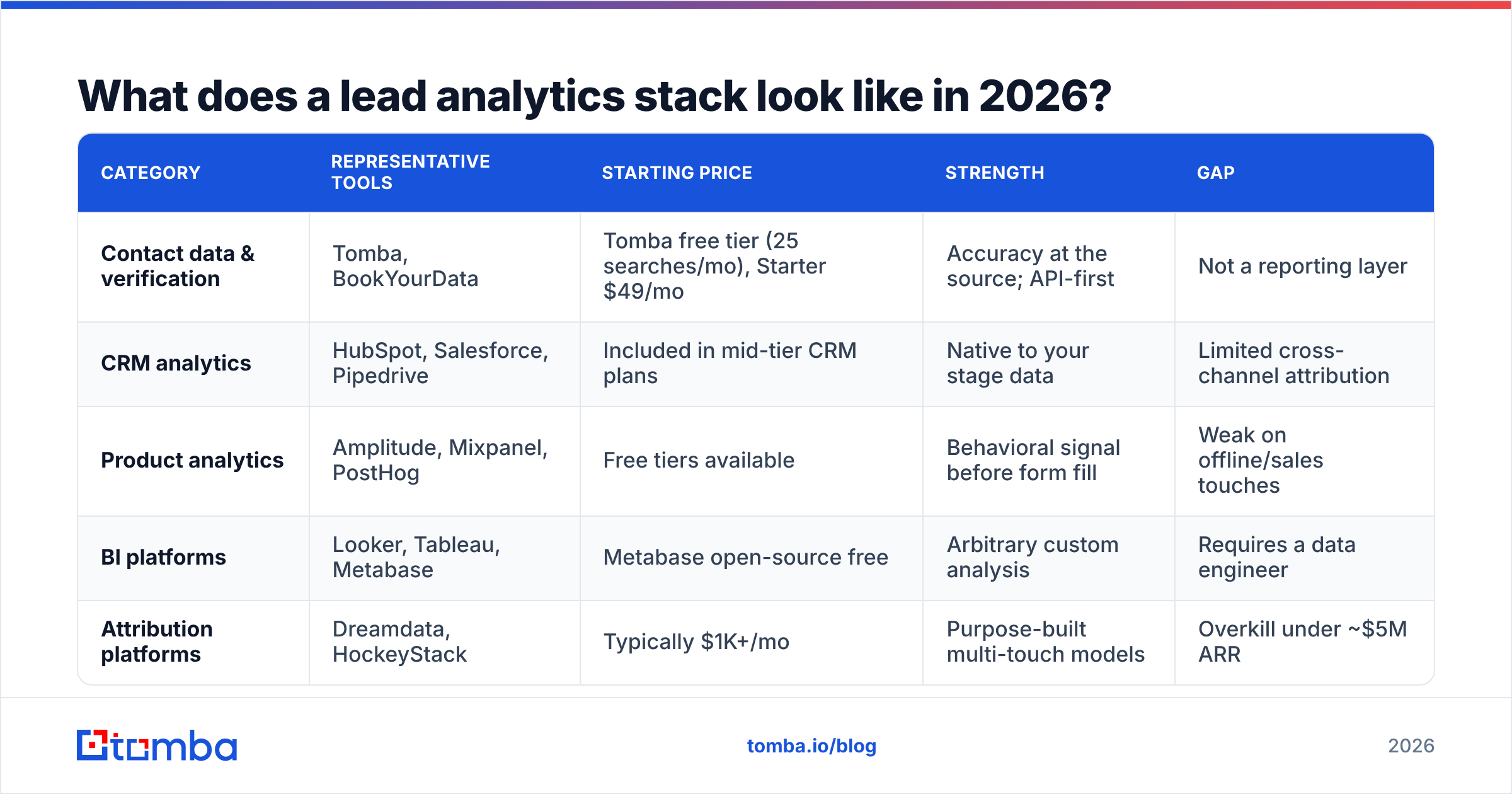
How do the common tool categories compare?#
| Category | Representative tools | Starting price | Strength | Gap |
|---|---|---|---|---|
| Contact data & verification | Tomba, BookYourData | Tomba free tier (25 searches/mo), Starter $49/mo | Accuracy at the source; API-first | Not a reporting layer |
| CRM analytics | HubSpot, Salesforce, Pipedrive | Included in mid-tier CRM plans | Native to your stage data | Limited cross-channel attribution |
| Product analytics | Amplitude, Mixpanel, PostHog | Free tiers available | Behavioral signal before form fill | Weak on offline/sales touches |
| BI platforms | Looker, Tableau, Metabase | Metabase open-source free | Arbitrary custom analysis | Requires a data engineer |
| Attribution platforms | Dreamdata, HockeyStack | Typically $1K+/mo | Purpose-built multi-touch models | Overkill under ~$5M ARR |
Two practical notes. First, you almost certainly don't need a dedicated attribution platform until your CRM reporting genuinely can't answer your questions — and for most teams under $5M ARR, it can. Second, budget for the data layer. Teams routinely spend $2,000/month on BI tooling while spending nothing on making sure the underlying contact records are valid. That's backwards.
For teams building analytics into their own systems, pulling contact data programmatically via a Tomba API call at the point of lead creation — rather than batch-enriching weeks later — means your records are complete and validated before they ever hit a report.
How do you actually build the reporting cadence?#
Analytics that nobody reads is a hobby. Structure it around decisions, not availability.
- Daily (operational): Speed-to-lead by rep, new leads by source, leads awaiting first touch. Owner: sales manager. Decision: who needs to be nudged today.
- Weekly (tactical): Source-to-SQL rates, stage conversion, sequence response rate. Owner: demand gen + sales ops. Decision: which campaigns to pause or scale.
- Monthly (strategic): Cost per opportunity by channel, cycle time trends, data quality audit. Owner: RevOps. Decision: budget reallocation.
- Quarterly (structural): MQL definition recalibration, attribution model review, ICP fit analysis against closed-won. Owner: leadership. Decision: whether the definitions themselves still hold.
The quarterly item is the one teams skip and shouldn't. Your qualification criteria were built from assumptions about who buys. Every quarter, run the closed-won list against your MQL criteria and check how many actually met the bar at creation. If the answer is under 60%, your criteria are describing a customer you no longer have.
What are the most common lead analytics mistakes?#
- Reporting averages instead of medians. One 400-day enterprise deal will drag your average cycle time into fiction. Medians survive outliers; averages don't.
- Comparing channels at different sample sizes. A channel with 14 leads and a 21% SQL rate tells you nothing. Set a minimum sample threshold — 50 leads is a reasonable floor — before a source earns a verdict.
- Measuring cost per lead instead of cost per opportunity. Cost per lead rewards buying cheap volume. Cost per opportunity rewards buying leads that convert. Only one of those is your actual goal.
- Letting stage definitions drift. If "qualified" means something different to each rep, every funnel chart you produce is noise. Write the definitions down, put them in the CRM field help text, and audit quarterly.
- Ignoring the offline touches. Conference conversations, referrals, and phone calls rarely get logged, which systematically undercredits your highest-intent channels. If your phone finder driven call motion isn't in the CRM, it doesn't exist in your reports.
- Treating the dashboard as the deliverable. The deliverable is a decision. If a chart has never caused anyone to change anything, delete it.
How do you get started if you have nothing?#
Four weeks, roughly, for a team starting from zero.
Week 1 — Audit. Export your CRM. Measure what percentage of records have a valid email, a source field populated, and a stage that matches your documented definitions. This baseline is usually uncomfortable and always useful.
Week 2 — Clean. Verify existing contact records, dedupe, and backfill missing source data where it's recoverable. Accept that some history is unrecoverable and mark it as such rather than guessing.
Week 3 — Instrument. Fix capture: required source fields, UTM persistence through the form, timestamp on lead creation. Lock down stage definitions with the sales team in the room.
Week 4 — Report. Build exactly four charts: source-to-SQL rate, speed-to-lead distribution, stage conversion funnel, and cost per opportunity. Resist adding a fifth for one full quarter.
That's it. Four charts, built on clean data, beat forty charts built on guesswork every time. You can find peer reviews of specific tooling on G2's marketing analytics category once you know which layer you actually need to fill.
Where to start with better lead data#
Every metric in this guide degrades in proportion to how bad your contact data is. That's the constraint worth fixing first, because it's the only one that improves every other number at once.
The Tomba Email Finder gives you verified professional email addresses at the point of lead creation, so your records enter the funnel complete and reachable rather than getting enriched (or written off) weeks later. The free tier covers 25 searches per month if you want to test accuracy against a known list before committing; paid plans start at $49/month. Check Tomba pricing for the full breakdown, or start with a domain you already know well and compare the results against your CRM — that's the fastest honest accuracy test there is.
Related guides#
// get started
Find, verify and enrich your first contacts today
Start on the free plan with 25 searches a month, then scale when your team is ready.
Free plan · No credit card required · GDPR & CCPA
// about the author