Lead Companies in 2026: How to Pick a B2B Lead Provider
Most lead companies resell the same aging database under a different logo. Here's how the four vendor types really differ, what they cost, and the questions that expose a bad list before you wire money.
TL;DR
- "Lead companies" is a catch-all for four very different businesses: data vendors, appointment-setting agencies, marketplace/pay-per-lead networks, and self-serve finder tools. They are not interchangeable.
- Price per contact means nothing on its own. A $0.02 record with a 30% bounce rate costs more than a $0.20 record that lands — once you count burned domain reputation.
- Ask every vendor three things: where the data came from, when that specific record was last verified, and whether they will hand you a 200-row sample before you pay.
- Most annual contracts in this space start around $6,000–$15,000 and are quoted per seat plus per credit. Self-serve tools cover the same job from roughly $49/month if you only need contact data, not a done-for-you pipeline.
- Run a bounce test on any list before it touches your sending domain. This is the single highest-ROI hour in the whole buying process.
What are lead companies, exactly?#
"Lead company" is a label four different business models hide behind, and the confusion is expensive.
Think of it like buying fish. You can buy from a wholesaler who sells the whole catch by the ton, from a restaurant that cooks and plates it for you, from a market stall that sells whatever came in that morning, or from a tackle shop that hands you a rod and teaches you to fish. All four are "in the fish business." Only one of them matches what you actually want tonight.
In B2B, the four models are:
- B2B data vendors. They sell access to a contact database — names, titles, emails, phone numbers, firmographics. You get records; you do the outreach. Examples span the large aggregators down to focused providers like BookYourData, which sells verified, filterable B2B contact lists on a pay-as-you-go basis.
- Lead generation agencies. They run outbound on your behalf — copy, sequences, inboxes, sometimes cold calling — and bill for booked meetings or a monthly retainer. You're buying labor and process, not a file.
- Pay-per-lead marketplaces. They generate inbound interest through content, comparison sites, or paid media, then sell each inquiry, sometimes to more than one buyer. Common in insurance, home services, and SaaS review categories.
- Self-serve prospecting tools. API and UI products that let your team find and verify contacts on demand — domain search, enrichment, verification. You control targeting, volume, and timing.
Most buyers think they want #1 and actually need a mix of #1 and #4, with #2 only if they have no SDR capacity at all.
Which type of lead company fits your motion?#
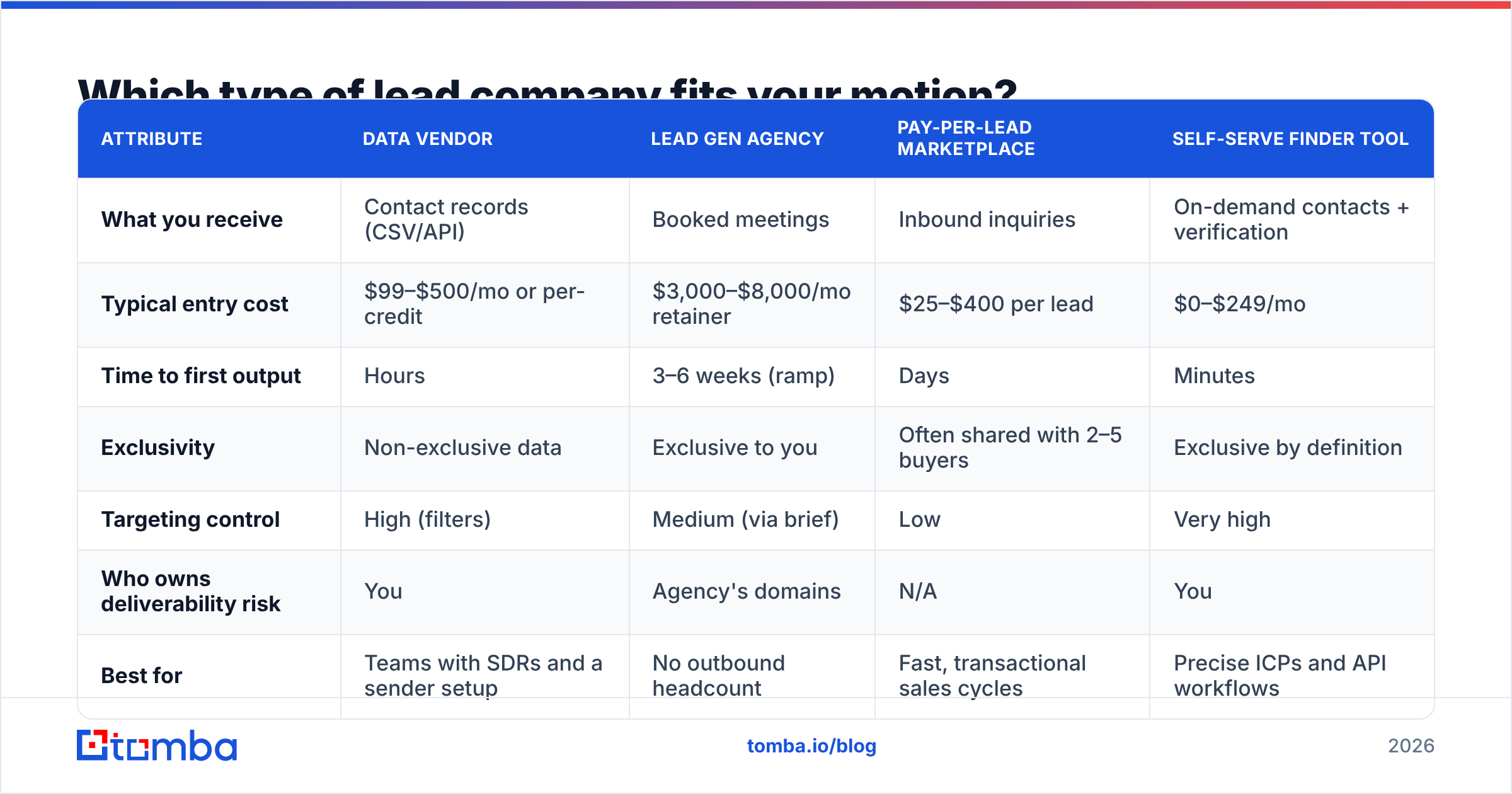
Match the model to your constraint — headcount, cadence, or targeting precision. Here's how they compare on the attributes that decide the outcome.
| Attribute | Data vendor | Lead gen agency | Pay-per-lead marketplace | Self-serve finder tool |
|---|---|---|---|---|
| What you receive | Contact records (CSV/API) | Booked meetings | Inbound inquiries | On-demand contacts + verification |
| Typical entry cost | $99–$500/mo or per-credit | $3,000–$8,000/mo retainer | $25–$400 per lead | $0–$249/mo |
| Time to first output | Hours | 3–6 weeks (ramp) | Days | Minutes |
| Exclusivity | Non-exclusive data | Exclusive to you | Often shared with 2–5 buyers | Exclusive by definition |
| Targeting control | High (filters) | Medium (via brief) | Low | Very high |
| Who owns deliverability risk | You | Agency's domains | N/A | You |
| Best for | Teams with SDRs and a sender setup | No outbound headcount | Fast, transactional sales cycles | Precise ICPs and API workflows |
The pattern worth internalizing: the more of the work the vendor does, the less control you keep over targeting — and the more you pay per resulting conversation.
How do lead companies actually get their data?#
Four sources, roughly in order of how much you should trust them.
First-party collection. The vendor operates something people log into or opt into — a browser extension, a community, a free tool — and observes verified professional identities directly. Smallest volume, highest quality.
Public web crawling and pattern inference. The provider crawls company sites, press releases, staff pages, and public profiles, then infers email patterns (first.last@, finitial+last@) and validates them at the SMTP layer. This is how most modern email finders work, and it's why data sources matter more than headline database size.
Contributory networks. Users sync their address books or inboxes in exchange for credits. Fast growth, murky consent, and the reason some vendors struggle with EU coverage.
License-and-resell. The vendor buys a file from someone else, cleans it lightly, and puts a new logo on it. This is where "45 million verified contacts" claims usually come from, and where the same stale record shows up in three tools you're paying for separately.
Ask which of the four applies. A vendor that can answer specifically is a vendor with a real pipeline. A vendor that says "proprietary AI-powered data engine" and stops is reselling.
What do lead companies cost in 2026?#
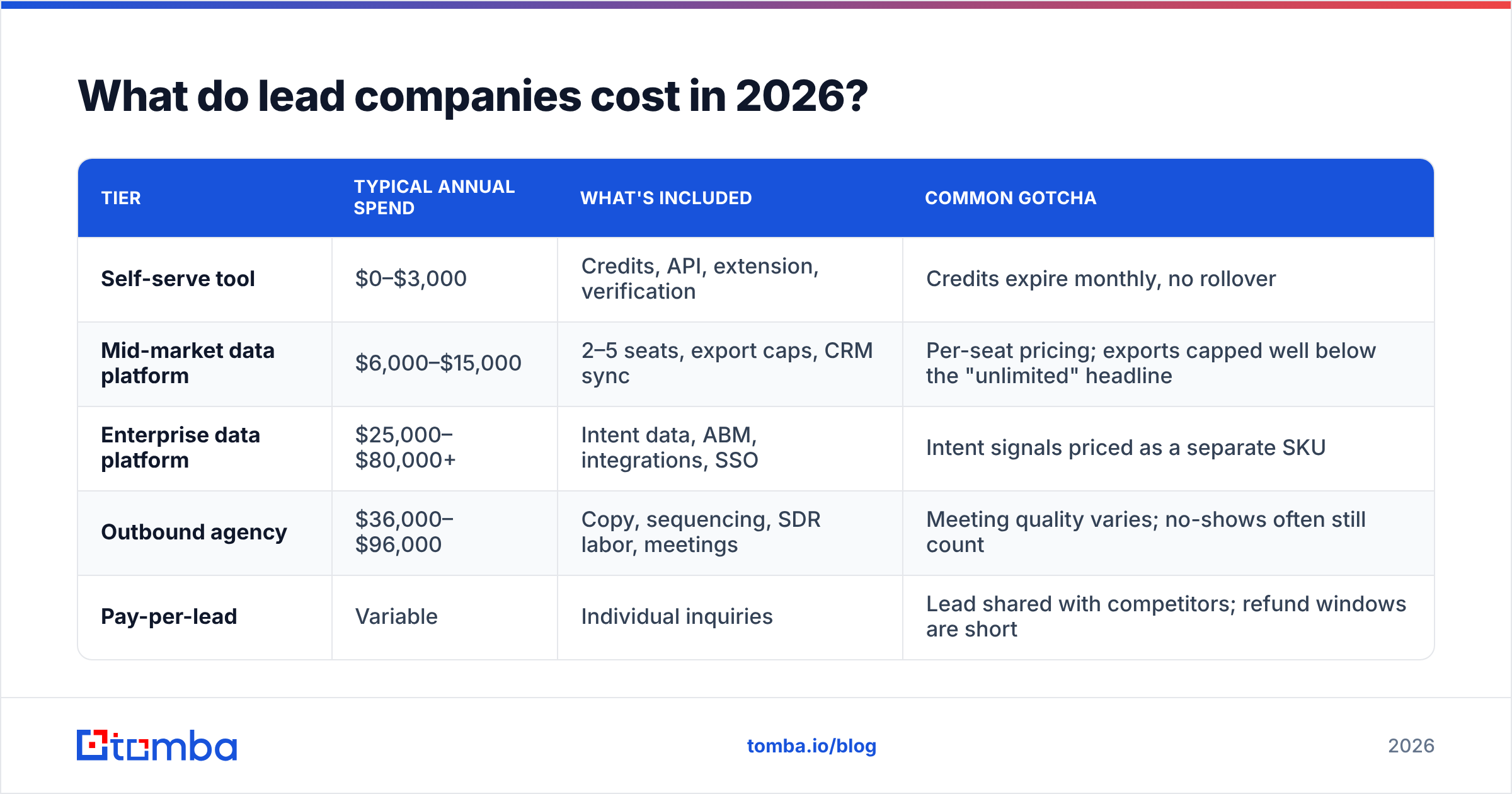
Published pricing is rare above the self-serve tier, but the shape of the market is consistent. Expect these ranges.
| Tier | Typical annual spend | What's included | Common gotcha |
|---|---|---|---|
| Self-serve tool | $0–$3,000 | Credits, API, extension, verification | Credits expire monthly, no rollover |
| Mid-market data platform | $6,000–$15,000 | 2–5 seats, export caps, CRM sync | Per-seat pricing; exports capped well below the "unlimited" headline |
| Enterprise data platform | $25,000–$80,000+ | Intent data, ABM, integrations, SSO | Intent signals priced as a separate SKU |
| Outbound agency | $36,000–$96,000 | Copy, sequencing, SDR labor, meetings | Meeting quality varies; no-shows often still count |
| Pay-per-lead | Variable | Individual inquiries | Lead shared with competitors; refund windows are short |
Two line items cause most of the buyer's remorse. Export limits: a plan advertising unlimited search may cap exports at 10,000 records a year, which is a week of sending for a real outbound team. Credit expiry: monthly credits that don't roll over convert a $99 plan into a $99 tax on the months you're busy elsewhere.
For comparison, transparent self-serve pricing looks like the Tomba plans: a free tier at 25 searches per month, Starter at $49/mo, Growth at $99/mo, Pro at $249/mo, and custom Enterprise. You can do the per-record math before a sales call instead of after three of them.
How do you vet a lead company before you sign?#
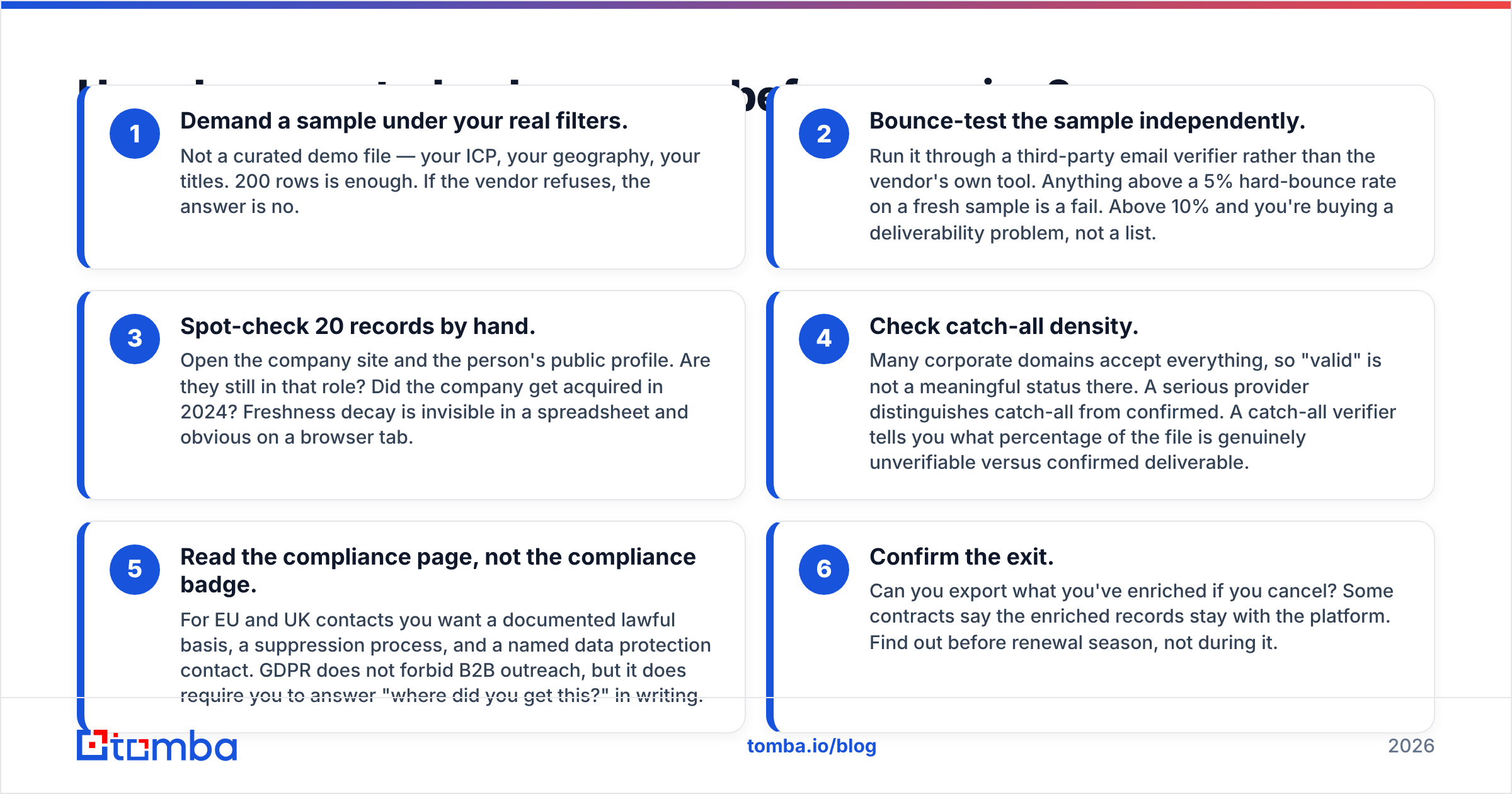
Run this sequence. It takes about ninety minutes and it has killed more bad deals than any reference call.
- Demand a sample under your real filters. Not a curated demo file — your ICP, your geography, your titles. 200 rows is enough. If the vendor refuses, the answer is no.
- Bounce-test the sample independently. Run it through a third-party email verifier rather than the vendor's own tool. Anything above a 5% hard-bounce rate on a fresh sample is a fail. Above 10% and you're buying a deliverability problem, not a list.
- Spot-check 20 records by hand. Open the company site and the person's public profile. Are they still in that role? Did the company get acquired in 2024? Freshness decay is invisible in a spreadsheet and obvious on a browser tab.
- Check catch-all density. Many corporate domains accept everything, so "valid" is not a meaningful status there. A serious provider distinguishes catch-all from confirmed. A catch-all verifier tells you what percentage of the file is genuinely unverifiable versus confirmed deliverable.
- Read the compliance page, not the compliance badge. For EU and UK contacts you want a documented lawful basis, a suppression process, and a named data protection contact. GDPR does not forbid B2B outreach, but it does require you to answer "where did you get this?" in writing.
- Confirm the exit. Can you export what you've enriched if you cancel? Some contracts say the enriched records stay with the platform. Find out before renewal season, not during it.
Independent review platforms help with step zero — scanning for patterns in complaints rather than for star ratings. Sort reviews on G2 or Capterra by lowest rating and read the one-stars. Refund disputes, auto-renewal surprises, and sudden coverage drops repeat across reviewers when they're real.
Are bought lead lists worth it?#
Yes — conditionally, and the condition is verification.
The case against buying lists usually cites bounce rates and spam complaints. Both are real, and both are symptoms of skipping step 2 above rather than of buying data itself. Google and Yahoo's bulk sender requirements pushed complaint-rate tolerance down to 0.3%, and mailbox providers now weigh invalid-recipient rates heavily in sender reputation. One unverified 5,000-row import can cost you a domain you spent six months warming.
The case for buying is simpler: building a comparable list manually costs an SDR roughly 8–12 hours per 500 accounts at the research stage. At loaded cost, that's more expensive than almost any data subscription.

So the decision isn't buy versus don't-buy. It's: buy, then verify with a second vendor, then send in small tranches while you watch the bounce rate. Teams that treat a purchased file as a raw input rather than a finished asset get the economics to work. Teams that upload it straight into a sequencer do not.
A practical rule: budget 10–15% of your data spend on independent verification. It's the cheapest insurance in outbound. Running the file through a bulk email finder before send also lets you fill gaps — plenty of lists have the right person with a wrong or missing address, and recovering those rows is pure margin on the purchase.
What questions expose a weak vendor on the demo call?#
Six. Ask them in this order and take notes on the hedging, not just the answers.
- "What was the last-verified date on this specific record?" A per-record timestamp is table stakes in 2026. A database-wide "we refresh quarterly" means nothing about the row you're about to email.
- "What's your hard-bounce guarantee, and how is the credit applied?" Good answers: a stated threshold and automatic credit-back. Bad answers: "our data is 98% accurate" with no remedy.
- "How do you treat catch-all domains?" If they count catch-alls as verified, their accuracy number is inflated by roughly the share of enterprise domains in your ICP.
- "Can I get this through an API?" Even if you won't use it on day one, an email finder API signals the vendor has real infrastructure rather than a file and a login page.
- "Which sources cover DACH / Nordics / LATAM?" Coverage is wildly uneven by region. Vendors strong in North America often collapse outside it, and the honest ones will tell you where.
- "What happens to my enriched data if I churn?" Ownership, export format, and deletion timeline. Get it in the order form.
If a rep answers all six specifically, you're dealing with an operator. Sales teams reading this from the other side of the table will recognize the pattern in HubSpot's own guidance on qualifying and discovery — specificity under pressure is the signal, in either direction.
Is a self-serve tool better than a full-service lead company?#
It depends on whether your bottleneck is data or labor. Be honest about which.
Choose a full-service agency when you have no SDR headcount, no sending infrastructure, and a board asking for pipeline this quarter. You're buying time, and the premium is the price of skipping a hiring cycle.
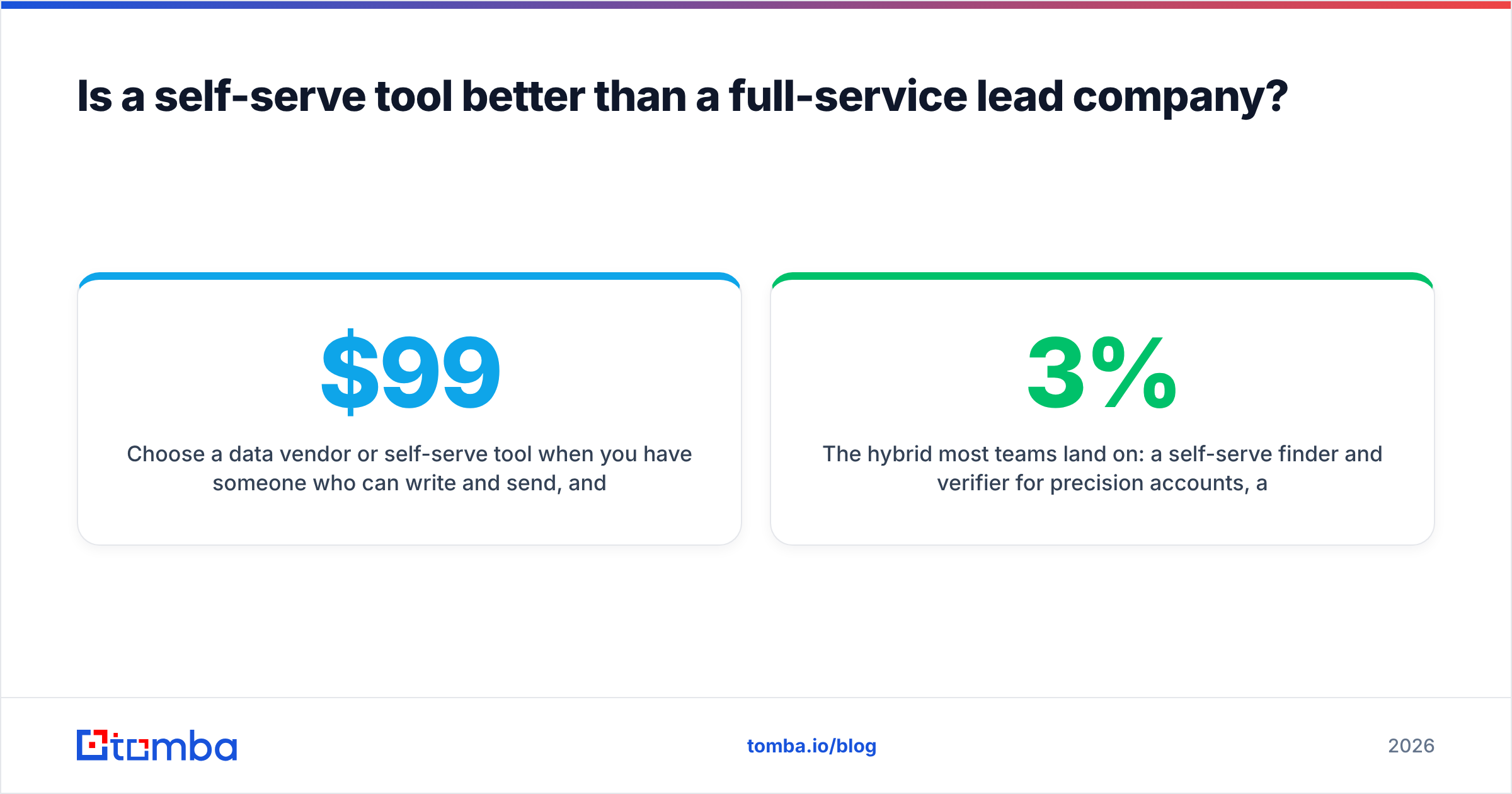
Choose a data vendor or self-serve tool when you have someone who can write and send, and your real problem is finding the right 2,000 people. This is most teams. It's also where the cost difference is largest: a $99/month tool plus one existing SDR outproduces a $5,000/month retainer in most mid-market motions, because targeting stays in the hands of the person who understands the product.
Choose a marketplace only when your sales cycle is short enough that shared leads still convert. If you need six touches and three stakeholders, a lead that four competitors also bought is not an asset.
The hybrid most teams land on: a self-serve finder and verifier for precision accounts, a bulk data purchase for broad-net campaigns, and data enrichment running continuously against the CRM so the records you already own don't decay into noise. Contact data degrades at roughly 2–3% per month through job changes alone. Enrichment is maintenance, not acquisition — and skipping it quietly undoes everything you bought last year.
Where should you start this week?#
Start with a test, not a contract.
Pull 100 accounts from your best-fit segment. Find the contacts yourself with a domain search, verify them, and send a small batch. Measure bounce rate, reply rate, and how long the sourcing actually took. Now you have a baseline — and any lead company pitching you has to beat a real number instead of a hypothetical one.
That baseline is what turns vendor selection from a taste test into an evaluation. It's also, frequently, the moment teams discover they didn't need a lead company at all; they needed twenty minutes a day and a reliable finder.
Ready to build that baseline? Start with the Tomba Email Finder — find verified professional emails by domain, name, or company, with 25 free searches a month and no card required. Run your own 100-account test, check the bounce rate, and then decide which lead company, if any, is worth signing.
Related guides#
// get started
Find, verify and enrich your first contacts today
Start on the free plan with 25 searches a month, then scale when your team is ready.
Free plan · No credit card required · GDPR & CCPA
// about the author