Lead Conversion Salesforce: The Complete 2026 Guide
The Convert button in Salesforce takes one click and permanently rewrites three objects. Here is what actually happens, where teams lose data, and how to build a conversion process that survives an audit.
TL;DR
- The lead conversion Salesforce runs is one-way. One Lead becomes up to three records — Account, Contact, and Opportunity — and the old Lead is locked read-only for good.
- Most conversion pain is a data problem, not a Salesforce bug. Think duplicate accounts, unmapped custom fields, and dead email addresses nobody checked.
- Custom Lead fields do not carry over unless you map them. The data is not deleted. It just sits on a converted Lead that nobody reports on.
- Convert too early and your deal count is inflated. Convert too late and good buyers sit in an object your reps ignore.
- The fix is dull, and it works: clear duplicates, verify emails, map every field you care about, then let Flow do the conversion.
Lead conversion Salesforce basics: what does Convert do?#
Lead conversion is the moment Salesforce stops treating a person as a maybe and starts treating them as a deal. Think of a hospital admissions desk. In the waiting room you are one line on a clipboard. The second a doctor admits you, that line becomes a patient chart, an insurance file, and a care plan. New departments, new rules, and no way back to the clipboard.
Technically, converting a Lead in Salesforce takes the single Lead object and creates or links:
- An Account — the company. Either a new Account record, or a match to one you pick during conversion.
- A Contact — the person. Name, title, email, phone, and any mapped Lead fields.
- An Opportunity — optional. Skip it if the person is a good contact but not a live deal.
After conversion, Salesforce flags the old Lead as IsConverted = true. The record turns read-only and drops out of lead views and lead reports. It still sits in the database. It still holds every field you never mapped. It just stops being part of anyone's day.
That permanence is why this topic fills so many support threads. You cannot un-convert a Lead in the UI. You can delete the new records and reset the flag through the API, but that is surgery, not a workflow.
What actually happens to your data when you hit Convert?#
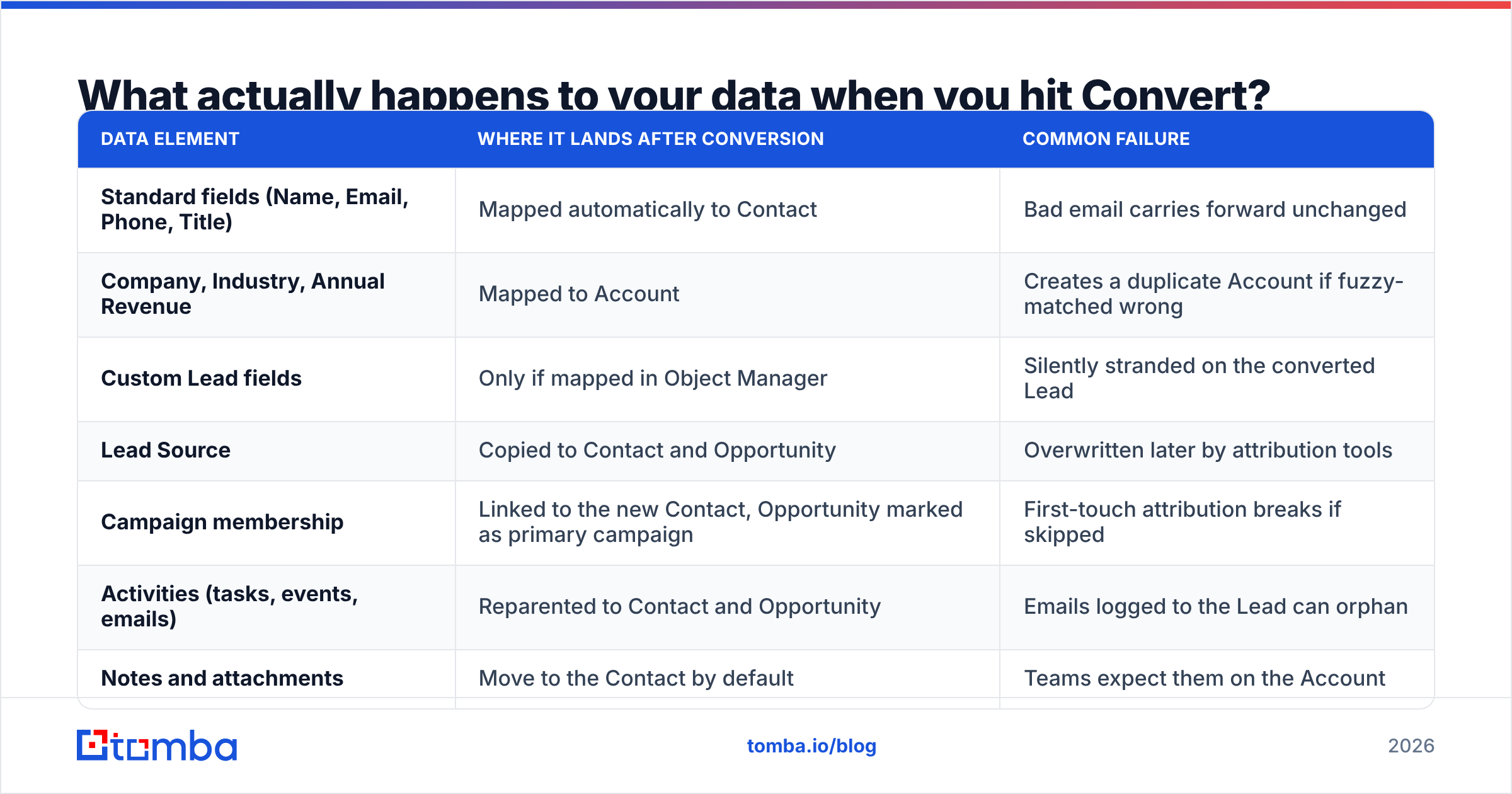
Here is the field-level reality, which is where most teams get burned:
| Data element | Where it lands after conversion | Common failure |
|---|---|---|
| Standard fields (Name, Email, Phone, Title) | Mapped automatically to Contact | Bad email carries forward unchanged |
| Company, Industry, Annual Revenue | Mapped to Account | Creates a duplicate Account if fuzzy-matched wrong |
| Custom Lead fields | Only if mapped in Object Manager | Silently stranded on the converted Lead |
| Lead Source | Copied to Contact and Opportunity | Overwritten later by attribution tools |
| Campaign membership | Linked to the new Contact, Opportunity marked as primary campaign | First-touch attribution breaks if skipped |
| Activities (tasks, events, emails) | Reparented to Contact and Opportunity | Emails logged to the Lead can orphan |
| Notes and attachments | Move to the Contact by default | Teams expect them on the Account |
| Converted Lead record | Read-only, hidden from lead views | Reporting teams forget it exists |
Two rows belong on your RevOps whiteboard: custom fields and email quality.
Custom fields are a manual job. Go to Setup → Object Manager → Lead → Fields & Relationships → Map Lead Fields. Salesforce will not guess for you. Say your SDR fills in "Tech Stack Detected" or "Budget Range" on the Lead. If nobody mapped those fields, the AE opens the Contact and sees nothing. The data still exists on the converted Lead. It is intact, but invisible.
Email quality is worse, because it fails quietly. A Lead with a guessed address like firstname@company.com converts just fine. Salesforce does not check whether the mailbox is real. You find out three weeks later, when the AE's sequence bounces and your sender score takes the hit. Run an email verifier pass before records reach the qualification stage. It takes five minutes to set up and it cuts a quarter of the noise downstream.
Why does lead conversion break so often?#
Five root causes cover almost every broken conversion process we see in B2B orgs:
- No single definition of "qualified." Marketing converts on a form fill. Sales converts after a call. Both write to the same Opportunity object, so pipeline stops meaning anything. Pick one gate and enforce it.
- Duplicate Accounts. Salesforce matches account names as text, not as entities. "Acme Inc.", "Acme, Inc" and "Acme Incorporated" become three accounts, three owners, and one angry CRO.
- Unmapped custom fields. Covered above. Check this every time you add a Lead field.
- Missing or unverified contact data. Converting a Lead with no real email just moves an empty record. The gap is now the AE's problem, and it shows up as "no response" instead of "no data."
- Manual conversion at volume. A rep converts 40 leads on the last day of the month to hit a number. Matching gets sloppy and the forecast absorbs the damage.
None of these are Salesforce defects. They are process gaps, and Salesforce runs them at scale.
Should you convert every lead, or only qualified ones?#
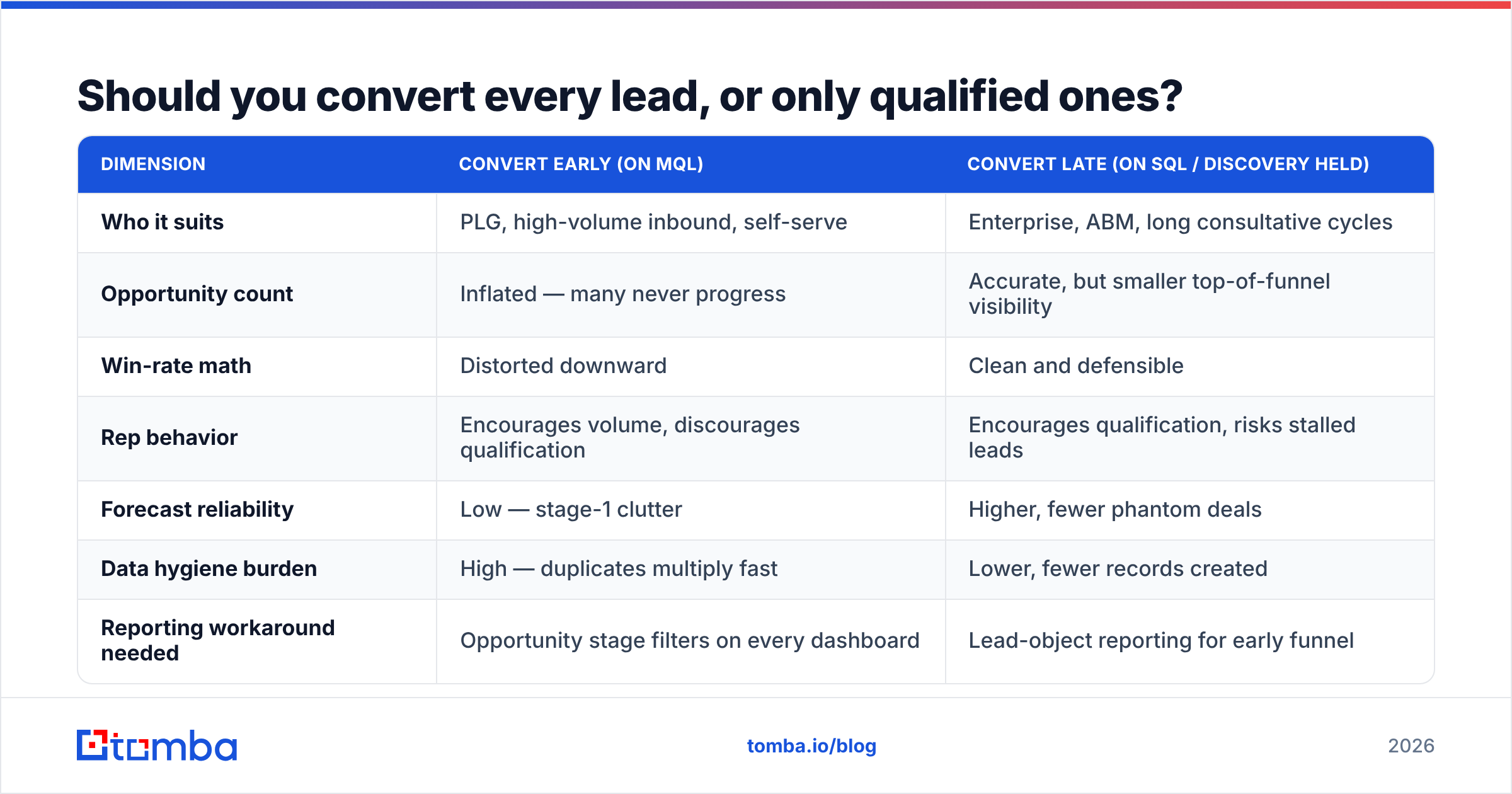
This argument eats more RevOps meeting time than any other, so here is the trade-off laid out straight. Neither column wins every time. It depends on whether you run high-volume inbound or low-volume enterprise outbound.
| Dimension | Convert early (on MQL) | Convert late (on SQL / discovery held) |
|---|---|---|
| Who it suits | PLG, high-volume inbound, self-serve | Enterprise, ABM, long consultative cycles |
| Opportunity count | Inflated — many never progress | Accurate, but smaller top-of-funnel visibility |
| Win-rate math | Distorted downward | Clean and defensible |
| Rep behavior | Encourages volume, discourages qualification | Encourages qualification, risks stalled leads |
| Forecast reliability | Low — stage-1 clutter | Higher, fewer phantom deals |
| Data hygiene burden | High — duplicates multiply fast | Lower, fewer records created |
| Reporting workaround needed | Opportunity stage filters on every dashboard | Lead-object reporting for early funnel |
Here is the pattern that works for most mid-market B2B teams. Convert the person early, so activity history lands on the right objects. Create the Opportunity only after a real, dated, budget-aware conversation. Salesforce lets you skip opportunity creation with one checkbox during conversion, and almost nobody uses it. That checkbox is the cheapest forecast fix you have.
A quick sanity test: if your win rate dropped sharply while the team sold just as well, you are probably converting too early.
How do you automate lead conversion in Salesforce?#
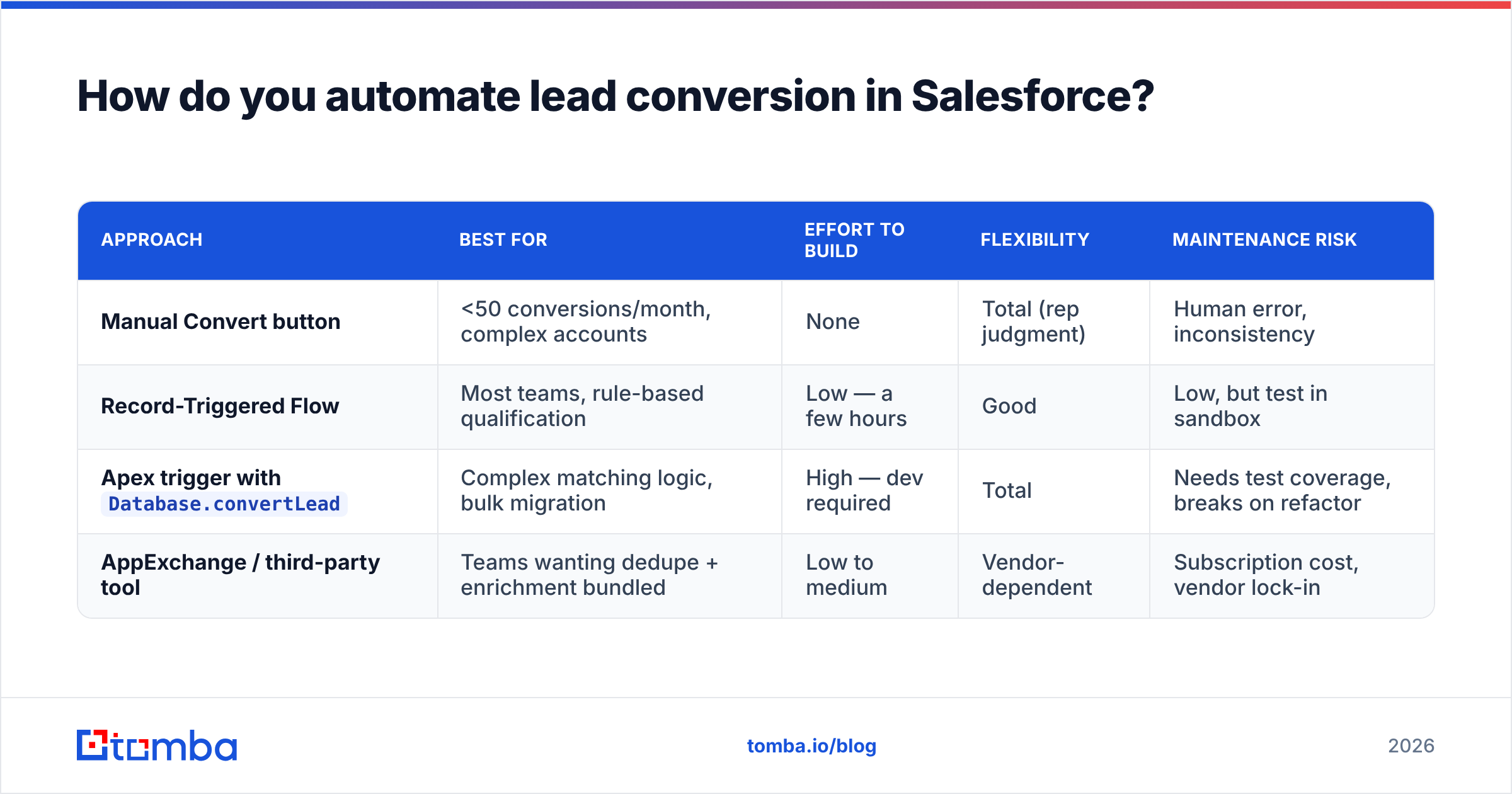
You have four real options. The right one is usually the least clever one that clears your volume.
| Approach | Best for | Effort to build | Flexibility | Maintenance risk |
|---|---|---|---|---|
| Manual Convert button | <50 conversions/month, complex accounts | None | Total (rep judgment) | Human error, inconsistency |
| Record-Triggered Flow | Most teams, rule-based qualification | Low — a few hours | Good | Low, but test in sandbox |
Apex trigger with Database.convertLead |
Complex matching logic, bulk migration | High — dev required | Total | Needs test coverage, breaks on refactor |
| AppExchange / third-party tool | Teams wanting dedupe + enrichment bundled | Low to medium | Vendor-dependent | Subscription cost, vendor lock-in |
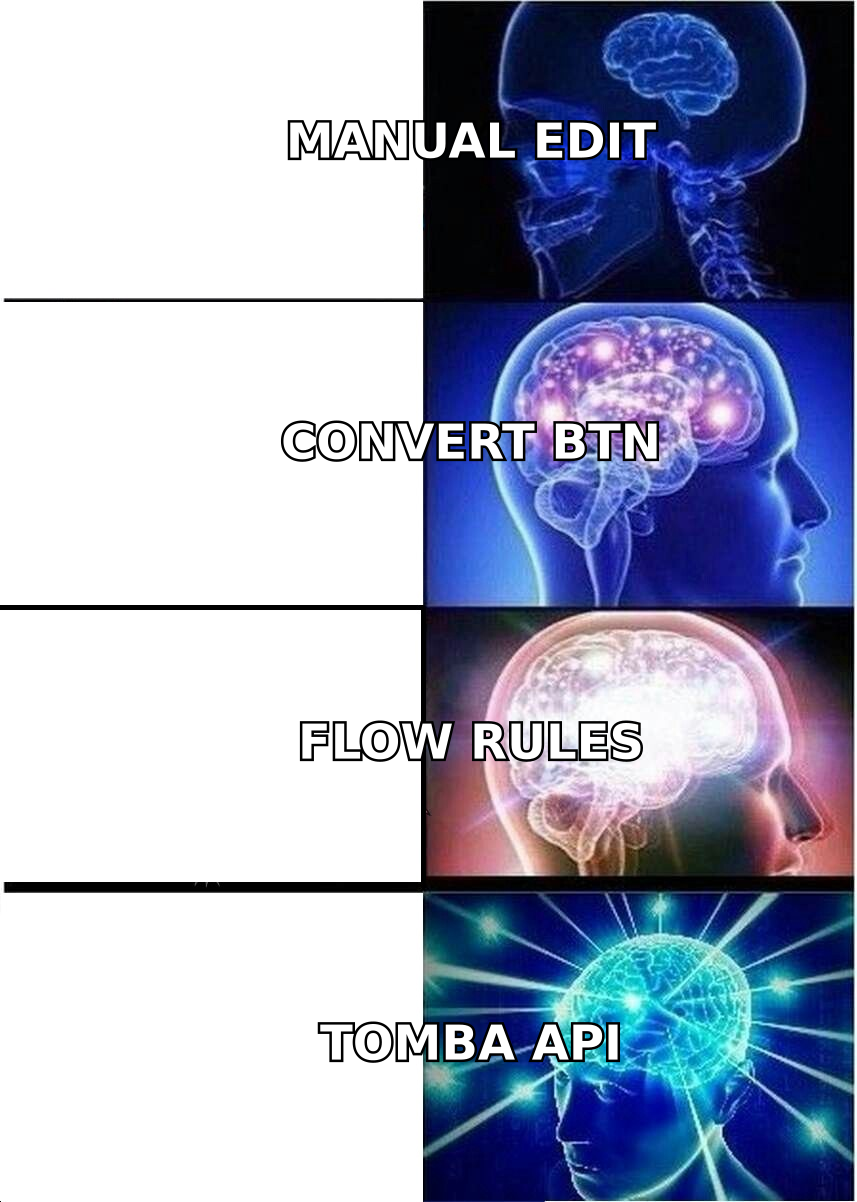
For most teams, a Record-Triggered Flow on the Lead object is the answer. Fire it when Status hits your qualified value. Add a Convert Lead element. Set the account-matching behavior. Then decide, on purpose, whether to create an opportunity. The Trailhead modules walk through the Flow element step by step, and you do not need a developer.
Before you build the Flow, put a data step in front of it. This is the order that holds up:
- Step 1 — Clear duplicates. Match on email domain plus a tidied company name, never on company name alone.
- Step 2 — Verify. Check every email address, so you do not turn dead contacts into live opportunities.
- Step 3 — Enrich. Add title, company size, LinkedIn profile, and direct phone. Contact enrichment at this stage means the AE opens a full record instead of a name and a guess.
- Step 4 — Map. Give every field you care about a home on Contact, Account, or Opportunity.
- Step 5 — Convert. Now the automation runs against clean input.
- Step 6 — Audit monthly. Report on converted Leads whose Contact has no email, or whose Account looks like a duplicate.
Skip steps 2 and 3 and even a well-built Flow will produce junk pipeline. Automation is a multiplier. It copies bad data as fast as it copies good data.
How does data quality change your conversion numbers?#
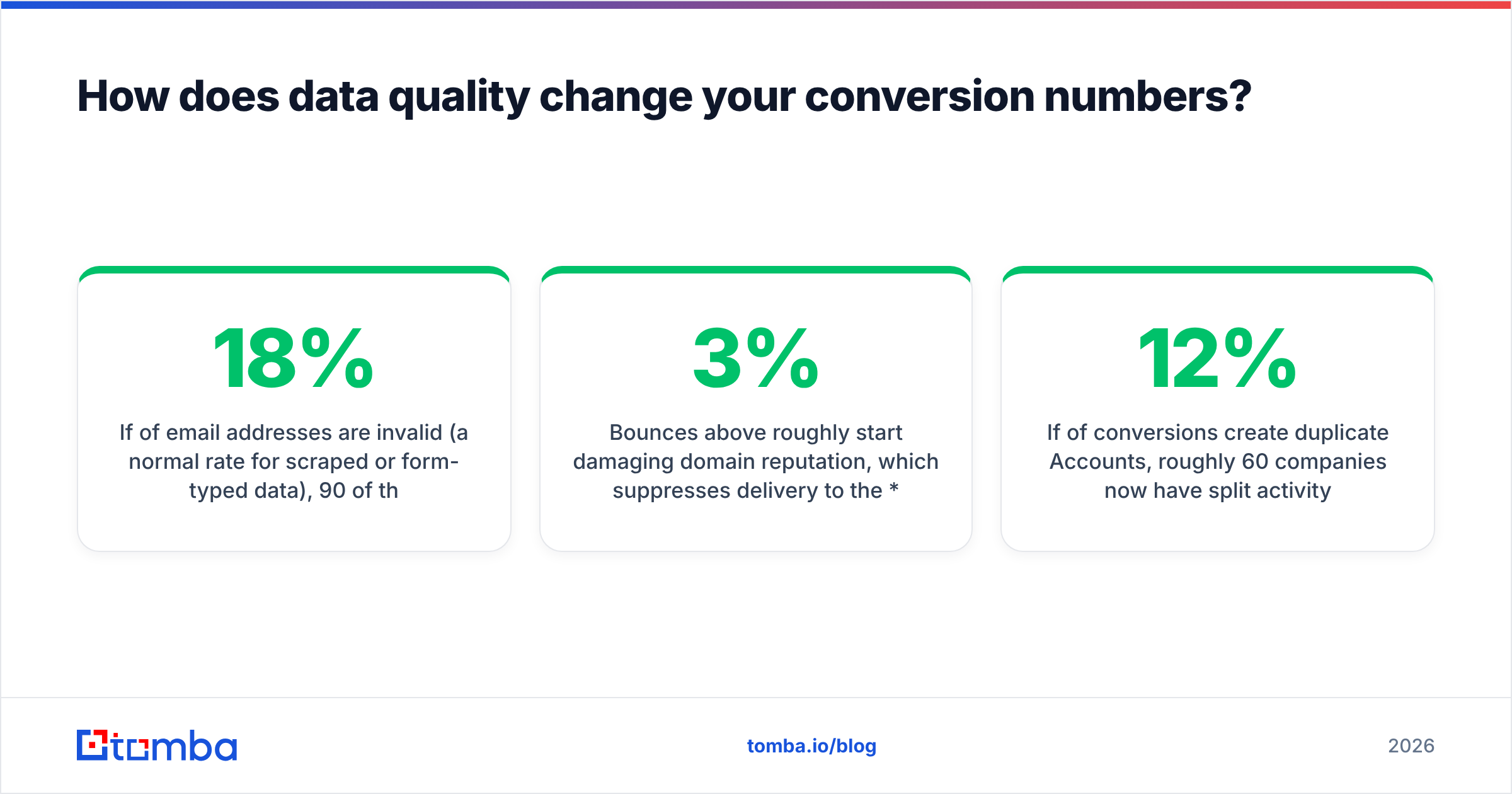
Concretely, not philosophically. Take a team that converts 500 leads a quarter:
- Say 18% of the email addresses are bad, which is normal for scraped or typed-in data. That leaves 90 new Contacts you cannot reach by email at all. They sit in sequences and bounce.
- Bounces above roughly 3% start to hurt your domain. That slows delivery to the valid 410 contacts too. The damage spreads out from the bad records.
- Say 12% of conversions create duplicate Accounts. Now 60 companies have split activity history, and account-based reporting understates engagement.
The fix is upstream, not downstream. Every lead conversion Salesforce runs is only as good as the record behind it. Verifying costs a fraction of a cent per record. Cleaning up afterwards costs a RevOps analyst an afternoon per hundred records, plus a deliverability hit you cannot buy back. If you are sourcing new contacts rather than cleaning old ones, pair a domain search with verification. You get a full, checked list before anything touches the Lead object.
Peer reviews say the same thing. Sales Cloud reviews on G2 rank data quality, not missing features, as the top admin complaint. The product does what you tell it. The instructions are the problem.
What should you measure after conversion?#
Four metrics, reviewed monthly, catch nearly every process drift:
- Lead-to-Opportunity rate — split by source. A source that converts at 40% and closes at 2% has a qualification problem, not a demand problem.
- Time in Lead status — if leads sit for 14 days or more, your SLA is fiction.
- Converted Contacts with no email or phone — your data canary. Keep it under 5%.
- Duplicate Accounts created per month — if it trends up, tighten your matching rules before you touch the Flow.
Add a fifth if you run outbound: bounce rate on first touch after conversion. It is the fastest read on whether your checks actually run.
What are the FAQs teams ask most?#
Can you reverse a lead conversion in Salesforce?
Not through the standard UI. You can delete the new Account, Contact, and Opportunity, then reset IsConverted through the API. Activity history and audit trails rarely survive. Treat conversion as one-way and gate it properly.
Do converted Leads still count against storage? Yes. They stay as rows in the Lead object. Large orgs archive them in time. Do not delete them casually, because they hold your unmapped field data and the original source.
Why did my custom field disappear after conversion? It did not disappear. It was never mapped. Open Object Manager → Lead → Map Lead Fields, give it a home, then check whether old records need a backfill.
Can one Lead convert into an existing Account? Yes, and it should whenever the company is already there. During conversion, pick the existing Account instead of the "Create New" default. This one habit prevents most Account duplication.
Should marketing or sales own the conversion moment? Whoever owns the definition of qualified. Splitting the definition from the action is how pipeline hygiene dies.
Where should you start this week?#
Pick one thing: audit your Lead field mappings. It takes twenty minutes, costs nothing, and almost always surfaces two or three fields your AEs have been asking for.
Then fix the input. The lead conversion Salesforce handles is only the last step. Conversion quality is capped by record quality, and record quality is capped by whether you had a real, verified email and a full company profile before the Lead ever entered a queue. That part is on you, not on Salesforce.
Start there with the Tomba Email Finder. Find verified work email addresses by name, company, or domain. Confirm they are deliverable before the record hits your CRM. Then convert Leads your AE can actually reach. The free tier gives you 25 searches a month to test against your own list, and paid plans start at $49/mo — see Tomba pricing if you need bulk or API volume. Clean input, clean conversion, a forecast you can defend.
Related guides#
// get started
Find, verify and enrich your first contacts today
Start on the free plan with 25 searches a month, then scale when your team is ready.
Free plan · No credit card required · GDPR & CCPA
// about the author