Lead CRM in 2026: How to Choose, Set Up, and Keep It Clean
Most lead CRMs don't fail because of missing features. They fail because the lead records inside them rot. Here's how to pick, structure, and maintain a lead CRM in 2026.
TL;DR
- A lead CRM is the system of record for people who are not yet customers. It optimizes for speed-to-contact and disqualification, not for renewals or support tickets.
- Tool choice matters less than you think. HubSpot, Pipedrive, Zoho, Close, and Salesforce all handle lead management competently at the mid-market level. The gap between them is workflow depth and price, not capability.
- The thing that actually kills a lead CRM is data decay: roughly a quarter to a third of B2B contact records go stale every year as people change jobs.
- Define stages by buyer behavior, not by rep activity. "Demo booked" is a real stage. "Following up" is not.
- Budget for enrichment and verification as a line item, not an afterthought. A clean 5,000-record lead CRM outperforms a dirty 50,000-record one on every metric that matters.
What is a lead CRM, and how is it different from a regular CRM?#
A lead CRM is a CRM configured around pre-customer records. Think of it as the emergency room versus the hospital ward: the ER triages, stabilizes, and routes fast, while the ward manages long relationships. Both are hospitals. They are optimized for completely different clocks.
A general CRM stores everyone — prospects, customers, churned accounts, partners, vendors. A lead CRM narrows the job to four questions:
- Who is this person? Name, role, company, seniority, and a reachable channel (work email, direct dial, LinkedIn profile).
- Where did they come from? Inbound form, outbound sequence, event list, referral, product signup, or a purchased list.
- Are they worth time? Fit score plus intent signal — does this account look like your best customers, and are they doing anything right now?
- What happens next, and when? One owner, one next action, one due date. No orphan records.
Everything else is decoration. If your lead CRM cannot answer those four questions in under ten seconds per record, it is a database, not a sales tool.
The practical dividing line in 2026 is that lead CRMs increasingly sit upstream of the main CRM. A growing number of teams run a lightweight lead layer — sometimes a dedicated tool, sometimes a filtered pipeline inside the same instance — and only promote records into the "real" CRM once they hit a qualification bar. That keeps the customer database clean and keeps rep dashboards from drowning in 40,000 unworked MQLs.

Why do most lead CRM implementations fail?#
Not because of the software. Three failure modes cover almost everything.
Failure one: the data rots faster than you work it. B2B job-change rates mean a meaningful slice of your lead records are wrong within twelve months. Emails bounce, phone numbers route to a former employer, and titles describe a job the person left two promotions ago. A lead CRM with 30% decay does not degrade gracefully — it poisons every downstream metric. Your bounce rate climbs, your sender reputation drops, and reps start distrusting the whole system.
Failure two: stages describe rep activity instead of buyer commitment. "Contacted," "Following up," and "Nurturing" are not stages. They are moods. A rep can sit in "Following up" for nine months without anything happening, and the forecast will happily count it. Stages must have an entry criterion the buyer triggers: replied, booked, attended, shared with a colleague, requested pricing.
Failure three: nobody owns disqualification. Healthy lead CRMs kill records aggressively. If your disqualification rate is under 40%, either your targeting is extraordinary or — far more likely — reps are hoarding dead leads to keep their pipeline count up. Make "Disqualified" a celebrated outcome with required reasons, and the whole system gets faster.
Which lead CRM should you choose in 2026?#
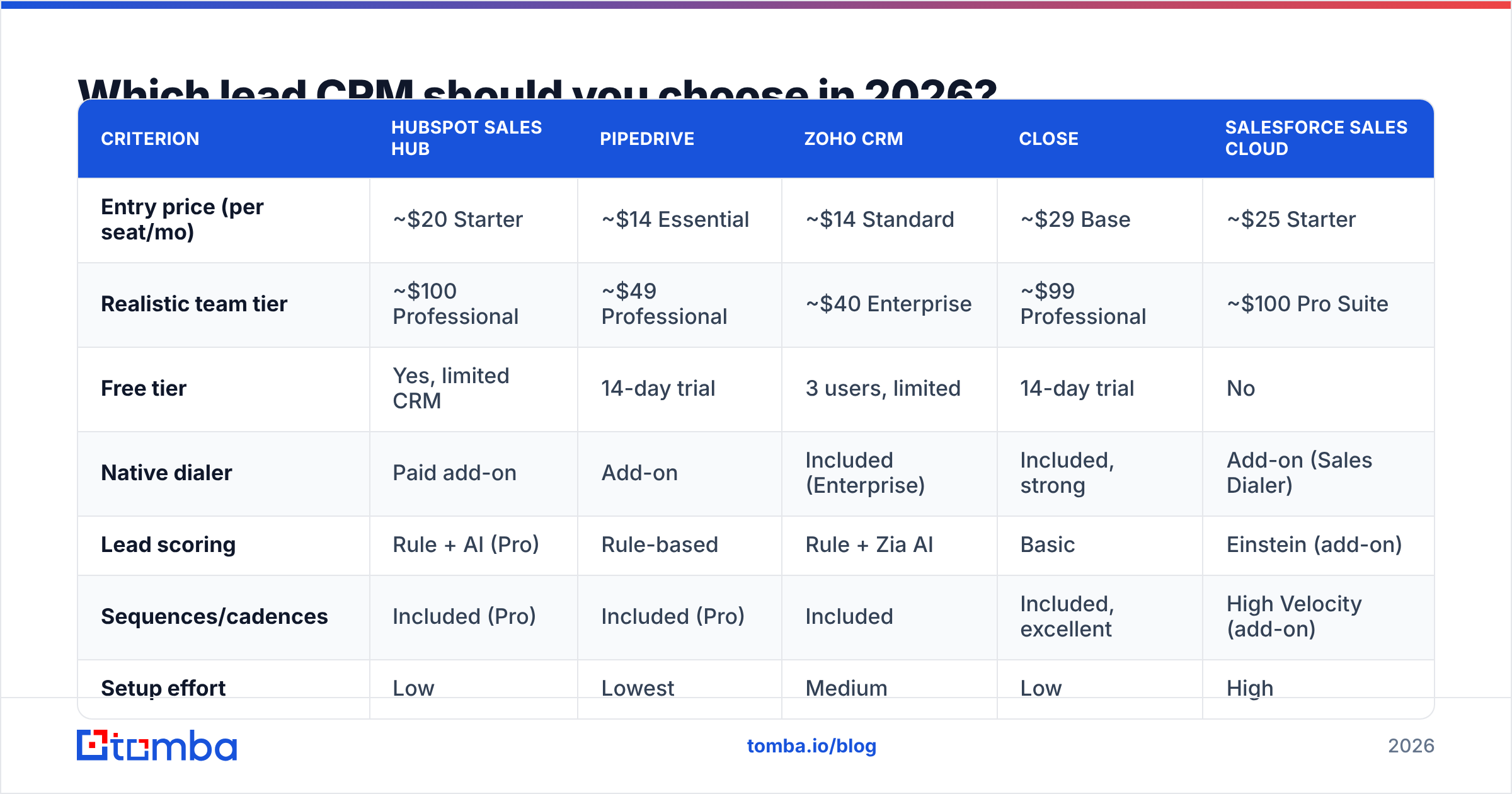
Here is the honest comparison. Prices are list prices for annual billing as published by each vendor in early 2026 — always check the vendor's current pricing page, because seat minimums and add-ons move constantly.
| Criterion | HubSpot Sales Hub | Pipedrive | Zoho CRM | Close | Salesforce Sales Cloud |
|---|---|---|---|---|---|
| Entry price (per seat/mo) | ~$20 Starter | ~$14 Essential | ~$14 Standard | ~$29 Base | ~$25 Starter |
| Realistic team tier | ~$100 Professional | ~$49 Professional | ~$40 Enterprise | ~$99 Professional | ~$100 Pro Suite |
| Free tier | Yes, limited CRM | 14-day trial | 3 users, limited | 14-day trial | No |
| Native dialer | Paid add-on | Add-on | Included (Enterprise) | Included, strong | Add-on (Sales Dialer) |
| Lead scoring | Rule + AI (Pro) | Rule-based | Rule + Zia AI | Basic | Einstein (add-on) |
| Sequences/cadences | Included (Pro) | Included (Pro) | Included | Included, excellent | High Velocity (add-on) |
| Setup effort | Low | Lowest | Medium | Low | High |
| Best fit | Marketing-heavy inbound | Simple outbound teams | Cost-sensitive SMB | Call-first SDR teams | Complex enterprise |
A few notes the pricing pages won't give you:
- Pipedrive wins on time-to-value. You can have a working lead pipeline in an afternoon. It loses when you need marketing automation, complex territories, or CPQ.
- HubSpot wins when marketing and sales share a definition of a lead. The trap is tier inflation: features you assumed were included often sit one tier up, and seat minimums bite.
- Close wins for phone-first teams. If your motion is 60+ dials a day, the built-in calling and the lack of tab-switching is worth real money.
- Salesforce wins when you have an admin. Without dedicated ops headcount, a Salesforce lead CRM becomes a very expensive spreadsheet with a permissions problem.
- Zoho wins on total cost. The ceiling is lower than the others and the UX is denser, but for a ten-person team watching burn, the math is hard to argue with.
Check peer reviews on G2 before you commit, and weight reviews from companies your size. A 200-seat enterprise complaining about customization limits tells you nothing if you have eight reps.
What fields does a lead record actually need?#
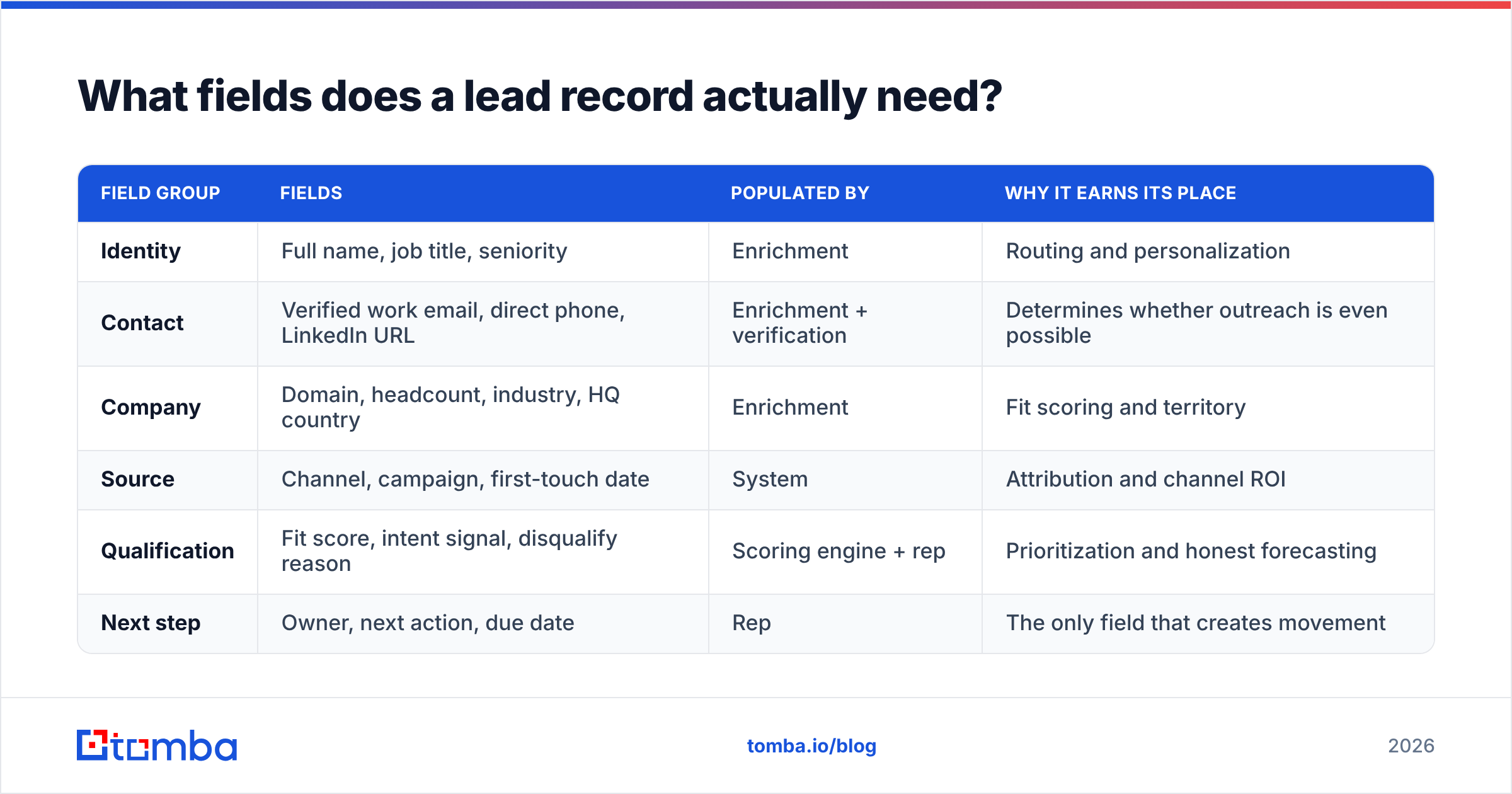
Fewer than you have. Every optional field is a place for data quality to go quietly wrong. Here is a defensible minimum, grouped by whether a human or a system should populate it.
| Field group | Fields | Populated by | Why it earns its place |
|---|---|---|---|
| Identity | Full name, job title, seniority | Enrichment | Routing and personalization |
| Contact | Verified work email, direct phone, LinkedIn URL | Enrichment + verification | Determines whether outreach is even possible |
| Company | Domain, headcount, industry, HQ country | Enrichment | Fit scoring and territory |
| Source | Channel, campaign, first-touch date | System | Attribution and channel ROI |
| Qualification | Fit score, intent signal, disqualify reason | Scoring engine + rep | Prioritization and honest forecasting |
| Next step | Owner, next action, due date | Rep | The only field that creates movement |
Anything outside that set should have to justify itself. "Preferred contact time" fields, custom picklists nobody fills, and legacy fields from a 2019 migration are pure drag — they slow record creation and make reporting ambiguous.
The enrichment column is doing a lot of work here. Manual entry of company data is the single most reliable way to introduce inconsistency: one rep types "Acme Inc.", another types "Acme, Inc", and now your account-level rollups are wrong. Push identity, contact, and firmographic fields through an automated data enrichment step at creation time and lock them against manual editing.
How do you keep lead CRM data clean?#
Treat hygiene as a scheduled operation with an owner, the same way you treat pipeline review. A workable cadence:
- At creation — verify before write. No email enters the lead CRM unverified. An email verifier check at the point of ingestion catches typos, defunct domains, spam traps, and role accounts before they ever reach a sequence. This one change usually drops bounce rates below 2%.
- Weekly — sweep the orphans. Any lead with no next action and no activity in 14 days gets auto-routed back to a queue or auto-disqualified. Orphaned records are the compound interest of CRM decay.
- Monthly — re-verify the working set. Not the whole database, just leads in active pipeline. Job changes are the enemy; catching them a month early can turn a lost contact into a warm intro at a new company.
- Quarterly — bulk re-enrichment. Run the full lead table through bulk verify and enrichment, then archive anything that fails twice. Archiving is not deleting. Keep the history, remove it from rep views.
- Annually — audit the field schema. Delete fields with under 20% fill rate. Every one of them is lying to someone in a report.
- Continuously — enforce dedupe on domain plus email. Duplicate leads cause double-outreach, the most expensive kind of unforced error.

None of this is glamorous, and that is precisely why it gets skipped. The teams that do it consistently report the same thing: reps stop arguing with the CRM and start living in it.
Should you buy a dedicated lead CRM or configure what you already own?#
Default answer: configure what you own. A second system means a sync, and syncs break.
Buy a separate lead layer only when at least two of these are true:
- Your main CRM has become an enterprise-governed environment where a field change takes three weeks of approvals.
- Your lead volume is more than 10x your opportunity volume, and rep views are unusable as a result.
- Your outbound motion needs cadence and dialer features that your CRM only sells as an expensive add-on.
- Marketing and sales genuinely disagree about what a marketing qualified lead is, and you need a neutral staging area to reconcile definitions.
If you do split the stack, define the promotion rule explicitly and in writing: a lead is promoted to the main CRM when it reaches a named stage, owned by a named role, with a named set of required fields. Anything vaguer produces two competing sources of truth and a quarterly argument about which number to trust.
How do you connect a lead CRM to the rest of the stack?#
Three integration points carry most of the value, and they should be built in this order.
One: ingestion. Every lead source should write through a single API path, not through eight different manual imports. Forms, event lists, chat, and outbound prospecting all land in the same shape. If you're programmatically creating records, the Tomba API can find and verify a contact before your ingestion handler writes the row, so the CRM never stores an address you haven't checked.
Two: enrichment on write. A trigger fires on record creation, fills the identity and company fields, assigns a fit score, and routes to an owner. Target under 60 seconds from form submit to owner notification. Speed-to-lead research has been consistent for a decade: response inside five minutes beats response at thirty minutes by an order of magnitude on connect rate.
Three: activity sync. Email and calls must log automatically. If reps have to log activity manually, your activity data is fiction, and every downstream report built on it is fiction too. Native integrations like the HubSpot integration path exist precisely so that enriched contact data and activity stay aligned without a human copying anything between tabs.
What metrics prove your lead CRM is working?#
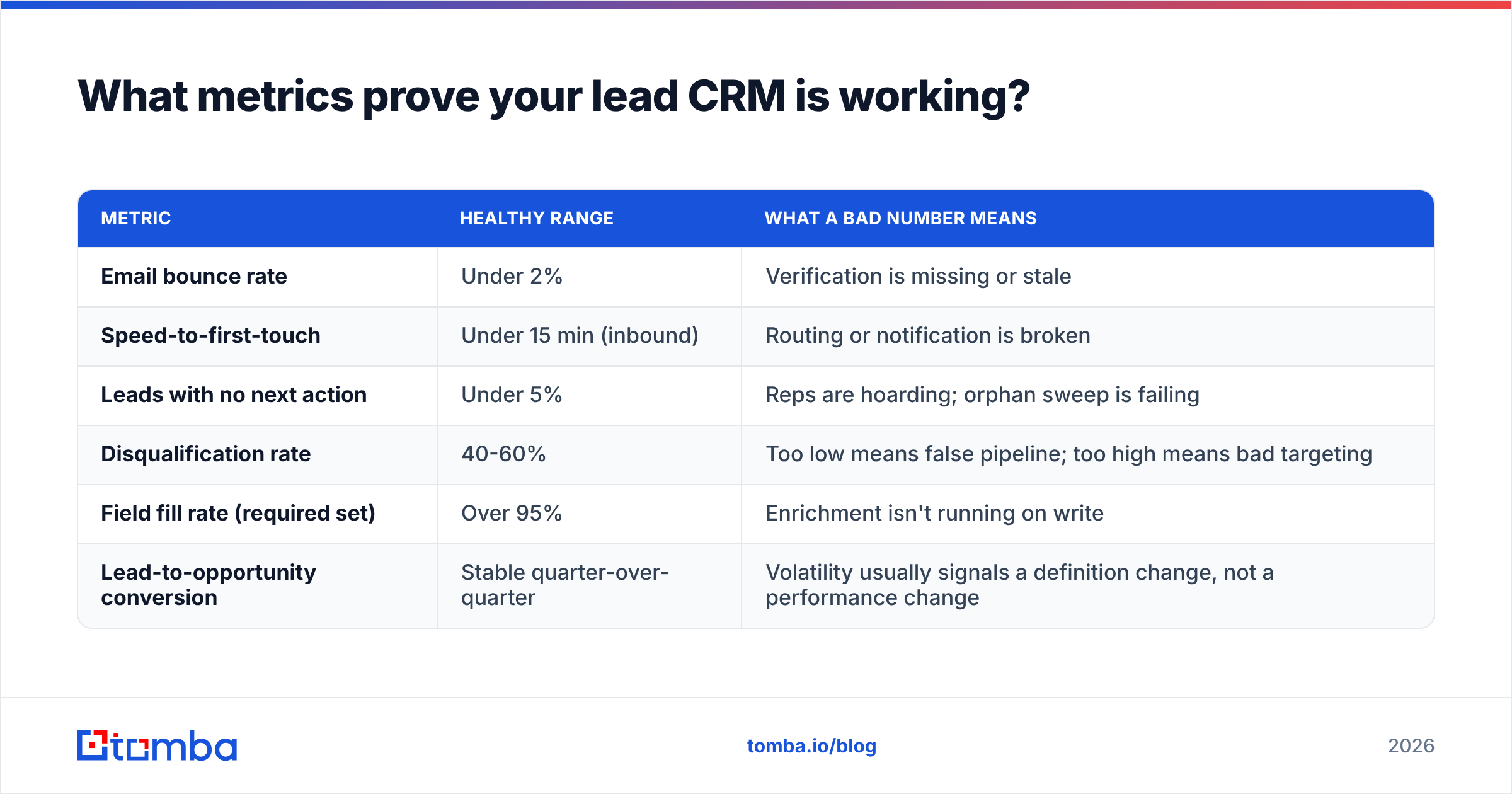
Ignore total lead count. It measures marketing's spend, not the system's health. Track these instead:
| Metric | Healthy range | What a bad number means |
|---|---|---|
| Email bounce rate | Under 2% | Verification is missing or stale |
| Speed-to-first-touch | Under 15 min (inbound) | Routing or notification is broken |
| Leads with no next action | Under 5% | Reps are hoarding; orphan sweep is failing |
| Disqualification rate | 40-60% | Too low means false pipeline; too high means bad targeting |
| Field fill rate (required set) | Over 95% | Enrichment isn't running on write |
| Lead-to-opportunity conversion | Stable quarter-over-quarter | Volatility usually signals a definition change, not a performance change |
The last row is the subtle one. When conversion rates swing wildly, the cause is almost never rep performance. It's someone quietly redefining a stage.
What's changing about lead CRMs in 2026?#
Two shifts are worth planning around.
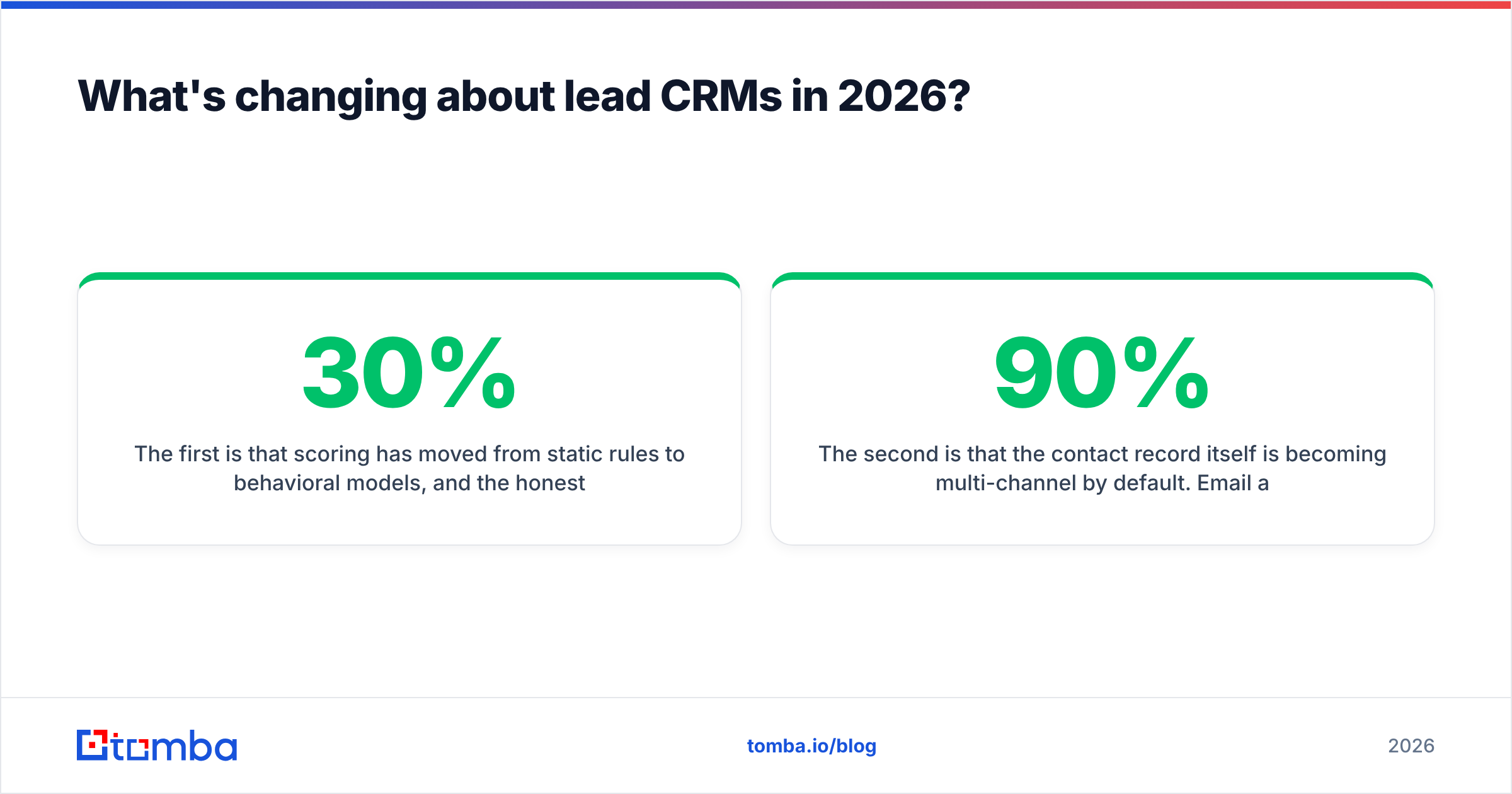
The first is that scoring has moved from static rules to behavioral models, and the honest assessment is that model quality depends entirely on input quality. An AI scoring engine trained on a database where 30% of job titles are outdated will produce confident, precisely-wrong rankings. Clean data is now the prerequisite for AI value, not a nice-to-have alongside it.
The second is that the contact record itself is becoming multi-channel by default. Email alone is no longer enough — teams want a verified work email, a direct dial, and a LinkedIn profile on the same record, because reply rates on any single channel keep compressing. That raises the bar on enrichment coverage: a provider that returns a verified email 90% of the time but a phone number 20% of the time leaves your lead CRM two-thirds empty on the fields reps actually use.
Where should you start?#
Pick the cheapest tool that covers your motion. Spend the money you saved on data quality instead. In practice that sequence looks like: define six stages with buyer-triggered entry criteria, cut your field list to the minimum above, wire enrichment and verification into record creation, and set the weekly orphan sweep before you onboard a single rep.
If the blocker is that your lead records are missing the one field that makes everything else work — a real, verified, deliverable work email — start there. The Tomba Email Finder pulls verified professional addresses by name, company, or domain, and pushes them straight into your lead CRM through the API or a native integration. The free tier gives you 25 searches a month to test coverage against your own target list before you commit; paid plans start at $49/mo, with Growth at $99/mo for teams running real outbound volume. See full Tomba pricing for tier details.
Run your next 100 leads through verification before they hit the CRM, then compare the bounce rate to your last 100. That comparison usually ends the debate.
Related guides#
// get started
Find, verify and enrich your first contacts today
Start on the free plan with 25 searches a month, then scale when your team is ready.
Free plan · No credit card required · GDPR & CCPA
// about the author