Lead Enrichment Services in 2026: Costs, Accuracy, Fit
Lead enrichment services promise complete records on every inbound form fill. Most deliver 40-70% coverage at wildly different prices. Here's how to pick one, what to test before you sign, and when to skip enrichment entirely.
TL;DR
- Lead enrichment services attach firmographic, technographic, and contact data to a record you already partially have — usually an email, a domain, or a form fill.
- Match rates matter more than field counts. A vendor claiming 200 attributes at 45% coverage is worse than one claiming 20 attributes at 85%.
- Pricing models split three ways: per-credit (pay per record), per-seat (flat), and per-API-call. Per-credit only wins if the vendor charges you for successful matches only — ask explicitly.
- Waterfall enrichment (querying 3-5 providers in sequence) lifts coverage 15-30 points but multiplies cost and latency. Worth it above roughly 5,000 records/month, rarely below.
- Start with the 6 fields your routing rules actually use. Everything else is data-warehouse decoration.
What are lead enrichment services?#
A lead enrichment service takes a thin record and thickens it. You have sarah@northwind.io from a webinar signup. Enrichment returns: Sarah Chen, VP Marketing, Northwind Analytics, 140 employees, Series B, Seattle, uses HubSpot and Segment, LinkedIn URL, direct dial.
Think of it like a passport check at a border. You hand over one identifier; the system queries several registries behind the counter and hands back a full profile. The speed and accuracy of that check depends entirely on which registries the officer can actually reach.
That's the whole category. The differences between vendors come down to four things:
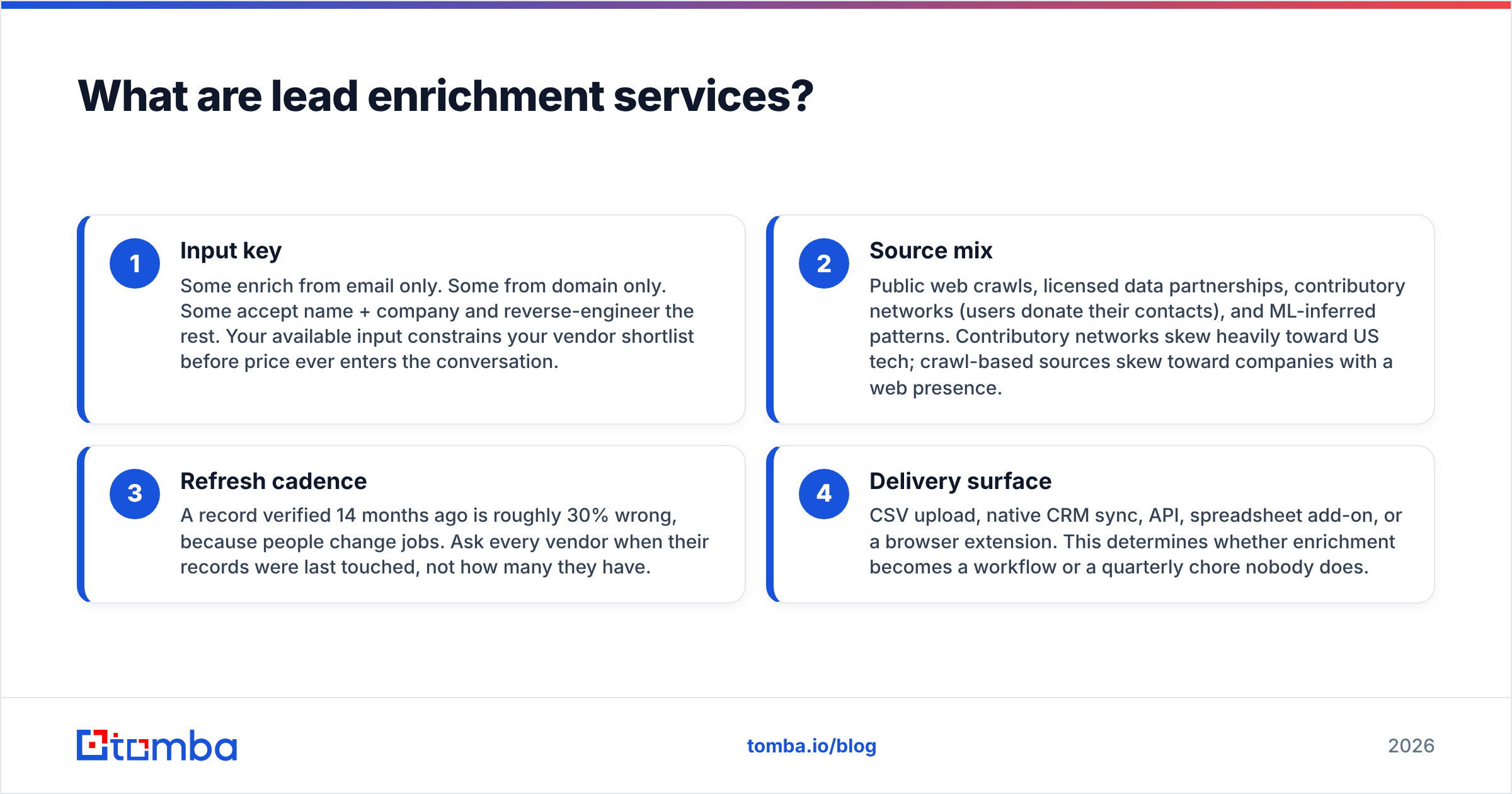
- Input key — Some enrich from email only. Some from domain only. Some accept name + company and reverse-engineer the rest. Your available input constrains your vendor shortlist before price ever enters the conversation.
- Source mix — Public web crawls, licensed data partnerships, contributory networks (users donate their contacts), and ML-inferred patterns. Contributory networks skew heavily toward US tech; crawl-based sources skew toward companies with a web presence.
- Refresh cadence — A record verified 14 months ago is roughly 30% wrong, because people change jobs. Ask every vendor when their records were last touched, not how many they have.
- Delivery surface — CSV upload, native CRM sync, API, spreadsheet add-on, or a browser extension. This determines whether enrichment becomes a workflow or a quarterly chore nobody does.
Most buyers over-index on #2 because vendors market it hardest. In practice #3 and #4 decide whether the tool gets used.

Why does lead enrichment matter more in 2026 than it did in 2022?#
Three shifts collided.
Form abandonment got worse. Every added field costs you conversions — the classic benchmark from HubSpot's form research has held up: cutting a form from seven fields to three reliably lifts submission rates. Enrichment lets you ask for an email and infer the other six fields server-side. That's the single highest-ROI use case and the one most teams still don't run.
Inbox providers tightened the screws. Google and Yahoo's bulk-sender requirements now enforce authentication and complaint-rate thresholds, so sending to stale or guessed addresses carries real cost. Enrichment paired with email verification protects your sender reputation instead of just padding your database.
Routing became a competitive edge. If your MQL lands in a rep's queue within 60 seconds with company size, funding stage, and tech stack attached, that rep opens the conversation informed. If it lands raw, they spend four minutes on LinkedIn first — or don't call at all.
How do the major lead enrichment approaches compare?#
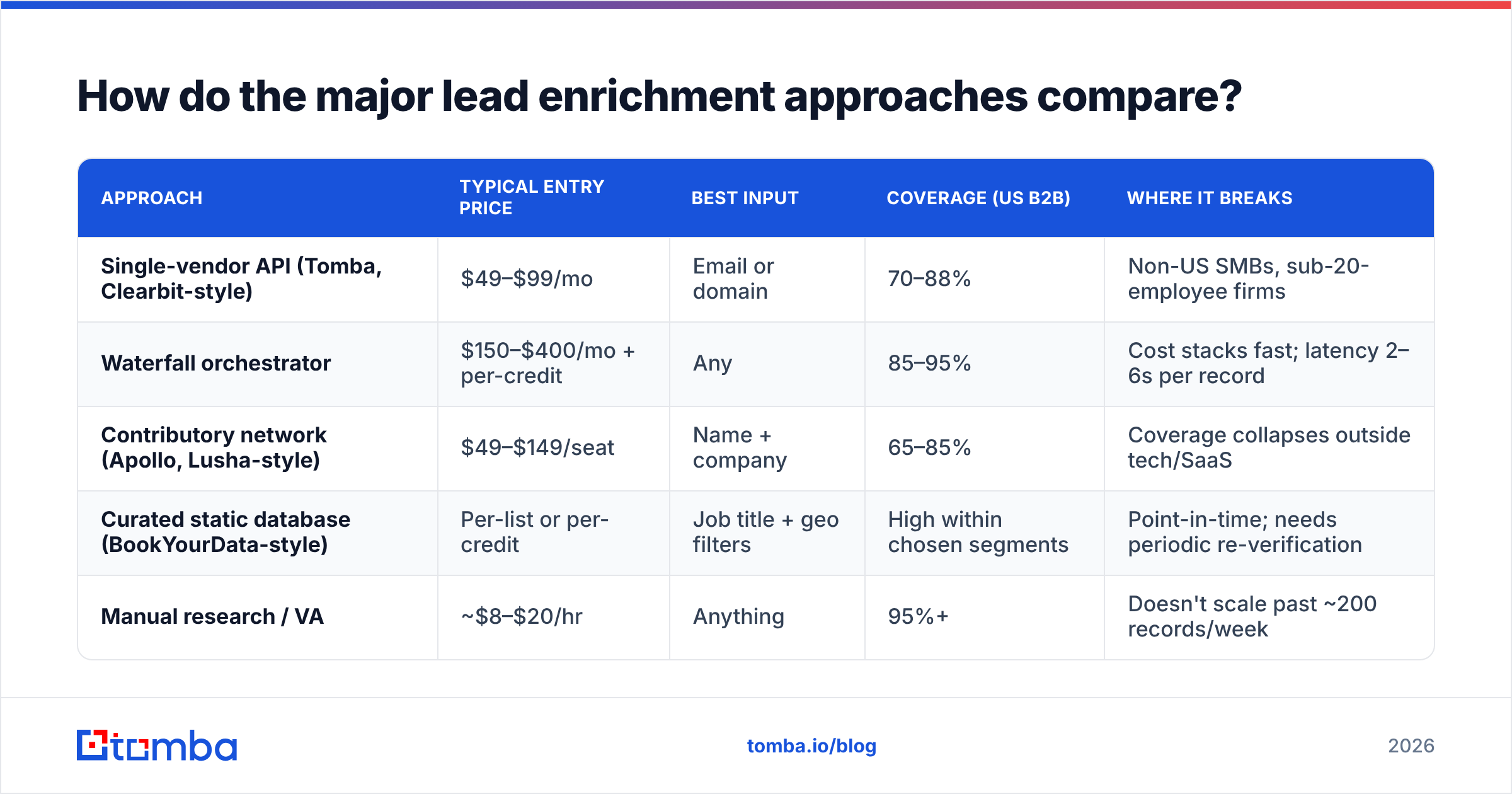
There are four distinct architectures on the market, and they're priced very differently because they solve different problems.
| Approach | Typical entry price | Best input | Coverage (US B2B) | Where it breaks |
|---|---|---|---|---|
| Single-vendor API (Tomba, Clearbit-style) | $49–$99/mo | Email or domain | 70–88% | Non-US SMBs, sub-20-employee firms |
| Waterfall orchestrator | $150–$400/mo + per-credit | Any | 85–95% | Cost stacks fast; latency 2–6s per record |
| Contributory network (Apollo, Lusha-style) | $49–$149/seat | Name + company | 65–85% | Coverage collapses outside tech/SaaS |
| Curated static database (BookYourData-style) | Per-list or per-credit | Job title + geo filters | High within chosen segments | Point-in-time; needs periodic re-verification |
| Manual research / VA | ~$8–$20/hr | Anything | 95%+ | Doesn't scale past ~200 records/week |
A few honest notes on that table. Waterfall tools are genuinely the accuracy leader, but they are orchestration layers — they resell the same underlying providers you could buy directly, plus a routing fee. If you enrich 500 records a month, you are paying the orchestration premium to solve a problem you don't have.
Curated database vendors like BookYourData work on a different model entirely: instead of enriching records you already own, you filter a verified list by title, industry, and geography and buy it outright. For teams that need 2,000 CMOs in DACH manufacturing this week, that's faster and cheaper than any enrichment pipeline. For continuous inbound enrichment, it's the wrong shape.
What fields should you actually enrich?#
Here is the uncomfortable finding from auditing enrichment setups: most teams enrich 40+ fields and build routing logic on six of them. The rest sit in the CRM as unused columns that slowly rot and make reports untrustworthy.
Start with these, in priority order:
- Verified work email — The one field with a hard binary outcome. Either it delivers or it doesn't. Everything downstream depends on it, so verify rather than infer.
- Company domain — Your join key for every other dataset. Normalize it (strip
www, resolve redirects) before storing, or you'll end up with three records for the same account. - Employee count band — Not exact headcount, which is always wrong. Bands (1-10, 11-50, 51-200…) are stable enough to route on and rarely change mid-quarter.
- Job title + seniority tier — Raw titles are chaos ("Growth Ninja"). Map to a seniority tier (IC / Manager / Director / VP / C-level) and route on the tier.
- Industry or vertical code — Only if your ICP genuinely differs by vertical. If your pitch is identical for fintech and logistics, skip it.
- One trigger signal — Recent funding, hiring for a relevant role, or a technology install. One good trigger beats twenty static attributes for reply rates.
Everything past this — office locations, SIC codes, parent-company hierarchies, social handles — is nice to have and should never block a deploy.
How much do lead enrichment services really cost?#
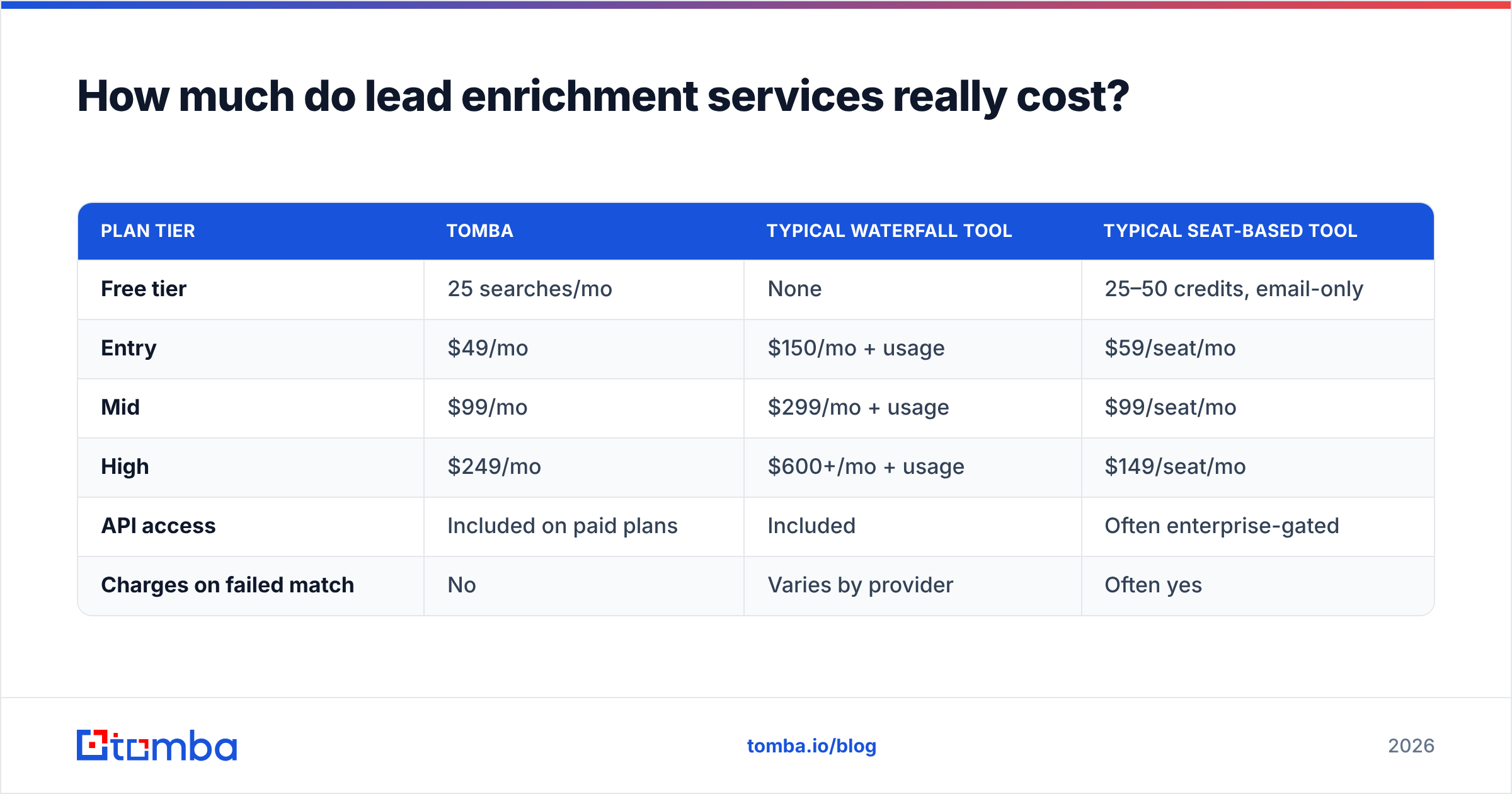
Sticker price and effective price diverge sharply, because the variable that moves your bill is match rate, not list price.
Run this calculation before signing anything:
Effective cost per enriched record = (monthly price ÷ credits) ÷ match rate
A $99/mo plan with 2,000 credits at a 50% match rate costs $0.099 per usable record. A $149/mo plan with 2,000 credits at an 85% match rate costs $0.088 — cheaper despite the higher sticker. Vendors that charge only on successful matches make this math simpler and are usually the better deal; vendors that burn a credit on every attempt are betting you won't measure.
| Plan tier | Tomba | Typical waterfall tool | Typical seat-based tool |
|---|---|---|---|
| Free tier | 25 searches/mo | None | 25–50 credits, email-only |
| Entry | $49/mo | $150/mo + usage | $59/seat/mo |
| Mid | $99/mo | $299/mo + usage | $99/seat/mo |
| High | $249/mo | $600+/mo + usage | $149/seat/mo |
| API access | Included on paid plans | Included | Often enterprise-gated |
| Charges on failed match | No | Varies by provider | Often yes |
Full Tomba pricing is public, which is itself a filter worth applying — any vendor that hides pricing behind a demo call is signaling that your price depends on how much they think you'll pay.
Two cost traps to watch. Seat-based pricing punishes distribution: if you want enrichment running inside ops automations and for six reps, per-seat billing gets expensive fast, and teams respond by sharing logins, which breaks attribution. Annual-only contracts on unproven coverage are the other one — never commit twelve months before running a match-rate test on your own data.

How do you run a fair enrichment bake-off?#
Vendor-published accuracy numbers are marketing. Run your own test; it takes about two hours.
Step 1 — Build a gold-standard sample. Pull 200 records from your CRM where you already know the truth: closed-won accounts, customers you've spoken to, contacts whose titles you've confirmed on a call. This is your answer key.
Step 2 — Strip it down. Reduce each record to the input key the vendors accept — usually email or domain + name. Save the full version separately.
Step 3 — Run all candidates on the same file. Same 200 rows, same day. Don't let a vendor "optimize" your file first; that's how demos get rigged.
Step 4 — Score three separate numbers.
- Coverage: what percentage returned any data at all?
- Accuracy: of those returned, what percentage matched your answer key?
- Freshness: how many returned a job title the person held over a year ago?
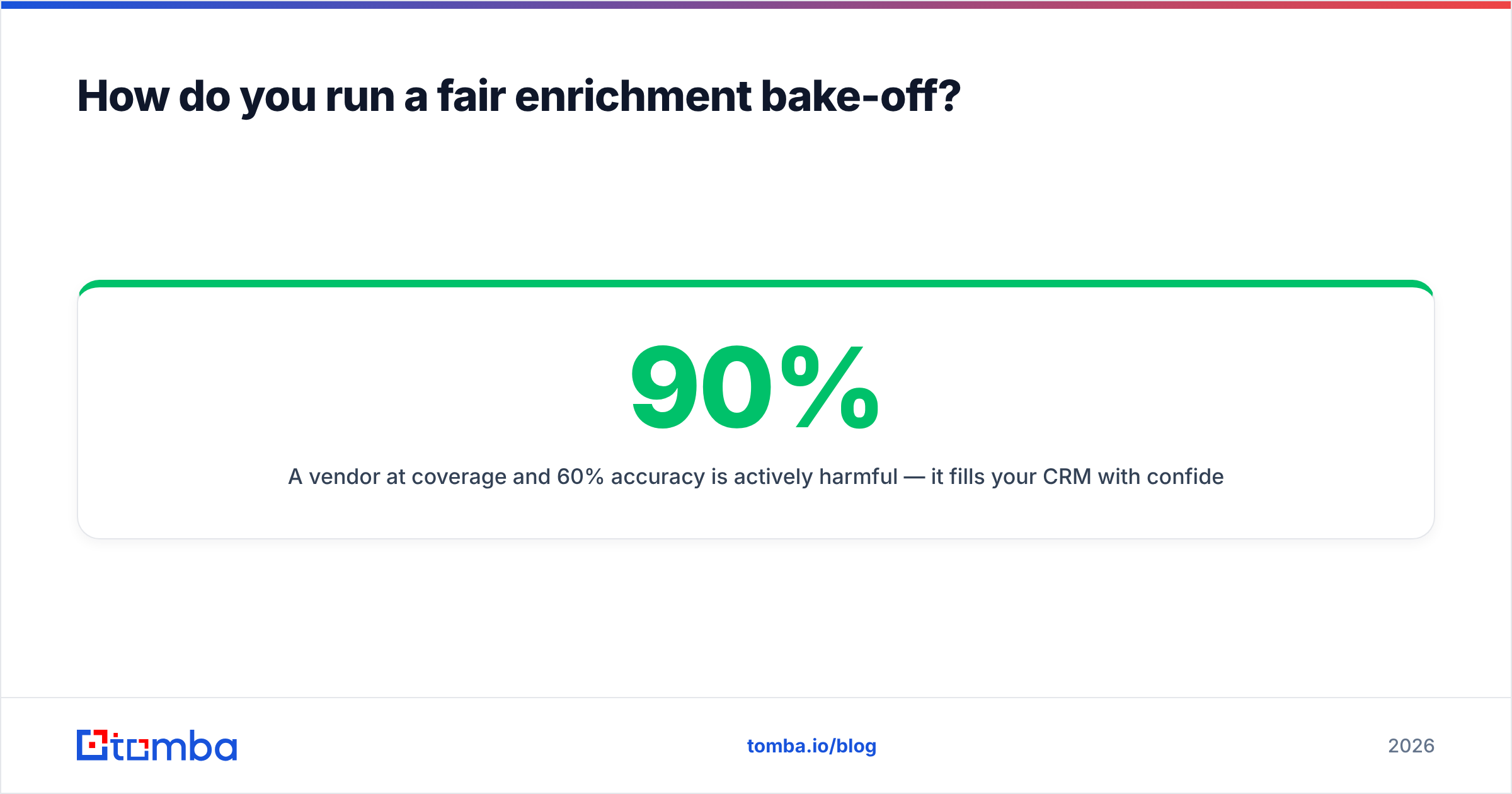
A vendor at 90% coverage and 60% accuracy is actively harmful — it fills your CRM with confident-looking wrong data that reps trust. 70% coverage at 95% accuracy is a far better tool.
Step 5 — Weight by your actual ICP. If half your pipeline is European mid-market, a vendor that scores brilliantly on US tech and poorly on EU manufacturing will underperform in production regardless of its aggregate number. Segment the results.
Step 6 — Test the failure mode. Feed in twenty deliberately bad inputs: typo'd domains, personal Gmail addresses, defunct companies. Good services return a clear null. Weak ones hallucinate a plausible guess, and you will never catch it in production.
That last test disqualifies more vendors than any other. Independent review sites like G2's data enrichment category are useful for narrowing the shortlist, but reviewer sentiment won't tell you how a tool behaves on your messy inputs.
Where does verification fit versus enrichment?#
They're different jobs and conflating them costs money.
Enrichment answers "who is this?" Verification answers "will this reach them?" A record can be perfectly enriched — correct name, correct title, correct company — and still bounce because the person left in March.
The sequence that works:
- Find → resolve the contact via domain search or an email finder when you only have a name and company.
- Enrich → attach the firmographic and role context your routing needs via data enrichment.
- Verify → SMTP-check before any send, and re-check anything older than 90 days.
- Re-enrich on trigger → not on a calendar. Re-run when a record is about to be contacted, not every quarter across the whole database.
That last point saves real money. Blanket quarterly re-enrichment of a 50,000-record database burns credits on 45,000 records nobody will contact. Enrich-on-use, not enrich-on-schedule.
Catch-all domains are the recurring edge case. Roughly 15-20% of B2B domains accept everything at the SMTP layer, so standard verification returns "unknown." A dedicated catch-all verifier applies pattern analysis and historical signals to resolve these instead of leaving them in limbo — and for outbound teams, that band of "unknown" addresses is often where a meaningful chunk of the ICP lives.
What does a working enrichment stack look like?#
For a team doing inbound + outbound at mid-market scale:
Inbound path. Three-field form (email, name, company optional) → enrichment API call on submit → seniority and employee-band routing rules fire → record lands in the rep's queue enriched within seconds. Fallback: if enrichment returns null, route to a general queue rather than dropping the lead.
Outbound path. Build target account list → bulk email finder across the account list → verify → enrich for personalization variables → push to sequencer. Verify again if the list sat unused for more than 30 days.
Maintenance path. Monthly job flags records with no activity in 12 months and titles older than 18 months. Re-verify only the subset entering an active sequence.
Integration surface. Whatever you choose must write back into your CRM natively or through a documented API. Enrichment that requires a human to export a CSV, upload it, download the result, and re-import gets done twice and then never again. Check for a HubSpot integration, Salesforce sync, or a Tomba API endpoint you can call from your automation layer before you buy.
When should you skip lead enrichment entirely?#
Three cases where the honest answer is "don't bother."
Your ICP is under 500 accounts. Manual research by a competent SDR will beat any API, and you'll learn things about the accounts that no data vendor sells. Enrichment is a scale tool.
You sell to consumers or micro-businesses. B2B enrichment coverage on sole traders, local services, and non-web-native businesses is poor everywhere. Vendors won't tell you this; the match rates will.
Your reply rates are bad for message reasons. Enrichment fixes targeting, not copy. If your emails are generic, enriched records just let you send generic emails to better-qualified people. Fix the message first — the data won't rescue it.
Making the call#
The shortlist should come down to two or three vendors after the bake-off, and at that point the decision is rarely about data. It's about whether the tool fits the way your team actually works: does it run inside your CRM, does the API return fast enough for form-fill enrichment, does it charge you for failures, and can you leave in 30 days if coverage disappoints.
If your primary bottleneck is finding and validating the contact itself — not decorating records you already have — start there. The Tomba Email Finder resolves work emails from a name and domain, verifies deliverability in the same call, and runs on a free tier of 25 searches a month so you can benchmark it against your own gold-standard sample before spending anything. Run the 200-record test, score coverage and accuracy separately, and let the numbers pick your vendor.
Related guides#
// get started
Find, verify and enrich your first contacts today
Start on the free plan with 25 searches a month, then scale when your team is ready.
Free plan · No credit card required · GDPR & CCPA
// about the author