What Is a Lead Finder? How to Pick the Right One in 2026
Most lead finders resell overlapping data with different packaging. Here's how match rates, credit models, and verification actually differ — and how to test any tool in 30 minutes before you pay for a year.
TL;DR
- A lead finder is software that turns a name, a company, or a domain into a contact record you can actually reach — email, phone, LinkedIn profile, firmographics.
- Nearly every vendor draws from overlapping sources. The real differences are match rate on your target segment, whether verification is bundled or billed separately, and how credits are consumed on failed lookups.
- Ignore headline "800M contacts" claims. A database of 800 million records with a 40% match rate on your ICP is worse than a 200M database that hits 75%.
- Budget realistically: usable entry plans land between $39 and $99/month; enterprise data platforms start in the low five figures annually and almost always require a contract.
- Test before you buy. Run 50 known-good contacts through any trial, measure match rate and bounce rate yourself, and disqualify anything under 90% deliverability.
What is a lead finder?#
A lead finder is a tool that converts an incomplete fragment of information into a contact you can reach. You give it a domain, a full name plus a company, a LinkedIn URL, or a list of target accounts. It gives back a business email address, and usually a phone number, job title, seniority, and company firmographics.
Think of it like a reverse phone book for the modern web. The old phone book went name to number within one city. A lead finder goes in every direction at once — domain to people, person to email, email to person, company to tech stack — across millions of companies, and it has to keep the entries fresh as roughly 25-30% of B2B contacts change jobs, titles, or domains every year.
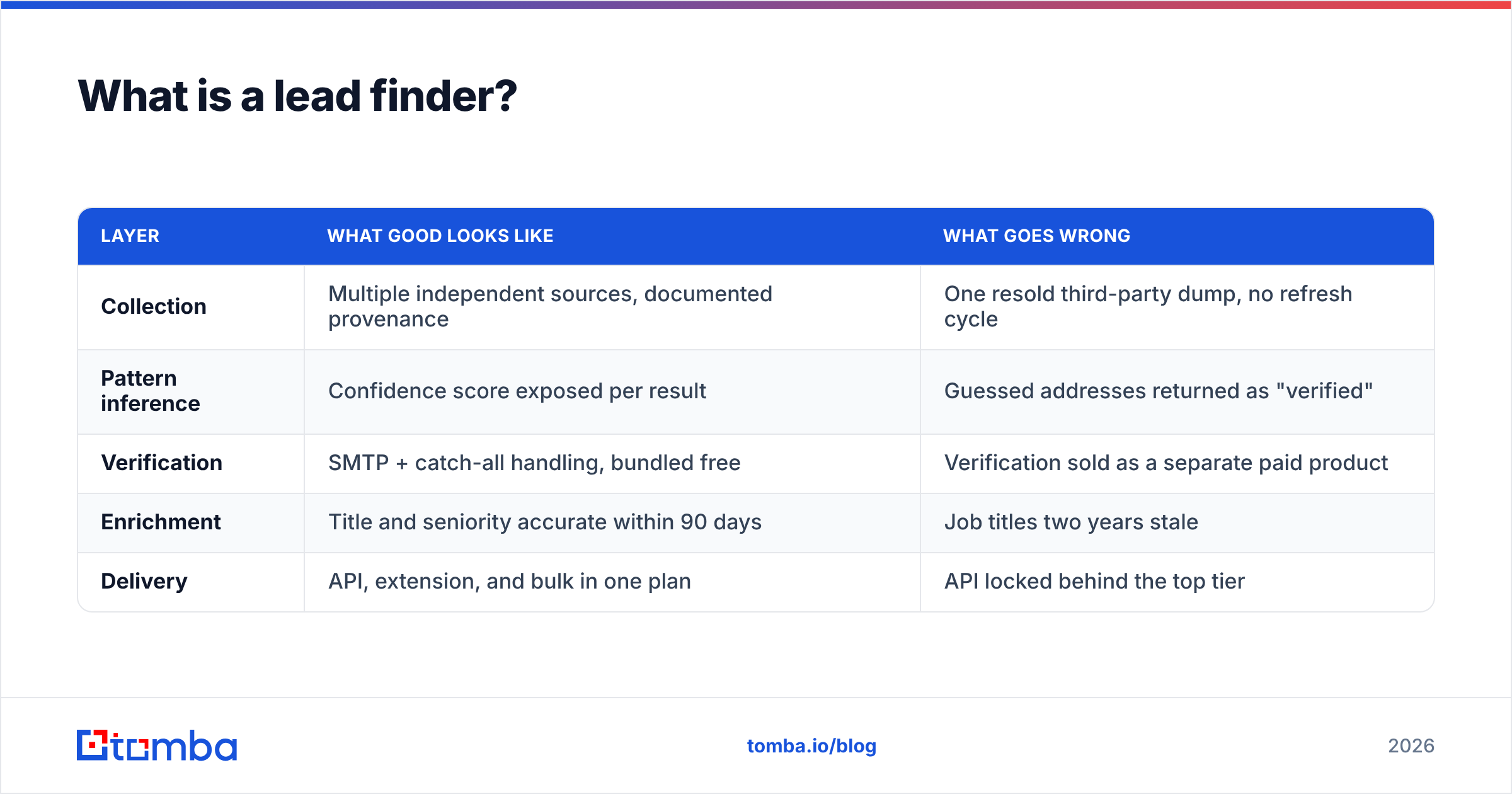
Under the hood, almost every lead finder is built from the same five layers. Understanding them is the whole game, because vendors compete on some layers and quietly outsource the others.
- Collection. Public web crawling, published corporate directories, press releases, WHOIS records, opt-in data partnerships, and contributory networks where users share their own address books in exchange for credits.
- Pattern inference. The system learns that a company uses
first.last@domain.comversusflast@domain.com, then generates candidate addresses for people it has never seen directly. - Verification. SMTP handshakes, MX record checks, syntax and disposable-domain filtering, and catch-all detection decide whether a candidate address is real.
- Enrichment. Title, seniority, department, location, company size, industry, funding stage, and installed technologies get attached to the record.
- Delivery. API, browser extension, CSV upload, CRM sync, or spreadsheet add-on — how the data reaches the place you actually work.
| Layer | What good looks like | What goes wrong |
|---|---|---|
| Collection | Multiple independent sources, documented provenance | One resold third-party dump, no refresh cycle |
| Pattern inference | Confidence score exposed per result | Guessed addresses returned as "verified" |
| Verification | SMTP + catch-all handling, bundled free | Verification sold as a separate paid product |
| Enrichment | Title and seniority accurate within 90 days | Job titles two years stale |
| Delivery | API, extension, and bulk in one plan | API locked behind the top tier |
That third row is where most buyer pain originates. A tool that finds an address but tells you nothing about whether it will bounce has handed you a liability, not a lead.

How does a lead finder actually find an email address?#
Two paths, and every vendor uses both.
Path one is direct retrieval. The address already exists in the index because it was published somewhere crawlable — a press contact page, a conference speaker bio, a GitHub commit, a public filing, an author byline. These results carry the highest confidence because nobody guessed anything. This is why an author finder works so reliably on media and content sites: bylines are public by design.
Path two is pattern-plus-verification. The system knows 40 employees at acme.com and that 38 of them use first.last@acme.com. You ask for Dana Whitfield. It generates dana.whitfield@acme.com, opens an SMTP conversation with Acme's mail server, and asks whether that mailbox accepts mail — without sending anything. If the server says yes, you get a verified result. If the server accepts everything (a catch-all domain), you get a flagged result that needs a different treatment entirely.
Catch-all domains are the single most misunderstood part of this workflow. Roughly one in five corporate domains accepts mail for any address, which means SMTP verification returns "valid" for asdfgh@company.com just as readily as for a real employee. Vendors handle this three ways: mark it unknown and charge you anyway, silently pass it off as valid, or run a separate probabilistic check. A dedicated catch-all verifier exists precisely because the naive SMTP path cannot resolve these domains on its own.
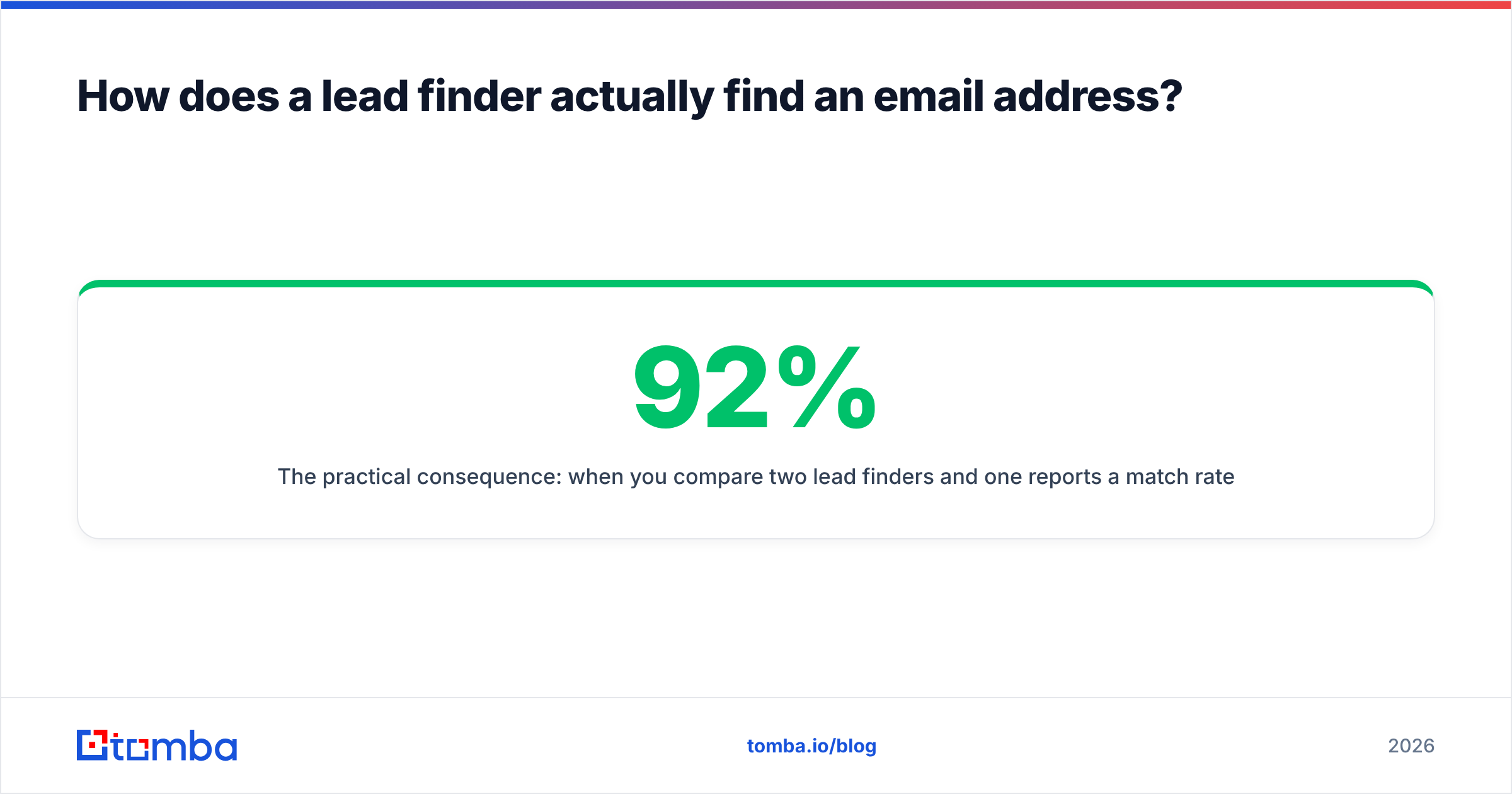
The practical consequence: when you compare two lead finders and one reports a 92% match rate while the other reports 71%, check how each one classifies catch-alls before concluding anything. The 92% tool may simply be counting unknowns as wins.
What separates a good lead finder from a bad one?#
Five criteria, ranked by how much they affect your actual pipeline.
Match rate on your specific segment. Not the vendor's published average. A tool tuned on US SaaS mid-market can collapse to 45% on German manufacturing SMBs or Japanese enterprises. Always test against a sample of accounts you genuinely target.
Verification included, not upsold. If finding and verifying are separate line items, your real cost per usable contact is roughly double the advertised price. Check whether the email verifier is bundled into the same credit pool or billed separately.
Credit fairness on misses. Some platforms charge a credit whether or not they return a result. Over 10,000 lookups at a 60% hit rate, that is 4,000 credits paid for nothing. Vendors that only bill on successful, verified results are structurally cheaper even at a higher list price.
Data freshness policy. Ask when the record was last confirmed. A vendor that cannot answer is telling you it does not track the answer. Published data sources and refresh cadence are a reasonable proxy for how seriously a provider takes decay.
Where it lives in your workflow. A brilliant database you have to export to CSV and reimport is a tax on every campaign. API access, a browser extension, and native CRM sync eliminate a real hour per day for an SDR team.
Analyst coverage is worth skimming here too. The lead intelligence category on G2 is one of the few places where you can read hundreds of verified reviews segmented by company size, which matters because a tool beloved by 500-person revenue orgs is frequently miserable for a two-person founding team.
Which lead finder tools should you compare in 2026?#
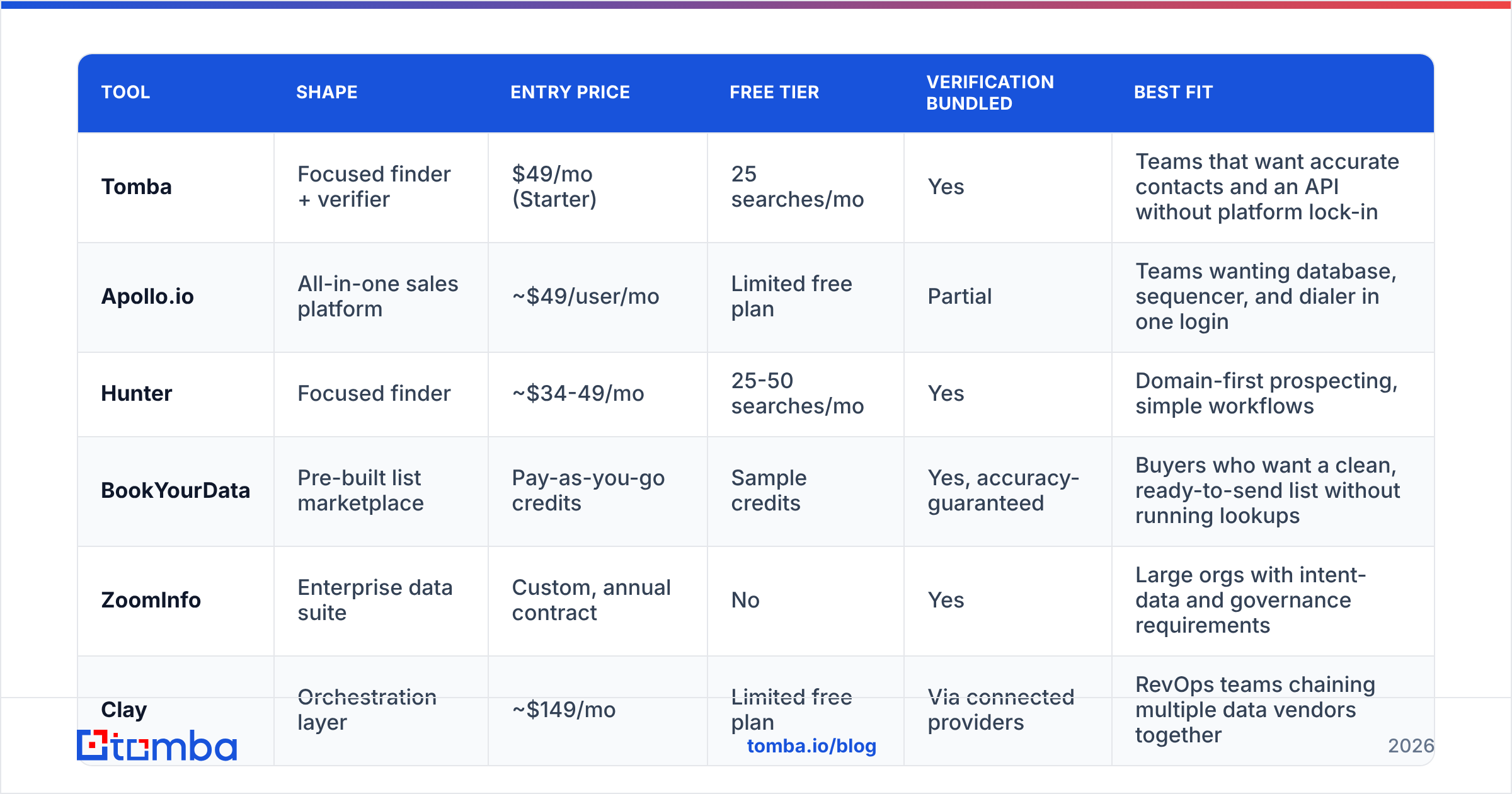
The market splits into four shapes: focused finders, all-in-one sales platforms, enterprise data suites, and pre-built list marketplaces. They are not interchangeable, and price alone will mislead you.
| Tool | Shape | Entry price | Free tier | Verification bundled | Best fit |
|---|---|---|---|---|---|
| Tomba | Focused finder + verifier | $49/mo (Starter) | 25 searches/mo | Yes | Teams that want accurate contacts and an API without platform lock-in |
| Apollo.io | All-in-one sales platform | ~$49/user/mo | Limited free plan | Partial | Teams wanting database, sequencer, and dialer in one login |
| Hunter | Focused finder | ~$34-49/mo | 25-50 searches/mo | Yes | Domain-first prospecting, simple workflows |
| BookYourData | Pre-built list marketplace | Pay-as-you-go credits | Sample credits | Yes, accuracy-guaranteed | Buyers who want a clean, ready-to-send list without running lookups |
| ZoomInfo | Enterprise data suite | Custom, annual contract | No | Yes | Large orgs with intent-data and governance requirements |
| Clay | Orchestration layer | ~$149/mo | Limited free plan | Via connected providers | RevOps teams chaining multiple data vendors together |
Prices above reflect publicly listed rates at the time of writing and change frequently; confirm on each vendor's own pricing page before committing. Tomba's tiers run Free (25 searches/mo), Starter $49/mo, Growth $99/mo, Pro $249/mo, and Enterprise custom — full details are on the Tomba pricing page.
A few honest notes on fit. All-in-one platforms like Apollo are genuinely convenient, and if you have no sequencer today, consolidating is defensible — just know that you are buying the data quality that comes with it, not choosing it. BookYourData occupies a different niche worth considering: instead of running lookups yourself, you buy a segmented, pre-verified list with an accuracy guarantee attached, which suits teams that need volume immediately and do not want to manage credits. Enterprise suites earn their price through intent signals, org charts, and compliance tooling — not through raw email accuracy, where focused finders routinely match or beat them.
Orchestration tools like Clay are a fifth category that confuses buyers. Clay does not primarily own data; it routes your lookups across providers and keeps the first good answer. That waterfall approach produces excellent coverage, but you still pay each underlying provider, so it sits on top of a lead finder rather than replacing one.

How much should a lead finder cost?#
Stop comparing monthly list price. Compare cost per verified, deliverable contact in your segment.
The arithmetic is simple and almost nobody runs it. Take the plan price, divide by the credits included, then divide again by your measured match rate, then adjust for whether misses consume credits.
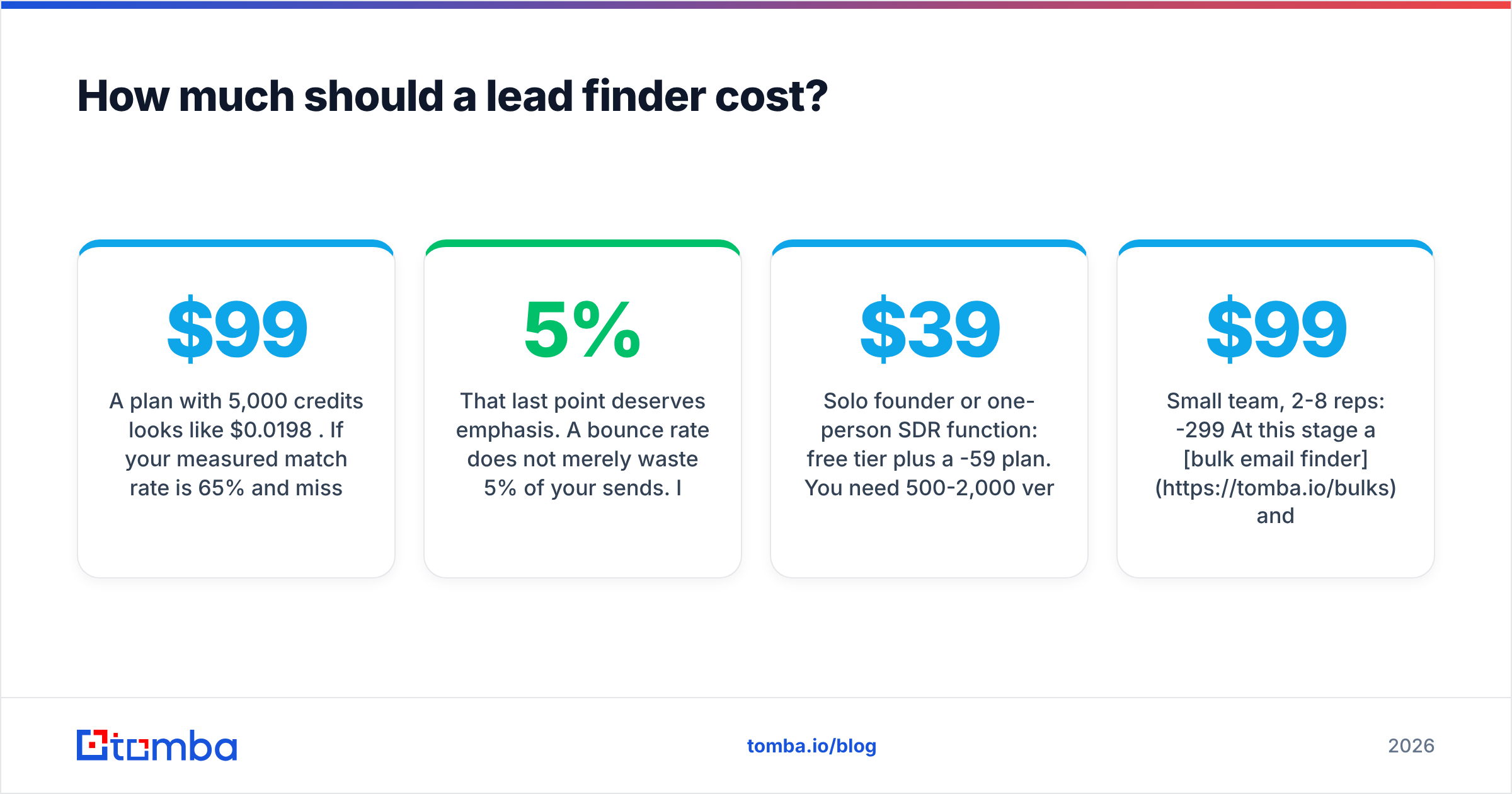
A $99/month plan with 5,000 credits looks like $0.0198 per credit. If your measured match rate is 65% and misses still burn credits, your true cost is $0.030 per usable contact. A $149/month plan with 5,000 credits that only charges on success, at a 78% match rate, costs $0.038 — slightly more, but the addresses bounce less, which protects the asset that actually matters: your sending domain.
That last point deserves emphasis. A 5% bounce rate does not merely waste 5% of your sends. It degrades sender reputation across the whole mailbox, pushing otherwise good messages to spam folders for weeks. HubSpot's ongoing sales research consistently shows reply rates collapsing once deliverability slips, and recovery takes far longer than the damage. Paying 20% more for verified data is cheap insurance against burning a domain you have spent a year warming.
Three budget bands to anchor on:
- Solo founder or one-person SDR function: free tier plus a $39-59/month plan. You need 500-2,000 verified contacts monthly, not 50,000.
- Small team, 2-8 reps: $99-299/month. At this stage a bulk email finder and API access matter more than seat count, because your workflow is list-driven.
- Enterprise: $15,000-60,000/year for a data suite, plus a focused finder alongside it. Running both is not redundancy — the suite handles account intelligence and the finder handles contact accuracy.
How do you test a lead finder before you commit?#
Thirty minutes, five steps, no vendor demo required.
- Build a 50-row truth set. Pick 50 contacts whose email addresses you already know to be correct — past customers, partners, people who have replied to you. Split them across the industries, company sizes, and countries you actually sell into.
- Strip the emails and run the lookup. Feed only name plus domain into each trial. Record what comes back: correct address, wrong address, or no result.
- Score three numbers. Match rate (results returned ÷ 50), accuracy (correct ÷ results returned), and catch-all share (flagged unknowns ÷ results returned). Accuracy under 92% is a disqualifier.
- Send a real test batch. Take 200 net-new addresses from the same tool and send a genuine, low-volume campaign. Watch the hard-bounce rate. Above 3% means the verification layer is weak regardless of what the dashboard claimed.
- Test the integration you will actually use. If your team lives in the CRM, install the sync. If you are building automation, hit the Tomba API or the equivalent endpoint and check rate limits, response latency, and error semantics. Tools that return HTTP 200 with an empty payload on failure will cost you a week of debugging later.
Run the identical protocol across every vendor on your shortlist in the same week. Data changes month to month; a test from March tells you little in September.
What mistakes do buyers make most often?#
Buying on database size. Total record count is the vanity metric of this industry. Coverage of your 2,000 target accounts is the only number with revenue attached. Ask any vendor to run your account list and report coverage before you sign — the ones that refuse are answering you anyway.
Skipping verification to save money. This is the most expensive saving in outbound. Unverified sends damage deliverability, and damaged deliverability suppresses every campaign afterward, including the ones with perfect data.
Annual contracts before a live test. Data quality drifts. A 12-month commitment based on a curated demo list is how teams end up paying for a tool the reps stopped opening in month three.
Ignoring compliance. GDPR, CCPA, and the growing patchwork of regional rules apply to how you acquire and store contact data, not just how you send. Confirm the vendor's lawful basis, its opt-out handling, and whether it will sign a DPA. The background on lead generation practice is a reasonable primer, but your legal review is not optional.
Treating the tool as the strategy. The best lead finder in the world hands you a correct address. It does not make the message worth reading. Targeting and offer quality still determine reply rates; data quality determines whether the message arrives at all.
Where should you start?#
If you are choosing your first lead finder, start narrow and prove the data before you buy a platform. Run a free tier against your real target accounts, measure match rate and bounce rate yourself, and only then decide whether you need a sequencer, a dialer, and an intent feed bundled alongside it.
Tomba Email Finder is a sensible place to run that test: the free tier gives you 25 searches a month with no card, verification is bundled rather than upsold, and Starter is $49/month when you are ready to scale. Find 50 contacts you can already validate, check the results against what you know, and let your own numbers pick the winner.
Related guides#
// get started
Find, verify and enrich your first contacts today
Start on the free plan with 25 searches a month, then scale when your team is ready.
Free plan · No credit card required · GDPR & CCPA
// about the author