Lead Follow Up in 2026: The Cadence and Timing That Convert
Most deals are lost in the gap between the first touch and the fifth. Here is the lead follow up cadence, timing, and channel mix that actually books meetings in 2026 — with a template sequence you can copy.
TL;DR
- Most pipelines do not leak at the top. They leak between touch two and touch five, where the majority of reps quietly stop following up.
- A working lead follow up system needs three things: a fixed cadence, a channel mix, and clean contact data. Missing any one of them makes the other two useless.
- Speed matters more than polish for inbound. Minutes-to-first-touch beats a beautifully written email sent the next morning.
- Outbound leads need 7–9 touches across 18–21 days. Inbound leads need 5–6 touches across 10–14 days. Different urgency, different math.
- Before you blame your copy, check your bounce rate. A 12% bounce rate is not a messaging problem, it is a data problem.
What is lead follow up, and why does it decide your quota?#
Lead follow up is the sequence of deliberate contact attempts you make after a lead enters your pipeline, until they either convert, explicitly decline, or age out of your process.
That definition sounds obvious. The part teams get wrong is "deliberate." Most follow up is reactive — a rep remembers a name, fires off a "just checking in," and calls it a touch. That is not a system, it is a habit with good intentions.
Here is the uncomfortable arithmetic. If you source 400 leads a quarter and your reps average 2.3 touches per lead before giving up, you are not running a 400-lead quarter. You are running a 400-lead quarter with the conversion math of a 150-lead quarter, because the majority of your leads never reach the touch count where replies actually happen. Reply curves in outbound are not linear — touches four through seven routinely produce as many responses as touches one through three combined, because that is when your name stops being noise and starts being familiar.
The second failure is silent. A follow up sequence that "underperforms" is often a sequence firing into dead mailboxes. If 15% of your addresses bounce and another 10% are role accounts nobody reads, a quarter of your effort was never delivered to a human. You will read that as "the market is tough." It is not the market.
How fast do you actually need to respond to a new lead?#
For inbound leads: minutes, not hours. For outbound-sourced leads: within one business day of the trigger event that made them worth contacting.
The speed-to-lead research that circulates in sales circles has been replicated enough times to treat the direction as settled, even if the exact multipliers vary by study and source. Leads contacted within the first five minutes of a form fill connect at dramatically higher rates than leads contacted an hour later, and the curve collapses hard after the first hour. The mechanism is not magic — it is attention. The prospect is still on your site, still thinking about the problem, still has the tab open. An hour later they are in a standup.
This has a practical consequence most teams ignore: your follow up system needs a fast lane and a slow lane.
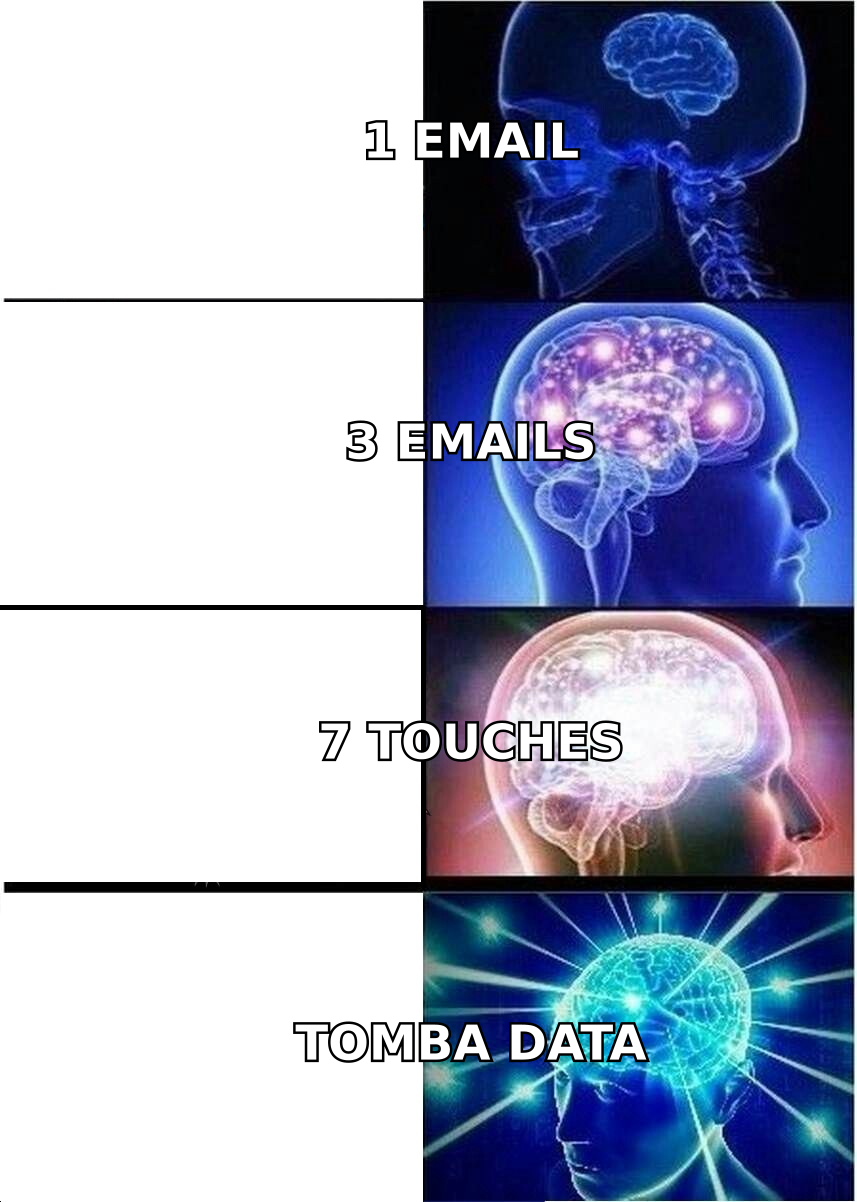
- Fast lane (inbound, high intent). Demo requests, pricing page form fills, trial signups. Target first touch under 10 minutes during business hours. Phone first, email second. Route by round-robin, not by territory, because territory routing adds latency.
- Medium lane (inbound, low intent). Ebook downloads, newsletter signups, webinar registrations. Target first touch within 24 hours. Email first, phone on touch three if the lead fits ICP.
- Slow lane (outbound, cold). Prospects you found, not prospects who found you. First touch whenever your sequence starts, but the cadence discipline matters far more than the start time.
- Recycle lane (closed-lost, gone dark). Leads that stalled or lost 90+ days ago. Quarterly re-entry with a genuinely new reason to reach out — a product change, a competitor migration, a trigger event.
- Do-not-touch lane. Unsubscribes, bounces, and anyone who said no clearly. Protecting this lane protects your sender reputation, which protects every other lane.
Sorting leads into those five lanes is roughly 80% of the operational work. The templates are the easy part.
What does a lead follow up cadence actually look like?#
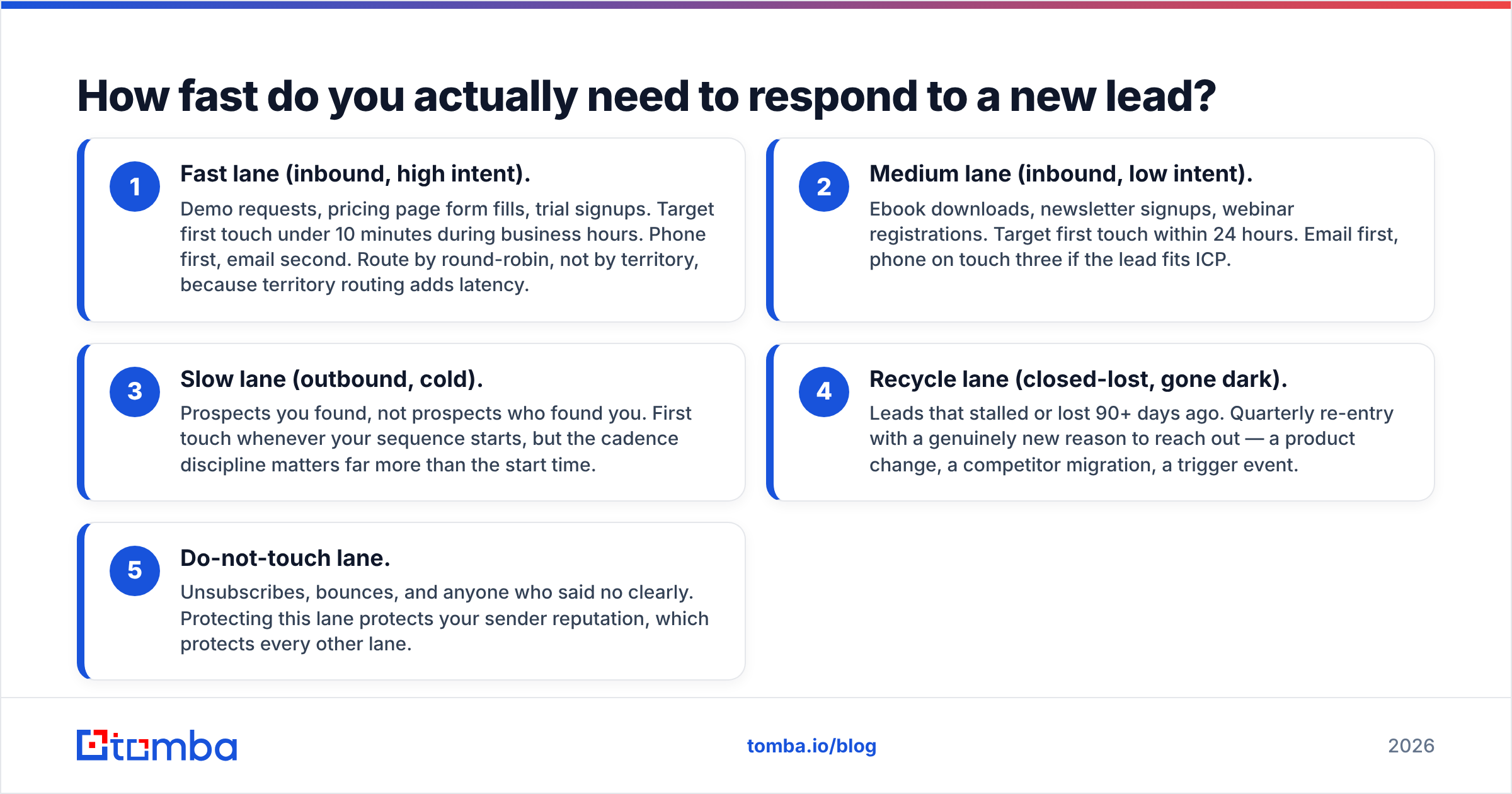
Here is a concrete 21-day outbound cadence and a compressed 14-day inbound cadence side by side. Use them as a starting shape, not scripture — the intervals matter more than the exact days.
| Touch | Outbound cadence (21 days) | Inbound cadence (14 days) | Channel |
|---|---|---|---|
| 1 | Day 1 — relevance-first opener, one specific observation | Day 0 — respond to the exact thing they asked about | Phone + email |
| 2 | Day 3 — different angle, no "following up" language | Day 1 — short nudge with a booking link | |
| 3 | Day 5 — phone call, voicemail if no answer | Day 3 — call, reference their form submission | Phone |
| 4 | Day 8 — LinkedIn connect or comment on their post | Day 5 — case study or proof point in their vertical | LinkedIn / email |
| 5 | Day 12 — value drop: relevant benchmark, no ask | Day 8 — video or loom walkthrough, 90 seconds max | |
| 6 | Day 16 — second call attempt, different time of day | Day 11 — "should I close the file?" breakup | Phone / email |
| 7 | Day 21 — breakup email, explicit and low pressure | — | |
| 8+ | Day 90 — recycle with new trigger | Day 60 — recycle into nurture |
Three things about this table are doing the real work.
The intervals widen. Days 1, 3, 5, 8, 12, 16, 21. Tight at the start when you have attention momentum, looser at the end so you do not read as desperate. Fixed three-day intervals for three weeks feel robotic because they are.
The channels rotate. Seven emails in a row is a spam pattern. Email, phone, LinkedIn, email, phone reads like a person with a reason. Multi-channel sequences consistently outperform single-channel ones, and the reason is mundane: different people check different inboxes.
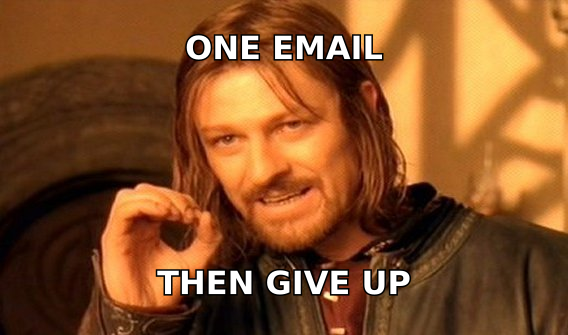
The breakup is real. Touch seven says you are closing the file, and you actually close the file. This is the highest-reply-rate email in most sequences, and it only works if you mean it. Send a breakup and then keep emailing and you have trained the prospect to ignore you permanently.
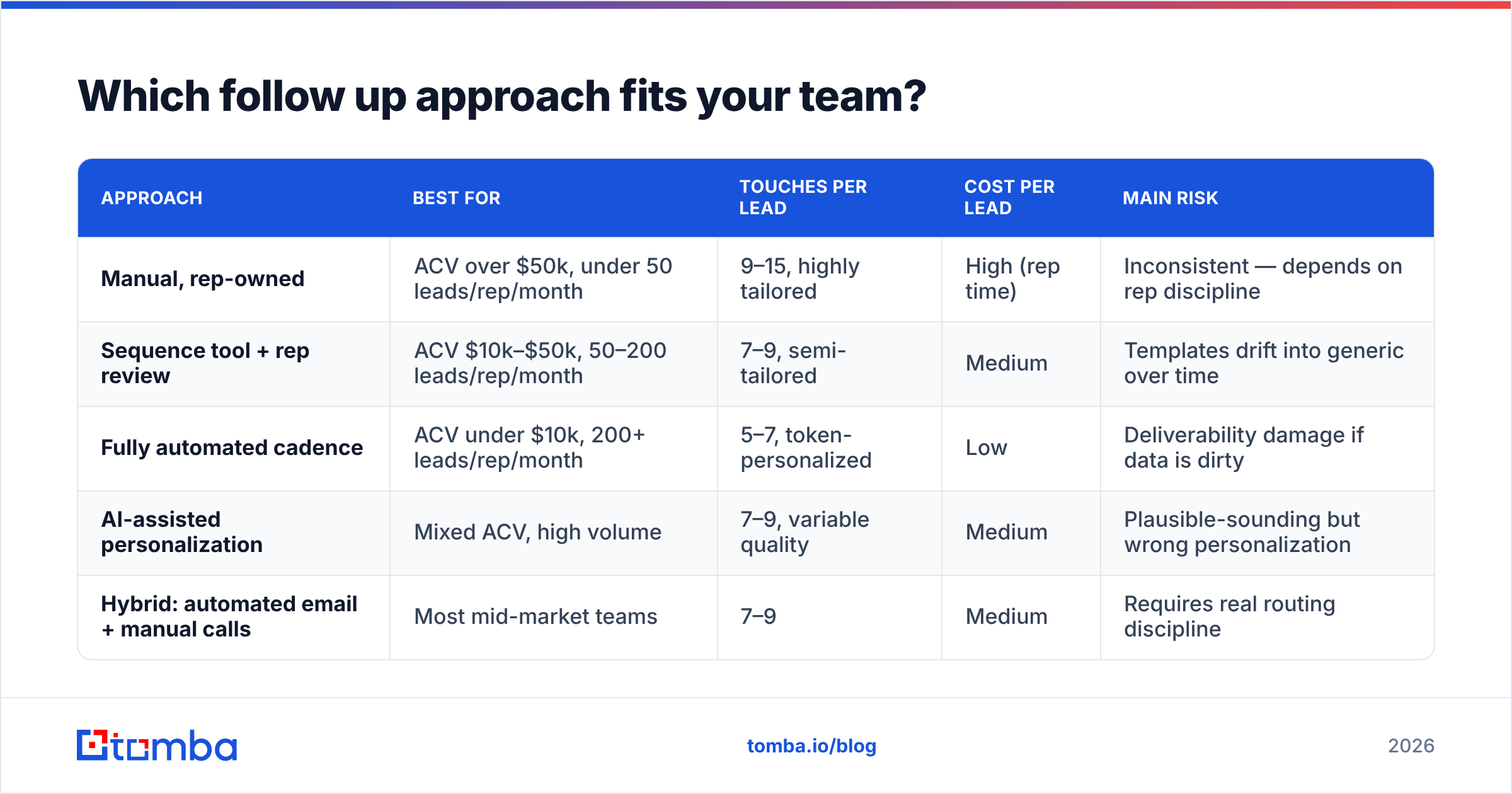
Which follow up approach fits your team?#
There is no single right model. There is a right model for your deal size, volume, and headcount.
| Approach | Best for | Touches per lead | Cost per lead | Main risk |
|---|---|---|---|---|
| Manual, rep-owned | ACV over $50k, under 50 leads/rep/month | 9–15, highly tailored | High (rep time) | Inconsistent — depends on rep discipline |
| Sequence tool + rep review | ACV $10k–$50k, 50–200 leads/rep/month | 7–9, semi-tailored | Medium | Templates drift into generic over time |
| Fully automated cadence | ACV under $10k, 200+ leads/rep/month | 5–7, token-personalized | Low | Deliverability damage if data is dirty |
| AI-assisted personalization | Mixed ACV, high volume | 7–9, variable quality | Medium | Plausible-sounding but wrong personalization |
| Hybrid: automated email + manual calls | Most mid-market teams | 7–9 | Medium | Requires real routing discipline |
The hybrid row is where most teams land after two years of experimentation. Automate the email spine, keep the calls and the LinkedIn touches human, and spend rep time on the leads that earn it.
One caveat on the AI row. AI personalization at scale is genuinely useful for research summarization and terrible at confident fabrication. If your tool writes "I saw your recent expansion into the Nordics" and there was no expansion, you have not personalized anything — you have proven you did not read. Gate AI-written first lines behind a human skim until you trust the source data.
Why does contact data quality decide your follow up results?#
Because a cadence multiplies whatever it is pointed at. Point nine touches at a bad address and you get nine bounces.
This is the least glamorous section of any lead follow up guide and the one that moves numbers fastest. A concrete sequence of operations before any cadence starts:
- Find the right address, not a guessed one. Permutating first.last@company.com and hoping is how you build a 20% bounce rate. A proper email finder resolves the actual pattern the company uses and returns a confidence signal with it.
- Verify before send, every time. Lists decay at roughly 2–3% per month as people change jobs. A list you verified in January is measurably worse in June. Run an email verifier pass immediately before a sequence launches, not at import time.
- Handle catch-all domains explicitly. Catch-all servers accept everything, which means standard verification returns "unknown." Treat unknowns as a separate segment with a lower-volume, higher-care cadence rather than dumping them into the main blast.
- Get a phone number for the fast lane. Touch three in both cadences above is a call. If you have no number, you have a six-touch sequence pretending to be a seven-touch sequence. A phone finder closes that gap for ICP-fit accounts.
- Suppress aggressively. Bounces, unsubscribes, and competitors go on a permanent list that every sequence checks against. This is the cheapest deliverability insurance available.
On sourcing: you have real options and they are not all the same shape. Self-serve finders like Tomba work best when you already know the company and need the person. Prebuilt list vendors such as BookYourData suit teams that want a filtered list delivered in one purchase rather than enriched account by account. Both are legitimate; the choice depends on whether your motion starts from a target account list or from a filter query. Whichever you use, verify on your side before sending — no vendor's freshness guarantee survives contact with a reorg.
How do you write follow up emails that do not sound like follow ups?#
Delete the phrase "just following up." It tells the prospect the email contains nothing new, which is usually accurate.
Every touch after the first needs its own reason to exist. Practical reasons that work:
- A new piece of information — a benchmark, a customer result in their industry, a relevant product change.
- A reframe — you pitched cost savings, now pitch time-to-value, because you do not know which one they care about.
- A question that is genuinely easy to answer — "Is this a 2026 problem or a 2027 problem?" gets replies because it costs nothing to answer.
- A referral request — "Is someone else on your team the right person here?" This one recovers a surprising number of dead threads.
- An explicit close — the breakup. Short, no guilt, door left open.
Length discipline matters more than cleverness. Under 100 words for touches two through six. One ask per email. No attachments before a reply. If you want a starting library, the free cold email templates collection is a reasonable place to steal structures from, and HubSpot's sales blog publishes consistently decent teardowns of what is working in the current inbox environment.
Track response rate per touch number, not just per sequence. When you see touch five outperforming touch two, you have proof that persistence is the variable — and a specific argument to make when a rep wants to quit at three.
How do you make follow up stick without micromanaging?#
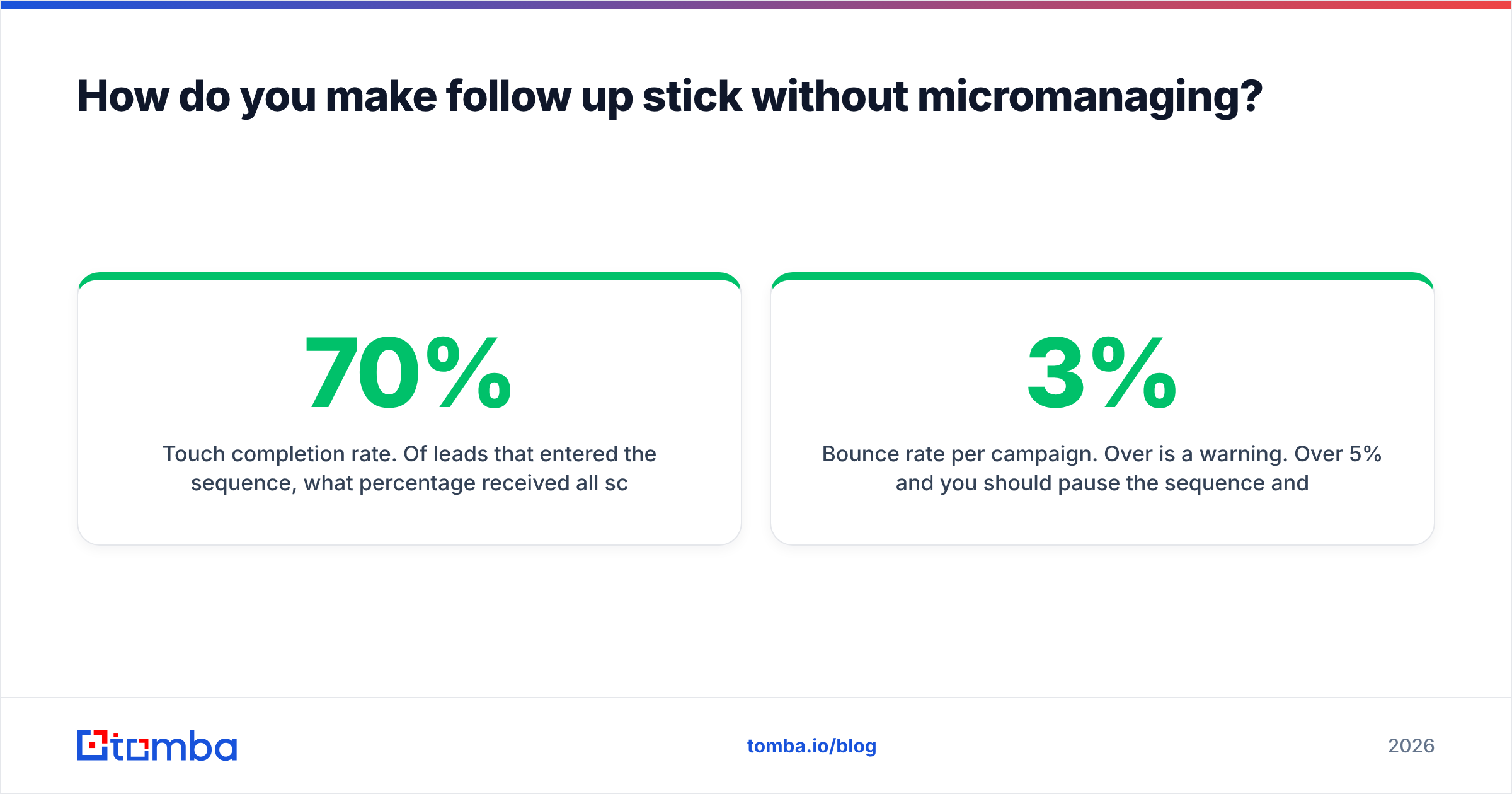
Instrument three numbers and review them weekly.
Touch completion rate. Of leads that entered the sequence, what percentage received all scheduled touches? If this is under 70%, your problem is execution, not copy. Fix it with tooling, not pep talks — a HubSpot integration or equivalent that writes enriched contact data straight into the CRM removes the most common excuse, which is "I did not have the email."
Time to first touch. Median, not average, because one rep who responds in 4 hours will not hide behind a colleague's 3 minutes in a median.
Bounce rate per campaign. Over 3% is a warning. Over 5% and you should pause the sequence and re-verify rather than push through. Providers throttle senders with poor list hygiene, and recovering a damaged domain takes weeks. Google's Postmaster Tools is the free way to see whether your reputation is drifting before your reply rate tells you the hard way.
Add one qualitative review: each month, read ten sequences that got no reply, start to finish, as the prospect would. Most teams discover their touch four is identical to their touch two. That is a 30-minute fix that no dashboard would have surfaced.
If you want external benchmarks to argue with, vendor category pages on G2 show what the sales engagement tools themselves claim, and reading their review complaints tells you more about real-world follow up failure modes than their marketing pages do.
Where should you start this week?#
Pick one lane and fix it end to end rather than upgrading everything at 10%.
For most teams the highest-return move is the fast lane: cut time-to-first-touch on inbound demo requests to under ten minutes, and make sure the address and phone number you touch with are verified before the rep picks up. That single change usually produces a visible pipeline difference inside one month, because it costs nothing in volume and everything in timing.
Then widen out. Lock a seven-touch outbound cadence with rotating channels, run verification before every launch, and review touch completion weekly. The sequence above is a working default — adapt the intervals, keep the structure.
Clean contact data is the part you cannot template your way around. If your follow up is landing in bounces or missing phone numbers at touch three, start there: run your next target account list through the Tomba Email Finder to resolve real addresses with confidence scores, verify them before launch, and see what your cadence does when every touch actually reaches a person. The free tier covers 25 searches a month if you want to test it on a small list first, and full Tomba pricing starts at $49/mo for Starter when you are ready to run it at volume.
Related guides#
// get started
Find, verify and enrich your first contacts today
Start on the free plan with 25 searches a month, then scale when your team is ready.
Free plan · No credit card required · GDPR & CCPA
// about the author