Lead Follow Up System: Build One That Closes in 2026
Most deals die in the gap between the first touch and the fifth. Here's how to build a lead follow up system with cadences, triggers, and data hygiene that actually gets replies.
TL;DR
- A lead follow up system is not a sequence tool. It's the combination of routing rules, cadence design, trigger logic, and data hygiene that decides who gets contacted, when, and with what.
- Most teams quit at 2 touches. Reply curves flatten around touch 8–10, which means the majority of pipeline sits in attempts 3 through 8 that nobody makes.
- Speed-to-lead is the single highest-leverage variable for inbound. Minutes matter; hours don't.
- Roughly a fifth of B2B contact data decays each year. If your follow-up runs on stale addresses, your "no reply" rate is really a bounce rate in disguise.
- Build the system in this order: clean data → routing SLA → cadence template → trigger overrides → measurement. Skipping step one makes the other four unmeasurable.
What is a lead follow up system?#
A lead follow up system is the documented, mostly-automated set of rules that governs every contact attempt after a lead enters your pipeline — who owns it, how fast they respond, how many touches across which channels, what changes the plan, and when the lead exits.
Think of it like a hospital triage desk. A walk-in with chest pain doesn't wait behind someone with a sprained wrist, and nobody decides that by vibes — there's a protocol. Your follow-up should work the same way: a demo request from a 500-person company gets a different response clock than an ebook download from a student, and that decision should be made by a rule, not by whichever rep happens to be refreshing the lead queue.
The distinction that matters: a sequence tool sends emails; a system decides what should be sent. You can own Outreach, Salesloft, or Instantly and still have no follow-up system, because the tool has no opinion about routing, qualification, or data quality. It executes whatever you point it at, including 4,000 dead addresses.
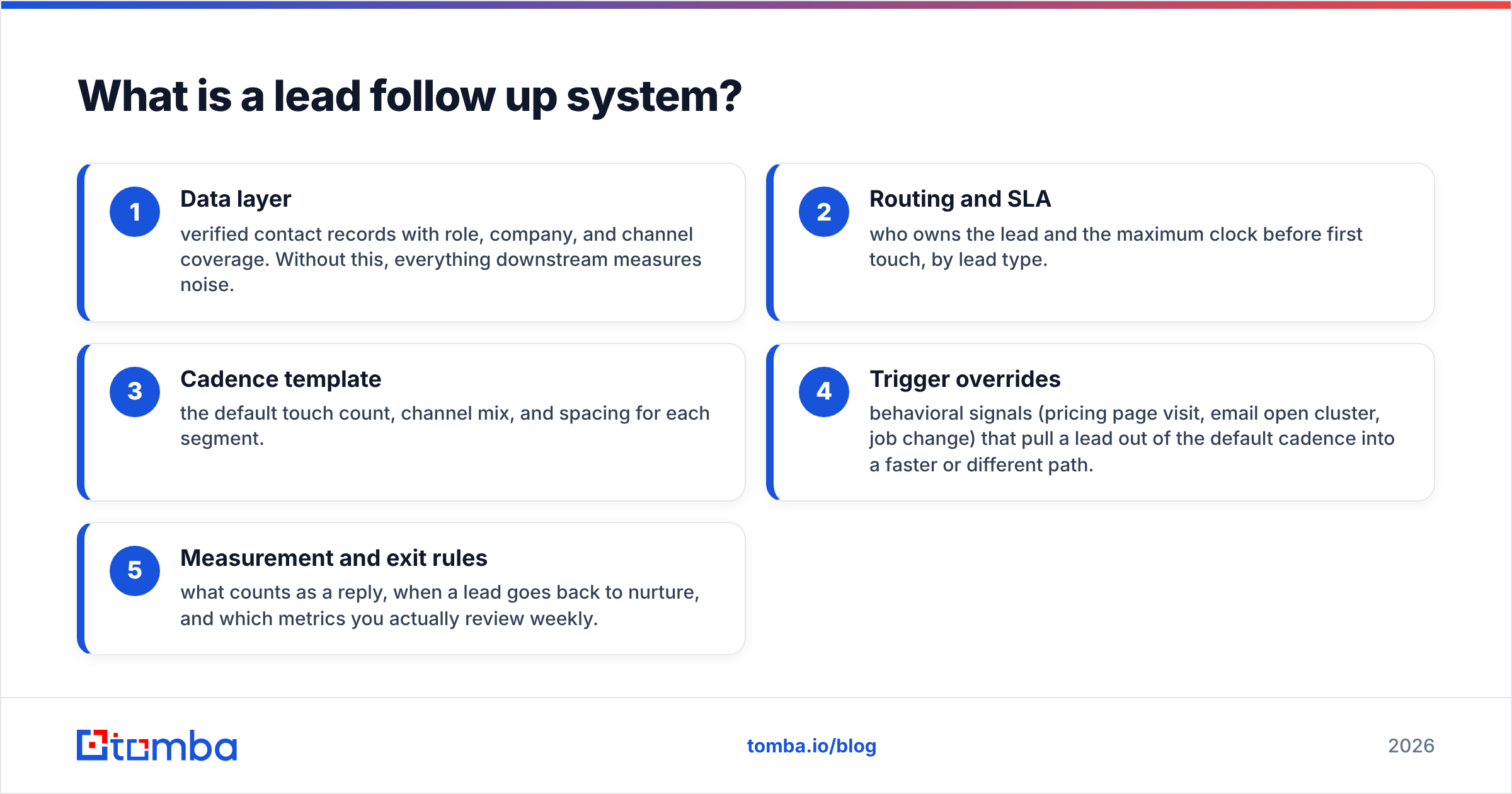
Here are the five components, in build order:
- Data layer — verified contact records with role, company, and channel coverage. Without this, everything downstream measures noise.
- Routing and SLA — who owns the lead and the maximum clock before first touch, by lead type.
- Cadence template — the default touch count, channel mix, and spacing for each segment.
- Trigger overrides — behavioral signals (pricing page visit, email open cluster, job change) that pull a lead out of the default cadence into a faster or different path.
- Measurement and exit rules — what counts as a reply, when a lead goes back to nurture, and which metrics you actually review weekly.
Why do most follow-up efforts fail before touch 3?#
Because the effort stops long before the buyer's attention starts. Sales activity data consistently shows a large share of leads receive one or two attempts and are then quietly abandoned — marked "not interested" without ever having been interested or uninterested, because nobody reached them.
The math is unforgiving. If each touch has an independent chance of landing during a window when the prospect is both at their desk and mentally available, then cumulative reply probability climbs steeply through the middle of a cadence. Stopping at touch 2 harvests maybe a third of the replies a full cadence would produce — and you've already paid the full acquisition cost for the lead.
Three failure patterns cause almost all of it:
- No owner, no clock. Leads land in a shared inbox or an unassigned CRM view. Everyone assumes someone else has it. The CRM shows the lead as "new" for nine days.
- Manual queueing. Reps decide each morning who to follow up with. Human working memory tops out around a few dozen open threads; anything past that falls off silently.
- Invisible bounces. The sequence "sent" 600 emails. 140 hard-bounced or hit catch-all voids. The dashboard reports a 3% reply rate on 600, when the real denominator is 460 — and the bounces are simultaneously torching sender reputation for the 460 that were fine.

That third one is the quiet killer. You can design a beautiful cadence and still watch it underperform because a quarter of the list was never deliverable. Running the list through an email verifier before the first send costs a few cents per record and removes an entire class of false conclusions from your reporting.
How fast does first contact need to be?#
Minutes, not hours — and the decay is steep enough that it's worth engineering around.
The well-known lead response research (originally out of InsideSales and echoed by HubSpot's own benchmarks) found contact and qualification odds drop by roughly an order of magnitude between a 5-minute and a 30-minute response, and again between 30 minutes and an hour. The mechanism is simple: a person who just filled out your form is, at that exact moment, thinking about the problem you solve. An hour later they're in a meeting. A day later they've booked a call with your competitor.
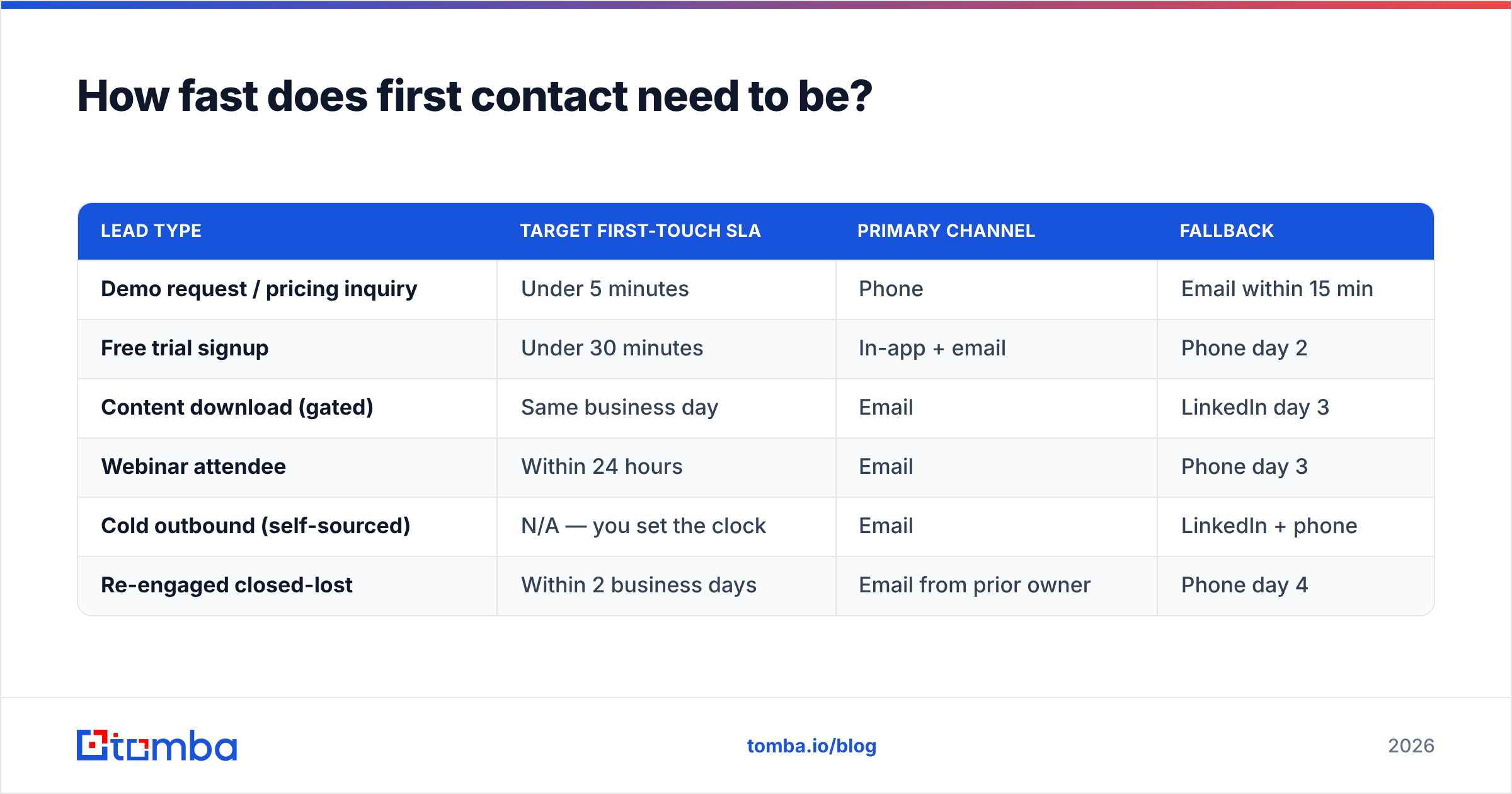
| Lead type | Target first-touch SLA | Primary channel | Fallback |
|---|---|---|---|
| Demo request / pricing inquiry | Under 5 minutes | Phone | Email within 15 min |
| Free trial signup | Under 30 minutes | In-app + email | Phone day 2 |
| Content download (gated) | Same business day | LinkedIn day 3 | |
| Webinar attendee | Within 24 hours | Phone day 3 | |
| Cold outbound (self-sourced) | N/A — you set the clock | LinkedIn + phone | |
| Re-engaged closed-lost | Within 2 business days | Email from prior owner | Phone day 4 |
Two practical notes. First, an SLA you can't measure is a wish — instrument first-touch timestamps in the CRM or the SLA will drift within a month. Second, speed only helps if the touch is competent; a 90-second auto-reply that says "a rep will contact you shortly" is not a first touch, it's a receipt.
What does a cadence that actually works look like?#
Eight to twelve touches over three to four weeks, mixed across at least two channels, front-loaded in the first ten days.
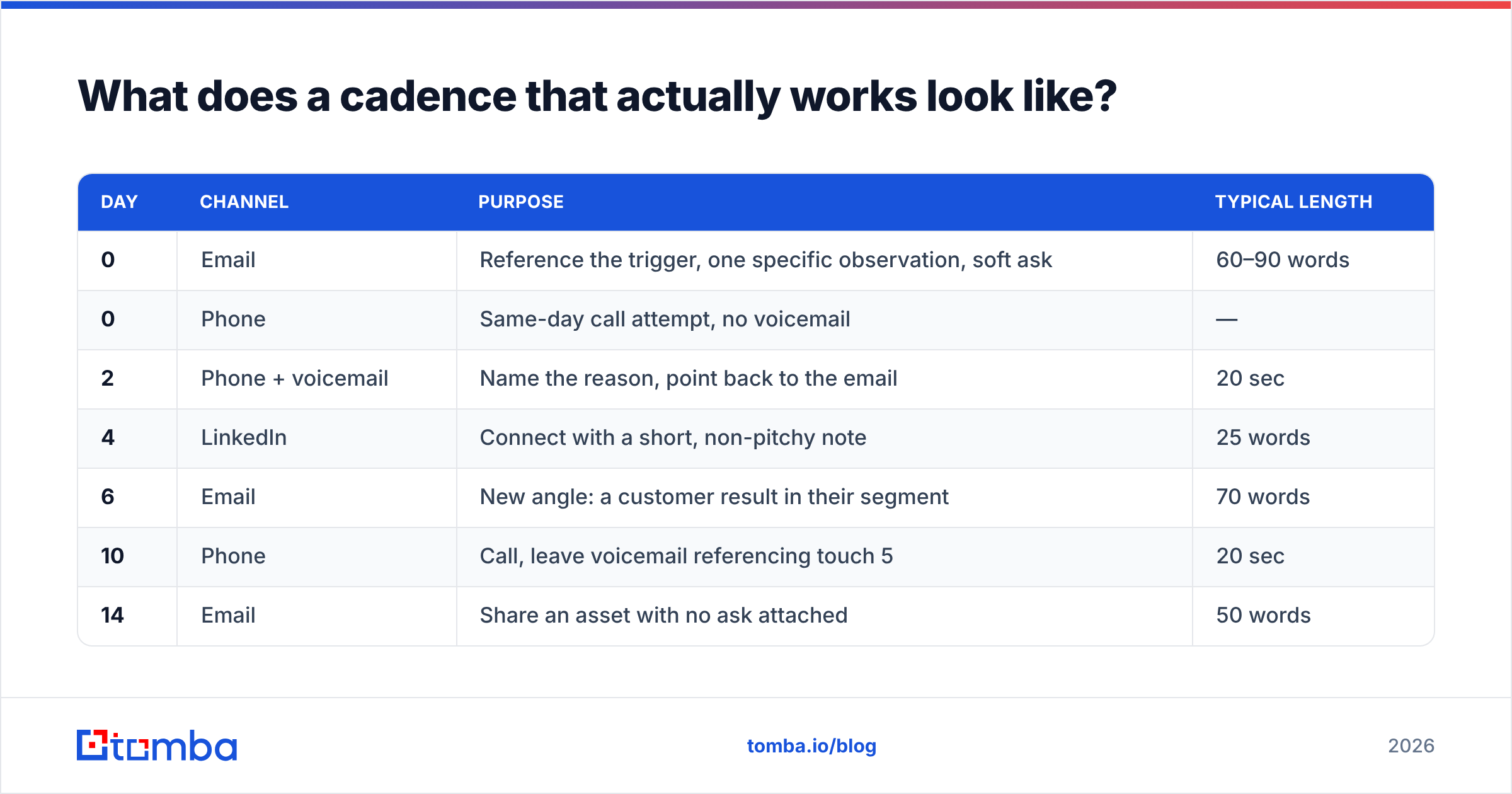
The shape matters more than the exact numbers. Early touches are close together because interest decays fastest right after the trigger event; later touches spread out because you're now playing for the moment the prospect's circumstances change. Below is a defensible default for a mid-market B2B motion — adjust the channel mix to where your buyers actually live.
| Day | Channel | Purpose | Typical length |
|---|---|---|---|
| 0 | Reference the trigger, one specific observation, soft ask | 60–90 words | |
| 0 | Phone | Same-day call attempt, no voicemail | — |
| 2 | Phone + voicemail | Name the reason, point back to the email | 20 sec |
| 4 | Connect with a short, non-pitchy note | 25 words | |
| 6 | New angle: a customer result in their segment | 70 words | |
| 10 | Phone | Call, leave voicemail referencing touch 5 | 20 sec |
| 14 | Share an asset with no ask attached | 50 words | |
| 18 | Comment or DM on something they posted | — | |
| 24 | Breakup — explicit, low-pressure, easy to reply to | 40 words |
Rules that make this work in practice:
- One idea per touch. Multi-ask emails convert worse than single-ask emails at every stage.
- Never resend the same message with "just bumping this." Each touch needs a new reason to exist. If you can't think of one, the cadence is too long for that segment.
- Channel-switch after silence. Three unanswered emails in a row means email is not the channel. Get a B2B phone number or move to LinkedIn.
- The breakup email works — it reliably produces a meaningful share of a cadence's total replies, partly from people who meant to answer and partly from people who'll tell you to stop, which is also useful information.
- Reply detection must be airtight. Nothing destroys credibility faster than touch 6 firing after a prospect already answered touch 4.
Keep a small library of tested cold email templates per segment so reps aren't writing from scratch at touch 7, which is exactly when writing quality collapses.
Which triggers should override the default cadence?#
Anything that proves the prospect is thinking about you right now. Triggers are the difference between a follow-up system and a drip campaign.
- Pricing page visit — pull the lead to the front of the queue and call the same day. This is the highest-intent passive signal most companies collect and ignore. Website visitor identification surfaces these for anonymous traffic.
- Repeated opens or link clicks in a short window — someone is forwarding your email internally. Follow up within the hour, and consider adding a second contact at the account.
- Job change at a closed-lost account — a champion who moved companies is the warmest cold lead that exists. Re-verify the new address and restart at touch 1 with an explicit reference to the prior relationship.
- Funding, hiring, or tech-stack changes — a company that just posted six SDR roles has a different problem set than it did last quarter. Time the outreach to the announcement, not to your cadence calendar.
- Inbound reply that isn't a yes — "not now, ask me in Q2" is a scheduling instruction, not a rejection. It should create a dated task, not a closed record.
The operational trap here is trigger overload. If everything is a trigger, reps stop trusting the queue and go back to picking leads by gut. Start with two: pricing page visits and reply-but-not-now. Add a third only when the first two are consistently actioned within SLA.
How does data quality decide whether any of this works?#
It sets the ceiling. You cannot follow up with a contact you can't reach, and a large fraction of "unresponsive" leads are simply unreachable ones.
B2B contact data decays at roughly 20–30% per year through job changes, company moves, and domain changes — a figure widely cited across the data-quality literature and visible in any CRM older than eighteen months. On a two-year-old list, close to half your records are questionable. That's not a follow-up problem; it's an input problem wearing a follow-up costume.
Build three hygiene steps into the system:
- Verify before the first send. Every new record passes through verification. Hard bounces never enter a sequence. Catch-all domains get flagged and routed to a phone-first cadence instead of being treated as valid — a catch-all verifier gives you a confidence signal rather than a coin flip.
- Re-verify on a schedule. Anything untouched for 90 days gets re-checked before reactivation. This is cheap and prevents reactivation campaigns from nuking your domain reputation.
- Enrich on entry, not on demand. A lead with a job title, company size, and a second channel can be routed correctly. A lead with just an email and a first name goes into the generic bucket, which is where follow-up quality goes to die. Contact enrichment at the point of capture keeps the routing logic honest.
Where do the missing addresses come from in the first place? For self-sourced outbound, a domain search against a target account returns the verified addresses and patterns on that domain, which is materially more reliable than guessing first.last@ and hoping. For inbound records with a personal Gmail and a company name, reverse lookup and enrichment fill the corporate address you actually want in the CRM.
How should you measure a follow-up system?#
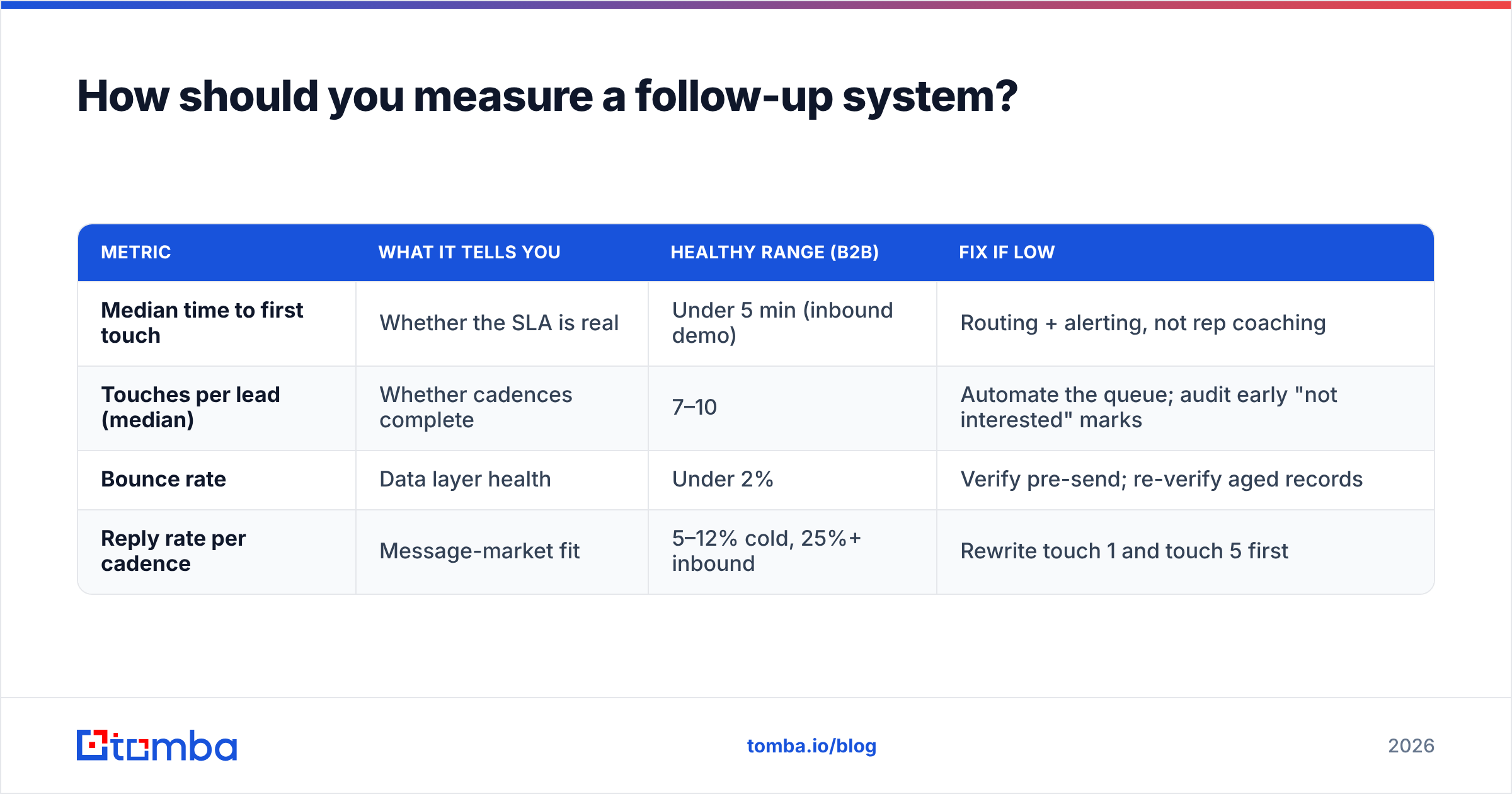
On four numbers, reviewed weekly, with a hard rule that none of them are trusted until bounce rate is under 2%.
| Metric | What it tells you | Healthy range (B2B) | Fix if low |
|---|---|---|---|
| Median time to first touch | Whether the SLA is real | Under 5 min (inbound demo) | Routing + alerting, not rep coaching |
| Touches per lead (median) | Whether cadences complete | 7–10 | Automate the queue; audit early "not interested" marks |
| Bounce rate | Data layer health | Under 2% | Verify pre-send; re-verify aged records |
| Reply rate per cadence | Message-market fit | 5–12% cold, 25%+ inbound | Rewrite touch 1 and touch 5 first |
Two measurement traps worth naming. Averages hide everything — a 4-hour average first-touch time usually means most leads get 10 minutes and a handful get three days; look at the median and the p90. And reply rate without bounce rate is meaningless, since a bad denominator can make a failing cadence look mediocre and a good one look failing. Check your sender reputation alongside these numbers; a reputation slide will depress every metric in the table at once and reps will blame the copy.
For benchmarking against peers rather than against yourself, the category reviews on G2 and the sales-process research from Gartner are more useful than vendor-published stats, which tend to be drawn from their own best-performing accounts.
What should you build first if you have nothing?#
In one week, in this order:
- Day 1 — Audit the data. Export every open lead. Verify the list. You'll likely find 10–25% unreachable. That number is your baseline excuse-remover.
- Day 2 — Write the routing rules. Three lead types maximum, each with an owner and an SLA. Put it in writing where reps can see it.
- Day 3 — Build one cadence. Nine touches, two channels, using the shape in the table above. One cadence, not six.
- Day 4 — Wire two triggers. Pricing page visit and "not now" replies. Nothing else yet.
- Day 5 — Instrument the four metrics. If your CRM can't report median time to first touch, that's the first thing to fix.
Resist the urge to buy more tooling before step 1 is done. A team with clean data, one good cadence, and an enforced SLA will outperform a team with three platforms and a 22% bounce rate every quarter, without exception.
Start with the input, not the sequence#
Your follow-up system is only as good as the contact records feeding it. Before you redesign a single cadence, make sure the addresses in it are real, current, and attached to the right person.
Tomba's Email Finder finds and verifies professional email addresses by name, company, or domain, so every lead that enters your cadence is one you can actually reach — with bulk processing for existing lists and an API for verifying at the point of capture. The free tier covers 25 searches a month; paid plans start at $49/mo. See Tomba pricing for the full breakdown, and run your current lead list through verification before you rebuild anything else — the results usually reframe the whole project.
Related guides#
// get started
Find, verify and enrich your first contacts today
Start on the free plan with 25 searches a month, then scale when your team is ready.
Free plan · No credit card required · GDPR & CCPA
// about the author