Lead Gen CRM in 2026: What It Is, Costs, and Best Picks
A lead gen CRM is supposed to create pipeline, not just store contacts. Here's what separates the two, which tools actually qualify in 2026, what they cost per seat, and when a plain CRM plus a data layer beats the all-in-one.
TL;DR
- A lead gen CRM is a CRM whose primary job is creating and qualifying new pipeline — capture, enrichment, scoring, routing, and outbound sequencing — not just recording deals that already exist.
- Most "lead gen CRMs" are really one of three things: a classic CRM with a marketing bolt-on (HubSpot, Zoho), a sales-execution CRM with sequencing built in (Close, Pipedrive + add-ons), or a database-first platform that ships a lightweight CRM on top (Apollo).
- Seat pricing ranges from roughly $14 to $99+ per user per month at list, but the real cost driver is contact tiers and enrichment credits, not seats.
- The part that decides whether any of it works is the data layer. A perfect pipeline stage full of bounced emails converts at zero.
- For most teams under 20 reps, a cheap pipeline CRM plus a dedicated finder/verifier stack beats an expensive all-in-one — and costs about a third as much.
What is a lead gen CRM?#
A lead gen CRM is a customer relationship management system built around the top of the funnel rather than the bottom.
Think of a standard CRM as a filing cabinet with a calendar attached: it remembers who you talked to, what you promised, and when you said you'd follow up. A lead gen CRM is that filing cabinet plus the machine that fills it — form capture, list building, data enrichment, lead scoring, assignment rules, and usually an email sequencer.
The distinction matters because the two are optimised for opposite problems. A traditional CRM assumes leads arrive from somewhere else and your job is to manage them. A lead gen CRM assumes finding the leads is the job.
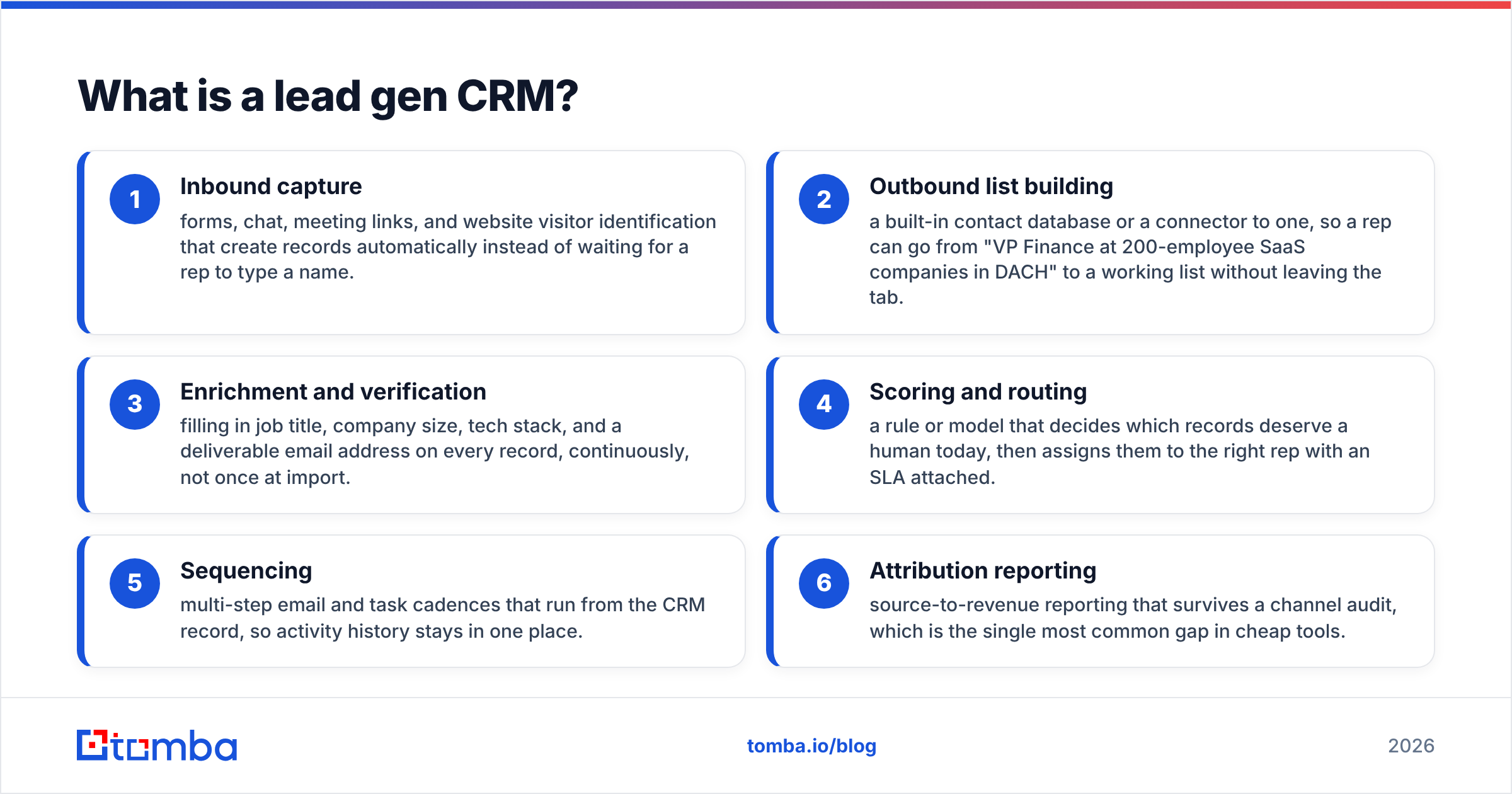
In practice, four capabilities define the category:
- Inbound capture — forms, chat, meeting links, and website visitor identification that create records automatically instead of waiting for a rep to type a name.
- Outbound list building — a built-in contact database or a connector to one, so a rep can go from "VP Finance at 200-employee SaaS companies in DACH" to a working list without leaving the tab.
- Enrichment and verification — filling in job title, company size, tech stack, and a deliverable email address on every record, continuously, not once at import.
- Scoring and routing — a rule or model that decides which records deserve a human today, then assigns them to the right rep with an SLA attached.
- Sequencing — multi-step email and task cadences that run from the CRM record, so activity history stays in one place.
- Attribution reporting — source-to-revenue reporting that survives a channel audit, which is the single most common gap in cheap tools.
If a tool does 1, 4, and 6 but not 2 and 3, you have a marketing automation platform. If it does 2, 3, and 5 but not 6, you have a sales engagement tool. A genuine lead gen CRM covers all six, and very few do it well at every price point.
How is a lead gen CRM different from a regular CRM?#
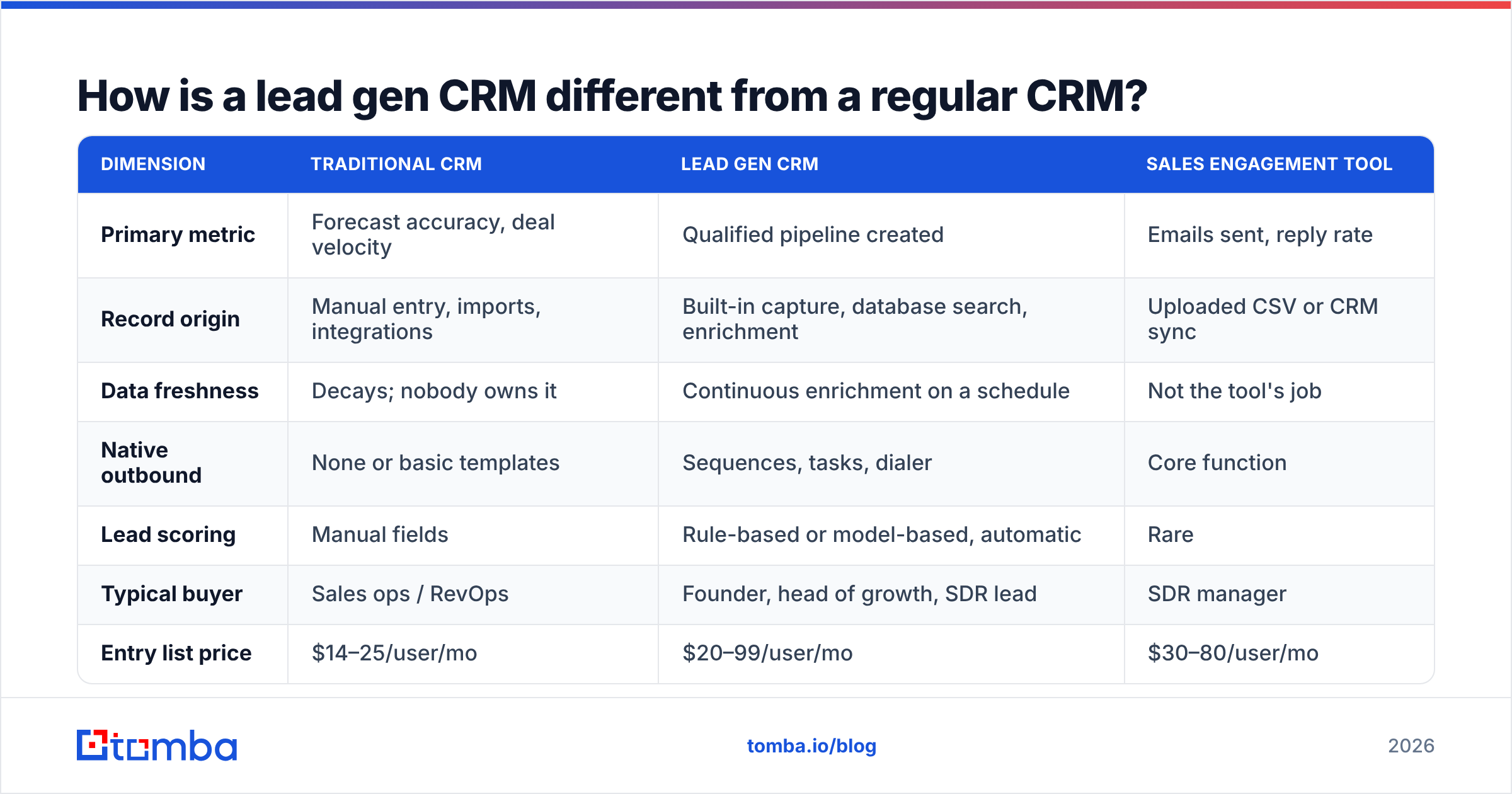
The clearest way to see the difference is to look at what each system is measured on.
| Dimension | Traditional CRM | Lead gen CRM | Sales engagement tool |
|---|---|---|---|
| Primary metric | Forecast accuracy, deal velocity | Qualified pipeline created | Emails sent, reply rate |
| Record origin | Manual entry, imports, integrations | Built-in capture, database search, enrichment | Uploaded CSV or CRM sync |
| Data freshness | Decays; nobody owns it | Continuous enrichment on a schedule | Not the tool's job |
| Native outbound | None or basic templates | Sequences, tasks, dialer | Core function |
| Lead scoring | Manual fields | Rule-based or model-based, automatic | Rare |
| Typical buyer | Sales ops / RevOps | Founder, head of growth, SDR lead | SDR manager |
| Entry list price | $14–25/user/mo | $20–99/user/mo | $30–80/user/mo |
| Fails when | Reps don't update it | Underlying contact data is stale | Deliverability collapses |
The last row is the one people skip. Every category has a characteristic failure mode, and for lead gen CRMs it is almost never the software — it is the data flowing through it. Gartner's research on CRM data quality has been saying a version of this for years: organisations consistently underestimate the revenue cost of decayed contact records. B2B contact data decays somewhere in the 20–30% range annually as people change jobs, which means a two-year-old list is roughly half fiction.
Which lead gen CRMs are worth comparing in 2026?#
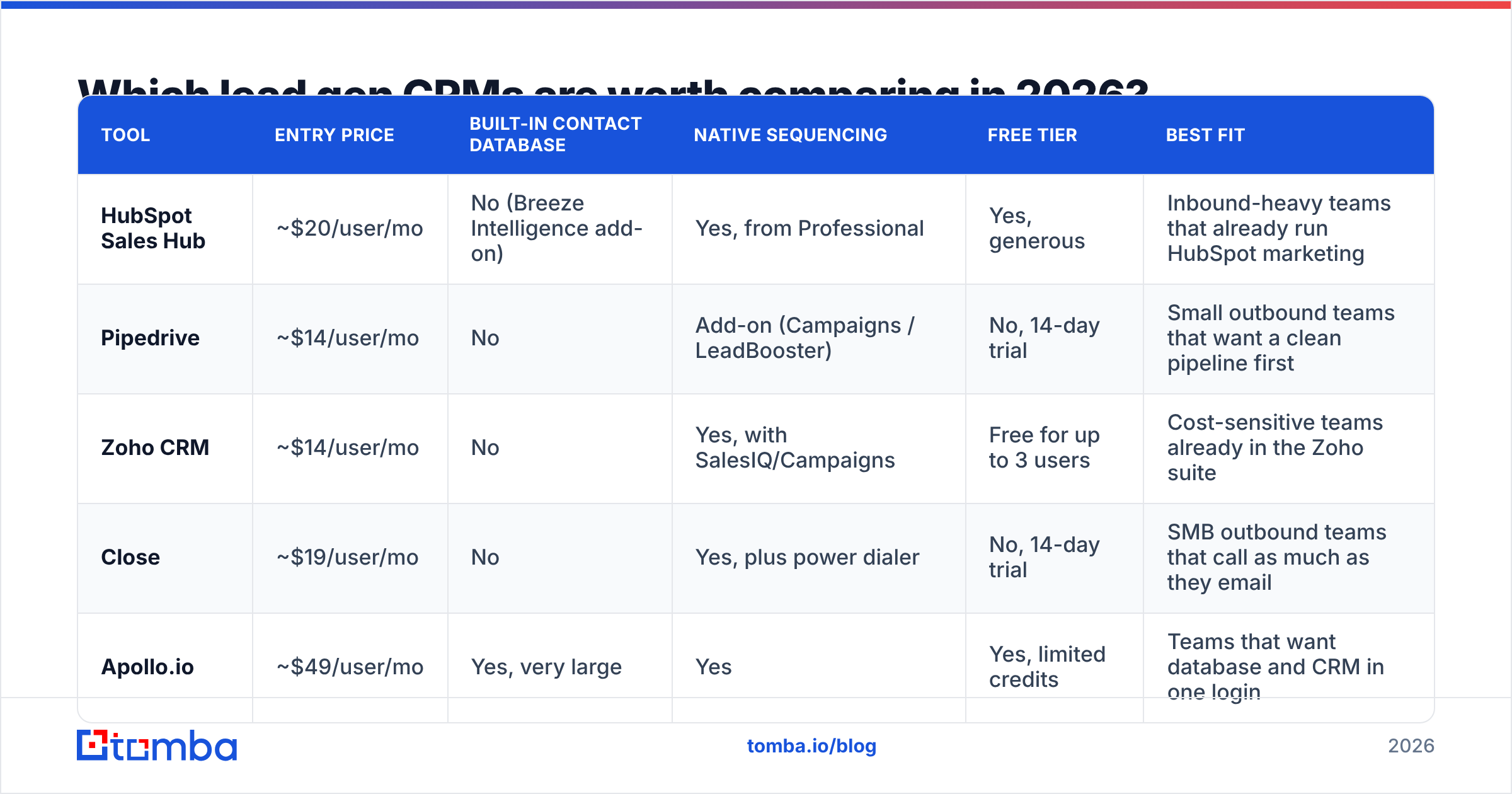
Five tools cover most of the realistic shortlist. Prices below are list prices for the entry paid tier at the time of writing — annual billing, per user, per month. Always confirm on the vendor's own pricing page before you budget, because packaging in this category changes several times a year.
| Tool | Entry price | Built-in contact database | Native sequencing | Free tier | Best fit |
|---|---|---|---|---|---|
| HubSpot Sales Hub | ~$20/user/mo | No (Breeze Intelligence add-on) | Yes, from Professional | Yes, generous | Inbound-heavy teams that already run HubSpot marketing |
| Pipedrive | ~$14/user/mo | No | Add-on (Campaigns / LeadBooster) | No, 14-day trial | Small outbound teams that want a clean pipeline first |
| Zoho CRM | ~$14/user/mo | No | Yes, with SalesIQ/Campaigns | Free for up to 3 users | Cost-sensitive teams already in the Zoho suite |
| Close | ~$19/user/mo | No | Yes, plus power dialer | No, 14-day trial | SMB outbound teams that call as much as they email |
| Apollo.io | ~$49/user/mo | Yes, very large | Yes | Yes, limited credits | Teams that want database and CRM in one login |
Two honest caveats about that table.
First, "built-in contact database" is not automatically a win. Bundled databases are convenient and usually cheaper per record, but coverage and accuracy vary sharply by region and seniority. If your ICP is European mid-market or non-English-speaking markets, test coverage on your actual accounts before committing to an annual contract. Providers such as BookYourData have built strong reputations precisely because they focus on verified, pay-as-you-go B2B records rather than bundling data into a seat licence — which is often the better economic fit when your list volume is lumpy rather than constant.
Second, HubSpot and Zoho win a lot of these bake-offs on ecosystem rather than lead gen features. If your marketing team already lives in HubSpot, the integration tax of running a second CRM usually outweighs a better sequencer. You can check current tier-by-tier detail directly on the HubSpot pricing page and cross-reference real user complaints on G2's CRM category — the review volume there is large enough that recurring complaints are signal, not noise.
What does a lead gen CRM actually cost?#
Seat price is the number vendors advertise and the number that matters least.
Three line items do the real damage:
- Contact tiers. Marketing-side CRMs price on how many contacts you store. Import 100,000 records from a bulk buy and your "$20/seat" plan quietly becomes a four-figure monthly invoice. This is the single most common budget surprise in the category.
- Enrichment credits. Bundled credits look generous until you run a real campaign. A 5,000-account territory build with contact discovery at two or three contacts per account burns 10,000–15,000 credits in a week.
- Annual commitments and seat minimums. Several vendors in this space require three- or five-seat minimums on the tiers where sequencing appears, so a three-person team pays for five.
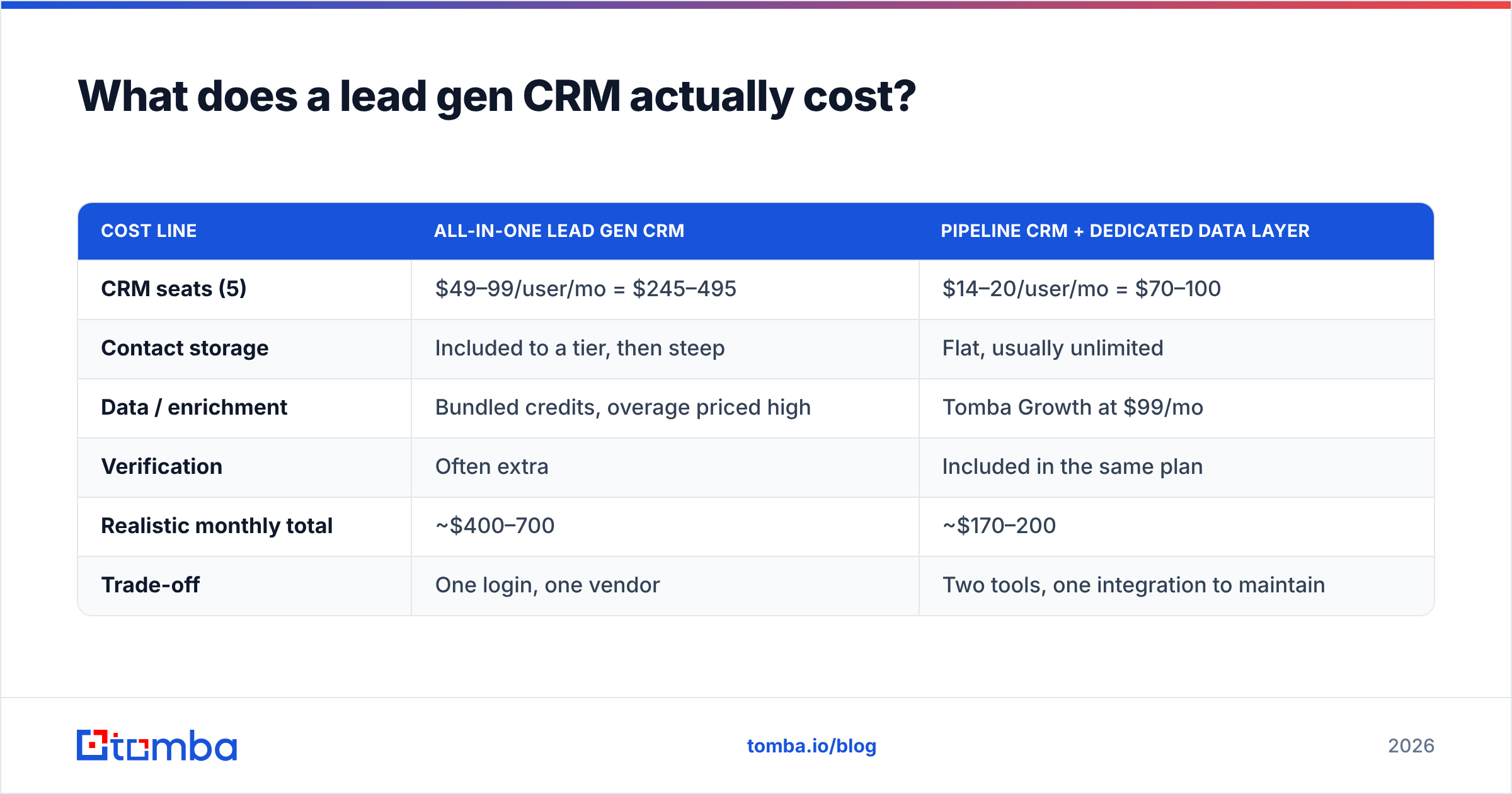
A concrete comparison of two realistic stacks for a five-person team running 3,000 net-new contacts a month:
| Cost line | All-in-one lead gen CRM | Pipeline CRM + dedicated data layer |
|---|---|---|
| CRM seats (5) | $49–99/user/mo = $245–495 | $14–20/user/mo = $70–100 |
| Contact storage | Included to a tier, then steep | Flat, usually unlimited |
| Data / enrichment | Bundled credits, overage priced high | Tomba Growth at $99/mo |
| Verification | Often extra | Included in the same plan |
| Realistic monthly total | ~$400–700 | ~$170–200 |
| Trade-off | One login, one vendor | Two tools, one integration to maintain |
The unbundled stack is cheaper and usually more accurate, because a specialist data vendor competes on match rate and bounce rate while an all-in-one competes on feature count. The cost is one more integration to own. If you have anyone technical — or you're comfortable with Zapier or Make — that's a cheap price to pay.
How do you build the data layer a lead gen CRM needs?#
Whichever CRM you choose, the workflow underneath looks the same. Get this right and a $14/seat tool outperforms a $99/seat one.
Step 1 — Define the account list before the contact list. Build the target account set from firmographics you can defend (industry, headcount, geography, tech signals). Contact-level prospecting before account-level targeting is how teams end up with 40,000 records and no ICP.
Step 2 — Find the people, not the pattern. Guessing first.last@domain.com works often enough to feel productive and fails often enough to wreck your sender reputation. A proper email finder resolves an address from name plus domain against observed sources, and a domain search returns every known role at the company so you can pick the right one rather than the first one.
Step 3 — Verify before anything enters the CRM. Every address should pass syntax, MX, and SMTP checks before it becomes a record. Catch-all domains need their own handling — they accept everything at the gateway, so a naive verifier marks them "valid" and you find out the truth from your bounce rate. Filter these at the door and your CRM stays clean.
Step 4 — Enrich on a schedule, not on import. Set a quarterly re-enrichment job across your active records. Job changes are the biggest single source of decay, and they are also a buying signal: a champion who moves to a new company is the warmest lead in your database. Continuous data enrichment turns that decay from a liability into a trigger.
Step 5 — Sync both directions. One-way pushes create drift. A proper HubSpot integration (or Pipedrive, or Salesforce) should write enriched fields back to the CRM record and read CRM status changes so you stop enriching closed-lost accounts.
Step 6 — Instrument the funnel by source. Tag every record with where it came from and hold each source to a cost-per-qualified-opportunity number. Within one quarter you'll know which of your channels are subsidising the others.
Is a lead gen CRM worth it for a small team?#
Usually yes for the CRM, usually no for the all-in-one bundle.
Here's the decision rule most teams land on after a year of trial and error:
- Under 5 reps, outbound-led: pick the cheapest pipeline CRM that has sequencing (Close or Pipedrive), and spend the savings on verified data. The bottleneck is list quality, not software.
- Under 5 reps, inbound-led: HubSpot's free tier is genuinely hard to beat. Stay there until contact tiers force you off.
- 5–25 reps, mixed motion: this is where a real lead gen CRM earns its price, because routing rules and SLAs start mattering more than per-seat cost.
- 25+ reps: you're buying Salesforce or an equivalent whether you like it or not, and the lead gen layer becomes a set of connected specialist tools around it rather than a single product.
The failure mode to avoid at every size: buying the platform that promises to replace three tools, migrating everything, then discovering its database doesn't cover your market. Test coverage on 100 of your real target accounts during the trial. Match rate on your ICP is the only benchmark that means anything — aggregate accuracy claims in vendor marketing are measured on datasets chosen by the vendor.
What should you do next?#
Start with the data, because it's the part that's cheap to fix and expensive to ignore. Run 50 of your real target accounts through the Tomba Email Finder on the free tier — 25 searches a month, no card — and compare the match rate and bounce rate against whatever your current CRM or database is giving you. If the verified addresses land and the bundled ones bounce, you have your answer about where the next $99 in your stack should go, and your lead gen CRM finally has something worth putting in it.
Related guides#
// get started
Find, verify and enrich your first contacts today
Start on the free plan with 25 searches a month, then scale when your team is ready.
Free plan · No credit card required · GDPR & CCPA
// about the author