How to Build a Lead Gen System That Fills Pipeline in 2026
Most teams buy tools and call it a lead gen system. Here are the five layers that actually produce pipeline, what each one costs, and the metrics that tell you it works.
TL;DR
- A lead gen system is not a tool stack. It is five connected layers — definition, sourcing, data quality, activation, and measurement — where the weakest layer caps the whole thing.
- Most teams over-invest in sequencing software and under-invest in the data layer, then blame copy when reply rates collapse.
- Pick one primary engine (inbound, outbound, or partner) and make it repeatable before you add a second. Running three half-built engines is the most common reason pipeline stays flat.
- Track four numbers only at first: verified contact rate, reply rate, meeting-to-opportunity rate, and cost per qualified meeting. Everything else is vanity.
- Budget realistically: a working system for a small team runs roughly $200–$600/month in tooling, with data quality as the line item you should never cheap out on.
What is a lead gen system, exactly?#
A lead gen system is a repeatable process that turns a defined audience into qualified conversations, with measurable inputs and outputs at every step. Think of it like plumbing rather than fishing. Fishing is a rep with a list and good instincts. Plumbing is a set of pipes where you know how much water goes in, where the leaks are, and what happens if you turn up the pressure.
The distinction matters because it changes what you fix when results drop. In a fishing model, a bad month means "the reps need to try harder." In a system, a bad month points at a specific joint: the ICP filter got loose, the contact data went stale, the follow-up stopped at email two.
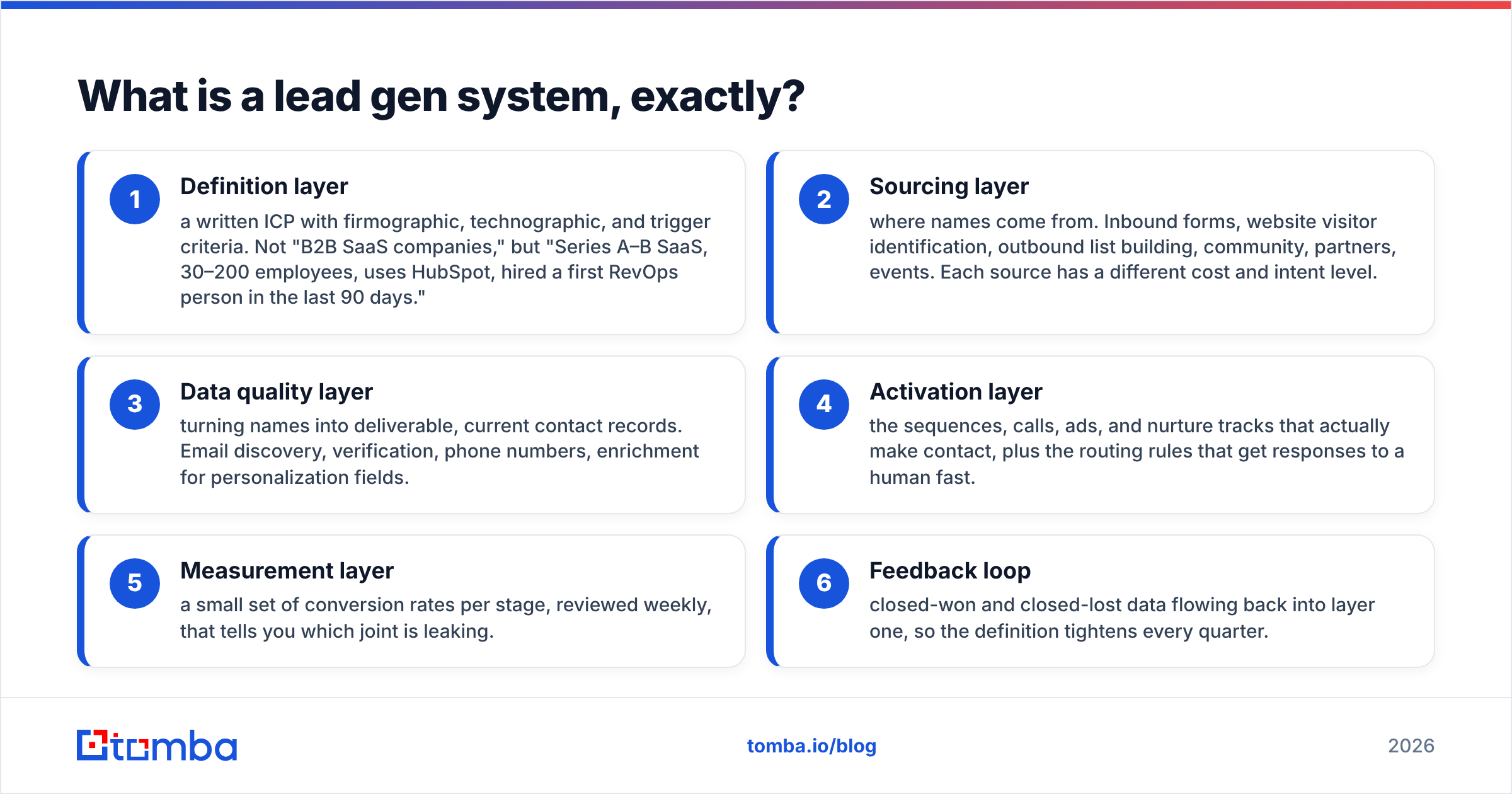
Here is the anatomy, in the order you should build it:
- Definition layer — a written ICP with firmographic, technographic, and trigger criteria. Not "B2B SaaS companies," but "Series A–B SaaS, 30–200 employees, uses HubSpot, hired a first RevOps person in the last 90 days."
- Sourcing layer — where names come from. Inbound forms, website visitor identification, outbound list building, community, partners, events. Each source has a different cost and intent level.
- Data quality layer — turning names into deliverable, current contact records. Email discovery, verification, phone numbers, enrichment for personalization fields.
- Activation layer — the sequences, calls, ads, and nurture tracks that actually make contact, plus the routing rules that get responses to a human fast.
- Measurement layer — a small set of conversion rates per stage, reviewed weekly, that tells you which joint is leaking.
- Feedback loop — closed-won and closed-lost data flowing back into layer one, so the definition tightens every quarter.
Most teams build 2, 4, and a dashboard. Then they wonder why the dashboard looks bad. Gartner's sales research has been consistent on this point for years: process discipline beats activity volume in complex B2B buying cycles, because buying groups have grown and single-threaded outreach dies quietly.
Why do most lead gen systems stall after the first 90 days?#
Because the first 90 days run on borrowed data. You export a list, you scrape a few hundred contacts, you get a handful of meetings, and the model looks like it works. Then three things happen at once.
Your list decays. B2B contact data goes stale fast — people change roles, companies rebrand domains, teams get restructured. Industry estimates commonly put annual decay somewhere between 20% and 30%, which means a list you bought in January is meaningfully worse by summer. If you are not re-verifying, your bounce rate climbs quietly until your sending domain starts getting filtered.
Your best-fit segment runs dry. A tightly defined ICP might only contain 3,000 accounts. At 200 contacts a week you exhaust it in months, and the natural response — loosening the filter — tanks conversion rates while making volume charts look healthier.
Nobody owns the joints. Marketing owns sourcing, sales owns activation, and the data quality layer between them belongs to no one. That is where the leak lives. Treating this as a revenue operations problem rather than a marketing-or-sales problem is usually the unlock.
The fix is unglamorous: build the data layer as infrastructure, not as a one-time purchase. That means verification on ingest, re-verification on a schedule, and enrichment that fills the fields your sequences actually reference.
Which engine should you build first: inbound, outbound, or partner?#
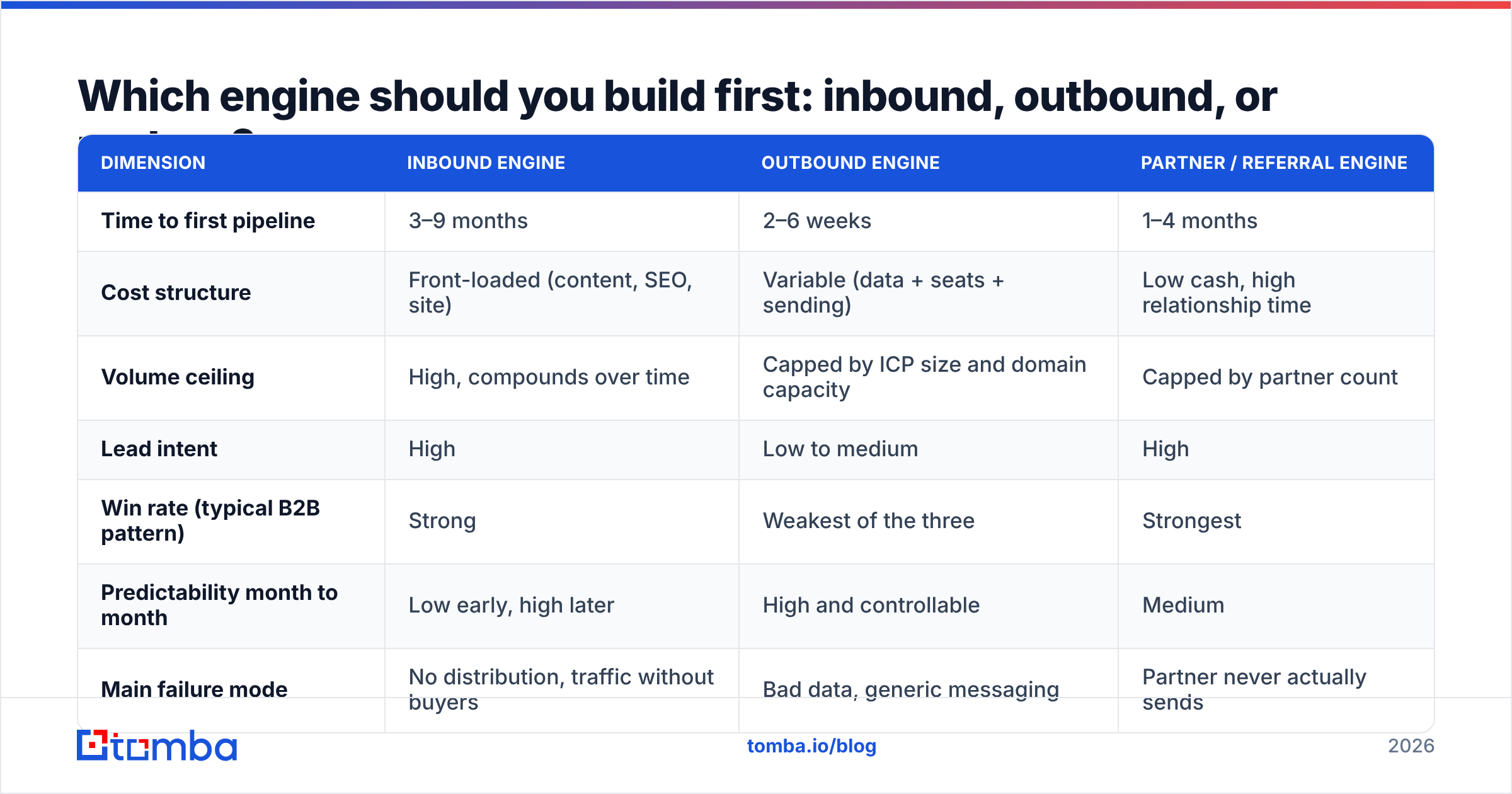
Pick one. The right answer depends on deal size, sales cycle, and how much content or network equity you already have. Here is the honest trade-off table.
| Dimension | Inbound engine | Outbound engine | Partner / referral engine |
|---|---|---|---|
| Time to first pipeline | 3–9 months | 2–6 weeks | 1–4 months |
| Cost structure | Front-loaded (content, SEO, site) | Variable (data + seats + sending) | Low cash, high relationship time |
| Volume ceiling | High, compounds over time | Capped by ICP size and domain capacity | Capped by partner count |
| Lead intent | High | Low to medium | High |
| Win rate (typical B2B pattern) | Strong | Weakest of the three | Strongest |
| Predictability month to month | Low early, high later | High and controllable | Medium |
| Main failure mode | No distribution, traffic without buyers | Bad data, generic messaging | Partner never actually sends |
| Best when | ACV under $15k, search demand exists | Clear ICP, ACV $10k+ | Ecosystem overlap, high ACV |
A practical sequencing rule: if you need pipeline this quarter, build outbound first and treat inbound as a parallel investment that pays out later. If you have existing organic traffic and no sales team, harvest inbound first — website visitor identification and form enrichment get you further, faster, than cold sequences.
What you should not do is start all three because a board deck says "multi-channel." Three engines at 30% quality produce less than one engine at 90%.
How do you build the data layer without burning your budget?#
This is the layer that determines whether everything downstream works, and it is where most of the waste happens. The pattern that works is a funnel, not a purchase.
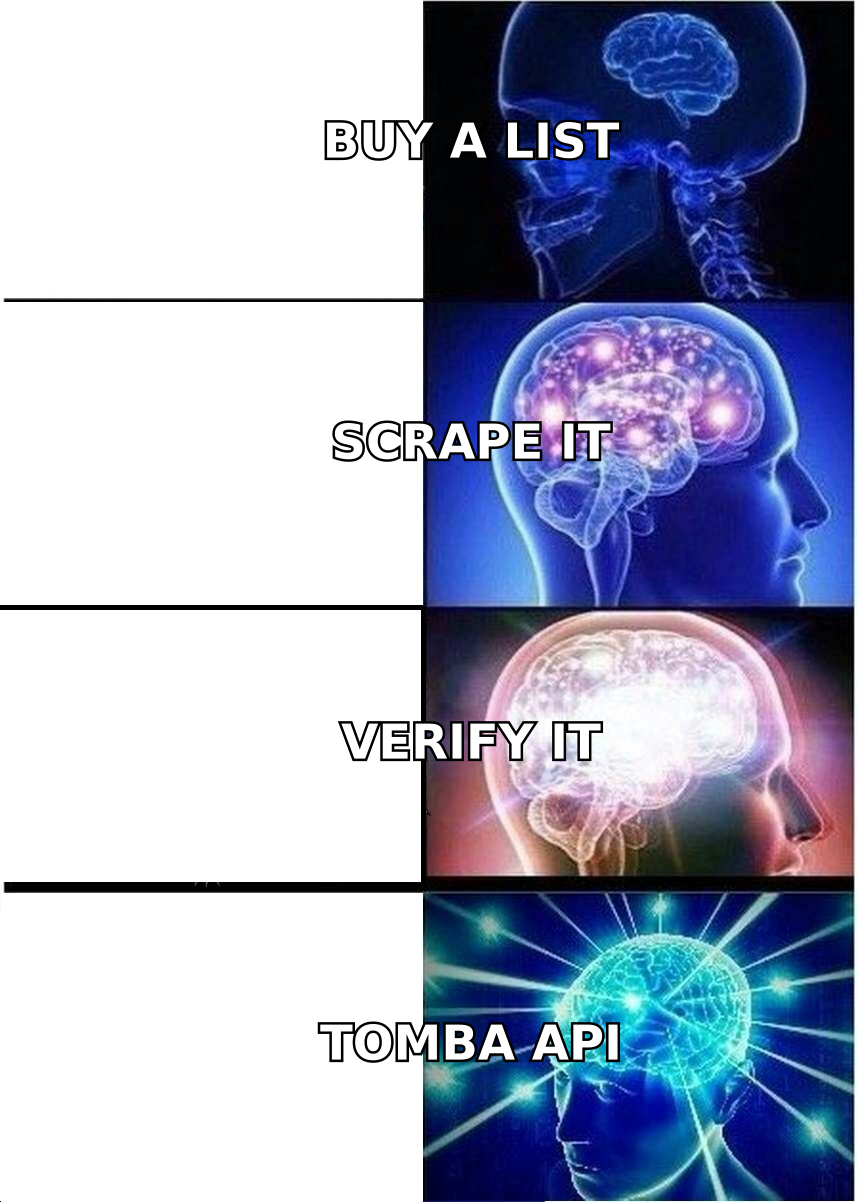
Step one: find, don't buy in bulk. Static lists are the most expensive data you can own, because you pay for every record including the 40% you would never contact. Targeted discovery — you define the account, then find the specific people — costs less per usable contact. An email finder or a domain search against a curated account list will beat a 50,000-row export on both cost and reply rate. Vendors like BookYourData are a reasonable fit when you genuinely need broad coverage in a region or vertical fast; just verify what you receive before it touches a sequence.
Step two: verify everything, always. Run every address through an email verifier before it enters a sequence, and re-run anything older than 60–90 days. This single habit protects your sender reputation more than any warmup trick.
Step three: handle catch-all domains explicitly. A large share of enterprise domains accept all mail, which means standard verification returns "unknown." Decide your policy: exclude them, route them to a catch-all verifier, or send to them at lower volume from a secondary domain. What you cannot do is pretend they are valid.
Step four: enrich only the fields you will use. If your sequence references role, recent funding, and tech stack, enrich those three. Paying for 40 attributes you never merge into a template is pure cost.
Step five: batch and schedule. Weekly bulk verify runs on your active list, monthly re-enrichment on open opportunities. Automate it or it will not happen.
What does a realistic lead gen stack cost?#
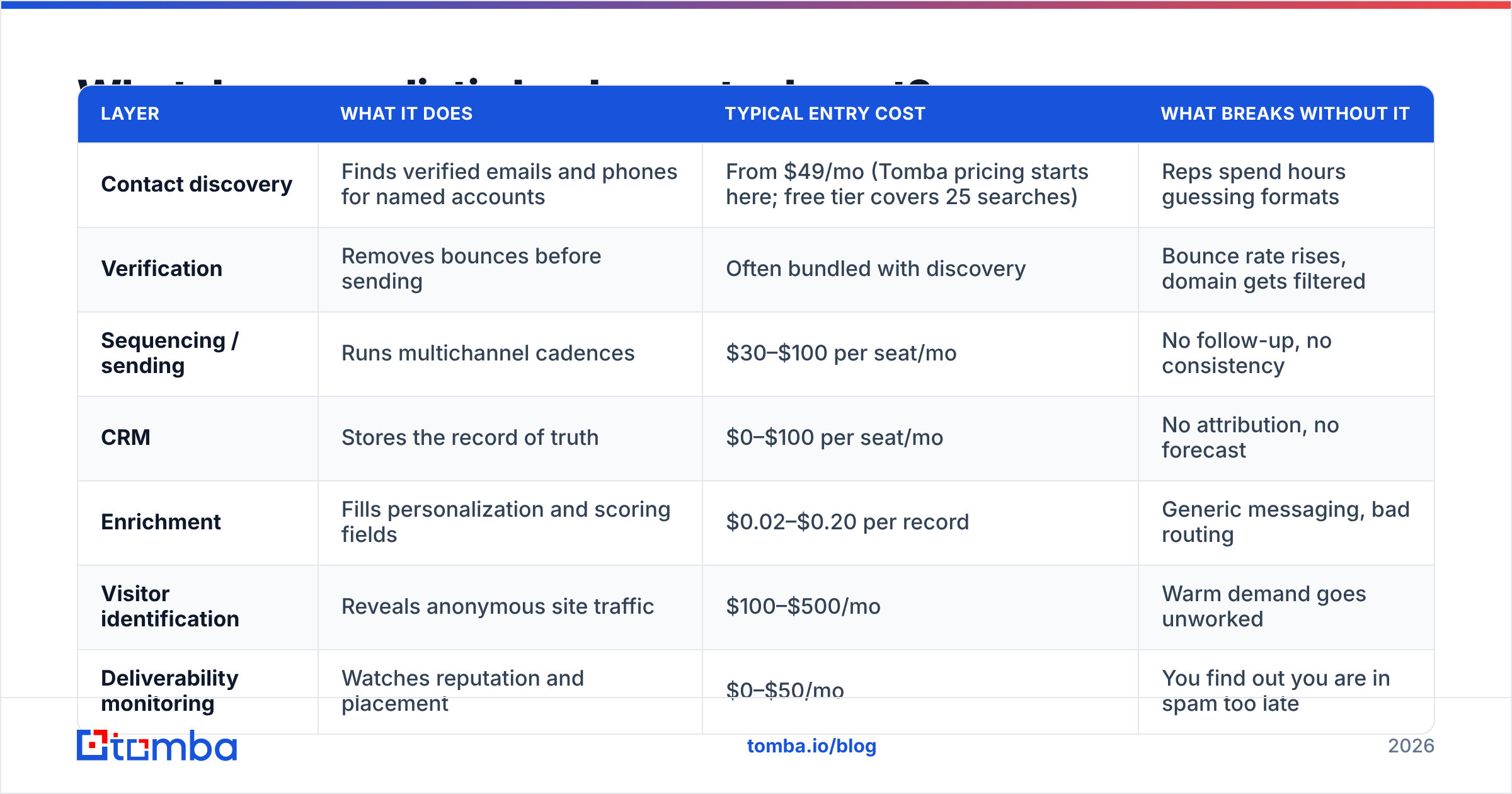
Prices move, so treat these as list-price ballparks and confirm with each vendor. The point of this table is relative weighting — where the money should go.
| Layer | What it does | Typical entry cost | What breaks without it |
|---|---|---|---|
| Contact discovery | Finds verified emails and phones for named accounts | From $49/mo (Tomba pricing starts here; free tier covers 25 searches) | Reps spend hours guessing formats |
| Verification | Removes bounces before sending | Often bundled with discovery | Bounce rate rises, domain gets filtered |
| Sequencing / sending | Runs multichannel cadences | $30–$100 per seat/mo | No follow-up, no consistency |
| CRM | Stores the record of truth | $0–$100 per seat/mo | No attribution, no forecast |
| Enrichment | Fills personalization and scoring fields | $0.02–$0.20 per record | Generic messaging, bad routing |
| Visitor identification | Reveals anonymous site traffic | $100–$500/mo | Warm demand goes unworked |
| Deliverability monitoring | Watches reputation and placement | $0–$50/mo | You find out you are in spam too late |
A two-person team can run a credible system for $200–$400 a month. The mistake is inverting the weights: $500 on sequencing seats and $50 on data. Sequencing software cannot rescue an unverified list, and the G2 lead intelligence category reviews are full of teams learning that the hard way.
If you are working from spreadsheets, the Google Sheets add-on route is a reasonable start; once volume grows past a few thousand records a month, move to the Tomba API so discovery and verification happen inside your pipeline rather than by hand.
How do you know the system is actually working?#
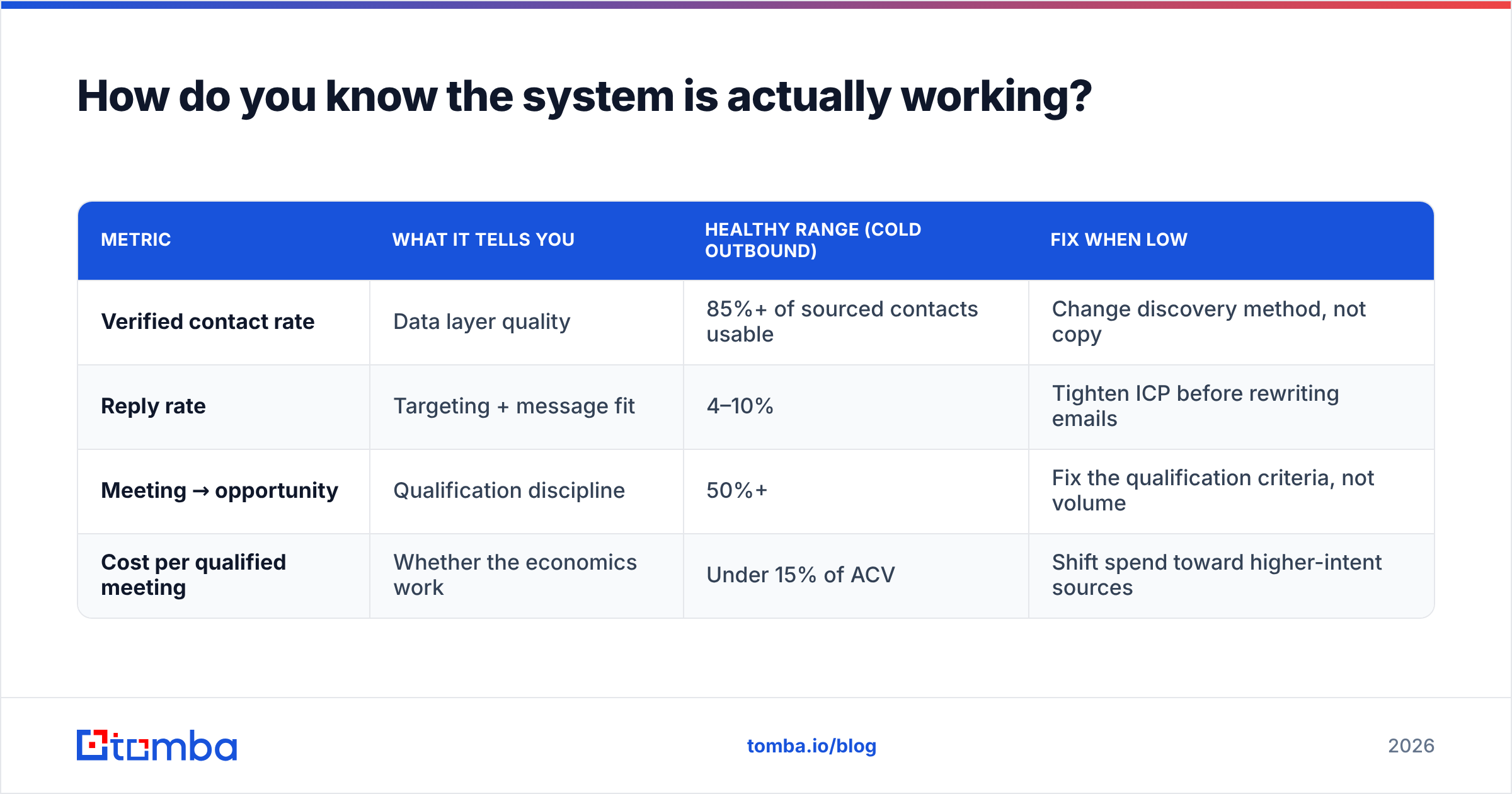
Four numbers, reviewed weekly. Resist adding a fifth until these are stable.
| Metric | What it tells you | Healthy range (cold outbound) | Fix when low |
|---|---|---|---|
| Verified contact rate | Data layer quality | 85%+ of sourced contacts usable | Change discovery method, not copy |
| Reply rate | Targeting + message fit | 4–10% | Tighten ICP before rewriting emails |
| Meeting → opportunity | Qualification discipline | 50%+ | Fix the qualification criteria, not volume |
| Cost per qualified meeting | Whether the economics work | Under 15% of ACV | Shift spend toward higher-intent sources |
Read them in order. A 1% reply rate with a 60% verified contact rate is a targeting or messaging problem. A 1% reply rate with a 55% verified contact rate is a data problem wearing a messaging costume — and rewriting subject lines will not touch it.
Two secondary signals worth watching monthly: bounce rate trend (rising means your re-verification cadence is too slow) and response rate by segment, which tells you which slice of the ICP to double down on. HubSpot's ongoing marketing statistics research is a decent external benchmark when you want to sanity-check your own numbers against the market.
What should the first 30 days look like?#
Week 1 — Definition. Write the ICP in one page. Pull your last 20 closed-won deals and reverse-engineer the shared traits. Name the disqualifiers explicitly. Build a target account list of 200–500 accounts, not 5,000.
Week 2 — Data. Find and verify contacts for the first 100 accounts. Aim for two to three contacts per account, because single-threading is why deals stall. Record which discovery method produced the highest verified rate; that becomes your default.
Week 3 — Activation. Build one sequence: four to six touches across email and one other channel, over 14–18 days. Personalize one variable that actually requires research. Route replies to a human within an hour.
Week 4 — Measure and tighten. Compute the four metrics. Kill the worst-performing segment. Double the budget on the best one. Write down what you learned about the ICP and update the one-page definition.
Then repeat. The compounding effect comes from the loop, not from any single tactic. Teams that run this cycle monthly for a year end up with a system that a new rep can operate on day three. Teams that improvise end up rebuilding from scratch every time someone leaves.
What are the most common mistakes to avoid?#
- Buying volume before validating fit. A 50,000-record purchase before you have proven message-market fit on 100 contacts is a very expensive way to learn.
- Sending to unverified catch-all addresses. It feels like free volume. It is borrowed reputation.
- Measuring leads instead of qualified meetings. Lead count rewards loosening filters, which is exactly the wrong incentive.
- One sequence for every segment. If your enterprise and SMB messaging are identical, one of them is wrong.
- No owner for the data layer. Assign it to a person by name, with a weekly verification job on the calendar.
- Ignoring existing demand. Before you cold-email strangers, work the people already on your site. Visitor identification and enrichment on inbound forms usually produce the cheapest meetings in the building.
Where should you start this week?#
Start with the layer that caps everything else: contact data you can trust. Define 100 accounts, find the right two or three people at each one, verify every address before it enters a sequence, and measure your verified contact rate as a first-class metric.
The Tomba Email Finder is built for exactly that step — targeted discovery against accounts you have already qualified, with verification built into the same workflow instead of bolted on afterward. The free tier covers 25 searches a month if you want to test the pattern on a single segment first, and the Starter plan at $49/mo is enough to run a focused outbound motion for a small team. Get that layer right and the rest of the system has something solid to sit on.
Related guides#
// get started
Find, verify and enrich your first contacts today
Start on the free plan with 25 searches a month, then scale when your team is ready.
Free plan · No credit card required · GDPR & CCPA
// about the author