Lead Generating Software in 2026: What Actually Works
Most lead generating software sells you volume, not pipeline. Here is how the five categories actually differ, what each costs in 2026, and which stack wins for a small outbound team.
TL;DR
- "Lead generating software" is not one product. It is five categories — data/contact discovery, inbound capture, visitor identification, outreach execution, and scoring/routing — sold under one label, which is why pricing comparisons feel impossible.
- The bottleneck for most teams is not tool count. It is the fact that 20-30% of a purchased contact list is stale within 12 months, so every downstream tool amplifies bad input.
- Budget roughly $150-$400/month for a functional two-person outbound stack in 2026: one data source, one verifier (often bundled), one sender, one CRM you already own.
- Credits are the trap. Per-contact pricing, non-rollover credits, and "one credit per attempt" billing quietly triple your real cost per delivered email.
- Buy in this order: data quality first, deliverability second, automation third. Reversing that order is how teams end up with a $900/month stack and a 0.4% reply rate.
What Is Lead Generating Software, Really?#
Lead generating software is any tool that turns an undefined audience into a contactable, qualified record in your CRM. That definition is deliberately broad because the market is deliberately broad — a chat widget and a 200-million-record B2B database both get shelved under the same G2 category.
Think of it like a kitchen. A knife, a stove, and a fridge are all "cooking equipment," but nobody compares a fridge to a knife on price per unit. Lead generation tools have the same problem: you are usually comparing tools that sit at different stations.
Here is the honest breakdown of what the five categories actually do:
- Contact data and discovery — Finds and verifies work emails, phone numbers, and firmographics for people who match your ICP. This is where an email finder, domain search, and enrichment tooling live. Output: a contactable record.
- Inbound capture — Forms, chat widgets, lead magnets, popups. Converts existing traffic into a submitted record. Output: a self-identified prospect.
- Visitor identification — Resolves anonymous website traffic to companies (and occasionally people) via IP and cookie matching. Output: an intent signal, not a contact.
- Outreach execution — Sequencers, dialers, LinkedIn automation, and inbox infrastructure. Output: delivered messages and replies.
- Scoring and routing — Lead scoring, deduplication, round-robin assignment, and lead lifecycle management inside the CRM. Output: prioritized work for reps.
Most "all-in-one" platforms genuinely cover two or three of these well and pad the rest. That is fine — as long as you know which two you are paying for.

Why Do Most Lead Generation Stacks Underperform?#
Because they are built in the wrong order. Teams buy the sequencer first (it feels like action), then the data (it feels like a commodity), then never buy verification at all.
The math punishes that order. Say you send 1,000 emails from a list with a 22% invalid rate. You lose 220 sends to bounces, your bounce rate lands around 22% — far past the ~2% threshold where Google and Yahoo's bulk sender rules start throttling you — and your sender reputation degrades for every future campaign, including to the 780 valid addresses. One bad list does not cost you one campaign. It costs you a domain.
Three failure patterns show up repeatedly:
- Stale data compounding. B2B contact records decay at roughly 2-3% per month as people change roles. A list bought in January is materially different by December. Vendors report database size; almost none report freshness.
- Catch-all blindness. A large share of enterprise domains accept all mail at the SMTP layer, so naive verifiers return "valid" for addresses that will hard-bounce internally. You need a dedicated catch-all verifier to score these probabilistically instead of guessing.
- Credit burn on retries. Some platforms charge a credit per search attempt, not per found contact. Your effective cost per usable email can be 2-3x the sticker price.
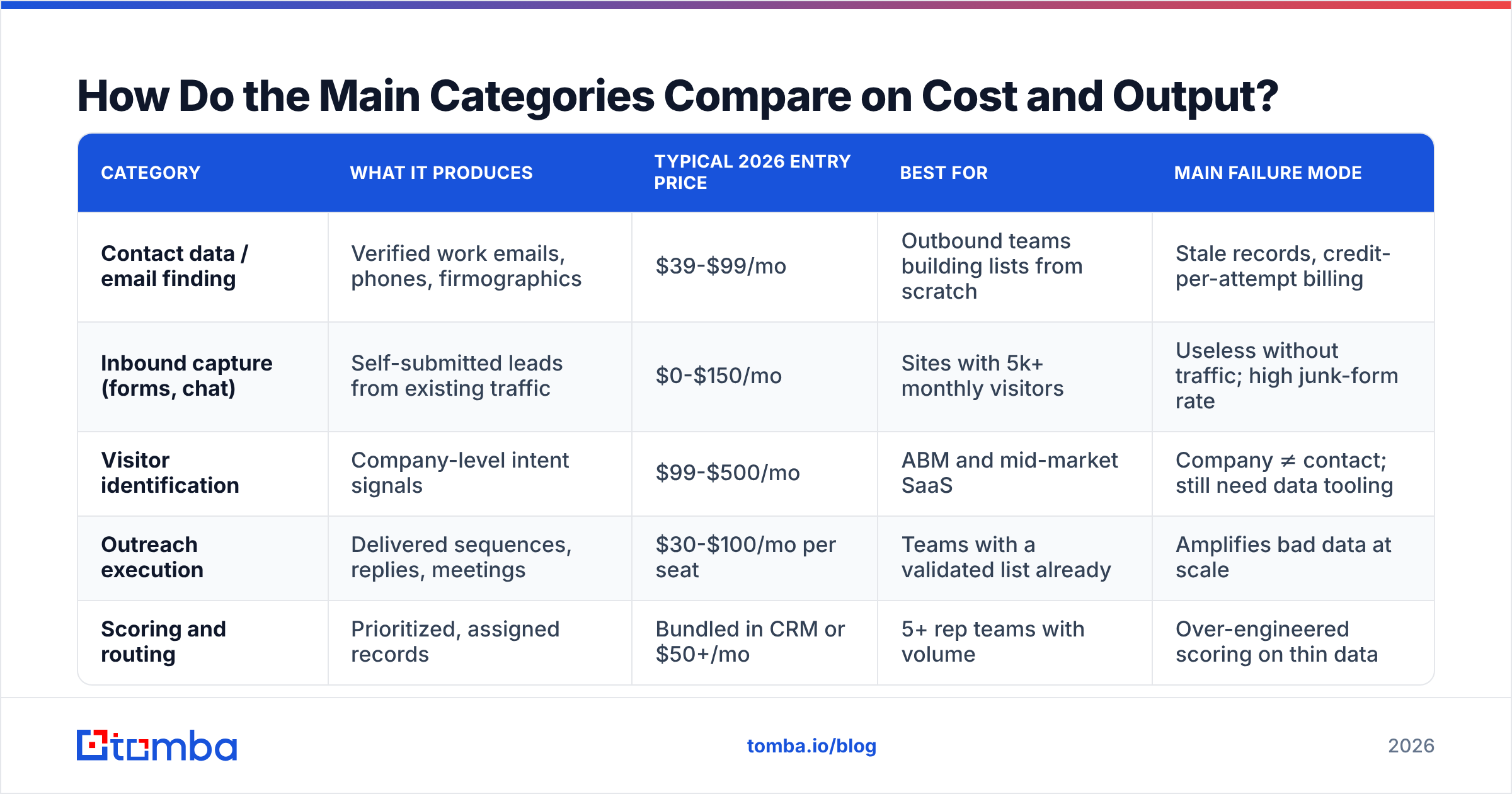
How Do the Main Categories Compare on Cost and Output?#
This table is the one worth screenshotting. It compares what each category actually produces, what you should expect to pay in 2026, and the failure mode to watch for.
| Category | What it produces | Typical 2026 entry price | Best for | Main failure mode |
|---|---|---|---|---|
| Contact data / email finding | Verified work emails, phones, firmographics | $39-$99/mo | Outbound teams building lists from scratch | Stale records, credit-per-attempt billing |
| Inbound capture (forms, chat) | Self-submitted leads from existing traffic | $0-$150/mo | Sites with 5k+ monthly visitors | Useless without traffic; high junk-form rate |
| Visitor identification | Company-level intent signals | $99-$500/mo | ABM and mid-market SaaS | Company ≠ contact; still need data tooling |
| Outreach execution | Delivered sequences, replies, meetings | $30-$100/mo per seat | Teams with a validated list already | Amplifies bad data at scale |
| Scoring and routing | Prioritized, assigned records | Bundled in CRM or $50+/mo | 5+ rep teams with volume | Over-engineered scoring on thin data |
Two things jump out. First, the cheapest category (inbound capture) is the one most dependent on an asset you may not have — traffic. Second, visitor identification sells an intent signal but leaves you needing a data tool anyway to turn "Acme Corp visited pricing" into "email chris@acme.com."
Which Lead Generating Software Should You Actually Buy?#
Depends on which of three shapes you are. Be honest about the shape before you look at a single pricing page.
Shape 1: No traffic, no list, outbound-only. Buy data and deliverability. A contact-discovery tool plus verification plus a single sending domain gets you to first meetings. Skip visitor ID and lead scoring entirely until you have 500+ records flowing monthly.
Shape 2: Real inbound traffic, weak follow-up. Buy capture and routing. Your problem is speed-to-lead, not volume. Research consistently shows response time is the dominant variable in inbound conversion — HubSpot's research on lead response puts the drop-off in the first hour at the center of it. A fast form-to-rep pipeline beats a bigger database.
Shape 3: Enterprise ABM motion. Buy intent plus enrichment. You know the accounts; you need the signals and the people inside them. Visitor identification plus data enrichment earns its cost here, and nowhere else.
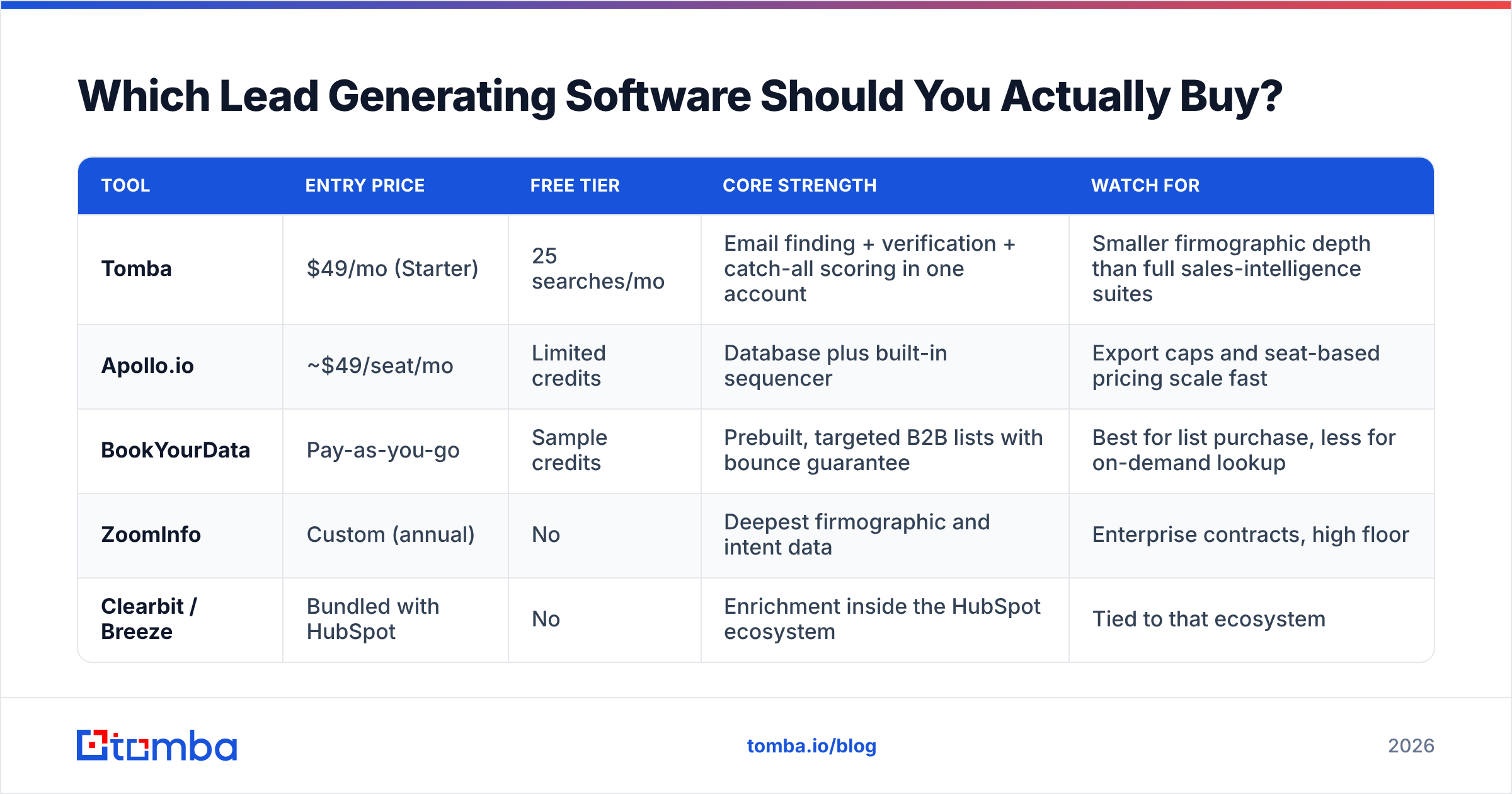
Here is how the better-known options in the data category stack up. Prices are 2026 published entry tiers; verify before you buy, since vendors reprice frequently.
| Tool | Entry price | Free tier | Core strength | Watch for |
|---|---|---|---|---|
| Tomba | $49/mo (Starter) | 25 searches/mo | Email finding + verification + catch-all scoring in one account | Smaller firmographic depth than full sales-intelligence suites |
| Apollo.io | ~$49/seat/mo | Limited credits | Database plus built-in sequencer | Export caps and seat-based pricing scale fast |
| BookYourData | Pay-as-you-go | Sample credits | Prebuilt, targeted B2B lists with bounce guarantee | Best for list purchase, less for on-demand lookup |
| ZoomInfo | Custom (annual) | No | Deepest firmographic and intent data | Enterprise contracts, high floor |
| Clearbit / Breeze | Bundled with HubSpot | No | Enrichment inside the HubSpot ecosystem | Tied to that ecosystem |
The pattern: broad suites win on breadth, focused tools win on cost-per-verified-contact. If your motion is "find 300 verified emails a month and send them," a focused tool at Tomba pricing levels beats a seat-priced suite you use 15% of. If you need intent signals across 4,000 target accounts, it does not.
How Do You Evaluate Data Quality Before You Pay?#
Run the same test on every vendor. It takes 30 minutes and saves quarters.
- Build a 50-contact control list. Pick real people you can independently confirm — your own team, past customers, public team pages. Include at least 10 from catch-all domains and 10 from companies under 50 employees.
- Run it through each trial. Record found rate (how many returned any address) and accuracy rate (how many matched the truth you already know). These are different numbers and vendors love to conflate them.
- Check what "verified" means. Ask whether the vendor does SMTP-level checking, pattern inference, or both, and how catch-all domains are labeled. A vendor that returns "unknown" honestly is more useful than one that returns "valid" optimistically.
- Test the bounce. Send a small real campaign to 100 records. Your actual bounce rate is the only number that matters, and it will be worse than the dashboard claims.
- Read the credit terms. Do credits roll over? Does a failed search consume one? Are exports metered separately from searches? This is where budgets quietly break.

A note on accuracy claims generally: treat any vendor-published percentage as marketing until your own control list confirms it. G2's category reviews are more useful than vendor pages because they surface the complaints — export limits, support response, billing surprises — that never make it into a feature matrix.
What Does a Working 2026 Stack Look Like?#
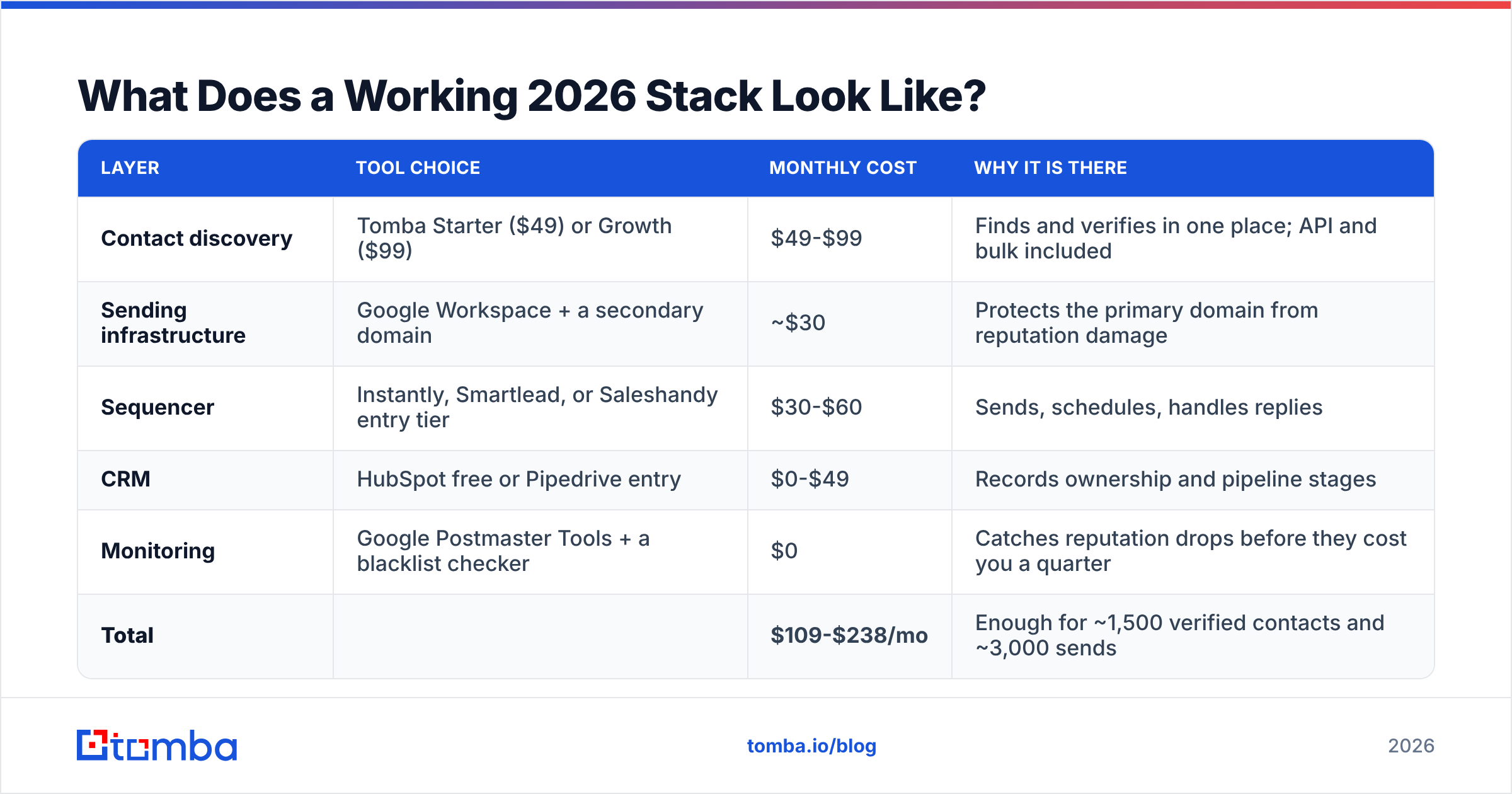
Lean. Here is a concrete build for a two-person outbound team targeting mid-market SaaS, with real 2026 costs.
| Layer | Tool choice | Monthly cost | Why it is there |
|---|---|---|---|
| Contact discovery | Tomba Starter ($49) or Growth ($99) | $49-$99 | Finds and verifies in one place; API and bulk included |
| Sending infrastructure | Google Workspace + a secondary domain | ~$30 | Protects the primary domain from reputation damage |
| Sequencer | Instantly, Smartlead, or Saleshandy entry tier | $30-$60 | Sends, schedules, handles replies |
| CRM | HubSpot free or Pipedrive entry | $0-$49 | Records ownership and pipeline stages |
| Monitoring | Google Postmaster Tools + a blacklist checker | $0 | Catches reputation drops before they cost you a quarter |
| Total | $109-$238/mo | Enough for ~1,500 verified contacts and ~3,000 sends |
What is deliberately missing: visitor identification, an AI SDR, intent data, and a standalone lead-scoring platform. Each is defensible later. None of them fix a bad list, and all of them are easier to justify once you have baseline reply-rate data to compare against.
Two operational details that matter more than tool choice:
- Warm the sending domain for 3-4 weeks before volume. Ramp from 10-20 sends a day. Check your SPF record, DKIM, and DMARC before the first send, not after the first bounce spike.
- Re-verify quarterly. Run your existing CRM contacts through an email verifier every 90 days. The 2-3% monthly decay rate means a year-old database is roughly a quarter wrong, and re-verification is far cheaper than acquisition.
Is All-in-One Better Than a Best-of-Breed Stack?#
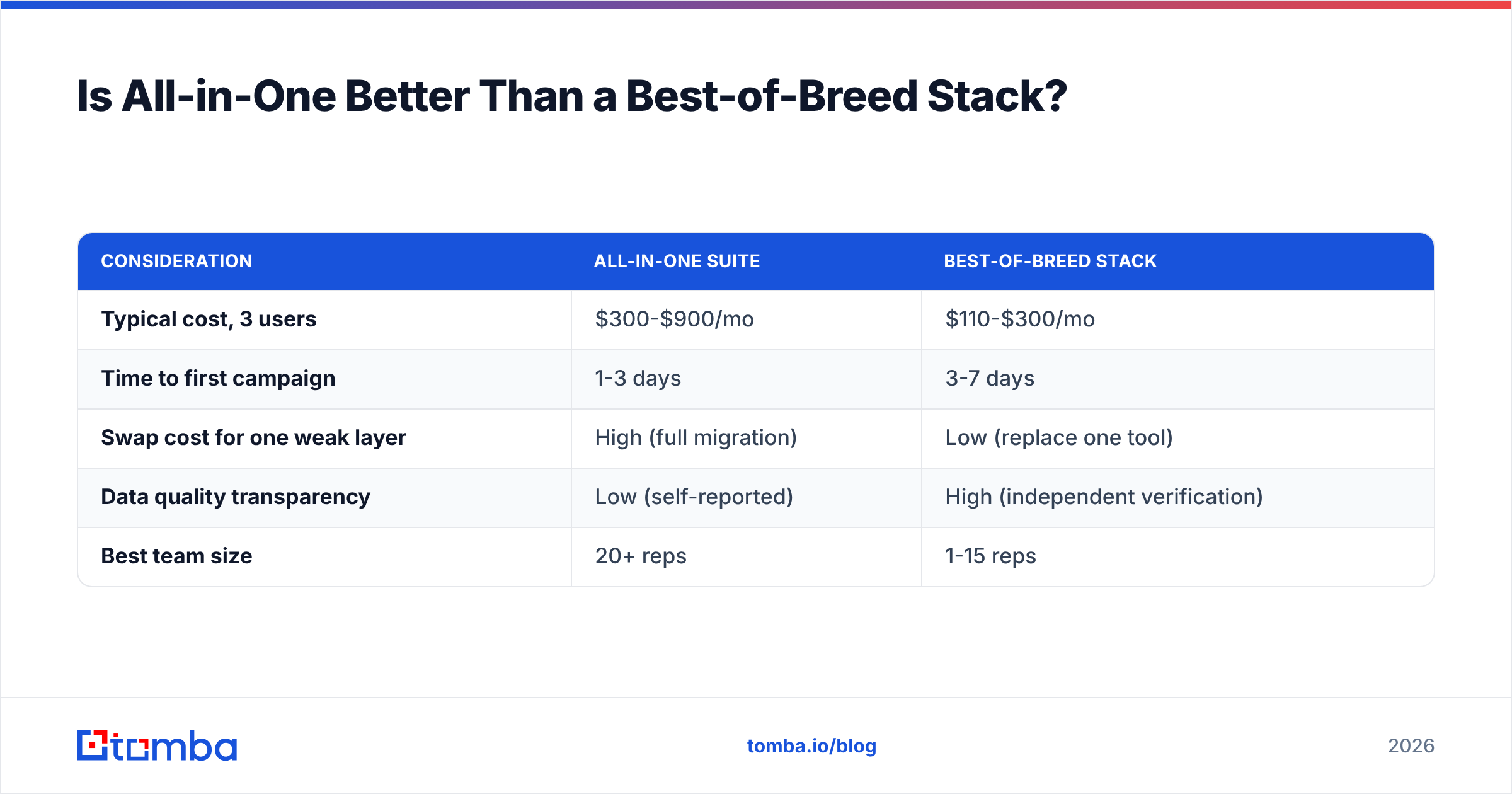
All-in-one wins on procurement and admin; best-of-breed wins on cost-per-outcome and switching risk. That is the real trade, and it flips based on team size.
Under 10 reps, best-of-breed usually wins. Your tools are cheap enough individually that the integration overhead is a few Zapier steps, and you can replace any single layer in an afternoon when it underperforms. Over 30 reps, consolidation starts winning because seat sprawl, security review, and vendor management become real costs.
The genuine risk with all-in-one is silent degradation. When your data, sending, and reporting all come from one vendor, the reporting will never tell you the data is the problem. Keeping verification separate from sending gives you an independent check on both.
| Consideration | All-in-one suite | Best-of-breed stack |
|---|---|---|
| Typical cost, 3 users | $300-$900/mo | $110-$300/mo |
| Time to first campaign | 1-3 days | 3-7 days |
| Swap cost for one weak layer | High (full migration) | Low (replace one tool) |
| Data quality transparency | Low (self-reported) | High (independent verification) |
| Best team size | 20+ reps | 1-15 reps |
If you are somewhere in the middle, the split that works: keep data and verification independent, consolidate everything downstream. You get an honest read on input quality and a single pane for execution.
Where Should You Start This Week?#
Pick the single weakest layer and fix only that one. Most teams already know which it is; they just keep buying around it.
If your bounce rate is over 3%, the answer is data quality and nothing else. If your open rates are fine but replies are near zero, the answer is targeting or copy, and no software fixes it. If you are getting replies but losing them, the answer is CRM hygiene and routing.
Start with a control-list test against two or three vendors, measure real bounce rates on a 100-record send, and only then commit to an annual plan. Free tiers exist precisely for this — use them adversarially.
When your bottleneck is finding and verifying the right contacts in the first place, start with the Tomba Email Finder. The free tier gives you 25 searches a month to run your own control-list test, Starter is $49/mo when you are ready for volume, and verification plus catch-all scoring sit in the same account, so you are not paying two vendors to check each other's work. Run your 50-contact test against it, compare the found rate and the accuracy rate separately, and let your own numbers make the call.
Related guides#
// get started
Find, verify and enrich your first contacts today
Start on the free plan with 25 searches a month, then scale when your team is ready.
Free plan · No credit card required · GDPR & CCPA
// about the author