Lead Generation Agent: How AI Prospecting Actually Works in 2026
AI lead generation agents promise to replace your SDR research stack. Here is what they actually do well, where they quietly fail, and how to build one that does not poison your CRM with bad data.
TL;DR
- A lead generation agent is an LLM-driven workflow that chains research, filtering, contact discovery, verification, and CRM writes — not a chatbot that "finds leads."
- The hard part is not the model. It is the data layer underneath it: an agent with no verified email source will happily invent addresses and burn your sending domain.
- Agents win on volume research (ICP scoring, trigger monitoring, list building at 500+ accounts/day) and lose on judgment calls (pricing objections, multi-threading strategy).
- Budget realistically: a usable agent stack runs $150–$600/month in tooling for a small team, versus $5,500+/month fully loaded for one junior SDR doing the same research.
- Put verification inside the agent loop, not after it. Post-hoc cleanup is where most teams silently lose 20–35% of their list.
What is a lead generation agent?#
A lead generation agent is a software process that uses a language model to plan and execute multi-step prospecting work autonomously — deciding what to look up next, calling tools to fetch data, and writing the results somewhere useful.
Think of it like the difference between a vending machine and a line cook. A vending machine gives you exactly what you punched in; a workflow automation like Zapier is a vending machine. A line cook reads the ticket, checks what's in the walk-in, substitutes when something's out, and plates the dish. That adaptive middle layer — deciding which tool to call and when to stop — is what makes something an agent rather than an automation.
In practice, a working agent handles this loop:
- Interpret the brief. "Find Series B fintech companies in the EU that hired a Head of Compliance in the last 90 days."
- Source accounts. Query a company database, job-board scrape, or funding feed for matches.
- Qualify against ICP. Score each account on headcount, tech stack, geography, and funding stage, then drop everything below threshold.
- Find the person. Identify the right title at each account, then resolve their work email and phone.
- Verify before writing. Run SMTP and catch-all checks so bad addresses never reach the sequence.
- Enrich and push. Write the record to your CRM with the evidence attached — source URL, confidence score, timestamp.
Steps 1–3 are where LLMs genuinely shine. Steps 4–5 are deterministic data problems that models are terrible at and should never guess on. That split matters more than any other design decision you'll make.

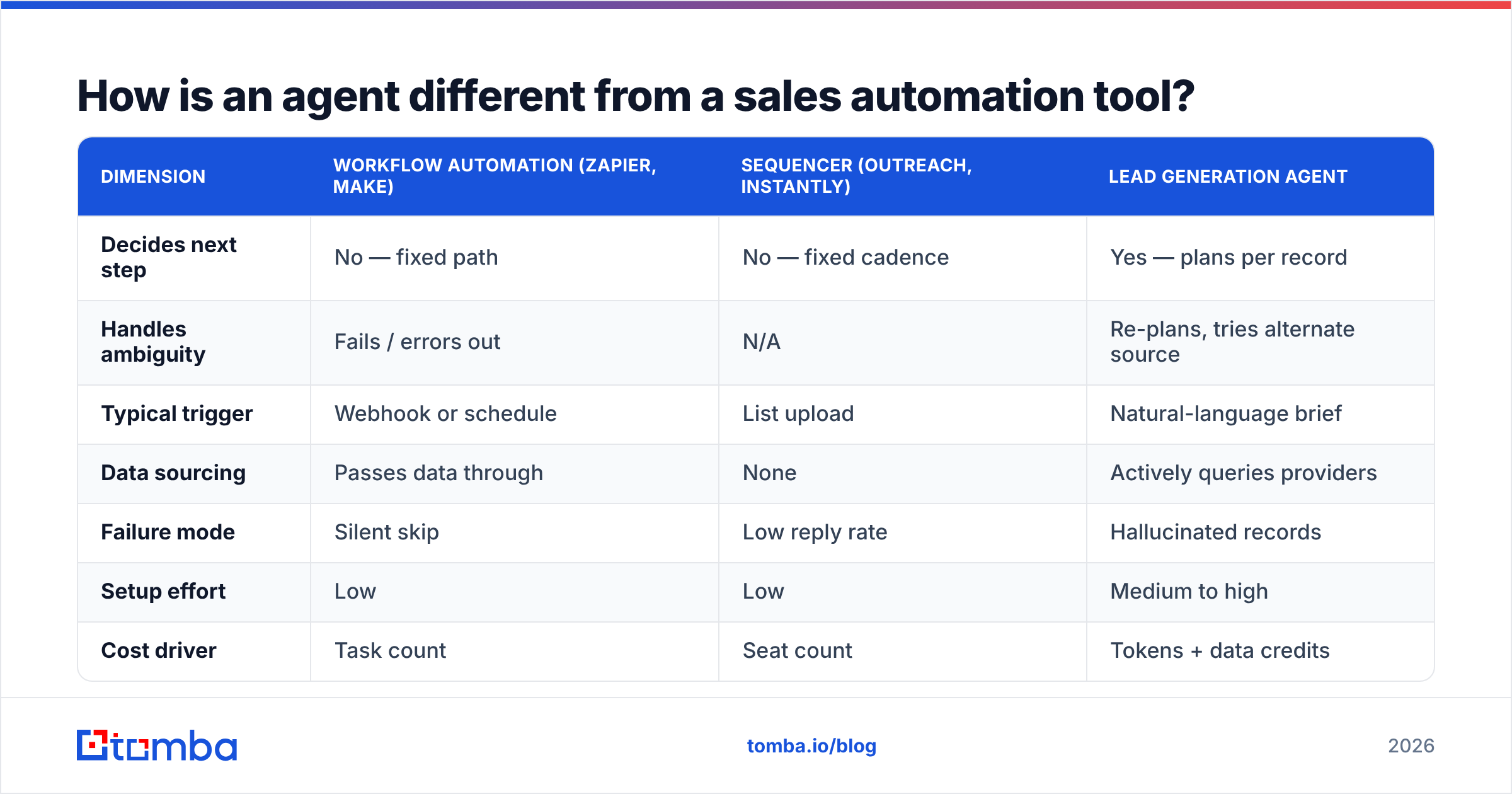
How is an agent different from a sales automation tool?#
The confusion is fair — vendors slap "AI agent" on everything now. Here's the honest separation:
| Dimension | Workflow automation (Zapier, Make) | Sequencer (Outreach, Instantly) | Lead generation agent |
|---|---|---|---|
| Decides next step | No — fixed path | No — fixed cadence | Yes — plans per record |
| Handles ambiguity | Fails / errors out | N/A | Re-plans, tries alternate source |
| Typical trigger | Webhook or schedule | List upload | Natural-language brief |
| Data sourcing | Passes data through | None | Actively queries providers |
| Failure mode | Silent skip | Low reply rate | Hallucinated records |
| Setup effort | Low | Low | Medium to high |
| Cost driver | Task count | Seat count | Tokens + data credits |
The last row is the one finance will ask about. Sequencers charge per seat, so they get expensive with headcount. Agents charge per token and per data credit, so they get expensive with volume — which is exactly the thing you bought them to increase. Model your cost per enriched record before you scale, not after.
One more distinction people miss: an agent's failure mode is worse than an automation's. When Zapier breaks, nothing happens and you notice. When an agent breaks, it produces confident, well-formatted, entirely fictional output that sails straight into your CRM. That asymmetry should drive how you architect the thing.
What does a lead generation agent actually do well?#
Four jobs, consistently, in production deployments:
- Trigger monitoring at scale. Watching 2,000 target accounts for funding rounds, exec hires, job postings, tech-stack changes, or G2 review activity. A human can watch maybe 50 accounts meaningfully. An agent can watch thousands and only surface the 12 that changed.
- ICP scoring with reasoning. Not just "headcount 50–200" but "does this company's careers page suggest they're building an in-house data team, which would make them a bad fit for us?" Models are good at reading unstructured signals like that.
- List construction from fuzzy briefs. Turning "companies like our top 10 customers, but in DACH" into an actual named list, complete with the reasoning for each inclusion.
- Pre-call research briefs. Compiling a 200-word summary per prospect — recent news, role tenure, likely pain — that a rep reads in 30 seconds before dialing. This is the highest-ROI agent task most teams never automate.
What agents do badly: anything requiring accountability. They cannot read a prospect's hesitation on a call, decide whether to escalate to the VP, or judge when a deal has gone quiet for structural reasons versus scheduling ones. Every credible 2026 deployment keeps humans on the conversation and gives the agent the research.
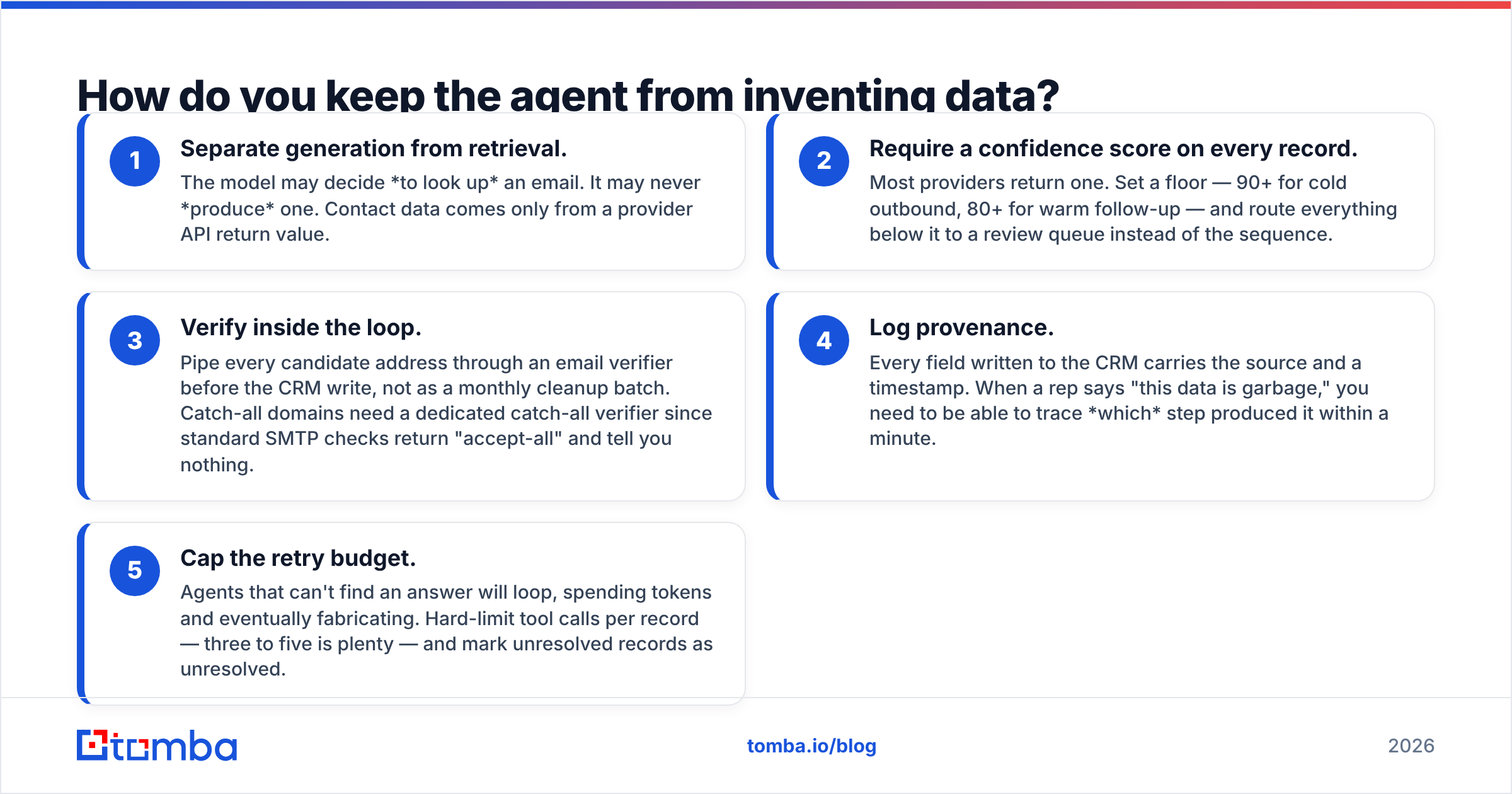
How do you keep the agent from inventing data?#
Ground every factual claim in a tool call, and never let the model generate an email address from pattern inference alone.
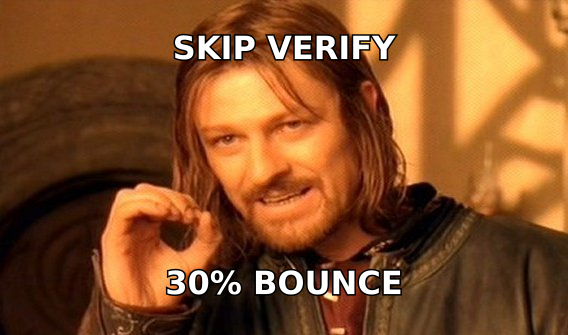
This is the single most common failure in DIY agent builds. Someone wires up GPT-class model plus a web search tool, asks it for "the email of the VP of Marketing at Acme," and the model returns first.last@acme.com because that pattern is statistically common. It looks right. It's unverified. At scale, roughly a quarter to a third of those guesses bounce, and your sender reputation absorbs the damage.
The fix is architectural, not prompt-engineering:
- Separate generation from retrieval. The model may decide to look up an email. It may never produce one. Contact data comes only from a provider API return value.
- Require a confidence score on every record. Most providers return one. Set a floor — 90+ for cold outbound, 80+ for warm follow-up — and route everything below it to a review queue instead of the sequence.
- Verify inside the loop. Pipe every candidate address through an email verifier before the CRM write, not as a monthly cleanup batch. Catch-all domains need a dedicated catch-all verifier since standard SMTP checks return "accept-all" and tell you nothing.
- Log provenance. Every field written to the CRM carries the source and a timestamp. When a rep says "this data is garbage," you need to be able to trace which step produced it within a minute.
- Cap the retry budget. Agents that can't find an answer will loop, spending tokens and eventually fabricating. Hard-limit tool calls per record — three to five is plenty — and mark unresolved records as unresolved.
What does the agent stack look like in practice?#
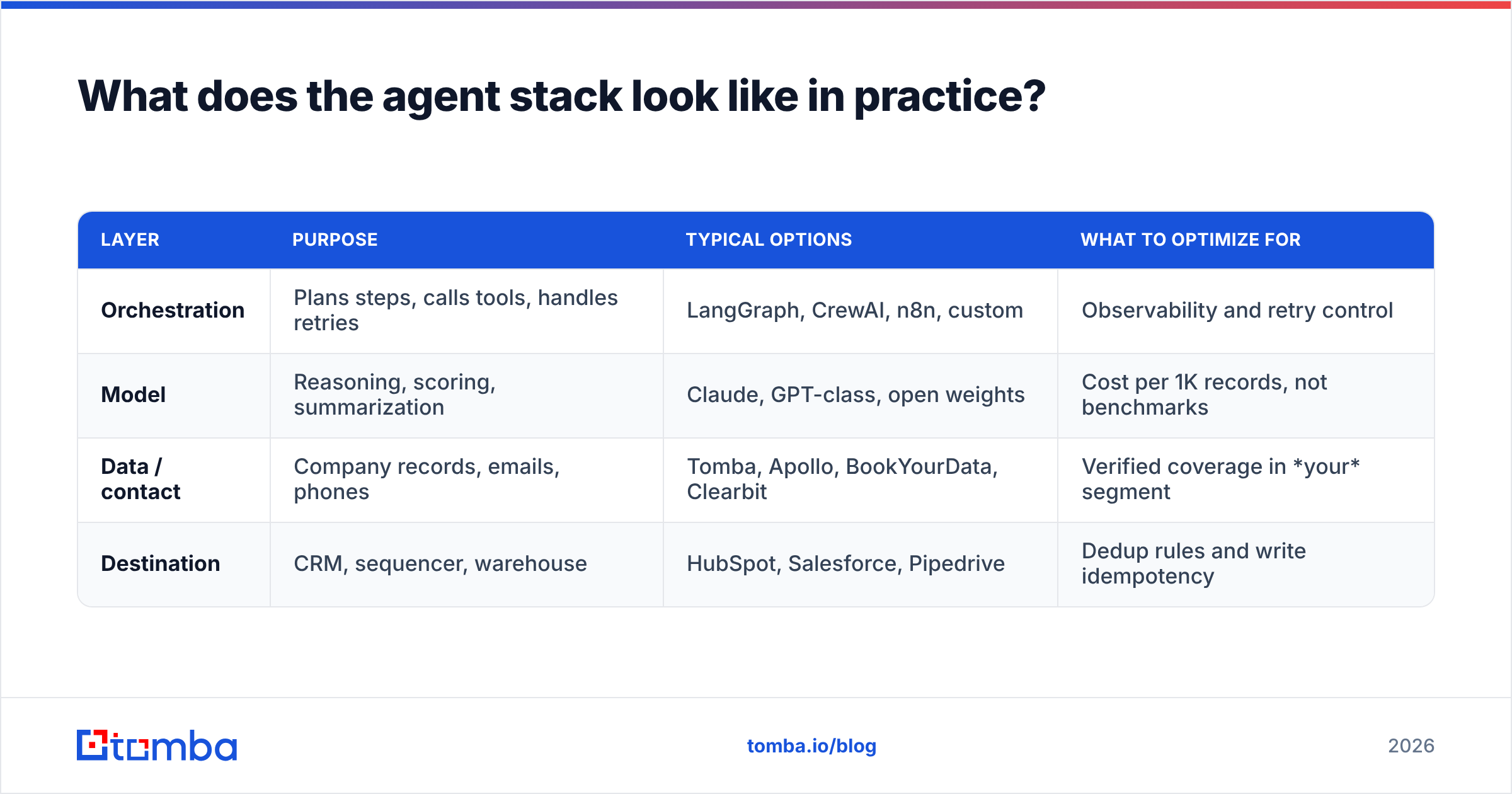
You need four layers. Most teams over-invest in the orchestration layer and under-invest in data, which is exactly backwards.
| Layer | Purpose | Typical options | What to optimize for |
|---|---|---|---|
| Orchestration | Plans steps, calls tools, handles retries | LangGraph, CrewAI, n8n, custom | Observability and retry control |
| Model | Reasoning, scoring, summarization | Claude, GPT-class, open weights | Cost per 1K records, not benchmarks |
| Data / contact | Company records, emails, phones | Tomba, Apollo, BookYourData, Clearbit | Verified coverage in your segment |
| Destination | CRM, sequencer, warehouse | HubSpot, Salesforce, Pipedrive | Dedup rules and write idempotency |
A note on the data layer, because it's the one that decides whether the whole thing works. Coverage is regional and segment-specific — a provider that nails US SaaS may return 40% coverage on European manufacturing. BookYourData, for instance, is strong on pre-built verified B2B lists when you want data delivered rather than queried live; Tomba leans toward real-time API lookup with source attribution, which fits agent loops better because the agent can query per record instead of pre-buying a list. Apollo bundles data with a sequencer, which is convenient until you want to swap either half.
Test all of them on the same 200-company sample from your actual ICP. Vendor-published coverage percentages are averages across everyone's use case, not yours. Run the sample, count verified hits, divide by cost, and pick on that number.
For the plumbing: if your agent runs on an MCP-compatible framework, a native MCP server for email removes a whole class of glue code — the agent calls the tool directly instead of you maintaining a REST wrapper. Otherwise a standard email finder API with a rate-limit-aware client does the job fine.
What does it cost to run?#
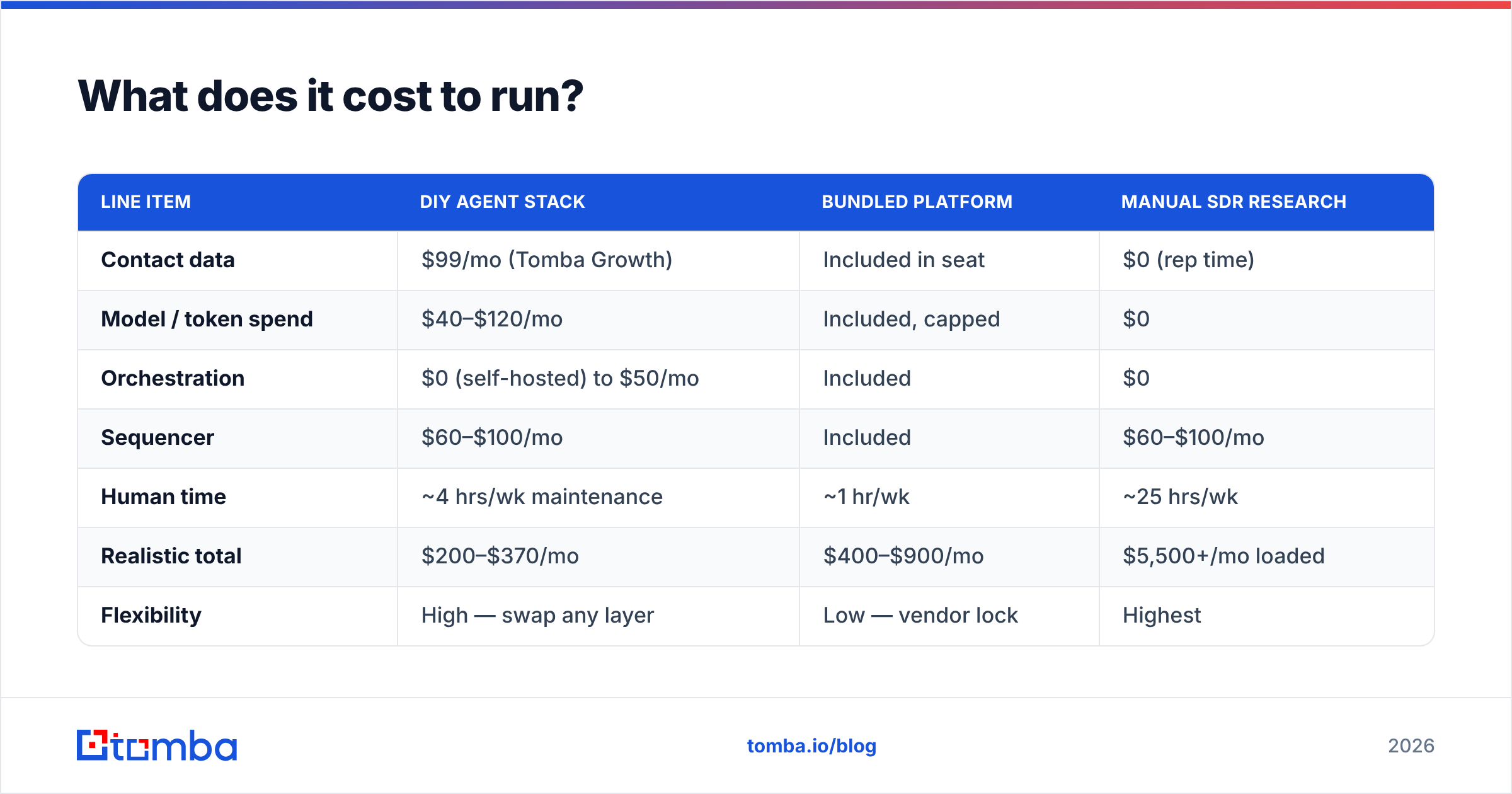
Here's a realistic monthly model for a two-rep team processing roughly 3,000 enriched records a month.
| Line item | DIY agent stack | Bundled platform | Manual SDR research |
|---|---|---|---|
| Contact data | $99/mo (Tomba Growth) | Included in seat | $0 (rep time) |
| Model / token spend | $40–$120/mo | Included, capped | $0 |
| Orchestration | $0 (self-hosted) to $50/mo | Included | $0 |
| Sequencer | $60–$100/mo | Included | $60–$100/mo |
| Human time | ~4 hrs/wk maintenance | ~1 hr/wk | ~25 hrs/wk |
| Realistic total | $200–$370/mo | $400–$900/mo | $5,500+/mo loaded |
| Flexibility | High — swap any layer | Low — vendor lock | Highest |
| Time to first value | 2–4 weeks | 2–5 days | 1 day |
Two things this table hides. First, the DIY column assumes someone on your team can maintain Python and debug a failed tool call at 6pm on a Thursday; if nobody can, the bundled column is genuinely cheaper. Second, the manual column isn't strictly worse — a good SDR researching 40 accounts deeply will beat an agent researching 400 shallowly on any complex enterprise deal. Agents win on breadth, humans win on depth. Pick based on your ACV.
Tomba pricing starts free at 25 searches/month for prototyping, then $49/mo Starter, $99/mo Growth, and $249/mo Pro — which is where most agent builds land once volume is steady. Prototype on the free tier until your verification rate is stable, then scale.
How do you build one without a six-month project?#
Start narrow and expand. The teams that fail try to automate the entire funnel on day one.
- Pick one repetitive research task your reps already do manually and hate. Usually it's "check if this account raised money or hired someone relevant." Automate only that.
- Run it read-only for two weeks. Output to a Google Sheet, not the CRM. Have a rep grade 50 random rows for accuracy. Under 85% accurate, fix the data layer before adding anything.
- Add contact resolution. Wire in domain search to find the right people at qualified accounts, then email finding for the specific named targets. Keep verification mandatory.
- Add CRM writes with dedup. This is where duplicate-record disasters happen. Match on domain plus normalized email, never on company name string.
- Add the second task. Only after the first has run clean for a month.
Instrument from step one. You want three numbers visible at all times: records processed, verified-contact rate, and cost per verified record. If the verified rate drops below 70%, something upstream broke — usually a provider's coverage for a new segment you just started targeting.
For deeper background on the metric side, HubSpot's research on sales productivity and G2's category data on AI sales assistants are both useful for benchmarking what "normal" looks like before you decide your numbers are bad. If you're evaluating orchestration frameworks, read the vendor's own docs rather than roundup posts — Anthropic's agent documentation covers tool-use patterns that apply regardless of which model you end up running.
Is a lead generation agent worth it for your team?#
Yes, if two conditions hold: your prospecting research is genuinely repetitive, and you have a verified data source under the agent. Fail either test and you're buying an expensive random-text generator.
Concretely, agents pay off when:
- Your ICP is definable in rules. "Series A–C, 50–500 employees, uses Snowflake" — an agent can execute that. "Companies where the CTO seems frustrated" — it cannot.
- Volume exceeds human capacity. Below ~200 accounts/month, a rep with a good Chrome extension is faster and cheaper than any agent you'll build.
- Your ACV justifies the setup. Sub-$5K ACV rarely funds a four-week build. Above $25K, the research quality lift alone usually covers it.
- Someone owns it. Agents drift. Providers change coverage, sites change structure, models get deprecated. Unowned agents quietly degrade for months before anyone notices the pipeline dried up.
They don't pay off when your problem is conversion, not volume. If you're already generating more leads than you can work and reply rates are the bottleneck, an agent just gets you to the same wall faster. Fix the message and the targeting first.
Where should you start this week?#
Run one test: take 100 accounts from your current target list, and see how many you can resolve to a verified, deliverable contact. That single number tells you whether an agent is a force multiplier or a fiction generator on your data.
Tomba's Email Finder is built for exactly this layer of the stack — real-time lookup by domain, name, or company, with source attribution and confidence scoring on every result, plus an API and MCP server so your agent can call it directly instead of scraping. Start on the free tier at 25 searches, measure your verified-hit rate on your own ICP, and only then decide how much agent to build on top of it.
Related guides#
// get started
Find, verify and enrich your first contacts today
Start on the free plan with 25 searches a month, then scale when your team is ready.
Free plan · No credit card required · GDPR & CCPA
// about the author