Lead Generation API: How to Build a Real-Time Lead Pipeline in 2026
CSV exports go stale the day you download them. A lead generation API keeps your pipeline fresh at request time. Here is how these APIs actually work, what they cost, and where they quietly fail.
TL;DR
- A lead generation API returns contact and company data over HTTP at request time, so your CRM, product, or workflow gets fresh records instead of a three-month-old CSV.
- The three jobs almost every lead generation API does: discovery (who works here), resolution (what is their email or phone), and enrichment (what else do we know about them).
- Accuracy is the whole game. A 95% deliverable API at $0.02 per verified contact beats a 70% API at $0.005, because bounced sends cost you sender reputation, not just credits.
- Budget realistically: entry-level API access starts around $49/mo, and most teams running real volume land between $99 and $249/mo before they need enterprise terms.
- Build the pipeline in this order: trigger → discovery → verification → enrichment → CRM write. Skipping verification is the single most common reason cold campaigns collapse.
What is a lead generation API?#
A lead generation API is a web service you call with a small amount of information — a domain, a full name, a LinkedIn URL, a company website — and it returns structured lead data in JSON: work email, job title, seniority, phone, company size, tech stack, and a confidence score.
Think of it like a phone book that rebuilds itself every time you open it. A CSV export is a photocopy of one page from last quarter. An API call asks the question right now, against the current index, and tells you how confident it is in the answer.
Mechanically, nearly all of them are REST services over HTTPS with an API key in the header. If you have ever called a REST endpoint you already know the shape:
GET https://api.tomba.io/v1/email-finder/stripe.com?full_name=Jane+Doe
X-Tomba-Key: <key>
X-Tomba-Secret: <secret>
Response comes back with the email, a score, the sources it was seen on, and often the person's title and LinkedIn handle. That is the entire primitive. Everything else — bulk jobs, webhooks, CRM sync — is orchestration on top of it.
Why not just export a CSV?#
Because B2B contact data decays at roughly 2–3% per month, and job changes cluster. A list you exported in January is meaningfully wrong by April, and you will not know which rows are wrong until you send to them.
CSV workflows also fail in ways that are annoying rather than dramatic:
- Staleness compounds silently. Nobody re-exports a list they already paid for. It sits in a Google Sheet and gets reused for the next three campaigns.
- You pay for rows you never touch. Bulk exports bill on delivery, not on use. A 10,000-row export where you only mail 1,200 people is 88% waste.
- There is no trigger. A CSV cannot react to a demo request, a website visit, or a new signup. An API can respond in under a second.
- Deduplication becomes your problem. Every export overlaps with the last one, and merge logic in a spreadsheet is where data quality goes to die.
- Compliance gets fuzzy. When a record's provenance is "a file someone downloaded," you cannot answer a deletion request properly. API responses that carry source metadata can.

The honest counterpoint: if you buy one list a year for a single conference and mail it once, a CSV is fine. APIs pay off when lead acquisition is continuous, event-driven, or embedded in a product.
What can you actually build with a lead generation API?#
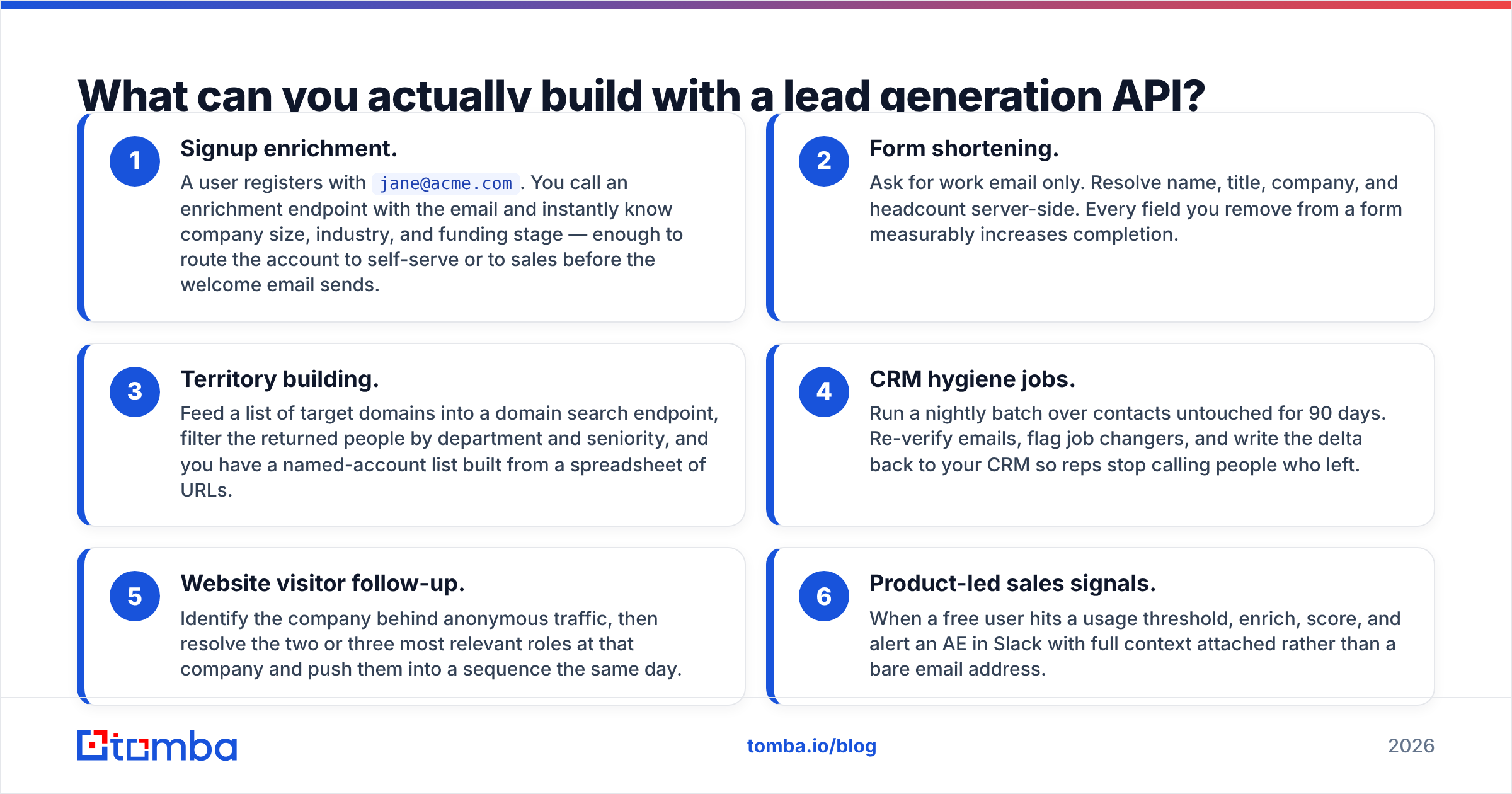
These are the six patterns that show up over and over in real implementations:
- Signup enrichment. A user registers with
jane@acme.com. You call an enrichment endpoint with the email and instantly know company size, industry, and funding stage — enough to route the account to self-serve or to sales before the welcome email sends. - Form shortening. Ask for work email only. Resolve name, title, company, and headcount server-side. Every field you remove from a form measurably increases completion.
- Territory building. Feed a list of target domains into a domain search endpoint, filter the returned people by department and seniority, and you have a named-account list built from a spreadsheet of URLs.
- CRM hygiene jobs. Run a nightly batch over contacts untouched for 90 days. Re-verify emails, flag job changers, and write the delta back to your CRM so reps stop calling people who left.
- Website visitor follow-up. Identify the company behind anonymous traffic, then resolve the two or three most relevant roles at that company and push them into a sequence the same day.
- Product-led sales signals. When a free user hits a usage threshold, enrich, score, and alert an AE in Slack with full context attached rather than a bare email address.
Notice that only two of the six are classic "build a prospect list." The rest are plumbing — and plumbing is where APIs beat every UI-driven tool, because no human has to be awake for it to run.
Which lead generation APIs matter in 2026?#
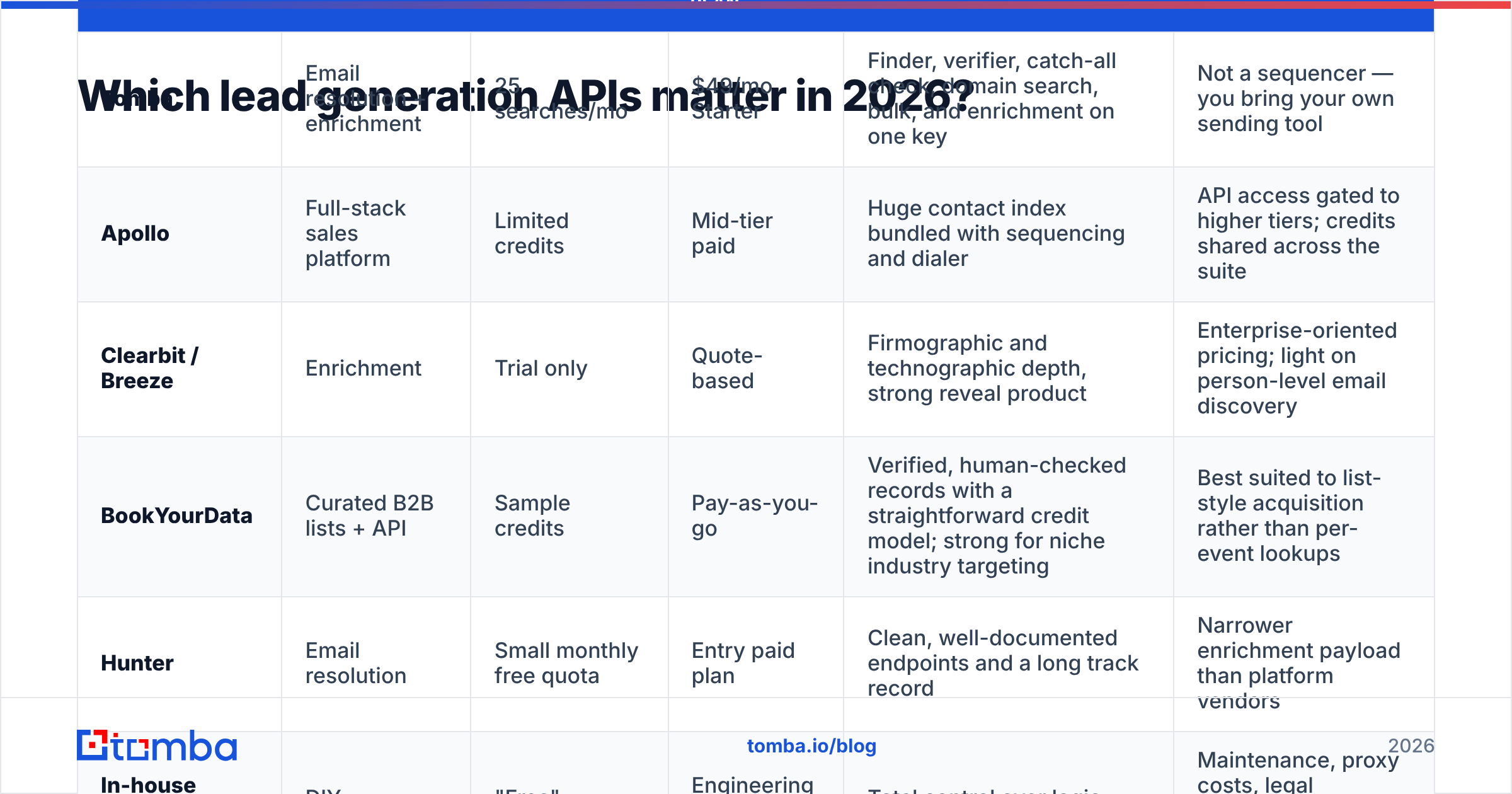
The market splits into three groups: email-resolution specialists, full-stack sales platforms, and pure enrichment providers. They are priced and built differently, and mixing them up is how teams overpay.
| Provider | Category | Free tier | Entry paid plan | API strength | Watch out for |
|---|---|---|---|---|---|
| Tomba | Email resolution + enrichment | 25 searches/mo | $49/mo Starter | Finder, verifier, catch-all check, domain search, bulk, and enrichment on one key | Not a sequencer — you bring your own sending tool |
| Apollo | Full-stack sales platform | Limited credits | Mid-tier paid | Huge contact index bundled with sequencing and dialer | API access gated to higher tiers; credits shared across the suite |
| Clearbit / Breeze | Enrichment | Trial only | Quote-based | Firmographic and technographic depth, strong reveal product | Enterprise-oriented pricing; light on person-level email discovery |
| BookYourData | Curated B2B lists + API | Sample credits | Pay-as-you-go | Verified, human-checked records with a straightforward credit model; strong for niche industry targeting | Best suited to list-style acquisition rather than per-event lookups |
| Hunter | Email resolution | Small monthly free quota | Entry paid plan | Clean, well-documented endpoints and a long track record | Narrower enrichment payload than platform vendors |
| In-house scraping | DIY | "Free" | Engineering time | Total control over logic | Maintenance, proxy costs, legal exposure, and no verification layer |
Pricing above reflects each vendor's published plans at the time of writing — always confirm on the vendor's own page, since credit definitions differ wildly. One provider's "credit" is a single lookup; another's is a lookup plus a verification plus an enrichment.
The practical selection rule: buy the narrowest tool that covers your trigger. If your use case is "resolve an email when a form is submitted," a resolution API at $49–$99/mo does it. Buying a full platform for that is paying for a sequencer and a dialer you will never open.
How accurate is the data behind the API?#
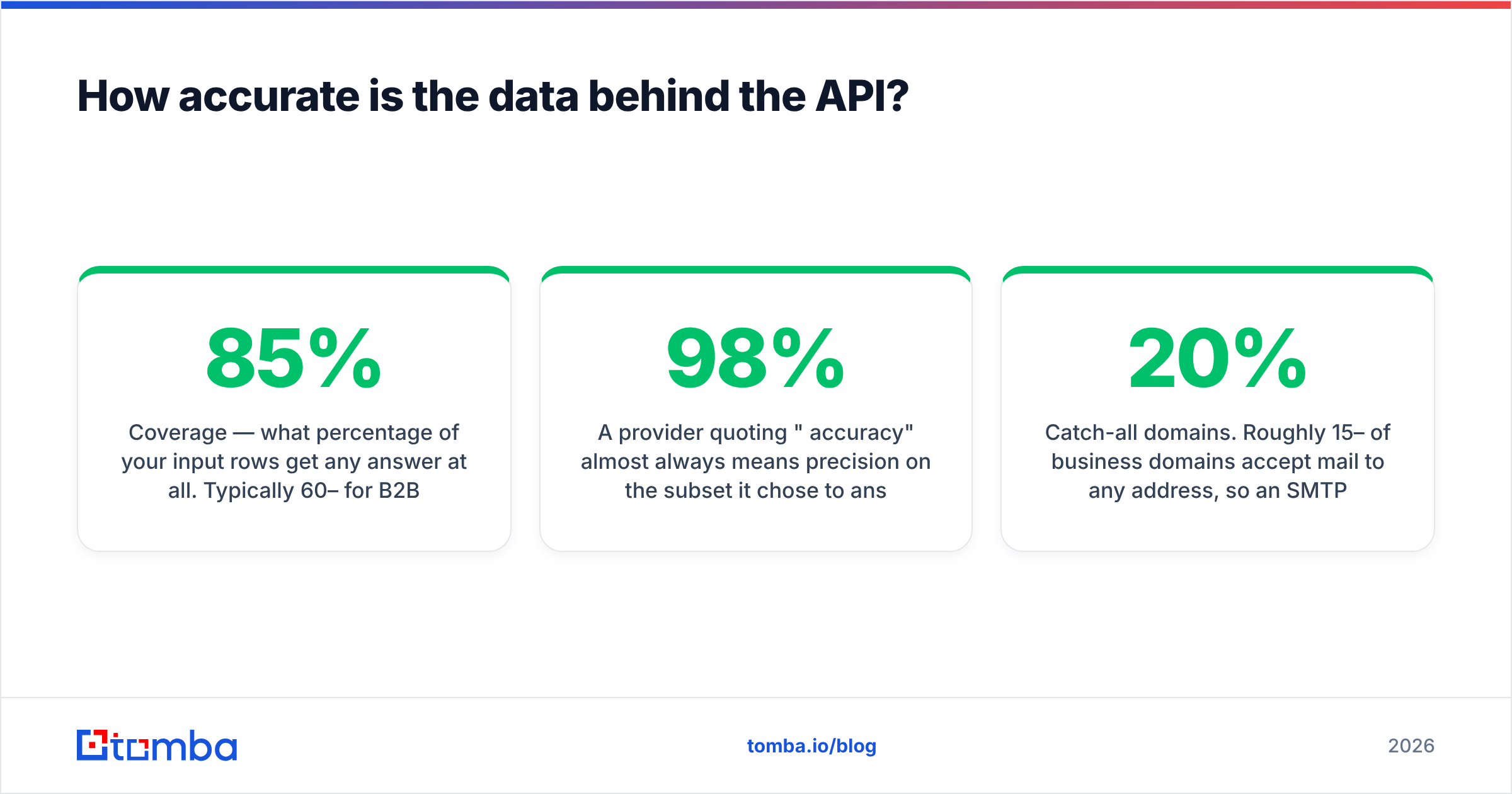
Accuracy is not one number. It decomposes into three that vendors often blur together:
- Coverage — what percentage of your input rows get any answer at all. Typically 60–85% for B2B work emails at mid-market companies, much lower for SMBs and non-English markets.
- Precision — of the answers returned, what percentage are genuinely correct. This is where verified-only APIs pull ahead.
- Deliverability — what percentage actually accept mail today. This is precision minus job changes, minus deactivated mailboxes, minus aggressive spam filters.
A provider quoting "98% accuracy" almost always means precision on the subset it chose to answer, not coverage. Both matter, and you should test both. Run 200 known-good contacts from your own CRM through each candidate API and measure all three yourself. It takes an afternoon and it will contradict at least one vendor's marketing page.
Two specific traps worth engineering around:
Catch-all domains. Roughly 15–20% of business domains accept mail to any address, so an SMTP check returns "valid" for asdfgh@company.com. A generic verifier will happily mark garbage as deliverable. You need a dedicated catch-all verifier that uses pattern confidence and source evidence rather than SMTP alone, or you need to route catch-all hits to a lower-risk sending pool.
Role accounts. info@, sales@, and support@ are deliverable and nearly worthless for outbound. Filter them at the API boundary, not in the inbox.
The fix for all of this is the same: never treat discovery output as send-ready. Chain it through an email verifier before anything touches your sending domain. One bad batch can take weeks of warmup to recover from.

What does a lead generation API actually cost?#
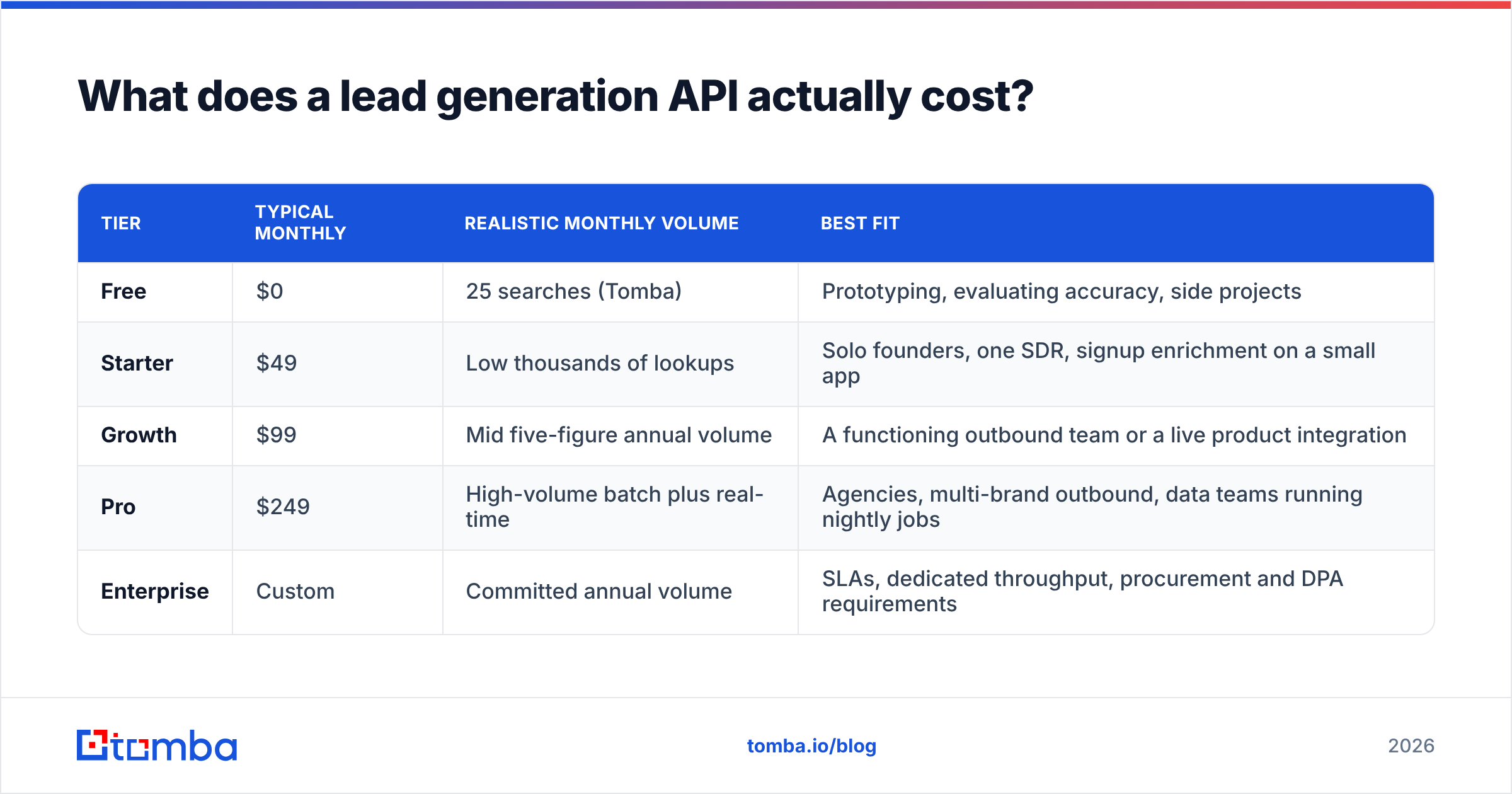
Sticker price is the smaller half of the equation. Here is how the real cost shakes out across plan tiers:
| Tier | Typical monthly | Realistic monthly volume | Best fit |
|---|---|---|---|
| Free | $0 | 25 searches (Tomba) | Prototyping, evaluating accuracy, side projects |
| Starter | $49 | Low thousands of lookups | Solo founders, one SDR, signup enrichment on a small app |
| Growth | $99 | Mid five-figure annual volume | A functioning outbound team or a live product integration |
| Pro | $249 | High-volume batch plus real-time | Agencies, multi-brand outbound, data teams running nightly jobs |
| Enterprise | Custom | Committed annual volume | SLAs, dedicated throughput, procurement and DPA requirements |
Full Tomba pricing is published per tier, which is worth noting because a meaningful slice of this market hides pricing behind a sales call.
Then add the costs that never appear on a pricing page:
- Bounce cost. At a 5% bounce rate on 10,000 sends, you burn 500 sends and take a reputation hit that suppresses the other 9,500. Verification that costs $30 prevents a problem worth thousands.
- Rework cost. Bad data reaching a rep means research time, wrong-person emails, and CRM cleanup later. Most teams price this at zero. It is not zero.
- Credit waste. If your API charges for "not found" responses, your effective cost per usable lead is higher than advertised. Ask explicitly; policies differ.
- Engineering time. Retries, backoff, idempotency keys, and webhook handling are a real sprint, not an afternoon.
How do you architect a lead generation pipeline?#
A pipeline that survives contact with production looks like this:
1. Trigger. Something happens: a form submit, a cron tick, a webhook from your CRM, a new row in a target-accounts table. Every API call should have a reason to exist. Untriggered polling is how you burn credits.
2. Discovery. Resolve the person. Call an email finder with name plus domain, or a domain search when you need the full roster at an account. Cache aggressively — the same domain queried twice in a week should hit your cache, not the vendor.
3. Verification. Every discovered address goes through verification before it is marked sendable. Store the verification timestamp. Anything older than 60 days gets re-checked, not trusted.
4. Enrichment. Layer on firmographics and technographics only for records that passed step three. Enriching unverified contacts is spending money on rows you will delete.
5. Scoring and routing. Apply your ICP rules server-side. A record that fails ICP should never reach a rep's queue, no matter how clean the email is.
6. Write-back. Push to your CRM with deduplication on a stable key (email lowercased, or a provider person ID). Use your CRM's official API — HubSpot's developer docs and Salesforce's REST guide both document upsert-by-external-id patterns that save you from duplicate-contact chaos.
For batch work, do not loop single-lookup calls. Use the bulk email finder endpoints — they are cheaper per record, they respect rate limits for you, and they return job IDs you can poll or receive via webhook instead of holding a connection open for twenty minutes.
Operational details that bite people: implement exponential backoff on 429s, make every job idempotent so a retry does not double-charge credits, log the raw response body for at least 30 days so you can debug attribution disputes, and set a hard monthly spend ceiling in code. That last one has saved more than one team from a runaway loop that spent a quarter's budget in ninety minutes.
Is a lead generation API right for your team?#
Use this as a quick filter.
Yes, if: lead acquisition happens continuously; you have a product or CRM to write into; you can spare a few engineering days; data freshness affects revenue; or you need enrichment to fire inside a user-facing flow.
Not yet, if: you are still validating your ICP and buy one list a quarter; you have nobody to maintain the integration; or your entire funnel is inbound with high-touch manual qualification. Start in the UI, prove the motion converts, then automate it.
Middle path: many teams start with a browser extension and manual data enrichment for three months, learn which fields actually change rep behavior, and only then build the API pipeline. That sequencing prevents you from automating a process that was never good.
One last thing on compliance. Under GDPR and similar regimes, legitimate interest for B2B outreach requires that you can explain where a record came from and honor deletion. Pick an API that returns source metadata and publishes its data sources. "We bought a list" is not a defensible answer in 2026, and reviewers on G2 increasingly call out vendors who are vague about provenance.
Where to start#
Pick one trigger. Just one. The highest-ROI first build for most teams is signup enrichment, because the volume is low, the value is immediate, and it fails safely — a missed enrichment just means a slightly less personalized welcome email.
Wire it up against a free tier first and measure coverage, precision, and deliverability on your own data before you commit to a plan. If the numbers hold, scale the same code path to your outbound pipeline.
Start with the Tomba API: finder, verifier, catch-all checks, domain search, bulk jobs, and enrichment all live behind one key, the free tier gives you 25 searches to validate accuracy on your own contacts, and paid plans open at $49/mo with no sales call required. Build the trigger, verify before you send, and let the pipeline run while you sleep.
Related guides#
// get started
Find, verify and enrich your first contacts today
Start on the free plan with 25 searches a month, then scale when your team is ready.
Free plan · No credit card required · GDPR & CCPA
// about the author