Lead Generation Campaigns: How to Build Ones That Convert
Most lead generation campaigns fail on structure, not creative. Here's the offer-to-list-to-channel math that separates campaigns filling pipeline from ones burning budget.
TL;DR
- A lead generation campaign is not "send emails until someone replies." It is a closed loop: a defined segment, a verified contact list, one offer, one channel mix, and a measurement window you agreed on before launch.
- The single biggest predictor of campaign performance is list quality, not copy. A 2% bounce rate campaign and a 12% bounce rate campaign are not the same campaign with different luck — they are different infrastructure.
- Cost per qualified lead in B2B ranges roughly $50–$400 depending on channel and ACV. If you are not tracking CPQL per campaign, you are optimizing blind.
- Multi-touch beats single-channel by a wide margin, but only when the touches reference each other. Six disconnected emails is not a sequence.
- Budget roughly 40% of campaign effort to targeting and data, 30% to offer design, 30% to execution. Most teams invert this and wonder why creative changes do nothing.
What is a lead generation campaign, actually?#
A lead generation campaign is a time-boxed, measurable effort to move a specific audience segment from "does not know you exist" to "has raised a hand." That definition is deliberately narrow, and the narrowness is the point.
Think of it like fishing. Most teams obsess over the lure — the subject line, the ad creative, the landing page headline. But the professionals obsess over which lake, what time of day, and whether the line is actually in the water. The lure matters last.
A campaign that qualifies as a campaign has five fixed components:
- A defined segment — not "SaaS companies" but "Series A–B vertical SaaS, 30–120 employees, US, using Salesforce, with a VP Sales hired in the last 9 months."
- A single primary offer — a demo, an audit, a benchmark report, a pilot. One. Campaigns with three CTAs convert like campaigns with zero.
- A verified contact list — names, roles, and deliverable email addresses, with bounce risk scored before send.
- A channel sequence — email, LinkedIn, phone, ads, or some combination, with defined timing between touches.
- A measurement window and a kill criterion — "if we are under 1.5% positive reply rate after 400 sends, we stop and rebuild the list."
Miss any one of those and you have activity, not a campaign. The kill criterion is the one teams skip most often, and it is the one that saves the most money.
Why do most lead generation campaigns underperform?#
Because the failure happens upstream of anything you can see in the dashboard.
Here is the usual autopsy. A team buys or scrapes a list of 20,000 contacts. They write a sequence. They launch. Open rates look fine at first, then collapse in week two. Replies are mostly "wrong person" and "unsubscribe." By week four the sending domain is throttled and the team concludes that cold email is dead.
What actually happened: the list had a 14% invalid rate and a 30% role-mismatch rate. The first wave of bounces damaged sender reputation, which suppressed inbox placement for the second wave, which made the copy look worse than it was. No amount of subject-line testing recovers from that.

The three most common structural failures, in order of how much damage they do:
- Unverified lists. Every invalid address is a deliverability tax paid by the valid ones. Google and Microsoft both treat elevated bounce rates as a spam signal. Run the list through an email verifier before the first send, not after the first complaint.
- Segment too broad. If your offer has to work for a 20-person agency and a 4,000-person enterprise, it works for neither. Broad segments force generic copy, and generic copy is what people mean when they say "this feels like a blast."
- No offer, just a meeting request. "Do you have 15 minutes?" is a cost to the reader with no stated return. A campaign offer should be something they would plausibly want even if they never buy: a benchmark, a teardown, a competitor breakdown, a free audit with actual findings.
Which lead generation channels are worth the budget?#
Depends entirely on your average contract value and sales cycle. A $500 ACV product cannot afford outbound SDR cost. A $90,000 ACV product cannot afford to rely on inbound content alone.
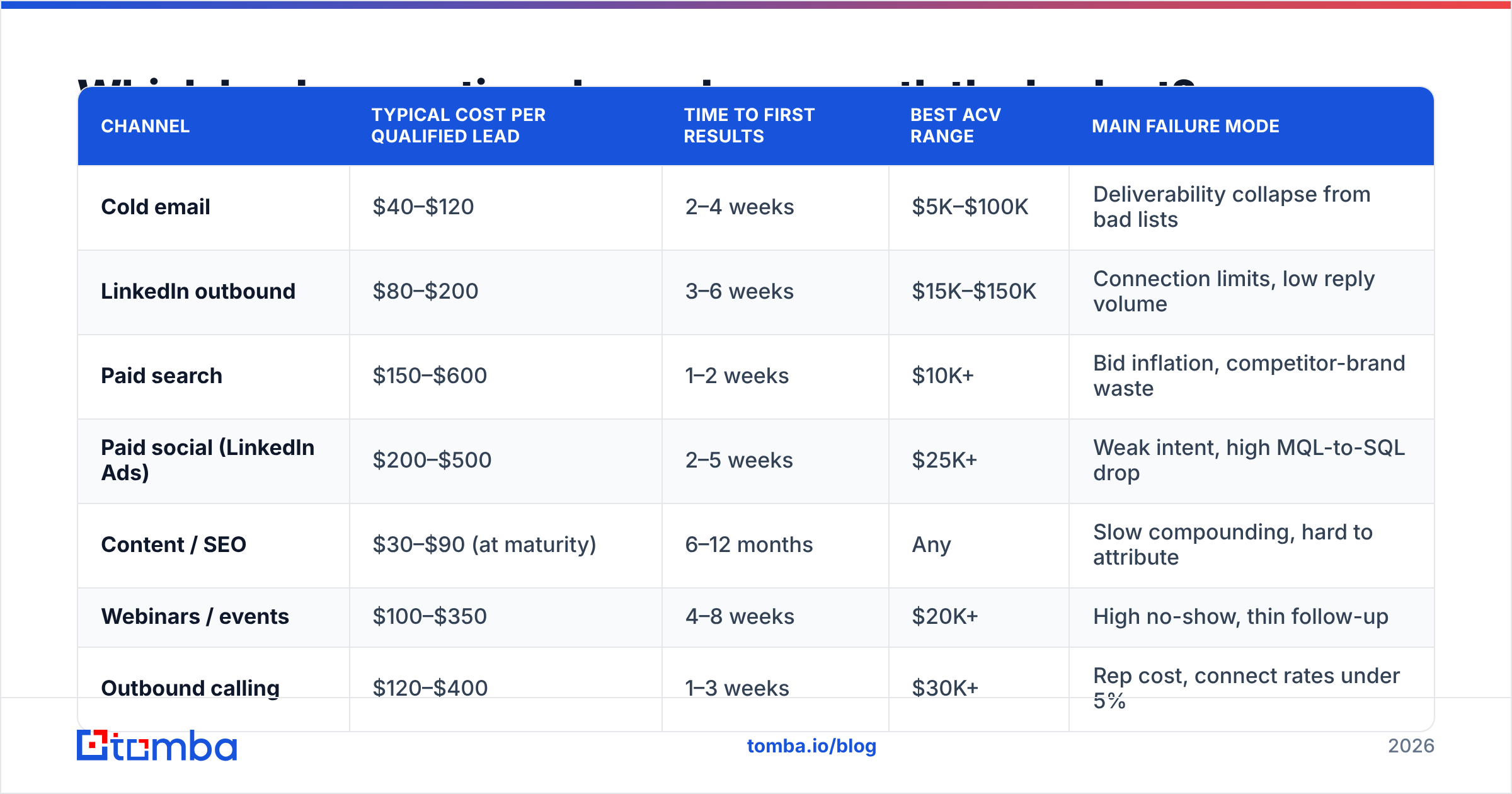
Here is a realistic comparison of the major B2B campaign channels as of 2026. Ranges are wide because they vary by vertical — treat them as calibration, not gospel.
| Channel | Typical cost per qualified lead | Time to first results | Best ACV range | Main failure mode |
|---|---|---|---|---|
| Cold email | $40–$120 | 2–4 weeks | $5K–$100K | Deliverability collapse from bad lists |
| LinkedIn outbound | $80–$200 | 3–6 weeks | $15K–$150K | Connection limits, low reply volume |
| Paid search | $150–$600 | 1–2 weeks | $10K+ | Bid inflation, competitor-brand waste |
| Paid social (LinkedIn Ads) | $200–$500 | 2–5 weeks | $25K+ | Weak intent, high MQL-to-SQL drop |
| Content / SEO | $30–$90 (at maturity) | 6–12 months | Any | Slow compounding, hard to attribute |
| Webinars / events | $100–$350 | 4–8 weeks | $20K+ | High no-show, thin follow-up |
| Outbound calling | $120–$400 | 1–3 weeks | $30K+ | Rep cost, connect rates under 5% |
The pattern worth noticing: the cheapest channels per lead (SEO, cold email) are the ones that require the most upfront infrastructure. The fastest channels (paid search, calling) are the most expensive per lead and stop the moment you stop paying. Most healthy pipelines run two to three channels simultaneously, with one compounding channel funding the fast ones.
For a broader view of channel benchmarks by industry, HubSpot's annual State of Marketing data and G2's buyer behavior reports are the two most-cited neutral sources.
How do you build the list your campaign actually needs?#
Work backwards from the reply you want, not forwards from the tool you have.
If your campaign is "we help RevOps leaders at mid-market SaaS clean up their Salesforce data," then your list is not "everyone at SaaS companies." It is RevOps, Sales Ops, and Sales Systems titles at companies between 200 and 2,000 employees running Salesforce. That is maybe 4,000 people in North America. That is a fine list. A campaign to 4,000 well-chosen people beats a campaign to 40,000 poorly-chosen ones on every metric that matters, including total meetings booked.
The build sequence that works:
- Define the account list first, people second. Firmographics and technographics filter accounts. Titles filter people inside those accounts. Doing it in reverse produces a list full of the right titles at the wrong companies.
- Pull contacts by domain, not by name guessing. A domain search returns the actual email patterns and known addresses at a company, which is dramatically more reliable than permutating firstname.lastname and hoping.
- Enrich before you verify. Add role, seniority, LinkedIn URL, and recent job-change signals. Contact enrichment at this stage is what lets you personalize at scale later without manual research per contact.
- Verify every address, including catch-alls. Catch-all domains accept everything at the SMTP layer and tell you nothing. A catch-all verifier applies additional signals so you are not treating "unknown" as "valid."
- Suppress aggressively. Existing customers, open opportunities, past unsubscribes, competitors, and anyone contacted by another rep in the last 90 days. Suppression lists prevent the single most expensive campaign error: a cold email to a current customer.
- Cap the send list at what you can follow up on. If two SDRs can handle 40 positive replies a week, do not build a list that generates 200. Unworked replies rot faster than cold leads.
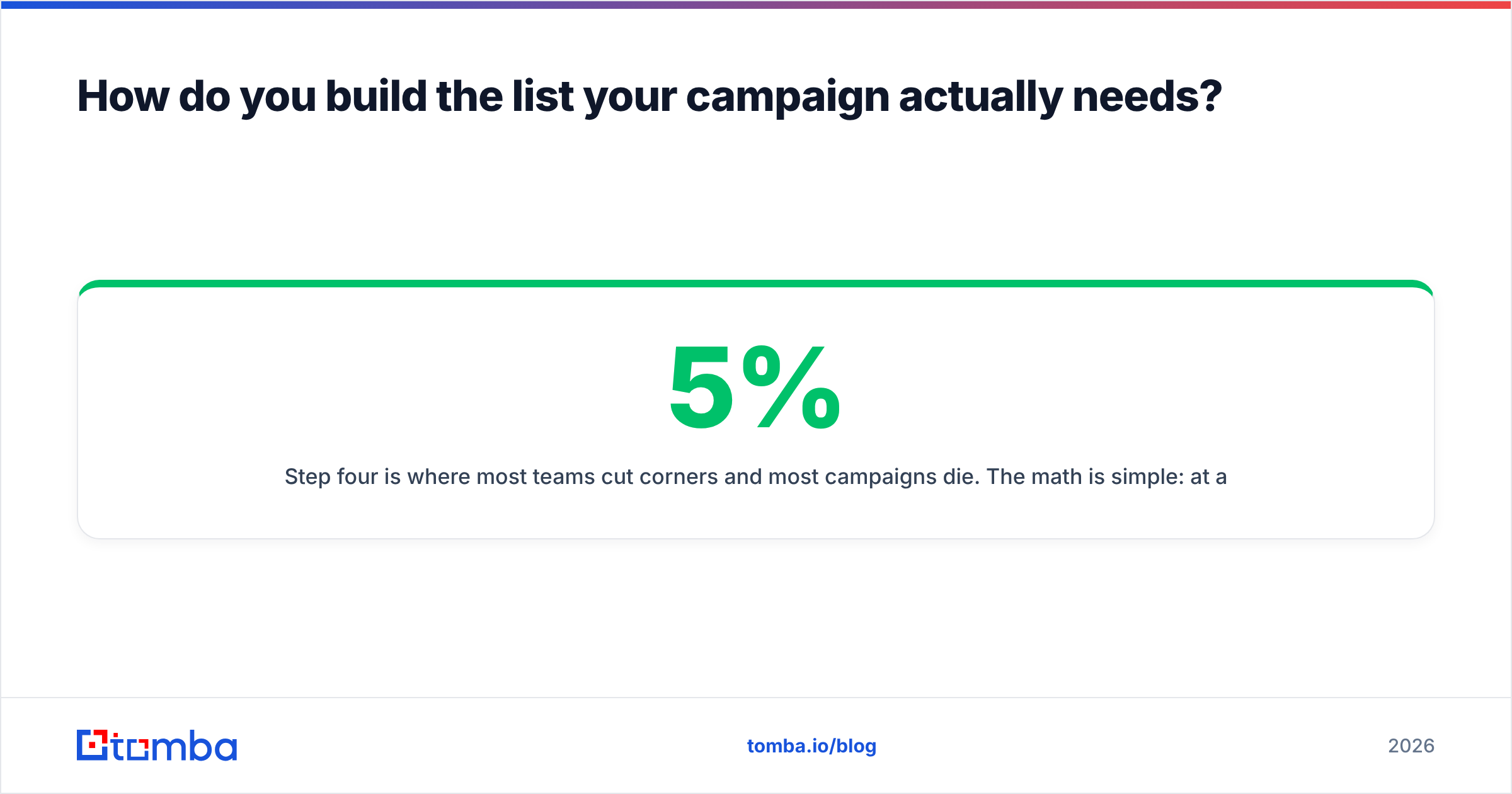
Step four is where most teams cut corners and most campaigns die. The math is simple: at a 5% invalid rate you are fine. At 10% you are throttled. At 15% mailbox providers start filtering your domain regardless of content quality.
What does a well-structured campaign sequence look like?#
Multi-touch, multi-channel, and internally referential. Each touch should make sense as a follow-on to the last one, which means you cannot write touch five without knowing what touch one said.
A sequence structure that holds up across verticals:
- Day 1 — Email 1 (the offer). Short. One specific observation about their company, one offer, one CTA. Under 90 words.
- Day 2 — LinkedIn profile view + connection request. No pitch in the connection note. You are creating familiarity, not selling.
- Day 4 — Email 2 (the proof). A concrete result from a comparable company. Numbers, not adjectives.
- Day 7 — Phone attempt. Reference the email explicitly: "I sent you a note Tuesday about X." Connect rates are low; the attempt still lifts email reply rates through mere-exposure effect.
- Day 9 — Email 3 (the reframe). Same problem, different angle. If touch one led with cost, touch three leads with risk or speed.
- Day 14 — Email 4 (the breakup). Not passive-aggressive. "Closing this out — if timing changes, here's the benchmark report either way." Attach value on the way out.
Four to six touches over two to three weeks is the range where marginal touches still produce replies. Past touch eight, you are mostly generating unsubscribes and spam complaints.

On timing between touches: two to four days is the sweet spot. Same-day double-sends read as automated. Two weeks between touches means the reader has no memory of touch one, which defeats the purpose of sequencing.
How should you measure lead generation campaigns?#
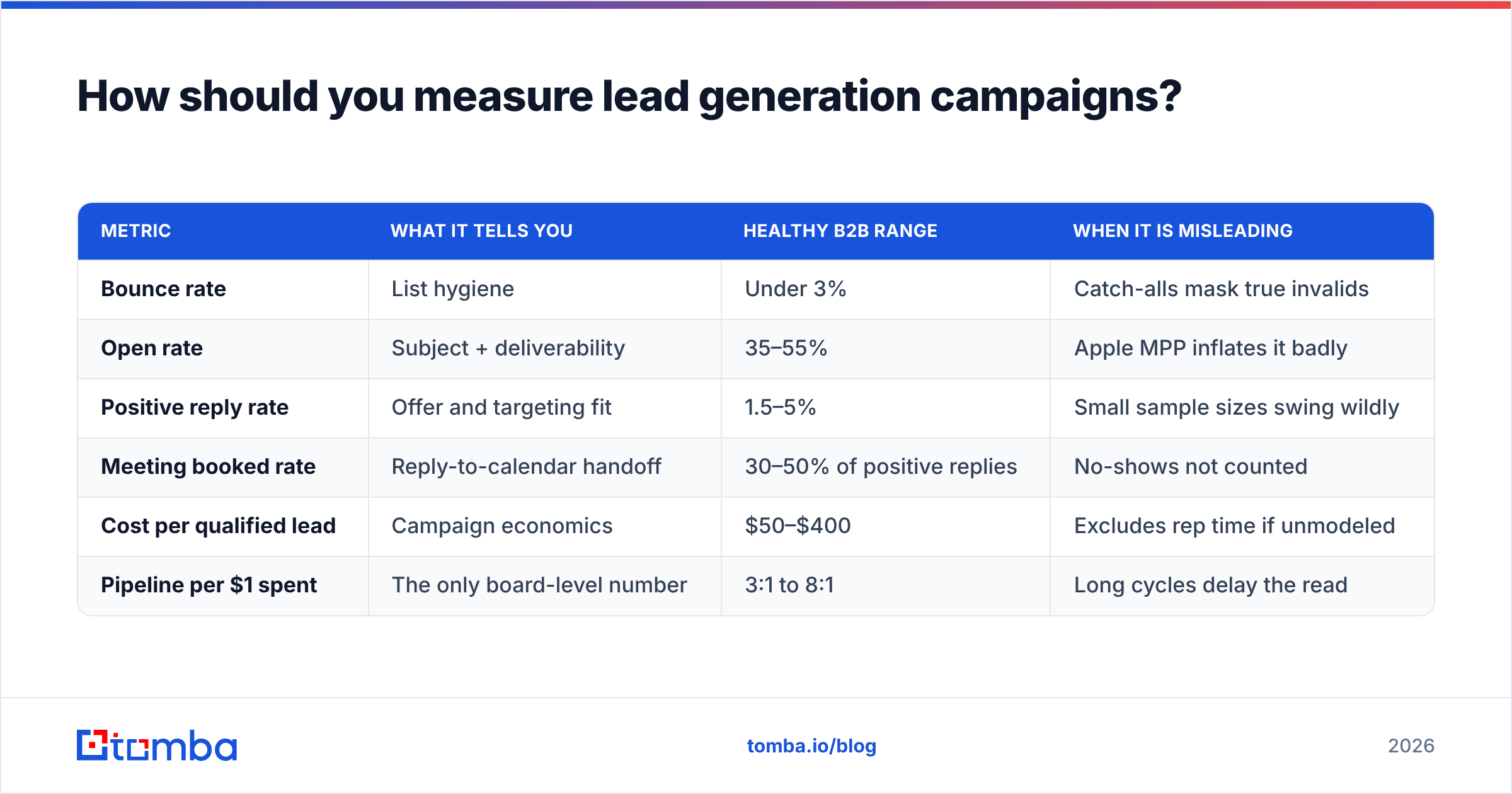
By cost per qualified lead and pipeline generated, with reply rate and meeting rate as diagnostics — never as the headline number.
Reply rate is a diagnostic because it can be gamed upward with provocative subject lines that produce angry replies. Meeting rate is a diagnostic because meetings with unqualified prospects cost more than they earn. The number that survives scrutiny at the board level is pipeline dollars per dollar spent.
| Metric | What it tells you | Healthy B2B range | When it is misleading |
|---|---|---|---|
| Bounce rate | List hygiene | Under 3% | Catch-alls mask true invalids |
| Open rate | Subject + deliverability | 35–55% | Apple MPP inflates it badly |
| Positive reply rate | Offer and targeting fit | 1.5–5% | Small sample sizes swing wildly |
| Meeting booked rate | Reply-to-calendar handoff | 30–50% of positive replies | No-shows not counted |
| Cost per qualified lead | Campaign economics | $50–$400 | Excludes rep time if unmodeled |
| Pipeline per $1 spent | The only board-level number | 3:1 to 8:1 | Long cycles delay the read |
Two measurement rules worth enforcing:
Agree on "qualified" before launch. If marketing counts a downloaded ebook as a lead and sales counts only a booked demo, every campaign review turns into a definitional argument. Write the MQL definition down and get both sides to sign it.
Give the campaign a fair window. Judging a cold email campaign after 200 sends is statistically meaningless at a 2% reply rate — you would expect four replies, and the difference between two and six is noise. Minimum 500 sends per variant before you draw conclusions.
Which tools do you actually need to run campaigns?#
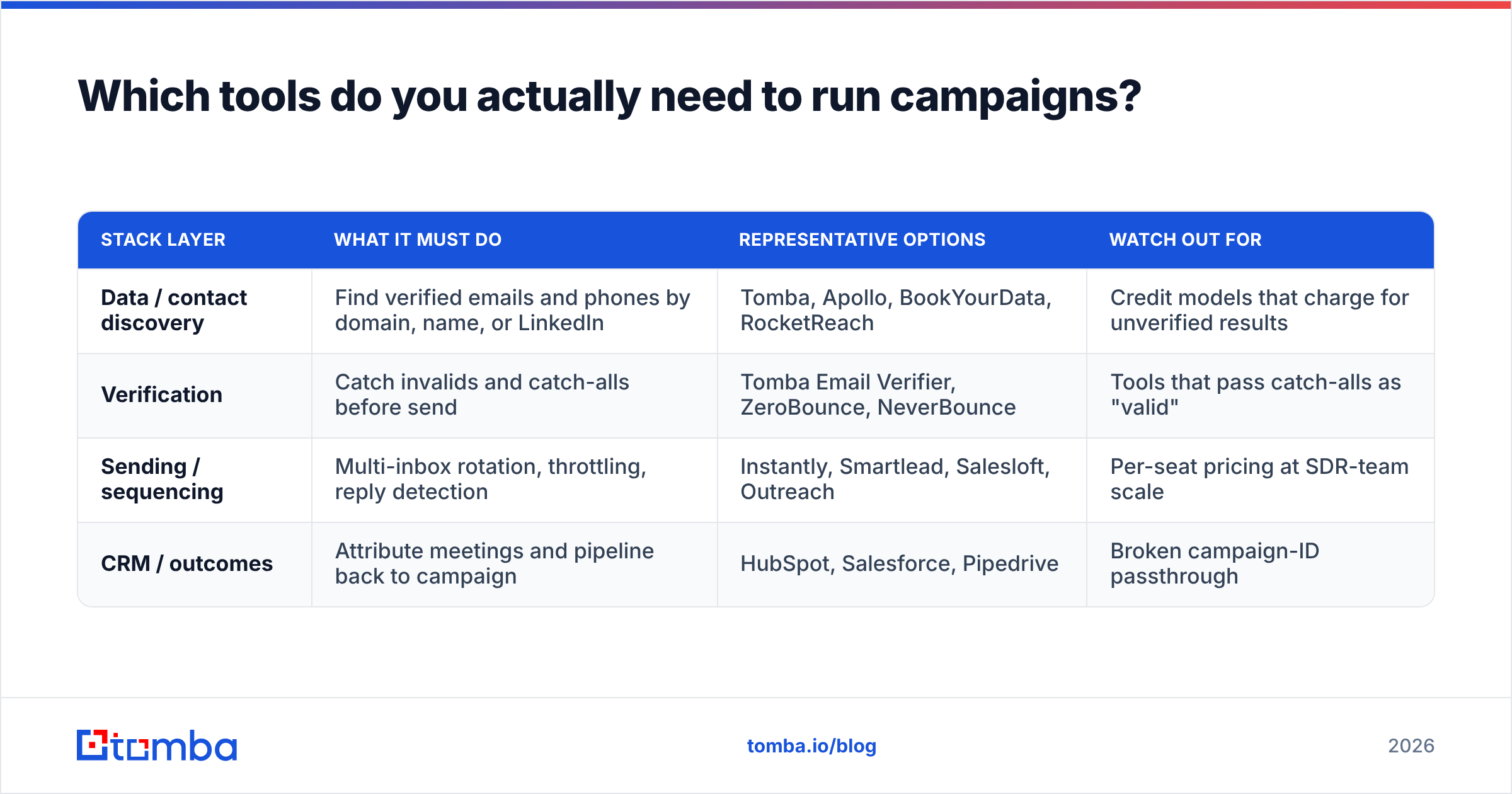
Fewer than the market wants you to believe. A functional campaign stack has four jobs: find contacts, verify them, send sequences, and record outcomes. Everything else is optimization.
| Stack layer | What it must do | Representative options | Watch out for |
|---|---|---|---|
| Data / contact discovery | Find verified emails and phones by domain, name, or LinkedIn | Tomba, Apollo, BookYourData, RocketReach | Credit models that charge for unverified results |
| Verification | Catch invalids and catch-alls before send | Tomba Email Verifier, ZeroBounce, NeverBounce | Tools that pass catch-alls as "valid" |
| Sending / sequencing | Multi-inbox rotation, throttling, reply detection | Instantly, Smartlead, Salesloft, Outreach | Per-seat pricing at SDR-team scale |
| CRM / outcomes | Attribute meetings and pipeline back to campaign | HubSpot, Salesforce, Pipedrive | Broken campaign-ID passthrough |
On the data layer specifically, price per verified contact matters more than price per credit. A tool at half the price that returns half as many deliverable addresses costs you the same and wastes twice as much sending capacity. Tomba's pricing starts with a free tier at 25 searches per month, then Starter at $49/mo, Growth at $99/mo, and Pro at $249/mo — with verification included rather than billed as a separate product, which is the detail worth comparing across vendors.
BookYourData takes a different approach with pre-built, purchase-ready lists, which suits teams that want volume immediately without building a discovery workflow. Apollo bundles data and sequencing in one platform, which is convenient until you want to change sending tools. There is no universally correct answer here — the right pick depends on whether your bottleneck is finding contacts or sending to them.
If you are already running sequences in a dedicated sending tool, connecting your data layer through Zapier or pushing verified contacts straight into HubSpot keeps the list-build and the send in one loop instead of two spreadsheet exports.
How do you scale a campaign that works?#
Slowly, and by duplicating the segment rather than the volume.
The instinct when a campaign works is to send more of it. That usually breaks two things at once. First, sending volume per domain has a ceiling — push past roughly 50 emails per inbox per day and placement degrades. Second, the segment that worked was probably narrow, and expanding it means adding worse-fit contacts, which drags reply rates down while volume goes up. You end up with more total meetings and a worse cost per lead, which looks like growth until you model it.
The scaling order that preserves economics:
- Add inboxes and domains, not volume per inbox. Three domains at 40/day beats one domain at 120/day by a mile.
- Clone the segment sideways. If mid-market fintech worked, test mid-market insurtech with the same offer before testing enterprise fintech with a new one. Change one variable.
- Rewrite the offer per segment. The structure carries over; the specifics do not. A benchmark report for fintech RevOps is not a benchmark report for insurtech RevOps.
- Only then increase spend. Once you have two or three segments each hitting target CPQL independently, adding budget compounds instead of diluting.
A note on velocity: campaigns decay. A segment that returned 4% positive replies in month one will return less in month three, because you have already contacted the most receptive people in it. Plan for segment rotation rather than treating a good list as a permanent asset.
Where should you start?#
Start with the list, because that is where the leverage is.
Pick one segment you can describe in a single sentence with at least four filters. Build a list of 500 to 1,500 contacts for it. Verify every address. Write one offer. Run a four-touch sequence over two weeks. Measure positive reply rate and cost per qualified lead against the benchmarks above. Then decide whether to fix the offer, fix the list, or scale.
That is a complete campaign, and it costs less than most teams spend on a single month of ads.
For the contact-discovery half of that workflow, the Tomba Email Finder finds professional email addresses by domain, name, or company, with verification built into the same credit rather than billed separately — which keeps the "verify everything before send" discipline from turning into a line-item you are tempted to skip. Start on the free tier at 25 searches a month, build your first 500-contact segment, and see what your bounce rate looks like when the list is clean from the start.
Related guides#
// get started
Find, verify and enrich your first contacts today
Start on the free plan with 25 searches a month, then scale when your team is ready.
Free plan · No credit card required · GDPR & CCPA
// about the author