Lead Generation Chatbot: How to Build One That Books Meetings
Most lead generation chatbots collect names and email addresses nobody follows up on. Here's how qualification logic, routing, and data enrichment turn a website widget into booked meetings.
TL;DR
- A lead generation chatbot is a conversational form with routing logic. The conversation is the cheap part; qualification, enrichment, and handoff are where the pipeline actually comes from.
- Typical website chat widgets convert 1-3% of visitors into identified leads. The teams hitting 8-12% do it by triggering on behavior, not on page load, and by asking two qualifying questions instead of seven.
- Chatbot-captured emails are dirtier than form emails — people type them one-handed on mobile. Verify at capture or your sequences will bounce into a spam folder.
- Instant routing beats clever copy. Responding within five minutes of a chat conversation is the single largest lever on conversion rate, and most teams lose it to a Slack notification nobody reads.
- Build vs. buy: a native tool (Intercom, Drift, Chatbase) wins on speed to launch; a custom LLM agent wins when your qualification logic is genuinely nonstandard. Most B2B teams should buy.
You have probably been sold on the idea that a lead generation chatbot replaces your contact form and doubles your inbound. It does not. What a good chatbot actually does is compress a three-step funnel — land, fill form, wait for a rep — into a single conversation with a qualified handoff at the end. That compression is worth a lot. But it only pays off when the plumbing behind the widget is real.
This guide covers what a lead generation chatbot is, what it realistically converts, how to design the qualification flow, which tools fit which team size, and the data hygiene work that separates a chatbot that fills your CRM with garbage from one that books meetings.
What is a lead generation chatbot?#
A lead generation chatbot is an automated conversational interface — on your website, in-app, or inside a messaging channel — that identifies visitors, qualifies them against your ICP criteria, and either books a meeting or hands them to a human rep with context attached.
Think of it like a good host at a restaurant door. A bad host takes your name and tells you to wait. A good host asks two questions — party size, do you have a reservation — then either seats you immediately or tells you exactly what happens next and when. The conversation is short. The routing is what makes it work.
The functional layers, in the order they matter:
- Trigger logic — when the bot appears. Time on page, scroll depth, pricing-page visit, return visit, or exit intent. Firing on page load for every visitor is the most common mistake and the fastest way to train people to dismiss the widget.
- Qualification — the questions that separate a buyer from a job applicant. Two to three questions maximum. Company size, use case, timeline. Anything more belongs in the meeting.
- Identification — capturing a work email, and ideally resolving the company behind the visit before anyone types anything.
- Enrichment — turning "sarah@acme.com" into a row with a title, company size, tech stack, and territory, so routing can happen automatically.
- Routing and handoff — assigning to the right rep, in the right timezone, with the transcript attached, fast enough that the visitor is still at their desk.
- Follow-up — the sequence that fires when the visitor drops off mid-conversation, which is most of them.
Layers 1 and 2 get 90% of the blog-post attention. Layers 4 and 5 produce the revenue.

Does a lead generation chatbot actually convert better than a form?#
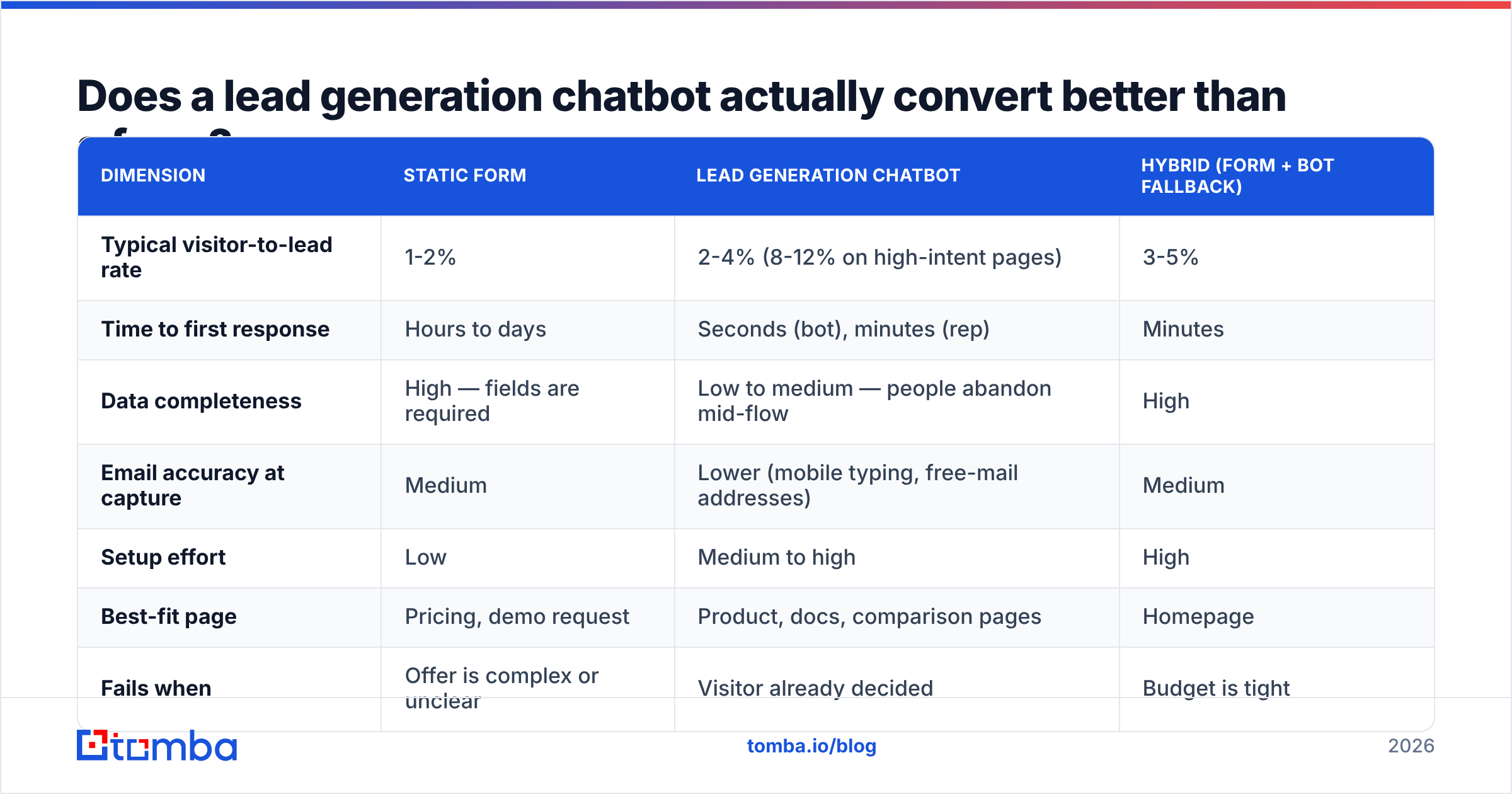
Sometimes, and the "sometimes" is specific. Chatbots beat static forms when the visitor has an unresolved question, when the offer is complex, or when the alternative is a nine-field demo request. They lose to forms when the visitor already knows what they want and just wants to submit and leave.
Here is the honest comparison:
| Dimension | Static form | Lead generation chatbot | Hybrid (form + bot fallback) |
|---|---|---|---|
| Typical visitor-to-lead rate | 1-2% | 2-4% (8-12% on high-intent pages) | 3-5% |
| Time to first response | Hours to days | Seconds (bot), minutes (rep) | Minutes |
| Data completeness | High — fields are required | Low to medium — people abandon mid-flow | High |
| Email accuracy at capture | Medium | Lower (mobile typing, free-mail addresses) | Medium |
| Setup effort | Low | Medium to high | High |
| Best-fit page | Pricing, demo request | Product, docs, comparison pages | Homepage |
| Fails when | Offer is complex or unclear | Visitor already decided | Budget is tight |
The pattern across teams that publish their numbers: chatbots move the needle on mid-funnel pages — feature pages, comparison pages, documentation — where visitors have questions that a form cannot answer. On a pricing page where someone has already decided to book a demo, a chatbot that interrupts with "Hi! Can I help you find something?" measurably hurts. Put a calendar there instead.
The other honest caveat: a 4% conversion rate on chat means 96% of your traffic still leaves anonymously. That is why visitor identification — resolving the company behind an anonymous session — matters more than most chatbot vendors admit. Pairing a bot with website visitor reveal gives you a named account list from traffic that never engaged the widget at all.
How do you design the qualification flow?#
Ask the fewest questions that let you route correctly, then stop.
Most teams build the flow backwards: they start with every field in their CRM and try to collect all of it conversationally. The result is a seven-turn interrogation with a 30% completion rate. Instead, start from the routing decision and work backwards.
The routing-first method:
- List your actual routes. Enterprise AE, SMB rep, self-serve onboarding, support, disqualify. For most B2B teams this is three to five destinations, not twenty.
- Identify the minimum signal per route. Usually company size and one use-case signal. That is two questions.
- Infer everything else. Company size, industry, funding stage, and tech stack can all be derived from the email domain via data enrichment. Do not ask a human to type what an API already knows.
- Capture email last, not first. Asking for an email in turn one kills completion. Ask after the visitor has invested two answers — commitment bias is real and measurable.
- Always offer the escape hatch. "Talk to a human" as a persistent option. Some of your highest-intent visitors refuse to talk to bots, and forcing them through the flow loses the deal.
- Handle the drop-off. Roughly two-thirds of started conversations do not finish. If you captured an email before the drop, that person belongs in a sequence — not in a report nobody reads.
The single biggest improvement most teams can make is deleting questions. If you ask company size and then enrich the domain anyway, you asked a redundant question and paid for it in completion rate.
What should the bot never ask?#
Anything you can infer, anything the visitor will get wrong, and anything that feels like a credit check. Budget questions in turn two are the classic offender — they signal that you are screening rather than helping, and they push serious buyers to your competitor's site. Save budget for the human conversation.
How does data quality break a chatbot funnel?#
Chat-captured emails are the dirtiest leads in your CRM, and almost nobody accounts for it.
Three reasons. First, people type on mobile with one thumb — typos in domains are routine. Second, chat feels casual, so visitors give personal Gmail addresses instead of work emails, which strips out every enrichment signal you were counting on. Third, there is no field validation pressure the way there is in a form with a red error state.
The downstream damage is predictable: your follow-up sequence bounces, your bounce rate climbs past the 2% threshold that mailbox providers watch, and your sender reputation degrades — which hurts every other campaign you run from that domain. One bad chatbot integration can quietly poison an entire outbound program.
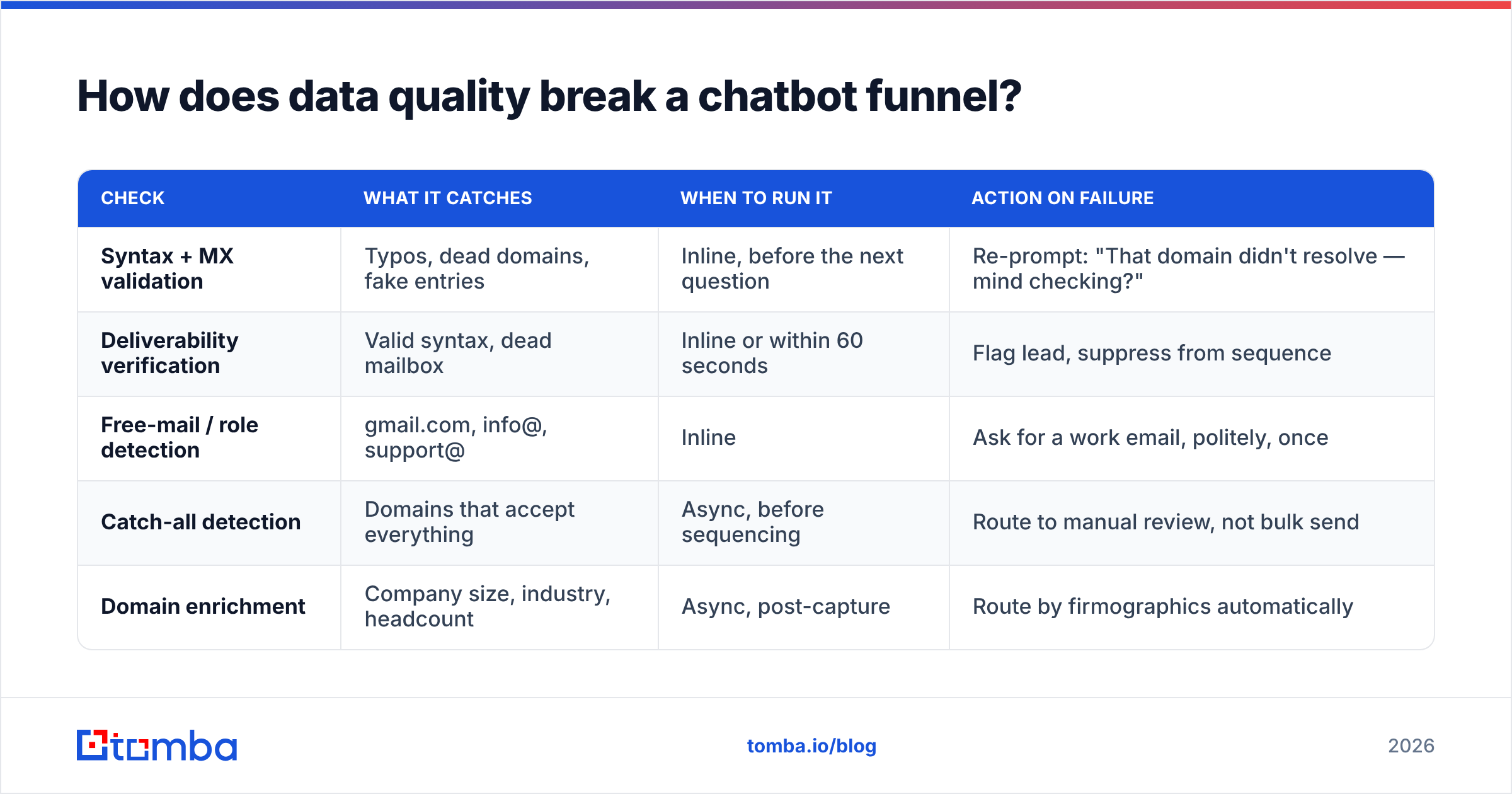
The fix is three checks at capture time, all of them sub-second:
| Check | What it catches | When to run it | Action on failure |
|---|---|---|---|
| Syntax + MX validation | Typos, dead domains, fake entries | Inline, before the next question | Re-prompt: "That domain didn't resolve — mind checking?" |
| Deliverability verification | Valid syntax, dead mailbox | Inline or within 60 seconds | Flag lead, suppress from sequence |
| Free-mail / role detection | gmail.com, info@, support@ | Inline | Ask for a work email, politely, once |
| Catch-all detection | Domains that accept everything | Async, before sequencing | Route to manual review, not bulk send |
| Domain enrichment | Company size, industry, headcount | Async, post-capture | Route by firmographics automatically |
Running an email verifier at the point of capture costs a fraction of a cent and protects the deliverability of everything you send afterwards. Catch-all domains deserve special handling — a standard verifier returns "accept all" and tells you nothing, which is why a dedicated catch-all verifier is worth having in the stack if you sell into enterprises, where catch-all configurations are common.
The free-mail problem deserves its own note. When a visitor gives you a personal address, you lose the company link that every routing rule depends on. Two options: ask once for a work email with a clear reason ("so I can pull up your account"), or run a reverse email lookup to resolve the person and their employer from the personal address. The second works more often than you would expect and does not add friction.
Which lead generation chatbot tool should you pick?#
Match the tool to your funnel complexity, not to the demo you liked best.
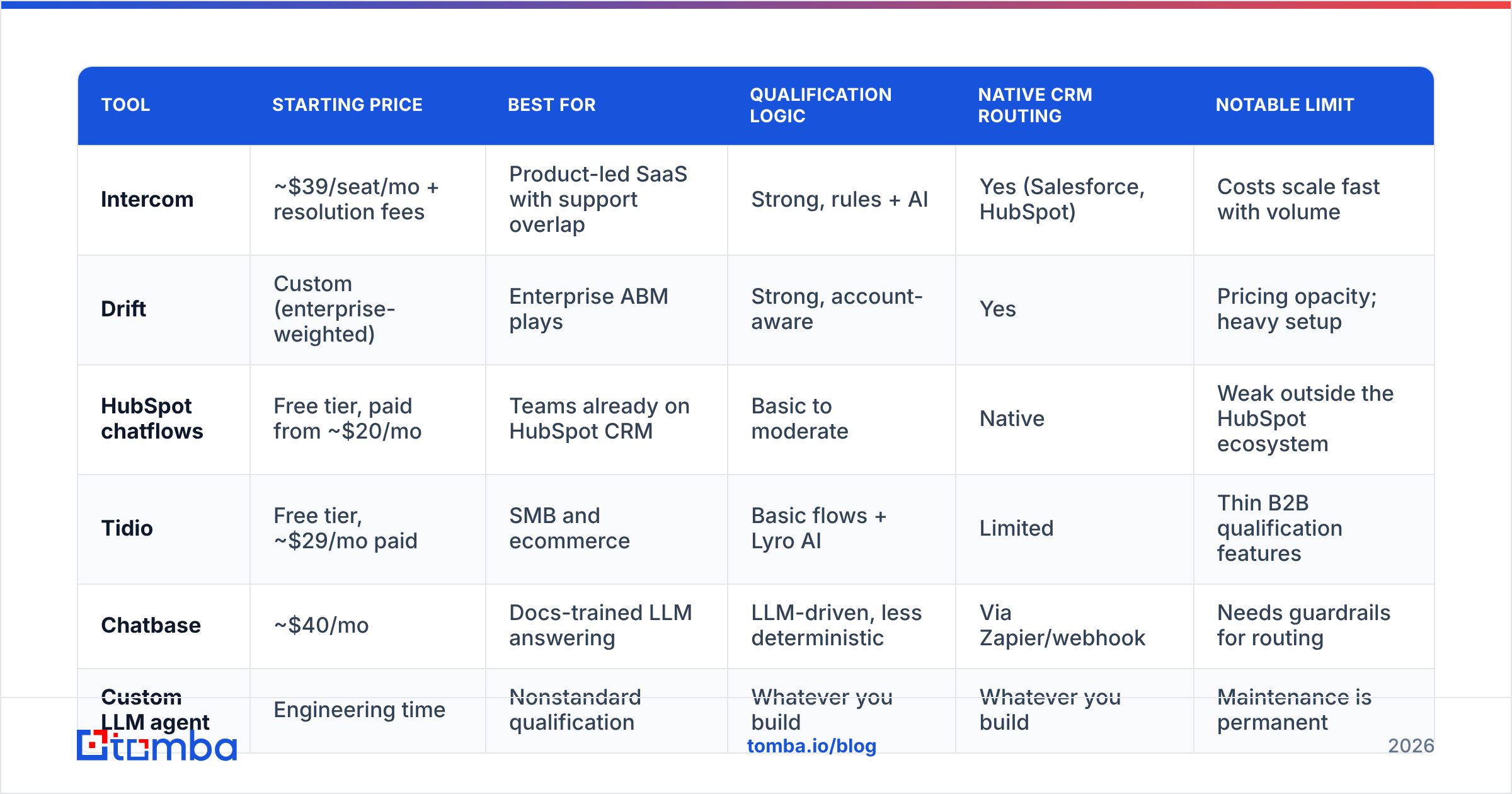
| Tool | Starting price | Best for | Qualification logic | Native CRM routing | Notable limit |
|---|---|---|---|---|---|
| Intercom | ~$39/seat/mo + resolution fees | Product-led SaaS with support overlap | Strong, rules + AI | Yes (Salesforce, HubSpot) | Costs scale fast with volume |
| Drift | Custom (enterprise-weighted) | Enterprise ABM plays | Strong, account-aware | Yes | Pricing opacity; heavy setup |
| HubSpot chatflows | Free tier, paid from ~$20/mo | Teams already on HubSpot CRM | Basic to moderate | Native | Weak outside the HubSpot ecosystem |
| Tidio | Free tier, ~$29/mo paid | SMB and ecommerce | Basic flows + Lyro AI | Limited | Thin B2B qualification features |
| Chatbase | ~$40/mo | Docs-trained LLM answering | LLM-driven, less deterministic | Via Zapier/webhook | Needs guardrails for routing |
| Custom LLM agent | Engineering time | Nonstandard qualification | Whatever you build | Whatever you build | Maintenance is permanent |
A few decision rules that hold up in practice:
- Already on HubSpot? Start with native chatflows. They are free, the routing works, and you will learn what your flow actually needs before spending money. You can layer a HubSpot integration for enrichment on top.
- Support and sales share the widget? Intercom, and accept the cost. Splitting the two across tools creates a worse visitor experience than overpaying for one.
- Enterprise ABM motion with named accounts? Drift's account-aware routing is genuinely differentiated, but budget for a real implementation, not a weekend.
- You want the bot to answer product questions from your docs? An LLM-native tool like Chatbase, with a hard rule that anything qualification-related falls back to deterministic logic. LLMs are excellent at answering and unreliable at routing.
Check current positioning on G2's live chat category before committing — this market reprices and repackages constantly, and vendor pricing pages lag their own sales motion.
How do you route and follow up fast enough to matter?#
Five minutes. That is the window, and it is the least glamorous and most valuable part of this entire system.
The classic Harvard Business Review finding — that response speed within the first hour dominates conversion outcomes — has been replicated enough times to treat as settled. For chat specifically the window is tighter, because the visitor is on your site right now. A reply 40 minutes later reaches someone who has moved on to three other tabs.
The routing checklist:
- Enrich before routing, not after. If the routing rule needs company headcount, the enrichment call has to complete before assignment. Enrich on email capture, not on conversation end.
- Route to a person, not a queue. Shared inboxes and channel notifications get diffused responsibility. Assign a named owner with a timer.
- Pass the transcript, always. A rep who opens the conversation cold asks questions the visitor already answered. That single failure kills more chat-sourced deals than bad qualification.
- Offer the calendar inside the chat. Every handoff step you add to the booking flow costs you conversions. If the rep is available, connect live; if not, book the slot in-widget.
- Sequence the drop-offs same-day. A visitor who gave an email and then vanished is warmer than any cold list you own. A three-touch sequence starting within four hours recovers a meaningful share of them.
- Track speed as a metric, not a vibe. Median time-to-first-human-response, reported weekly. If nobody owns the number, the number decays.
For the drop-off sequence, you often only have a first name and a company — the visitor bailed before giving a full email. That is a solvable problem: the Tomba Email Finder resolves a work address from a name and domain, and domain search surfaces the rest of the buying committee at that account if the person who chatted was not the decision maker.
What metrics tell you the chatbot is working?#
Track five numbers and ignore the rest.
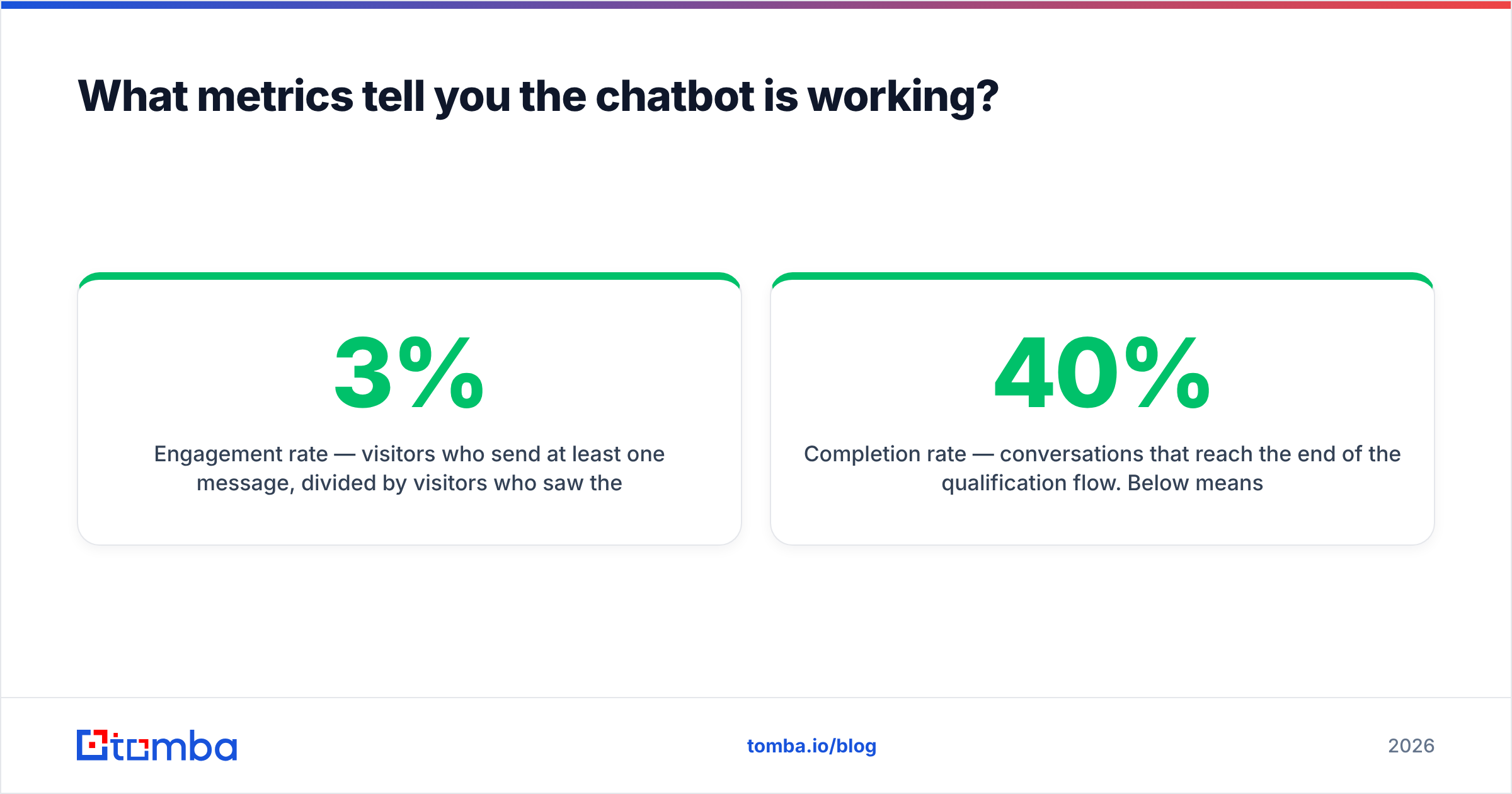
- Engagement rate — visitors who send at least one message, divided by visitors who saw the widget. Below 3% means your trigger or opener is wrong.
- Completion rate — conversations that reach the end of the qualification flow. Below 40% means the flow is too long. Delete a question.
- Qualified lead rate — conversations that produce a lead matching ICP. This is the number your CFO cares about; the raw conversation count is vanity.
- Median time to human response — the five-minute metric. Report it weekly.
- Chat-sourced meeting rate — meetings booked, divided by qualified leads. If this is low while qualified lead rate is high, your qualification is too generous, not your routing.
The trap is optimizing engagement rate. It is the easiest number to move — make the widget more aggressive and it climbs immediately — and it correlates weakly with revenue. Aggressive triggers raise engagement and lower qualified lead rate at the same time. Watch both or you will optimize yourself into a worse funnel while the dashboard turns green.
One more: audit your chat-sourced list against your verified list quarterly. If chat leads bounce at 3x the rate of form leads, your capture-time verification is not running, no matter what the integration settings claim.
Is it worth building a custom chatbot instead?#
Usually not, and the exceptions are narrower than engineering teams estimate.
Build custom when your qualification depends on data no vendor can reach — a pricing calculator tied to your own usage tiers, a regulated eligibility check, a product configurator. In those cases the conversation is the product experience and a generic widget cannot express it.
Buy when your qualification is "how big are you and what do you want to do" — which describes the overwhelming majority of B2B funnels. A custom LLM agent means owning prompt drift, hallucination guardrails, transcript storage, compliance review, and an on-call rotation for a widget. That maintenance load never goes away, and it competes with your actual roadmap forever.
The middle path most teams land on: buy the widget, own the data layer. Use a vendor for conversation and UI, then hit your own endpoints for enrichment, verification, and routing via webhook. The Tomba API is built for exactly that shape of integration — a sub-second call on email capture that returns verification status plus company firmographics, so your routing rules fire on real data instead of whatever the visitor typed.
Where should you start this week?#
Pick your highest-intent non-pricing page. Put a two-question bot on it with a scroll-depth trigger at 60%. Wire email capture to a verification call and a work-email check. Route to one named person with a five-minute SLA. Run it for three weeks and look at qualified lead rate, not engagement rate.
That is a two-day build, and it will tell you more about whether conversational capture fits your funnel than any vendor pilot.
When you get to the data layer — and every chatbot project eventually does — the Tomba Email Finder handles the part where a first name and a company domain need to become a verified, sequence-safe work address. It is free to test with 25 searches a month, and paid plans start at $49/mo on Tomba pricing if the volume justifies it. Clean contact data will not make a bad chatbot good, but no chatbot survives dirty data — start there.
Related guides#
// get started
Find, verify and enrich your first contacts today
Start on the free plan with 25 searches a month, then scale when your team is ready.
Free plan · No credit card required · GDPR & CCPA
// about the author