How to Build a Lead Generation Dashboard That Drives Pipeline
Most lead gen dashboards report activity, not pipeline. Here are the nine metrics that actually predict revenue, the vanity numbers to delete, and how to wire the whole thing together in a week.

TL;DR
- A lead generation dashboard is not a report card. It is a decision tool: every tile should change what you do next week, or it should not be on the screen.
- Track nine metrics across four layers — volume, quality, conversion, and cost — and delete anything that cannot be traced to a closed deal.
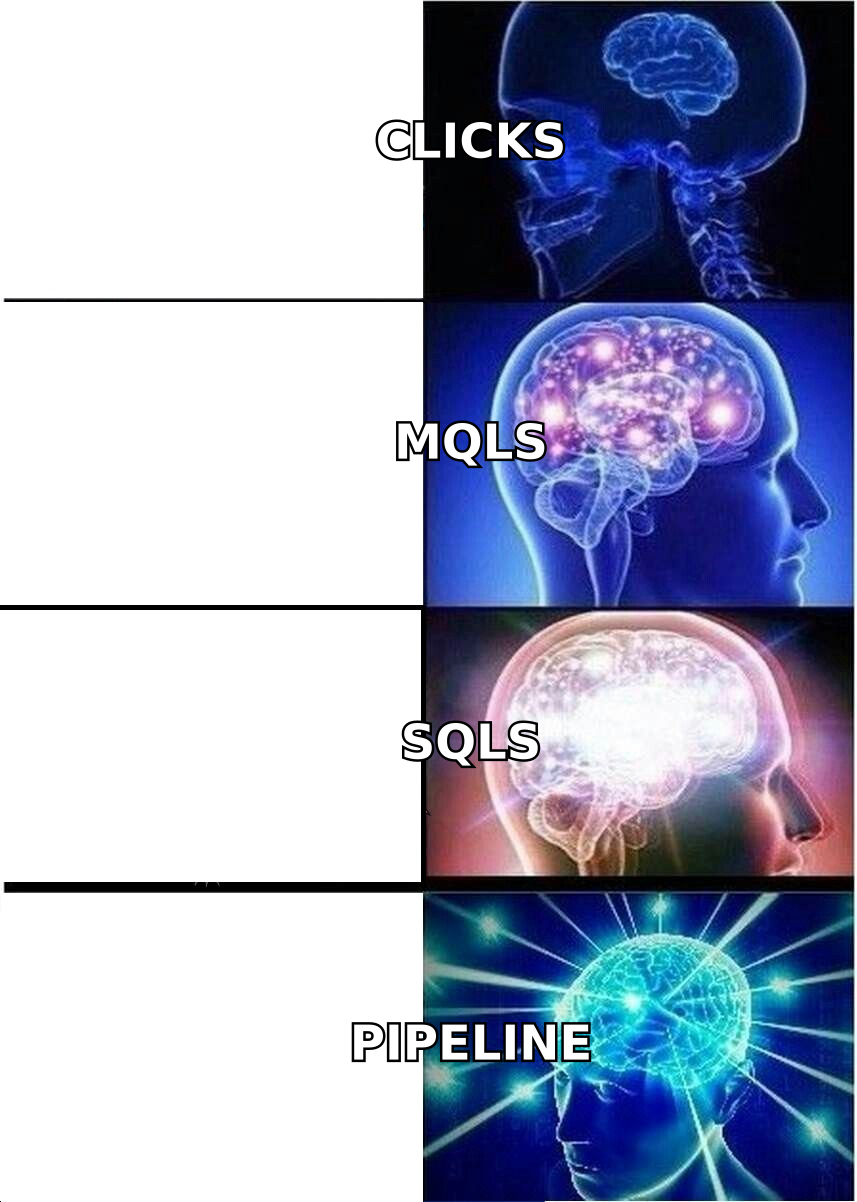
- Impressions, raw list size, "total leads," and open rate are the four vanity traps that make bad channels look healthy.
- Your dashboard is only as honest as your contact data. Bounces, duplicates, and unverified records inflate every ratio above them.
- Build it in five days: define the funnel stages, pick the source of truth, wire the data, add cost, then set a weekly review ritual.
What is a lead generation dashboard?#
A lead generation dashboard is a single view that shows how many qualified buyers your acquisition motion produces, what they cost, and where they get stuck. That is the whole job.
Think of it like the instrument panel in a car. You do not need a readout for every bolt in the engine. You need speed, fuel, temperature, and a warning light — four numbers that tell you whether to accelerate, refuel, or pull over. Most marketing dashboards fail because they are built like a parts catalogue instead of an instrument panel: forty tiles, no decision.
Technically, a lead generation dashboard joins three data sets:
- Activity data — sends, calls, ad impressions, page views. Comes from your sequencer, ad platform, and analytics tool.
- Contact data — who the lead is, where they work, whether the email is deliverable, what the company does. Comes from your enrichment and verification layer.
- Outcome data — stage changes, opportunity creation, closed-won revenue. Comes from your CRM.
If any of those three is missing, you do not have a dashboard. You have a chart.
What metrics belong on a lead generation dashboard?#
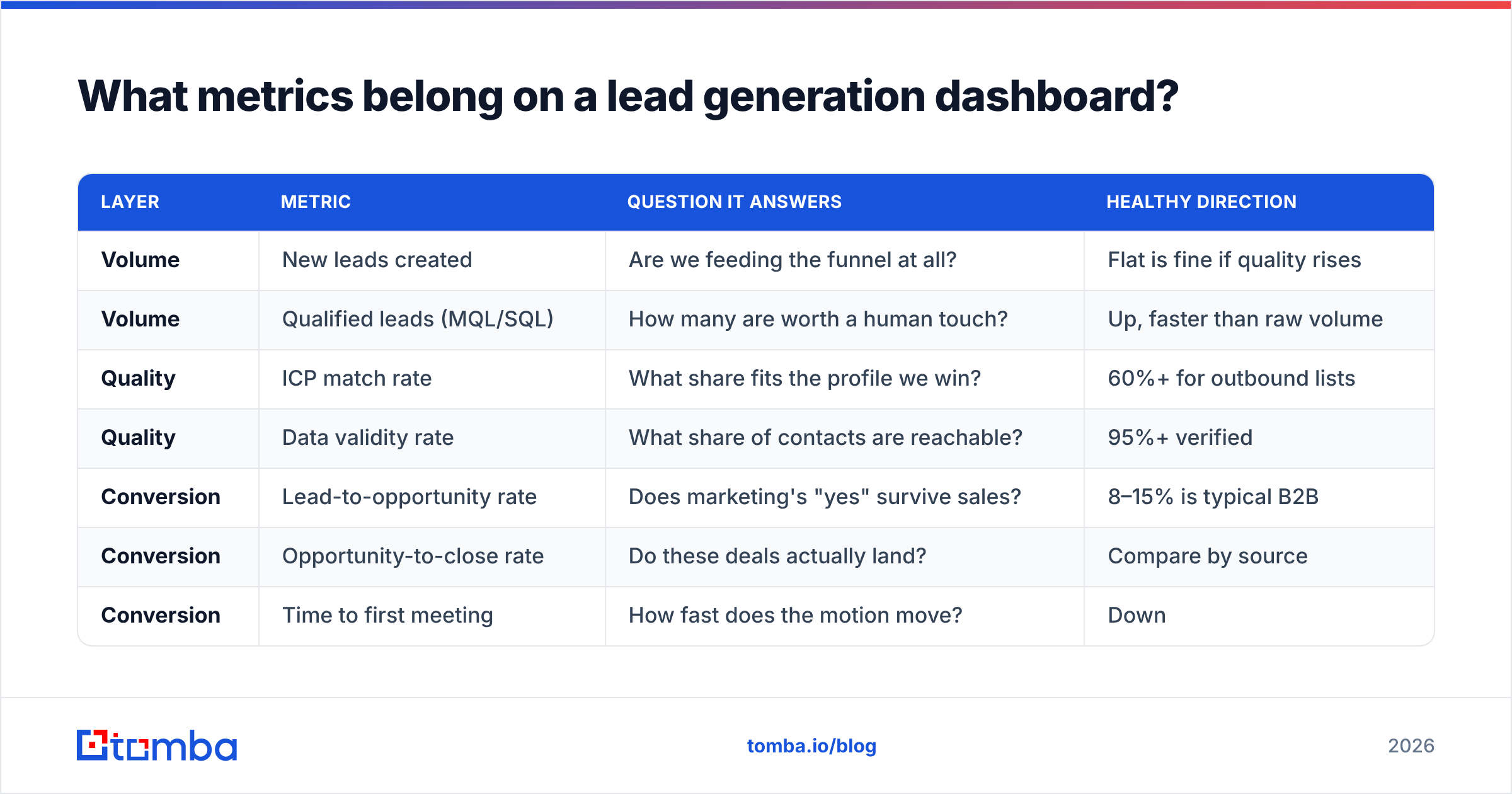
Nine, grouped into four layers. Each layer answers a different question, and each one constrains the layer above it.
| Layer | Metric | Question it answers | Healthy direction |
|---|---|---|---|
| Volume | New leads created | Are we feeding the funnel at all? | Flat is fine if quality rises |
| Volume | Qualified leads (MQL/SQL) | How many are worth a human touch? | Up, faster than raw volume |
| Quality | ICP match rate | What share fits the profile we win? | 60%+ for outbound lists |
| Quality | Data validity rate | What share of contacts are reachable? | 95%+ verified |
| Conversion | Lead-to-opportunity rate | Does marketing's "yes" survive sales? | 8–15% is typical B2B |
| Conversion | Opportunity-to-close rate | Do these deals actually land? | Compare by source |
| Conversion | Time to first meeting | How fast does the motion move? | Down |
| Cost | Cost per qualified lead | What are we paying for a real buyer? | Down or flat as volume grows |
| Cost | Pipeline per $1 spent | Is the channel worth funding? | 3x+ before you scale it |
Notice what is missing. There is no "total contacts in database," no "email opens," no "social impressions." Those are inputs to other metrics, not decisions.
The four layers work as a chain. Volume without quality produces busy reps and no meetings. Quality without conversion means your definition of "qualified" is a fiction. Conversion without cost means you are buying pipeline at a loss and celebrating it in the Monday meeting.
How should you structure the four layers?#
Build the dashboard top to bottom in this order, because each layer is the denominator for the next:
- Volume layer (top row). New leads and qualified leads, plotted weekly, not monthly. Monthly charts hide two bad weeks inside one acceptable number.
- Quality layer (second row). ICP match rate and data validity rate. These two tiles are the ones that catch a bad list or a broken scraping job within days rather than at quarter-end.
- Conversion layer (third row). Lead-to-opportunity, opportunity-to-close, and time to first meeting, always split by source. A blended conversion rate is an average of your best and worst channels, and averages hide the channel you should kill.
- Cost layer (bottom row). Cost per qualified lead and pipeline per dollar. Include tooling and headcount, not just ad spend — otherwise outbound always looks free and paid always looks expensive.
- Exception panel (right rail). Leads with no owner, leads untouched for 5+ days, bounced sends, and duplicates. This is the panel your ops person works from every morning.
That is roughly eleven tiles including the exception panel. If you are past twenty, you are building a parts catalogue again.
Which numbers should you delete?#
Four metrics survive on dashboards mostly because they are easy to pull and they always go up.
Total leads in the database. This number never goes down, so it never tells you anything. A database of 400,000 contacts where 30% bounce is worse than 40,000 verified ones — it just looks more impressive in a board deck.
Ad impressions and reach. Useful for a media buyer optimizing creative. Useless on a pipeline dashboard, because impressions correlate with budget, not with buyers.
Email open rate. Apple Mail Privacy Protection and similar image-proxy features inflate opens with machine-triggered pixel loads. Open rate is now directionally unreliable, and teams still make subject-line decisions on it. Use response rate and meetings booked instead.
"Total leads" without a stage definition. If a whitepaper download, a webinar registrant, and a hand-raiser who asked for pricing all count as one "lead," your conversion rate is meaningless. Split them or do not count them.
There is one more trap worth naming: reporting the same number twice under different labels. Marketing counts an MQL, sales counts an SQL, ops counts a "qualified account," and the three tiles disagree by 40% because nobody wrote down the rule. Pick one definition, write it in the dashboard description field, and make every tile inherit it.
How do you keep the underlying data honest?#
Everything above the data layer inherits its errors. This is the part most teams skip, and it is why dashboards lose credibility three months in.
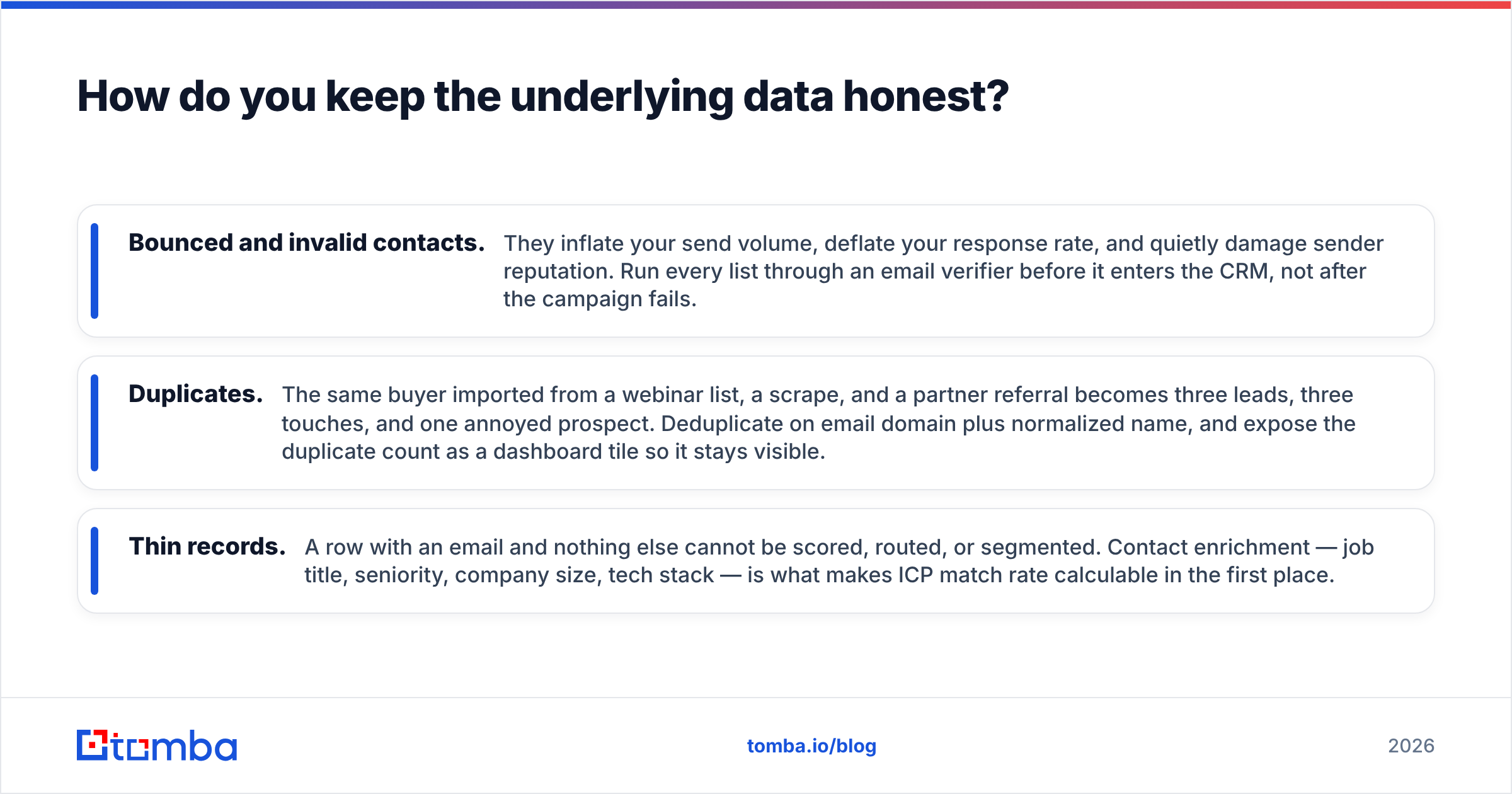
Three failure modes cause almost all of it:
- Bounced and invalid contacts. They inflate your send volume, deflate your response rate, and quietly damage sender reputation. Run every list through an email verifier before it enters the CRM, not after the campaign fails.
- Duplicates. The same buyer imported from a webinar list, a scrape, and a partner referral becomes three leads, three touches, and one annoyed prospect. Deduplicate on email domain plus normalized name, and expose the duplicate count as a dashboard tile so it stays visible.
- Thin records. A row with an email and nothing else cannot be scored, routed, or segmented. Contact enrichment — job title, seniority, company size, tech stack — is what makes ICP match rate calculable in the first place.
If you are pulling contacts programmatically, the cleanest architecture is to verify and enrich at the point of ingestion via the Tomba API or an equivalent, so nothing unvalidated ever reaches your CRM. A record that fails verification should be logged, not imported. Your dashboard then measures a database you can trust, and "data validity rate" becomes a real early-warning tile instead of a decorative one.

Which tool should you build the dashboard in?#
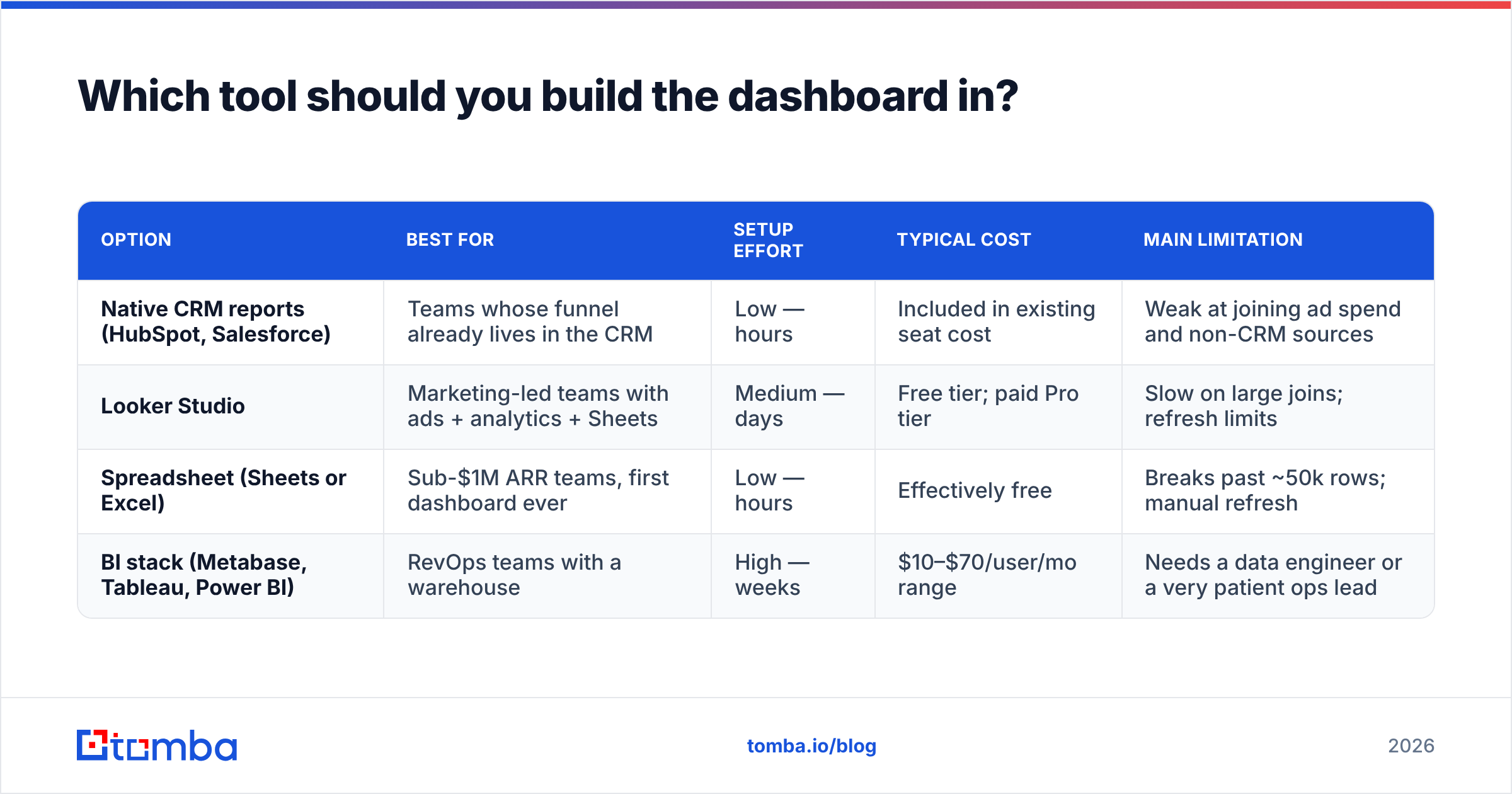
Four realistic options, depending on how much of your funnel already lives in one system. Prices are list prices as published by each vendor and change often — check before you commit.
| Option | Best for | Setup effort | Typical cost | Main limitation |
|---|---|---|---|---|
| Native CRM reports (HubSpot, Salesforce) | Teams whose funnel already lives in the CRM | Low — hours | Included in existing seat cost | Weak at joining ad spend and non-CRM sources |
| Looker Studio | Marketing-led teams with ads + analytics + Sheets | Medium — days | Free tier; paid Pro tier | Slow on large joins; refresh limits |
| Spreadsheet (Sheets or Excel) | Sub-$1M ARR teams, first dashboard ever | Low — hours | Effectively free | Breaks past ~50k rows; manual refresh |
| BI stack (Metabase, Tableau, Power BI) | RevOps teams with a warehouse | High — weeks | $10–$70/user/mo range | Needs a data engineer or a very patient ops lead |
The honest default for most teams under 50 people: build v1 in your CRM's native reporting, because the outcome data already lives there and joins are free. Graduate to Looker Studio when you need ad spend in the same view, and to a warehouse-backed BI tool only when someone on the team can own SQL. You can compare user reviews of the BI category on G2 before spending a quarter migrating.
One practical note on spreadsheets: they are underrated for v1. A Google Sheets tab pulling verified contacts and a pivot table will answer "which source produces meetings" faster than a two-week BI project. Ship the ugly version, prove the metric matters, then invest.
How do you build it in five days?#
Day 1 — Write the definitions. Before touching a tool, write one sentence for each of: lead, qualified lead, opportunity, and source. Get sales to agree in writing. This is 80% of the work and the only step teams skip.
Day 2 — Pick the source of truth. One system holds outcome data. Usually the CRM. Everything else feeds it. If your sequencer and your CRM disagree on meetings booked, the CRM wins and the sequencer gets fixed.
Day 3 — Wire the data in. Connect ad platforms, forms, and your outbound tool. Make sure every inbound record carries a source field that is set at creation, never backfilled. Backfilled attribution is a guess wearing a suit.
Day 4 — Add cost. Pull spend per channel, plus tool and headcount allocation. This is the step that turns a marketing report into a business dashboard, and it is the one executives notice.
Day 5 — Build the review ritual. A dashboard nobody opens is a screensaver. Schedule a 20-minute weekly review with three standing questions: which channel moved, what broke, and what are we changing this week. Log the decision next to the number.
Most teams can do this. The reason it usually takes three months instead of five days is Day 1 — nobody wants to force the definition argument, so the dashboard gets built on ambiguity and dies of it.
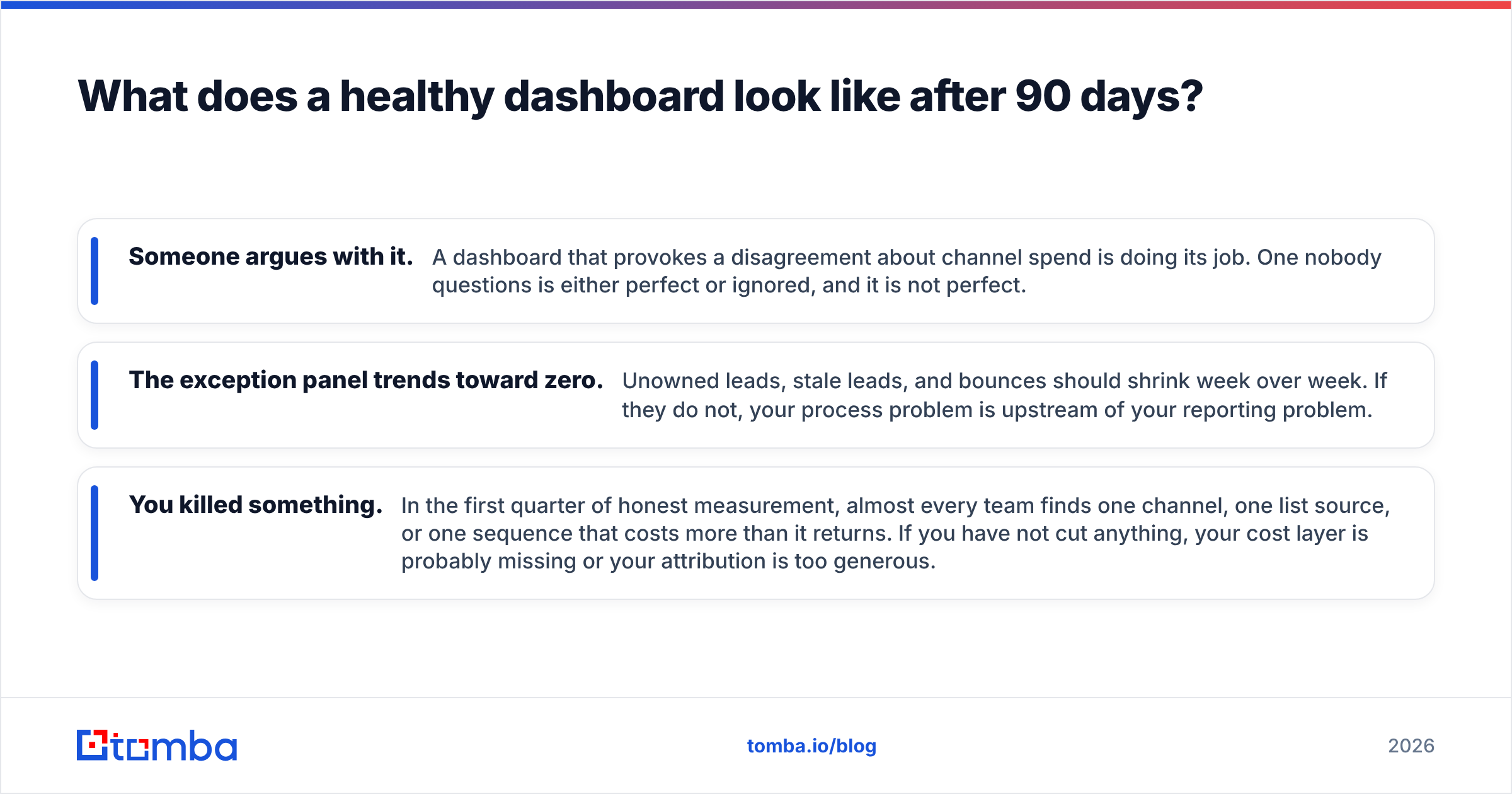
What does a healthy dashboard look like after 90 days?#
Three signs it is working:
- Someone argues with it. A dashboard that provokes a disagreement about channel spend is doing its job. One nobody questions is either perfect or ignored, and it is not perfect.
- The exception panel trends toward zero. Unowned leads, stale leads, and bounces should shrink week over week. If they do not, your process problem is upstream of your reporting problem.
- You killed something. In the first quarter of honest measurement, almost every team finds one channel, one list source, or one sequence that costs more than it returns. If you have not cut anything, your cost layer is probably missing or your attribution is too generous.
And one sign it is failing: the numbers keep needing explanation. If every review starts with "well, that tile is misleading because...", the definition from Day 1 was never actually agreed. Go back and fix it — no visualization tool will paper over a metric nobody believes.
For teams running outbound as a primary channel, add one more tile most dashboards lack: contactable rate — the share of your target account list for which you actually hold a verified, deliverable email or direct dial. A 2,000-account target list with a 45% contactable rate is a 900-account campaign, and knowing that before launch changes your forecast. Tools like a domain search make that number measurable in advance instead of discoverable after the bounces roll in. Vendor-side guidance from platforms like HubSpot is useful for funnel-stage definitions, but the reachability layer is something you have to measure on your own list.
Where should you start this week?#
Start with the quality layer, because it is the cheapest to fix and it silently corrupts everything else. Pull your last 1,000 imported leads, verify them, and calculate what share are deliverable and what share match your ICP. If the answer is under 90% deliverable, your conversion rates have been lying to you, and no amount of dashboard design will fix that.
Then build the volume and conversion tiles on top of the cleaned set, add cost last, and put the whole thing on a screen your team actually opens on Monday morning.
If the bottleneck is reachable contacts rather than reporting, the Tomba Email Finder is the fastest place to close the gap: find verified professional emails by name, domain, or company, check them before they hit your CRM, and feed your dashboard a funnel built on contacts that actually exist. The free tier covers 25 searches a month so you can audit a sample list before committing, and paid plans start at $49/mo — see Tomba pricing for the full breakdown.
Related guides#
// get started
Find, verify and enrich your first contacts today
Start on the free plan with 25 searches a month, then scale when your team is ready.
Free plan · No credit card required · GDPR & CCPA
// about the author