Lead Generation Email Template: 12 That Actually Get Replies
Most lead generation email templates fail because they're copied without the data underneath. Here are 12 tested structures, the reply rates they produce, and the setup that makes them work.
TL;DR
- A lead generation email template is a reusable message structure — not a fill-in-the-blank script. The structure stays; the research changes every time.
- Reply rates live or die on three things: list accuracy, relevance of the opening line, and how small your ask is. Copy is fourth.
- The highest-performing templates in 2026 are short (50–125 words), single-ask, and reference something observable about the prospect's business.
- Sending a great template to a stale list produces bounces, not meetings. Verify before you send — a 2% bounce rate is the ceiling most inbox providers tolerate.
- Below: 12 templates with the situation each one fits, plus a comparison of the four main template archetypes and the metrics they realistically produce.
What is a lead generation email template?#
A lead generation email template is a repeatable skeleton for a cold or warm outbound email: an opening that earns attention, a line of relevance, a value statement, and a single call to action. The words change per prospect. The bones do not.
The confusion most teams have is treating a template as a script. A script you paste and send. A template you fill with research. The difference shows up in the reply rate — roughly 1–3% for pasted scripts versus 8–15% for the same structure filled with something the prospect actually recognizes about their own company.
Here is the anatomy that every template in this post shares:
- Subject line (2–5 words). Lowercase, specific, no hype. "quick question re: your API docs" beats "Transform Your Revenue Operations."
- Opening line (1 sentence). Something observable — a hire, a launch, a page on their site, a post they wrote. Never "I hope this email finds you well."
- Relevance bridge (1–2 sentences). Why that observation connects to a problem you solve.
- Proof or specificity (1 sentence, optional). A number, a comparable customer, a mechanism. Not a case-study paragraph.
- Single ask (1 sentence). One question, answerable with yes or no, or with a sentence.
- Signature. Name, company, one link. No banner, no six social icons.
That's it. Everything below is a variation on those six parts.
Why do most lead generation email templates fail?#
They fail before the copy is even read, for reasons that have nothing to do with writing.
Bad data. If 18% of your list is invalid, your bounce rate alone can tank domain reputation and route the surviving sends to spam. Google and Microsoft both tightened bulk-sender rules in 2024, and enforcement has only sharpened since. Google's official sender guidelines put the practical spam-complaint ceiling at 0.3%. You cannot template your way past a list problem.
Wrong person. A perfect template sent to a marketing coordinator about a CFO-level problem is a deleted email. Titles matter more than copy tweaks.
Too many asks. "Would you be open to a chat, or I can send over a deck, or feel free to book a time here" gives the reader three decisions. Three decisions equals zero decisions.
Length. Analysis of outbound campaigns consistently puts the sweet spot under 125 words. Past 200 words, reply rates fall off a cliff on mobile — which is where more than half of B2B email is first opened.
Generic personalization. Merge-tag personalization ("I see you work at {{company}}") now reads as automation. Prospects have been trained to spot it. Observable personalization — referencing something that required a human to look — still works.

Which template archetype should you use?#
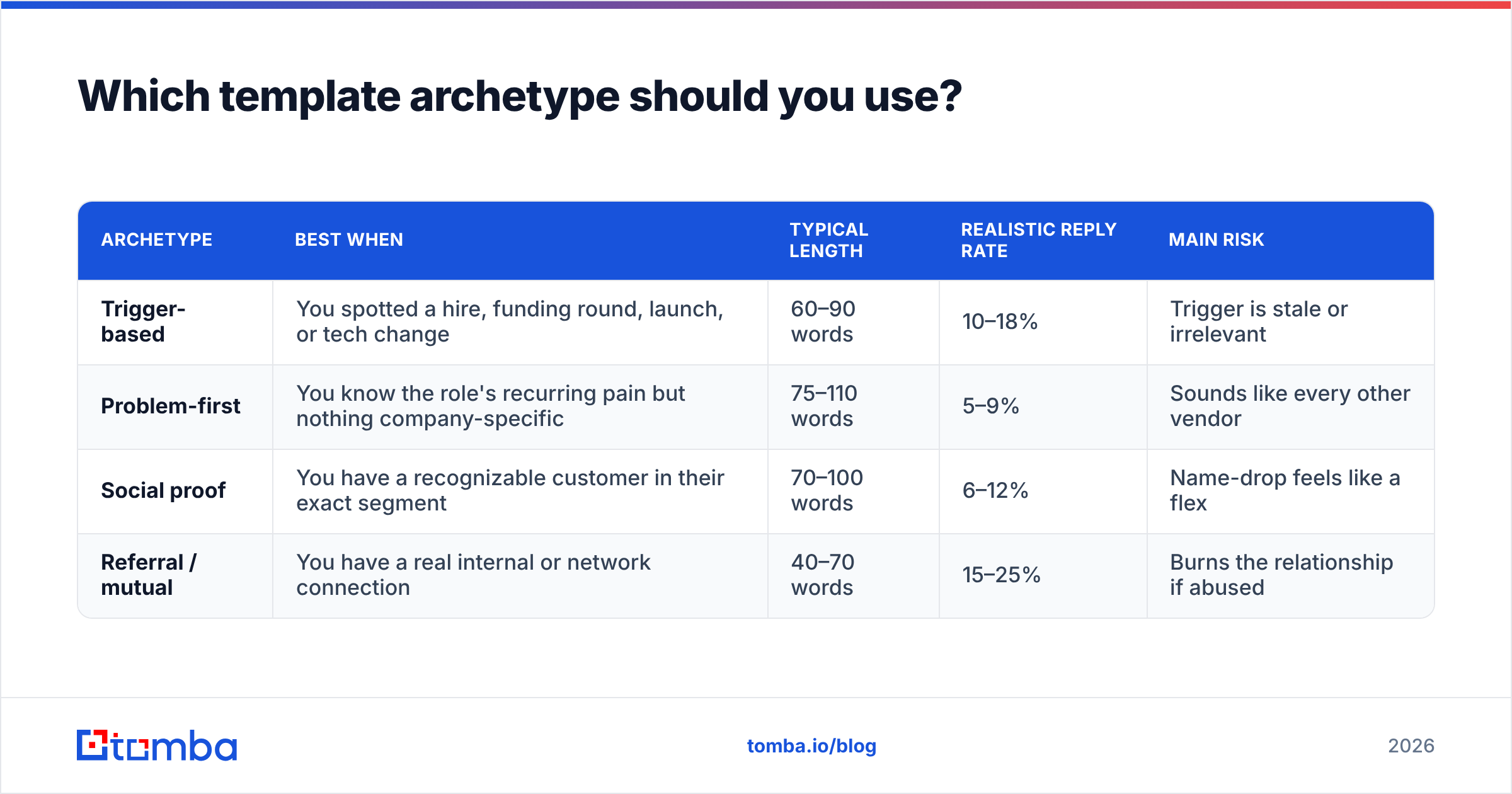
Four archetypes cover nearly every B2B outbound situation. Pick by what you actually know about the prospect, not by what sounds clever.
| Archetype | Best when | Typical length | Realistic reply rate | Main risk |
|---|---|---|---|---|
| Trigger-based | You spotted a hire, funding round, launch, or tech change | 60–90 words | 10–18% | Trigger is stale or irrelevant |
| Problem-first | You know the role's recurring pain but nothing company-specific | 75–110 words | 5–9% | Sounds like every other vendor |
| Social proof | You have a recognizable customer in their exact segment | 70–100 words | 6–12% | Name-drop feels like a flex |
| Referral / mutual | You have a real internal or network connection | 40–70 words | 15–25% | Burns the relationship if abused |
Trigger-based wins when you can source triggers at scale. Referral wins on raw conversion but doesn't scale. Problem-first is the fallback — and it's where most teams live, which is exactly why it underperforms.
The decision rule: spend your research budget on triggers for your top 20% of accounts, use problem-first for the rest, and never send a social-proof email where the named customer is a direct competitor of the recipient.
What are the 12 lead generation email templates?#
Each one below is stripped to the structure. Brackets are where research goes, not where merge tags go.
1. The observable trigger#
Subject: [their new hire's role]
Saw you brought on a [Head of RevOps] last month — usually means the reporting stack is about to get rebuilt.
We handle the contact-data layer for teams at that exact stage, so the CRM isn't full of bounced records on day one.
Worth 10 minutes before the stack is locked in?
2. The competitor-adjacent#
Subject: how [their competitor] handles this
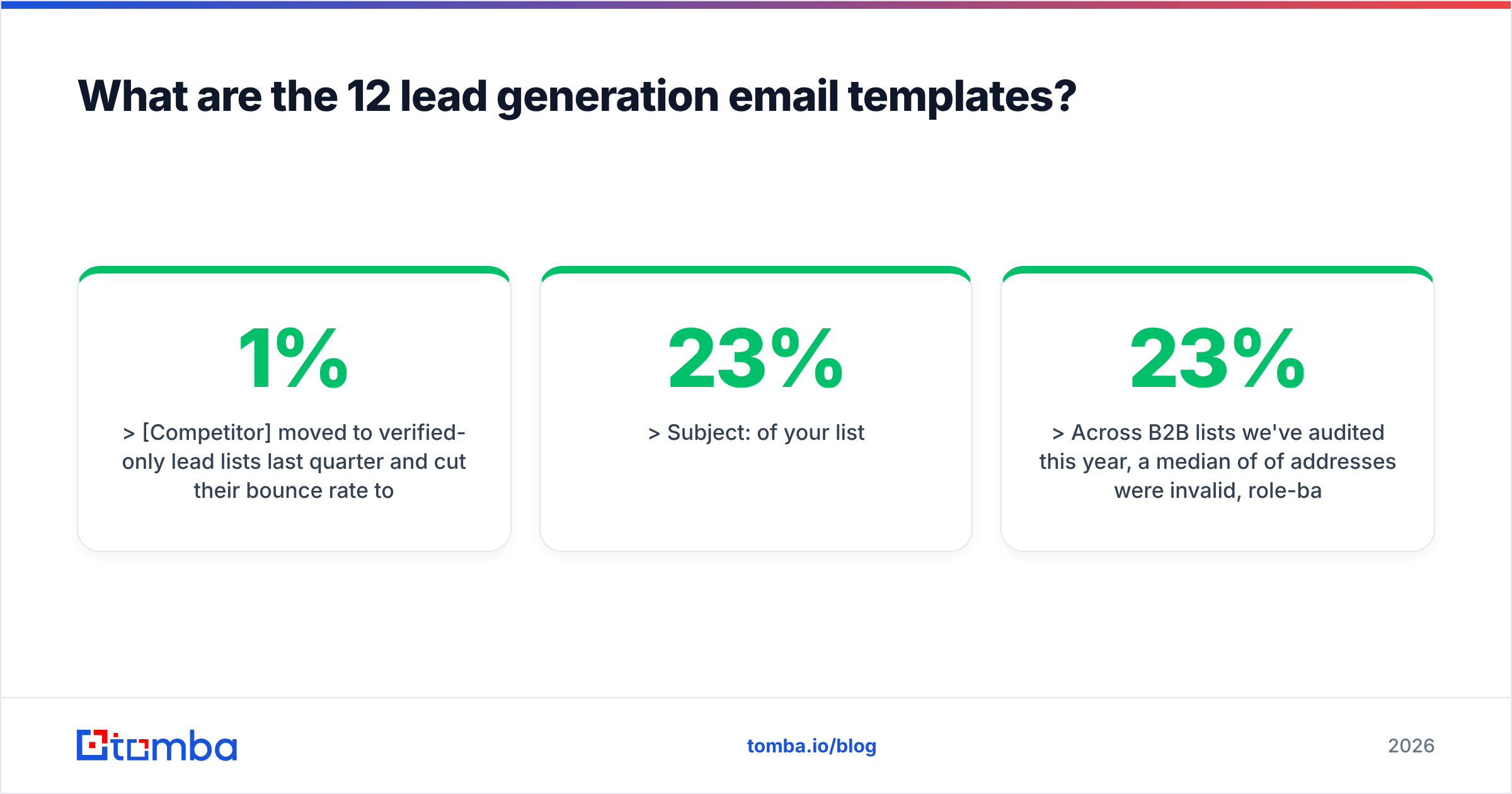
[Competitor] moved to verified-only lead lists last quarter and cut their bounce rate to under 1%.
If you're still running unverified imports into [their CRM], that gap compounds fast.
Want the two-line summary of what they changed?
3. The specific number#
Subject: 23% of your list
Across B2B lists we've audited this year, a median of 23% of addresses were invalid, role-based, or catch-all with no mailbox behind them.
If nobody's checked yours in six months, the number is probably similar.
Happy to run a free sample of 100 records so you can see where you land — want me to?
4. The one-question email#
Subject: quick one
Who owns outbound data quality at [company] these days?
Asking because I've got a comparison of how the four main providers score on [their specific vertical], and I'd rather send it to the right person than the wrong one.
5. The content-led#
Subject: your post on [topic]
Your piece on [specific argument they made] matched something we see in the data — [one concrete supporting or contradicting fact].
We pulled the numbers across [N] accounts. Want the dataset? No pitch attached, it's a CSV.
6. The problem-first#
Subject: [role]'s unglamorous problem
Most [SDR managers] we talk to lose 4–6 hours a week manually checking whether contact records are still live.
We collapse that into an API call.
Is that a real cost on your team, or have you already solved it?
7. The referral#
Subject: [mutual contact] suggested I reach out
[Name] mentioned you're rebuilding the [outbound motion] at [company].
They thought the contact-enrichment piece we did for them might be relevant to your build.
Free for 15 minutes this week or next?
8. The teardown#
Subject: your [pricing page / signup flow]
Went through [specific page] this morning. One thing stood out: [concrete, non-insulting observation].
We fixed the same thing for [similar company] and [measurable outcome].
Want the two-minute walkthrough of what we'd change?
9. The breakup (send 4th or 5th)#
Subject: closing the loop
I've sent a few notes about [topic] and haven't heard back — which usually means it's not a priority right now.
I'll stop here. If it becomes one in Q[next], reply to this thread and I'll pick it up.
10. The re-engagement#
Subject: revisiting — [original topic]
We spoke in [month] about [specific thing]. You said [specific objection].
That's now shipped. Worth a second look, or is the timing still wrong?
11. The event follow-up#
Subject: [event name] — the [specific topic] conversation
You mentioned at [event] that [specific thing they said].
Here's the thing I promised: [link or one-line answer].
If you want to go deeper, I'm free [two specific windows].
12. The low-stakes ask#
Subject: wrong person?
I think I've got the wrong contact for [specific function] at [company].
If it's not you, a name would save me a lot of guessing — and I'll leave you alone.
Template 12 has the highest raw reply rate of the twelve in most programs, because it asks for almost nothing. It also generates the fewest meetings. Use it to build the map, not to book the calendar.
How do you fill the brackets at scale?#
The templates are free. The inputs are the work.
A realistic workflow for a 500-contact campaign:
- Define the account list. Firmographics first — industry, size, tech stack, geography. Fewer, better-fitting accounts beat a bigger list every time.
- Find the right person per account. Title-based, not "whoever comes up." Use a domain search to pull the contact map for each company rather than guessing one name at a time.
- Resolve the email. Name plus domain into an email finder gives you the address and a confidence score. Score below your threshold, drop the record — don't send hopefully.
- Verify before send. Run the list through an email verifier and remove everything that isn't deliverable. Catch-all domains need a separate decision: send at lower volume, or skip.
- Enrich for the bracket. Recent hires, funding, tech changes, headcount deltas — these are what fill the "observable trigger" slot. Data enrichment turns a name and domain into something worth writing about.
- Write 3–5 variants, not one. Split at the opening line and the CTA, hold everything else constant, and you'll learn something in 200 sends.
That's a sequence, not a pile of tools. Steps 2–5 are the difference between a template that reads like it was written for one person and one that reads like it was blasted to a thousand.

How do the best templates compare on pricing and effort?#
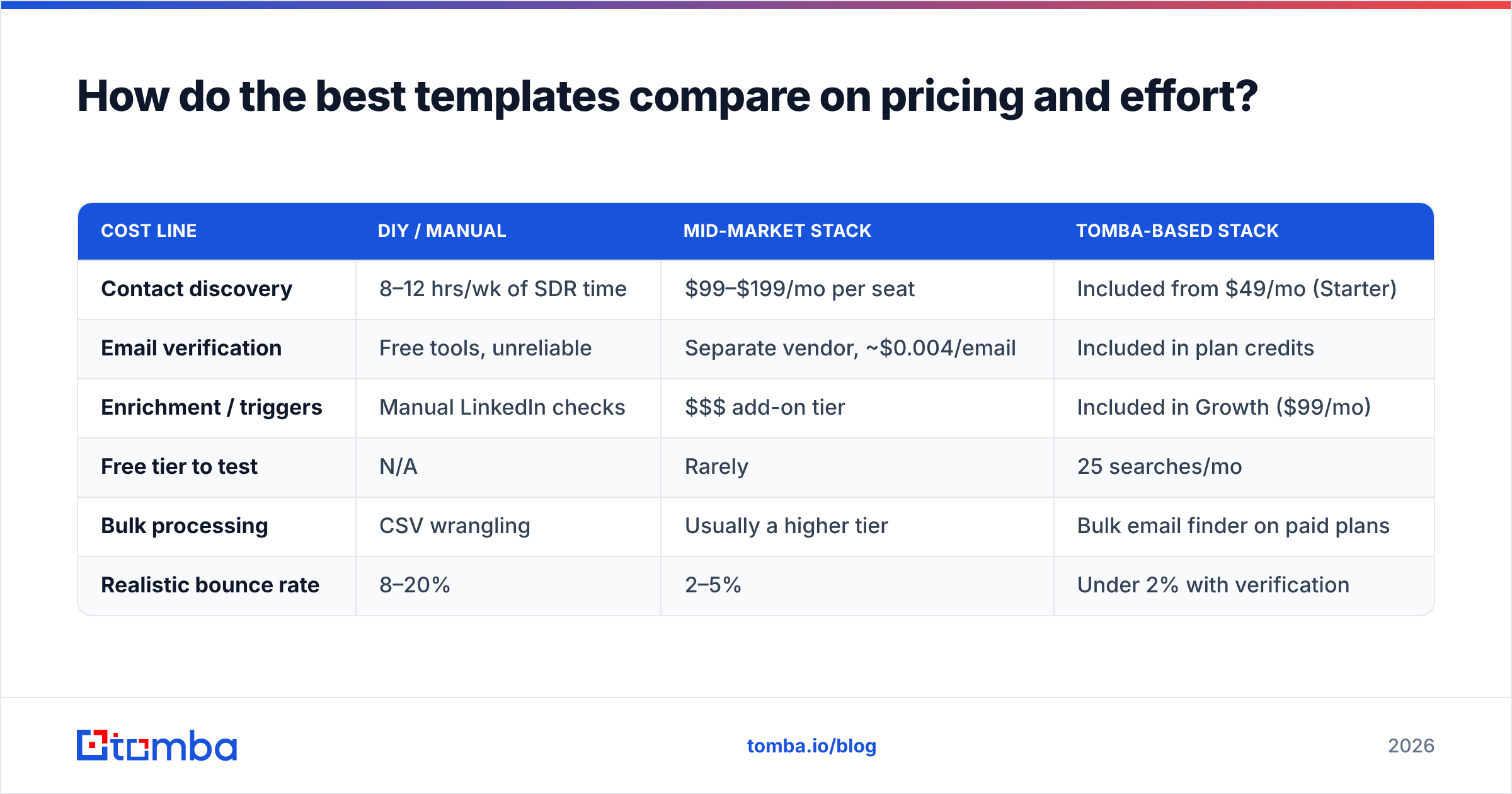
Templates don't cost money — the data behind them does. Here's how the cost structure actually breaks down when you're running outbound at a modest scale.
| Cost line | DIY / manual | Mid-market stack | Tomba-based stack |
|---|---|---|---|
| Contact discovery | 8–12 hrs/wk of SDR time | $99–$199/mo per seat | Included from $49/mo (Starter) |
| Email verification | Free tools, unreliable | Separate vendor, ~$0.004/email | Included in plan credits |
| Enrichment / triggers | Manual LinkedIn checks | $$$ add-on tier | Included in Growth ($99/mo) |
| Free tier to test | N/A | Rarely | 25 searches/mo |
| Bulk processing | CSV wrangling | Usually a higher tier | Bulk email finder on paid plans |
| Realistic bounce rate | 8–20% | 2–5% | Under 2% with verification |
Two honest caveats. First, if your ICP is a few hundred accounts, manual research genuinely wins — tooling is overhead at that scale. Second, if you need deep intent signals and buying-committee mapping rather than accurate contacts, a platform like BookYourData or a larger intent vendor covers ground a pure finder-and-verifier stack doesn't. Match the tool to the motion.
For an outside read on where the tools in this space rank on real user reviews rather than vendor claims, G2's lead intelligence category is the least-biased public comparison available.
What metrics tell you a template is working?#
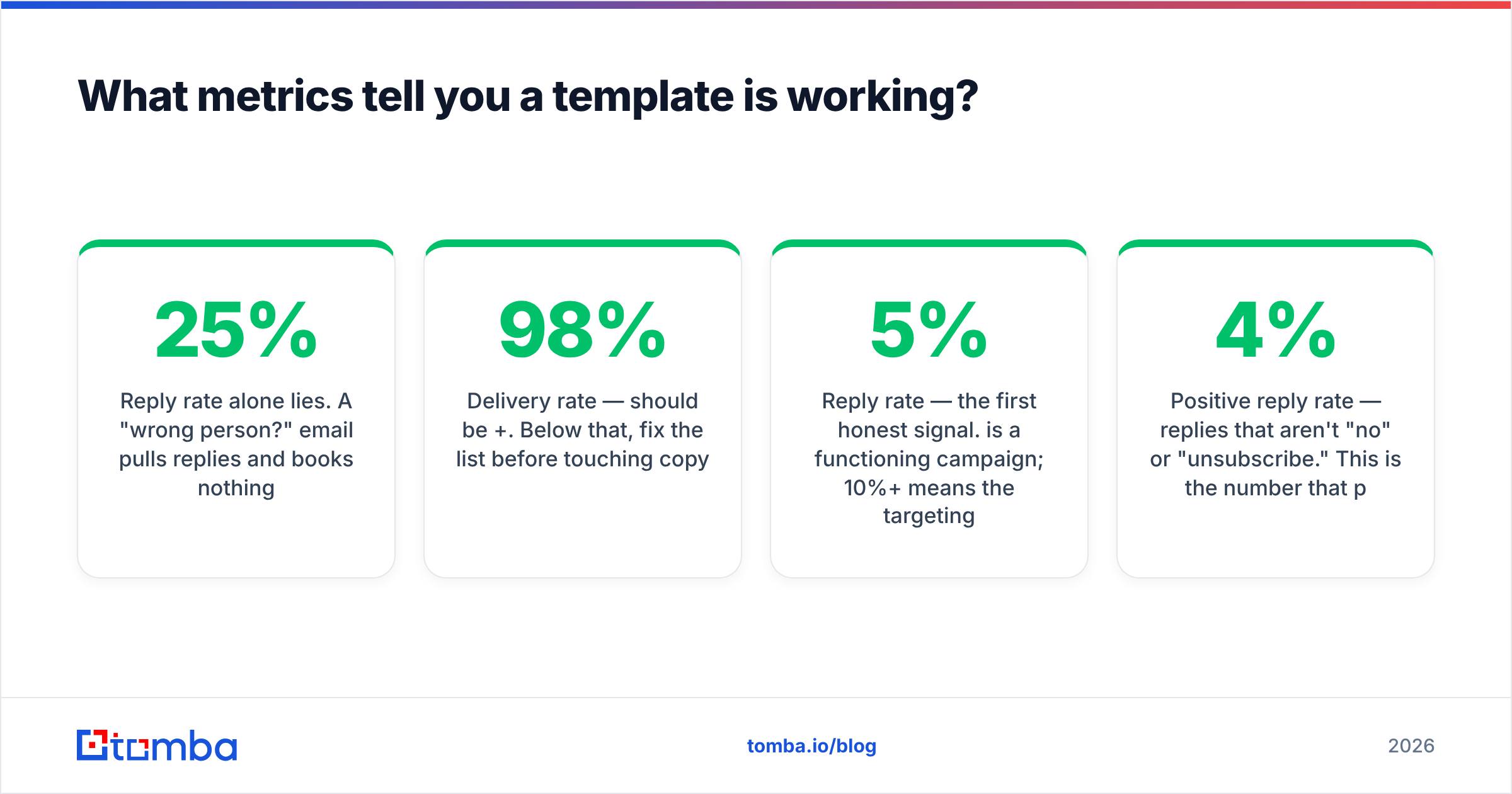
Reply rate alone lies. A "wrong person?" email pulls 25% replies and books nothing.
Track this ladder, in order:
- Delivery rate — should be 98%+. Below that, fix the list before touching copy.
- Open rate — directional only, since Apple Mail Privacy Protection inflates it. Use it to compare subject lines against each other, never as an absolute.
- Reply rate — the first honest signal. 5% is a functioning campaign; 10%+ means the targeting is right.
- Positive reply rate — replies that aren't "no" or "unsubscribe." This is the number that predicts pipeline. 2–4% is healthy.
- Meetings booked per 100 sends — the only metric a CRO cares about. 1–2 is a good program.
- Unsubscribe / complaint rate — keep complaints under 0.1%. Above 0.3% and your domain is in trouble regardless of how well the rest performs.
Run one variable at a time. Changing the subject line, the opener, and the CTA simultaneously teaches you nothing about which one moved the number. And give each variant at least 100 sends before you draw a conclusion — 20 sends is noise, not data. HubSpot's ongoing sales statistics research is a reasonable external benchmark set if you want to sanity-check your numbers against the broader market.
What should you do first?#
Pick one archetype, one segment of 100 well-fitting accounts, and one metric to move. Verify the list, write three variants of a single template, and send over two weeks. Read the positive-reply rate, not the opens.
Then iterate on the input, not the adjective. Most teams rewrite their copy six times before they ever check whether the addresses are valid — which is backwards. A mediocre template to a clean, well-targeted list beats a brilliant template to a stale one, every time.
If step one on your list is "get accurate addresses for the right people," start with the Tomba Email Finder. The free tier gives you 25 searches a month to test your first segment without a card, and the Starter plan at $49/mo covers a realistic first campaign including verification. Check Tomba pricing to match a plan to your send volume — or pull the whole flow into your own stack through the Tomba API if you'd rather automate steps 2 through 5 entirely.
Related guides#
// get started
Find, verify and enrich your first contacts today
Start on the free plan with 25 searches a month, then scale when your team is ready.
Free plan · No credit card required · GDPR & CCPA
// about the author