Lead Generation Email Templates That Actually Get Replies
Nine lead generation email templates with the reply-rate math behind them, plus the personalization layer and data hygiene that decide whether any of them land.
TL;DR
- A template is a skeleton, not a script. The three variables that move reply rate are the opening line, the proof, and the ask — everything else is scaffolding you should reuse verbatim.
- Short wins. Cold emails under 125 words consistently outperform longer ones, and a single-question CTA beats "let me know if you'd like to hop on a call."
- Sequence length matters more than any individual template. Most replies to a cold sequence arrive on emails 2 through 4, not email 1.
- Bad data kills good copy. A 12% bounce rate on a verified-looking list will tank your domain before anyone reads your subject line.
- Below: nine templates you can paste today, a comparison of when to use each, and the personalization tiers that justify their cost.
What makes a lead generation email template actually work?#
A good template does one job: it removes the blank page so you can spend your thinking time on the one or two lines that are specific to the person.
Think of it like a restaurant's mise en place. The prep cook chops the onions and portions the sauces ahead of service so the line cook only has to make the decisions that matter in the moment. A template is your mise en place. If you're rewriting the sign-off every time, you're chopping onions during dinner rush.
Every cold email that works has the same four load-bearing parts:
The trigger line — why you're emailing this person now. A funding round, a job posting, a new tool on their stack, a podcast they were on. Without this, the email reads as bulk.
The relevance bridge — one sentence connecting the trigger to a problem you solve. Not a feature list. A problem statement they'd recognize as their own.
The proof — a number, a named customer in their segment, or a specific outcome. "We helped a 40-rep SDR team cut research time by 6 hours a week" beats "we help sales teams be more efficient."
The ask — one question, answerable with a yes or no, requiring no calendar coordination to reply.
The exit — a low-friction out ("if this isn't your area, happy to be pointed elsewhere"). It raises reply rate because it gives non-buyers a socially easy way to respond, and those referrals are frequently better than the original target.
Parts 1 and 3 change per prospect. Parts 2, 4, and 5 you write once and reuse for a quarter. That ratio — roughly 30% custom, 70% fixed — is what makes templating worth the effort instead of a shortcut to being ignored.
Which lead generation email template should you use for each scenario?#
Nine templates, grouped by the situation that triggers them. Each is written to be pasted and edited, not admired.
1. The trigger-event template (funding, hiring, launch)#
Subject: your Series B + the 12 SDR roles
Hi {FirstName},
Saw the Series B close last month and the 12 SDR openings on your careers page. Usually that combination means the ops team is about to spend Q2 rebuilding the prospecting stack under deadline.
We work with post-Series-B teams in that exact window — one 40-person org cut list-building time from 9 hours a week to under 2 by moving research out of LinkedIn tabs and into their CRM.
Worth a 10-minute look before you scale the headcount?
{YourName}
Use when: you have a hard, dateable trigger less than 45 days old. Reply rates on trigger-event emails run substantially higher than on flat-cold sends because the timing objection disappears.
2. The competitor-switch template#
Subject: switching off {Competitor}?
{FirstName} — noticed {Company} is running {Competitor}. Not here to trash it; it's a solid product and plenty of teams stay on it happily.
The one complaint we hear from teams your size is per-seat cost once you cross 15 users. We're flat-rate at that tier.
If cost per seat isn't a live issue for you, ignore this. If it is, want the side-by-side?
Use when: you can verify their stack. Never guess — being wrong about a prospect's tooling is the fastest way to lose credibility in one sentence.
3. The problem-agitate-solve (PAS) template#
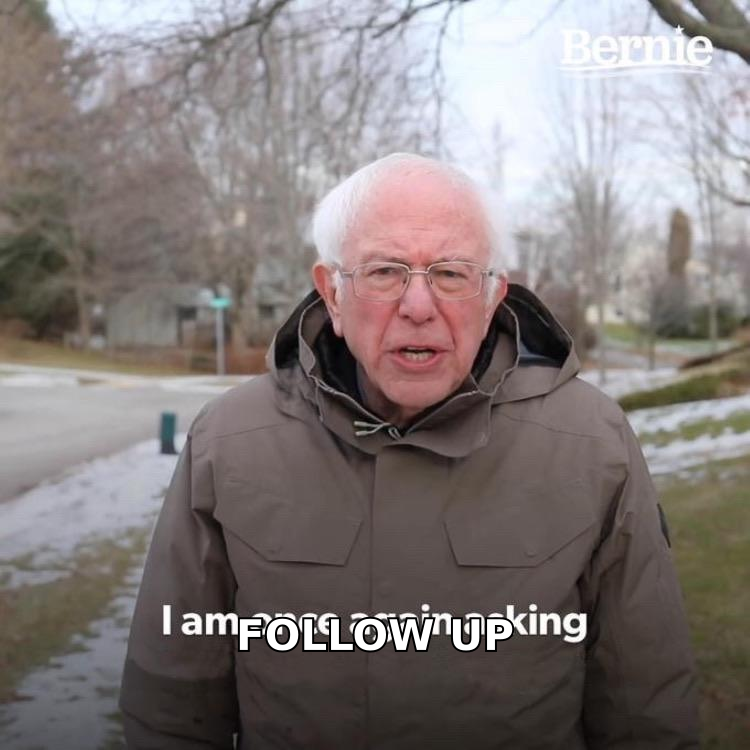
Subject: 40% of your list is probably dead
{FirstName},
Most B2B lists decay at roughly 2-3% per month as people change jobs. On a list built 18 months ago, that's a meaningful chunk bouncing.
The damage isn't the wasted sends — it's the sender reputation hit that pushes your good emails to spam.
We re-verify before every send. Want me to run a free sample against 500 of your contacts so you can see the decay rate on your own data?
Use when: the pain is measurable and they may not have measured it. PAS needs a number in the agitation step or it reads as fear-mongering.
4. The mutual-connection template#
Subject: {MutualName} suggested I reach out
{FirstName} — {MutualName} mentioned you're rebuilding outbound at {Company} and thought this might be relevant.
We did the same project with {SimilarCompany} last year; the short version is they consolidated four tools into two and cut $31k in annual spend.
Happy to send the one-pager, or {MutualName} can vouch — up to you.
Use when: the connection is real and would confirm it. Fabricated referrals are a permanent reputation cost.
5. The content-hook template#
Subject: your post on RevOps hiring
{FirstName}, your LinkedIn post on hiring RevOps before you have revenue ops to run — the line about "buying a CRM to avoid a conversation" is the most accurate thing I've read this quarter.
Curious how you're handling the data layer underneath. Most teams we talk to at your stage are still doing manual enrichment in spreadsheets.
Is that where you are, or did you solve it already?
Use when: you've actually read the thing. Use the author finder to get contact details for people who publish — writers and analysts respond well to specific engagement with their work.
6. The "wrong person" / referral-seek template#
Subject: right person for outbound data?
{FirstName} — guessing this isn't your call, but I couldn't find who owns prospecting data at {Company}.
We handle contact enrichment for teams running 500+ outbound touches a month.
Who should I be talking to?
Use when: you're unsure of the title match. This one has an unusually high reply rate for a cold send because answering costs the recipient ten seconds.
7. The value-first template (no ask)#
Subject: 3 companies hiring against you
{FirstName} — pulled a quick list of three companies that posted roles overlapping your ICP this week: {A}, {B}, {C}.
No ask. Thought it'd be useful for your team's territory planning.
{YourName}
Use when: you have high-value accounts worth a slow burn. Send the value, ask for nothing, follow up in 8 days.
8. The breakup template#
Subject: closing the loop
{FirstName} — I've sent a few notes about {topic} and haven't heard back, which usually means it's not a priority right now. Totally fine.
I'll stop here. If it becomes relevant in Q3, reply to this and I'll pick it back up.
Use when: email 5 or 6 of a sequence. Breakup emails often generate the second-highest reply rate in a sequence, purely because they remove the pressure.
9. The re-engagement template (warm-ish lead)#
Subject: revisiting — {thing that changed}
{FirstName}, we spoke in March and the blocker was {objection}. That shipped in July.
Not assuming it changes your answer, but it seemed worth telling you rather than not.
Want the 3-minute demo of just that piece?
Use when: you have CRM history. This is the highest-converting email in most pipelines and the most commonly neglected.
How do these templates compare on effort versus payoff?#
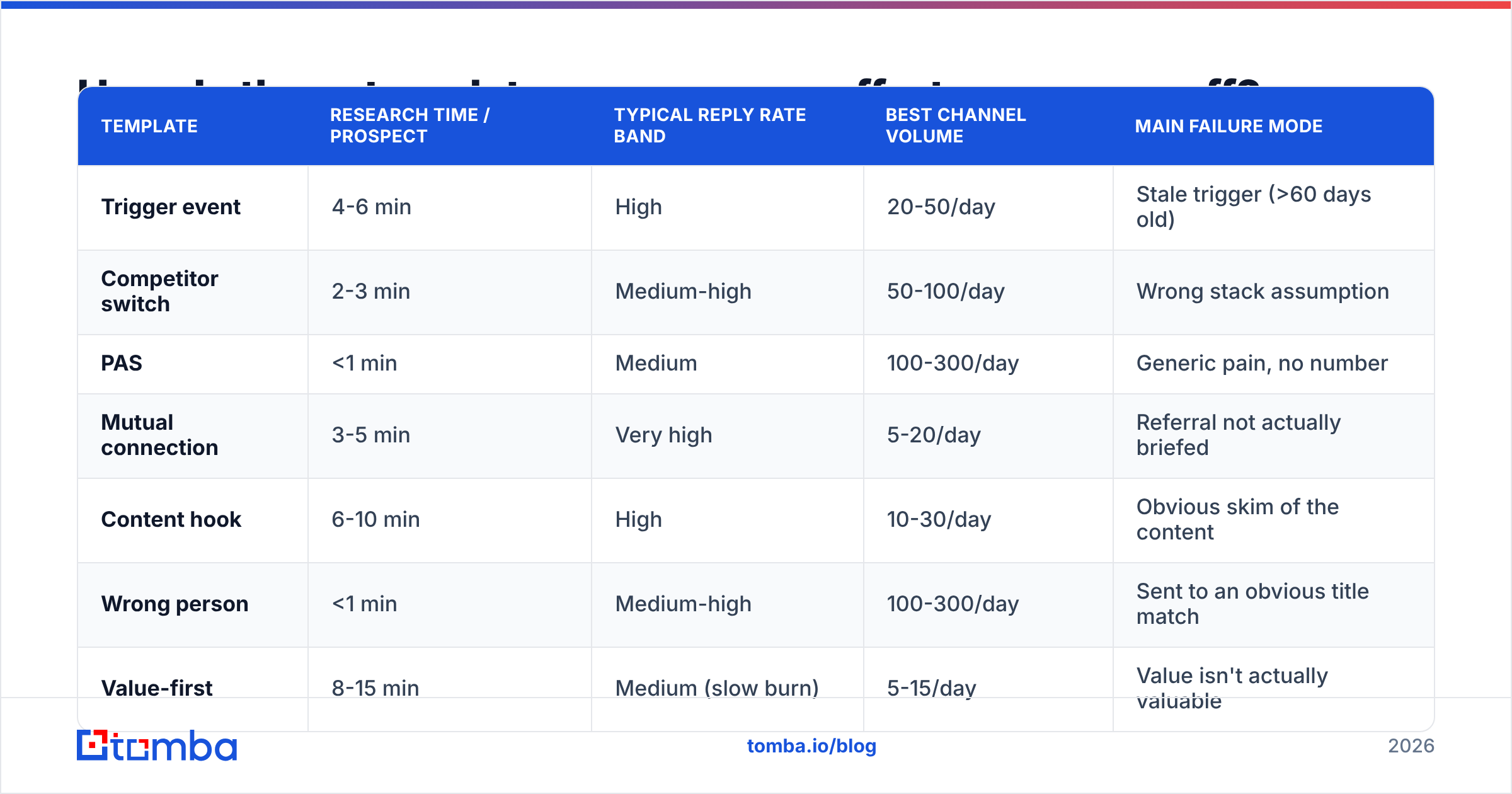
Not every template deserves the same investment. Here's the honest tradeoff:
| Template | Research time / prospect | Typical reply rate band | Best channel volume | Main failure mode |
|---|---|---|---|---|
| Trigger event | 4-6 min | High | 20-50/day | Stale trigger (>60 days old) |
| Competitor switch | 2-3 min | Medium-high | 50-100/day | Wrong stack assumption |
| PAS | <1 min | Medium | 100-300/day | Generic pain, no number |
| Mutual connection | 3-5 min | Very high | 5-20/day | Referral not actually briefed |
| Content hook | 6-10 min | High | 10-30/day | Obvious skim of the content |
| Wrong person | <1 min | Medium-high | 100-300/day | Sent to an obvious title match |
| Value-first | 8-15 min | Medium (slow burn) | 5-15/day | Value isn't actually valuable |
| Breakup | 0 min | Medium-high | Sequence-wide | Sent too early in sequence |
| Re-engagement | 2 min | Very high | CRM-limited | No real change to report |
The pattern: research time and reply rate correlate, but volume caps fall off a cliff at the high-touch end. A rational mix is roughly 60% low-research templates for coverage, 40% high-research for your named accounts.
Why do good templates still fail?#
Three reasons, in order of how often they're the actual culprit.
Reason one: the list is wrong. If the email doesn't reach the inbox, copy quality is irrelevant. According to HubSpot's research on email marketing, list hygiene consistently ranks among the strongest predictors of campaign performance. A list with 10%+ invalid addresses generates bounces that providers read as a spam signal, and the deliverability hit applies to every email you send from that domain — including the ones to people who'd have replied.
Run every list through an email verifier before the first send, and re-verify anything older than 90 days. If your list contains catch-all domains, they need separate handling — a catch-all verifier distinguishes the ones worth sending to from the ones that accept everything and deliver nothing.
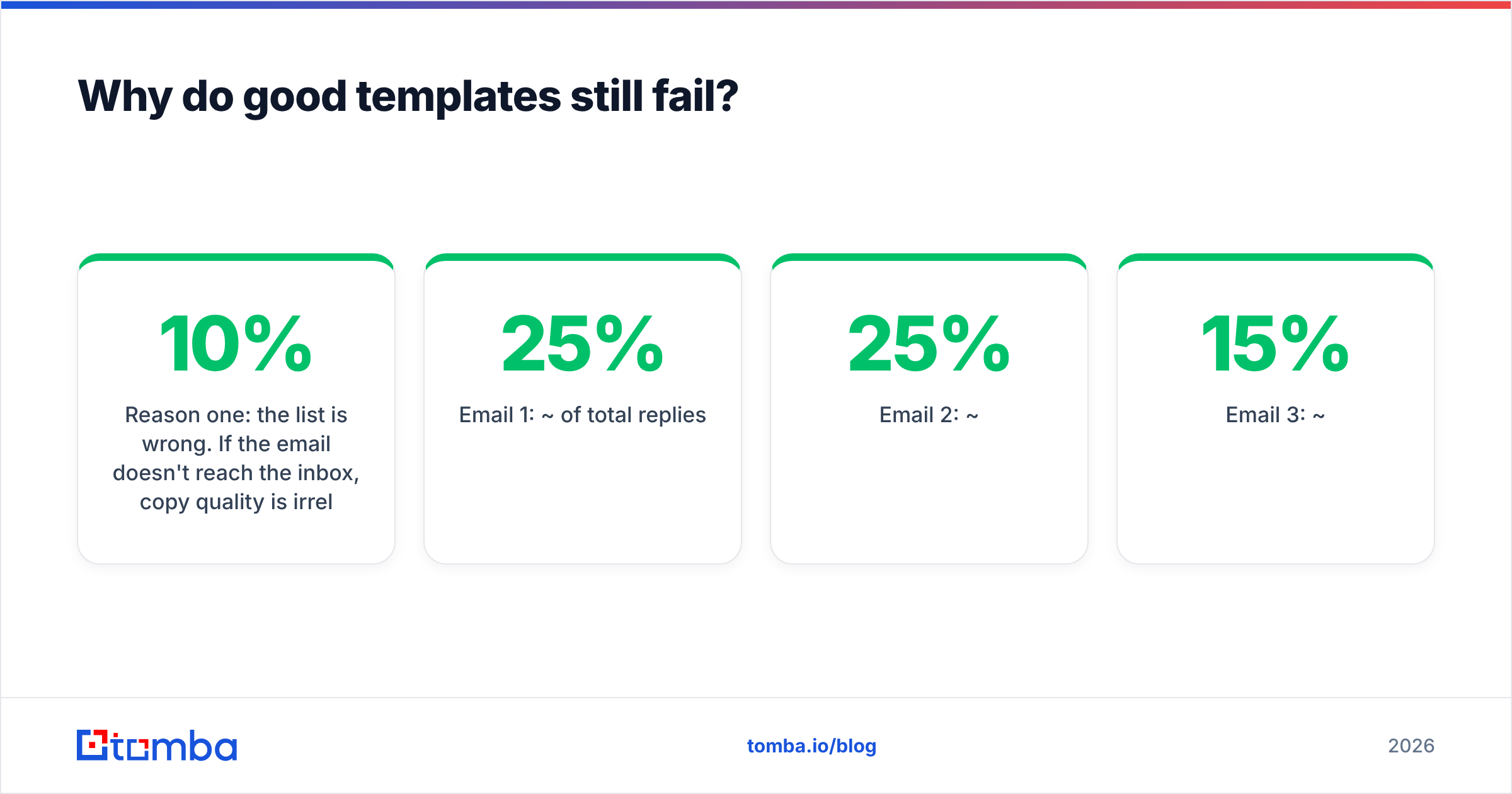
Reason two: the sequence is too short. Single-send campaigns are the most common structural mistake in outbound. Reply distribution across a well-built six-email sequence typically looks like:
- Email 1: ~25% of total replies
- Email 2: ~25%
- Email 3: ~15%
- Email 4: ~12%
- Email 5: ~8%
- Email 6 (breakup): ~15%
Stopping after email 2 discards roughly half your potential replies. The templates above are designed to be sequenced, not fired individually.
Reason three: the personalization is fake. "I loved your website" is worse than no personalization because it signals a mail merge with extra steps. Real personalization references something that could only be true of this one recipient. If you can't produce that in under six minutes, use a lower-tier template and send more of them instead.
What personalization tier is worth paying for?#
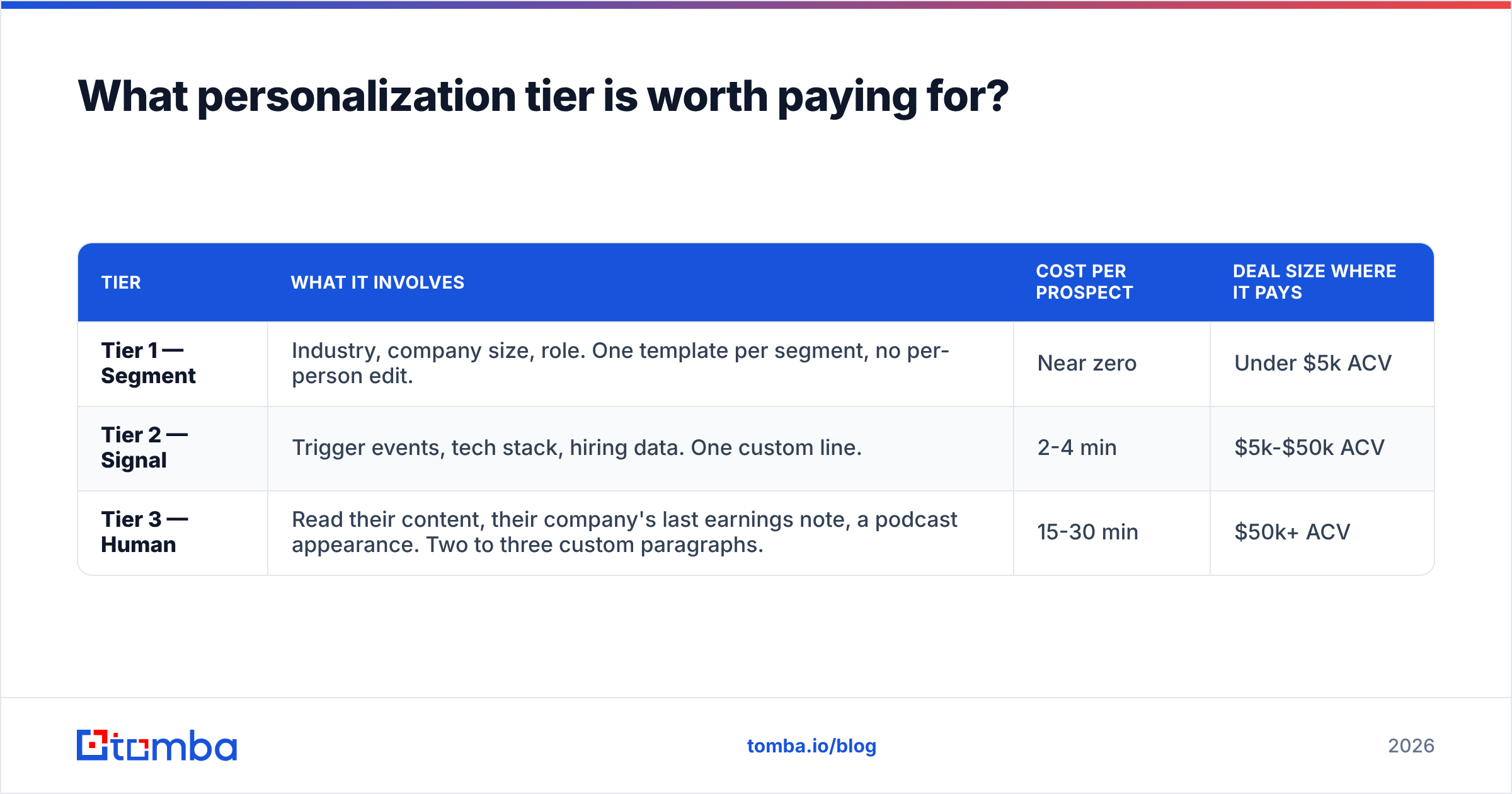
Three tiers, and most teams pick the wrong one for their deal size.
| Tier | What it involves | Cost per prospect | Deal size where it pays |
|---|---|---|---|
| Tier 1 — Segment | Industry, company size, role. One template per segment, no per-person edit. | Near zero | Under $5k ACV |
| Tier 2 — Signal | Trigger events, tech stack, hiring data. One custom line. | 2-4 min | $5k-$50k ACV |
| Tier 3 — Human | Read their content, their company's last earnings note, a podcast appearance. Two to three custom paragraphs. | 15-30 min | $50k+ ACV |
The error most teams make is running Tier 3 effort on Tier 1 deals — spending half an hour on a $2k contract — or, more commonly, Tier 1 copy on enterprise accounts where the buyer expects to be treated as an individual.
For Tier 2, which covers most B2B outbound, your bottleneck is data, not writing. You need verified contacts plus the signals to write the trigger line. A domain search gives you the contact map for a target account in one query; data enrichment fills in the role, seniority, and firmographics that let you route each contact to the right template. Both feed the merge fields the templates above depend on.
If you want a starting point for subject lines specifically, G2's category reviews are a reasonable place to see what tooling other teams actually rate — and the response rate benchmarks you'll find there are a useful sanity check against your own numbers.
How should you test and iterate on these templates?#
Test one variable at a time, and give each test enough volume to mean anything.
The minimum sample. A 200-send test with a 4% reply rate gives you 8 replies. That's not a result, that's noise. You need roughly 400-500 sends per variant before a reply-rate difference under 3 percentage points is worth acting on. Below that, you're reading tea leaves.
Test in this order:
- Deliverability first. Before any copy test, confirm inbox placement. Check your SPF record and DMARC alignment. A copy test on a domain landing in spam measures nothing.
- Subject line second. Biggest single lever on open rate, cheapest to change. Test lowercase-conversational against descriptive.
- The ask third. Swap "worth a 10-minute call?" for "is this on your roadmap this quarter?" and watch reply rate — question-style CTAs consistently outperform meeting requests on first touch.
- Body length fourth. Cut your best-performing template by 30% and re-test. It usually wins.
- Trigger type last. Once the structure is stable, test which signal (funding vs. hiring vs. tech change) drives your segment.
What not to test: tone, emoji use, and sign-off variants. These produce differences smaller than your measurement error and eat the testing budget you should be spending on steps 1-3.
Log results per template per segment, not in aggregate. A template that fails against CTOs may be your best performer against VPs of Marketing, and blended numbers hide that completely. If you're tracking this in a spreadsheet, the Google Sheets add-on lets you refresh contact data in the same sheet where you're logging outcomes, which removes one export step from the loop.
What should you do with these templates this week?#
Pick two. Not nine.
Take the PAS template for volume and the trigger-event template for your top 25 accounts. Build the trigger list first — it's the constraint. Verify every address before the first send. Run a five-email sequence with the breakup at position five. Give it 400 sends before you judge anything.
Then swap in a third template and repeat. Outbound improves through a series of small, measured changes, not through template collections.
Ready to fill the merge fields? Templates only work when the contact data behind them is real. The Tomba Email Finder returns verified professional email addresses by name and domain, with confidence scoring and source attribution so you know what you're sending to before you send it. The free tier covers 25 searches a month; paid plans start at $49/mo on Starter and $99/mo on Growth, with bulk processing and API access included — see Tomba pricing for the full breakdown. Build the list, verify it, then let the templates do the part they're actually good at.
Related guides#
// get started
Find, verify and enrich your first contacts today
Start on the free plan with 25 searches a month, then scale when your team is ready.
Free plan · No credit card required · GDPR & CCPA
// about the author