Lead Generation Form Design: What Converts in 2026
Most lead generation forms leak qualified buyers at field four. Here is what actually converts in 2026 — field counts, progressive profiling, enrichment, and the tradeoffs nobody benchmarks honestly.
TL;DR
- Field count matters less than field cost. Asking for "company size" is cheap; asking for "phone number" costs you roughly a fifth of your submissions.
- The 2026 consensus is 3–5 visible fields for top-of-funnel offers and 6–9 for demo requests — but only if you enrich the rest server-side instead of asking for it.
- Progressive profiling beats one giant form in every multi-touch funnel, and it is the single easiest upgrade in most marketing stacks.
- Free-email blocking, real-time verification, and honeypots kill more junk than any CAPTCHA, without the conversion tax.
- The best lead generation form in 2026 asks for a work email and then fills in the other fourteen attributes from data.
Every marketing team has the same argument once a quarter. Sales wants more fields. Marketing wants fewer. Someone cites the "each extra field costs you 10% conversion" stat, someone else cites a HubSpot study showing the opposite, and the form ships with whatever the loudest person wanted.
That argument is solvable. Not with opinions, but with a clear model of what each field actually costs, what it actually buys, and which fields you can stop asking for entirely because the data already exists.
What is a lead generation form, and what is it actually for?#
A lead generation form is any on-site input that trades something of value — a guide, a demo, a trial, a quote — for contact information you can follow up on. That is the mechanical definition. The strategic definition is narrower and more useful:
A lead generation form is a qualification instrument disguised as a contact form.
If it were only about capture, one email field would win every time. It is not. The form has four jobs running simultaneously, and most teams optimize for exactly one of them:
- Capture — get a reachable identifier (work email, ideally, or a phone number).
- Qualify — collect or infer enough to route the lead to the right motion (self-serve, SDR, AE, or nurture).
- Filter — keep out bots, students, competitors, and tire-kickers without insulting real buyers.
- Set expectations — tell the person what happens next so the follow-up email is not a surprise.
A form that nails capture and fails qualification hands sales a list of 4,000 unsorted rows. A form that nails qualification and fails capture converts at 4% and starves the pipeline. The whole craft is balancing the two, and modern enrichment tooling has quietly changed where that balance sits.

How many fields should a lead generation form have in 2026?#
Short answer: as few as the next step actually requires.
The classic research — HubSpot's form-length analysis and a decade of CRO case studies — consistently shows conversion declining as fields increase, but not linearly and not uniformly. The drop depends entirely on which field you added.
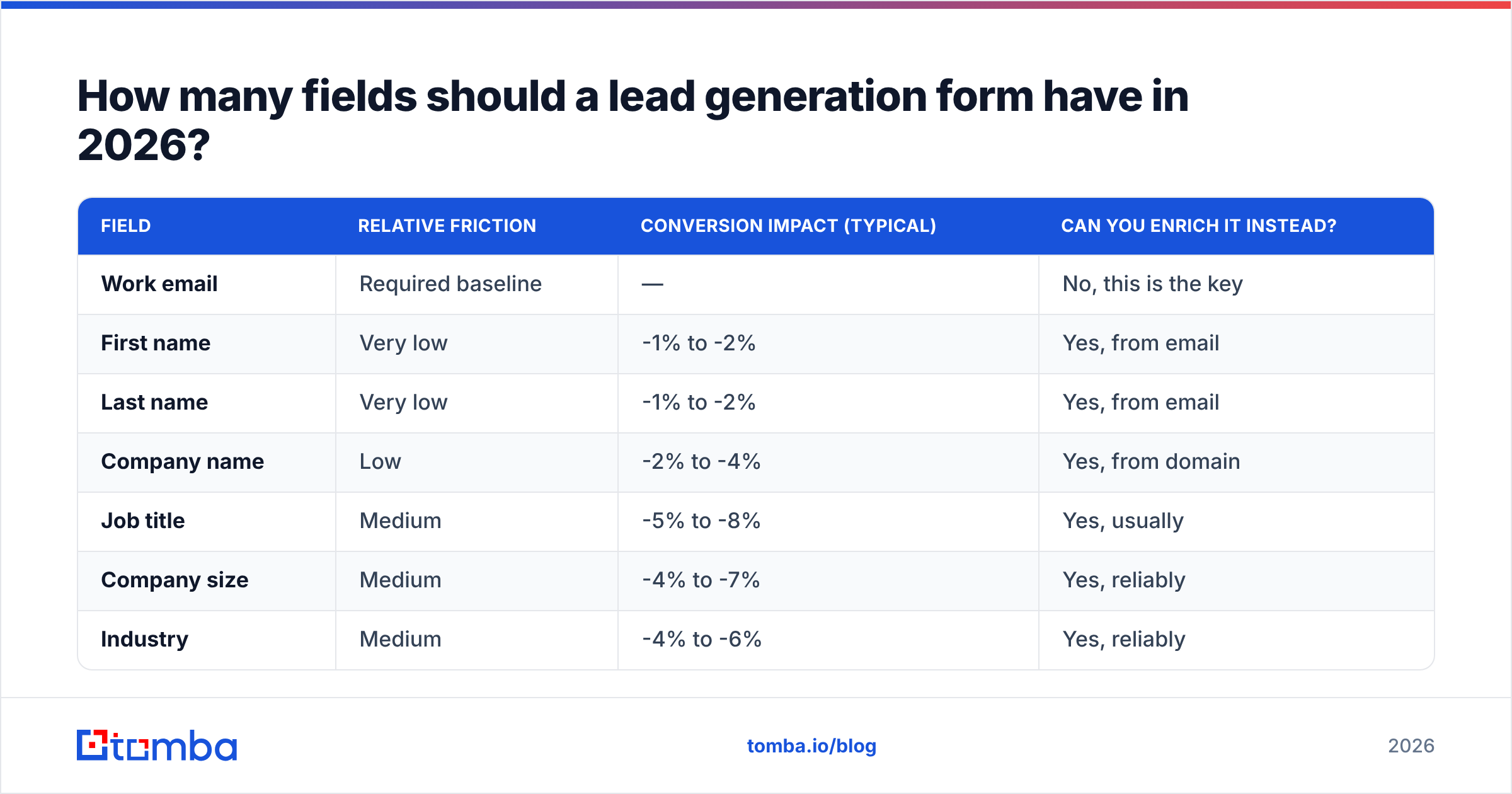
Here is a realistic cost model based on aggregated B2B form benchmarks. Treat these as directional, not gospel — your audience and offer shift them:
| Field | Relative friction | Conversion impact (typical) | Can you enrich it instead? |
|---|---|---|---|
| Work email | Required baseline | — | No, this is the key |
| First name | Very low | -1% to -2% | Yes, from email |
| Last name | Very low | -1% to -2% | Yes, from email |
| Company name | Low | -2% to -4% | Yes, from domain |
| Job title | Medium | -5% to -8% | Yes, usually |
| Company size | Medium | -4% to -7% | Yes, reliably |
| Industry | Medium | -4% to -6% | Yes, reliably |
| Phone number | High | -15% to -25% | Partially |
| Free-text "what's your challenge?" | High | -10% to -18% | No — and it is often worth the cost |
| Budget / timeline dropdown | Very high | -20% to -30% | No |
Two things jump out of that table.
First, the cheap fields are mostly the enrichable ones. Name, company, title, size, and industry — the stuff sales says it needs for routing — are precisely the attributes a data enrichment call can return from a single work email. Asking for them is paying a conversion tax for data you could have had for a fraction of a cent.
Second, the expensive fields are the ones no database can give you: intent, budget, timeline, pain. Those are worth their friction when the offer justifies it. Nobody fills in a budget dropdown for a PDF checklist. Plenty of people fill it in for a custom quote.
So the operating rule for 2026:
Ask only for what cannot be inferred, and only when the offer earns the right to ask.
What does that look like by offer type?#
- Ungated-adjacent content (checklist, template, calculator): 1 field. Work email. Enrich everything else.
- Gated report or webinar: 2–3 fields. Email, first name, and optionally company — mostly for the personalization in the confirmation email.
- Newsletter: 1 field, always. Anything more is self-sabotage.
- Demo request: 4–6 fields. Email, name, company, and one or two qualifying questions you genuinely route on.
- Enterprise quote / RFP: 7–10 fields. The buyer expects effort here; a two-field form actually reduces perceived seriousness.
That last point gets ignored constantly. Form length signals process weight. A one-field form for a $250k implementation reads as unserious. Match the form to the transaction.
Is progressive profiling better than a single long form?#
Yes, in almost every case where you will touch the lead more than once — and that is most B2B funnels.
Progressive profiling means the form remembers who someone is and asks for new information each time instead of re-asking for what it already has. Visit one gets email. Visit two gets job title. Visit three gets team size. By the fourth interaction you have a complete profile that a single form would never have extracted, and every individual form stayed short.
The mechanics differ by stack, but the pattern is consistent:
- Identify the returning visitor — cookie, email-link parameter, or a reverse lookup on a known email.
- Query what you already store — CRM fields, enrichment cache, prior submissions.
- Render only the gaps — three slots, filled with the highest-priority missing attributes.
- Write back immediately — so the next form does not re-ask.
- Stop asking eventually — once the profile is complete, replace the form with a direct CTA.
The failure mode is stack complexity. Progressive profiling needs a reliable identity key and a writable data store. If your forms post to three different endpoints and nothing reconciles them, you will build a system that asks for job title five times and annoys the exact buyers you wanted.
A simpler middle path that captures most of the value: one short form plus server-side enrichment, with a single follow-up question in the thank-you step. You get the short form's conversion rate, the enrichment fills the firmographics, and the post-submit question captures the one piece of intent data that matters. No identity graph required.
How do you stop junk submissions without a CAPTCHA?#
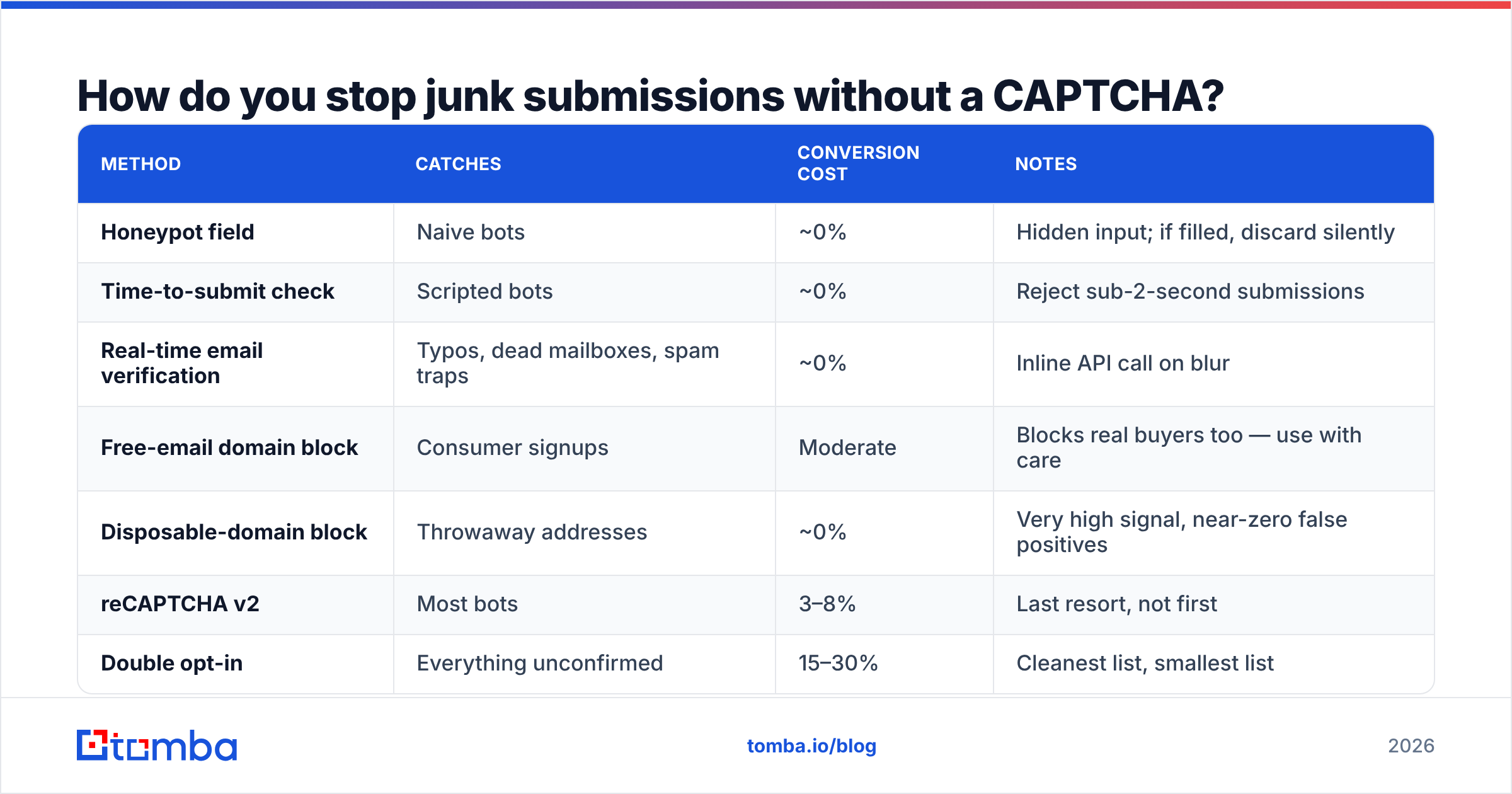
CAPTCHAs work. They also cost you real conversions — friction studies routinely put the drop at 3–8% for image challenges, concentrated among mobile users and anyone on a slow connection. There are cheaper filters that catch more.
| Method | Catches | Conversion cost | Notes |
|---|---|---|---|
| Honeypot field | Naive bots | ~0% | Hidden input; if filled, discard silently |
| Time-to-submit check | Scripted bots | ~0% | Reject sub-2-second submissions |
| Real-time email verification | Typos, dead mailboxes, spam traps | ~0% | Inline API call on blur |
| Free-email domain block | Consumer signups | Moderate | Blocks real buyers too — use with care |
| Disposable-domain block | Throwaway addresses | ~0% | Very high signal, near-zero false positives |
| reCAPTCHA v2 | Most bots | 3–8% | Last resort, not first |
| Double opt-in | Everything unconfirmed | 15–30% | Cleanest list, smallest list |
Real-time verification deserves the top slot. Running each submission through an email verifier at the moment of entry does three things at once: it catches the gmial.com typo before the lead is lost forever, it flags catch-all domains so sales knows deliverability is uncertain, and it silently drops the spam traps that quietly wreck your sender reputation.
On free-email blocking: be careful. "Work email required" is a reasonable policy for a demo form and a bad policy for a newsletter. Plenty of legitimate founders, consultants, and buyers at small companies use Gmail. If you block, block disposable domains hard and consumer domains softly — flag the lead, route it to self-serve, do not reject it.
What should happen after the form is submitted?#
More than most teams do. The submission is the start of the pipeline, not the end of the marketing job.
A well-built post-submit sequence runs four steps in under two seconds:
- Verify the email syntactically and via SMTP so you know the follow-up will land.
- Enrich from the domain — company name, size, industry, tech stack, LinkedIn URL, and often the direct-dial numbers you did not ask for.
- Score and route using the enriched attributes, not the self-reported ones. Self-reported company size is wrong roughly a third of the time; firmographic data is not.
- Trigger the correct motion — instant calendar link for ICP-fit demo requests, nurture sequence for everyone else.
Step two is where the leverage sits. A single domain search call on acme.com returns the company's email pattern, its verified contacts, and enough firmographics to route intelligently — from a form that only ever asked for one thing. That is the trade the 2026 playbook is built on: collect the key, buy the rest.
Step three is worth a warning. If you route on self-reported data, you will misroute. Ask a prospect their company size and you get a guess, an ego-inflated number, or whatever dropdown option is first. Pull it from a B2B database and you get the actual headcount band. Route on the second one.

Which lead generation form tools should you actually compare?#
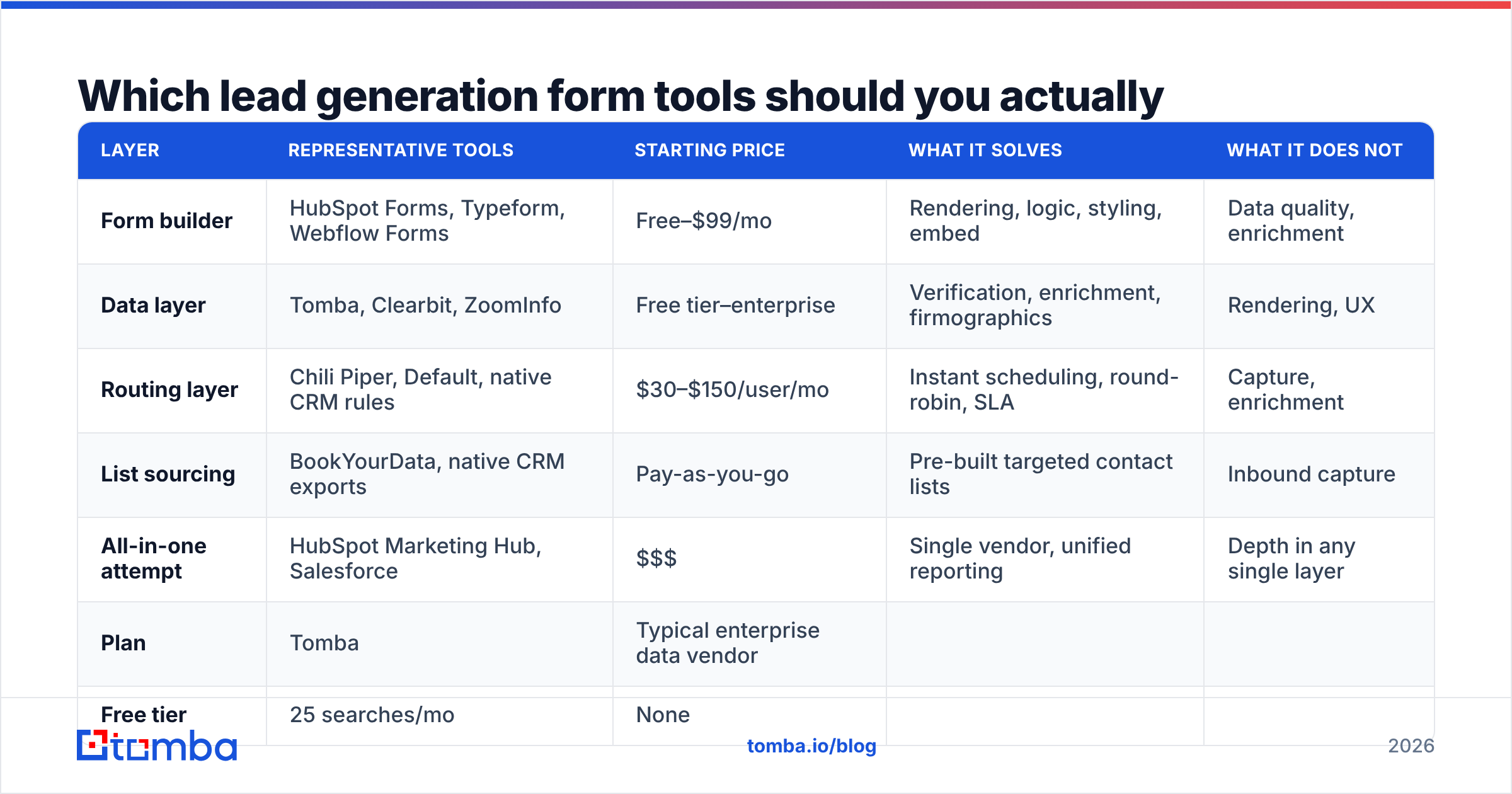
The tooling splits into three layers that people constantly conflate: the form builder (renders and collects), the data layer (verifies and enriches), and the routing layer (scores and assigns). You need all three; almost nobody sells all three well.
| Layer | Representative tools | Starting price | What it solves | What it does not |
|---|---|---|---|---|
| Form builder | HubSpot Forms, Typeform, Webflow Forms | Free–$99/mo | Rendering, logic, styling, embed | Data quality, enrichment |
| Data layer | Tomba, Clearbit, ZoomInfo | Free tier–enterprise | Verification, enrichment, firmographics | Rendering, UX |
| Routing layer | Chili Piper, Default, native CRM rules | $30–$150/user/mo | Instant scheduling, round-robin, SLA | Capture, enrichment |
| List sourcing | BookYourData, native CRM exports | Pay-as-you-go | Pre-built targeted contact lists | Inbound capture |
| All-in-one attempt | HubSpot Marketing Hub, Salesforce | $$$ | Single vendor, unified reporting | Depth in any single layer |
A note on the last row: all-in-one suites are genuinely convenient and genuinely mediocre at enrichment. Salesforce and HubSpot both ship native enrichment now, and both are fine for coarse firmographics and weak on verified email and direct-dial coverage. If your outbound follow-up depends on reaching the person, you will end up bolting a dedicated data layer on anyway.
On the data layer specifically, the comparison points that matter are verification accuracy, catch-all handling, API latency (you are calling this synchronously on form submit — 400ms is fine, 4 seconds is not), and price per enriched record. Check G2's category listings for current user-reported accuracy, and read the vendor's own methodology page before you believe any accuracy claim, including ours.
What does the data layer cost?#
Pricing here is where teams get surprised, because per-credit costs diverge wildly once you are enriching every inbound submission.
| Plan | Tomba | Typical enterprise data vendor |
|---|---|---|
| Free tier | 25 searches/mo | None |
| Entry paid | $49/mo | $1,000+/mo annual commit |
| Mid tier | $99/mo | Custom |
| Higher tier | $249/mo | Custom |
| API access | All paid plans | Often gated to top tier |
| Contract | Monthly, no commit | Annual minimum typical |
The practical implication: if you are enriching 2,000 form submissions a month, the difference between a self-serve plan and an enterprise contract is the difference between a line item and a procurement cycle. Full Tomba pricing is public, which is itself a differentiator in a category that loves "contact sales."
What are the most common lead generation form mistakes?#
Ranked by how much revenue they quietly destroy:
- Asking for the phone number too early. It is the single most expensive field on the form and the one sales demands loudest. Compromise: make it optional and enrich direct dials with a phone finder instead of forcing it.
- No inline validation. A typo'd email is a lead you paid for and can never contact. Validate on blur, not on submit.
- Generic button copy. "Submit" underperforms specific copy ("Get the 2026 benchmark report") in almost every test that has been run on it.
- Hiding the form below the fold on a dedicated landing page. If the page's only job is the form, the form goes where the eye lands.
- Dropdowns with 40 options. Every additional option is a decision. Collapse industry lists to 6–8 buckets or infer them entirely.
- No expectation-setting. "We'll be in touch" is not a promise. "An AE will email you within one business hour" is, and it reduces both abandonment and no-shows.
- Treating mobile as an afterthought. Roughly half of B2B content traffic is mobile now. A three-column form layout is a three-column disaster at 390px wide.
One more, less obvious: not testing the thank-you page. It is the highest-intent moment in the entire funnel, and most teams ship a static "Thanks!" A calendar embed, a second relevant offer, or a single qualifying question all perform better than nothing, and none of them cost you a conversion because the conversion already happened.
How do you measure whether your form is actually working?#
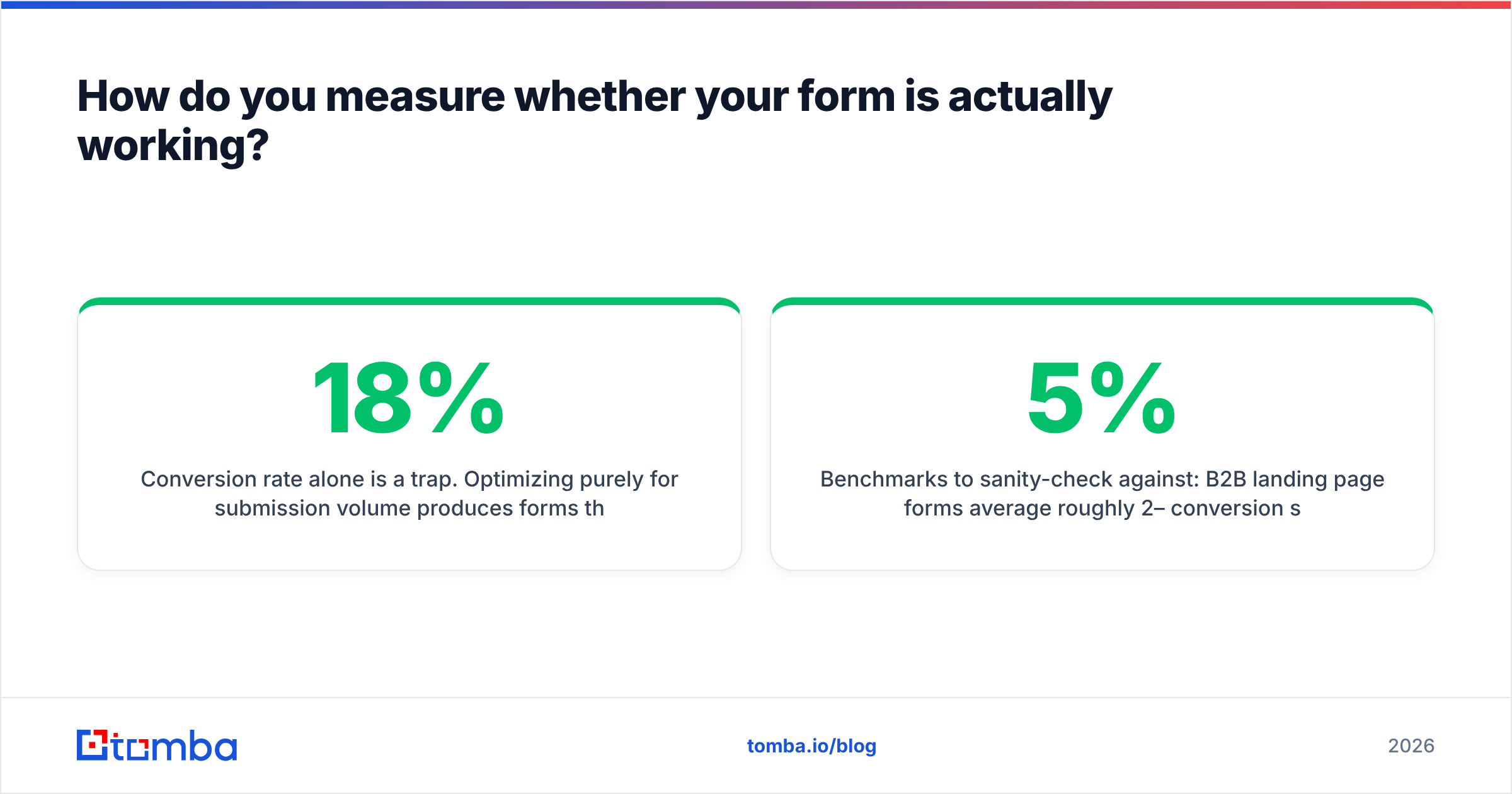
Conversion rate alone is a trap. Optimizing purely for submission volume produces forms that convert at 18% and generate zero qualified pipeline.
Track these four together:
- Form conversion rate — submissions ÷ form views. Your baseline metric.
- Qualified rate — submissions that match ICP ÷ total submissions. This is where field decisions show up.
- Contactability rate — leads with a verified, deliverable email ÷ total. Enrichment and verification move this one.
- Pipeline per 100 submissions — the only number that settles the marketing-vs-sales field argument permanently.
If you shorten the form and metric 1 rises while metric 4 holds, you made the right call. If metric 4 drops, you removed a field that was doing real qualification work — put it back, or replace it with an enrichment-driven routing rule. The argument stops being about opinions the moment you instrument metric 4.
Benchmarks to sanity-check against: B2B landing page forms average roughly 2–5% conversion sitewide, 10–15% on dedicated high-intent landing pages, and 20%+ on single-field newsletter captures. If you are far below those, the problem is usually the offer, not the form.
Where should you start?#
Pick the single highest-traffic form you own. Count the fields. For each one, ask: can this be enriched from the email, and does anyone actually use it? Remove every field that fails both tests, wire verification into the submit handler, and enrich the rest server-side. That one change, on one form, typically recovers more conversions than a quarter of copy testing.
Then instrument pipeline per 100 submissions so the next version of this argument gets settled with data instead of seniority.
If the bottleneck is turning a captured work email into a complete, routable lead record, that is exactly what the Tomba Email Finder and its enrichment endpoints are built for — verify the address at submit, pull company, role, and firmographics from the domain, and hand sales a record that is already qualified. The free tier covers 25 searches a month if you want to test it against your own form traffic before committing to anything, and the Tomba API is available on every paid plan so you can wire it directly into the submit handler rather than a nightly batch job.
Related guides#
// get started
Find, verify and enrich your first contacts today
Start on the free plan with 25 searches a month, then scale when your team is ready.
Free plan · No credit card required · GDPR & CCPA
// about the author