Lead Generation in Marketing: The Complete 2026 Playbook
Most lead gen advice stops at "create great content." This guide covers the whole machine: channels, costs per lead, the inbound vs outbound trade-off, the data layer nobody budgets for, and a 30-day build plan.
TL;DR
- Lead generation in marketing is the system that turns anonymous attention into named, contactable, qualified people your sales team can actually work — not a single campaign or channel.
- Channel choice matters less than channel fit: SEO and content compound but take 6–12 months; paid search buys intent instantly at 3–10x the cost per lead; outbound gives you control over exactly who enters the pipeline.
- Cost per lead means nothing without cost per qualified lead. A $40 MQL that converts at 2% is worse than a $180 MQL that converts at 20%.
- The most expensive leak in most programs is data quality — bad emails, stale job titles, and duplicate records quietly burn 20–30% of every list before a single message lands.
- Build the measurement layer and the data layer first. Channels are swappable; a broken attribution model and a dirty database poison every channel you try.
What is lead generation in marketing?#
Lead generation in marketing is the process of attracting people who match your buyer profile and capturing enough information to contact them again on your terms. That's the whole definition. Everything else — gated ebooks, webinars, LinkedIn ads, cold email, conference badge scans — is just a delivery mechanism for the same two jobs: get attention, get permission (or at least an address).
The part teams get wrong is treating lead gen as a campaign instead of a system. A campaign produces a spike. A system produces a predictable number of qualified conversations per month, at a known cost, from sources you can turn up or down. If your answer to "where will next quarter's pipeline come from?" is "we'll do another webinar," you don't have lead generation. You have events.
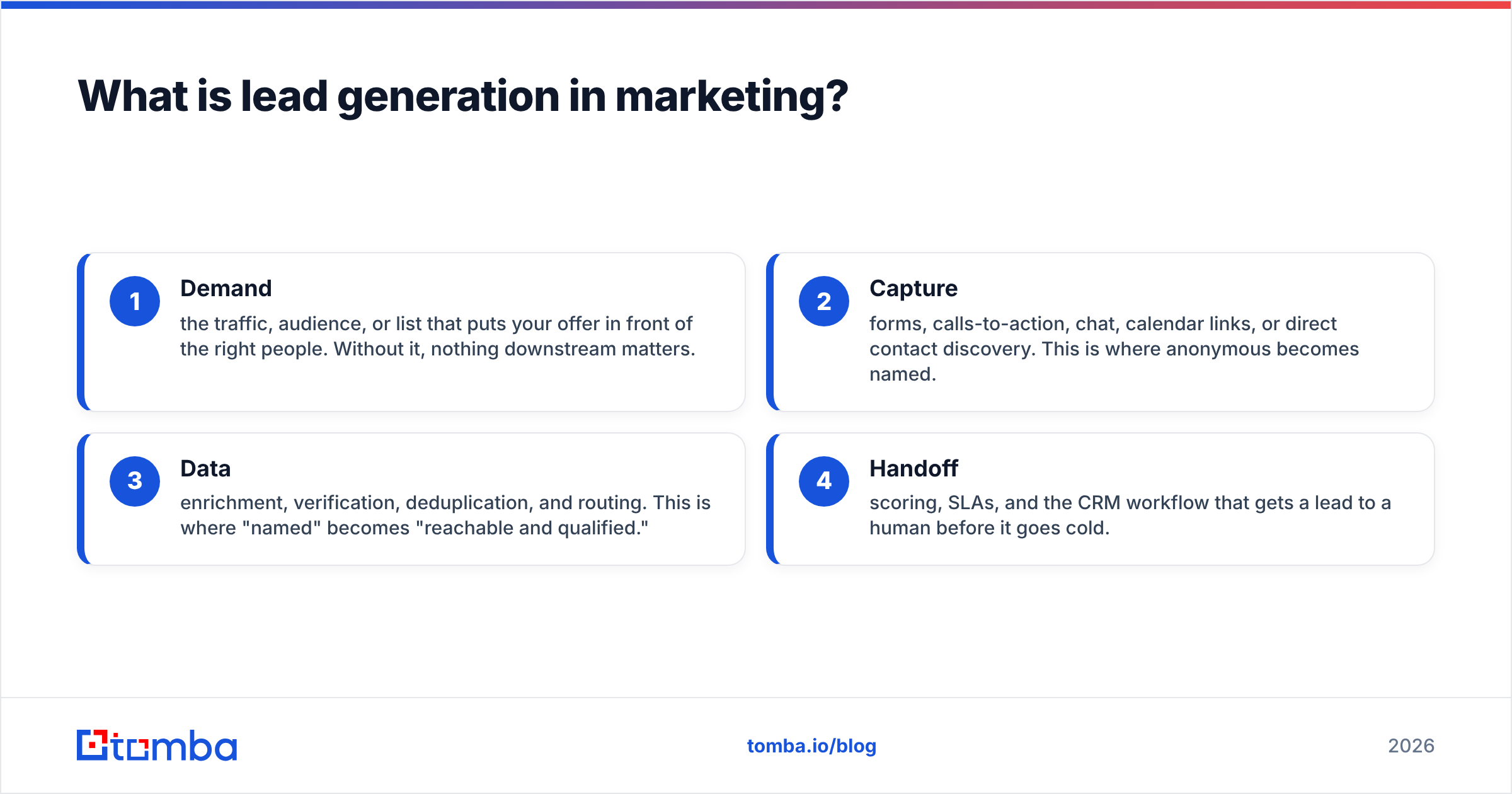
A working system has four parts, and weakness in any one caps the whole thing:
- Demand — the traffic, audience, or list that puts your offer in front of the right people. Without it, nothing downstream matters.
- Capture — forms, calls-to-action, chat, calendar links, or direct contact discovery. This is where anonymous becomes named.
- Data — enrichment, verification, deduplication, and routing. This is where "named" becomes "reachable and qualified."
- Handoff — scoring, SLAs, and the CRM workflow that gets a lead to a human before it goes cold.
Most marketing teams over-invest in part one, under-invest in parts three and four, then blame the channel when conversion rates disappoint.

How does the lead generation funnel actually work?#
The classic funnel — awareness, interest, decision, action — is a useful sketch and a terrible operating model. Real B2B buying is nonlinear: a prospect reads three of your posts, disappears for four months, sees a competitor comparison, asks a peer on Slack, then books a demo from a branded search. Gartner's research on B2B buying has consistently found that buyers spend the majority of their journey doing independent research, not talking to sellers.
What you can still control is the stage definition — the shared vocabulary that lets marketing and sales argue productively instead of emotionally:
- Lead — you have a name and a contact method. Nothing more is implied.
- MQL — a marketing qualified lead matches your ICP and has taken an action that correlates with buying. Fit and behavior, not just one.
- SQL — sales has contacted the lead, confirmed the need, and accepted it into the pipeline.
- Opportunity — there's a deal, an amount, and a date.
Write those definitions down, get sales to sign them, and revisit them every quarter. Half of all "marketing isn't sending us good leads" conflicts are definition disputes wearing a costume.
Which lead generation channels perform best in 2026?#
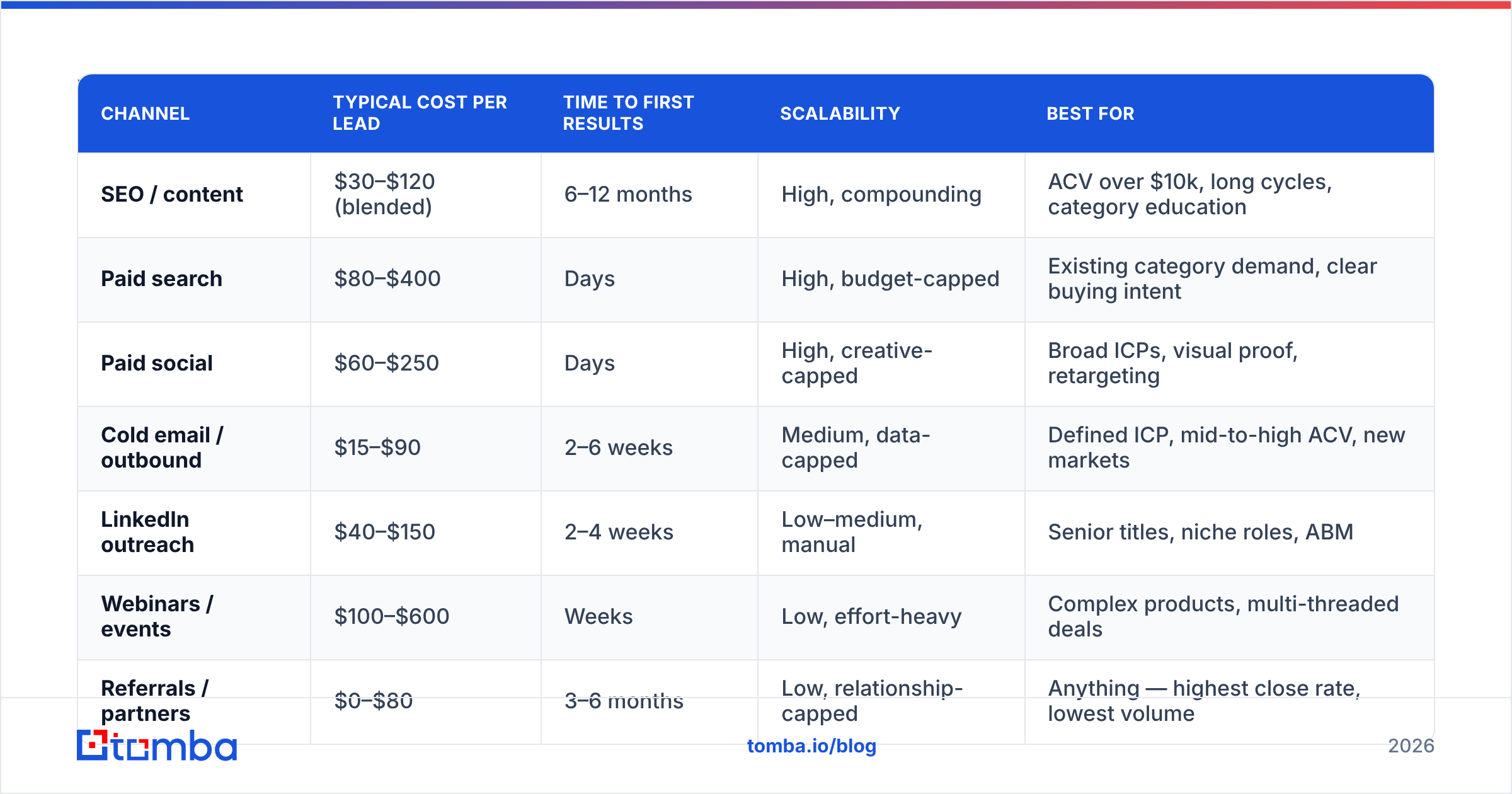
There is no universally best channel — there's only the best channel for your price point, sales cycle, and patience. Here's how the main options compare on the dimensions that actually drive the decision:
| Channel | Typical cost per lead | Time to first results | Scalability | Best for |
|---|---|---|---|---|
| SEO / content | $30–$120 (blended) | 6–12 months | High, compounding | ACV over $10k, long cycles, category education |
| Paid search | $80–$400 | Days | High, budget-capped | Existing category demand, clear buying intent |
| Paid social | $60–$250 | Days | High, creative-capped | Broad ICPs, visual proof, retargeting |
| Cold email / outbound | $15–$90 | 2–6 weeks | Medium, data-capped | Defined ICP, mid-to-high ACV, new markets |
| LinkedIn outreach | $40–$150 | 2–4 weeks | Low–medium, manual | Senior titles, niche roles, ABM |
| Webinars / events | $100–$600 | Weeks | Low, effort-heavy | Complex products, multi-threaded deals |
| Referrals / partners | $0–$80 | 3–6 months | Low, relationship-capped | Anything — highest close rate, lowest volume |
Treat those ranges as orientation, not gospel; they swing wildly by industry, and a crowded category like cybersecurity or HR tech will sit at the top of every band. Public benchmark roundups from HubSpot's marketing statistics library and peer reviews on G2's lead capture category are useful sanity checks before you commit budget.
The strategic read: compounding channels and instant channels solve different problems. SEO and referrals are annuities — expensive and slow to build, nearly free to maintain. Paid and outbound are faucets — instant, controllable, and they stop the moment you stop paying. Healthy programs run at least one of each so a bad quarter in one doesn't zero out pipeline.
Is inbound or outbound better for lead generation?#
Neither. They fail differently, which is exactly why you want both.
Inbound fails on timing: you get the right person at the wrong moment, or you get the wrong person entirely because your ebook attracted students and consultants. Outbound fails on relevance: you pick the right company and the right title, then send a message that could have been sent to anyone.
The practical split most B2B teams land on:
- Inbound owns the bottom of the funnel. Branded search, comparison pages, pricing page visitors, and free-tool users convert at multiples of anything else. Protect that budget first.
- Outbound owns account selection. If there are 400 companies you must win this year, waiting for them to download a whitepaper is not a plan. Build the list, find the contacts, and go.
- Retargeting is the bridge. Anonymous visitors who didn't convert are the cheapest audience you'll ever buy. Pair that with website visitor reveal so the accounts browsing your pricing page become an outbound list instead of a bounce statistic.
A useful heuristic: if your average contract value is under $3,000, outbound rarely pays for the labor. Above $15,000, outbound almost always beats waiting. Between those, it depends on how well you can target.
What metrics should you track — and what's a good benchmark?#
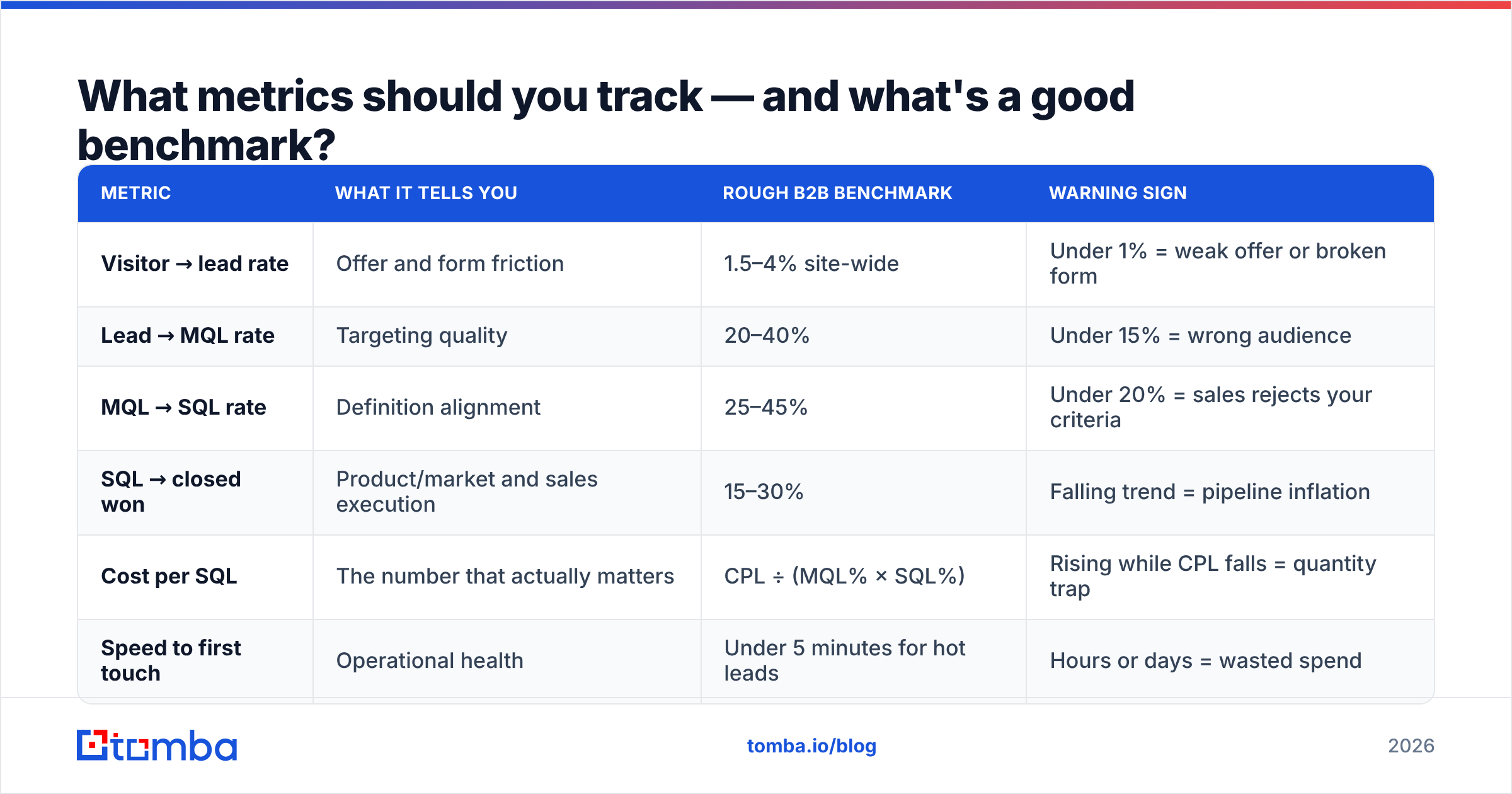
Cost per lead is the metric everyone reports and the metric that explains the least. Track the chain, not the headline:
| Metric | What it tells you | Rough B2B benchmark | Warning sign |
|---|---|---|---|
| Visitor → lead rate | Offer and form friction | 1.5–4% site-wide | Under 1% = weak offer or broken form |
| Lead → MQL rate | Targeting quality | 20–40% | Under 15% = wrong audience |
| MQL → SQL rate | Definition alignment | 25–45% | Under 20% = sales rejects your criteria |
| SQL → closed won | Product/market and sales execution | 15–30% | Falling trend = pipeline inflation |
| Cost per SQL | The number that actually matters | CPL ÷ (MQL% × SQL%) | Rising while CPL falls = quantity trap |
| Speed to first touch | Operational health | Under 5 minutes for hot leads | Hours or days = wasted spend |
That last one is unglamorous and enormous. Response time to inbound leads degrades conversion faster than almost any creative decision you'll make this year. If your form fills sit in a queue overnight, fix routing before you fix copy.
One more discipline: report cost per SQL by channel and by segment, not just blended. Blended numbers hide the fact that one channel is subsidizing three losers.
Why do most lead generation programs leak pipeline?#
Because the data layer is invisible until it fails, and then it fails everywhere at once.
Here's the mechanic. B2B contact data decays at roughly 25–30% per year through job changes, company moves, and domain changes. A list you built in January is meaningfully wrong by December. Layer on top of that: form spam, typo'd email addresses, role accounts, duplicates from three different capture points, and catch-all domains that accept everything and deliver nothing. It is entirely normal for a "clean" list of 10,000 records to contain 2,000+ contacts that cannot be reached.
The downstream damage compounds:
- Deliverability collapses. High bounce rates hurt sender reputation, which means even your good addresses stop reaching the inbox.
- Reporting lies. If 20% of MQLs were never contactable, your MQL→SQL rate is measuring data quality, not marketing quality — and you'll optimize the wrong thing.
- Sales trust evaporates. Reps who hit three dead addresses in a row stop working the queue, and now your conversion problem is a behavioral problem.

The fix is boring and cheap relative to what it saves: verify at capture, re-verify before every send, and enrich on entry so routing and scoring have real firmographics to work with. Running every new record through an email verifier before it hits the CRM costs a fraction of a cent per contact and removes the single largest source of silent waste in most programs.
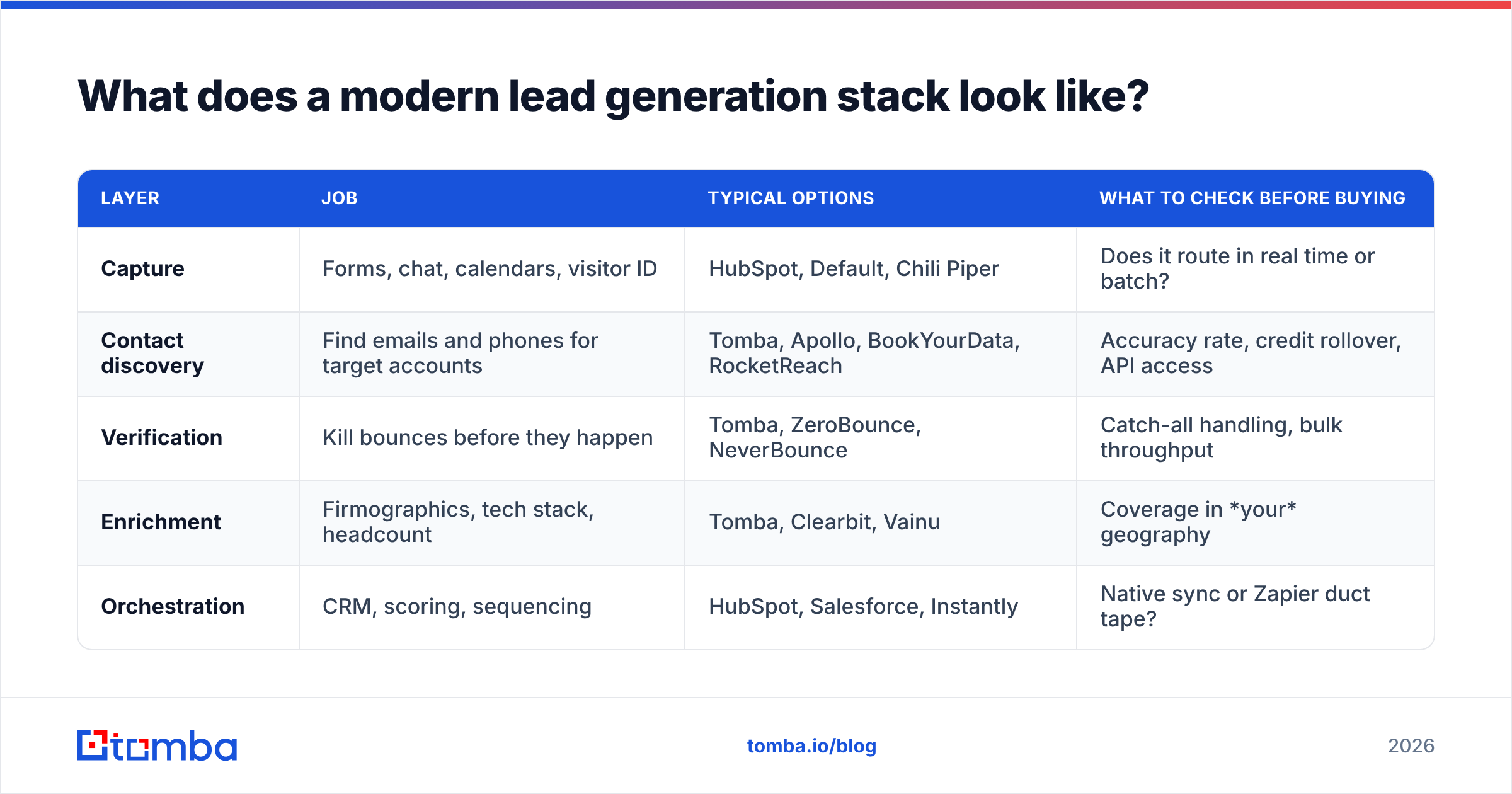
What does a modern lead generation stack look like?#
You need five capabilities. You do not need five separate vendors — most teams end up with three or four tools covering overlapping ground.
| Layer | Job | Typical options | What to check before buying |
|---|---|---|---|
| Capture | Forms, chat, calendars, visitor ID | HubSpot, Default, Chili Piper | Does it route in real time or batch? |
| Contact discovery | Find emails and phones for target accounts | Tomba, Apollo, BookYourData, RocketReach | Accuracy rate, credit rollover, API access |
| Verification | Kill bounces before they happen | Tomba, ZeroBounce, NeverBounce | Catch-all handling, bulk throughput |
| Enrichment | Firmographics, tech stack, headcount | Tomba, Clearbit, Vainu | Coverage in your geography |
| Orchestration | CRM, scoring, sequencing | HubSpot, Salesforce, Instantly | Native sync or Zapier duct tape? |
On the discovery layer specifically, the two questions that matter are accuracy and unit economics. A provider that returns twice as many addresses at half the accuracy is not cheaper — you pay the difference in bounces and reputation. Compare verified-hit rate, not raw match rate. Tomba pricing starts with a free tier at 25 searches per month, then $49/mo for Starter, $99/mo for Growth, and $249/mo for Pro, with an API and bulk tooling on every paid plan; BookYourData takes a database-first approach with pay-as-you-go credits that suits teams buying in large one-off batches. Both are reasonable choices — pick based on whether your workflow is "look up contacts continuously" or "buy a list once per quarter."
How do you build a lead generation system in 30 days?#
If you're starting cold or rebuilding, run it in this order. The sequence matters more than the speed.
- Days 1–5: Define and instrument. Write the ICP in one paragraph with firmographic filters you can actually query. Agree MQL and SQL definitions with sales in writing. Make sure every form, CTA, and source writes a clean source field to the CRM.
- Days 6–10: Fix the data layer. Dedupe the existing database, verify every address, enrich for title and company size. You'll likely delete 10–25% of records. Do it anyway — you're removing noise, not assets.
- Days 11–15: Ship one high-intent capture asset. Not an ebook. A comparison page, a calculator, a free tool, or a teardown — something a person with a live problem would use this week.
- Days 16–22: Launch one paid and one outbound motion. Small budgets, tight targeting. Build the outbound list against your ICP filters, then use domain search to pull verified contacts for the exact roles you defined in step one.
- Days 23–27: Close the loop. Routing rules, response-time SLA, and a weekly report showing cost per SQL by source. If a rep can't see why a lead arrived, the loop isn't closed.
- Days 28–30: Review and kill something. Look at cost per SQL. Cut the worst channel, move its budget to the best one, and set a re-test date 90 days out.
Repeat monthly. Lead generation in marketing is not a project you finish; it's a loop you tighten.
Where should you start?#
Start with the part nobody wants to own: the data. Channels are easy to add and easy to swap, but every channel you run pours into the same database — and if that database is 25% wrong, you're paying a 25% tax on every dollar of demand you generate, forever.
Get your contact layer right first and everything downstream gets cheaper. The Tomba Email Finder gives you verified professional email addresses by domain, name, or company, with a free tier to test accuracy against your own ICP before you commit — run 25 known contacts through it, check the hit rate yourself, and then decide. It's the cheapest experiment in your entire lead gen program, and it usually explains more about your conversion rates than your last three campaign reviews combined.
Related guides#
// get started
Find, verify and enrich your first contacts today
Start on the free plan with 25 searches a month, then scale when your team is ready.
Free plan · No credit card required · GDPR & CCPA
// about the author