Lead Generation Lists: How to Build One That Converts
Most lead generation lists are dead on arrival — stale titles, catch-all domains, and no ICP filter. Here's the buy-vs-build math, a field-by-field list spec, and the verification steps that keep your bounce rate under 2%.
TL;DR
- A lead generation list is not a contact dump. It is a filtered, verified, enriched set of rows where every field maps to something your sequence actually uses.
- Buying is faster and cheaper per row; building is slower but gives you ICP precision and fresher data. Most teams that hit quota run a hybrid.
- B2B contact data decays roughly 2–2.5% per month — about 25–30% a year — so a list you "finished" in January is a different list by July.
- Verify before every send, not once at import. Catch-all domains are where most "verified" lists quietly leak bounces.
- Budget 5–15% of the list cost for verification and enrichment. It is the cheapest insurance you will buy all quarter.
What is a lead generation list, actually?#
A lead generation list is a structured set of prospect records — company, person, role, contact channel — that a specific campaign can act on without further research.
Think of it like a grocery list versus a photo of a supermarket. The supermarket photo contains everything; it tells you nothing about what to buy. A real lead generation list has already made the decisions: this segment, this seniority, this trigger, this message.
That distinction matters because most "lists" circulating inside B2B teams are supermarket photos. Ten thousand rows scraped from a directory, no ICP filter, no verification pass, no owner. They generate activity metrics and nothing else.
A usable list has four properties:
- Scoped to one ICP segment. One industry band, one company-size band, one buying role. If a single email template cannot plausibly address every row, the list is two lists.
- Verified at the address level. Every email has been SMTP-checked or catch-all-classified within the last 30 days.
- Enriched with at least one personalization hook. A funding round, a tech-stack signal, a job posting, a recent hire. Something a human could reference in line one.
- Owned and dated. A name on it and a
sourced_attimestamp, so you know when to re-verify or retire it.
Everything below is about producing those four properties cheaply and repeatedly.
Why do most lead generation lists fail before the first send?#
Because data rots faster than teams re-verify it.
Industry estimates cluster around 2–2.5% monthly decay for B2B contact records, driven by job changes, domain migrations, mergers, and offboarding. Compound that and roughly a quarter to a third of a list is wrong within twelve months. HubSpot's research on database decay has been making this point for years and the number has not improved — if anything, post-2023 layoff churn made it worse.
The failure pattern is predictable:
- Bounce spike on send one. You imported 8,000 rows, 1,400 of them are ex-employees, and your bounce rate lands at 17%. Mailbox providers read that as a spam signal within hours.
- Catch-all blindness. The verifier returned "accepted" because the domain accepts everything. Half those addresses do not resolve to a human.
- Role mismatch. The title field said "Marketing Manager" eighteen months ago. Today that person runs RevOps at a different company, and your pitch lands as noise.
- Duplicate inflation. The same person appears three times under three email permutations, so your "12,000 prospects" is really 9,100 and your reply-rate denominator is wrong.
None of these are strategy problems. They are hygiene problems, and hygiene is cheap compared to a burned sending domain.

Should you buy a lead list or build one?#
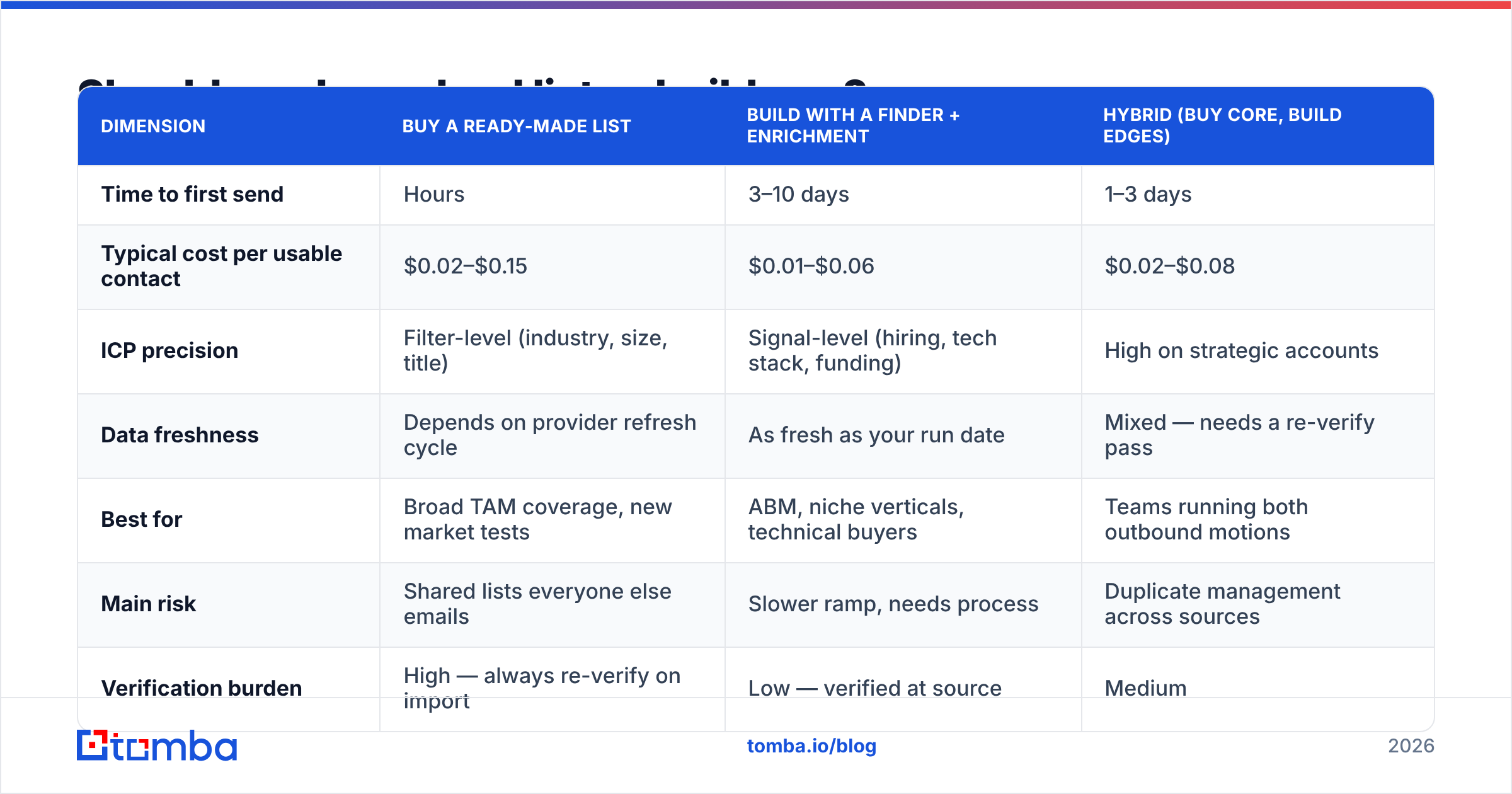
Buy when speed and coverage matter more than precision. Build when your ICP is narrow, technical, or defined by signals no database carries.
Here is the honest comparison, with the tradeoffs most vendor pages skip.
| Dimension | Buy a ready-made list | Build with a finder + enrichment | Hybrid (buy core, build edges) |
|---|---|---|---|
| Time to first send | Hours | 3–10 days | 1–3 days |
| Typical cost per usable contact | $0.02–$0.15 | $0.01–$0.06 | $0.02–$0.08 |
| ICP precision | Filter-level (industry, size, title) | Signal-level (hiring, tech stack, funding) | High on strategic accounts |
| Data freshness | Depends on provider refresh cycle | As fresh as your run date | Mixed — needs a re-verify pass |
| Best for | Broad TAM coverage, new market tests | ABM, niche verticals, technical buyers | Teams running both outbound motions |
| Main risk | Shared lists everyone else emails | Slower ramp, needs process | Duplicate management across sources |
| Verification burden | High — always re-verify on import | Low — verified at source | Medium |
Two vendor notes worth stating plainly. BookYourData is a solid option on the buy side: pay-as-you-go pricing, no forced subscription, and an accuracy guarantee that makes budgeting predictable when you need a segment fast. On the build side, an email finder plus a domain search run against a curated account list gives you rows nobody else is emailing this week — which is usually the difference between a 2% and a 7% reply rate.
Neither approach is morally superior. The mistake is picking one and never measuring the other.
How do you build a lead generation list step by step?#
Five steps. Each one narrows the funnel, and the narrowing is the point.
- Define the account list first, people second. Start with 150–500 companies that match firmographics and at least one trigger (hiring for a role you serve, using a complementary tool, recent funding). Account-first lists outperform title-first lists because the "why now" is baked in.
- Map the buying committee per account. For most B2B deals that is 3–6 people. Pull the economic buyer, the champion, and one technical evaluator. A single-contact-per-account list wastes the account research you just did.
- Resolve contact data. Run domain search to get the company's email pattern and known addresses, then use the finder for named individuals the pattern missed. A bulk email finder handles this at list scale rather than one row at a time.
- Verify and classify. Split results into deliverable, risky, catch-all, and invalid. Send to deliverable. Route catch-all through a dedicated check. Discard invalid — do not "try them anyway."
- Enrich for personalization. Add the one field your opener needs: headcount growth, recent job post, funding stage, current vendor. One good field beats twelve unused ones.
- Stamp and schedule decay. Add
sourced_atandverified_atcolumns. Anything older than 90 days goes back through step 4 before reuse.
Teams that skip step 6 rebuild the same list from scratch twice a year. Teams that keep it spend 20 minutes re-verifying.
What fields should a lead generation list contain?#
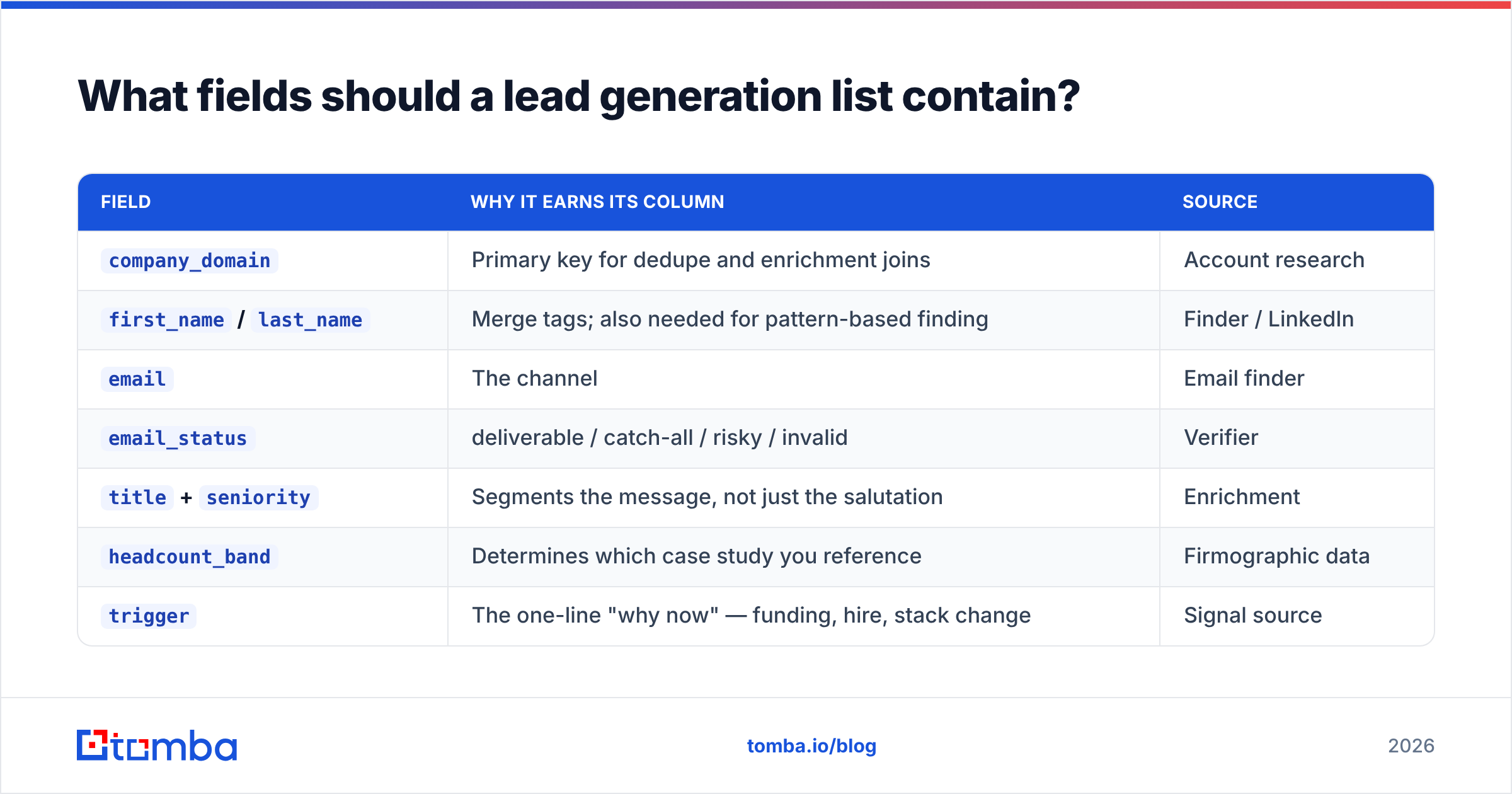
Fewer than you think, but specific ones. A bloated schema is a sign nobody has decided what the campaign actually uses.
| Field | Why it earns its column | Source |
|---|---|---|
company_domain |
Primary key for dedupe and enrichment joins | Account research |
first_name / last_name |
Merge tags; also needed for pattern-based finding | Finder / LinkedIn |
email |
The channel | Email finder |
email_status |
deliverable / catch-all / risky / invalid | Verifier |
title + seniority |
Segments the message, not just the salutation | Enrichment |
headcount_band |
Determines which case study you reference | Firmographic data |
trigger |
The one-line "why now" — funding, hire, stack change | Signal source |
sourced_at / verified_at |
Decay management | Your pipeline |
phone (optional) |
Multichannel follow-up on tier-1 accounts | Phone data provider |
If a column has never changed the content of an email you sent, delete it. Every unused field is a field someone has to maintain.
How do you verify a lead generation list without burning your domain?#
Verify in layers, and treat catch-all domains as their own problem.
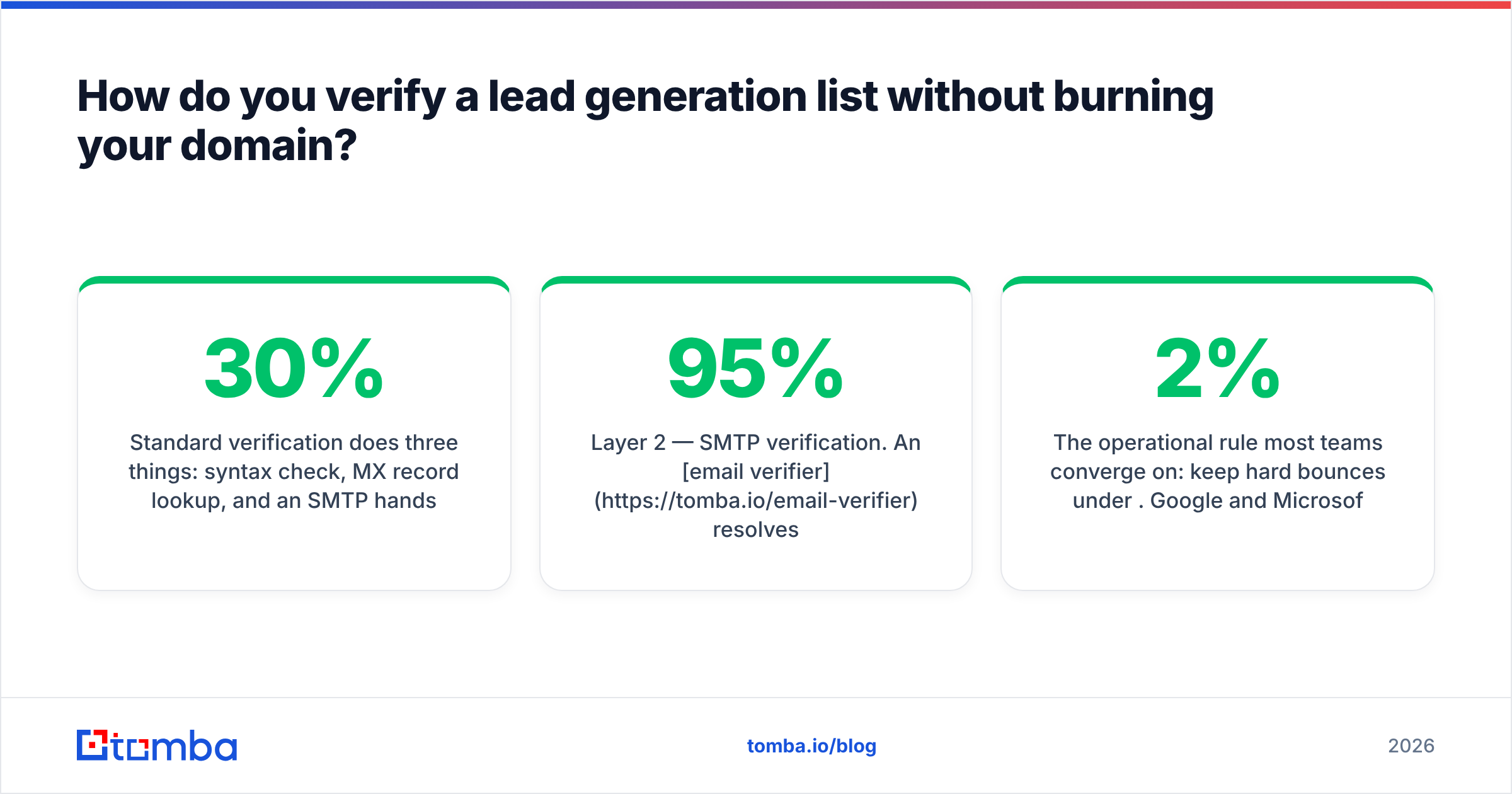
Standard verification does three things: syntax check, MX record lookup, and an SMTP handshake to see whether the mailbox accepts mail. That catches the obvious failures. What it does not catch is the domain configured to accept every address at the gateway and bounce internally afterward — the catch-all. On enterprise domains, catch-all rates frequently run 20–30% of a list.
The layered approach:
- Layer 1 — syntax and MX. Free, instant, removes typos and dead domains. Run it on import, always.
- Layer 2 — SMTP verification. An email verifier resolves the bulk of the list into deliverable or invalid. Target: 95%+ of remaining rows resolved.
- Layer 3 — catch-all handling. Route the ambiguous set through a catch-all verifier rather than guessing. What survives goes into a separate, lower-volume sending pool.
- Layer 4 — send-time throttling. Even a clean list should ramp. New sending domains start at 20–30 sends/day and climb over 2–3 weeks.
The operational rule most teams converge on: keep hard bounces under 2%. Google and Microsoft both tightened bulk-sender requirements in 2024, and the spam-complaint threshold now sits at 0.3% — with 0.1% as the practical target. A dirty list does not just underperform; it removes your ability to send at all.

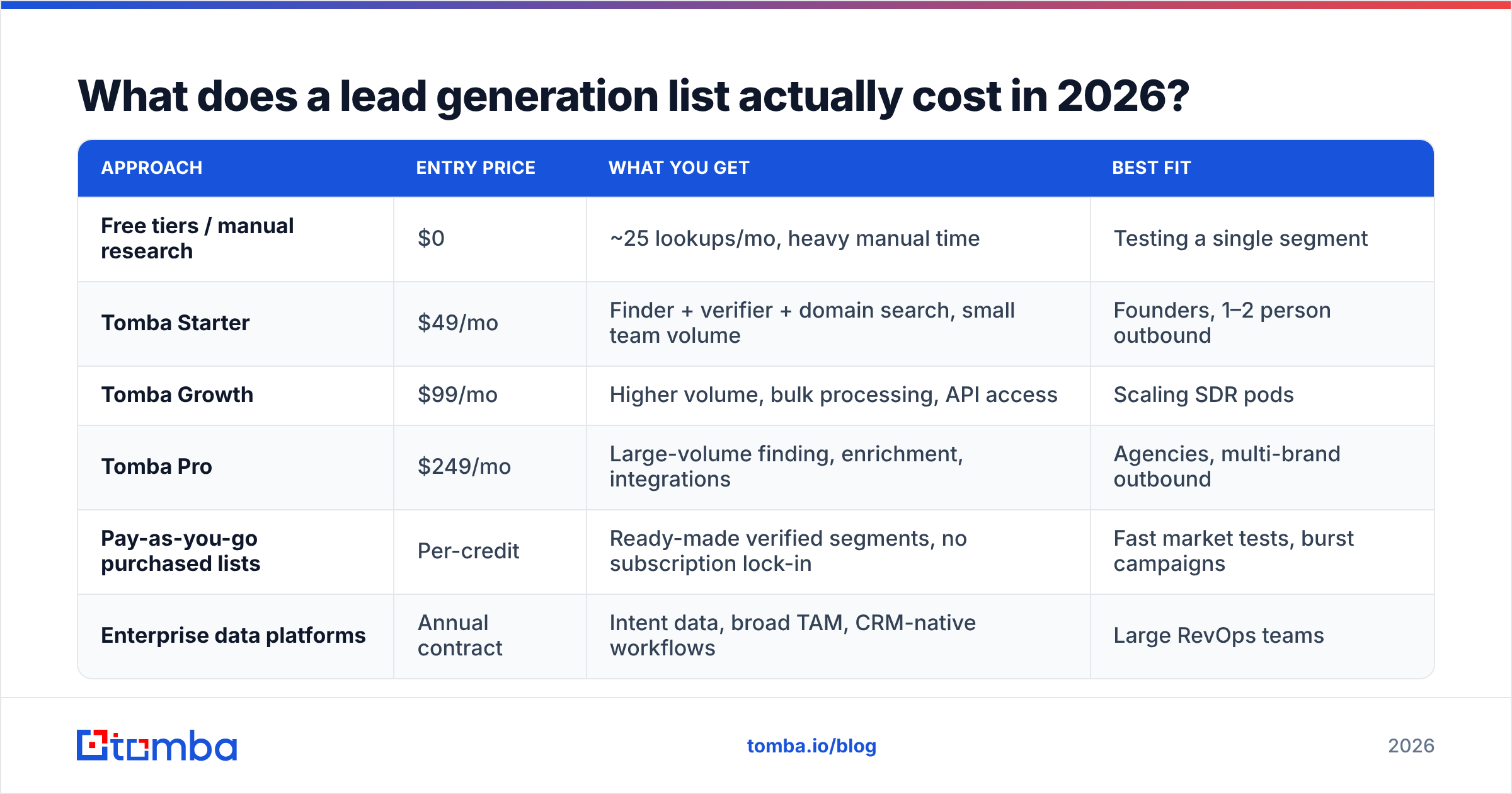
What does a lead generation list actually cost in 2026?#
Less than a single SDR-hour per thousand rows, if you run it properly.
| Approach | Entry price | What you get | Best fit |
|---|---|---|---|
| Free tiers / manual research | $0 | ~25 lookups/mo, heavy manual time | Testing a single segment |
| Tomba Starter | $49/mo | Finder + verifier + domain search, small team volume | Founders, 1–2 person outbound |
| Tomba Growth | $99/mo | Higher volume, bulk processing, API access | Scaling SDR pods |
| Tomba Pro | $249/mo | Large-volume finding, enrichment, integrations | Agencies, multi-brand outbound |
| Pay-as-you-go purchased lists | Per-credit | Ready-made verified segments, no subscription lock-in | Fast market tests, burst campaigns |
| Enterprise data platforms | Annual contract | Intent data, broad TAM, CRM-native workflows | Large RevOps teams |
Full Tomba pricing is public, which is worth noting because a large share of this category still hides numbers behind a demo call. When you compare vendors, check the per-credit cost on failed lookups — some providers charge for a search that returns nothing, which can quietly double your effective cost per usable row. Peer reviews on G2 are useful for spotting this pattern before you commit.
Which metrics tell you the list is working?#
Four numbers, checked after every campaign, in this order:
- Bounce rate. Under 2% means the verification layer works. Above 5% means stop sending and re-verify.
- Reply rate (not open rate). Opens are unreliable post-MPP. A well-targeted list with a mediocre template still clears 3–5% replies; a bad list with a great template does not.
- Positive reply ratio. Of the replies, how many are "tell me more" versus "wrong person"? High wrong-person rates are a title-mapping failure, not a copy failure.
- Meetings per 1,000 contacts. The only number that survives a board meeting. Benchmarks vary wildly by segment, but tracking your own trend line across list sources tells you which source to buy more of.
Run each list source as its own cohort. If purchased segments convert at 40% of what your built lists do, but cost 20% as much, buying still wins on unit economics. You cannot know that without cohorting.
What are the most common lead list mistakes?#
- Treating volume as progress. A 50,000-row list you cannot personalize is a liability with a storage cost.
- Verifying once. Import-day verification is a snapshot of a moving target. Re-verify anything over 90 days old.
- Ignoring catch-alls. They inflate your "valid" count and deflate your deliverability.
- Merging sources without dedupe. Person-level dedupe on domain plus name, not just email — the same human shows up under three permutations.
- No suppression list. Current customers, open opportunities, and past opt-outs must be excluded automatically, not manually.
- Skipping enrichment to save $30. The data enrichment pass is what turns a row into a reason to write.
Build your next lead generation list on data you can verify#
If you are rebuilding your outbound motion this quarter, start with the contact layer — everything downstream inherits its error rate. The Tomba Email Finder resolves names and domains into verified professional addresses, with catch-all classification, bulk processing, and an API when you want the whole pipeline automated. The free tier gives you 25 searches a month to test against a segment you already know, and Starter at $49/mo covers most single-operator outbound programs.
Pick one ICP segment, build 200 verified rows, and send. Then compare that cohort against whatever you were doing before. The list that wins is the one you can prove.
Related guides#
// get started
Find, verify and enrich your first contacts today
Start on the free plan with 25 searches a month, then scale when your team is ready.
Free plan · No credit card required · GDPR & CCPA
// about the author