Lead Generation Management Software: The 2026 Buyer's Guide
Most teams buy lead generation management software to fix a pipeline problem that is actually a data problem. Here is what each layer of the stack really does, what it costs in 2026, and how to pick without overbuying.
TL;DR
- Lead generation management software is not one product. It is four jobs — capture, enrich, score, route — that vendors bundle in different ratios and price very differently.
- Most teams already own 60-70% of what they need inside their CRM. The gap is usually enrichment and routing, not another dashboard.
- Expect $0-$49/month for a small team running capture + enrichment, $300-$1,200/month once scoring, routing, and multi-seat CRM sync are in play, and five figures annually for enterprise ABM platforms.
- Bad contact data kills more pipeline than bad software. A 30% bounce rate on an enriched list will sink your domain faster than any missing feature will slow your reps.
- Buy the layer you're actually missing. Run a 30-day test with one segment, measure connect rate and speed-to-lead, and only then sign an annual contract.
What is lead generation management software?#
Lead generation management software is the system that takes a raw signal — a form fill, a website visit, a list upload, a LinkedIn export — and turns it into a contactable, prioritized, assigned record that a human can act on today.
Think of it like a restaurant kitchen. Orders arrive from the dining room, the drive-through, and delivery apps (capture). The line cook checks what's actually in the walk-in and fills in missing ingredients (enrichment). The expediter decides which tickets fire first (scoring). Then plates go to the right server for the right table (routing). Most "lead management" tools are strong at one or two stations and mediocre at the rest.
Technically, the category spans form builders, chat widgets, visitor identification, contact databases, enrichment APIs, scoring engines, and assignment rules. Vendors from HubSpot and Salesforce down to single-purpose point tools all claim the label. That's why buyer comparisons go sideways: two products with the same G2 category can solve opposite problems.
What are the five layers of a lead generation stack?#
Before you compare vendors, name the layer you're missing. Almost every failed purchase I've seen came from buying layer 4 when the hole was in layer 2.
- Capture — forms, chat, landing pages, event lists, website visitor identification. This is where a stranger becomes a row. Tools here compete on conversion rate and how cleanly they hand off to the CRM.
- Enrichment — turning a name + company into a verified work email, direct dial, job title, headcount, and tech stack. This layer decides whether your sequences ever get delivered. An email verifier and a data enrichment endpoint live here.
- Scoring — ranking records by fit (does this company look like our best customers?) and intent (are they behaving like a buyer?). Fit scoring works with 200 leads a month; intent scoring needs real traffic volume to be worth the setup cost.
- Routing — assignment rules, round-robin, territory logic, SLA timers. Unsexy and the highest-ROI layer in most mid-market teams, because speed-to-lead is the one metric that reliably moves conversion.
- Reporting — source attribution, stage conversion, cohort decay. Useful only if layers 1-4 write clean, consistent fields. Garbage in, beautiful dashboard out.
If you can't say which of those five is your bottleneck this quarter, you are not ready to buy. Pull last quarter's numbers: form-to-MQL rate (layer 1), bounce rate and email-found rate (layer 2), MQL-to-SQL rate (layer 3), median minutes-to-first-touch (layer 4).
How do the main categories compare?#
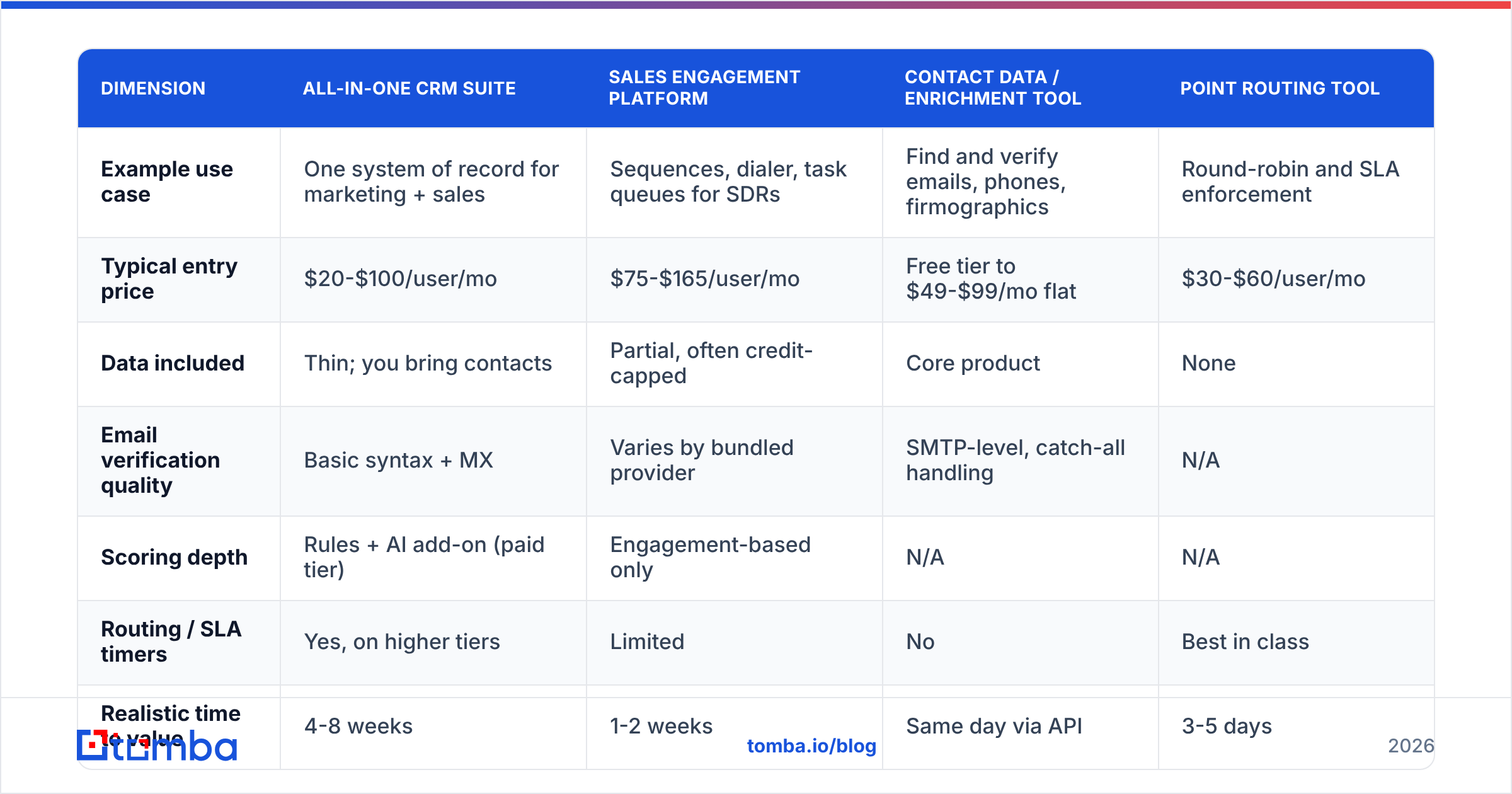
Here's how the four common shapes of lead generation management software stack up on the things that actually differ. Prices are list prices as of early 2026 and move with seat counts.
| Dimension | All-in-one CRM suite | Sales engagement platform | Contact data / enrichment tool | Point routing tool |
|---|---|---|---|---|
| Example use case | One system of record for marketing + sales | Sequences, dialer, task queues for SDRs | Find and verify emails, phones, firmographics | Round-robin and SLA enforcement |
| Typical entry price | $20-$100/user/mo | $75-$165/user/mo | Free tier to $49-$99/mo flat | $30-$60/user/mo |
| Data included | Thin; you bring contacts | Partial, often credit-capped | Core product | None |
| Email verification quality | Basic syntax + MX | Varies by bundled provider | SMTP-level, catch-all handling | N/A |
| Scoring depth | Rules + AI add-on (paid tier) | Engagement-based only | N/A | N/A |
| Routing / SLA timers | Yes, on higher tiers | Limited | No | Best in class |
| Realistic time to value | 4-8 weeks | 1-2 weeks | Same day via API | 3-5 days |
| Biggest failure mode | Half-configured, nobody trusts the data | Volume without accuracy, domain burns | Treated as a list vendor, not a workflow | Bought before capture is fixed |
Two honest observations from that table. First, the CRM suite is the only column that can pretend to cover all five layers, and it charges you for the privilege of a lot of features you'll never enable. Second, the enrichment column is the cheapest line item and the one that most directly determines whether the other three work.

What does lead generation management software cost in 2026?#
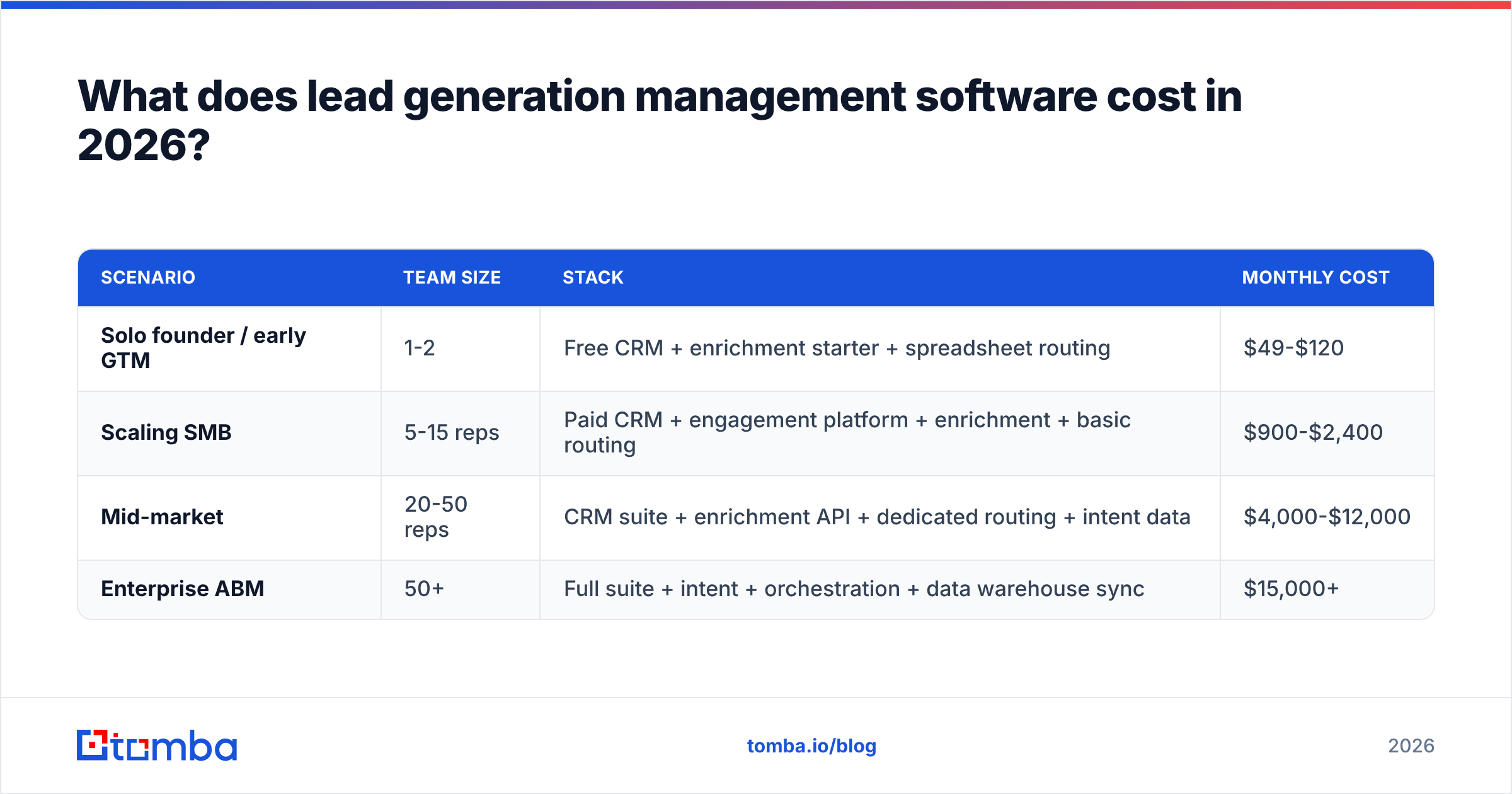
Budget by scenario, not by vendor. Three shapes cover most teams:
| Scenario | Team size | Stack | Monthly cost |
|---|---|---|---|
| Solo founder / early GTM | 1-2 | Free CRM + enrichment starter + spreadsheet routing | $49-$120 |
| Scaling SMB | 5-15 reps | Paid CRM + engagement platform + enrichment + basic routing | $900-$2,400 |
| Mid-market | 20-50 reps | CRM suite + enrichment API + dedicated routing + intent data | $4,000-$12,000 |
| Enterprise ABM | 50+ | Full suite + intent + orchestration + data warehouse sync | $15,000+ |
Two cost traps worth naming. Credit math: many platforms sell "credits" that get consumed on failed lookups, so a tool advertising 10,000 credits at a 45% hit rate really sold you 4,500 contacts. Ask every vendor to quote cost per verified, deliverable contact, not cost per credit. Seat inflation: routing and scoring features usually live on per-seat tiers, so the price of fixing a workflow problem scales with headcount even though the workflow is one set of rules.
For reference, Tomba pricing runs a free tier at 25 searches per month, Starter at $49/mo, Growth at $99/mo, Pro at $249/mo, and custom enterprise — which sits in the "cheapest line item, biggest leverage" slot described above. Compare that against a per-seat engagement platform where the same 15-person team pays four figures monthly before a single email is verified.
Is data quality more important than features?#
Yes, and it's not close.
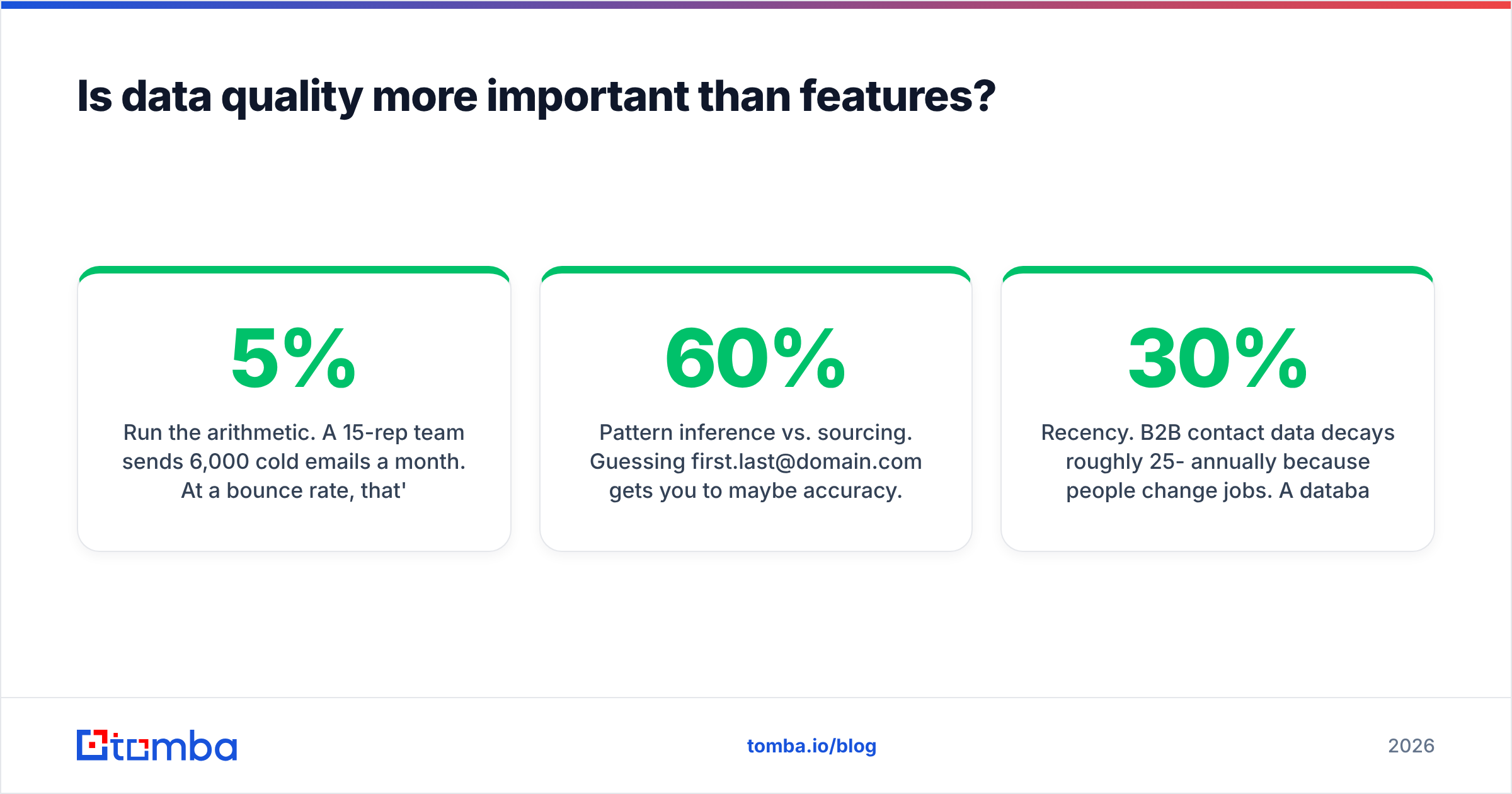
Run the arithmetic. A 15-rep team sends 6,000 cold emails a month. At a 5% bounce rate, that's 300 hard bounces — annoying but survivable. At 22% (a realistic figure for unverified scraped lists), that's 1,320 bounces, and mailbox providers start treating your domain as a spam source within two weeks. You didn't lose 1,320 leads. You lost the deliverability of the other 4,680.
This is why the enrichment layer deserves scrutiny the other layers don't:
- Catch-all domains. Roughly a fifth of B2B domains accept everything at the SMTP door, which means naive verifiers mark them "valid" and you find out at send time. A dedicated catch-all verifier uses pattern confidence and historic signal instead of pretending the SMTP handshake answered the question.
- Pattern inference vs. sourcing. Guessing
first.last@domain.comgets you to maybe 60% accuracy. Cross-referencing published sources and observed addresses via domain search is what pushes the found-rate above 90% on mid-market targets. - Recency. B2B contact data decays roughly 25-30% annually because people change jobs. A database refreshed quarterly is meaningfully different from one refreshed continuously, and vendors rarely publish this. Ask.
- Compliance posture. GDPR and CCPA obligations follow the data, not the vendor. Confirm lawful basis, opt-out handling, and whether the provider will name its data sources.
A note on list vendors versus finders, because buyers conflate them: prebuilt databases such as BookYourData are genuinely useful when you want a defined, filterable slice of a market delivered now — a solid complement to on-demand lookup, not a substitute for it. Finders shine when you already know the accounts and need current, verified contacts for specific people. Plenty of good teams run both.
How do you score and route leads without over-engineering?#
Start embarrassingly simple and add complexity only when a number forces you to.
Fit scoring, v1. Three attributes, ten points each: right industry, right headcount band, right role seniority. A 30/30 goes to a rep today; a 10/30 goes to nurture. That's it. Don't build a 40-variable model before you have 500 closed-won records to train it on.
Intent, v1. One signal: pricing-page visit in the last 7 days. Add a second only after you've proven the first one predicts anything.
Routing, v1. Round-robin within territory, with a 15-minute SLA timer and automatic reassignment on breach. The Harvard Business Review lead-response study that established the five-minute response window is old now, but the direction of the finding has never been contradicted: response speed dominates response cleverness.
The rule of thumb. If a scoring or routing rule can't be explained to a new SDR in one sentence, it will be ignored, and ignored rules corrupt your reporting worse than no rules at all.

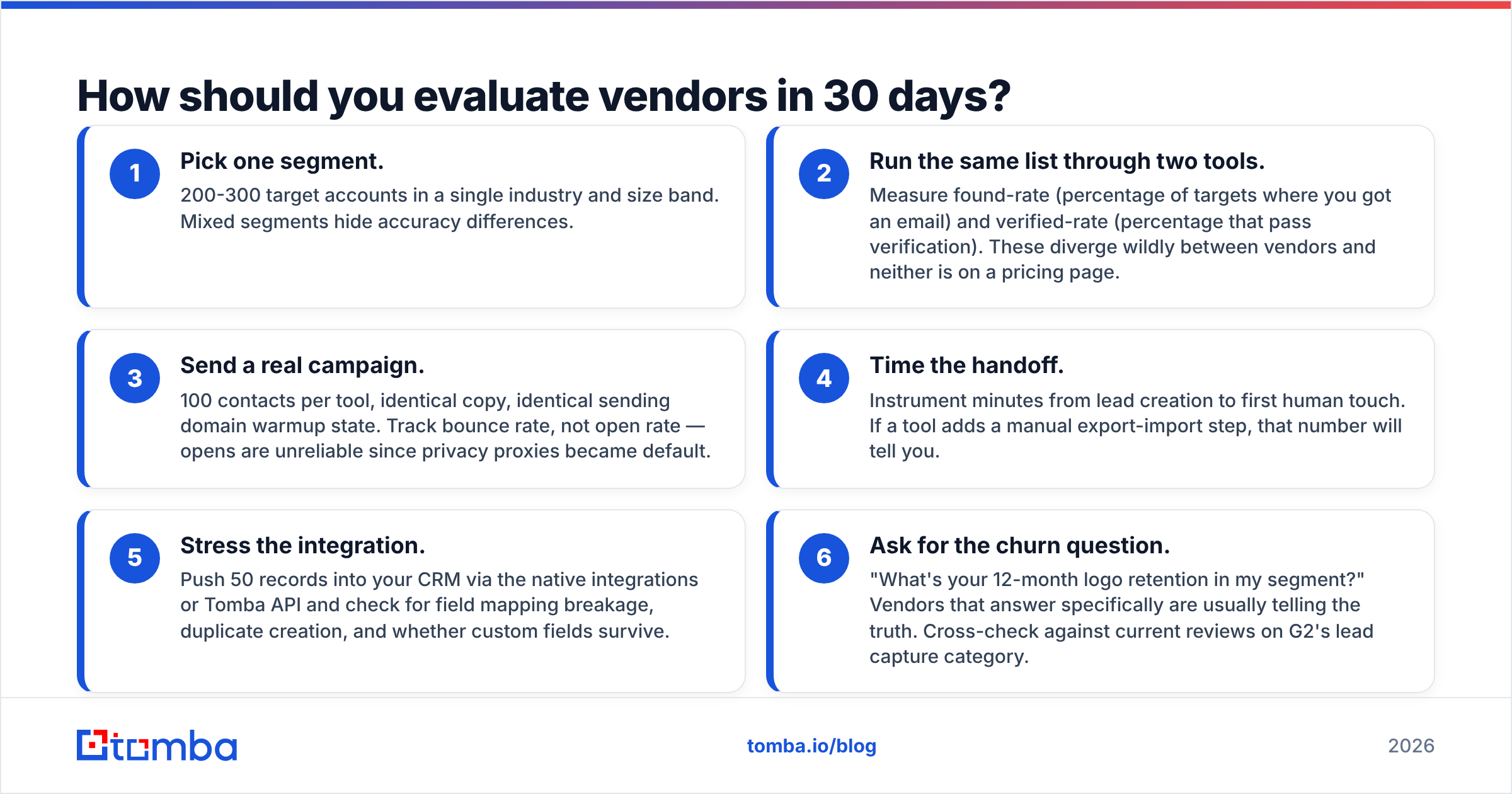
How should you evaluate vendors in 30 days?#
A structured trial beats a feature matrix every time. Here's the sequence that surfaces real differences.
- Pick one segment. 200-300 target accounts in a single industry and size band. Mixed segments hide accuracy differences.
- Run the same list through two tools. Measure found-rate (percentage of targets where you got an email) and verified-rate (percentage that pass verification). These diverge wildly between vendors and neither is on a pricing page.
- Send a real campaign. 100 contacts per tool, identical copy, identical sending domain warmup state. Track bounce rate, not open rate — opens are unreliable since privacy proxies became default.
- Time the handoff. Instrument minutes from lead creation to first human touch. If a tool adds a manual export-import step, that number will tell you.
- Stress the integration. Push 50 records into your CRM via the native integrations or Tomba API and check for field mapping breakage, duplicate creation, and whether custom fields survive.
- Ask for the churn question. "What's your 12-month logo retention in my segment?" Vendors that answer specifically are usually telling the truth. Cross-check against current reviews on G2's lead capture category.
Score each tool on those six, weighted toward whichever stack layer you identified as your bottleneck. A tool that wins on dashboards and loses on verified-rate is the wrong tool for an outbound team, no matter how the demo looked.
What do teams get wrong most often?#
Buying a suite to fix a process. If reps don't follow up within an hour today, a new platform makes them not follow up within an hour in a nicer interface. Fix the SLA first; it costs nothing.
Optimizing volume before deliverability. Doubling send volume on a domain with a 20% bounce rate doesn't double pipeline, it halves inbox placement. Verify first, then scale.
Ignoring the phone. Email-only outbound has gotten crowded enough that multichannel is now table stakes for mid-market and up. Pairing verified emails with B2B phone numbers typically lifts connect rates more than any subject-line experiment will.
Treating enrichment as a one-time event. Records decay. Schedule a quarterly re-verification pass over your active pipeline with a bulk email finder workflow rather than discovering staleness during a campaign.
Signing annual before the 30-day test. Annual discounts are real, and so is the cost of being locked into the wrong layer for a year. Negotiate a 60-day out clause or pay monthly through the first quarter.
Where should you start?#
Map your five layers, find the bottleneck, and buy only that. For most teams under 50 reps, the bottleneck is layer 2 — you have plenty of names and not enough verified, current, reachable contact details, which makes every downstream layer look broken.
If that's you, start at the data layer before you shop for another platform. The Tomba Email Finder finds and verifies professional email addresses by domain, name, or company, with SMTP-level verification, catch-all handling, and native pushes into HubSpot, Salesforce, Pipedrive, Sheets, and anything you can reach through the API. The free tier gives you 25 searches a month — enough to run the found-rate and verified-rate test above on a real segment before you spend anything. Test it against whatever you're using now on the same 200 accounts, and let the bounce rate decide.
Related guides#
// get started
Find, verify and enrich your first contacts today
Start on the free plan with 25 searches a month, then scale when your team is ready.
Free plan · No credit card required · GDPR & CCPA
// about the author