Lead Generation Pipeline: How to Build One That Converts
Most teams do not have a lead generation pipeline problem at the top — they have a leak problem in the middle. Here is how to define the stages, size the math, and fix the three places demand quietly disappears.
TL;DR
- A lead generation pipeline is not a funnel drawing. It is a set of named stages, each with an entry rule, an exit rule, and one metric you actually review weekly.
- Work the math backwards from closed revenue, not forwards from activity. If you need 8 deals and your stage conversion is honest, the required top-of-pipeline number is arithmetic, not ambition.
- Three leaks account for most losses: unverified contact data at stage one, no defined MQL-to-SQL handoff at stage three, and no re-entry path for the 85% who say "not now."
- Data quality is the cheapest fix and the one teams skip. A 12% bounce rate does not just waste sends — it degrades the sending domain that every later stage depends on.
- Tooling matters less than stage definitions. A $49/mo stack with clean rules beats a $2,000/mo stack feeding a pipeline nobody agrees on.
What is a lead generation pipeline?#
A lead generation pipeline is the documented path a stranger travels from first identification to sales-accepted opportunity, broken into stages where each stage has an explicit entry condition, an owner, and a conversion rate you measure.
Think of it like a water treatment plant rather than a funnel. A funnel implies everything poured in the top eventually comes out the bottom, just less of it. A treatment plant is closer to reality: at every stage, something is filtered out on purpose, something is lost to a leak you did not intend, and the output quality depends entirely on the input quality. Pour in dirty water and no amount of downstream pressure fixes it.
The distinction from a sales pipeline matters. A sales pipeline tracks deals that already have a qualified buyer attached. A lead generation pipeline tracks the manufacture of those buyers. Different owners, different metrics, different failure modes. Teams that collapse the two into one board end up with a stage-one column containing 4,000 scraped rows and a forecast that means nothing.
Here is the structure that holds up across most B2B motions:
- Sourced — a contact exists in your system with a name, company, role, and a reason they fit your ICP. Entry rule: matches at least two firmographic criteria. Owner: RevOps or growth.
- Contactable — the email is verified, the phone is validated, and the record has enough context for a relevant first line. Entry rule: verification status is "valid" or a deliberately accepted catch-all. Owner: data ops.
- Engaged — the contact replied, clicked twice, booked, or otherwise raised a hand. Entry rule: a human action, never a system event. Owner: SDR.
- Qualified (MQL to SQL) — a rep has confirmed need, authority, and timing loosely enough to warrant a meeting. Entry rule: written qualification note. Owner: SDR plus AE acceptance.
- Accepted opportunity — the AE has taken it into the sales pipeline. Entry rule: AE clicks accept, or explicitly rejects with a reason. Owner: AE.
- Nurture / recycled — everything rejected or stalled, with a defined re-entry date. Entry rule: a date, not a vibe. Owner: marketing.
That sixth stage is the one most teams never build, and it is usually where the majority of eventual revenue sits.
How do you size the pipeline you actually need?#
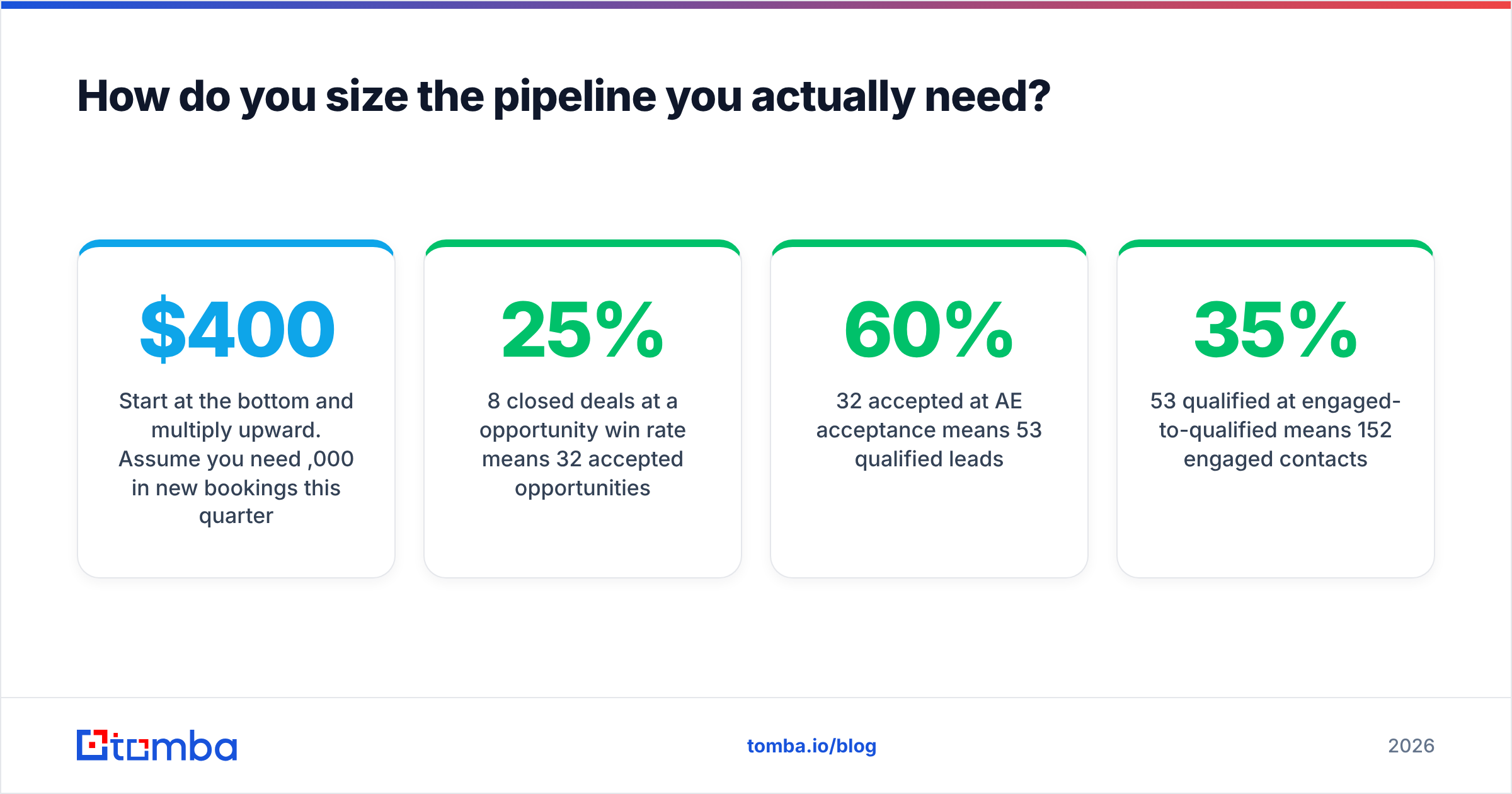
Start at the bottom and multiply upward. Assume you need $400,000 in new bookings this quarter at a $50,000 average contract value. That is 8 closed deals.
Apply honest conversion rates — yours, from your CRM, not from a blog post:
- 8 closed deals at a 25% opportunity win rate means 32 accepted opportunities.
- 32 accepted at 60% AE acceptance means 53 qualified leads.
- 53 qualified at 35% engaged-to-qualified means 152 engaged contacts.
- 152 engaged at a 6% reply-to-engagement rate means roughly 2,530 contactable people reached.
- 2,530 contactable at a 90% verified-deliverable rate means about 2,800 sourced records.
Now the interesting part. Push that verified rate down from 90% to 70% — a realistic outcome for a purchased list nobody re-checked — and you need 3,615 sourced records for the same 8 deals. That is 800 extra records, 800 extra credits, and 800 extra sends hammering your sender reputation for zero incremental revenue. The fix costs less than the waste.
This is also why the "just add more volume" instinct fails. Volume at the top multiplies every downstream inefficiency. Fixing a stage-three conversion rate from 25% to 35% does more for output than doubling stage-one input, and it does not cost you domain reputation.

What should each stage measure?#
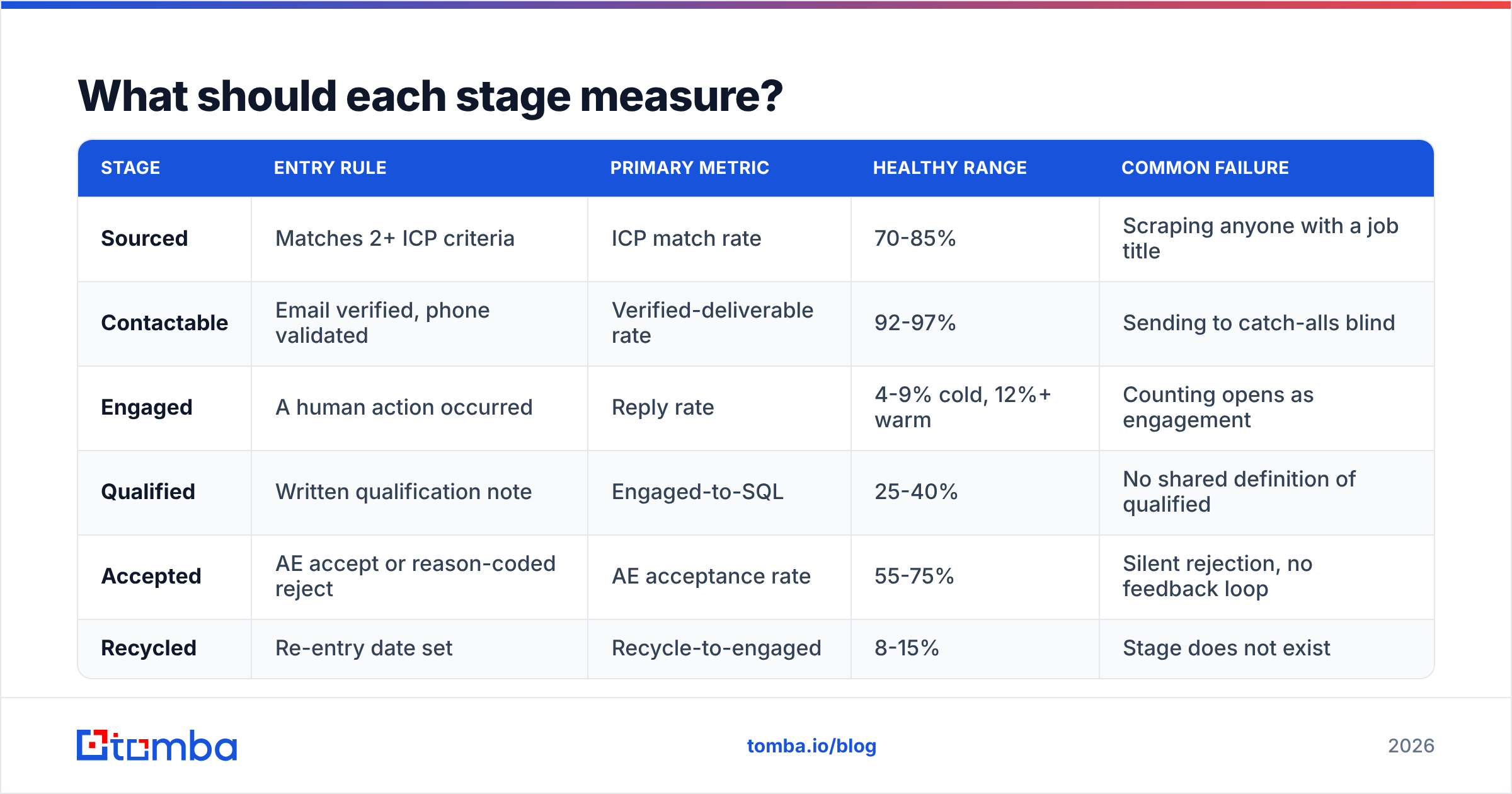
One metric per stage. Not a dashboard — a number a person can recite in a standup.
| Stage | Entry rule | Primary metric | Healthy range | Common failure |
|---|---|---|---|---|
| Sourced | Matches 2+ ICP criteria | ICP match rate | 70-85% | Scraping anyone with a job title |
| Contactable | Email verified, phone validated | Verified-deliverable rate | 92-97% | Sending to catch-alls blind |
| Engaged | A human action occurred | Reply rate | 4-9% cold, 12%+ warm | Counting opens as engagement |
| Qualified | Written qualification note | Engaged-to-SQL | 25-40% | No shared definition of qualified |
| Accepted | AE accept or reason-coded reject | AE acceptance rate | 55-75% | Silent rejection, no feedback loop |
| Recycled | Re-entry date set | Recycle-to-engaged | 8-15% | Stage does not exist |
The "common failure" column is the useful one. Notice that four of six failures are definitional, not technological. You cannot buy your way past a team that has not agreed on what "qualified" means. The marketing qualified lead definition should be written down, dated, and signed off by both marketing and sales — then revisited quarterly, because ICPs drift.
On the metrics side, resist vanity. Open rate has been effectively unreliable since Apple Mail Privacy Protection began pre-fetching images, and privacy proxies have only spread since. If your stage-three gate is "opened twice," you are gating on noise. Response rate and booked meetings are the only stage-three signals worth reviewing.
Where does a lead generation pipeline actually leak?#
Three places, in order of how much revenue they cost.
Leak 1: the data layer. Bad contact data does not just waste a send. It raises hard bounces, which raises your bounce rate, which lowers inbox placement for the good addresses in the same campaign. A 12% bounce rate on a 3,000-contact send means 360 hard bounces — enough to get a young domain throttled at Google and Microsoft. The compounding effect is what hurts: the leads you got right stop arriving because of the ones you got wrong. Run every list through an email verifier before it enters stage two, and treat catch-all domains as a separate segment with its own expectations rather than folding them into your main numbers.
Leak 2: the handoff. A lead sits in "engaged" for nine days because the SDR is not sure whether it is theirs or marketing's. By the time someone follows up, the buying trigger that caused the reply has passed. Research from HubSpot and others has long pointed to the same conclusion: response speed to an inbound signal is one of the highest-leverage variables in the entire process, and the decay is measured in minutes and hours, not days. Fix it with an SLA, a rotation, and an alert — not a meeting.
Leak 3: the missing recycle stage. Most rejected leads are rejected for timing. "We just signed with someone else," "budget resets in Q3," "revisit after the migration." If your pipeline has no stage for those, they evaporate into a CRM field nobody queries. A recycle stage with a date field and a quarterly pull often outperforms net-new prospecting on cost per meeting, because the relationship and the context already exist.

Which tools belong at each stage?#
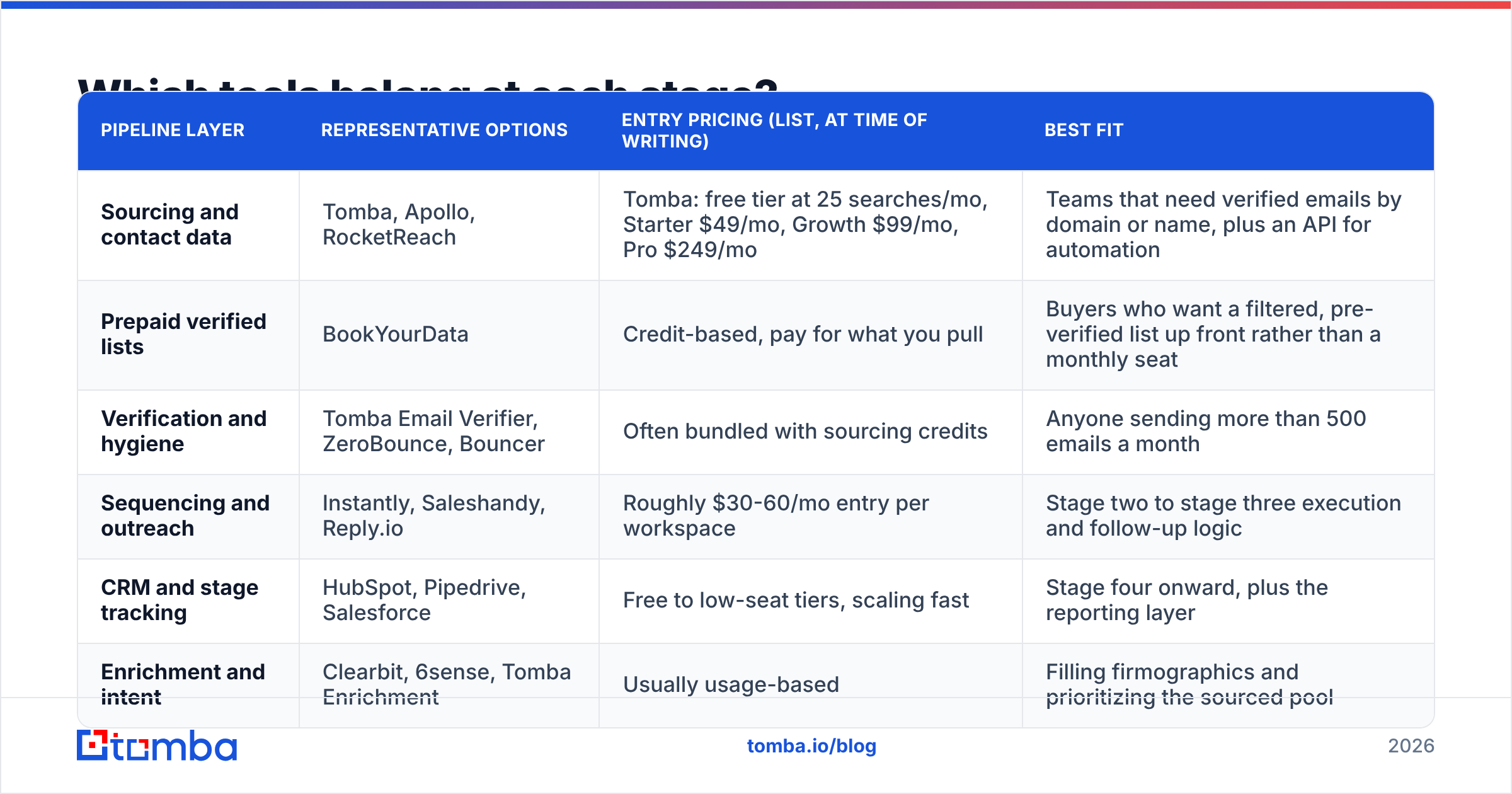
Match the tool to the stage, not to the demo you liked. A sequencer cannot fix sourcing, and an enrichment API cannot fix qualification.
| Pipeline layer | Representative options | Entry pricing (list, at time of writing) | Best fit |
|---|---|---|---|
| Sourcing and contact data | Tomba, Apollo, RocketReach | Tomba: free tier at 25 searches/mo, Starter $49/mo, Growth $99/mo, Pro $249/mo | Teams that need verified emails by domain or name, plus an API for automation |
| Prepaid verified lists | BookYourData | Credit-based, pay for what you pull | Buyers who want a filtered, pre-verified list up front rather than a monthly seat |
| Verification and hygiene | Tomba Email Verifier, ZeroBounce, Bouncer | Often bundled with sourcing credits | Anyone sending more than 500 emails a month |
| Sequencing and outreach | Instantly, Saleshandy, Reply.io | Roughly $30-60/mo entry per workspace | Stage two to stage three execution and follow-up logic |
| CRM and stage tracking | HubSpot, Pipedrive, Salesforce | Free to low-seat tiers, scaling fast | Stage four onward, plus the reporting layer |
| Enrichment and intent | Clearbit, 6sense, Tomba Enrichment | Usually usage-based | Filling firmographics and prioritizing the sourced pool |
Two practical notes on this table.
First, consolidation is usually a false economy at the data layer. An all-in-one platform's contact database and its sequencer are rarely both best-in-class, and you cannot swap half of it out. Keeping sourcing and sending separate means a data quality problem is a vendor swap, not a migration. Independent review sites like G2 are useful here specifically because they let you read verification-accuracy complaints separately from deliverability complaints.
Second, pay-per-record and subscription models solve different problems. A credit-based provider like BookYourData suits a one-off campaign into a new vertical where you want a filtered list delivered and verified up front. A subscription finder with an API suits continuous, triggered enrichment — a new signup appears, you resolve the work email, you enrich, you route, all without a human. Plenty of teams run both, and there is no contradiction in that.
For continuous sourcing, the mechanics matter more than the brand: can you go from a company domain to the right person's address without manual work? A domain search that returns every published address at a company, plus pattern detection for the ones it infers, is the difference between 40 records an hour and 4,000.
How do you instrument the pipeline without a data team?#
You need three artifacts. None of them require an engineer.
1. A stage field with locked picklist values. Free text kills reporting. Six values, matching the six stages above, and nobody can invent a seventh.
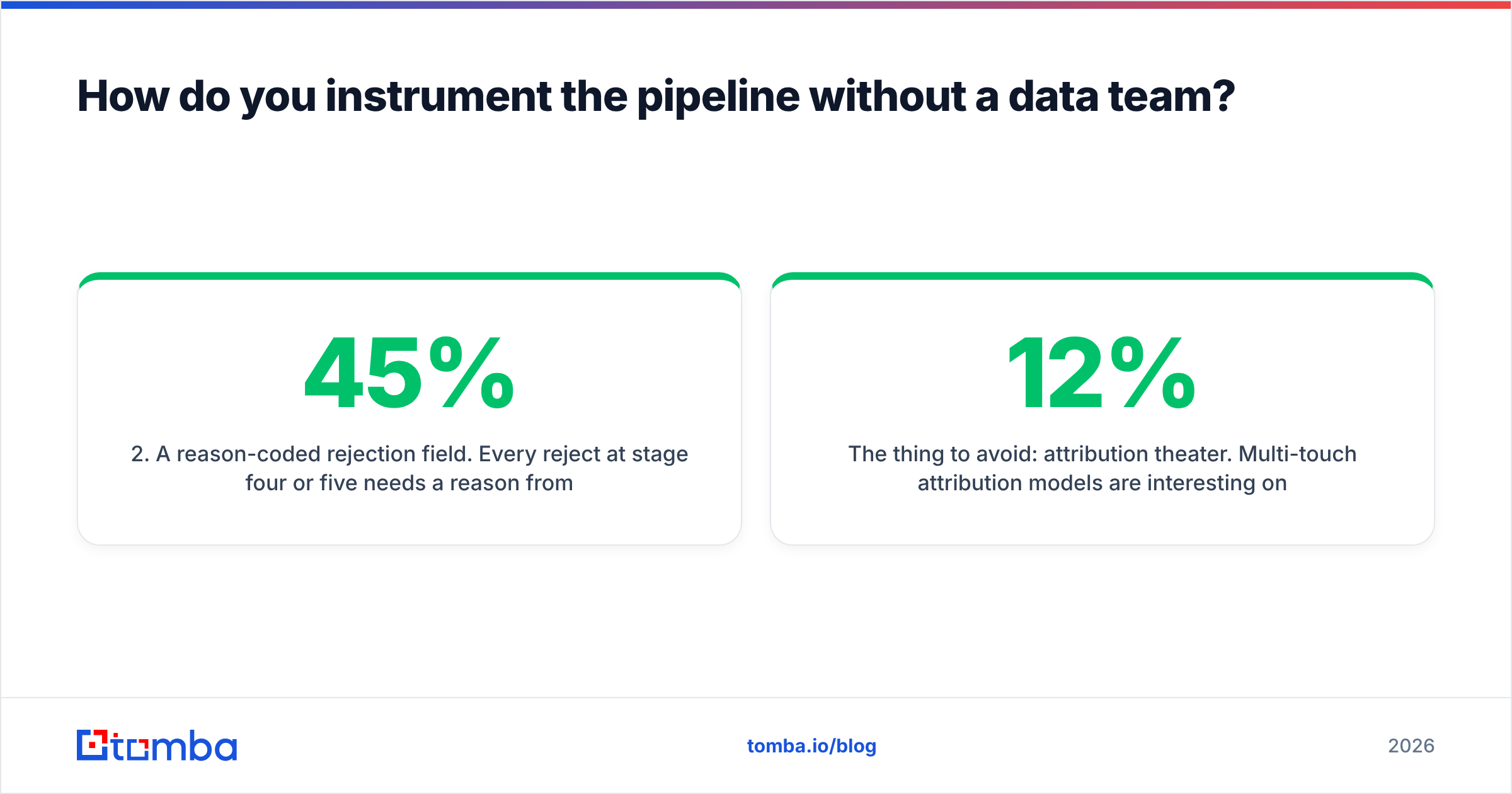
2. A reason-coded rejection field. Every reject at stage four or five needs a reason from a fixed list: not ICP, no budget, wrong timing, competitor incumbent, no response. This single field turns rejection into a product and marketing input. If 45% of rejects are "not ICP," your problem is sourcing, and no amount of SDR coaching fixes it.
3. A weekly snapshot table. Stage counts, every Monday, appended not overwritten. Conversion rates computed from cohorts, not from current totals. Without snapshots you cannot see whether stage three is slowing down, only what it looks like today. Salesforce and HubSpot both support historical trending natively; a Google Sheet with a weekly append does the same job at zero cost, and the Sheets email finder add-on means your sourcing and your reporting can live in the same file while you are small.
The thing to avoid: attribution theater. Multi-touch attribution models are interesting once you have thousands of monthly leads and a real analytics function. Before that, they are a way to spend six weeks arguing about credit splits instead of fixing a 12% bounce rate. Stage counts and conversion rates answer 90% of the questions a growing team actually has.
What does a healthy weekly pipeline review look like?#
Thirty minutes, same agenda, same numbers, in this order:
- Stage counts versus required counts. Not "how are we doing" — "we need 2,800 sourced this quarter, we have 940 at week four, we are behind by 260."
- The one worst conversion rate. Find the stage that dropped most versus its four-week average. Discuss only that one.
- Aging. Anything sitting in a stage past its SLA. Engaged leads older than 48 hours are an emergency; sourced leads older than 30 days are stale and should be re-verified before contact, because roughly 2-3% of B2B contacts change jobs every month.
- Reject reasons. Read them aloud. The pattern is usually obvious within a month.
- One change. Pick a single stage to alter this week and write down the expected effect. If you change four things, you learn nothing.
The discipline here is negative: no new channel discussion, no tool evaluations, no creative review. Those belong in a separate meeting. A pipeline review that becomes a general marketing meeting stops producing decisions within three weeks.
What is the smallest version worth building?#
If you are starting from nothing, build this in an afternoon:
- A spreadsheet or CRM with six stage values and a reject-reason column.
- A verified contact source feeding stage one, with verification running before anything enters stage two.
- One sequencer with a four-touch cadence and a hard stop on reply.
- A Monday snapshot row.
- A recycle date field.
That is it. No intent data, no AI SDR, no attribution model. Add those when the stage conversion rates are stable enough that you can measure whether the addition helped. Adding sophistication to an unmeasured pipeline just makes the failure harder to diagnose — a point worth remembering when a vendor's deck promises to "transform" a process you have not yet defined. The concept itself is not new; lead generation as a discipline predates every tool in the table above, and the fundamentals have not moved much.
The one place not to economize is stage two. Every downstream number in your pipeline is a percentage of the contactable pool, which means data quality is a multiplier on everything else. A team with 2,000 verified contacts and clear stage definitions reliably outperforms a team with 20,000 unverified rows and a bigger budget, because the second team is burning its sending reputation to discover what the first team knew before it pressed send.
Ready to fix stage one and two?#
Start where the leverage is highest: get verified, deliverable contacts into the pipeline before you spend a cent on sequencing. The Tomba Email Finder resolves professional addresses by domain, name, or company, with verification built into the same workflow — so records land in stage two already clean rather than bouncing out of it. The free tier gives you 25 searches a month to test against a list you already have; Starter is $49/mo when the math works, and the API drops the whole thing into whatever automation you are already running. Check Tomba pricing and run one verified cohort against one unverified cohort. The conversion difference will make the rest of this argument for you.
Related guides#
// get started
Find, verify and enrich your first contacts today
Start on the free plan with 25 searches a month, then scale when your team is ready.
Free plan · No credit card required · GDPR & CCPA
// about the author